Epson ET 4700 - User Manual
The Epson WorkForce ET-4700 EcoTank printer is designed for cost-effective, high-volume printing in home or office settings, featuring a cartridge-free ink system that extends print capacity significantly. Its key areas include wireless connectivity (Wi-Fi, Ethernet) and mobile printing via AirPrint and Google Cloud Print, alongside refillable ink tanks for long-term savings. The manual also covers advanced functionality like a 30-page automatic document feeder for scanning and copying, along with PC-free operations through its user-friendly interface. Technical specifications address print quality, paper handling, and system compatibility, ensuring broad usability across environments.


Table of Contents:
- Page 1 – Product Introduction and Key Features
- Page 2 – Ink System and Connectivity Options
- Page 3 – Document Handling and Display Features
- Page 4 – Detailed Printer Specifications
- Page 5 – Physical Details and Consumables Information
Epson Australia - WorkForce ET-4700
1/5
EcoTank 4 Colour Multifunction Printers
Print | Copy | Scan | Fax | Ethernet | Wi-Fi
Direct
®
PRINTING FREEDOM
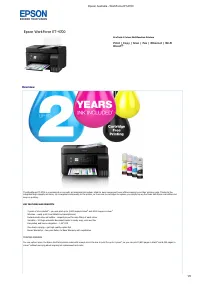
For one upfront price, the Epson EcoTank printers come with enough ink in the box to print for up to 2 years
1
, so you can print 3,600 pages in black
2
and 6,500 pages in
colour
2
without worrying about ongoing ink replacement and costs.
Epson WorkForce ET-4700
Overview
The WorkForce ET-4700 is a wireless all-in-one with an integrated ink system, ideal for busy homes and home offices looking to cut their printing costs. Thanks to the
integrated high-capacity ink tanks, ink is supplied continuously to the printer, so there are no cartridges to replace; you simply top up the tanks with Epson ink bottles and
keep on printing.
KEY FEATURES AND BENEFITS
2 years of ink included
1
– you can print up to 3,600 pages in black
2
and 6,500 pages in colour
2
Wireless – easily print from tablets and smartphones
3
Exclusive auto-stop ink bottles – uniquely keyed for easy filling of each colour
Versatile – 30 Page automatic document feeder to easily copy, scan and fax
Easy setup and menu navigation – 1.44" LCD
One-touch copying – get high quality copies fast
Bonus Warranty
4
– two year Return to Base Warranty with registration
"Loading the manual" means you need to wait until the file loads and becomes available for online reading. Some manuals are very large, and the time they take to appear depends on your internet speed.
Was this manual helpful?
About this manual
- Brand
- Epson
- Model
- ET 4700
- Document type
- User Manual
- Language(s)
- English
- Pages
- 5
- File size
- 343.2 KB
- Format
Summary
Introduction to the printer highlighting wireless connectivity, cartridge-free printing with extended ink supply, and automatic document feeding capabilities for ease of use.
Details regarding the high-volume ink bottle system, support for wireless and wired connections, mobile printing via AirPrint and Google Cloud Print, and compatibility with various devices.
Information on the 30-page Automatic Document Feeder, the color LCD screen, PC-free scanning and copying functions, and extended warranty registration details.
Ask a question
Related manuals
Popular Epson Other
 Epson PictureMate Flash - PM 280 - PictureMate Flash Compact Photo Printer User Manual
 Epson TM-T70II Troubleshooting Guide
 Epson U925 - TM B/W Dot-matrix Printer User Manual
 Epson RR 70W User Manual
 Epson 9890 Manual
 Epson 206636 - PocketJet 3 Plus User Manual
 Epson Printer TM-H5000II User Manual
 Epson TM-T88V User Manual