Epson ES 580W - Installation Manual
Epson ES 580W – Installation Manual, read for free online in PDF format. We hope this helps you resolve any issues you may have. If you have further questions, please contact us through the contact form.
Note:
An internet connection is required to obtain the
product software.
Remarque :
Une connexion Internet est requise pour
obtenir le logiciel du produit.
Download the ES-580W software package from:
www.epson.com/support/es580w
(U.S.)
www.epson.ca/support/es580w
(Canada)
Téléchargez le progiciel ES-580W à l’adresse :
www.epson.ca/support/es580w
Click
Download
for the Drivers and Utilities Combo
Package.
Cliquez sur
Télécharger
pour obtenir l’Ensemble des
pilotes et logiciels.
Double-click the file you downloaded to install the
software. Follow the on-screen instructions to set up
the connection.
Double-cliquez sur le fichier que vous avez
téléchargé pour installer le logiciel. Suivez les
instructions à l’écran pour établir la connexion.
Select your language and time.
Sélectionnez votre langue et l’heure.
1
1
1
1
3
2
ES-580W
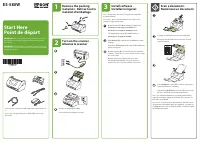
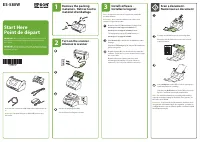
IMPORTANT: Before using this product, make sure you read
these instructions and the safety instructions in the online
User’s Guide
.
IMPORTANT : Avant d’utiliser ce produit, assurez-vous de lire
ces instructions et les instructions de sécurité dans le
Guide de
l’utilisateur
en ligne.
Start Here
Point de départ
Remove the packing
materials
•
Retirez tout le
matériel d’emballage
Install software
•
Installez le logiciel
Turn on the scanner
•
Allumez le scanner
Load the document facedown, short edge first.
Chargez votre document face vers le bas et bord
court en premier.
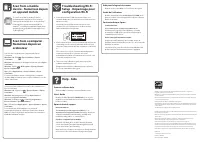
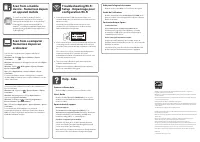
Select
Computer
on the LCD screen to open Epson®
ScanSmart and start scanning.
Sélectionnez
Ordinateur
sur l’écran ACL pour ouvrir
Epson® ScanSmart et lancez la numérisation.
Note:
For detailed information on loading and scanning
originals, including setting up the Quick Send options, see
the online
User’s Guide
.
Remarque :
Pour obtenir des informations détaillées sur le
chargement et la numérisation des originaux, y compris la
configuration des options d’Envoi rapide, consultez le
Guide
de l’utilisateur
en ligne.
1
Scan a document
•
Numérisez un document
Note:
Do not connect the USB cable unless instructed to do
so.
Remarque :
Ne branchez pas le câble USB sauf si vous y
êtes invité.
"Loading the manual" means you need to wait until the file loads and becomes available for online reading. Some manuals are very large, and the time they take to appear depends on your internet speed.




