Dewalt DW0822 - User Manual
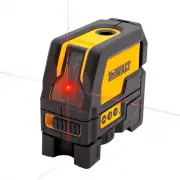
A user manual for DeWalt’s DW0822 self-leveling cross-line/plumb spot combination laser addresses its core functions, including horizontal and vertical alignment, magnetic pivoting, and integrated calibration checks. The guide covers essential operational topics such as safety protocols (including Class 2 laser radiation), technical specifications like beam accuracy and battery requirements, and practical setup procedures for field use. It also includes troubleshooting guidance for common issues like misalignment or power failures, supported by visual diagrams and measurement tolerances.


Table of Contents:
- Page 1 – Product Identification and Basic Operation
- Page 2 – Field Calibration Procedures and Troubleshooting
- Page 3 – Technical Specifications and Safety Precautions
- Page 4 – Level Calibration Accuracy Checks
- Page 5 – Operational Safety and Performance
- Page 6 – Alignment Verification and Troubleshooting
INSTRUCTION MANUAL
D
e
WALT Industrial Tool Co., 701 East Joppa Road, Baltimore, MD 21286
(JULY13) Part No. 79002843 Copyright © 2013 D
e
WALT
DW0822
Self-Leveling Cr
oss Line/Plumb Spot Combination Laser
IF YOU HAVE ANY QUESTIONS OR COMMENTS ABOUT THIS OR ANY D
e
WALT TOOL, CALL
US TOLL FREE AT:
1-800-4-D
e
WALT (1-800-433-9258)
.
Safety
WARNING:
To reduce the risk of injury, read the safety manual provided with your product
or access it online at
www.DeWALT.com.
Use of controls or adjustments or performance of procedures other than those specified
herein may result in hazardous radiation exposure.
WARNING LABELS
For your convenience and safety, the following label is on your laser.
CAUTION: LASER RADIATION - DO NOT STARE INTO BEAM. CLASS 2 LASER
PRODUCT.
Laser Information
The DW0822 laser level is a class 2 laser product and complies with 21 CFR 1040.10 and 1040.11
except for deviations pursuant to laser notice No. 50, dated June 24, 2007.
PRODUCT OVERVIEW
The DW0822 laser level is a self-leveling laser tool that can be used for horizontal (level) and vertical
(plumb) alignment and square alignment. This tool comes fully assembled and has been designed
with features that allow for quick and easy set-up. Please read and understand all instructions within
this instruction manual in addition the Safety Manual prior to use.
Specifications
SPECIFICATIONS
Light Source
Semiconductor laser diode
Laser Wavelength
630–680 nm visible
Laser Power
<1.0 mW (each beam) CLASS 2 LASER PRODUCT
Working Range
±50' (15 m) / (165' with detector)
Accuracy* (Up)
± 3/16" @ 50' (± 4.5 mm @ 15 m)
Accuracy* (Horizontal)
Accuracy* (Vertical)
± 1/8" @ 50' (± 3 mm @ 15 m)
± 1/8" @ 50' (± 3 mm @ 15 m)
Indicators
Flashing Indicator: battery low
Flashing Laser: tilt range exceeded
Power Source
3 AA size batteries (4.5V DC)
Operating Temperature
20 °F to 120 °F (-10 °C to 50 °C)
Storage Temperature
-5 °F to 140 °F (-20 °C to 60 °C)
Environmental
IP54
Keypad, Modes and LED.
Power switch.
The Power ON/OFF switch is located on the front of the tool as shown in Figure 3. When the
switch (C) is in the OFF/LOCKED position, the unit will remain off and the pendulum will be locked
When the on/off switch (A) is in the ON/UNLOCKED position, the unit will be powered ON and the
pendulum will be released from the locked position and self level.
Keypad .
The keypad located on the side of the tool (FIG. 2 & 3) provides activation keys for selection of
laser dots and / or line function.
Low Battery Indicator.
The DW0822 is equipped with a low battery indicator on the keypad as shown in Figure 2. The
indicator light is located on the keypad. When the light flashes, the batteries are low and need to be
replaced. The laser may continue to operate for a short time while the batteries continue to drain.
After fresh batteries are installed and the laser is turned on again, the indicator light will remain
green.
Out of level Range Indicator
The DW0822 is equipped with an Out of level indicator on the keypad as shown in Figure 2. When
the tilt range (> 4° tilt) has been exceeded the LED will will turn on and the laser beam will flash.
The flashing beam indicates the tilt range has been exceeded and the tool IS NOT LEVEL (OR
PLUMB) AND SHOULD NOT BE USED FOR DETERMINING OR MARKING LEVEL (OR PLUMB).
Try repositioning the laser on a more level surface.
Batteries & Power
Your laser tool requires 3 x AA batteries.
(Fig. 1-B)
Use only new, high-quality batteries for best results.
•
Ensure batteries are in good working condition. If the low battery indicator light is flashing, the
batteries need replacement.
•
To extend battery life, turn laser off when not working with or marking the beam.
Set Up
LEVELING THE LASER
This tool is self-leveling. It is calibrated at the factory to find plumb as long as it is positioned on
a flat surface within 4° of level. As long as the tool is properly calibrated, no manual adjustments
must be made.
To ensure the accuracy of your work, check to make sure your laser is calibrated often. See
Field
Calibration Check.
• Before attempting to use the laser, make sure it is positioned securely, on a smooth, flat
surface.
• Always mark the center of the dot or pattern created by the laser.
• Extreme temperature changes may cause movement of internal parts that can affect accuracy.
Check your accuracy often while working. See
Field Calibration Check.
• If the laser has been dropped, check to make sure your laser is calibrated. See
Field Calibration
Check.
OPERATION
Turning the Laser On and Off
(Fig. 3)
•
With the laser off, place it on a stable, flat surface. Turn the laser on by sliding the on/off
switch (C) to the ON/UNLOCKED position.
•
Activate or deactivate the desired function using the keypad located on the side of the tool.
It can project four beams in total:-a horizontal line (D) , a vertical line (E) as well as one dot
beam up (F) and one dot beam down (G) It will project a horizontal line when the horizontal
"LINE" key is pressed and it will project a vertical line when the vertical "LINE" key is pressed.
The up-dot beam and down-dot beam will be projected when the 'DOT" key is pressed,.
•
To turn the laser off, slide the the on/off switch (C) to the locked position.
The DW0822 is equipped with a locking pendulum mechanism. This feature is only activated when
the laser is switched off using the OFF/Locked switch, (C)
Using the Laser
The beams are level or plumb as long as the calibration has been checked (see
Field Calibration
Check
) and the laser beam is not flashing (see
Out of level Range Indicator
).
The tool can be used to transfer points using any combination of the five beams and/or horizontal
line.
INTEGRATED MAGNETIC PIVOTING BRACKET (FIG. 1 & 3)
The DW0822 has a magnetic pivoting bracket (J) permanently attached to the unit. This bracket
allows the unit to be mounted to any upright surface made of steel or iron using the magnets
located on the back of the pivoting bracket. Common examples of suitable surfaces include steel
framing studs, steel door frames and structural steel beams. Position the laser on a stable surface.
CAUTION: Do not stand underneath the laser when it is mounted with the magnetic
pivoting bracket.
Serious personal injury or damage to the laser may result if the laser falls.
The pivoting bracket also provides floor clearance of approximately 1-3/4" (44.5 mm) which aids in
the installation of steel framing track.
USING THE LASER WITH ACCESSORIES
The laser is equipped with both 1/4" x 20 and 5/8" x11 female threads on the bottom of the unit.
These threads may be used to accommodate current or future D
e
WALT accessories. Only use
D
e
WALT accessories specified for use with this product. Follow the directions included with the
accessory.
If you have questions or comments, contact us.
1-800-4-D
e
W
AL
T • www
.dewalt.com
"Loading the manual" means you need to wait until the file loads and becomes available for online reading. Some manuals are very large, and the time they take to appear depends on your internet speed.
Was this manual helpful?
About this manual
- Brand
- Dewalt
- Model
- DW0822
- Document type
- User Manual
- Category
- Laser Level
- Language(s)
- English, Spanish, French
- Pages
- 6
- File size
- 1.1 MB
- Format
Other Manuals for Dewalt DW0822
Summary
Details on specifications, safety warnings, setup procedures, operation controls for turning the laser on/off, using keypads for alignment, handling the magnetic bracket, battery information, and field calibration checks.
Step-by-step instructions, measurement tables, and diagrams detailing procedures for checking horizontal beam, pitch direction, vertical beam, and plumb accuracy, along with troubleshooting for laser power issues.
Laser technical parameters including wavelength and accuracy, safety precautions for Class 2 laser radiation, requirements for power supply, leveling functions, and information regarding the magnetic base and accessories.


