Page 2 - DellTM U2212HM Monitor User's Guide; About Your Monitor; Information in this document is subject to change without notice.
Dell™ U2212HM Monitor User's Guide About Your Monitor Setting Up the Monitor Operating the Monitor Troubleshooting Appendix Notes, Notices, and Cautions NOTE: A NOTE indicates important information that helps you make better use of your computer. CAUTION: A CAUTION indicates either potential damage ...
Page 3 - Setting Up Your Monitor; If you have a non DellTM desktop, portable computer, or graphics card.; Back to Contents Page
Back to Contents Page Setting Up Your Monitor Dell™ U2212HM Monitor Setting the display resolution to 1920 x 1080 (for U2212HM) For maximum display performance with Microsoft ® Windows ® operating systems, set the display resolution to 1920 x 1080 (for U2212HM) pixels by performing the following ste...
Page 4 - Package Contents
Back to Contents Page About Your Monitor Dell™ U2212HM Monitor User's Guide Package ContentsProduct FeaturesIdentifying Parts and ControlsMonitor SpecificationsPlug and Play CapabilityUniversal Serial Bus (USB) InterfaceLCD Monitor Quality and Pixel PolicyMaintenance Guidelines Package Contents Your...
Page 6 - Front View
Product Features The U2212HM flat panel display has an active matrix, thin -film transistor (TFT), liquid crystal display (LCD). The monitor features include: ■ 54.61 cm (21.5-inch) viewable area display (Measured diagonally). 1920 x 1080 resolution, plus full-screen support for lower resolutions. ■...
Page 7 - Back View
Front View Front panel controls Label Description 1 Preset Modes (default, but configurable) 2 Brightness & Contrast (default, but configurable) 3 Menu 4 Exit 5 Power (with power light indicator) Back View
Page 8 - Side View
Back view Back view with monitor stand Label Description Use 1 VESA mounting holes (100 mm x 100 mm - behind attached VESA Plate) Wall mount monitor using VESA -compatible wall mount kit (100 mm x 100 mm). 2 Regulatory label Lists the regulatory approvals. 3 Stand release button Release stand from m...
Page 9 - Bottom View
Left view Right view Bottom View Bottom view Bottom view with monitor stand Label Description Use 1 AC power cord connector Connect the power cable.
Page 10 - Monitor Specifications; Flat Panel Specifications
2 DC power connector for Dell Soundbar Connect the power cord for the soundbar (optional). 3 DisplayPort connector Connect your computer DP cable. 4 DVI connector Connect your computer DVI cable. 5 VGA connector Connect your computer VGA cable. 6 USB upstream port Connect the USB cable that came wit...
Page 11 - Resolution Specifications; Supported Video Modes; Preset Display Modes; Display Mode
*[U2212HM] color gamut (typical) is based on CIE1976 (82% ) and CIE1931 (72%) test standards. Resolution Specifications Model U2212HM Horizontal scan range 30 kHz to 83 kHz (automatic) Vertical scan range 56 Hz to 75 Hz (automatic) Maximum preset resolution 1920 x 1080 at 60 Hz Supported Video Modes...
Page 12 - Connector type
Electrical Specifications Model U2212HM Video input signals Analog RGB, 0.7 Volts +/ - 5%, positive polarity at 75 ohm input impedance Digital DVI-D TMDS, 600 mV for each differential line, positive polarity at 50 ohm input impedance DP 1.1a signal input support Synchronization input signals TTL lev...
Page 13 - Weight; Environmental Characteristics; Temperature; Power Management Modes
Height (compressed) 358.1 mm (14.10 inches) Width 265.8 mm (10.46 inches) Depth 183.3 mm (7.22 inches) Weight Weight with packaging 6.8 kg (15.0 lbs) Weight with stand assembly and cables 5.4 kg (12.0 lbs) Weight without stand assembly (For wall mount or VESA mount considerations - no cables) 2.7 kg...
Page 14 - Pin Assignments; VGA Connector
VESA Modes Horizontal Sync Vertical Sync Video Power Indicator Power Consumption Normal operation Active Active Active Blue 70 W (maximum) ** 30 W (typical) *** Active-off mode Inactive Inactive Blanked Amber Less than 0.5 W Switch off - - - Off Less than 0.5 W The OSD functions only in the normal o...
Page 15 - Number; DVI Connector; Pin
Number 1 Video-Red 2 Video-Green 3 Video-Blue 4 GND 5 Self-test 6 GND-R 7 GND-G 8 GND-B 9 Computer 5 V/3.3 V 10 GND-sync 11 GND 12 DDC data 13 H -sync 14 V -sync 15 DDC clock DVI Connector Pin Number 24 -pin Side of th e Co nnected Signal Cable 1 TMDS RX2 - 2 TMDS RX2+ 3 TMDS Ground 4 Floating 5 Flo...
Page 16 - DisplayPort Connector
7 DDC Data 8 Floating 9 TMDS RX1 - 10 TMDS RX1+ 11 TMDS Ground 12 Floating 13 Floating 14 +5 V/+3.3 V power 15 Self test 16 Hot Plug Detect 17 TMDS RX0 - 18 TMDS RX0+ 19 TMDS Ground 20 Floating 21 Floating 22 TMDS Ground 23 TMDS Clock+ 24 TMDS Clock- DisplayPort Connector Pin Number 20 -pin Side of ...
Page 17 - Plug and Play Capability; Transfer speed
5 GND 6 ML1(n) 7 ML2(p) 8 GND 9 ML2(n) 10 ML3(p) 11 GND 12 ML3(n) 13 GND 14 GND 15 AUX(p) 16 GND 17 AUX(n) 18 HPD 19 DP_PWR Return 20 +3.3V DP_PWR Plug and Play Capability You can install the monitor in any Plug and Play-compatible system. The monitor automatically provides the computer system with ...
Page 18 - USB Upstream Connector; Pin Number 4-pin Side of the Connector; USB Downstream Connector; Pin Number; USB Ports
USB Upstream Connector Pin Number 4-pin Side of the Connector 1 DMU 2 VCC 3 DPU 4 GND USB Downstream Connector Pin Number 4-Pin Side of the Signal Cable 1 VCC 2 DMD 3 DPD 4 GND USB Ports 1 upstream - back 4 downstream - 2 at the back; 2 on the left side NOTE: USB 2.0 functionality requires a USB 2.0...
Page 19 - LCD Monitor Quality and Pixel Policy; Cleaning Your Monitor; Read and follow the
NOTE: The monitor's USB interface works only when the monitor is on or in the power save mode. If you turn off the monitor and then turn it on, the attached peripherals may take a few seconds to resume normal functionality. LCD Monitor Quality and Pixel Policy During the LCD Monitor manufacturing pr...
Page 20 - Setting Up the Monitor; DellTM U2212HM Monitor User's Guide; Attaching the Stand; Connecting the Monitor
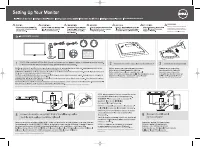
Back to Contents Page Setting Up the Monitor Dell™ U2212HM Monitor User's Guide Attaching the Stand Connecting the Monitor Organizing Your Cables Attaching the Soundbar (optional) Removing the Stand Wall Mounting (Optional) Attaching the Stand NOTE: The stand is detached when the monitor is shipped ...
Page 22 - Connecting the USB cable; Organizing Your Cables
CAUTION: The graphics are used for the purpose of illustration only. Appearance of the computer may vary. Connecting the USB cable After you have completed connecting the DVI/VGA/DP cable, follow the procedure below to connect the USB cable to the computer and complete your monitor setup: 1. Connect...
Page 23 - Removing the Stand
NOTE: The Soundbar power connector (+12 V DC output) is for the optional Dell Soundbar only. To attach the Soundbar: 1. At the back of the monitor, attach the Soundbar by aligning the two slots with the two tabs along the bottom of the monitor. 2. Slide the Soundbar to the left until it snaps into p...
Page 24 - Using the Front Panel Controls
Back to Contents Page Operating the Monitor Dell™ U2212HM Monitor User's Guide Using the Front Panel Controls Using the On -Screen Display (OSD) Menu Setting the Maximum Resolution Using the Dell Soundbar (Optional) Using the Tilt, Swivel, and Vertical Extension Rotating the monitor Adjusting the Ro...
Page 25 - Accessing the Menu System
Shortcut key / Brightness/Contrast 3 Menu Use this button to launch the on-screen display (OSD) and select the OSD Menu. See Accessing the Menu System . 4 Exit Use this button to go back to the main menu or exit the OSD main menu. 5 Power (with power light indicator) Use this button to turn the moni...
Page 34 - OSD Warning Messages
LCD Conditioning Helps reduce minor cases of image retention. Depending on the degree of image retention, the program may take some time to run. You can enable this feature by selecting "Enable". Factory Reset Reset all OSD settings to the factory preset values. Personalize User can select f...
Page 36 - Setting the Maximum Resolution
If either VGA or DVI-D or DP input is selected and both VGA and DVI-D cables are not connected, a floating dialog box as shown below appears. or or See Solving Problems for more information. Setting the Maximum Resolution To set the Maximum resolution for the monitor: U2212HM Windows XP: 1. Right-cl...
Page 37 - Using the Tilt, Swivel, and Vertical Extension
The Dell Soundbar is a stereo two channel system adaptable to mount on Dell Flat Panel Displays. The Soundbar has a rotary volume and on/off control to adjust the overall system level, a blue LED for power indication, and two audio headset jacks. 1. Attach mechanism 2. Headphone jacks 3. Power/Volum...
Page 38 - Rotating the Monitor
NOTE: The stand is detached when the monitor is shipped from the factory. Vertical Extension NOTE: The stand extends vertically up to 130 mm. The figures below illustrate how to extend the stand vertically. Rotating the Monitor Before you rotate the monitor, your monitor should be fully vertically e...
Page 39 - Adjusting the Rotation Display Settings of Your System
NOTE: To use the Display Rotation function (Landscape versus Portrait view) with your Dell computer, you require an updated graphics driver that is not included with this monitor. To download the graphics driver, go to support.dell.com and see the Download section for Video Drivers for latest driver...
Page 42 - Troubleshooting
Back to Contents Page Troubleshooting Dell™ U2212HM Monitor User's Guide Self-Test Built -in Diagnostics Common Problems Product Specific Problems Universal Serial Bus Specific Problems Dell Soundbar Problems WARNING: Before you begin any of the procedures in this section, follow the Safety Instruct...
Page 43 - Common Problems
To run the built-in diagnostics: 1. Ensure that the screen is clean (no dust particles on the surface of the screen). 2. Unplug the video cable(s) from the back of the computer or monitor. The monitor then goes into the self-test mode. 3. Press and hold the Button 1 and Button 4 on the front panel s...
Page 44 - Product Specific Problems; Universal Serial Bus (USB) Specific Problems
Stuck-on Pixels LCD screen has bright spots Cycle power on-off. Pixel that is permanently off is a natural defect that can occur in LCD technology. For more information on Dell Monitor Quality and Pixel Policy, see Dell Support site at: support.dell.com . Brightness Problems Picture too dim or too b...
Page 45 - DellTM Soundbar Problems
Reconnect the upstream cable to your computer. Reconnect the USB peripherals (downstream connector). Switch off and then turn on the monitor again. Reboot the computer. Some USB devices like external portable HDD require higher electric current; connect the device directly to the computer system. Hi...
Page 46 - Appendix; WARNING: Safety Instructions; Contacting Dell
Back to Contents Page Appendix Dell™ U2212HM Monitor User's Guide Safety Instructions FCC Notice (U.S. Only) and Other Regulatory Information Contacting Dell WARNING: Safety Instructions WARNING: Use of controls, adjustments, or procedures other than those specified in this documentation may result ...
Page 47 - Graphics Adapter that supports these resolutions.
Back to Contents Page Setting Up Your Monitor Dell™ U2212HM Monitor If you have a Dell™ desktop or a Dell™ portable computer with internet access : 1. Go to http://support.dell.com , enter your service tag, and download the latest driver for your graphics card. 2. After installing the drivers for yo...
Page 48 - If you have a non DellTM desktop, portable computer, or graphics card; In Windows Vista; Personalization; OR
Back to Contents Page Setting Up Your Monitor Dell™ U2212HM Monitor If you have a non Dell™ desktop, portable computer, or graphics card In Windows Vista ® or Windows ® 7: 1. Right-click on the desktop and click Personalization . 2. Click Change Display Settings . 3. Click Advanced Settings . 4. Ide...