Page 2 - Information in this document is subject to change without notice.
Dell™ U2413/U2713H Monitor User's Guide About Your Monitor Setting Up the Monitor Operating the Monitor Troubleshooting Appendix Notes, Cautions, and Warnings NOTE: A NOTE indicates important information that helps you make better use of your computer. CAUTION: A CAUTION indicates potential damage t...
Page 3 - About Your Monitor; Package Contents
Back to Contents Page About Your Monitor Dell™ U2413/U2713H Monitor User's Guide Package ContentsProduct FeaturesIdentifying Parts and ControlsMonitor SpecificationsPlug and Play CapabilityUniversal Serial Bus (USB) InterfaceCard Reader SpecificationsLCD Monitor Quality and Pixel PolicyMaintenance G...
Page 5 - Product Features
USB 3.0 upstream cable (enables the USB ports on the monitor) Velcro cable tie Product and Safety Information Guide Quick Setup Guide Factory Calibration Report Drivers and Documentation media Product Features The Dell U2413/U2713H flat panel display has an active matrix, Thin-Film Transistor (TFT),...
Page 6 - Identifying Parts and Controls; Front View
■ EPEAT Gold Rating. ■ Energy Saver feature for Energy Star compliance. ■ Compatible with Adobe and sRGB color standards. ■ Factory calibrated sRGB and Adobe RGB input source for brand new Dell U2413/U2713H monitor. Dedicated Custom Color Mode (6 -axis Color-control) for Saturation , Hue, Gain (RGB)...
Page 7 - Back View
Back View Back View with monitor stand Label Description Use 1 VESA mounting holes (100 mm x 100 mm - behind attached VESA Plate) Wall mount monitor using VESA-compatible wall mount kit (100 mm x 100 mm). 2 Regulatory label List the regulatory approvals. 3 Stand release button Release stand from mon...
Page 8 - Side View
Side View Label Description Use 1 Card Reader See Card Reader Specifications for more information. 2 USB Down Stream Port Connect your USB devices. 3 USB Down Stream Port Connect your USB devices. This USB port supports BC 1.2 compliance charging devices, at 1.5A max for fast charging.
Page 9 - Bottom View
Bottom View Bottom view without monitor stand Label Description Use 1 AC power cord connector Connect the power cable. 2 DC power connector for Dell Soundbar Connect the power cord for the soundbar (optional). 3 Audio Out Connect the soundbar mini stereo plug (Support two channel output ). 4 Display...
Page 10 - Monitor Specifications; Flat Panel Specifications; Resolution Specifications
Monitor Specifications Flat Panel Specifications Model U2413 U2713H Screen type Active matrix - TFT LCD Active matrix - TFT LCD Panel type AH In-plane switching AH In-plane switching Screen dimensions 609.6 mm (24-inches diagonal viewable image size) 684.7 mm (27-inches diagonal viewable image size)...
Page 11 - Supported Video Modes; Preset Display Modes
Supported Video Modes Model U2413/U2713H Video display capabilities (DVI & DP & HDMI playback) 480p, 480i, 576p, 576i, 720p, 1080p, 1080i Preset Display Modes U2413 Display Mode Horizontal Frequency (kHz) Vertical Frequency (Hz) Pixel Clock (MHz) Sync Polarity (Horizontal/Vertical) VESA, 640...
Page 12 - Electrical Specifications; Physical Characteristics
VESA, 1280 x 1024 80.0 75.0 135.0 +/+ VESA, 1600 x 1200 75.0 60.0 162.0 +/+ VESA, 1680 x 1050 65.3 60.0 146.3 -/+ VESA, 1920 x 1080 67.5 60.0 148.5 +/+ VESA, 1920 x 1200 74.6 60.0 193.3 -/+ VESA, 2560 x 1440 88.8 60.0 241.5 +/- Electrical Specifications Model U2413 U2713H Video input signals Digital...
Page 13 - Environmental Characteristics
Height 361.6 mm (14.24 inches) 378.2 mm (14.89 inches) Width 556.0 mm (21.89 inches) 639.3 mm (25.17 inches) Depth 67.1 mm (2.64 inches) 74.1 mm (2.92 inches) Stand dimensions Height (extended) 418.4 mm (16.47 inches) 418.4 mm (16.47 inches) Height (compressed) 372.3 mm (14.66 inches) 372.3 mm (14.6...
Page 14 - Power Management Modes
Power Management Modes If you have VESA's DPM™ compliance display card or software installed in your PC, the monitor can automatically reduce its power consumption when not in use. This is referred to as Power Save Mode *. If the computer detects input from the keyboard, mouse, or other input device...
Page 15 - Pin Assignments
Pin Assignments U2413 DVI Connector U2713H DVI (Dual link) Connector Pin Number 24 -pin Side of th e Connected Signal Cable 1 TMDS RX2- 2 TMDS RX2+ 3 TMDS Ground 4 No Connection 5 No Connection 6 DDC Clock 7 DDC Data 8 No Connection 9 TMDS RX1- 10 TMDS RX1+ 11 TMDS Ground 12 No Connection 13 No Conn...
Page 17 - Mini DisplayPort Connector
Mini DisplayPort Connector Pin Number 20 -pin Side of the Connected Signal Cable 1 GND 2 Hot Plug Detect 3 ML3(n) 4 GND 5 ML3(n) 6 GND 7 GND 8 GND 9 ML2(n) 10 ML0(p) 11 ML2(p) 12 ML0(p) 13 GND 14 GND 15 ML1(n) 16 AUX(p) 17 ML1(p) 18 AUX(n) 19 GND 20 +3.3 V DP_PWR
Page 18 - HDMI Connector; Plug and Play Capability
HDMI Connector Pin Number 19 -pin Side of the Connected Signal Cable 1 TMDS DATA 2+ 2 TMDS DATA 2 SHIELD 3 TMDS DATA 2- 4 TMDS DATA 1+ 5 TMDS DATA 1 SHIELD 6 TMDS DATA 1- 7 TMDS DATA 0+ 8 TMDS DATA 0 SHIELD 9 TMDS DATA 0- 10 TMDS CLOCK 11 TMDS CLOCK SHIELD 12 TMDS CLOCK- 13 No Connection 14 No Conne...
Page 19 - USB Upstream Connector
Universal Serial Bus (USB) Interface This section gives you information about the USB ports that are available on the monitor. NOTE: This monitor is Super-Speed USB 3.0 compatible. Transfer Speed Data Rate Power Consumption* Super-Speed 5G bps 4.5W (Max, each port) High speed 480M bps 4.5W (Max, eac...
Page 20 - USB Downstream Connector; USB Ports; Card Reader Specifications; Overview
USB Downstream Connector Pin Number 9-pin Side of the Connector 1 VCC 2 D- 3 D+ 4 GND 5 SSTX - 6 SSTX+ 7 GND 8 SSRX- 9 SSRX+ USB Ports 1 upstream - back 4 downstream -2 on back; 2 on left side Power Charging Port- the lower one of two USB ports on left side (port with lightning icon) ; supports fast...
Page 21 - LCD Monitor Quality and Pixel Policy
Features The Flash Memory Card Reader has the following features: Supports Microsoft® Windows® Vista and Windows® 7 operating systems Mass Storage Class device (No drivers are required under Microsoft® Windows® Vista and Windows® 7) Supports various memory card media The following table lists the me...
Page 22 - Maintenance Guidelines; Cleaning Your Monitor
Maintenance Guidelines Cleaning Your Monitor CAUTION: Read and follow the safety instructions before cleaning the monitor. WARNING: Before cleaning the monitor, unplug the monitor power cable from the electrical outlet. For best practices, follow the instructions in the list below while unpacking, c...
Page 23 - Setting Up the Monitor; Attaching the Stand
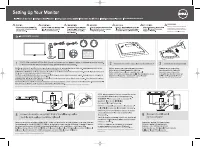
Back to Contents Page Setting Up the Monitor Dell™ U2413/U2713H Monitor User's Guide Attaching the Stand Connecting the Monitor Organizing Your Cables Attaching Dell Soundbar AX510/AY511 (Optional) Removing the Monitor Stand Wall Mounting (Optional) Attaching the Stand NOTE: The stand is detached wh...
Page 24 - Connecting Your Monitor; Connecting the white DVI cable
Connecting Your Monitor WARNING: Before you begin any of the procedures in this section, follow the Safety Instructions . To connect your monitor to the computer: 1. Turn Off your computer and disconnect the power cable. 2. Connect the white (digital DVI-D) or the black (DisplayPort/Mini DP/HDMI) di...
Page 30 - Connecting the USB 3.0 cable
Connecting the USB 3.0 cable After you have completed connecting the DVI/Mini DP/DP/HDMI cable, follow the procedures below to connect the USB 3.0 cable to the computer and complete your monitor setup: 1. Connect the upstream USB 3.0 port (cable supplied) to an appropriate USB 3.0 port on your compu...
Page 31 - Organizing Your Cables
Organizing Your Cables After attaching all necessary cables to your monitor and computer, (See Connecting Your Monitor for cable attachment,) organize all cables as shown above.
Page 33 - Removing the Monitor Stand
Removing the Monitor Stand NOTE: To prevent scratches on the LCD screen while removing the stand, ensure that the monitor is placed on a soft, clean surface. NOTE: This is applicable for a monitor with a stand. When any other stand is bought, please refer to the respective stand setup guide for the ...
Page 35 - Power On the Monitor
Back to Contents Page Operating the Monitor Dell™ U2413/U2713H Monitor User's Guide Power On the Monitor Using the Front Panel Controls Using the On -Screen Display (OSD) Menu Setting the Maximum Resolution Using Dell Soundbar Using the Tilt, Swivel, and Vertical Extension Rotating the Monitor Adjus...
Page 36 - Using the Front Panel Controls
Using the Front Panel Controls Use the control buttons on the front of the monitor to adjust the characteristics of the image being displayed. As you use these buttons to adjust the controls, an OSD shows the numeric values of the features as they change. The following table describes the front pane...
Page 37 - Front Panel Button
4 Menu Use the Menu key to launch the On -Screen Display (OSD) and select the OSD Menu. See Accessing the Menu System . 5 Exit Use the Exit key to go back to the main menu or exit the OSD main menu. 6 Power (with power light indicator) Use the Power key to turn the monitor On and Off. The white LED ...
Page 53 - OSD Warning Messages
OSD Warning Messages When the Energy Smart or Dynamic Contrast feature is enabled (in these preset modes: Game or Movie), the manual brightness adjustment is disabled. When the monitor does not support a particular resolution mode, you will see the following message:
Page 56 - Setting the Maximum Resolution
or See Solving Problems for more information. Setting the Maximum Resolution To set the maximum resolution for the monitor: In Windows Vista ® , Windows ® 7 , Windows ® 8: 1. For Windows® 8 only, select the Desktop tile to switch to classic desktop. 2. Right-click on the desktop and click Screen res...
Page 57 - Using Dell Soundbar
Using Dell Soundbar The soundbar has an On/Off power and rotary volume control to adjust the overall sound system, a LED for power indication and two audio headset jacks. 1 Attach mechanism 2 Power/Volume control 3 Headphone jacks 4 Power indicator
Page 58 - Using the Tilt, Swivel, and Vertical Extension
Using the Tilt, Swivel, and Vertical Extension NOTE: This is applicable for a monitor with a stand. When any other stand is bought, please refer to the respective stand setup guide for set up instructions. Tilt, Swivel With the stand attached to the monitor, you can tilt and swivel the monitor for t...
Page 59 - Vertical Extension
Vertical Extension NOTE: The stand extends vertically up to 115 mm. The figure below illustrates how to extend the stand vertically.
Page 60 - Rotating the Monitor
Rotating the Monitor Before you rotate the monitor, your monitor should be fully vertically extended ( Vertical Extension ) and fully tilted ( Tilt ) up to avoid hitting the bottom edge of the monitor. NOTE: To use the Display Rotation function (Landscape versus Portrait view) with your Dell compute...
Page 61 - Adjusting the Rotation Display Settings of Your System
Adjusting the Rotation Display Settings of Your System After you have rotated your monitor, you need to complete the procedure below to adjust the Rotation Display Settings of your system. NOTE: If you are using the monitor with a non-Dell computer, you need to go the graphics driver website or your...
Page 62 - Troubleshooting
Back to Contents Page Troubleshooting Dell™ U2413/U2713H Monitor User's Guide Self-Test Built -in Diagnostics Common Problems Product Specific Problems Universal Serial Bus (USB) Specific Problems Dell™ Soundbar Problems Card Reader Troubleshooting WARNING: Before you begin any of the procedures in ...
Page 64 - Common Problems
Common Problems The following table contains general information about common monitor problems you might encounter and the possible solutions: Common Symptoms What You Experience Possible Solutions No Video/Power LED Off No picture Ensure that the video cable connecting the monitor and the computer ...
Page 65 - Product Specific Problems; Universal Serial Bus (USB) Specific Problems
Wrong Color Picture color not good Change the Color Setting Mode in the Color Settings OSD to Graphics or Video depending on the application. Try different Color Preset Settings in Color Settings OSD. Adjust R/G/B value in Color Settings OSD if the Color Management is turned Off. Change the Input Co...
Page 66 - Troubleshooting the Card Reader
Play some audio content on the computer (i.e. audio CD, or MP3). Turn the Power/Volume knob on the soundbar clockwise to a higher volume setting. Clean and reseat the audio line-in plug. Test the soundbar using another audio source (i.e. portable CD player). Distorted Sound Computer's sound card is ...
Page 68 - Appendix; WARNING: Safety Instructions; Contacting Dell
Back to Contents Page Appendix Dell™ U2413/U2713H Monitor User's Guide Safety Instructions FCC Notice (U.S. Only) and Other Regulatory Information Contacting Dell WARNING: Safety Instructions WARNING: Use of controls, adjustments, or procedures other than those specified in this documentation may re...
Page 69 - Setting Up Your Monitor; Setting the display resolution
Back to Contents Page Setting Up Your Monitor Dell™ U2413/U2713H Monitor User's Guide Setting the display resolution For maximum display performance with Microsoft ® Windows ® operating systems, set the display resolution to 1920 x 1200 (for U2413) or 2560 x 1440 (for U2713H) pixels by performing th...
Page 71 - If you have a non DellTM desktop, portable computer, or graphics card
Back to Contents Page Setting Up Your Monitor Dell™ U2413/U2713H Monitor User's Guide If you have a non Dell™ desktop, portable computer, or graphics card In Windows Vista ® , Windows ® 7 or Windows ® 8: 1. For Windows® 8 only, select the Desktop tile to switch to classic desktop. 2. Right-click on ...