Dell U2211H - User Manual

Dell U2211H – User Manual, read for free online in PDF format. We hope this helps you resolve any issues you may have. If you have further questions, please contact us through the contact form.


Table of Contents:
- Page 2 – About Your Monitor; Package Contents
- Page 3 – Front View
- Page 4 – Back View
- Page 6 – Monitor Specifications; Flat Panel Specifications
- Page 9 – Pin Assignments; VGA Connector
- Page 10 – DisplayPort Connector
- Page 11 – Plug and Play Capability; USB Upstream Connector; LCD Monitor Quality and Pixel Policy
- Page 12 – Maintenance Guidelines; Cleaning Your Monitor
- Page 13 – Appendix; WARNING: Safety Instructions; Contacting Dell
- Page 14 – Setting Up Your Monitor
- Page 15 – If you have a non DellTM desktop, portable computer, or graphics card
- Page 16 – Using the Front Panel
- Page 17 – Accessing the Menu System
- Page 18 – Note
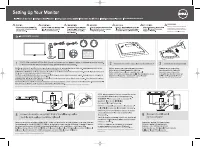
- Page 30 – Setting Up the Monitor; Attaching the Stand
- Page 31 – Connecting the white DVI cable
- Page 32 – Connecting the USB cable; Organizing Your Cables
- Page 33 – Removing the Stand
- Page 35 – Troubleshooting; Built-in Diagnostics
- Page 36 – Common Problems
Dell™ U2211H /U2311H Monitor User's Guide
Notes, Notices, and Cautions
Information in this document is subject to change without notice.
© 2010 Dell Inc. All rights reserved.
R e p r o d u c t i o n o f t h e s e m a t e r i a l s i n a n y m a n n e r w h a t s o e v e r w i t h o u t t h e w r i t t e n p e r m i s s i o n o f D e l l I n c . i s s t r i c t l y f o r b i d d e n .
T r a d e m a r k s u s e d i n t h i s t e x t :
Dell
a n d t h e
DELL
l o g o a r e t r a d e m a r k s o f D e l l I n c ;
Microsoft
a n d
Windows
a r e e i t h e r t r a d e m a r k s o r r e g i s t e r e d t r a d e m a r k s o f M i c r o s o f t C o r p o r a t i o n i n
t h e U n i t e d S t a t e s a n d / o r o t h e r c o u n t r i e s,
Intel
i s a r e g i s t e r e d t r a d e m a r k o f I n t e l C o r p o r a t i o n i n t h e U . S . a n d o t h e r c o u n t r i e s ; a n d A T I i s a t r a d e m a r k o f A d v a n c e d M i c r o D e v i c e s ,
I n c . E N E R G Y S T A R i s a r e g i s t e r e d t r a d e m a r k o f t h e U . S . E n v i r o n m e n t a l P r o t e c t i o n A g e n c y . A s a n E N E R G Y S T A R p a r t n e r , D e l l I n c . h a s d e t e r m i n e d t h a t t h i s p r o d u c t m e e t s t h e
ENERGY STAR guidelines for energy efficiency.
O t h e r t r a d e m a r k s a n d t r a d e n a m e s m a y b e u s e d i n t h i s d o c u m e n t t o r e f e r t o e i t h e r t h e e n t i t i e s c l a i m i n g t h e m a r k s a n d n a m e s o r t h e i r p r o d u c t s . D e l l I n c . d i s c l a i m s a n y
p r o p r i e t a r y i n t e r e s t i n t r a d e m a r k s a n d t r a d e n a m e s o t h e r t h a n i t s o w n .
Model U2211Ht / U2311Hb
May 2010 Rev. A01
NOTE: A NOTE indicates important information that helps you make better use of your computer.
CAUTION:
A CAUTION indicates either potential damage to hardware or loss of data and tells you how to avoid the problem.
WARNING:
A WARNING indicates a potential for property damage, personal injury, or death.
"Loading the manual" means you need to wait until the file loads and becomes available for online reading. Some manuals are very large, and the time they take to appear depends on your internet speed.
Was this manual helpful?
About this manual
- Brand
- Dell
- Model
- U2211H
- Document type
- User Manual
- Language(s)
- English
- Pages
- 38
- File size
- 1.3 MB
- Format
Other Manuals for Dell U2211H
Summary
Back to Contents Page About Your Monitor Dell™ U2211H / U2311H Monitor User's Guide Package Contents Your monitor ships with the components shown below. Ensure that you have received all the components and contact Dell if something is missing. Package Contents Product Features Identifying Parts ...
Product Features The U2211H / U2311H flat panel display has an active matrix, thin-film transistor (TFT), liquid crystal display (LCD). The monitor features include: ■ 546.1 mm (21.5- inch) viewable area display (Measured diagonally). 1920 x 1080 resolution, plus full-screen support for lower re...
Back View Front View Front panel controls Label Description 1 Preset Modes (default, but configurable) 2 Brightness & Contrast (default, but configurable) 3 Menu 4 Exit 5 Power (with power light indicator) Back view Back view with monitor stand Label Description Use 1 VESA mounting holes (100 mm...