Page 2 - Abbreviations and Acronyms; User’s Guide
Notes, Notices, and Cautions NOTE: A NOTE indicates important information that helps you make better use of your computer. NOTICE: A NOTICE indicates either potential damage to hardware or loss of data and tells you how to avoid the problem. CAUTION: A CAUTION indicates a potential for property dama...
Page 3 - Contents; Finding Information; Index
Contents 3 Contents Finding Information . . . . . . . . . . . . . . . . . . . . . . . . . . . . . . . . 5 Setting Up Your Computer . . . . . . . . . . . . . . . . . . . . . . . . . . . . . 9 About Your Computer . . . . . . . . . . . . . . . . . . . . . . . . . . . . . . . 10 Front View . . . . . . ....
Page 5 - What Are You Looking For?; DellTM Product Information Guide
Quick Reference Guide 5 Finding Information NOTE: Some features or media may be optional and may not ship with your computer. Some features or media may not be available in certain countries. NOTE: Additional information may ship with your computer. What Are You Looking For? Find It Here • A diagnos...
Page 6 - Dell LatitudeTM User’s Guide; Start; Service Tag and Microsoft
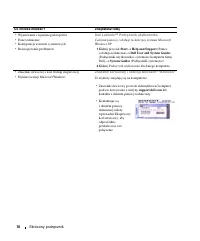
6 Quick Reference Guide • How to remove and replace parts• Specifications• How to configure system settings• How to troubleshoot and solve problems Dell Latitude™ User’s Guide Microsoft Windows XP Help and Support Center 1 Click Start → Help and Support → Dell User and System Guides → System Guides ...
Page 7 - Go; Dell Support Utility; Windows Help and Support Center
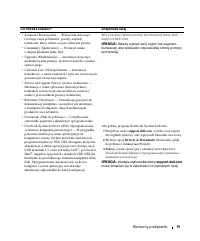
Quick Reference Guide 7 • Solutions — Troubleshooting hints and tips, articles from technicians, online courses, and frequently asked questions • Community — Online discussion with other Dell customers • Upgrades — Upgrade information for components, such as memory, the hard drive, and the operating...
Page 8 - Dell QuickSet Help; To view; Operating System CD
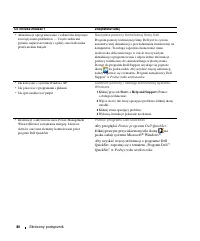
8 Quick Reference Guide • Information on network activity, the Power Management Wizard, hotkeys, and other items controlled by Dell QuickSet. Dell QuickSet Help To view Dell QuickSet Help , right-click the icon in the Microsoft ® Windows ® taskbar. For more information on Dell QuickSet, see "Del...
Page 9 - Setting Up Your Computer; Product
Quick Reference Guide 9 Setting Up Your Computer CAUTION: Before you begin any of the procedures in this section, follow the safety instructions in the Product Information Guide . 1 Unpack the accessories box. 2 Set aside the contents of the accessories box, which you will need to complete the setup...
Page 10 - About Your Computer; Front View
10 Quick Reference Guide About Your Computer Front View 1 display 2 device status lights 3 keyboard 4 touch pad 5 display latch 6 speakers 7 touch pad buttons 8 keyboard status lights 9 power button 4 1 3 8 7 2 6 9 5
Page 11 - Left Side View
Quick Reference Guide 11 Left Side View Right Side View Back View CAUTION: Do not block, push objects into, or allow dust to accumulate in the air vents. Do not store your computer in a low-airflow environment, such as a closed briefcase, while it is running. Restricting the airflow can damage the c...
Page 12 - Bottom View
12 Quick Reference Guide Bottom View 1 USB connectors (2) 2 modem connector (RJ-11) 3 network connector (RJ-45) 4 S-video TV-out connector 5 serial connector 6 video connector 7 AC adapter connector 8 air vents 1 memory module/modem/WLAN Mini-Card/coin-cell battery cover 2 battery-bay latch release ...
Page 13 - Using a Battery; Battery Performance; Using optical drives
Quick Reference Guide 13 Using a Battery Battery Performance NOTE: For information about the Dell warranty for your computer, see the Product Information Guide or separate paper warranty document that shipped with your computer. For optimal computer performance and to help preserve BIOS settings, op...
Page 14 - Checking the Battery Charge; Power Meter; pressing and holding; Help
14 Quick Reference Guide CAUTION: Misuse of the battery may increase the risk of fire or chemical burn. Do not puncture, incinerate, disassemble, or expose the battery to temperatures above 60°C (140°F). Keep the battery away from children. Handle damaged or leaking batteries with extreme care. Dama...
Page 15 - press and hold; Power Options Properties; Charging the Battery; User’s; Removing the Battery
Quick Reference Guide 15 To check the battery health using the charge gauge, press and hold the status button on the battery charge gauge for at least 3 seconds. If no lights appear, the battery is in good condition, and more than 80 percent of its original charge capacity remains. Each light repres...
Page 16 - To remove the battery:; Storing a Battery
16 Quick Reference Guide NOTICE: You must remove all external cables from the computer to avoid possible connector damage.For information about replacing the second battery, which is located in the media bay, see "Using Multimedia" in your User’s Guide . To remove the battery: 1 If the compu...
Page 17 - Troubleshooting; Lockups and Software Problems; A C
Quick Reference Guide 17 Troubleshooting Lockups and Software Problems CAUTION: Before you begin any of the procedures in this section, follow the safety instructions in the Product Information Guide . The computer does not start up E N S U R E T H A T T H E A C A D A P T E R I S F I R M L Y C O N N...
Page 18 - Other software problems; C D; spyware; Dell Diagnostics
18 Quick Reference Guide Other software problems C H E C K T H E S O F T W A R E D O C U M E N T A T I O N O R C O N T A C T T H E S O F T W A R E M A N U F A C T U R E R F O R T R O U B L E S H O O T I N G I N F O R M A T I O N — • Ensure that the program is compatible with the operating system ins...
Page 19 - Starting the Dell Diagnostics From Your Hard Drive
Quick Reference Guide 19 Starting the Dell Diagnostics From Your Hard Drive The Dell Diagnostics is located on a hidden diagnostic utility partition on your hard drive. NOTE: If your computer cannot display a screen image, contact Dell (see "Contacting Dell" in your User’s Guide ). 1 Shut do...
Page 20 - Dell Diagnostics Main Menu; Option
20 Quick Reference Guide 3 When the boot device list appears, highlight CD/DVD/CD-RW Drive and press <Enter>. 4 Select the Boot from CD-ROM option from the menu that appears and press <Enter>. 5 Type 1 to start the menu and press <Enter> to proceed. 6 Select Run the 32 Bit Dell Dia...
Page 21 - screen. To exit the Dell; Main; Tab
Quick Reference Guide 21 4 When the tests are completed, if you are running the Dell Diagnostics from the Drivers and Utilities CD , remove the CD. 5 When the tests are complete, close the test screen to return to the Main Menu screen. To exit the Dell Diagnostics and restart the computer, close the...
Page 26 - ní a varování; UPOZORN; VAROVÁNÍ upozor; Zkratky a zna; Uživatelské p
Poznámky, upozorn ě ní a varování POZNÁMKA: POZNÁMKA ozna č uje d ů ležité informace, které pomáhají lepšímu využití po č íta č e. UPOZORN Ě NÍ: UPOZORN Ě NÍ upozor ň uje na možné poškození hardwaru nebo ztrátu dat a obsahuje pokyny, jak t ě mto problém ů m p ř edejít. VAROVÁNÍ: VAROVÁNÍ upozor ň uj...
Page 27 - Obsah; Rejst
Obsah 27 Obsah Vyhledání informací . . . . . . . . . . . . . . . . . . . . . . . . . . . . . 29 Instalace po č íta č e . . . . . . . . . . . . . . . . . . . . . . . . . . . . . . 33 Po č íta č Dell . . . . . . . . . . . . . . . . . . . . . . . . . . . . . . . . . . 34 Č elní pohled . . . . . . . . ....
Page 29 - Vyhledání informací; Hledané informace; íru
Stru č ná referen č ní p ř íru č ka 29 Vyhledání informací POZNÁMKA: N ě které funkce nebo média jsou dopl ň kové a nemusí být s tímto po č íta č em k dispozici. N ě které funkce nebo média pravd ě podobn ě nebudou v n ě kterých zemích k dispozici. POZNÁMKA: S po č íta č em mohly být dodány další in...
Page 31 - Nástroj Dell Support Utility; Centrum pro nápov
Stru č ná referen č ní p ř íru č ka 31 • Ř ešení — tipy a rady pro odstra ň ování problém ů , č lánky odborník ů , školení online a č asté dotazy. • Ve ř ejnost — diskuse online s ostatními zákazníky spole č nosti Dell. • Upgrady — informace o upgradech sou č ástí, nap ř íklad pam ě ti, pevného disk...
Page 32 - Dell QuickSet; Disk CD s opera
32 Stru č ná referen č ní p ř íru č ka • Informace o sít’ové aktivit ě , pr ů vodci ř ízením spot ř eby, klávesových zkratkách a dalších položkách ř ízených nástrojem Dell QuickSet Nápov ě da pro nástroj Dell QuickSet Chcete-li zobrazit nápov ě du pro nástroj Dell QuickSet , klepn ě te pravým tla č ...
Page 34 - Po; elní pohled
34 Stru č ná referen č ní p ř íru č ka Po č íta č Dell Č elní pohled 1 Displej 2 Indikátory stavu za ř ízení 3 Klávesnice 4 Dotyková podložka 5 Pojistka displeje 6 Reproduktory 7 Tla č ítka dotykové podložky 8 Indikátory stavu klávesnice 9 Vypína č 4 1 3 8 7 2 6 9 5
Page 35 - Pohled zleva
Stru č ná referen č ní p ř íru č ka 35 Pohled zleva Pohled zprava Pohled zezadu VAROVÁNÍ: Nezakrývejte v ě trací otvory. Dejte pozor, aby se do nich nedostaly žádné p ř edm ě ty, a dbejte, aby se v nich nehromadil prach. Spušt ě ný po č íta č neuchovávejte v prost ř edí s nedostate č ným v ě tráním,...
Page 36 - Pohled zespodu
36 Stru č ná referen č ní p ř íru č ka Pohled zespodu 1 Konektory USB (2) 2 Konektor modemu (RJ-11) 3 Sít’ový konektor (RJ-45) 4 Konektor S-video (televizní výstup) 5 Konektor sériového rozhraní 6 Konektor zobrazovacího za ř ízení 7 Konektor adaptéru napájení 8 V ě trací otvory 1 Kryt pam ě t’ového ...
Page 37 - Používání baterie; Výkon baterie
Stru č ná referen č ní p ř íru č ka 37 Používání baterie Výkon baterie POZNÁMKA: Informace o záruce spole č nosti Dell na tento po č íta č najdete v P ř íru č ce s informacemi o produktu nebo v samostatném dokumentu se zn ě ním záruky, který byl dodán s po č íta č em. Pro dosažení optimálního výkonu...
Page 38 - Kontrola nabití baterie; napájení
38 Stru č ná referen č ní p ř íru č ka VAROVÁNÍ: V p ř ípad ě nevhodné manipulace s baterii hrozí zvýšené nebezpe č í požáru nebo popálení chemikáliemi. Baterii neperforujte, nespalujte, nedemontujte ani nevystavujte teplot ě nad 60 °C. Uchovávejte baterii mimo dosah d ě tí. P ř i manipulaci s poško...
Page 39 - Kontrola kapacity baterie; Dobíjení baterie
Stru č ná referen č ní p ř íru č ka 39 Kontrola kapacity baterie POZNÁMKA: Kapacitu baterie lze zkontrolovat dv ě ma zp ů soby: pomocí m ěř idla nabití na baterii (popsáno níže) nebo pomocí m ěř i č e baterie nástroje Dell QuickSet. Chcete-li získat další informace o nástroji QuickSet, klepn ě te pr...
Page 40 - Vyjmutí baterie; Skladování baterie
40 Stru č ná referen č ní p ř íru č ka Vyjmutí baterie VAROVÁNÍ: P ř ed provád ě ním t ě chto postup ů vypn ě te po č íta č , odpojte napájecí adaptér z elektrické zásuvky a od po č íta č e, odpojte modem od konektoru v místnosti a od po č íta č e a odpojte ostatní externí kabely od po č íta č e. VA...
Page 41 - Zablokování a problémy se softwarem
Stru č ná referen č ní p ř íru č ka 41 Odstra ň ování problém ů Zablokování a problémy se softwarem VAROVÁNÍ: P ř ed provád ě ním jakéhokoli z postup ů uvedených v této č ásti si p ř e č t ě te bezpe č nostní pokyny v P ř íru č ce s informacemi o produktu a ř i ď te se jimi. Po č íta č nelze spustit...
Page 42 - Diagnostický nástroj Dell Diagnostics; Drivers and Utilities CD
42 Stru č ná referen č ní p ř íru č ka Jiné problémy se softwarem P O K Y N Y P R O O D S T R A N Ě N Í P R O B L É M Ů V Y H L E D E J T E V D O K U M E N T A C I K S O F T W A R U N E B O S E O B R A T ’ TE N A V Ý R O B C E S O F T W A R U — • P ř esv ě d č te se, zda je program kompatibilní s op...
Page 44 - Možnost
44 Stru č ná referen č ní p ř íru č ka POZNÁMKA: Další kroky zm ě ní zavád ě cí sekvenci, a to jednorázov ě . P ř i p ř íštím spušt ě ní se po č íta č spustí podle toho, jaká za ř ízení jsou zadána v nastavení systému. 3 Když se zobrazí seznam za ř ízení k zavedení, vyberte položku CD/DVD/CD-RW Driv...
Page 45 - Karta
Stru č ná referen č ní p ř íru č ka 45 4 Po dokon č ení test ů a v p ř ípad ě , že jste nástroj Dell Diagnostics spustili z disku Drivers and Utilities CD (Disk s ovlada č i a nástroji), vyjm ě te disk CD. 5 Po skon č ení test ů zav ř ete obrazovku test ů . Znovu se objeví obrazovka Main Menu (Hlavn...
Page 49 - Rövid útmutató
w w w . d e l l . c o m | s u p p o r t . d e l l . c o m Dell™ Latitude™ D520 Rövid útmutató Model PP17L
Page 50 - Megjegyzések és figyelmeztetések; Rövidítések és mozaikszavak; A rövidítések és mozaikszavak teljes listáját megtekintheti a
Megjegyzések és figyelmeztetések MEGJEGYZÉS: A MEGJEGYZÉSEK a számítógép biztonságosabb és hatékonyabb használatát el ő segít ő , fontos tudnivalókat tartalmaznak. FIGYELMEZTETÉS: A figyelmeztetés hardver-meghibásodás vagy adatvesztés potenciális lehet ő ségére hívja fel a figyelmet, egyben közli a ...
Page 51 - Tartalomjegyzék; Információkeresés; Tárgymutató
Tartalomjegyzék 51 Tartalomjegyzék Információkeresés . . . . . . . . . . . . . . . . . . . . . . . . . . . . . . 53 A számítógép üzembe helyezése . . . . . . . . . . . . . . . . . . . . . 57 A számítógép . . . . . . . . . . . . . . . . . . . . . . . . . . . . . . . . . 58 Elölnézet . . . . . . . . ....
Page 53 - Témakör
Rövid útmutató 53 Információkeresés MEGJEGYZÉS: Mivel néhány tulajdonság vagy adathordozó opcionális, elképzelhet ő , hogy nem képezi a számítógép részét. Elképzelhet ő , hogy számítógépe egyes funkciói bizonyos országokban nem m ű ködnek. MEGJEGYZÉS: A számítógéphez kiegészít ő információk is tarto...
Page 54 - DellTM Termékismertet; Szervizcímke és Microsoft
54 Rövid útmutató • Garanciális tudnivalók • Eladási feltételek és kikötések az Egyesült Államokban • Biztonsági el ő írások • Szabályozással kapcsolatos információk • Ergonómiával kapcsolatos információk • Végfelhasználói licencmegállapodás Dell™ Termékismertet ő • Alkatrészek eltávolítása és cseré...
Page 55 - Dell Támogatási webhely — support.dell.com; Dell Support Utility (Dell támogató segédprogram)
Rövid útmutató 55 • Megoldások –– Hibakeresési útmutatások és tippek, cikkek technikusoktól, online tanfolyamok és gyakran feltett kérdések • Közösség — Online eszmecsere, más Dell-ügyfelek részvételével • Frissítések –– Az egyes összetev ő kre, például a memóriára, merevlemezre és operációs rendsze...
Page 56 - Ha meg kívánja tekinteni a; Az operációs rendszer CD-je
56 Rövid útmutató • A Windows XP használata • A programok és fájlok kezelése • Az asztal személyre szabása Windows Help and Support Center (Windows súgó és támogatás) 1 Kattintson a Start (Indítás) → Help and Support (Súgó és támogatás) elemre. 2 Írjon be egy szót vagy kifejezést a probléma leírásár...
Page 57 - A számítógép üzembe helyezése; Az ebben a részben ismertetett m; Termékismertet
Rövid útmutató 57 A számítógép üzembe helyezése VIGYÁZAT! Az ebben a részben ismertetett m ű veletek elvégzése el ő tt tanulmányozza a Termékismertet ő -t. 1 Csomagolja ki a tartozékokat. 2 Rakja ki egymás mellé a tartozékokat a dobozból, ezekre szüksége lesz a számítógép üzembe helyezéséhez. A tart...
Page 58 - A számítógép; Elölnézet
58 Rövid útmutató A számítógép Elölnézet 1 kijelz ő 2 az eszközök állapotjelz ő -lámpái 3 billenty ű zet 4 érint ő panel (touch pad) 5 a képerny ő zárja 6 hangszórók 7 érint ő tálca gombjai 8 a billenty ű zet állapotjelz ő -lámpái 9 tápellátás gomb 4 1 3 8 7 2 6 9 5
Page 59 - Bal oldali nézet
Rövid útmutató 59 Bal oldali nézet Jobb oldali nézet Hátulnézet VIGYÁZAT! A számítógép szell ő z ő - és egyéb nyílásait soha ne zárja el, a nyílásokon semmit ne dugjon be, illetve ne hagyja, hogy a nyílásokban por rakódjon le. M ű ködés közben ne tartsa a számítógépet rosszul szell ő z ő helyen, pél...
Page 60 - Alulnézet
60 Rövid útmutató Alulnézet 1 memóriamodul/modem/WLAN Mini-Card/gombakku zárófedele 2 akkumulátor-rekesz kioldógombja 3 akkumulátor töltöttségmér ő je 4 akkumulátor 5 dokkolóeszköz b ő vít ő helye 6 szell ő z ő nyílások 7 merevlemezes meghajtó 1 5 4 2 7 3 6
Page 61 - Az akkumulátor használata; Az akkumulátor teljesítménye
Rövid útmutató 61 Az akkumulátor használata Az akkumulátor teljesítménye MEGJEGYZÉS: A számítógépre vonatkozó Dell™ garanciával kapcsolatban, lásd a Termékismertet ő -t vagy a számítógéphez járó különálló, a garanciavállalással kapcsolatos információkat tartalmazó dokumentumot. A számítógép optimáli...
Page 62 - Az akkumulátor töltöttségének ellen; lenyomva
62 Rövid útmutató VIGYÁZAT! Az akkumulátort ne a háztartási hulladékkal együtt dobja ki. Ha az akkumulátor már nem tartja meg a töltést, lépjen kapcsolatba a helyi hulladékkezel ő vagy környezetvédelmi képviselettel, és érdekl ő dje meg a használt lítium-ion akkumulátor elhelyezésének módját. Lásd a...
Page 63 - Súgó; „Alacsony akkumulátorfeszültség” figyelmeztetés; Az akkumulátor töltése
Rövid útmutató 63 Az akkumulátor töltöttségének ellen ő rzése Az akkumulátor töltöttségének ellen ő rzéséhez nyomja le, majd engedje el a töltöttségmér ő állapotjelz ő gombját, hogy a töltöttségiszint-visszajelz ő k világítsanak. Minden visszajelz ő körülbelül 20 százalékát jelzi a teljes töltöttség...
Page 64 - Az akkumulátor eltávolítása; Az akkumulátor eltávolítása:
64 Rövid útmutató Az akkumulátor-problémák megoldásával kapcsolatban lásd „Power Problems” (Energiaproblémák) címszó alatt a Felhasználói kézikönyv -ben. Az akkumulátor eltávolítása VIGYÁZAT! Miel ő tt a következ ő m ű veletekbe kezd, kapcsolja ki a számítógépet, húzza ki a tápadaptert a konnektorbó...
Page 65 - Az akkumulátor tárolása; Hibaelhárítás; Lefagyások és szoftverproblémák; Task Manager
Rövid útmutató 65 Az akkumulátor tárolása Ha számítógépét hosszabb ideig nem használja, szerelje ki az akkumulátort. Hosszabb tárolás alatt az akkumulátor lemerül. Hosszabb tárolást követ ő en, a használatba vétel el ő tt, töltse fel teljesen az akkumulátort (lásd „Az akkumulátor töltése” címszó ala...
Page 66 - S t a r t
66 Rövid útmutató 1 Kattintson a következ ő kre: Start → All Programs → Accessories → Program Compatibility Wizard → Next . 2 Kövesse a kijelz ő n megjelen ő utasításokat. Egybefügg ő kék képerny ő jelenik meg K A P C S O L J A K I A S Z Á M Í T Ó G É P E T — Ha a számítógép a billenty ű zetre vagy ...
Page 68 - - és segédprogramokat; Run the 32 Bit Dell Diagnostics; A Dell-diagnosztika f; Express Test
68 Rövid útmutató 5 Valamelyik gomb megnyomásával indítsa el a Dell-diagnosztikát a diagnosztikai segédprogram-partícióról a merev lemezen. A Dell Diagnostics (Dell-diagnosztika) indítása a Drivers and Utilities (illeszt ő - és segédprogramokat tartalmazó) CD-r ő l 1 Helyezze be a Drivers and Utilit...
Page 69 - Fül
Rövid útmutató 69 2 Ha egy teszt során probléma merült fel, megjelenik egy üzenet a hibakóddal és a probléma leírásával. Jegyezze fel a hibakódot és a probléma rövid leírását, majd kövesse a képerny ő n megjelen ő utasításokat. Ha a hiba nem oldható meg, forduljon a Dellhez (lásd „A Dell elérhet ő s...
Page 74 - enia i przestrogi; OSTRZE; OSTRZE; Skróty i skrótowce; źć
Uwagi, ostrze ż enia i przestrogi UWAGA: UWAGA oznacza wa ż n ą wiadomo ść , która pomo ż e lepiej wykorzysta ć komputer. OSTRZE Ż ENIE: OSTRZE Ż ENIE oznacza mo ż liwo ść uszkodzenia sprz ę tu lub utraty danych, a tak ż e przedstawia sposób unikni ę cia problemu. PRZESTROGA: OSTRZE Ż ENIE informuje...
Page 75 - Skorowidz
Spis tre ś ci 75 Spis tre ś ci Wyszukiwanie informacji . . . . . . . . . . . . . . . . . . . . . . . . . . 77 Przygotowywanie komputera do pracy . . . . . . . . . . . . . . . . . 82 Informacje o komputerze . . . . . . . . . . . . . . . . . . . . . . . . . . 83 Widok od przodu . . . . . . . . . . . ....
Page 77 - Wyszukiwanie informacji; Co chcesz znale; Znajdziesz tutaj; DellTM Przewodnik z informacjami o produkcie
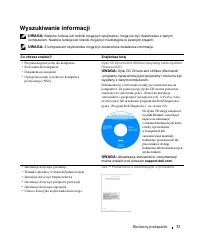
Skrócony podr ę cznik 77 Wyszukiwanie informacji UWAGA: Niektóre funkcje lub no ś niki mog ą by ć opcjonalne i mog ą nie by ć dostarczane z danym komputerem. Niektóre funkcje lub no ś niki mog ą by ć niedost ę pne w pewnych krajach. UWAGA: Z komputerem u ż ytkownika mog ą by ć dostarczone dodatkowe ...
Page 78 - Dell LatitudeTM Podr; Znacznik serwisowy i licencja Microsoft
78 Skrócony podr ę cznik • Wyjmowanie i wymiana podzespołów • Dane techniczne • Konfiguracja ustawie ń systemowych • Rozwi ą zywanie problemów Dell Latitude™ Podr ę cznik u ż ytkownika Centrum pomocy i obsługi technicznej systemu Microsoft Windows XP 1 Kliknij przycisk Start → Help and Support (Pomo...
Page 80 - Narz; Pomoc programu Dell QuickSet
80 Skrócony podr ę cznik • Aktualizacje oprogramowania i wskazówki dotycz ą ce rozwi ą zywania problemów — Cz ę sto zadawane pytania, najnowsze tematy i ogólny stan ś rodowiska przetwarzania danych Narz ę dzie pomocy technicznej firmy Dell Program pomocy technicznej firmy Dell jest to system automat...
Page 81 - Dysk CD z systemem operacyjnym (Operating System)
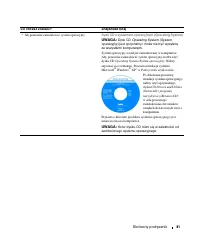
Skrócony podr ę cznik 81 • Jak ponownie zainstalowa ć system operacyjny Dysk CD z systemem operacyjnym (Operating System) UWAGA: Dysk CD Operating System (System operacyjny) jest opcjonalny i mo ż e nie by ć wysyłany ze wszystkimi komputerami. System operacyjny został ju ż zainstalowany w komputerze...
Page 82 - Przygotowywanie komputera do pracy; Przewodniku
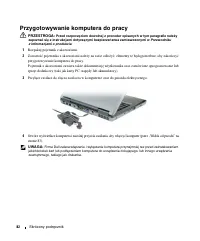
82 Skrócony podr ę cznik Przygotowywanie komputera do pracy PRZESTROGA: Przed rozpocz ę ciem dowolnej z procedur opisanych w tym paragrafie nale ż y zapozna ć si ę z instrukcjami dotycz ą cymi bezpiecze ń stwa zamieszczonymi w Przewodniku z informacjami o produkcie . 1 Rozpakuj pojemnik z akcesoriam...
Page 83 - Informacje o komputerze; Widok od przodu
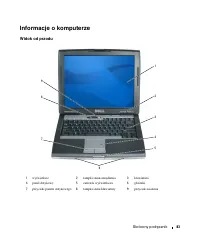
Skrócony podr ę cznik 83 Informacje o komputerze Widok od przodu 1 wy ś wietlacz 2 lampki stanu urz ą dzenia 3 klawiatura 4 panel dotykowy 5 zatrzask wy ś wietlacza 6 gło ś niki 7 przyciski panelu dotykowego 8 lampki stanu klawiatury 9 przycisk zasilania 4 1 3 8 7 2 6 9 5
Page 84 - Widok od lewej
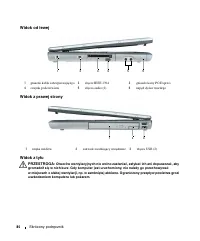
84 Skrócony podr ę cznik Widok od lewej Widok z prawej strony Widok z tyłu PRZESTROGA: Otworów wentylacyjnych nie wolno zasłania ć , zatyka ć ich ani dopuszcza ć , aby gromadził si ę w nich kurz. Gdy komputer jest uruchomiony, nie nale ż y go przechowywa ć w miejscach o słabej wentylacji, np. w zamk...
Page 85 - Widok z dołu
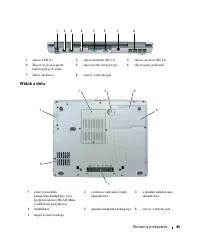
Skrócony podr ę cznik 85 Widok z dołu 1 zł ą cza USB (2) 2 zł ą cze modemu (RJ-11) 3 zł ą cze sieciowe (RJ-45) 4 Zł ą cze wyj ś cia sygnału telewizyjnego S-video 5 zł ą cze portu szeregowego 6 zł ą cze karty graficznej 7 zł ą cze zasilacza 8 otwory wentylacyjne 1 pokrywa modułu pami ę ci/modemu/kart...
Page 86 - Korzystanie z akumulatora; Wydajno; akumulatora; ąć
86 Skrócony podr ę cznik Korzystanie z akumulatora Wydajno ść akumulatora UWAGA: Informacje na temat gwarancji firmy Dell dla komputera znajduj ą si ę w Przewodniku z informacjami o produkcie lub w oddzielnym drukowanym dokumencie gwarancji, dostarczonym wraz z komputerem. Podczas korzystania z komp...
Page 87 - Przewodniku z informacjami o produkcie; Sprawdzanie poziomu naładowania akumulatora; Miernik energii; Miernik akumulatora programu DellTM QuickSet; Miernik energii w systemie Microsoft
Skrócony podr ę cznik 87 PRZESTROGA: Zu ż ytych akumulatorów nie nale ż y wyrzuca ć razem z innymi odpadkami. Je ż eli akumulator straci pojemno ść , nale ż y skontaktowa ć si ę z lokalnym punktem utylizacji odpadów lub wydziałem ochrony ś rodowiska, aby uzyska ć informacje dotycz ą ce sposobu utyli...
Page 88 - Ładowanie akumulatora
88 Skrócony podr ę cznik Sprawdzanie poziomu naładowania akumulatora Aby sprawdzi ć poziom naładowania akumulatora, nale ż y nacisn ąć i zwolni ć przycisk stanu na mierniku poziomu naładowania w celu wł ą czenia lampek poziomu naładowania. Ka ż da lampka oznacza około 20 procent pełnego naładowania ...
Page 89 - Wyjmowanie akumulatora
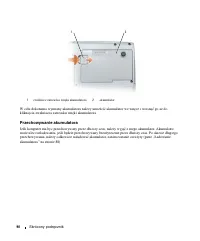
Skrócony podr ę cznik 89 Je ś li akumulator si ę rozgrzeje wskutek u ż ywania go w komputerze lub poddaniu go działaniu wysokiej temperatury, ładowanie mo ż e si ę nie rozpocz ąć po podł ą czeniu komputera do gniazda elektrycznego. Je ś li lampka miga na przemian zielonym i pomara ń czowym ś wiatłem...
Page 90 - Przechowywanie akumulatora
90 Skrócony podr ę cznik W celu dokonania wymiany akumulatora nale ż y umie ś ci ć akumulator we wn ę ce i wcisn ąć go a ż do klikni ę cia zwalniacza zatrzasku wn ę ki akumulatora. Przechowywanie akumulatora Je ś li komputer ma by ć przechowywany przez dłu ż szy czas, nale ż y wyj ąć z niego akumula...
Page 91 - Rozwi; Blokowanie si
Skrócony podr ę cznik 91 Rozwi ą zywanie problemów Blokowanie si ę komputera i problemy z oprogramowaniem PRZESTROGA: Przed rozpocz ę ciem dowolnej z procedur opisanych w tym paragrafie nale ż y zapozna ć si ę z instrukcjami dotycz ą cymi bezpiecze ń stwa zamieszczonymi w Przewodniku z informacjami ...
Page 92 - ęś; Program Dell Diagnostics; Drivers and Utilities (Sterowniki
92 Skrócony podr ę cznik Inne problemy z oprogramowaniem S P R A W D Ź D O K U M E N T A C J Ę D O S T A R C Z O N ą W R A Z Z O P R O G R A M O W A N I E M L U B S K O N T A K T U J S I Ę Z P R O D U C E N T E M O P R O G R A M O W A N I A W C E L U U Z Y S K A N I A I N F O R M A C J I N A T E M A...
Page 94 - Menu główne programu Dell Diagnostics; Main Menu; Opcja
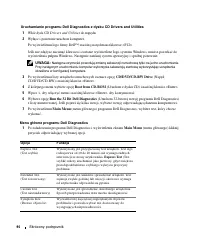
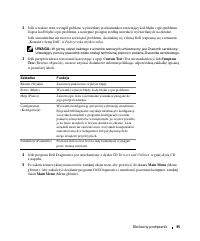
94 Skrócony podr ę cznik Uruchamianie programu Dell Diagnostics z dysku CD Drivers and Utilities 1 Włó ż dysk CD Drivers and Utilities do nap ę du. 2 Wył ą cz i ponownie uruchom komputer. Po wy ś wietleniu logo firmy Dell™, naci ś nij natychmiast klawisz <F12>. Je ś li nie zd ąż ysz nacisn ąć ...
Page 95 - Drivers and Utilities,; Zakładka
Skrócony podr ę cznik 95 2 Je ś li w trakcie testu wyst ą pił problem, wy ś wietlany jest komunikat zawieraj ą cy kod bł ę du i opis problemu. Zapisz kod bł ę du i opis problemu, a nast ę pnie post ę puj według instrukcji wy ś wietlanych na ekranie. Je ś li samodzielnie nie mo ż esz rozwi ą za ć pro...
Page 99 - Краткий справочник
w w w . d e l l . c o m | s u p p o r t . d e l l . c o m Dell™ Latitude™ D520 Краткий справочник Модель PP17L
Page 100 - Примечания, замечания и предупреждения; Сокращения и аббревиатуры; Руководству
Примечания, замечания и предупреждения ПРИМЕЧАНИЕ. Содержит важную информацию, которая помогает более эффективно работать с компьютером. ЗАМЕЧАНИЕ. Указывает на опасность повреждения оборудования или потери данных и объясняет, как этого избежать. ПРЕДУПРЕЖДЕНИЕ. Указывает на потенциальную опасность ...
Page 101 - Содержание; Указатель
Содержание 101 Содержание Источники информации . . . . . . . . . . . . . . . . . . . . . . . . . 103 Настройка компьютера . . . . . . . . . . . . . . . . . . . . . . . . . 108 Сведения о компьютере . . . . . . . . . . . . . . . . . . . . . . . . 109 Вид спереди . . . . . . . . . . . . . . . . . . . ...
Page 104 - Dell User
104 Краткий справочник • Удаление и замена компонентов • Технические характеристики • Настройка системы • Устранение неисправностей и решение проблем Руководство пользователя Dell Latitude™ Центр справки и поддержки Microsoft Windows XP 1 Нажмите Пуск → Справка и поддержка → Dell User and System Gui...
Page 106 - Чтобы
106 Краткий справочник • Software upgrades and troubleshooting hints ( Подсказки по обновлению программного обеспечения и устранению неисправностей ) — часто задаваемые вопросы , популярные разделы и общие рекомендации по организации рабочей среды утилита Dell Support Utility Утилита Dell Support Ut...
Page 108 - Настройка компьютера
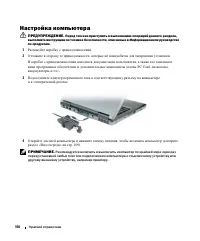
108 Краткий справочник Настройка компьютера ПРЕДУПРЕЖДЕНИЕ. Перед тем как приступить к выполнению операций данного раздела, выполните инструкции по технике безопасности, описанные в Информационном руководстве по продуктам . 1 Распакуйте коробку с принадлежностями . 2 Отложите в сторону те принадлежн...
Page 109 - Сведения о компьютере; Вид спереди
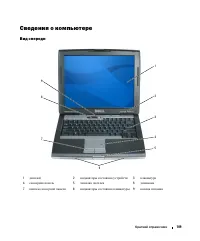
Краткий справочник 109 Сведения о компьютере Вид спереди 1 дисплей 2 индикаторы состояния устройств 3 клавиатура 4 сенсорная панель 5 защелка дисплея 6 динамики 7 кнопки сенсорной панели 8 индикаторы состояния клавиатуры 9 кнопка питания 4 1 3 8 7 2 6 9 5
Page 110 - Вид слева
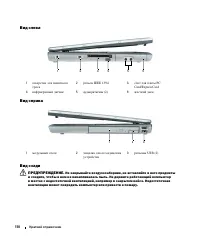
110 Краткий справочник Вид слева Вид справа Вид сзади ПРЕДУПРЕЖДЕНИЕ. Не закрывайте воздухозаборник, не вставляйте в него предметы и следите, чтобы в нем не накапливалась пыль. Не держите работающий компьютер в местах с недостаточной вентиляцией, например в закрытом кейсе. Недостаточная вентиляция м...
Page 111 - Вид снизу
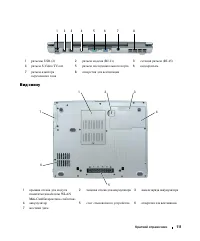
Краткий справочник 111 Вид снизу 1 p азъемы USB (2) 2 разъем модема (RJ-11) 3 сетевой разъем (RJ-45) 4 разъем S-Video TV-out 5 разъем последовательного порта 6 видеоразъем 7 разъем адаптера переменного тока 8 отверстия для вентиляции 1 крышка отсека для модуля памяти / модема / платы WLAN Mini-Card/...
Page 112 - Использование аккумулятора; Работа аккумулятора; Dell; Руководстве
112 Краткий справочник Использование аккумулятора Работа аккумулятора ПРИМЕЧАНИЕ. Информацию относительно гарантии корпорации Dell на компьютер смотрите в Информационном руководстве по продуктам или в отдельном бумажном гарантийном свидетельстве, прилагаемом к компьютеру. Чтобы достичь оптимальной п...
Page 113 - Проверка заряда аккумулятора; индикатора; Индикатор аккумулятора DellTM QuickSet Battery Meter; Индикатор питания Microsoft; нажатия
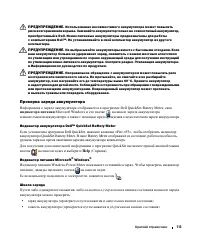
Краткий справочник 113 ПРЕДУПРЕЖДЕНИЕ. Использование несовместимого аккумулятора может повысить риск возгорания или взрыва. Заменяйте аккумулятор только на совместимый аккумулятор, приобретенный в Dell. Ионно:литиевые аккумуляторы предназначены для работы с компьютерами Dell™. Не устанавливайте в св...
Page 114 - Предупреждение о недостаточном заряде; QuickSet; Подзарядка аккумулятора
114 Краткий справочник Время работы аккумулятора в значительной мере определяется количеством циклов его зарядки . После нескольких сотен циклов зарядки - разрядки аккумуляторы теряют часть зарядной емкости . Таким образом , индикатор аккумулятора может показывать состояние « заряжен », но при этом ...
Page 115 - Извлечение аккумулятора
Краткий справочник 115 При подключении компьютера к электросети или во время установки аккумулятора в компьютер , который уже подключен к электросети , выполняется проверка температуры и заряда аккумулятора . При необходимости адаптер переменного тока производит подзарядку аккумулятора и поддерживае...
Page 116 - Хранение аккумулятора
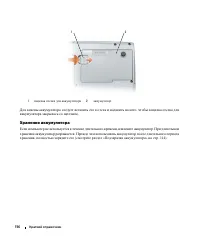
116 Краткий справочник Для замены аккумулятора следует вставить его в отсек и надавить на него , чтобы защелка отсека для аккумулятора закрылась со щелчком . Хранение аккумулятора Если компьютер не используется в течение длительного времени , извлеките аккумулятор . При длительном хранении аккумулят...
Page 117 - Поиск и устранение неисправностей; Блокировки и неполадки программного обеспечения; Компьютер не запускается; Windows
Краткий справочник 117 Поиск и устранение неисправностей Блокировки и неполадки программного обеспечения ПРЕДУПРЕЖДЕНИЕ. Перед тем как приступить к выполнению операций данного раздела, выполните инструкции по технике безопасности, описанные в Информационном руководстве по продуктам . Компьютер не за...
Page 118 - Появляется сплошной синий экран
118 Краткий справочник Появляется сплошной синий экран В Ы К Л Ю Ч И Т Е К О М П Ь Ю Т Е Р — Если компьютер не реагирует на нажатие клавиш на клавиатуре или перемещение мыши , нажмите кнопку питания не менее чем на 8-10 секунд , пока компьютер не выключится . Затем перезагрузите компьютер . Другие н...
Page 119 - Когда использовать программу Dell Diagnostics; Запуск программы Dell Diagnostics с жесткого диска; DELL
Краткий справочник 119 Когда использовать программу Dell Diagnostics Если при работе на компьютере возникают неполадки , выполните тесты , указанные в разделе « Блокировки и неполадки программного обеспечения » на стр . 117, и запустите программу Dell Diagnostics, прежде чем обращаться за консультац...
Page 120 - Dell »; Главное меню программы Dell Diagnostics
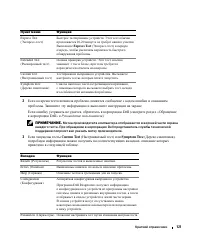
120 Краткий справочник • Если обнаружен какой - либо сбой , компьютер останавливается и выдает звуковой сигнал . Чтобы остановить тестирование и перезагрузить компьютер , нажмите клавишу <Esc>. Чтобы перейти к следующему тесту , нажмите клавишу <y>. Чтобы повторно протестировать неисправ...
Page 121 - Dell»; Custom Test
Краткий справочник 121 2 Если во время теста возникла проблема , появится сообщение с кодом ошибки и описанием проблемы . Запишите эту информацию и выполните инструкции на экране . Если ошибку устранить не удается , обратитесь в корпорацию Dell ( смотрите раздел « Обращение в корпорацию Dell» в Руко...