Comica CVM-VM10-K5 - User Manual
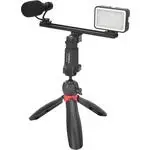
Comica CVM-VM10-K5 Microphone – User Manual, read for free online in PDF format. We hope this helps you resolve any issues you may have. If you have further questions, please contact us through the contact form.
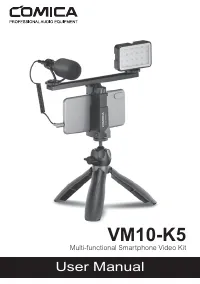
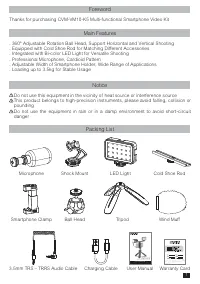
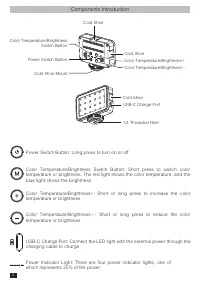
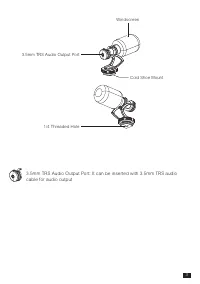
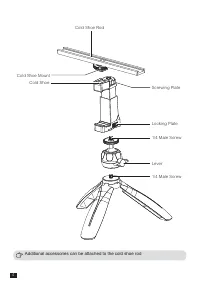
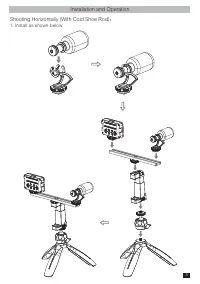
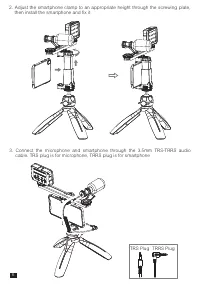
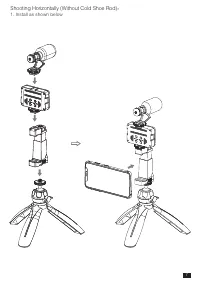
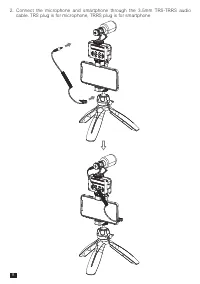
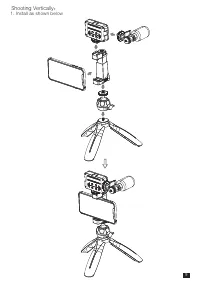
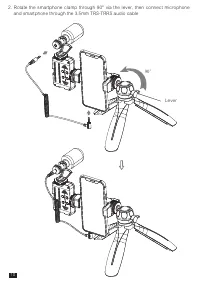
Table of Contents:
- Page 3 – Components Introduction; Color Temperature/Brightness
- Page 4 – mm TRS Audio Output Port
- Page 5 – Additional accessories can be attached to the cold shoe rod
- Page 6 – Shooting Horizontally (With Cold Shoe Rod); Install as shown below; Installation and Operation
- Page 8 – Shooting Horizontally (Without Cold Shoe Rod)
- Page 9 – cable. TRS plug is for microphone, TRRS plug is for smartphone
- Page 10 – Shooting Vertically
- Page 12 – Brightness Range; LED Light
User Manual
VM10-K5
Multi-functional Smar tphone Video Kit
"Loading the manual" means you need to wait until the file loads and becomes available for online reading. Some manuals are very large, and the time they take to appear depends on your internet speed.
Summary
Power Switch Button: Long press to turn on or off Color Temperature/Brightness Switch Button: Short press to switch color temperature or brightness. The red light shows the color temperature, and the blue light shows the brightness Color Temperature/Brightness+: Short or long press to increase the c...
3.5mm TRS Audio Output Port: It can be inserted with 3.5mm TRS audio cable for audio output 3.5mm TRS Audio Output Port 1/4 Threaded Hole Cold Shoe Mount Windscreen 3
Cold Shoe Mount Cold Shoe Screwing Plate Locking Plate 1/4 Male Screw Lever 1/4 Male Screw Cold Shoe Rod Additional accessories can be attached to the cold shoe rod 4


