Comica CVM-V30 - User Manual
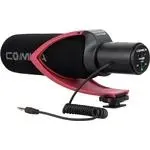
Comica CVM-V30 Microphone – User Manual, read for free online in PDF format. We hope this helps you resolve any issues you may have. If you have further questions, please contact us through the contact form.
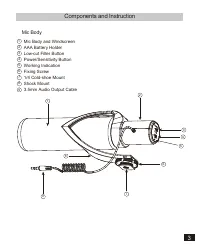
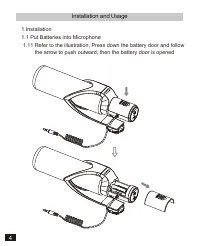
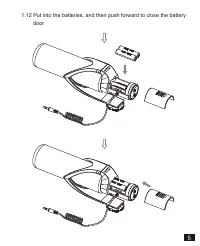
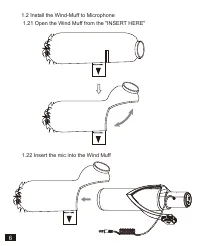
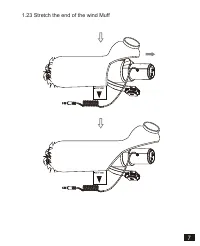
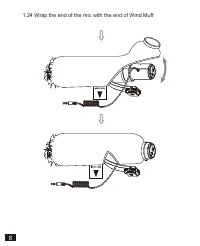
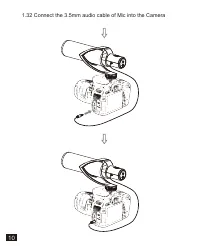
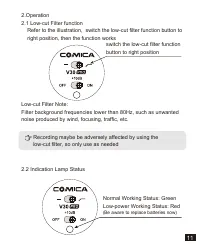
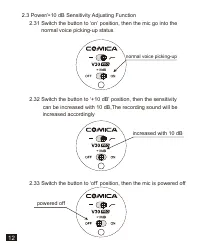
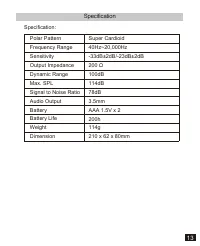
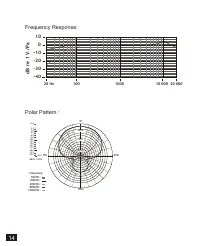
Table of Contents:
- Page 4 – Components and Instruction; Mic Body
- Page 5 – Installation and Usage
- Page 7 – Insert the mic into the Wind Muff
- Page 8 – Stretch the end of the wind Muff
- Page 9 – Wrap the end of the mic with the end of Wind Muff
- Page 11 – Connect the 3.5mm audio cable of Mic into the Camera
- Page 12 – Indication Lamp Status
- Page 13 – Switch the button to ‘off’ position, then the mic is powered off; normal voice picking-up; increased with 10 dB
- Page 14 – Specification
- Page 15 – dB r
CVM-V30 PRO
Directional Condenser Shotgun Video Microphone
USER MANUAL
"Loading the manual" means you need to wait until the file loads and becomes available for online reading. Some manuals are very large, and the time they take to appear depends on your internet speed.
Was this manual helpful?
About this manual
- Brand
- Comica
- Model
- CVM-V30
- Document type
- User Manual
- Category
- Microphone
- Language(s)
- English
- Pages
- 16
- File size
- 1.9 MB
- Format
Summary
Components and Instruction Mic Body Mic Body and WindscreenAAA Battery HolderLow-cut Filter ButtonPower/Sensitivity Button Working Indication Fixing Screw 1/4 Cold-shoe Mount Shock Mount 3.5mm Audio Output Cable 1 23456789 1 9 7 8 2 3 4 6 5 3
Installation and Usage 1.Installation1.1 Put Batteries into Microphone 1.11 Refer to the illustration, Press down the battery door and follow the arrow to push outward, then the battery door is opened 4
1.2 Install the Wind-Muff to Microphone 1.21 Open the Wind Muff from the "INSERT HERE" 1.22 Insert the mic into the Wind Muff 6


