Cisco Room - User Manual
Cisco Room Telephone – User Manual, read for free online in PDF format. We hope this helps you resolve any issues you may have. If you have further questions, please contact us through the contact form.
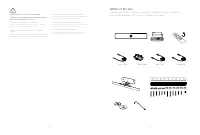
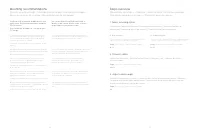
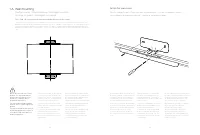
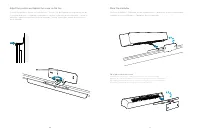
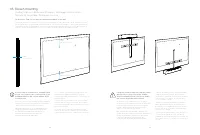
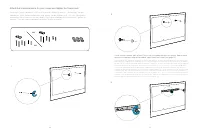
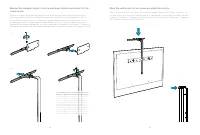
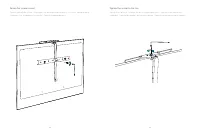
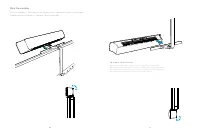
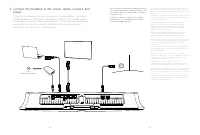
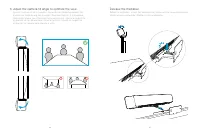
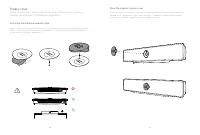
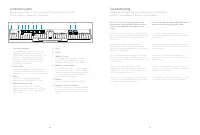
Table of Contents:
- Page 3 – What’s in the box; Descripción general de los pasos / Conteúdo da caixa
- Page 4 – Steps overview; Descripción general de los pasos / Descrição geral dos passos; Ligue os cabos; Adjust camera angle; Ajuste do ângulo de inclinação da câmara; Mounting recommendations; Recomendaciones de montaje / Recomendações de montagem
- Page 5 – Fije el soporte de montaje en pared. / Apertar o suporte de parede.
- Page 6 – Adjust the position and tighten the screw on the top.
- Page 7 – Soporte de la pantalla / Montagem no ecrã
- Page 8 – tuercas. / Instale a peça horizontal no ecrã e aperte as porcas.; ii
- Page 9 – Place the vertical part on the screen and adjust the position.; peça vertical no ecrã e ajuste a posição.
- Page 12 – power; Connectez la mediabar à l’écran,
- Page 13 – Adjust the camera tilt angle to optimize the view; inclinação da câmara para otimizar a vista; Release the mediabar; Retire la barra multimedia / Retirar a barra multimédia
- Page 14 – Privacy cover; Cubierta de privacidad / Cobertura de privacidade; Instale a placa magnética autoadesiva.; Place the magnetic privacy cover.
- Page 15 – Connector panel; Panneau de connexion / Anschlussfeld / Pannello del connettore /; Troubleshooting; Solución de problemas / Solução de problemas
Cisco Webex
Room USB
FR
Guide d’installation
DE Installationshandbuch
IT
Guida per l’installazione
ES
Guía de instalación
PT
Manual de Instalação
Installation Guide
"Loading the manual" means you need to wait until the file loads and becomes available for online reading. Some manuals are very large, and the time they take to appear depends on your internet speed.
Was this manual helpful?
About this manual
- Brand
- Cisco
- Model
- Room
- Document type
- User Manual
- Category
- Telephone
- Language(s)
- German, English, Spanish, French, Italian, Dutch, Polish, Russian, Swedish
- Pages
- 17
- File size
- 3.5 MB
- Format
Summary
4 5 WARNING Do not to cover the mediabar To prevent overheating, the mediabar should not be covered or placed in a niche. ATTENTION à ne pas couvrir la mediabar Pour éviter toute surchauffe, la mediabar ne doit pas être couverte ou placée dans une alcôve. WARNUNG: Die Medienleiste darf nicht verdeck...
6 7 Steps overview Présentation des étapes / Überblick – Arbeitsschritte / Procedura generale / Descripción general de los pasos / Descrição geral dos passos 1. Select mounting option Sélectionnez l’option de montage / Montageoption auswählen / Seleziona l’opzione di montaggio / Seleccionar opción d...
8 9 1 A. Wall mounting Fixation murale / Wandhalterung / Montaggio a parete / Montaje en pared / Montagem na parede Due to the size and mass of this product, it is important that the wall-mounted system is safely installed according to these installation instructions. The wall and mounting hardware ...
Ask a question
Related manuals
Other Cisco appliances
 Cisco 1 Manual
- Cisco 2 Manual
 Cisco 2.5 Manual
 Cisco 3 Manual
 Cisco 3.0(10) Manual
 Cisco 4 Manual
 Cisco 4.2(1) Manual
- Cisco 5 Manual
 Cisco 6 Manual
- Cisco 8 Manual
 Cisco 77H Manual
 Cisco 78-6897-01 Manual
 Cisco 78-11450-03 Manual
 Cisco 78-13212-01 Manual
 Cisco 78-16845-01 Manual
 Cisco 200 Manual
 Cisco 300 Manual
 Cisco 303 Manual
 Cisco 350 Manual
 Cisco 400 Manual