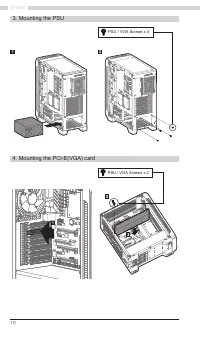
Page 4 - 주의사항
4 Z7 NEO 预防措施 ■ 在安装前请仔细阅读本手册。 ■ 在安装前请检查产品和组件。如果您发现任何异常情况,请联系您购买本产品的地方,进行更换或是退款。 ■ 在安装本产品时,请佩戴手套,以防止发生事故。 ■ 在安装系统时,可能会发生严重伤害,所以请不要过度用力。 ■ 错误的接线可能导致因短路而造成的火灾。接线时请确保参考本手册。 ■ 在使用该系统时,请小心不要遮挡本产品的通风口。 ■ 避免放置在阳光直晒、有水、潮湿、有油或是尘土过多的地方。请在通风良好的场合保存并使用本产品。 ■ 请不要用化学品擦拭本产品的表面。(例如酒精或丙酮等有机溶剂) ■ 在操作过程中请不要把手或是其它物品伸入本产...
Page 7 - om
7 Specifications Accessories Model Z7 NEO Case Form Factor ATX Mid-Tower Dimensions 420 x 213 x 460(H)mm Weight 7.2kg Case Materials Plastic, Steel, Tempered Glass Motherboard Support ATX / mATX / Mini-ITX Maximum VGA Length 355mm Maximum CPU Cooler Height 165mm Maximum PSU Length 180mm PCI Expansio...
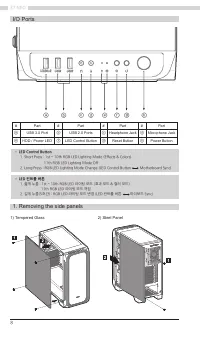
Page 8 - Removing the side panels; • LED Control Button
8 Z7 NEO 1. Removing the side panels 1) Tempered Glass • LED Control Button 1. Short Press : 1st ~ 10th RGB LED Lighting Mode (Effects & Colors) 11th RGB LED Lighting Mode Off 2. Long Press : RGB LED Lighting Mode Change (LED Control Button Motherboard Sync) • LED 컨트롤 버튼 1. 짧게 누름 : 1st ~ 10th RG...
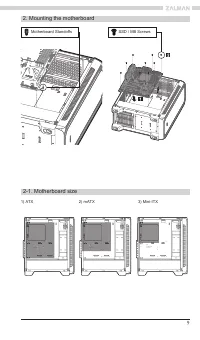
Page 9 - Mounting the motherboard; Motherboard Standoffs
9 2-1. Motherboard size 2. Mounting the motherboard 1) ATX 2) mATX 3) Mini-ITX Motherboard Standoffs SSD / MB Screws 1 ITX1+2 MICRO ATX1+2+3 ATX 1 3 2 2 3 3 2 1 1 1 3 3 1 ITX1+2 MICRO ATX1+2+3 ATX 1 3 2 2 3 3 2 1 1 1 3 3 1 ITX1+2 MICRO ATX1+2+3 ATX 1 3 2 2 3 3 2 1 1 1 3 3 1 1 1 1 1 ITX1+2 MICRO ATX1...
Page 11 - HDD Screws
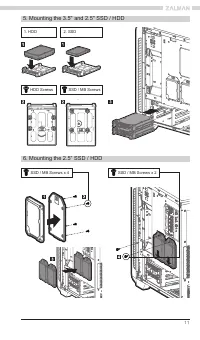
11 2. SSD 1. HDD 5. Mounting the 3.5" and 2.5" SSD / HDD 6. Mounting the 2.5” SSD / HDD SSD / MB Screws HDD Screws SSD / MB Screws x 4 SSD / MB Screws x 2
Page 12 - Fan Screws
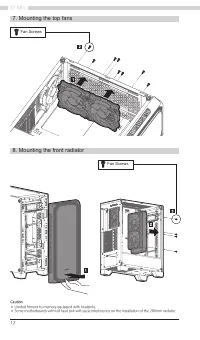
12 Z7 NEO 7. Mounting the top fans 8. Mounting the front radiator Fan Screws Fan Screws Caution ※ Limited fitment to memory equipped with heatsinks.※ Some motherboards with tall heat sink will cause interference on the installation of the 280mm radiator.
Page 13 - Fan specifications; HD Audio
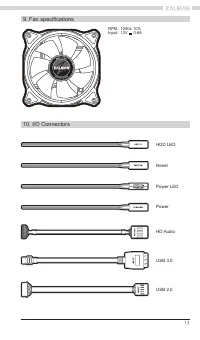
13 10. I/O Connectors 9. Fan specifications HD Audio USB 3.0 USB 2.0 HDD LED Reset Power LED Power RPM : 1200± 10% Input : 12V 0.6A
Page 14 - RGB LED Controller; ※ Ca; Please be sure to check the arrow of the; SW; ENG
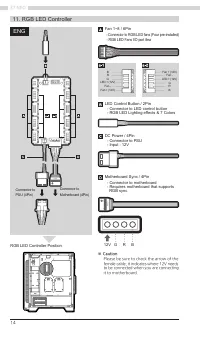
14 Z7 NEO 11. RGB LED Controller LED Control Button / 2Pin - Connector to LED control button - RGB LED Lighting effects & 7 Colors DC Power / 4Pin - Connector to PSU - Input : 12V Motherboard Sync / 4Pin - Connector to motherboard - Requires motherboard that supports RGB sync ※ Ca ution Please b...
Page 15 - ※ 주의사항; 마더보드의 12V Header에 맞추어 연결하세요.; RGB LED Controller 위치; KOR
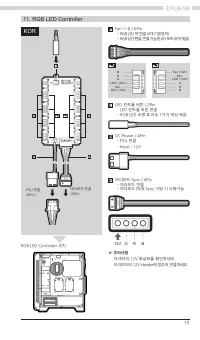
15 LED + (12V) LED + (12V) Fan - Fan - Fan + (12V) Fan + (12V) G G R R B B 11. RGB LED Controller LED 컨트롤 버튼 / 2Pin - LED 컨트롤 버튼 연결 - RGB LED 조명 효과 & 7가지 색상 제공 DC Power / 4Pin - PSU 연결 - Input : 12V 마더보드 Sync / 4Pin - 마더보드 연결 - 마더보드 RGB Sync 지원 시 사용가능 ※ 주의사항 커넥터의 12V 화살표를 확인하세요. 마더보드의 12V Header...
Page 16 - RGB LED Контроллер; ※ Предупреждение; RUS
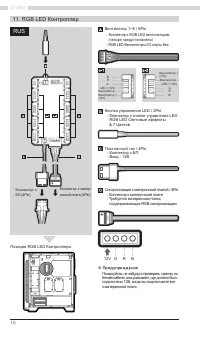
16 Z7 NEO 11. RGB LED Контроллер Кнопка управления LED / 2Pin - Коннектор к кнопке управления LED - RGB LED Световые эффекты & 7 Цветов Постоянный ток / 4Pin - Коннектор к БП - Вход : 12В Синхронизация с материнской платой / 4Pin - Коннектор к материнской плате - Требуется материнская плата, под...
Page 17 - Certification; 제품 보증서; 예제
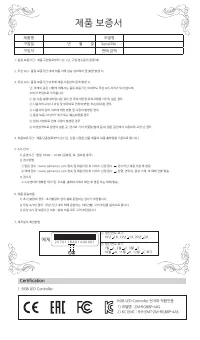
17 Certification RGB LED Controller 전자파 적합인증1) 모델명 : ZM-RGB8P-4AS2) KC EMC : R-R-ZMT-ZM-RGB8P-4AS 1. RGB LED Controller 제품 보증서 제품명 모델명 구입일 년 월 일 Serial No. 구입처 판매 금액 예제 ① 생산연도 표기 18년 18, 19년 19, 20년 20 .... ② 생산연도 표기 1월 1, 2월 2, 3월 3 .... 10월 A, 11월 B, 12월 C 표기 2 0 7 0 1 1 8 A 0 1 A 0 0 0 0 1 1. 품질 ...
Page 18 - MEMO