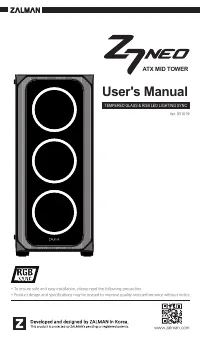
ZALMAN Z7 - User Manual
ZALMAN Z7 PC Case – User Manual, read for free online in PDF format. We hope this helps you resolve any issues you may have. If you have further questions, please contact us through the contact form.
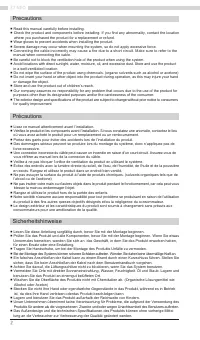

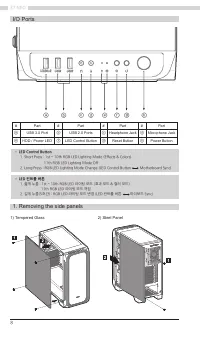
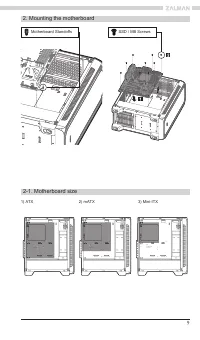
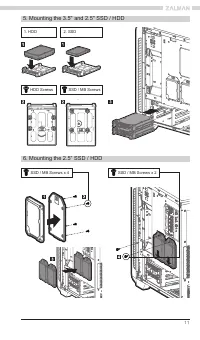
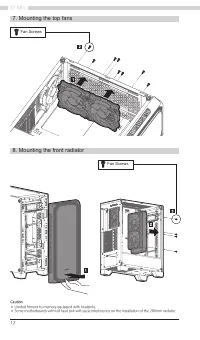
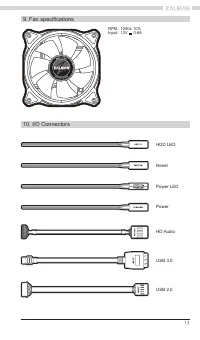
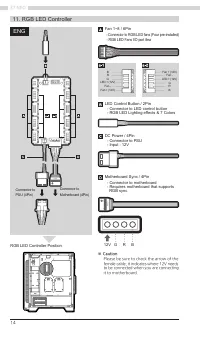
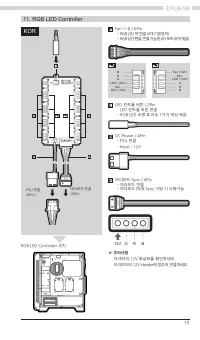
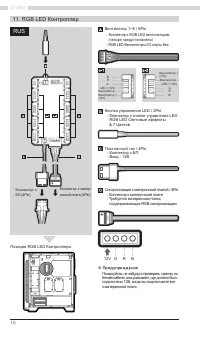

Table of Contents:
- Page 4 – 주의사항
- Page 7 – om
- Page 8 – Removing the side panels; • LED Control Button
- Page 9 – Mounting the motherboard; Motherboard Standoffs
- Page 11 – HDD Screws
- Page 12 – Fan Screws
- Page 13 – Fan specifications; HD Audio
- Page 14 – RGB LED Controller; ※ Ca; Please be sure to check the arrow of the; SW; ENG
- Page 15 – ※ 주의사항; 마더보드의 12V Header에 맞추어 연결하세요.; RGB LED Controller 위치; KOR
- Page 16 – RGB LED Контроллер; ※ Предупреждение; RUS
- Page 17 – Certification; 제품 보증서; 예제
- Page 18 – MEMO
1
User's Manual
www.zalman.com
Ver. 051019
TEMPERED GLASS & RGB LED LIGHTING SYNC
ATX MID TOWER
* To ensure safe and easy installation, please read the following precaution.
* Product design and specifications may be revised to improve quality and performance without notice.
"Loading the manual" means you need to wait until the file loads and becomes available for online reading. Some manuals are very large, and the time they take to appear depends on your internet speed.
Was this manual helpful?
About this manual
- Brand
- ZALMAN
- Model
- Z7
- Document type
- User Manual
- Category
- PC Case
- Language(s)
- English
- Pages
- 20
- File size
- 13.3 MB
- Format
Summary
4 Z7 NEO 预防措施 ■ 在安装前请仔细阅读本手册。 ■ 在安装前请检查产品和组件。如果您发现任何异常情况,请联系您购买本产品的地方,进行更换或是退款。 ■ 在安装本产品时,请佩戴手套,以防止发生事故。 ■ 在安装系统时,可能会发生严重伤害,所以请不要过度用力。 ■ 错误的接线可能导致因短路而造成的火灾。接线时请确保参考本手册。 ■ 在使用该系统时,请小心不要遮挡本产品的通风口。 ■ 避免放置在阳光直晒、有水、潮湿、有油或是尘土过多的地方。请在通风良好的场合保存并使用本产品。 ■ 请不要用化学品擦拭本产品的表面。(例如酒精或丙酮等有机溶剂) ■ 在操作过程中请不要把手或是其它物品伸入本产...
7 Specifications Accessories Model Z7 NEO Case Form Factor ATX Mid-Tower Dimensions 420 x 213 x 460(H)mm Weight 7.2kg Case Materials Plastic, Steel, Tempered Glass Motherboard Support ATX / mATX / Mini-ITX Maximum VGA Length 355mm Maximum CPU Cooler Height 165mm Maximum PSU Length 180mm PCI Expansio...
8 Z7 NEO 1. Removing the side panels 1) Tempered Glass • LED Control Button 1. Short Press : 1st ~ 10th RGB LED Lighting Mode (Effects & Colors) 11th RGB LED Lighting Mode Off 2. Long Press : RGB LED Lighting Mode Change (LED Control Button Motherboard Sync) • LED 컨트롤 버튼 1. 짧게 누름 : 1st ~ 10th RG...