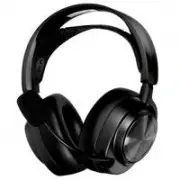
Page 3 - WELCOME TO ARCTIS
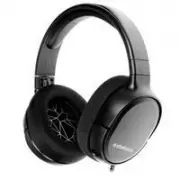
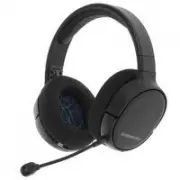
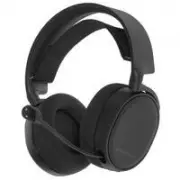
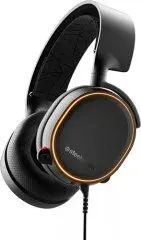
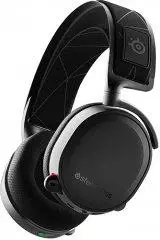
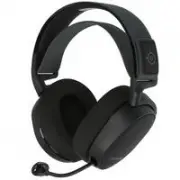
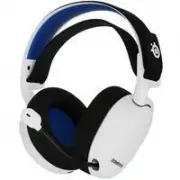
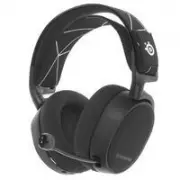
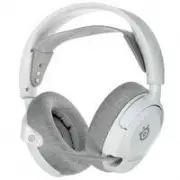
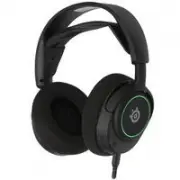
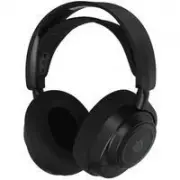
2 WELCOME TO ARCTIS . Your new headset is the result of more than 15 years of gaming expertise and our unyielding pursuit of perfection. We poured our hearts into making your new Arctis, giving it the best gaming mic available, 7.1 surround sound and comfort and style unlike anything you’ve experien...
Page 5 - CONTENTS; 한국어
4 CONTENTS SteelSeries EngineWelcomeInfo and Table of contentsProduct overviewSetupMicrophoneHeadband InstallationSystem Setting: WindowsSystem Setting: MacTranslations Español 简体中文 繁體中文 日本語 한국어 Deutsch Русский Français Italiano Português Regulatory 1 2 3 -4 5-6 7 8 9 10 11 12 14 16 18 20 22 24 26 2...
Page 6 - selected accessories available at; PRODUCT OVERVIEW
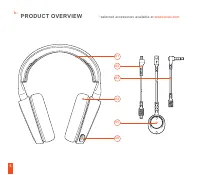
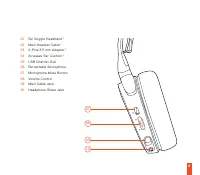
5 CH AT GA M E * selected accessories available at steelseries.com PRODUCT OVERVIEW 01 02 05 04 03 06 b.
Page 8 - find help at; SETUP
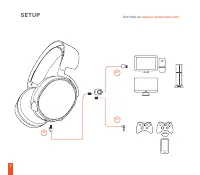
7 find help at support.steelseries.com SETUP 02 05 03
Page 9 - MICROPHONE; top view
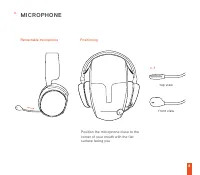
8 MICROPHONE top view Retractable microphone Positioning front view Position the microphone close to the corner of your mouth with the flat surface facing you c. c -1
Page 10 - SKI GOGGLE HEADBAND; Velcro
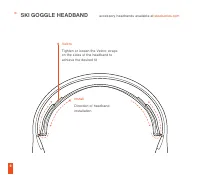
9 SKI GOGGLE HEADBAND Velcro Tighten or loosen the Velcro straps on the sides of the headband to achieve the desired fit Install Direction of headband installation. d. accessory headbands available at steelseries.com
Page 11 - SYSTEM SETTING : WINDOWS
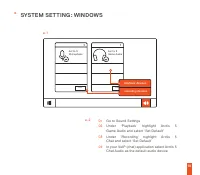
10 OK SYSTEM SETTING : WINDOWS 01 Go to Sound Settings 02 Under ‘Playback’ highlight Arctis 5 Game Audio and select ‘Set Default’ 03 Under ’Recording’ highlight Arctis 5 Chat and select ‘Set Default’ 04 In your VoIP (chat) application select Arctis 5 Chat Audio as the default audio device playback d...
Page 13 - ESPAÑOL; Descripción general del producto
12 ESPAÑOL a. b. c. Contenido Del PaqueteGuía de Información del ProductoAuricularesCable principal (1.2m)USB Cuadrante Chatmix Adaptador de 3.5 mm 4 polos Compatibilidad del sistema PC / MAC Requisito de EnginePlataformas: Windows 7 + Mac OS X 10.8 +Se requieren 120 MB de espacio libre en el disco ...
Page 14 - Dispositivos de reproducción; Salida : Arctis 5 Game Audio
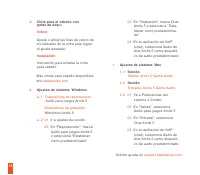
13 Cinta para el cabello con gafas de esquí Velcro Ajuste o afloje las tiras de velcro de los laterales de la cinta para lograr el ajuste deseado. Instalación Instrucción para instalar la cinta para cabello d. Más cintas para cabello disponibles env steelseries.com e. f. Ajustes de sistema: Windows ...
Page 15 - 简 体 中 文; 包 装 内 含; P C; 产 品 概 览; s t e e l s e r i e s . c o m; 伸 縮 式; 麦 克 风; 位 置
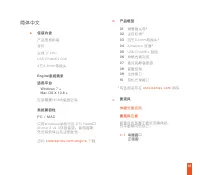
14 简 体 中 文 a. 包 装 内 含 产 品 信 息 指 南耳 机主 线 ( 1 . 2 m )U S B C h a t M i x D i a l4 节 3 . 5 m m 转 换 头 系 统 兼 容 性 P C / M A C 只 有 W i n d o w s 系 统 可 设 D T S H e a d - p h o n e : X v 2 . 0 环 绕 音 效 。 使 用 前 需 先 安 装 软 体 以 及 注 册 账 号 。 E n g i n e 系 统 需 求适 用 平 台 Windows 7 + Mac OS X 10.8 + 安 装 需 要 1 2 0 M B 磁...
Page 16 - 声音; 输出
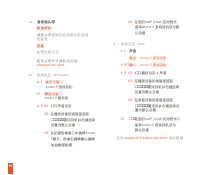
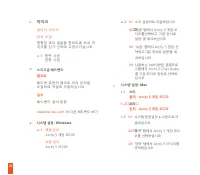
15 d. 滑 雪 镜 头 帶 尼 龙 搭 扣 调 整 头 帶 兩 側 的 尼 龙 搭 扣 至 适 宜 松 紧 度 安 装 头 帶 安 装 方 法 更 多 头 帶 样 式 请 参 考 官 网 s t e e l s e r i e s . c o m e. f. 系 统 设 定 : W i n d o w s e - 1 播放设备 Arctis 5 游戏耳机 录音设备 Arctis 5 麦克风 e - 2 01 打开声音设定 02 在播放设备的视窗里选取 Arctis 5 游戏耳机并右键选择 设置为默认设备 03 在記錄設備窗口中選擇Arctis 5聊天,然後右鍵單擊以選擇 設為默認設備 系 ...
Page 17 - 繁 體 中 文; Engine; s t e e l s e r i e s . c o m / e n g i n e
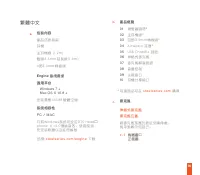
16 繁 體 中 文 a. 包 裝 內 容 產 品 信 息 指 南耳 機主 耳 機 線 ( 1 . 2 m )雙 頭 3 . 5 m m 延 長 線 ( 1 . 8 m )4 節 3 . 5 m m 轉 接 頭 系 统 相 容 性 P C / M A C 只 有 W i n d o w s 系 统 可 設 定 D T S H e a d - p h o n e : X v 2 . 0 環 繞 音 效 。 使 用 前 須 先 安 裝 軟 體 以 及 註 冊 帳 號 Engine 系 統 需 求 適 用 平 台 Windows 7 + Mac OS X 10.8 + 安 裝 需 要 1 2 0 M...
Page 18 - 系 統 設 定 : W i n d o w s; 播放設備; 輸出; 聲音; 輸入:
17 d. 滑 雪 鏡 頭 帶 魔 鬼 氈 調 整 頭 帶 兩 側 的 魔 鬼 氈 至 適 宜 鬆 緊 度 安 裝 頭 帶 安 裝 方 法 更 多 頭 帶 樣 式 請 参 考 官 網 s t e e l s e r i e s . c o m e. f. 系 統 設 定 : W i n d o w s e - 1 播放設備 Arctis 5 遊戲耳機 錄音設備 Arctis 5 麥克風 e - 2 01 打開聲音設定 02 在播放設備的視窗裡選取 Arctis 5 遊戲耳機並右鍵選擇 設為預設設備 03 在記錄設備窗口中選擇Arctis 5聊天,然後右鍵單擊以選擇 設為默認設備 系 統 設 定...
Page 19 - 日本語; パッケージの内容; PC; 製 品 概 要; マイク; トップビュー
18 s t e e l s e r i e s . c o m で 厳 選 さ れ た ア ク セ サ リ を お 求 め い た だ け ま す 日本語 a. パッケージの内容 製品情報ガイドヘッドセットメインケーブル (1.2m)USB ChatMix ダイヤル 4極3.5mmプラグ エンジン要件プラットフォーム Windows 7 + Mac OS X 10.8 + イ ン ス ト ー ル に 1 2 0 M B 以 上 の 空 き 容 量 が 必 要 。 シ ス テ ム 互 換 性 PC / MAC D T S H e a d p h o n e : X v 2 . 0 S u r ...
Page 20 - 出力:Arctis 5 ゲームオーディオ; サウンド; 入力:Arctis 5 ゲームオーディオ
19 d. ス キ ー ゴ ー グ ル ヘ ッ ド バ ン ド 面 フ ァ ス ナ ー き つ す ぎ ず 緩 す ぎ な い 、 丁 度 い い 装 着 感 に な る よ う に 、 ヘ ッ ド バ ン ド 両 側 の ス ト ラ ッ プ の 面 フ ァ ス ナ ー を 調 整 し て く だ さ い 。 イ ン ス ト ー ル ヘ ッ ド バ ン ド の 取 り 付 け 方 法 の 説 明 で す 。 他 の ヘ ッ ド バ ン ド を お 求 め の 場 合 は s t e e l s e r i e s . c o m を ご 覧 く だ さ い e. システム設定: Windows...
Page 21 - 한국인; 패키지 구성; 제품 개요
20 04 ご利用のVoIP(チャット)ア プリケーションで [Arctis 5 チ ャットオーディオ] をデフォ ルトのオーディオ機器として 選択します ヘ ル プ に つ い て は s u p p o r t . s t e e l s e r i e s . c o m を ご 覧 く だ さ い 한국인 a. 패키지 구성 제품 정보 가이드 헤드셋 메인 케이블 (1.2m) 듀얼 3.5mm 연장 케이블 (1.8m) 4 극 3.5mm 어댑터 Engine 요구 사양 플랫폼 Windows 7 + Mac OS X 10.8 + 설치에 120 MB 의 하드 드라이브 공...
Page 22 - 마이크; 접 이 식 마 이 크; 스키고글 헤드밴드; 재생 장치; 시스템 설정
21 c. 마이크 접 이 식 마 이 크 위 치 조 절 평 평 한 쪽 이 얼 굴 을 향 하 도 록 하 여 마이 크 를 입 가 근 처 에 고 정 시 키 십 시 오 c -1 평 면 시 점 정 면 시 점 d. 스키고글 헤드밴드 벨크로 헤 드 셋 측 면 의 벨 크 로 띠 의 부 착 을 조 절 하 여 적 절 히 착 용 하 십 시 오 설치 헤 드 밴 드 설 치 방 향 s t e e l s e r i e s . c o m 의 다른 헤드밴드 보기 e. 시스템 설정 : Windows e - 1 재생 장치 Arctis 5 게임 오디오 녹음 장치 Arc...
Page 23 - DEUTSCH; Produktüberblick
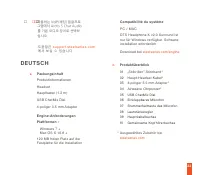
22 04 사용하는 VoIP(채팅) 응용프로 그램에서 Arctis 5 Chat Audio 를 기본 오디오 장치로 선택하 십시오 도 움 말 은 s u p p o r t . s t e e l s e r i e s . c o m 에 서 보 실 수 있 습 니 다 DEUTSCH a. PackungsinhaltProduktinformationenHeadsetHauptkabel (1. 2 m)USB ChatMix Dial 4-poliger 3.5 mm Adapter Engine-AnforderungenPlattformen : Windows 7 ...
Page 24 - Wiedergabegeräte; Ausgabe: Arctis 5 Game Audio
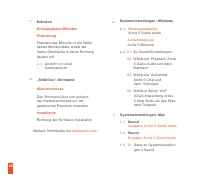
23 c. Mikrofon Einklappbares MikrofonPlatzierung Platziere das Mikrofon in die Nähe deines Mundwinkels, wobei die flache Oberfläche in deine Richtung deuten soll. c -1 Ansicht von oben Seitenansicht „Skibrillen”-Stirnband Klettverschluss Das Stirnband lässt sich anhand des Klettverschlusses auf die ...
Page 25 - Обзор изделия; РУССКИЙ
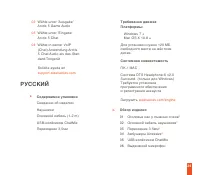
24 02 Wähle unter 'Ausgabe' Arctis 5 Game Audio 03 Wähle unter 'Eingabe' Arctis 5 Chat 04 Wähle in deiner VoIP (Chat) Anwendung Arctis 5 Chat Audio als das Stan- dard-Tongerät Solicite ayuda en support.steelseries.com b. Обзор изделия 01 Оголовье как у лыжных очков * 02 Основной кабель наушников * 0...
Page 26 - микрофон; Велкро; Запись звука; вход: Игровой звук Arctis 5
25 01 Кнопка отключения микрофона 02 Настройка громкости 03 Переходник основного кабеля 04 Переходник для второго пользователя * Аксессуары steelseries.com c. микрофон Выдвижной микрофонPlatzierung Расположите микрофон около уголка рта, плоской стороной к себе. c -1 Вид сверху Вид спереди Оголовье к...
Page 27 - FRANÇAIS; Présentation du produit; 1 Serre-tête de masque de ski
26 f- 3 01 Перейдите в раздел «Системные настройки > Звук». 02 В разделе «Вход» выберите «Игровой звук Arctis 5». 03 В разделе «Выход» выберите «чат Arctis 5». 04 В приложении VoIP (чате) установите «звук чата Arctis 5» по умолчанию. Техподдержка support.steelseries.com FRANÇAIS a. Contenu de l’e...
Page 28 - Périphériques de lecture; Sortie: Audio de jeu Arctis 5
27 08 Contrôle du volume09 Prise câble principal10 Prise partage casque audio * Sélection d’accessoires disponibles ici steelseries.com c. Microphone Microphone rétractablePositionnement Placez le microphone près du coin de votre bouche, la surface plate vous faisant face c -1 Vue du haut Vue avant ...
Page 29 - ITALIANO; Generalità sul prodotto
28 f- 3 01 Ouvrez « Préférences système > Son » 02 Sous « Sortie » , sélection- nez « Audio de jeu Arctis 5 » 03 Sous « Entrée », sélection- nez « Chat Arctis 5 » 04 Dans votre application VoIP (de chat), sélectionnez « Audio chat Arctis 5 » en tant que périphérique audio par défaut. Vous obtiend...
Page 30 - Periferica di registrazione; Uscita: Audio del gioco Arctis 5; Entrée: Microfono Arctis 5
29 07 Pulsante microfono muto 08 Controllo del volume 09 Jack cavo principale 10 Splitter per cuffie * accessori selezionati disponibili su steelseries.com Archetto stile occhiali da sci Velcro Stringi o allenta le cinghie di velcro ai lati dell’archetto per ottenere la misura desiderata Montaggio S...
Page 31 - PORTUGUÊS; Visão geral do produto; 1 Faixa de óculos de esqui
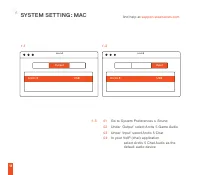
30 f- 3 01 apri preferenze di sistema > Audio 02 In "Uscita" seleziona Audio del gioco Arctis 5 03 In "Ingresso" seleziona Chat Arctis 5 04 Seleziona Arctis 5 Chat Audio come periferica audio predefinita per la tua applicazione VoIP (chat) Per assistenza vai su support.steelseries...
Page 32 - Dispositivos de reprodução; Saída: Áudio de jogo Arctis 5; Entrada: Microfone Arctis 5
31 * acessórios selecionados disponíveis em steelseries.com 08 Controle de volume09 Entrada do cabo principal10 Entrada de compartilhar fone c. Microfone Microfone retrátilPosicionamento Posicione o microfone perto do canto da sua boca com a superfície lisa virada para você c -1 Visão de cima Visão ...
Page 40 - learn more at steelseries.com