Page 2 - CONTENTS; 简体中文
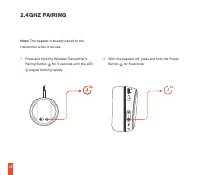
CONTENTS Welcome 2 SteelSeries Engine 3 Product Overview 5–6 Setup PC 7 Playstation / Switch 9 Ski Goggle Headband 11 Power On/Off 12 2.4 GHz Pairing 13 Bluetooth 14 Charging 15 Microphone 16 Translations Español 17 简体中文 19 繁體中文 22 日本語 24 한국어 27 Deutsch 29 Русский 32 Français 35 Italiano 38 Portuguê...
Page 3 - WELCOME TO ARCTIS
2 WELCOME TO ARCTIS Your new headset is the result of our unyielding pursuit of perfection for over 15 years. We poured our hearts into creating the best possible gaming headset by pushing the boundaries of sound quality, mic clarity, comfort, and style. Arctis is our glory; now go chase yours.
Page 4 - STEELSERIES ENGINE
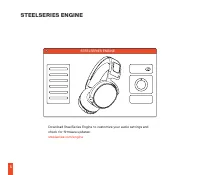
STEELSERIES ENGINE 3 Download SteelSeries Engine to customize your audio settings and check for firmware updates: steelseries.com/engine STEELSERIES ENGINE
Page 5 - PACKAGE CONTENTS; * Some software features available
STEELSERIES ENGINE 4 PACKAGE CONTENTS Arctis 9 Wireless Transmitter USB Charging Cable SYSTEM REQUIREMENTS // COMPATIBILITY PC Playstation Switch STEELSERIES ENGINE SOFTWARE REQUIREMENTS Platforms* Windows 7+ Mac OS X 10.8+ * Some software features available on Windows 10 only find help at support.s...
Page 6 - PRODUCT OVERVIEW
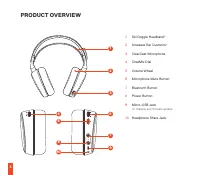
GAME IN LINE OUT 1 12 14 15 16 17 13 3 5 4 6 8 10 7 9 11 2 5 PRODUCT OVERVIEW 1 Ski Goggle Headband* 2 Airweave Ear Cushions* 3 ClearCast Microphone 4 ChatMix Dial 5 Volume Wheel 6 Microphone Mute Button 7 Bluetooth Button 8 Power Button 9 Micro-USB Jack for charging and firmware updates 10 Headphon...
Page 7 - WIRELESS TRANSMITTER
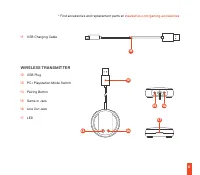
GAME IN LINE OUT 1 12 14 15 16 17 13 3 5 4 6 8 10 7 9 11 2 6 * Find accessories and replacement parts at steelseries.com/gaming-accessories 11 USB Charging Cable WIRELESS TRANSMITTER 12 USB Plug 13 PC / Playstation Mode Switch 14 Pairing Button 15 Game In Jack 16 Line Out Jack 17 LED
Page 8 - SETUP – PC; HARDWARE INSTALLATION; Connect the Wireless Transmitter’s USB Plug
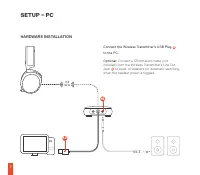
GAME IN LINE OUT 2.4 GHz 16 12 7 SETUP – PC HARDWARE INSTALLATION Connect the Wireless Transmitter’s USB Plug 12 to the PC. Optional: Connect a 3.5 mm audio cable (not included) from the Wireless Transmitter’s Line Out Jack 16 to a pair of speakers for automatic switching when the headset power is t...
Page 9 - WIRELESS TRANSMITTER SETTINGS; Toggle the PC / Playstation Mode Switch; WINDOWS SOUND SETTINGS
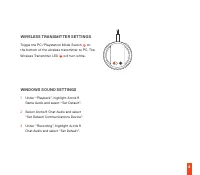
GAME IN LINE OUT 2.4 GHz 16 12 8 WIRELESS TRANSMITTER SETTINGS Toggle the PC / Playstation Mode Switch 13 on the bottom of the wireless transmitter to PC. The Wireless Transmitter LED 17 will turn white. WINDOWS SOUND SETTINGS 1 Under “Playback”, highlight Arctis 9 Game Audio and select “Set Default...
Page 10 - SETUP – PLAYSTATION / SWITCH
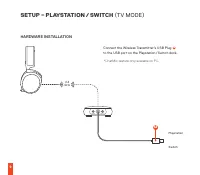
GAME IN LINE OUT 2.4 GHz 12 Playstation Switch 9 SETUP – PLAYSTATION / SWITCH (TV MODE) HARDWARE INSTALLATION Connect the Wireless Transmitter’s USB Plug 12 to the USB port on the Playstation / Switch dock. *ChatMix feature only available on PC.
Page 12 - SKI GOGGLE HEADBAND; Install
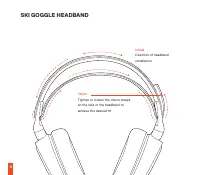
3s ON OFF 11 SKI GOGGLE HEADBAND Install Direction of headband installation Velcro Tighten or loosen the Velcro straps on the side of the headband to achieve the desired fit
Page 13 - for at least 3
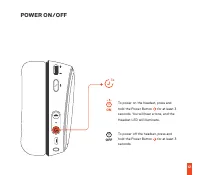
3s ON OFF 12 POWER ON / OFF To power on the headset, press and hold the Power Button 8 for at least 3 seconds. You will hear a tone, and the Headset LED will illuminate. To power off the headset, press and hold the Power Button 8 for at least 3 seconds.
Page 15 - BLUETOOTH; headset LED will rapidly blink blue.; PAIRING; press Bluetooth button
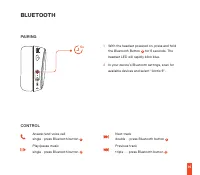
5s 5s 6s 6s 14 BLUETOOTH 1 With the headset powered on, press and hold the Bluetooth Button 7 for 6 seconds. The headset LED will rapidly blink blue. 2 In your device’s Bluetooth settings, scan for available devices and select “Arctis 9”. Answer/end voice call single · press Bluetooth button 7 Play/...
Page 16 - CHARGING
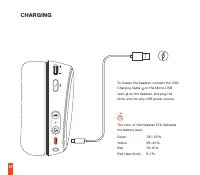
15 CHARGING To charge the headset, connect the USB Charging Cable 11 to the Micro-USB Jack 9 on the headset, and plug the other end into any USB power source. The color of the Headset LED indicates the battery level. Green 100–50 % Yellow 49–20 % Red 19–10 % Red (fast blink) 9–1 %
Page 17 - MICROPHONE; RETRACTABLE MICROPHONE; Position the ClearCast Microphone
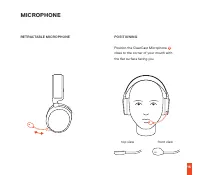
16 MICROPHONE RETRACTABLE MICROPHONE POSITIONING Position the ClearCast Microphone 3 close to the corner of your mouth with the flat surface facing you top view front view
Page 18 - ESPAÑOL; CONTENIDO DE LA CAJA; DESCRIPCIÓN GENERAL DEL PRODUCTO; TRANSMISOR INALÁMBRICO; Conecta un cable de audio de 3,5 mm; AJUSTES DEL TRANSMISOR INALÁMBRICO
17 ESPAÑOL CONTENIDO DE LA CAJA Arctis 9 Transmisor inalámbrico Cable de carga USB REQUISITOS DEL SISTEMA // COMPATIBILIDAD PC / Playstation / Switch REQUISITOS DEL SOFTWARE STEELSERIES ENGINE Plataformas* Windows 7 o superior Mac OS X 10.8 o superior *Algunas características de software solo están ...
Page 19 - *La función ChatMix solo está disponible para PC.; DIADEMA DE GAFAS DE ESQUÍ; ENLAZADO
18 CONFIGURACIÓN DE SONIDO DE WINDOWS 1 Dentro de “Reproducción”, selecciona Arctis 9 Game Audio y establécelo como “Dispositivo predeterminado”. 2 Selecciona Arctis 9 Chat Audio y establécelo como “Dispositivo de comunicaciones predeterminado”. 3 Dentro de “Grabar”, selecciona Arctis 9 Chat Audio y...
Page 20 - CONTROL; CARGA; 包装内容; *一些软件功能只能在Windows10上使用
19 auriculares parpadeará rápidamente en color azul. En los ajustes de Bluetooth de su dispositivo, busque los dispositivos disponibles y seleccione «Arctis 9». CONTROL Responder/finalizar llamada de voz Única · pulsación del botón de Bluetooth 7 Reproducir/pausar música Única · pulsación del botón ...
Page 21 - 产品概览; 设置 – PC
20 产品概览 1 滑雪镜头带* 2 AirWeave 耳罩* 3 ClearCast 麦克风 4 ChatMix 旋钮 5 音量调节滚轮 6 麦克风静音按钮 7 蓝牙按钮 8 电源按钮 9 Micro-USB 接口 用于充电和固件更新 10 耳机共享接口 11 USB 充电线缆 无线适配器 12 USB 插头 13 Playstation / PC 模式切换 14 配对按键 15 游戏音频输入接口 16 音频输出接口 17 LED 指示灯 设置 – PC 硬件安装 将无线适配器的 USB 插头 12 连接至 PC 可选:使用 3.5mm 耳机线缆(未随附) 从无线适配 器音频输出接口 16 ...
Page 23 - 繁體中文; 產品介紹; 設定 – PC; 可選:
22 繁體中文 包裝內容 Arctis 9無線傳輸器USB 充電線 系統要求 //相容性 PC / Playstation / Switch STEELSERIES ENGINE 軟體要求 平台* Windows 7+ Mac OS X 10.8+ *部份軟體功能只適用於Windows10 產品介紹 1 滑雪鏡頭帶* 2 Airweave 耳罩* 3 ClearCast 麥克風 4 ChatMix 控制調節鈕 5 音量控制鈕 6 麥克風靜音鍵 7 藍牙鍵 8 電源鍵 9 Micro-USB 插孔 用於充電及韌體更新 10 耳機分享孔 11 USB 充電線 無線傳輸器 12 USB 插頭 13 ...
Page 24 - 設定 – PLAYSTATION / SWITCH; (電視模式); 硬體安裝
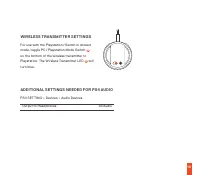
23 3 在「錄音」下方,高亮標示 Arctis 9 聊天音效並選 取「設定預設值」 設定 – PLAYSTATION / SWITCH (電視模式) 硬體安裝 將無線接收器的 USB 插頭 12 連接至 Playstation / Switch 底座的 USB 端口。 *ChatMix功能僅PC端可用。 無線傳輸器設定 若要在電視模式下使用 Playstation / Switch,請將 無線接收器底部的 PC / Playstation 模式開關 13 切 换至 Playstation。無線接收器 LED 17 將變藍色。 PLAYSTATION 音訊所需的其他設定 Playstation...
Page 25 - 日本語; パッケージ内容; 一部のソフトウェア機能はWindows10でのみご利; 製品概要
24 綠色 100–50 % 黄色 49–20 % 紅色 19–10 % 紅色(快速閃爍) 9–1 % 麥克風 伸縮式麥克風 麥克風位置 將麥克風放置於靠近您嘴角處,寬平面朝向您自己。 鳥瞰圖 正面圖 日本語 パッケージ内容 Arctis 9 ワイヤレストランスミッター USB充電ケーブル システム要件 // 互換性 PC / Playstation / Switch STEELSERIES ENGINEのソフトウェア要件 プラットフォーム* Windows 7以降 Mac OS X 10.8以降 一部のソフトウェア機能はWindows10でのみご利 用いただけます 製品概要 1 スキーゴーグ...
Page 26 - セットアップ – PC; オプション:; セットアップ ー PLAYSTATION / SWITCH; (TVモ; スキーゴーグルヘッドバンド
25 ワイヤレストランスミッター 12 USBプラグ 13 Playstation / PCモード切替 14 ペアリングボタン 15 ゲーム入力ジャック 16 ライン出力ジャック 17 LED セットアップ – PC ハードウェアのインストール ワイヤレストランスミッターのUSBプラグ 12 をPCに 接続します オプション: ヘッドセットの電源を切り替える際に自 動で切り替えるには、ワイヤレストランスミッターのラ イン出力ジャック 16 から3.5mmオーディオケーブル (別売)をスピーカーに接続します。 ワイヤレストランスミッターの設定ワイヤレストランスミッターの底面にあるモードスイ ッチ...
Page 28 - 한국어; 패키지 구성품; * 일부 소프트웨어 기능은 Windows 10에서만 사용; 제품 개요; 무선 트랜스미터; 무선 트랜스미터의 라인아웃 잭; 무선 트랜스미터 설정
27 한국어 패키지 구성품 Arctis 9무선 트랜스미터USB 충전 케이블 시스템 요구 사항 // 호환성 PC / Playstation / Switch STEELSERIES ENGINE 소프트웨어 요구 사항 플랫폼* Windows 7 이상 Mac OS X 10.8 이상 * 일부 소프트웨어 기능은 Windows 10에서만 사용 가능합니다 제품 개요 1 스키 고글 헤드밴드* 2 Airweave 이어 쿠션* 3 ClearCast 마이크 4 ChatMix 다이얼 5 볼륨 휠 6 마이크 음소거 버튼 7 블루투스 버튼 8 전원 버튼 9 Mic...
Page 30 - DEUTSCH; LIEFERUMFANG; Arctis 9
29 전화 받기/끊기 블루투스 버튼 한번 누름 7 음악 재생/일시 정지 블루투스 버튼 한번 누름 7 다음 트랙 블루투스 버튼 두번 누름 7 이전 트랙 블루투스 버튼 세번 누름 7 충전 헤드셋을 충전하려면, micro-USB 케이블 11 를 헤드셋의 micro-USB 잭 9 에 연결하고 다른 한쪽을 전력원에 연결하세요.헤드셋 LED의 색상은 배터리 잔량을 나타냅니다. 녹색 100 – 50% 노란색 49 – 20% 빨강 19 – 10% 빨강 (빠르게 깜빡임) 9 – 1% 마이크 접이식 마이크 위치 조절 평평한 쪽이 얼굴을 향하도록 하여...
Page 31 - KONFIGURATION – PC
30 6 Stummschalttaste für das Mikrofon 7 Bluetooth-Taste 8 Ein/Aus-Taste 9 Micro-USB-Port für Aufladung und Firmware-Updates 10 Klinkenbuchse für zweiten Kopfhörer 11 USB-Ladekabel FUNKSENDER 12 USB-Stecker 13 Schalter für Playstation-/PC-Modus 14 Kopplungstaste 15 Game-In-Buchse 16 Line-Out-Buchse ...
Page 32 - KOPPELN; BEDIENUNG
31 Playstation: EINSTELLUNGEN > Geräte > Audiogeräte Ausgabe über Kopfhörer Gesamtes Audio SKIBRILLENRIEMEN Befestigung Befestigungsrichtung des Riemens Klettband Stelle mit den Klettbändern an den Seiten des Riemens die gewünschte Länge ein. EIN/AUS Halte die Ein/Aus-Taste 8 mindestens 3 Seku...
Page 33 - MIKROFON; РУССКИЙ; КРАТКИЕ СВЕДЕНИЯ О ПРОДУКТЕ
32 Rot (schnell blinkend) 9–1 % MIKROFON Einklappbares MikrofonPlatzierung Platziere das Mikrofon in die Nähe deines Mundwinkels, wobei die flache Oberfläche in deine Richtung deuten soll. Ansicht von obenSeitenansicht РУССКИЙ КОМПЛЕКТАЦИЯ Гарнитура Arctis 9Беспроводной передатчикКабель зарядки USB ...
Page 36 - МИКРОФОН; Расположите микрофон около уголка рта,; FRANÇAIS; CONTENU DE L’EMBALLAGE; * Certaines fonctionnalités logicielles sont; ÉMETTEUR SANS FIL
35 аккумулятора.Зеленый 100–50 % Желтый 49–20 % Красный 19–10 % Красный (быстро мигает) 9–1 % МИКРОФОН Выдвижной микрофон Platzierung Расположите микрофон около уголка рта, плоской стороной к себе.Вид сверху Вид спереди FRANÇAIS CONTENU DE L’EMBALLAGE Arctis 9 Émetteur sans fil Câble de charge USB C...
Page 37 - CONFIGURATION – PC; INSTALLATION DU MATÉRIEL; Branchez un câble audio de 3,5 mm; *La fonction ChatMix n’est disponible que sur PC.; RÉGLAGES DE L’ÉMETTEUR SANS FIL; BANDEAU DE LUNETTE SKI
36 13 Commutateur de mode Playstation/PC 14 Bouton d’appariement 15 Prise d’entrée Jeu 16 Prise de sortie de ligne 17 Témoin lumineux CONFIGURATION – PC INSTALLATION DU MATÉRIEL Branchez la prise USB 12 de l’émetteur sans fil au PC Facultatif : Branchez un câble audio de 3,5 mm (non fourni) de la pr...
Page 38 - APPARIEMENT; CHARGE
37 Pour allumer le casque, appuyez sur le bouton marche / arrêt 8 et maintenez-le pendant au moins 3 secondes. Vous entendez une tonalité et la LED du casque s’allume. Pour éteindre le casque, appuyez sur le bouton marche / arrêt 8 et maintenez-le pendant au moins 3 secondes. APPARIEMENT 2,4 GHZ Le ...
Page 39 - ITALIANO; CONTENUTO DELLA CONFEZIONE; * Alcune funzionalità software disponibili solo su; TRASMETTITORE WIRELESS; CONFIGURAZIONE – PC; INSTALLAZIONE DELL’HARDWARE
38 MICROPHONE Microphone rétractablePositionnement Placez le microphone près du coin de votre bouche, la surface plate vous faisant face Vue du hautVue avant ITALIANO CONTENUTO DELLA CONFEZIONE Arctis 9 Trasmettitore wireless Cavo di ricarica USB REQUISITI DI SISTEMA//COMPATIBILITÀ PC / Playstation ...
Page 40 - *La funzione ChatMix è disponibile solo su PC.
39 Facoltativo: collegare un cavo audio da 3,5 mm (non incluso) dal jack di uscita linea del trasmettitore wireless 16 a una coppia di altoparlanti per la commutazione automatica quando l’alimentazione dell’auricolare viene attivata IMPOSTAZIONI DEL TRASMETTITORE WIRELESS Commutare l’interruttore di...
Page 41 - ASSOCIAZIONE; RICARICA; PORTUGUÊS; CONTEÚDO DA EMBALAGEM
40 del trasmettitore wireless 14 per 5 secondi fino a quando il LED 17 inizia a lampeggiare rapidamente 2 Con le cuffie spente, tenere premuto il pulsante di accensione 8 per 6 secondi BLUETOOTH ASSOCIAZIONE Con le cuffie accese, tenere premuto il pulsante Bluetooth 7 per 6 secondi. Il LED delle cuf...
Page 42 - TRANSMISSOR SEM FIOS; CONFIGURAÇÃO – PC; INSTALAÇÃO DE HARDWARE
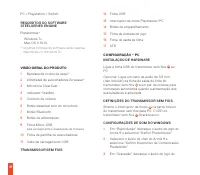
41 PC / Playstation / Switch REQUISITOS DO SOFTWARE STEELSERIES ENGINE Plataformas* Windows 7+ Mac OS X 10.8+ * Algumas funções do software estão apenas disponíveis no Windows 10 VISÃO GERAL DO PRODUTO 1 Bandana de óculos de esqui* 2 Almofadas de auscultadores Airweave* 3 Microfone ClearCast 4 Indic...
Page 43 - BANDANA DE ÓCULOS DE ESQUI; EMPARELHAMENTO
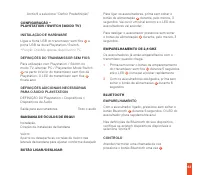
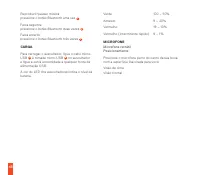
42 Arctis 9 e selecione “Definir Predefinição” CONFIGURAÇÃO – PLAYSTATION / SWITCH (MODO TV) INSTALAÇÃO DE HARDWARE Ligue a ficha USB do transmissor sem fios 12 à porta USB na doca Playstation / Switch. *Função ChatMix apenas disponível no PC. DEFINIÇÕES DO TRANSMISSOR SEM FIOS Para utilização com P...
Page 46 - REGULATORY
45 REGULATORY Europe – EU Declaration of Conformity Hereby, SteelSeries ApS. declares that the equipment which is compliance with directive RoHS 2.0 (2015/863/EU), R.E.D (2014/53/EU), EMC Directive (2014/30/EU), and LVD (2014/35/EU) which are issued by the Commission of the European Community.The fu...
Page 56 - learn more at