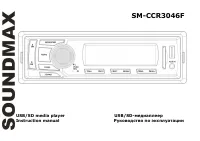
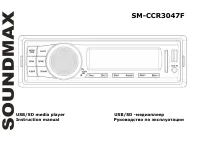
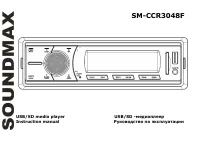
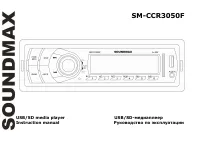
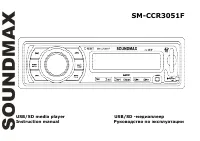
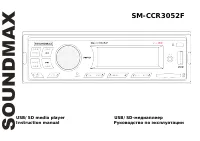
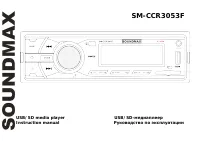
Page 2 - Table of contents
2 Dear customer! Thank you for purchasing our product. For safety, it is strongly recommended to read this manual carefullybefore connecting, operating and/or adjusting the product and keep the manual for reference in the future. Table of contents Table of contents......................................
Page 3 - Important safeguards; period or during a thunderstorm.
3 Important safeguards - Read carefully through this manual to familiarize yourself with this high-quality sound system. - Disconnect the vehicle's negative battery terminal while mounting and connecting the unit. - When replacing the fuse, be sure to use one with an identical amperage rating. Using...
Page 4 - Installation/ Connections; Installation way
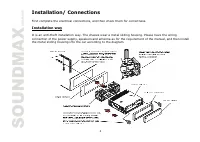
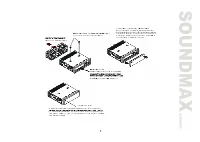
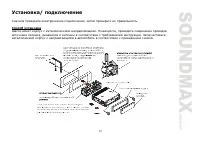
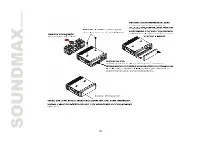
4 Installation/ Connections First complete the electrical connections, and then check them for correctness. Installation way It is an anti-theft installation way. The chassis wear a metal sliding housing. Please have the wiring connection of the power supply, speakers and antenna as for the requirem...
Page 6 - the control panel must be attached into the T-Joint.
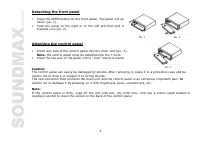
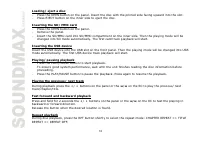
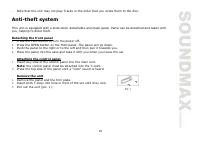
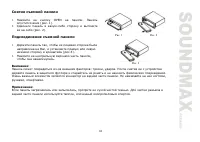
6 Detaching the front panel 1. Press the OPEN button on the front panel. The panel will godown (pic. 1). 2. Push the panel to the right or to the left and then pull ittowards you (pic. 2). Attaching the control panel 1. Insert any side of the control panel into the main unit (pic. 3). Note: the cont...
Page 7 - Connection scheme
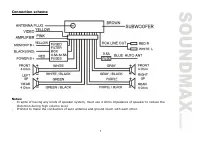
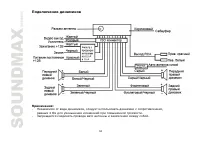
7 Connection scheme Notes: - In spite of having any kinds of speaker system, must use 4 ohms impedance of speaker to reduce thedistortion during high volume level. - Prohibit to make the conductors of auto antenna and ground touch with each other.
Page 8 - Panel controls; Front panel
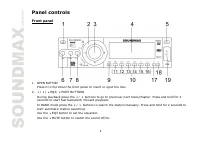
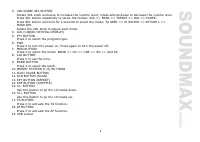
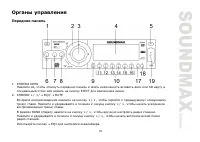
8 Panel controls Front panel 1. OPEN BUTTON Press it to flip down the front panel to insert or eject the disc. 2. 3 / 4 / 5 EQ3/ 6 MUTE BUTTONS During playback press the 3 / 4 buttons to go to previous/ next track/chapter. Press and hold for 2 seconds to start fast backward/ forward playback.In BAND...
Page 10 - Remote control
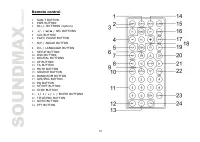
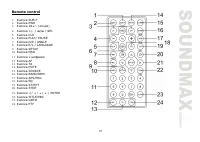
10 Remote control 1. SUB-T BUTTON 2. PWR BUTTON 3. DI+/- BUTTONS (option) 4. +/- / 9 / : / SEL BUTTONS 5. CLK BUTTON 6. PLAY/ PAUSE BUTTON 7. N/P / ANGLE BUTTON 8. R/L / LANGUAGE BUTTON 9. SETUP BUTTON 10. OSD BUTTON 11. DIGITAL BUTTONS 12. AF BUTTON 13. TA BUTTON 14. MUTE BUTTON 15. SOURCE BUTTON 1...
Page 11 - Inner panel; Press the OPEN button on the front panel to flip it down.
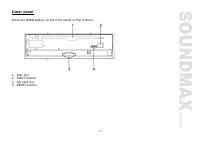
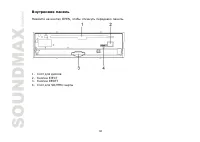
11 Inner panel Press the OPEN button on the front panel to flip it down. 1. Disc slot2. EJECT button3. SD card slot4. RESET button
Page 12 - General operations; the unit on it will resume the stored status you set.
12 General operations Reset the unit Operating the unit for the first time or after replacing the car battery, you must reset the unit.Press OPEN button, then press the RESET button to restore the unit to the original factory settings. Power button Press the PWR button to switch the unit on. Press i...
Page 13 - Radio operations; BAND selection
13 Equalizer setting Press the 5 EQ3 button to select EQ mode: EQ3 => CLASSIC => POPS => ROCK. Clock display Press the CLK button to show the clock on the display.In BAND mode press the CLK button on the RC and hold it for 2 seconds to enter the time set mode. Pressthe +/- buttons on the RC...
Page 14 - Select a station by; Radio settings adjustment; Press the TA button shortly to turn on or turn off the TA function.
14 Preset scan Select a band. Press APS button on the RC to scan all preset stations in the memories of the current bandand stay on each memory stations for about 7 seconds. To stop preset scan, press the APS button again. Programming tuner stations You can store up to a total of 30 radio stations i...
Page 15 - Press PTY button again to switch the PTY function off.
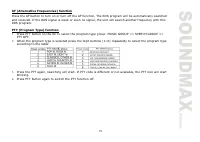
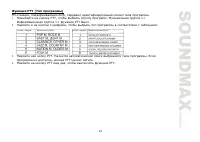
15 AF (Alternative Frequencies) function Press the AF button to turn on or turn off the AF function. The RDS program will be automatically searchedand received. If the RDS signal is week or even no signal, the unit will search another frequency with thisRDS program. PTY (Program Type) function 1. Pr...
Page 16 - Discs glossary; Title; Discs for playback
16 CD/ DVD/ USB/ SD card operations Discs glossary PBC (PlayBack Control) PBC is a menu recorded on the disc with SVCD or VCD2.0 format. For the discs contained PBC, it can playback interactive software with the menu displayed on TV. And if the disc contains still images, it canplayback high definit...
Page 17 - SD cards
17 Max. Track number is 448 Max. nested directory is 8 levels The max. album number is 99 The max. length of each track is 99 minutes 59 seconds Supported sampling frequency for MP3 disc: 8 KHz 48 KHz (44.1 KHz preferably) Supported bit-rates of MP3 disc are: 32 - 320 kbps (128 kbps preferably). Fol...
Page 19 - During playback press TITLE button on the RC to open the disc menu.
19 Random playback During disc playback, press the SHF button on the panel or the RDM button on the RC to start randomplayback of the tracks/chapters. Press again to cancel. Intro playback You can play the beginning of every track/chapter for 10 seconds in sequence. Press the SCN button to startintr...
Page 20 - Color system selection; chapter number. Press ENTER to start its playing.
20 PBC (Playback Control) function (for VCD only) If you insert a VCD with PBC, playback starts from the beginning of the 1st track automatically. 1. Press PBC button on the RC to activate PBC menu on screen during playback. 2. If the menu consists a list of titles, you can select a desired one usin...
Page 21 - System setup; General setup; PICTURE MODE
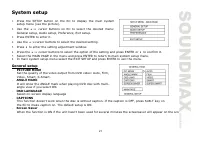
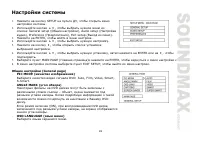
21 System setup 1. Press the SETUP button on the RC to display the main systemsetup menu (see the picture). 2. Use the 5 / 6 cursor buttons on RC to select the desired menu: General setup, Audio setup, Preference, Exit setup. 3. Press ENTER to enter it. 4. Use the 5 / 6 cursor buttons to select the ...
Page 22 - Audio setup; OP MODE; Preferences page; Wide
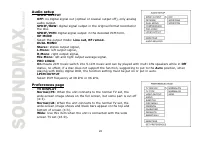
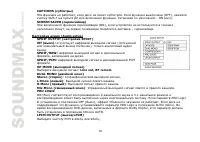
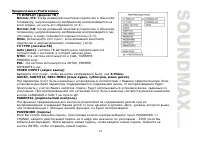
22 Audio setup SPDIF OUTPUTOFF: no digital signal out (optical or coaxial output off), only analog audio output. SPDIF/RAW: digital signal output in the original format recorded in the disc. SPDIF/PCM: digital signal output in the decoded PCM form. OP MODE Select the output mode: Line out, RF remod....
Page 24 - MP3 overview; Notes on MP3; the MP3 data written by the method of packet write.; Notes on creating your own CD-Rs or CD-RWs containing MP3 files; DO NOT store more than 256 MP3 files per disc.
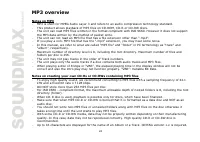
24 MP3 overview Notes on MP3 - MP3 is short for MPEG Audio Layer 3 and refers to an audio compression technology standard. - This product allows playback of MP3 files on CD-ROM, CD-R or CD-RW discs. - The unit can read MP3 files written in the format compliant with ISO 9660. However it does not supp...
Page 26 - Cleaning the cabinet
26 Handling compact discs Dirty, scratched or warped discs may cause skip ping or noise.Handle the disc only by the edges. To keep clean do not touch its surface.Discs should be stored in their cases after use to avoid scratches.Do not expose discs to direct sunlight, high humidity, high temperature...
Page 27 - Troubleshooting guide
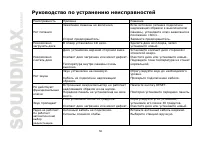
27 Troubleshooting guide Symptom Cause Solution GeneralNo power The car ignition is not on. The fuse is blown. If the power supply is properly connected to thecar accessory switch the ignition key to " ACC ".Replace the fuse. DiscDisc cannot beloaded. Presence of CD disc inside theplayer. Re...
Page 28 - Specification; General
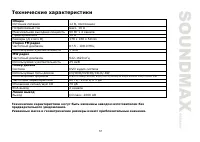
28 Specification Specifications are subject to change without notice. Mass and dimension are approximate. General Power supply 12 V DC Current consumption max. 10 A Maximum power output 50 W x 4 channels Fuse 10 A Dimensions (L x W x H) 178 x 50 x 160 mm FM stereo radio Frequency range 87.5 - 108.0 ...
Page 33 - OPEN
33 1. OPEN . ( . 1). 2. ( . 2). 1. , , ( .3). 2. , . : : , . . . , , . : , . , . . 1 . 3 . 2
Page 39 - BASS TREBLE
39 RESET ( ) OPEN. . RESET, . : , , . PWR, . , . : , , . , . , . SEL ( ), : VOL ( ) => BASS ) => TREBLE ( ) => BAL ( / ) => FADER / ). , . - VOLUME: 00, 02,......, 44, 46- BASS/TREBLE: -6, -5,......, 0, +1, +2,......+5, +6- BALANCE: 12L, 11L,......, L=R, 1R,......,12R (R- , L - ) - FADER...
Page 46 - USB
46 - OPEN, . . - EJECT , . SD/ MMC - OPEN . - . - SD/MMC . . . USB USB . . . / - PLAY/ PAUSE, . , , , . - PLAY/PAUSE, . PLAY/PAUSE , . 3 / 4 9 / : , / . 3 / 4 9 / : , . , .
Page 47 - ANGLE; DVD; LANGUAGE; DVD; OSD
47 R , : CHAPTER REPEAT ( ) => TITLE REPEAT ( ). , . SHF RDM , . , . 10 . SCN, . , . ( DVD ) DVD- , 2 ANGLE . , . ( DVD ) DVD- , LANGUAGE , . ( CD/VCD ) R/L , : Left ( ) => Right ( ) => Stereo ( ). ( DVD ) DVD- , SUB-T , . OSD , : => => .
Page 50 - PRO LOGIC; PRO Logic
50 CAPTIONS ( ) , . (OFF), SUB-T . - ON ( ). SCREEN SAVER ( ) (ON), , . (Audio setup) SPDIF OUTPUT ( SPDIF) Off ( ): ( ), . SPDIF/RAW: , . SPDIF/PCM: . OP MODE ( ) : Line out, RF remod. DUAL MONO ( ) Stereo ( ) : . L-Mono ( ) : . R-Mono ( ) : . Mix-Mono ( ) : . PRO LOGIC ON ( ) 2- 5.1- . PRO Logic I...
Page 56 - CD
56 . . , « ». . CD . , . . . . . . . . . . . . . RESET. . 30 . . , 30 . . . . . . .