Page 2 - manual for reference in the future.; Table of contents
2 Dear customer! Thank you for purchasing our product. For safety, it is strongly recommended to read this manual carefully before connecting, operating and/or adjusting the product and keep the manual for reference in the future. Table of contents Table of contents ....................................
Page 3 - Important safeguards; to the operation temperature.
3 Important safeguards Read carefully through this manual to familiarize yourself with this high-quality sound system. The beginning of operation is the moment of the unit installation. Before use the device in winter it is recommended to heat up the passenger compartment during 20 seconds or to the...
Page 4 - Otherwise it may overload or burn out the power amplifier.
4 Do not allow the speaker wires to be shorted together when the unit is switched on. Otherwise it may overload or burn out the power amplifier.
Page 5 - Installation/Connections; function of the driver.
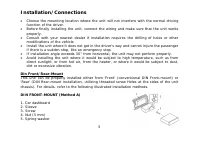
5 Installation/Connections Choose the mounting location where the unit will not interfere with the normal driving function of the driver. Before finally installing the unit, connect the wiring and make sure that the unit works properly. Consult with your nearest dealer if installation requires the d...
Page 6 - Dismantling the unit
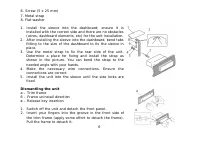
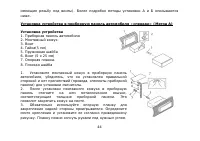
6 6. Screw (5 25 mm) 7. Metal strap 8. Flat washer 1. Install the sleeve into the dashboard; ensure it is installed with the correct side and there are no obstacles (wires, dashboard elements, etc) for the unit installation. 2. After installing the sleeve into the dashboard, bend tabs fitting to the...
Page 7 - Trim frame installation; help of the factory radio mounting brackets.
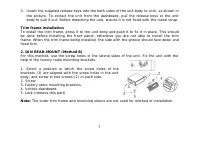
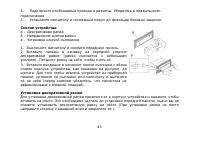
7 3. Insert the supplied release keys into the both sides of the unit body to click, as shown in the picture. To extract the unit from the dashboard, pull the release keys or the unit body to pull it out. Before detaching the unit, ensure it is not fixed with the metal strap. Trim frame installation...
Page 10 - Speaker wiring notes; An impedance load of less than 4 Ohms could damage the unit.
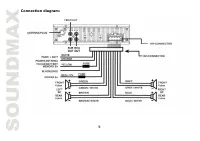
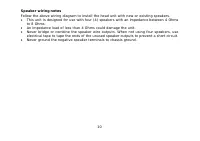
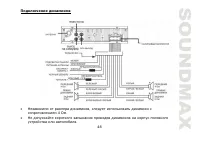
10 Speaker wiring notes Follow the above wiring diagram to install the head unit with new or existing speakers. This unit is designed for use with four (4) speakers with an impedance between 4 Ohms to 8 Ohms. An impedance load of less than 4 Ohms could damage the unit. Never bridge or combine the sp...
Page 11 - Using the ISO Connector
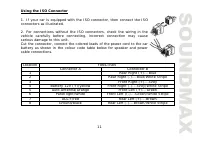
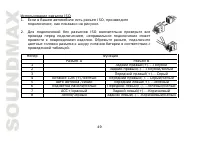
11 Using the ISO Connector 1. If your car is equipped with the ISO connector, then connect the ISO connectors as illustrated. 2. For connections without the ISO connectors, check the wiring in the vehicle carefully before connecting, incorrect connection may cause serious damage to this unit. Cut th...
Page 12 - Accessories
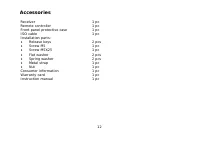
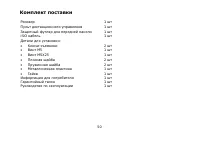
12 Accessories Receiver 1 pc Remote controller 1 pc Front panel protective case 1 pc ISO cable 1 pc Installation parts: Release keys 2 pcs Screw 5 1 pc Screw 25 1 pc Flat washer 2 pcs Spring washer 2 pcs Metal strap 1 pc Nut 1 pc Consumer information 1 pc Warranty card 1 pc Instruction manual 1 pc
Page 13 - Controls description; Front panel; Preset station buttons
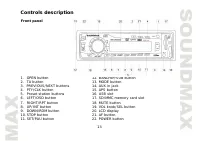
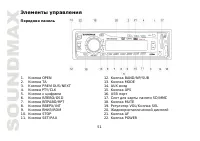
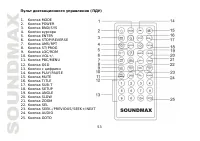
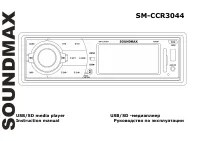
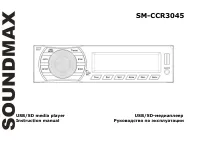
13 Controls description Front panel 1. OPEN button 12. BAND/NP/SUB button 2. TA button 13. MODE button 3. PREVIOUS/NEXT buttons 14. AUX in jack 4. PTY/CLK button 15. APS button 5. Preset station buttons 16. USB slot 6. LEFT/OSD button 17. SD/MMC memory card slot 7. RIGHT/RPT button 18. MUTE button 8...
Page 14 - Back of the front panel; panel status LED indicator
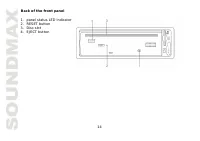
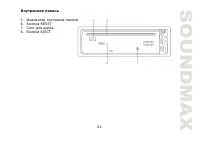
14 Back of the front panel 1. panel status LED indicator 2. RESET button 3. Disc slot 4. EJECT button
Page 16 - Changing the battery; Press the catch and at the same time pull out the battery tray.
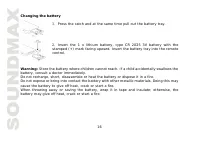
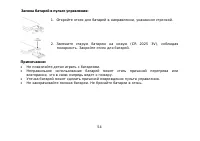
16 Changing the battery 1. Press the catch and at the same time pull out the battery tray. 2. Insert the 1 x lithium battery, type CR 2025 3V battery with the stamped (+) mark facing upward. Insert the battery tray into the remote control. Warning: Store the battery where children cannot reach. If a...
Page 17 - General operations; Reset the unit; unit to the original factory settings.; Power button; external amplifier is required to operate a subwoofer.
17 General operations Reset the unit Operating the unit for the first time or after replacing the car battery, you must reset the unit. Press OPEN button and remove the panel, then press the RESET button to restore the unit to the original factory settings. Power button Press any button (except OPEN...
Page 18 - Mute function; Press MUTE button to cancel the sound. Press again to resume.; Sound settings; adjust each parameter.; Clock display and adjustment; PTY/CLK button or leave the unit idle for 5 seconds.
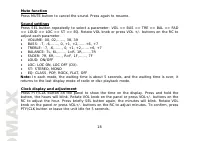
18 Mute function Press MUTE button to cancel the sound. Press again to resume. Sound settings Press SEL button repeatedly to select a parameter: VOL => BAS => TRE => BAL => FAD => LOUD => LOC => ST => EQ. Rotate VOL knob or press VOL +/- buttons on the RC to adjust each param...
Page 19 - Radio operations; Band select; start. It will play when finds the station.; Programming tuner stations
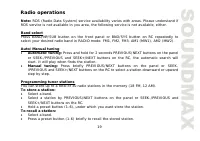
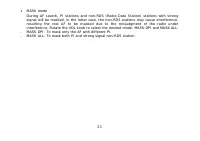
19 Radio operations Note: RDS (Radio Data System) service availability varies with areas. Please understand if RDS service is not available in you area, the following service is not available, either. Band select Press BAND/NP/SUB button on the front panel or BND/SYS button on RC repeatedly to selec...
Page 20 - buttons on the RC to select ST ON or ST OFF.; Local/Distant reception; Press LOC/RDM button on the RC to select LOC ON or LOC OFF mode.
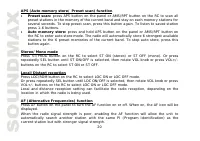
20 APS (Auto memory store/ Preset scan) function Preset scan: press APS button on the panel or AMS/RPT button on the RC to scan all preset stations in the memory of the current band and stay on each memory stations for several seconds. To stop preset scan, press this button again. To listen to saved...
Page 22 - Other settings
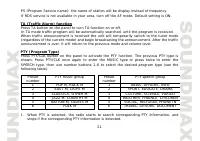
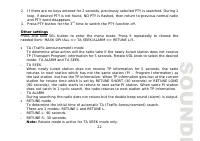
22 2. If there are no keys entered for 2 seconds, previously selected PTY is searched. During 1 loop, if desired PTY is not found, NO PTY is flashed, then return to previous normal radio and PTY word disappears. 3. Press PTY button for the 3 rd time to switch the PTY function off. Other settings Pre...
Page 24 - Disc operations; Disc glossary; unit is called chapter. The chapter contains a unit at least.; Track; The following file types are supported:
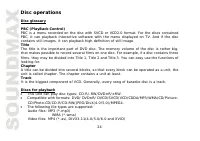
24 Disc operations Disc glossary PBC (PlayBack Control) PBC is a menu recorded on the disc with SVCD or VCD2.0 format. For the discs contained PBC, it can playback interactive software with the menu displayed on TV. And if the disc contains still images, it can playback high definition of still imag...
Page 26 - Stop playback; to play the previous track.
26 Capacity: 8 MB ~ 1 GB. SD cards brands: Cannon, Fuji film, Palm, Motorola, Microsoft, IBM, HP, Compaq, Sharp, Samsung, etc. Capacity: 8 MB ~ 1 GB. MMC cards brands: Ericsson, Nokia, Motorola, HP, Palm, Sanyo, Microsystems, etc. Capacity: 16 MB ~ 1 GB. Inserting the SD/MMC card/USB device Insert t...
Page 27 - when the desired location is found.; Repeat playback; the RC to start the random playing. Press again time to cancel.
27 Scanning forward and backwardPress and hold PREVIOUS/NEXT buttons on the panel or SEEK-/PREVIOUS and SEEK+/NEXT buttons on the RC to fast the playing in backward or forward direction. Release the button when the desired location is found. Slow playback (for DVD/VCD) During DVD/VCD playback press ...
Page 28 - Intro playback; UP/INT button on the panel to start intro play. Press again to cancel.; Changing size
28 Intro playback You can play the beginning of every track for several seconds in sequence. Press and hold UP/INT button on the panel to start intro play. Press again to cancel. Changing size Press repeatedly ZOOM button on the RC. The picture will be enlarged accordingly: X2, X3, X4, 1/2, 1/3, 1/4...
Page 29 - GOTO function; button to start its playing.; Program playing; Press ST/PROG button to exit the program function.
29 PBC (Playback Control) function (for VCD only) If you use a VCD with PBC, playback starts from the beginning of the 1st track automatically. 1. Press PBC/MENU button on the RC to activate PBC menu on screen during playback. 2. If the menu consists a list of titles, you can select a desired one us...
Page 30 - Notes on MP3 and WMA; does not support the MP3 data written by the method of packet write.
30 Notes on MP3 and WMA MP3 is short for MPEG Audio Layer 3 and refers to an audio compression technology standard. This product allows playback of MP3 files on CD-ROM, CD-R or CD-RW discs. The unit can read MP3 files written in the format compliant with ISO 9660. However it does not support the MP3...
Page 31 - Notes on creating your own CD-Rs or CD-RWs containing MP3 files; frequency of 44.1 kHz and a fixed bit rate o f 128 kbps.
31 Notes on creating your own CD-Rs or CD-RWs containing MP3 files To enjoy high quality sound, we recommend converting to MP3 files with a sampling frequency of 44.1 kHz and a fixed bit rate o f 128 kbps. DO NOT store more than 256 MP3 files per disc. For ISO 9660 - compliant format, the maximum al...
Page 32 - System setup; ENTER button to confirm the selected option.
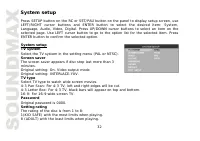
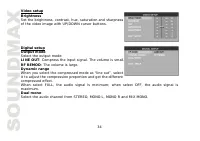
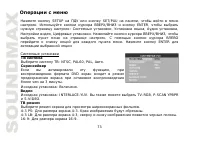
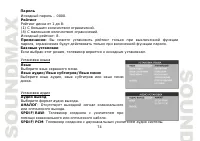
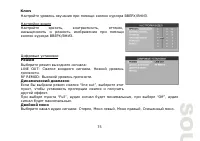
32 System setup Press SETUP button on the RC or SET/PAU button on the panel to display setup screen, use LEFT/RIGHT cursor buttons and ENTER button to select the desired item: System, Language, Audio, Video, Digital. Press UP/DOWN cursor buttons to select an item on the selected page. Use LEFT curso...
Page 36 - Handling discs; Cleaning
36 Handling discs Dirty, scratched or warped discs may cause skip ping or noise. Handle the disc only by the edges. To keep clean do not touch its surface. Discs should be stored in their cases after use to avoid scratches. Do not expose discs to direct sunlight, high humidity, high temperature or d...
Page 37 - Troubleshooting guide; Symptom
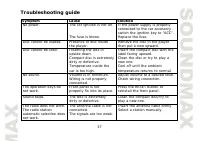
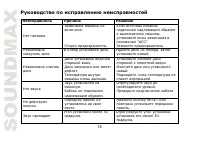
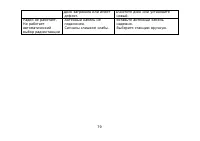
37 Troubleshooting guide Symptom Cause Solution No power. The car ignition is not on. The fuse is blown. If the power supply is properly connected to the car accessory switch the ignition key to “ACC”. Replace the fuse. Disc cannot be loaded. Presence of disc inside the player. Remove the disc in th...
Page 38 - Specification; Disc player; Horizontal Resolution; Audio Specification
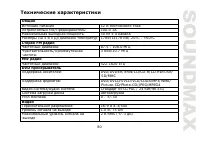
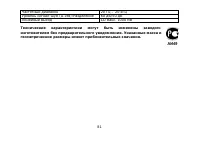
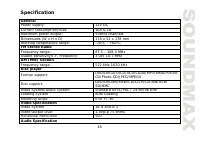
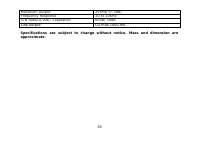
38 Specification GeneralPower supply: 12V DC Current consumption/Fuse: 10A & 1A Maximum power output: 50Wx4 channels Dimensions (W x H x D) 178 x 51 x 178 mm Working temperature range: -20º - +60º FM Stereo RadioFrequency range: 87.5 - 108.0 MHz Usable sensitivity/I.F. Frequency: 3 uV/ 10.7 MHz ...
Page 43 - DIN
43 , , . , . . , . , , , . 30°, . , , , , , , , , . . « » « » « » ( DIN ), « » ( DIN, ,
Page 46 - OPEN
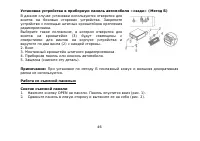
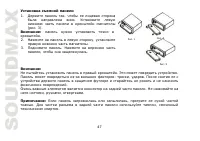
46 « » ( ) . . , (3) (2) . 2. . 3. . 4. . 5. ( ). : . 1. OPEN . ( . 1). 2. ( . 2).
Page 50 - ISO
Page 55 - VOL
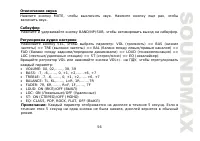
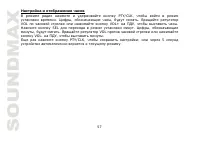
55 OPEN, . RESET, . , . ( OPEN) , . POWER, . : , , . VOL , . , . VOL+/- . MODE, : AUX => RADIO ) => DISK ( ) => USB => CARD ( ). : USB, CARD, DISK , .
Page 58 - RDS
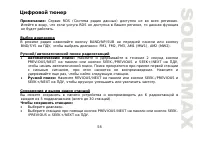
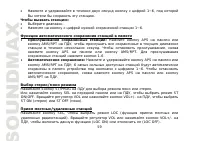
58 : RDS ( ) . , RDS , . BAND/NP/SUB BND/SYS , : FM1, FM2, FM3, AM1 (MW1), AM2 (MW2). : 2 PREVIOUS/NEXT SEEK-/PREVIOUS SEEK+/NEXT , . , . , . : REVIOUS/NEXT SEEK-/PREVIOUS SEEK+/NEXT , . 6 5 ( 30 ). : . PREVIOUS/NEXT SEEK- /PREVIOUS SEEK+/NEXT .
Page 65 - USB
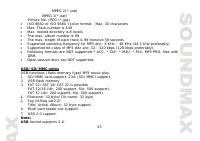
65 USB/SD/MMC MP3 USB ( ). SD/ MMC, 2 1 (SD/MMC). USB . FAT 12/ FAT 16/ FAT 32 FAT 12/ 16 ( 200 , 500 ), FAT 32 ( 200 , 500 ). : 32 / : 32 . (id3tag ver 2.0) / / : 32 . . USB 2.0. : USB: USB 2.0. : 8 M ~ 1 . SD: SD : Cannon, Fuji film, Palm, Motorola, Microsoft, IBM, HP, Compaq, Sharp, Samsung, . . ...
Page 69 - STOP; GOTO; ENTER
69 1. /MENU , . 2. , – . 3. , ENTER, . 4. STOP STOP/REVERSE , . 5. /MENU, . GOTO GOTO, GOTO. . ENTER . VCD: GOTO, . , , ). , 18 20 00 , : 1 => 8 => 2 => 0 => 0 => 0. ENTER , . DVD: GOTO, . . , 234, : 2 => 3 => 4. ENTER, . , . , , ). , 18 20 00 , : 1 => 8 => 2 => 0 =>...
Page 71 - WMA; MPEG 3
71 3 WMA 3 MPEG 3 . 3 CD-ROM, CD-R CD-RW. 3, , ISO 9660. 3, . 3, , “.mp3”. 3 , “.mp3”, . , “ MP3” ”, PC “ ” “ ” . 8, . 256. . , , 3. 8 VBR, , . VBR: . WMA . ID3 WMA , . WMA (Windows Media Audio) – , Microsoft Corporation.
Page 78 - RESET
78 . . , “ ”. . . , . . . . . . , . . . . . . RESET . 30 . , 30 .
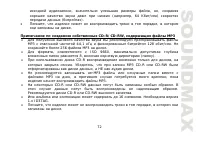
Page 81 - CD