Page 2 - Table of contents
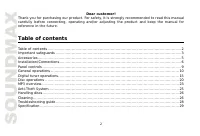
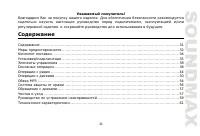
2 Dear customer! Thank you for purchasing our product. For safety, it is strongly recommended to read this manualcarefully before connecting, operating and/or adjusting the product and keep the manual forreference in the future. Table of contents Table of contents ......................................
Page 3 - Important safeguards
3 Important safeguards Read carefully through this manual to familiarize yourself with this high-quality sound system.Disconnect the vehicle's negative battery terminal while mounting and connecting the unit.When replacing the fuse, be sure to use one with an identical amperage rating. Using a fuse ...
Page 5 - Accessories
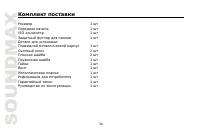
5 Accessories Receiver 1 pc Front panel 1 pc Installation parts:Mounting bracket (half sleeve) 1 pc Release key 2 pcs Flat washer 2 pcs Spring washer 1 pc Nut 1 pc Screw 1 pc Metal strap 1 pc ISO connector 1 pc Protective case 1 pc Customer information 1 pc Warranty card 1 pc Instruction manual 1 pc
Page 6 - Installation/Connections
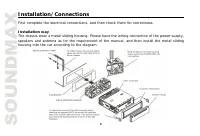
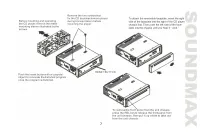
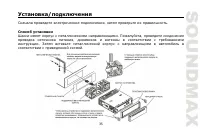
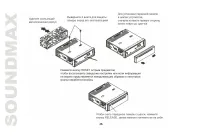
6 Installation/Connections First complete the electrical connections, and then check them for correctness. Installation wayThe chassis wear a metal sliding housing. Please have the wiring connection of the power supply,speakers and antenna as for the requirement of the manual, and then install the m...
Page 8 - onnection diagram
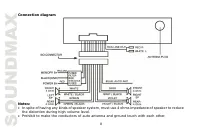
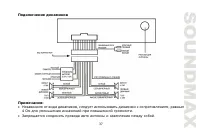
8 onnection diagram Notes: In spite of having any kinds of speaker system, must use 4 ohms impedance of speaker to reducethe distortion during high volume level.Prohibit to make the conductors of auto antenna and ground touch with each other.
Page 9 - Panel controls
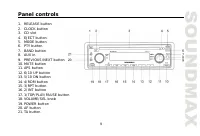
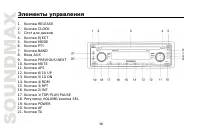
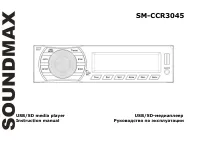
9 Panel controls 1. RELEASE button2. CLOCK button3. CD slot4. EJECT button5. MODE button6. PTY button7. BAND button8. AUX in9. PREVIOUS/NEXT button10. MUTE button11. APS button12. 6/10 UP button13. 5/10 DN button14. 4/RDM button15. 3/RPT button16. 2/INT button17. 1/TOP/PLAY/PAUSE button18. VOLUME/SE...
Page 10 - General operations
10 General operations Reset the unitOperating the unit for the first time or after replacing the car battery, you must reset the unit.Press RELEASE button and remove the front panel, then press RESET button on the inner panel torestore the unit to the original factory settings. Power buttonPress any...
Page 11 - Setting the clock
11 Setting the clock To show the time: - In Radio mode when RDS data is received press CLOCK button to select the mode: CLOCK=> PTY => FREQUENCY => PS NAME. - In Radio mode when RDS data is not received press CLOCK button to select the item: CLOCK=> PTY => FREQUENCY. - In Disc mode: P...
Page 15 - Digital tuner operations
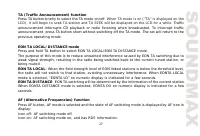
15 Digital tuner operations Note: RDS (Radio Data System) service availability varies with areas. Please understand if RDSservice is not available in your area, the following service is not available, either. Band selectionPress BAND button to select a band: FM1, FM2, FM3, AM1 (MW1), AM2 (MW2). Disp...
Page 20 - Disc operations
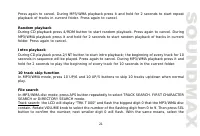
20 Disc operations Loading a discTurn the power on. Insert the disc with the printed side facing upward into the slot. To eject the disc,press EJECT button. Play/pauseTo ensure good system performance, wait until the unit finishes reading the disc information beforeproceeding.After inserting the dis...
Page 23 - MP3 overview
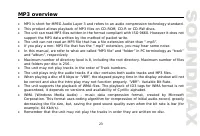
23 MP3 overview MP3 is short for MPEG Audio Layer 3 and refers to an audio compression technology standard.This product allows playback of MP3 files on CD-ROM, CD-R or CD-RW discs.The unit can read MP3 files written in the format compliant with ISO 9660. However it does notsupport the MP3 data writt...
Page 24 - Notes on creating your own CD-R or CD-RW containing MP3 files:
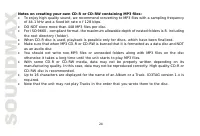
24 Notes on creating your own CD-R or CD-RW containing MP3 files: To enjoy high quality sound, we recommend converting to MP3 files with a sampling frequencyof 44.1 kHz and a fixed bit rate o f 128 kbps.DO NOT store more than 448 MP3 files per disc.For ISO 9660 - compliant format, the maximum allowa...
Page 26 - Handling discs; Cleaning; Cleaning discs
26 Handling discs Dirty, scratched or warped discs may cause skip ping or noise. Handle the disc only by the edges. To keep clean do not touch its surface.Discs should be stored in their cases after use to avoid scratches.Do not expose discs to direct sunlight, high humidity, high temperature ordust...
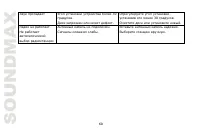
Page 28 - Troubleshooting guide
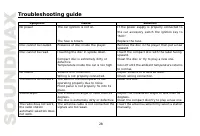
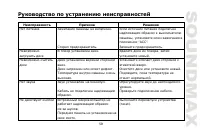
28 Troubleshooting guide Symptom Cause Solution No power The car ignition is not on. The fuse is blown. If the power supply is properly connected tothe car accessory switch the ignition key to“ACC”.Replace the fuse. Disc cannot be loaded. Presence of disc inside the player. Remove the disc in the pl...
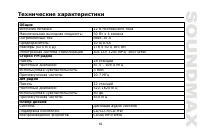
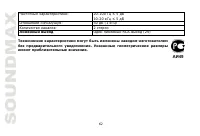
Page 29 - Specification
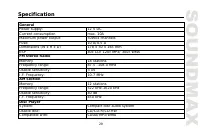
29 Specification GeneralPower supply: 12 V DC Current consumption max. 10A Maximum power output: 50Wx4 channels Fuse: 10 A/0.5 A Dimensions (W x H x D) 178 x 50 x 165 mm ESP 40 CD/ 120c MP3/ 300c WMA FM Stereo RadioMemory 18 stations Frequency range: 87.5 -108.0 MHz Usable sensitivity: 3 uV I.F. Fre...
Page 43 - AUX
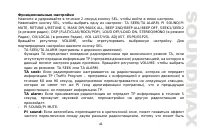
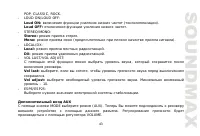
43 POP, CLASSIC, ROCK. - LOUD ON/LOUD OFF:Loud ON: ( ). Loud OFF: . - STEREO/MONO:Stereo: . Mono: ( ). - LOCAL/DX:Local: . DX: . - VOL LAST/VOL ADJUST: , . Vol last: , , . Vol adjust: . – 10. - ESP6/ESP25: . AUX MODE (AUX). . VOLUME.
Page 48 - REGIONAL
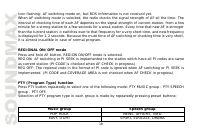
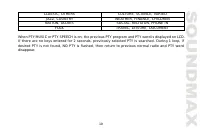
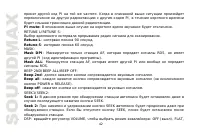
48 , 1-2 . AF , . REGIONAL AF, REGION. REG ON ( ): AF TA , PI- . REG OFF ( ): PI- . PTY (Program Type) function PTY, PTY: – - PTY . . POP, ROCK NEWS, AFFAIRS, INFO EASY, LIGHT SPORT, EDUCATE, DRAMA CLASSIC, OTHERS CULTURE, SCIENCE, VARIED JAZZ, COUNTRY WEATHER, FINANCE, CHILDREN NATION, OLDIES SOCIA...
Page 51 - Intro
51 : , , . CD 3/RPT, . , . MP3/WMA , 2 3/RPT, . , . CD 4/RDM, . , . MP3/WMA , 2 4/RDM, . , . Intro 10 . CD 2/INT. 2/INT , . MP3/WMA 2/INT; 10 . 2/INT , .