Page 2 - About Manuals; Location of the identification label; • TV installation and setup.; IMPORTANT NOTICE
2 US About Manuals This TV comes with the following manuals. Please retain the manuals for future reference. Note • Images and illustrations used in the Setup Guide and this manual are for reference only and may differ from the actual product. • Setting menus are subject to change without notice due...
Page 5 - US; The BRAVIA
5 US US 3 Anchor the TV to the wall by using bolts, wall anchor and chain (or rope). Please refer to below illustration for M6 eye bolt length. Note • Your TV is shipped with screws attached to the rear of the TV depending on the TV model. (They are fastened in the screw holes for wall mounting.) Be...
Page 6 - Using TV as Center Speaker; Remote Control and TV
6 US Using TV as Center Speaker Note • Before connecting cables, disconnect the AC power cord of both TV and AV receiver. Using TV as Part of Audio System Note • Before connecting cables, disconnect the AC power cord of both TV and AV receiver. • Refer to the instruction manual of the Audio system w...
Page 7 - App buttons; Guidelines for IR Remote Control; Installing the TV to the Wall
7 US US App buttons (Power): (It can be found by removing the side cover) BUILT-IN MIC SWITCH: Turn on/off the built-in MIC. (It can be found by removing the side cover) Built-in MIC* 4 * 5 * 8 : To enable the built-in MIC, press the Google Assistant button on the remote control and follow t...
Page 8 - Remove the terminal covers.
8 US For product protection and safety reasons, Sony strongly recommends that installation of your TV on the wall be performed by qualified professionals. Do not attempt to install it yourself. • Follow the instruction guide provided with the Wall-Mount Bracket for your model. Sufficient expertise i...
Page 9 - To detach the Table-Top Stand from the; Attaching the Bottom Corner cover; Make sure to attach the Table-Top Stand; Troubleshooting; Refer to the Help menu shown below.
9 US US Detaching the Table-Top Stand from the TV To detach the Table-Top Stand from the TV, remove the screws . Attaching the Bottom Corner cover Make sure to attach the Table-Top Stand in narrow position before installing the Bottom Corner cover by referring to the Setup Guide. Note • Be careful w...
Page 10 - How to reset the TV to factory settings; Specifications; System; 5 ohm external terminal for RF inputs
10 US When you plug in the TV, the TV may not be able to turn on for a while even if you press the power button on the remote control or the TV. It takes time to initialize the system. Wait for about one minute, then operate it again. How to reset the TV to factory settings WARNING: The reset will c...
Page 11 - Power and others
11 US US eARC/ARC (Enhanced Audio Return Channel/Audio Return Channel) (HDMI IN 3 only) * 8 In eARC mode Refer to the online Help Guide for details. In ARC mode Two channel linear PCM: 48 kHz 16 bits, Dolby Audio, Dolby Atmos, DTS DIGITAL AUDIO OUT (OPTICAL) Digital optical jack (Two channel linear ...
Page 12 - Others; Licensing Information
12 US Others Camera and Microphone Unit: CMU-BC1M Power supply: DC 5 V, 500 mALens: F/2.2; Fixed focusImage sensor: CMOS sensor (2560 × 1920)Output format: Visual communication: Max. 1920 × 1080,Sensing: 2560 × 1920 Microphone: Microphone × 2 Operating temperature: 0 ºC – 40 ºC / 32 ºF – 104 ºF *1 2...
Page 13 - blank
Page 14 - À propos des manuels; ATTENTION; Manuel de configuration; • Installation et configuration du téléviseur.; AVIS IMPORTANT
2 FR À propos des manuels Ce téléviseur est fourni avec les manuels suivants. Veuillez conserver ces manuels à titre de référence. Remarque • Les images et illustrations utilisées dans le Manuel de configuration et ce manuel sont fournies uniquement à titre de référence et peuvent différer de l’aspe...
Page 17 - Fonctionnalités de l’expérience
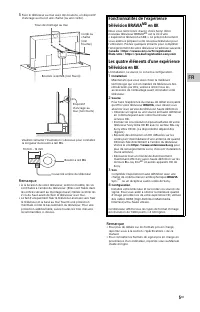
5 FR FR 3 Fixer le téléviseur au mur avec des boulons, un dispositif d’ancrage au mur et une chaîne (ou une corde). Veuillez consulter l’illustration ci-dessous pour connaître la longueur du boulon à œil M6. Remarque • À la livraison de votre téléviseur, selon le modèle, les vis sont fixées à l’arri...
Page 18 - Télécommande et téléviseur; Touches de l’application
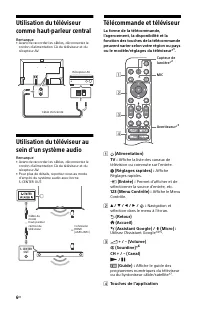
6 FR Utilisation du téléviseur comme haut-parleur central Remarque • Avant de raccorder les câbles, déconnectez le cordon d’alimentation CA du téléviseur et du récepteur AV. Utilisation du téléviseur au sein d’un système audio Remarque • Avant de raccorder les câbles, déconnectez le cordon d’aliment...
Page 19 - Directives pour la télécommande IR; Fixer le téléviseur au mur
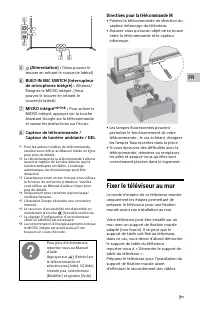
7 FR FR (Alimentation) : (Vous pouvez le trouver en retirant le couvercle latéral) BUILT-IN MIC SWITCH (Interrupteur de microphone intégré) : Allumez/ Éteignez le MICRO intégré. (Vous pouvez le trouver en retirant le couvercle latéral) MICRO intégré* 4 * 5 * 8 : Pour activer le MICRO intégré, ...
Page 20 - Retirez les couvercles des bornes.
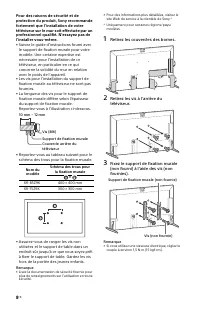
8 FR Pour des raisons de sécurité et de protection du produit, Sony recommande fortement que l’installation de votre téléviseur sur le mur soit effectuée par un professionnel qualifié. N’essayez pas de l’installer vous-même. • Suivez le guide d’instructions fourni avec le support de fixation murale ...
Page 21 - Fixation du cache de l’Angle Inférieur; Dépannage
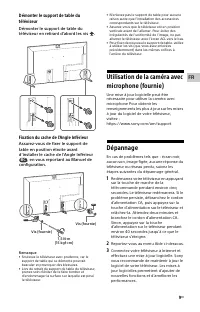
9 FR FR Démonter le support de table du téléviseur Démonter le support de table du téléviseur en retirant d’abord les vis . Fixation du cache de l’Angle Inférieur Assurez-vous de fixer le support de table en position étroite avant d’installer le cache de l’Angle Inférieur , en vous reportant au Manu...
Page 22 - La télécommande ne fonctionne pas.; Spécifications; Système; Sauf mode eARC
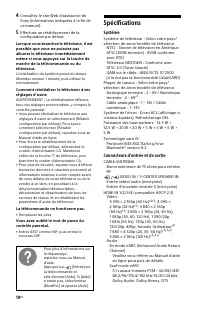
10 FR 4 Consultez le site Web d’assistance de Sony (informations indiquées à la fin de ce manuel). 5 Effectuez un rétablissement de la configuration par défaut. Lorsque vous branchez le téléviseur, il est possible que vous ne puissiez pas allumer le téléviseur immédiatement même si vous appuyez sur ...
Page 23 - Alimentation et autres
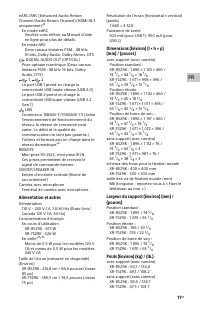
11 FR FR eARC/ARC (Enhanced Audio Return Channel/Audio Return Channel) (HDMI IN 3 uniquement )* 8 En mode eARC Veuillez vous référer au Manuel d’aide en ligne pour plus de détails. En mode ARC Deux canaux linéaires PCM : 48 kHz 16 bits, Dolby Audio, Dolby Atmos, DTS DIGITAL AUDIO OUT (OPTICAL) Prise...
Page 24 - Autres; Information de licence
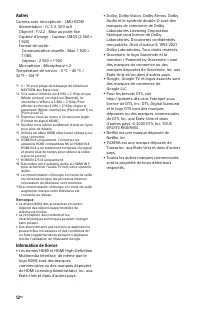
12 FR Autres Caméra avec microphone : CMU-BC1M Alimentation : CC 5 V, 500 mAObjectif : F/2.2 ; Mise au point fixeCapteur d’image : Capteur CMOS (2 560 × 1 920)Format de sortie : Communication visuelle : Max. 1 920 × 1 080,Capteur : 2 560 × 1 920 Microphone : Microphone × 2 Température de service : 0...
Page 26 - Acerca de los manuales; • Instalación y configuración del TV.
2 ES Acerca de los manuales Este TV se entrega con los siguientes manuales. Guarde los manuales para futuras consultas. Nota • Las imágenes e ilustraciones que aparecen en este manual y Guía de configuración son solo de referencia y pueden diferir del producto real. • Los menús de configuración está...
Page 27 - PRECAUCIÓN; Seguridad y reglamentación
3 ES ES * Para ver el nombre del modelo del control remoto, abra la cubierta del control remoto y consulte la etiqueta del mismo. PRECAUCIÓN Para evitar descargas eléctricas y exposición a contactos eléctricos, no utilice este enchufe de corriente alterna con un cable de extensión, receptáculo u otr...
Page 29 - La experiencia de TV BRAVIA
5 ES ES 3 Sujete el TV a la pared mediante pernos, tornillos de anclaje y cadena (o soga). Observe la siguiente ilustración para saber la longitud de las armellas roscadas M6. Nota • Junto con el TV se incluyen tornillos que se encuentran instalados en la parte posterior del TV dependiendo del model...
Page 30 - Referencia de funciones y traducciones
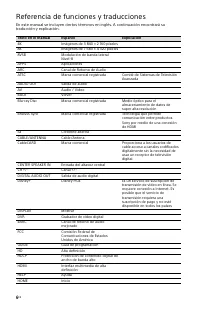
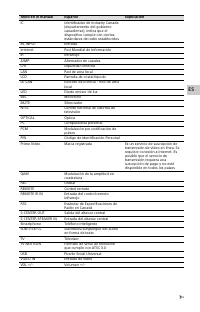
6 ES Referencia de funciones y traducciones En este manual se incluyen ciertos términos en inglés. A continuación encontrará su traducción y explicación. Texto en el manual Español Explicación 4K Imágenes de 3 840 × 2 160 píxeles 8K Imágenes de 7 680 × 4 320 píxeles 8VSB Modulación de banda lateral ...

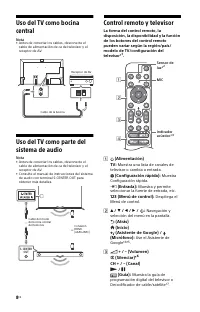
Page 32 - Control remoto y televisor
8 ES Uso del TV como bocina central Nota • Antes de conectar los cables, desconecte el cable de alimentación de ca del televisor y el receptor de AV. Uso del TV como parte del sistema de audio Nota • Antes de conectar los cables, desconecte el cable de alimentación de ca del televisor y el receptor ...
Page 33 - Botones de las aplicaciones
9 ES ES Botones de las aplicaciones (Alimentación): (Se encuentra debajo de la cubierta lateral) BUILT-IN MIC SWITCH (Cambiar el micrófono integrado): Encienda/ Apague el micrófono integrado. (Se encuentra debajo de la cubierta lateral) Micrófono integrado* 4 * 5 * 8 : Para habilitar el micr...
Page 34 - Retire las cubiertas de los
10 ES Por motivos de seguridad y protección del producto, Sony recomienda que la instalación del televisor en la pared sea realizada por profesionales calificados. No trate de instalarlo usted mismo. • Siga el manual de instrucciones proporcionado con el soporte de montaje mural para su modelo. Se r...
Page 35 - Solución de problemas
11 ES ES Desinstalación del soporte de sobremesa del TV Para desinstalar el soporte de sobremesa del TV, quite los tornillos . Colocación de la cubierta de la esquina inferior Instale el soporte de sobremesa en una posición estrecha antes de colocar la cubierta de la esquina inferior consultando la ...
Page 36 - El control remoto no funciona.; Especificaciones; Sistema; Excepto el modo eARC
12 ES 4 Visite el sitio web de soporte de Sony (información suministrada al final de este manual). 5 Realice el restablecimiento de la configuración de fábrica. Al conectar el TV, es posible que el TV no pueda encenderse durante un cierto tiempo aunque pulse el botón de encendido del control remoto ...
Page 37 - Alimentación y otras especificaciones
13 ES ES eARC/ARC (Canal de retorno de audio mejorado / Canal de retorno de audio) (solo HDMI IN 3) * 8 En el modo eARC Consulte la Guía de ayuda en línea para más información. En el modo ARC PCM lineal de dos canales: 48 kHz 16 bits, Dolby Audio, Dolby Atmos, DTS DIGITAL AUDIO OUT (OPTICAL) Toma óp...
Page 38 - Otros; Información de licencias
14 ES Otros Unidad de cámara y micrófono: CMU-BC1M Tensión de alimentación / Consumo de potencia o corriente: cc 5 V, 500 mALente: F/2.2; Enfoque fijoSensor de imágenes: Sensor CMOS (2 560 × 1 920)Formato de salida: Comunicación visual: Max. 1 920 x 1 080Detección: 2 560 × 1 920 Micrófono: Micrófono...
Page 40 - For Your Convenience; Online; Pour votre commodité
For Your Convenience Online Registration: Be sure to register your TV. United StatesCanada https://productregistration.sony.com https://www.sony.ca/registration Pour votre commodité Enregistrement en ligne : Faire en sorte de compléter l’enregistrement de votre téléviseur. CanadaÉtats-Unis https://w...