Page 3 - I m p o r t a n t s a f e t y in s t r u c t i o n s .; Contents
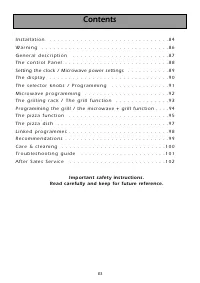
83 I n s t a l l a t i o n . . . . . . . . . . . . . . . . . . . . . . . . . . . . . . . 8 4 W a r n i n g . . . . . . . . . . . . . . . . . . . . . . . . . . . . . . . . . 8 6 G e n e r a l d e s c r i p t i o n . . . . . . . . . . . . . . . . . . . . . . . . . 8 7 T h e c o n t r o l P a n e l . ....
Page 4 - Installation; BEFORE CONNECTION; ELECTRICAL CONNECTION
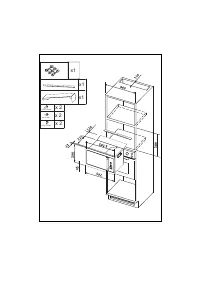
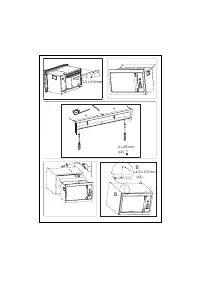
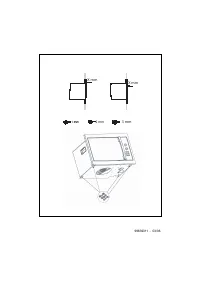
Installation BEFORE CONNECTION • C heck whether your oven has suffered any damage during transport (deformed door or door seal, etc.). If you see any signs of damage, contact your dealer before use. In order to easily locate the reference informationfor your appliance,we recommend that younotethese ...
Page 6 - Warning
86 Warning • Warning:Ensure that your appliance has not sufferedany damage during transport (deformed sealordoor,etc...).If you see any kind of damage,before doing anything else,contact your retai-ler. Safety recommandations: • Your appliance is designed for standard householduse for cooking, reheat...
Page 7 - General description
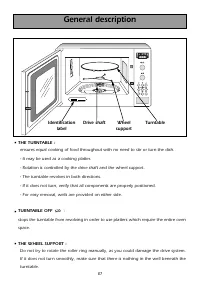
87 General description • THE TURNTABLE : ensures equal cooking of food throughout with no need to stir or turn the dish. - It may be used as a cooking platter. - Rotation is controlled by the drive shaft and the wheel support. - The turntable revolves in both directions. - If it does not turn, verif...
Page 8 - Control panel
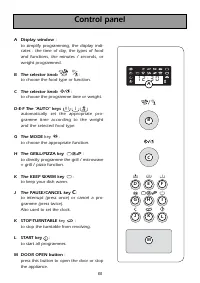
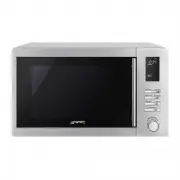
88 Control panel A Display window : to simplify programming, the display indi-cates : the time of day, the types of foodand functions, the minutes / seconds, orweight programmed. B The selector knob : to choose the food type or function. C The selector knob : to choose the programme time or weight. ...
Page 9 - S e t t i n g t h e c l o c k; Microwave output power : 900 W
89 P O W E R S E T T I N G A P P L I C A T I O N S e t t i n g t h e c l o c k After first plugging in your microwave oven or after a power outage, the clock reads 0 0 : 0 0 and the two dots flash. To set the clock : - Press the PAUSE / CANCEL key C for 5 seconds . " 0 0 0 0 :: 0 0 0 0 " fla...
Page 10 - the weight; AUTO; the length of the programme; The food type or function being selected will flash in the display.; T h e d i s p l a y
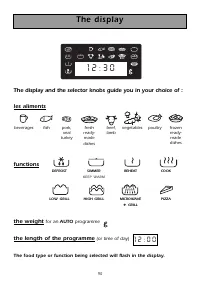
90 The display and the selector knobs guide you in your choice of : les aliments functions DEFROST SIMMER REHEAT COOK KEEP WARM LOW GRILL HIGH GRILL MICROWAVE PIZZA + GRILL the weight for an AUTO programme the length of the programme (or time of day) The food type or function being selected will fla...
Page 11 - P r o g r a m m i n g; T h e s e l e c t o r k n o b s
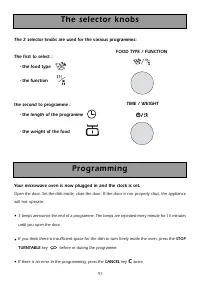
91 The 2 selector knobs are used for the various programmes: The first to select : - the food type - the function the second to programme : - the length of the programme - the weight of the food P r o g r a m m i n g Your microwave oven is now plugged in and the clock is set. Open the door. Set the ...
Page 12 - Automatic programming by weight :; A U T O keys; Automatic programming by function; Available programmes :; M i c r o w a v e p r o g r a m m i n g; Programming the keep warm function
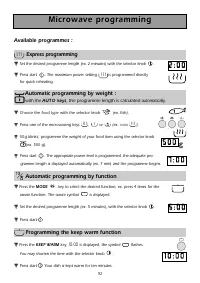
92 Automatic programming by weight : with the A U T O keys , the programme length is calculated automatically. ▼ ▼ Choose the food type with the selector knob (ex. fish). ▼ ▼ Press one of the microwaving keys , or (ex. COOK ). ▼ ▼ 50g blinks ; programme the weight of your food item using the selecto...
Page 13 - The grilling rack; the rack; The grill function
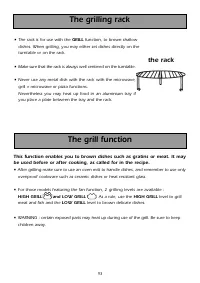
93 The grilling rack • The rack is for use with the GRILL function, to brown shallow dishes. When grilling, you may either set dishes directly on the turntable or on the rack. • Make sure that the rack is always well centered on the turntable. • Never use any metal dish with the rack with the microw...
Page 14 - Programming the grill; Using the 2 level grill; Using the microwave + grill function; The microwave + grill function
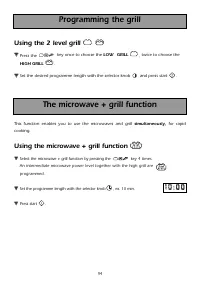
94 Programming the grill Using the 2 level grill ▼ ▼ Press the key once to choose the LOW GRILL , twice to choose the HIGH GRILL . ▼ ▼ Set the desired programme length with the selector knob and press start . Using the microwave + grill function ▼ ▼ Select the microwave + grill function by pressing ...
Page 15 - T h e P I Z Z A f u n c t i o n
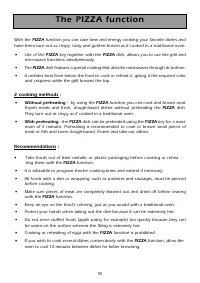
95 With the PIZZA function you can save time and energy cooking your favorite dishes and have them turn out as crispy, tasty and golden brown as if cooked in a traditional oven. • Use of the PIZZA key together with the PIZZA dish, allows you to use the grill and microwave functions simultaneously. •...
Page 16 - Programming
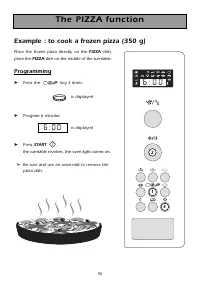
96 T h e P I Z Z A f u n c t i o n Example : to cook a frozen pizza (350 g) Place the frozen pizza directly on the PIZZA dish, place the PIZZA dish on the middle of the turntable. Programming ➤ Press the key 3 times : is displayed ➤ Program 6 minutes is displayed ➤ Press START . the turntable revolv...
Page 17 - Care of the PIZZA dish; Recommendations; The; T h e P I Z Z A d i s h
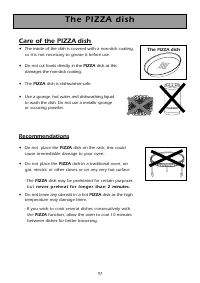
97 Care of the PIZZA dish • The inside of the dish is covered with a non-stick coating,so it is not necessary to grease it before use. • Do not cut foods directly in the PIZZA dish as this damages the non-stick coating. • The PIZZA dish is dishwasher-safe. • Use a sponge, hot water and dishwashing l...
Page 18 - Linked programmes; simmer level microwave + grill programme for 20 minutes
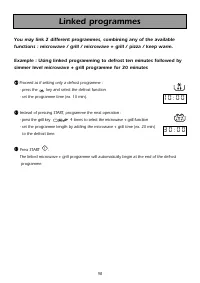
98 Linked programmes You may link 2 different programmes, combining any of the available functions : microwave / grill / microwave + grill / pizza / keep warm. Example : Using linked programming to defrost ten minutes followed by simmer level microwave + grill programme for 20 minutes ① ① Proceed as...
Page 21 - T r o u b l e s h o o t i n g g u i d e; Problem
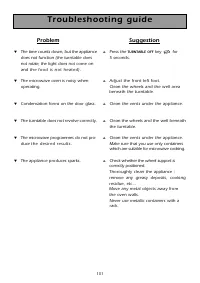
101 T r o u b l e s h o o t i n g g u i d e Problem ▼ The time counts down, but the appliancedoes not function (the turntable does not rotate, the light does not come on and t h e f o o d i s n o t h e a t e d ). ▼ The microwave oven is noisy whenoperating. ▼ Condensation forms on the door glass. ▼ ...
Page 22 - O n l y a s p e c i a l l y t r a i n e d t e c h n i c i a n i s q u a l i f i e d
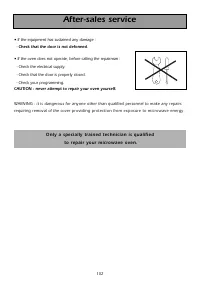
After-sales service • If the equipment has sustained any damage : - Check that the door is not deformed . • If the oven does not operate, before calling the repairman : - Check the electrical supply. - Check that the door is properly closed. - Check your programming. CAUTION : never attempt to repai...