Page 2 - EN; The user manual is also available for download at; DE; SMEG; Gerät entschieden haben.; SMEG; El manual del usuario también está disponible para su descarga en; SMEG; Este manual de instruções também se encontra disponível em
EN Dear Customer, Thank you for choosing this SMEG product. We ask you to read the instructions in this booklet very carefully as this will allow you to get the best results from using it. KEEP THE DOCUMENTATION OF THIS PRODUCT FOR FUTURE REFERENCE. Always keep the instruction manual handy. If you l...
Page 3 - Contents; Special functions and automatic programs
3 / EN Contents 1. Instructions ..................................................................................................................................... 4 1.1. Safety Information ...............................................................................................................
Page 5 - Instructions
5 / EN Instructions Only use utensils that are suitable for use in microwave ovens. When heating food in plastic or paper containers, keep an eye on the appliance due to the possibility of ignition. The appliance is intended for heating food and beverages. Drying of food or clothing and heatin...
Page 8 - Do not cover or obstruct the ventilation openings.
8 8 / EN Instructions Do not cover or obstruct the ventilation openings. Use only dishes suitable for microwaves. Before using dishes and containers in the microwave, check that these are suitable (see the section on types of dishes). Never remove the mica cover on the ceiling of the oven inte...
Page 9 - Eliminating the packaging; Read this user manual carefully before using; Safety Instructions
9 / EN Instructions 1.2. Disposal Eliminating the packaging The packaging carries the Green Dot. Use the right bins when discarding all of the packaging materials, such as the cardboard, styrene and plastic films. This will ensure that the packaging materials are recycled. Disposal of old electrical...
Page 10 - Description
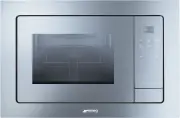
10 10 / EN Description 2.1. General Description 1. Glass window on the door 2. Catch 3. Quartz grill 4. Mica covers 5. Control panel 6. Open button 7. Slot for rotating base
Page 11 - Rotating base
11 / EN Description 2.2. Control Panel 2.3. Acessories 1. Rotating base 2. Turntable support 3. Rotating plate Grill Some models are not provided with all accessories. 1 Display 2 Program key 3 Duration key 4 Power / Weight key 5 Start key 6 Clock key 7 Stop / Safety block key 8 – Minus key 9 + Plus...
Page 13 - Use; Microwave oven operating mode
13 / EN Use 3.1. Advantages of the microwave oven In a conventional cooker, the heat that is radiated through the resistances or gas burners slowly penetrates the foods from the outside in. Therefore, there is a great loss of energy in heating the air, the oven components and the containers holding ...
Page 14 - Danger of fire or explosion; Microwave function
14 14 / EN 3.2. Instructions High temperature inside the oven during use Danger of fire or explosion Do not spray any products near the oven. Do not use or leave flammable materials near the oven. Do not use plastic kitchenware to cook food (except with the microwave function). Do not put se...
Page 15 - Lids
15 / EN Use Lids The use of glass or plastic lids or adherent film is recommended, for the following reasons: 1. They prevent excessive evaporation (especially in very long cooking periods); 2. The cooking process is faster; 3. The food does not go dry; 4. The aroma is preserved. The lid should have...
Page 17 - Microwave
17 / EN Use 3.6. Cooking Functions Microwave 1 . Press the PROGRAM KEY «P» (2). The MICROWAVE indicator lights up on the DISPLAY (1). 2 . Confirm the function by pressing the PROGRAM KEY «P» (2) again. 3. Press the DURATION KEY (3). 4. Enter the desired operating time pressing “ – ” or “ + ” keys (8...
Page 20 - Special Functions
20 20 / EN Special Functions Auto1: (cook 500g potatoes) 1. Put the potatoes (approx. 500g) with some water in a heat resistant container and place it on the rotating plate in the microwave. 2. Press the PROGRAM KEY «P» (2). 3. Select the «AUTO 1» function by pressing “ – ” or “ + ” keys (8/9). 4. C...
Page 21 - Memory function; Memory storage procedure
21 / EN Use Auto3: (slow boiled / stewed dishes) 1 . Prepare the mashed potato using 1 kg of raw potatoes. Place the mashed potato in a suitable container (25-26 cm in diameter) and then place it on the micro-oven tray. 2. Press the PROGRAM KEY «P» (2). 3 . Select the «AUTO 3» function by pressing “...
Page 22 - During Operation...; Function interruption; STOP; End of program; “End”
22 22 / EN 3.8. During Operation… During the cooking process, you may open the door at any moment, as: THE PRODUCTION OF MICROWAVES IS IMMEDIATELY INTERRUPTED. The grill is deactivated and remains at a high temperature. The timer stops and the screen shows the operating time that is left. If y...
Page 23 - Cleaning and Maintenance; Danger of burns; Do not use rough or abrasive materials; Outer surface
23 / EN Cleaning and Maintenance 4.1. Instructions High temperature inside the oven after use Danger of burns Perform cleaning only after letting the appliance cool down. Improper use Risk of damage to surfaces Do not use a steam jet to clean the appliance. Do not use cleaning products contain...
Page 24 - Mica covers
24 24 / EN Door, door-hinges and front of the appliance 1. These parts must always be clean, especially the contact surfaces between the door and the front of the appliance, so that there are no leaks. 2. To clean, use a neutral detergent and lukewarm water. Dry with a soft cloth. Mica covers Always...
Page 25 - Installation; the
25 / EN Installation 5.1. Technical Features AC voltage (See characteristics plate) Fuse 8 A / 250 V Power required 1200 W Grill power 1000 W Microwave output power 700 W Microwave frequency 2450 MHz Outer dimensions (W A D) 595 390 350 mm Cavity dimensions (W A D) 305 210 305 mm Ove...
Page 26 - Instalación / Imagens de Instalação
95 Installation Images/ Installations-Images / Imágenes de Instalación / Imagens de Instalação