Page 2 - WARNING; PLEASE READ CAREFULLY BEFORE USE • FOR HOUSEHOLD USE ONLY; SAVE THESE INSTRUCTIONS
s h a r k c l e a n . c o m s h a r k c l e a n . c o m WARNING To reduce the risk of fire, electric shock, injury, or property damage: IMPORTANT SAFETY INSTRUCTIONS PLEASE READ CAREFULLY BEFORE USE • FOR HOUSEHOLD USE ONLY SAVE THESE INSTRUCTIONS If the charging cable plug does not fit fully into t...
Page 3 - GETTING TO KNOW YOUR SHARK® AI ROBOT VACMOPTM
s h a r k c l e a n . c o m s h a r k c l e a n . c o m GETTING TO KNOW YOUR SHARK® AI ROBOT VACMOP™ GETTING TO KNOW YOUR SHARK® AI ROBOT VACMOP™ Clean Button Front Bumper Fluid Reservoir Error Indicator Light Charge Indicator Lights Wi-Fi Indicator Light Cliff and Boundary Sensors Charging Contact ...
Page 4 - DOCK SETUP; INSTALLING THE SIDE BRUSHES; Side Brushes; CHARGING; Power; Charging Dock
s h a r k c l e a n . c o m s h a r k c l e a n . c o m DOCK SETUP INSTALLING THE SIDE BRUSHES Snap the 2 included Side Brushes onto the square pegs on the bottom of the robot. If the robot has no charge or it cannot return to the dock, manually place it on the dock. The indicator light will turn bl...
Page 5 - CHARGE INDICATOR LIGHTS
s h a r k c l e a n . c o m s h a r k c l e a n . c o m CHARGE INDICATOR LIGHTS BUTTONS AND INDICATOR LIGHTS DOCK BUTTON Press to stop cleaning and send robot back to the charging dock. CHARGE INDICATOR LIGHTS Display the amount of charge remaining in the battery. WET MOPPING INDICATOR LIGHT Illumin...
Page 6 - PREP YOUR HOME; THE SHARK® AI ROBOT VACMOPTM; IQ NAVIGATIONTM AND AI LASER VISION
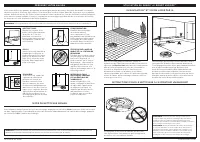
s h a r k c l e a n . c o m s h a r k c l e a n . c o m PREP YOUR HOME USING THE SHARK® AI ROBOT VACMOP™ IQ NAVIGATION™ AND AI LASER VISION After setup is complete, follow instructions in the app to help your robot conduct an Explore Run to create an initial map of your home.The robot will travel fr...
Page 7 - USING; WET MOPPING SETUP; MUST; Carpet
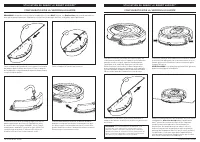
s h a r k c l e a n . c o m s h a r k c l e a n . c o m USING THE SHARK® AI ROBOT VACMOP™ USING THE SHARK® AI ROBOT VACMOP™ WET MOPPING SETUP WET MOPPING SETUP Secure the pad to the back of the reservoir. Lift open the fill cap on the top of the reservoir. Fill with VACMOP cleaning solution, or room...
Page 8 - MAINTENANCE; WI-FI TROUBLESHOOTING; ERROR CODE; USING THE SHARKCLEANTM APP AND VOICE CONTROLS
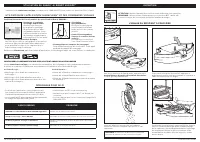
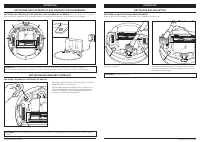
s h a r k c l e a n . c o m s h a r k c l e a n . c o m MAINTENANCE EMPTYING THE DUST BIN With the fluid reservoir removed, press the Dust Bin Release Button and slide out the dust bin. CAUTION: Turn off power before performing any maintenance. NOTE: Even when the switch is in the OFF (O) position, ...
Page 9 - CLEANING AND REPLACING THE FILTER; See sharkaccessories.com for replacement filters.; SELF-CLEANING BRUSHROLL; Self-Cleaning Brushroll
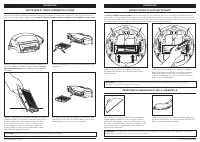
s h a r k c l e a n . c o m s h a r k c l e a n . c o m MAINTENANCE CLEANING AND REPLACING THE FILTER Remove and empty the dust bin. Clean any hair or debris off the Anti-Tangle Comb on the back of the dust bin. Pull filter out of the dust bin by the tabs. Lightly tap the filter to remove debris eve...
Page 10 - CLEANING SENSORS AND CHARGING CONTACTS; CLEAN SENSORS AND CHARGING CONTACTS AS NEEDED.; CLEANING THE WHEELS; CLEAN FRONT WHEEL PERIODICALLY.
s h a r k c l e a n . c o m s h a r k c l e a n . c o m CLEANING SENSORS AND CHARGING CONTACTS CLEANING SIDE BRUSHES MAINTENANCE Carefully unwind and remove any string or hair wrapped around brushes.Gently wipe brushes with a dry cloth. To reinstall, snap the brushes over the pegs. Spin the brushes ...
Page 11 - REPLACEMENT PARTS; TROUBLESHOOTING
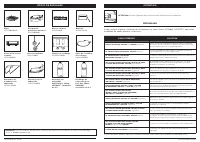
s h a r k c l e a n . c o m s h a r k c l e a n . c o m REPLACEMENT PARTS Filter XFRV2000WD Brushroll 127KY2000 Side Brushes 102KY1000 Charging Dock XDCKRV2000 Robot Dust Bin 118KY2000W Brushroll Door 121KY2000W Mop Pad 2-Pack PADRVWD02 Battery RVBAT850A Fluid Reservoir 122KY2000W Dock Landing Mat 1...
Page 12 - DESCRIPTION OF OTHER RIGHTS AND LIMITATIONS.; END-USER LICENSE AGREEMENT FOR SHARKNINJA SOFTWARE
s h a r k c l e a n . c o m s h a r k c l e a n . c o m END-USER LICENSE AGREEMENT FOR SHARKNINJA SOFTWARE IMPORTANT: PLEASE READ THE TERMS AND CONDITIONS OF THIS LICENSE AGREEMENT CAREFULLY BEFORE CONTINUING WITH THIS PROGRAM INSTALL OR USE OF THIS PRODUCT: SharkNinja Operating LLC’s (“SharkNinja”)...
Page 13 - SharkNinja; PLEASE READ CAREFULLY AND KEEP FOR FUTURE REFERENCE.; REGISTER YOUR PURCHASE
s h a r k c l e a n . c o m s h a r k c l e a n . c o m ONE (1) YEAR LIMITED WARRANTY The One (1) Year Limited Warranty applies to purchases made from authorized retailers of SharkNinja Operating LLC. Warranty coverage applies to the original owner and to the original product only and is not transfe...
Page 14 - AVERTISSEMENT; de dommage matériel :; CONSIGNES DE SÉCURITÉ IMPORTANTES; DOMESTIQUE SEULEMENT; CONSERVEZ CES INSTRUCTIONS; AVERTISSEMENTS GÉNÉRAUX
s h a r k c l e a n . c o m s h a r k c l e a n . c o m AVERTISSEMENT Afin de réduire les risques d’incendie, de décharges électriques, de blessure ou de dommage matériel : CONSIGNES DE SÉCURITÉ IMPORTANTES VEUILLEZ LES LIRE ATTENTIVEMENT AVANT L’UTILISATION • POUR UN USAGE DOMESTIQUE SEULEMENT CONS...
Page 15 - PRÉSENTATION DU SHARK® AI ROBOT VACMOPTM
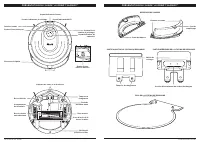
s h a r k c l e a n . c o m s h a r k c l e a n . c o m PRÉSENTATION DU SHARK® AI ROBOT VACMOP™ PRÉSENTATION DU SHARK® AI ROBOT VACMOP™ Bouton Clean (nettoyer) Parechoc avant Réservoir de liquide Voyant indicateur d’erreur Voyants indicateurs de recharge Voyant indicateur Wi-Fi Capteurs de chute et ...
Page 16 - CONFIGURATION DE LA STATION DE RECHARGE; INSTALLATION DES BROSSES LATÉRALES; brosses latérales; EN CHARGE; station de recharge
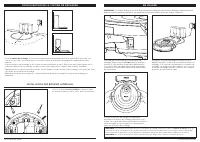
s h a r k c l e a n . c o m s h a r k c l e a n . c o m CONFIGURATION DE LA STATION DE RECHARGE INSTALLATION DES BROSSES LATÉRALES Insérez les deux brosses latérales comprises dans les chevilles carrées logées sur le dessous du robot. Si le robot n’a plus de charge et ne peut pas retourner à la stat...
Page 17 - VOYANTS INDICATEURS DE RECHARGE
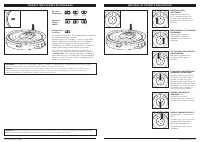
s h a r k c l e a n . c o m s h a r k c l e a n . c o m VOYANTS INDICATEURS DE RECHARGE BOUTONS ET VOYANTS INDICATEURS BOUTON DOCK (STATION DE RECHARGE) Appuyez pour arrêter le nettoyage et renvoyer l’appareil sur la station de recharge. LES VOYANTS INDICATEURS DE RECHARGE indiquent la quantité de c...
Page 18 - PRÉPAREZ VOTRE MAISON; SHARK® AI ROBOT VACMOPTM; IQ NAVIGATIONTM ET VISION LASER PAR IA
s h a r k c l e a n . c o m s h a r k c l e a n . c o m PRÉPAREZ VOTRE MAISON UTILISATION DU SHARK® AI ROBOT VACMOP™ IQ NAVIGATION™ ET VISION LASER PAR IA Une fois la configuration terminée, suivez les instructions de l’application pour aider votre robot à effectuer un Explore Run (un parcours d’exp...
Page 19 - UTILISATION DU; CONFIGURATION DE LA VADROUILLE HUMIDE; DOIT
s h a r k c l e a n . c o m s h a r k c l e a n . c o m UTILISATION DU SHARK® AI ROBOT VACMOP™ UTILISATION DU SHARK® AI ROBOT VACMOP™ CONFIGURATION DE LA VADROUILLE HUMIDE CONFIGURATION DE LA VADROUILLE HUMIDE Fixez le tampon à l’arrière du réservoir. Soulevez le bouchon de remplissage situé sur la ...
Page 20 - ENTRETIEN; CODE D’ERREUR
s h a r k c l e a n . c o m s h a r k c l e a n . c o m ENTRETIEN VIDANGE DU RÉCIPIENT À POUSSIÈRE Une fois le réservoir de liquide retiré, appuyez sur le bouton Release (dégager) du récipient à poussière et faites glisser pour le retirer. ATTENTION : Mettez l’appareil hors tension avant d’effectuer...
Page 21 - NETTOYAGE ET REMPLACEMENT DU FILTRE; peigne; BROSSE ROTATIVE AUTONETTOYANTE; brosse rotative autonettoyante
s h a r k c l e a n . c o m s h a r k c l e a n . c o m ENTRETIEN NETTOYAGE ET REMPLACEMENT DU FILTRE Retirez et videz le récipient à poussière. Retirez tous les poils, cheveux et débris coincés dans le peigne anti-enchevêtrement situé à l’arrière du récipient à poussière. Tirez sur la languette pou...
Page 22 - NETTOYAGE DES CAPTEURS ET DES CONTACTS DE CHARGEMENT; NETTOYEZ LES CAPTEURS ET LES CONTACTS DE CHARGEMENT AU BESOIN.; NETTOYEZ LES BROSSES LATÉRALES AU BESOIN.; NETTOYAGE DES ROULETTES; NETTOYEZ LA ROULETTE AVANT RÉGULIÈREMENT.
s h a r k c l e a n . c o m s h a r k c l e a n . c o m NETTOYAGE DES CAPTEURS ET DES CONTACTS DE CHARGEMENT NETTOYAGE DES BROSSES LATÉRALES ENTRETIEN Déroulez soigneusement tout fil ou cheveu enroulé autour des brosses rotatives.Essuyez délicatement les brosses avec un linge sec. Pour la réinstalla...
Page 23 - PIÈCES DE RECHANGE; DÉPANNAGE; le tableau de codes d’erreur ci-dessous :
s h a r k c l e a n . c o m s h a r k c l e a n . c o m PIÈCES DE RECHANGE Filtre XFRV2000WD Brosse rotative 127KY2000 Brosses latérales 102KY1000 Station de recharge XDCKRV2000 Récipient à poussière du robot 118KY2000W Porte de la brosse rotative 121KY2000W Batterie RVBAT850A Tapis de la station de...
Page 24 - DESCRIPTION DES AUTRES DROITS ET LIMITATIONS.
s h a r k c l e a n . c o m s h a r k c l e a n . c o m CONTRAT DE LICENCE D’UTILISATEUR FINAL POUR LE LOGICIEL SHARKNINJA IMPORTANT : VEUILLEZ LIRE ATTENTIVEMENT LES CONDITIONS DE CE CONTRAT DE LICENCE AVANT DE CONTINUER L’INSTALLATION DE CE PROGRAMME OU L’UTILISATION DE CE PRODUIT : Le Contrat de ...
Page 25 - SharkNinja Operating LLC.; RENDEMENT PRÉVU; ENREGISTREZ VOTRE ACHAT
s h a r k c l e a n . c o m s h a r k c l e a n . c o m GARANTIE LIMITÉE D’UN (1) AN La garantie limitée d’un (1) an s’applique aux achats effectués auprès de détaillants autorisés de SharkNinja Operating LLC. La garantie s’applique uniquement au premier propriétaire et au produit original et n’est ...
Page 26 - ADVERTENCIA; LEA DETENIDAMENTE ANTES DE USAR • SOLO PARA USO DOMÉSTICO; GUARDE ESTAS INSTRUCCIONES
s h a r k c l e a n . c o m s h a r k c l e a n . c o m ADVERTENCIA Para reducir el riesgo de incendio, descarga eléctrica, lesión o daños a la propiedad: INSTRUCCIONES DE SEGURIDAD IMPORTANTES LEA DETENIDAMENTE ANTES DE USAR • SOLO PARA USO DOMÉSTICO GUARDE ESTAS INSTRUCCIONES Si el enchufe del cab...
Page 27 - CONOZCA EL AI ROBOT SHARK® VACMOPTM
s h a r k c l e a n . c o m s h a r k c l e a n . c o m CONOZCA EL AI ROBOT SHARK® VACMOP™ CONOZCA EL AI ROBOT SHARK® VACMOP™ Botón Clean (limpieza) Parachoques delantero Depósito de líquidos Luz indicadora de error Luces indicadoras de carga Luz indicadora de wifi Sensores de bordes y desniveles Co...
Page 28 - CONFIGURACIÓN DE LA BASE; INSTALACIÓN DE LOS CEPILLOS LATERALES; cepillos laterales; CARGA; base de carga
s h a r k c l e a n . c o m s h a r k c l e a n . c o m CONFIGURACIÓN DE LA BASE INSTALACIÓN DE LOS CEPILLOS LATERALES Coloque los 2 cepillos laterales incluidos en los soportes cuadrados de la parte inferior del robot aspirador. Si el robot no tiene carga o no puede volver a la base de carga, colóq...
Page 29 - LUCES INDICADORAS DE CARGA
s h a r k c l e a n . c o m s h a r k c l e a n . c o m LUCES INDICADORAS DE CARGA BOTONES Y LUCES INDICADORAS BOTÓN DOCK (BASE) Presione para detener la limpieza y hacer que el robot vuelva a la base de carga. LUCES INDICADORAS DE CARGA Muestran la cantidad de carga que queda en la batería. LA LUZ ...
Page 30 - PREPARE SU HOGAR; DE VACMOPTM DEL AI ROBOT SHARK®; IQ NAVIGATIONTM Y AI LASER VISION
s h a r k c l e a n . c o m s h a r k c l e a n . c o m PREPARE SU HOGAR USO DE VACMOP™ DEL AI ROBOT SHARK® IQ NAVIGATION™ Y AI LASER VISION Después de que la configuración esté completa, siga las instrucciones de la aplicación para ayudar al robot a hacer un Explore Run (recorrido de exploración) y...
Page 31 - USO; CONFIGURACIÓN DE FREGADO HÚMEDO; DEBE
s h a r k c l e a n . c o m s h a r k c l e a n . c o m USO DE VACMOP™ DEL AI ROBOT SHARK® USO DE VACMOP™ DEL AI ROBOT SHARK® CONFIGURACIÓN DE FREGADO HÚMEDO CONFIGURACIÓN DE FREGADO HÚMEDO Asegure la almohadilla en la parte posterior del depósito. Levante y abra la tapa de llenado ubicada en la par...
Page 32 - MANTENIMIENTO; SOLUCIÓN DE PROBLEMAS DE WIFI; CÓDIGO DE ERROR; USO DE LA APLICACIÓN SHARKCLEANTM Y LOS CONTROLES DE VOZ
s h a r k c l e a n . c o m s h a r k c l e a n . c o m MANTENIMIENTO VACIADO DEL RECIPIENTE PARA EL POLVO Luego de retirar el depósito de líquidos, presione el botón de liberación del recipiente para el polvo y deslice hacia afuera el recipiente. PRECAUCIÓN: apague la unidad antes de realizar cualq...
Page 33 - CÓMO LIMPIAR Y REEMPLAZAR EL FILTRO; peine antienredos; CEPILLO GIRATORIO DE AUTOLIMPIEZA; cepillo giratorio de autolimpieza
s h a r k c l e a n . c o m s h a r k c l e a n . c o m MANTENIMIENTO CÓMO LIMPIAR Y REEMPLAZAR EL FILTRO Retire y vacíe el recipiente para el polvo. Retire los cabellos o escombros del peine antienredos que se encuentra en la parte posterior del recipiente para el polvo. Tire del filtro del recipie...
Page 34 - LIMPIEZA DE LOS SENSORES Y LOS CONTACTOS DE CARGA; LIMPIE LOS SENSORES Y LOS CONTACTOS DE CARGA SEGÚN SEA NECESARIO.; LIMPIEZA DE LAS RUEDAS; LIMPIE LA RUEDA DELANTERA DE FORMA PERIÓDICA.
s h a r k c l e a n . c o m s h a r k c l e a n . c o m LIMPIEZA DE LOS SENSORES Y LOS CONTACTOS DE CARGA LIMPIEZA DE LOS CEPILLOS LATERALES MANTENIMIENTO Desenrolle y retire cuidadosamente cualquier hilo o pelo enredado en los cepillos.Limpie suavemente los cepillos con un paño seco. Para volver a ...
Page 35 - PIEZAS DE REPUESTO; SOLUCIÓN DE PROBLEMAS; siguiente tabla de códigos de error:
s h a r k c l e a n . c o m s h a r k c l e a n . c o m PIEZAS DE REPUESTO Filtro XFRV2000WD Cepillo giratorio 127KY2000 Cepillos laterales 102KY1000 Base de carga XDCKRV2000 Recipiente para el polvo del robot 118KY2000W Cubierta de cepillo giratorio 121KY2000W Batería RVBAT850A Plataforma de descan...
Page 36 - DESCRIPCIÓN DE OTROS DERECHOS Y LIMITACIONES.; CONTRATO DE LICENCIA DEL USUARIO FINAL DEL SOFTWARE SHARKNINJA
s h a r k c l e a n . c o m s h a r k c l e a n . c o m CONTRATO DE LICENCIA DEL USUARIO FINAL DEL SOFTWARE SHARKNINJA IMPORTANTE: LEA ATENTAMENTE LOS TÉRMINOS Y CONDICIONES DE ESTE CONTRATO DE LICENCIA ANTES DE CONTINUAR CON LA INSTALACIÓN DE ESTE PROGRAMA O DE USAR ESTE PRODUCTO: El Contrato de li...
Page 37 - RENDIMIENTO PREVISTO; REGISTRE SU COMPRA
s h a r k c l e a n . c o m s h a r k c l e a n . c o m GARANTÍA LIMITADA DE UN (1) AÑO La garantía limitada de un (1) año se aplica a las compras realizadas a los vendedores minoristas autorizados de SharkNinja Operating LLC. La cobertura de garantía se aplica solo al propietario y al producto orig...





 Shark NV356E
User Manual
Shark NV356E
User Manual
 Shark BU3521
User Manual
Shark BU3521
User Manual
 Shark S8201
User Manual
Shark S8201
User Manual
 Shark FA222
Manual
Shark FA222
Manual
 Shark S5003D
User Manual
Shark S5003D
User Manual
 Shark NV141
User Manual
Shark NV141
User Manual
 Shark S7201
User Manual
Shark S7201
User Manual
 Shark RV2410WD
User Manual
Shark RV2410WD
User Manual
 Shark ZD201
User Manual
Shark ZD201
User Manual
 Shark AZ913ANZ
User Manual
Shark AZ913ANZ
User Manual
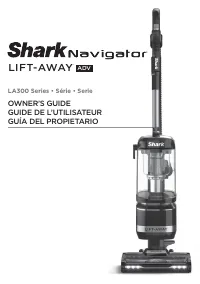 Shark LA322
User Manual
Shark LA322
User Manual
 Shark HZ251
User Manual
Shark HZ251
User Manual
 Shark SV1115
Manual
Shark SV1115
Manual
 Shark WD101
User Manual
Shark WD101
User Manual
 Shark HP200
User Manual
Shark HP200
User Manual