Page 2 - WARNHINWEIS; qualifizierten Elektriker.; DIESE GEBRAUCHSANWEISUNG; DEUT
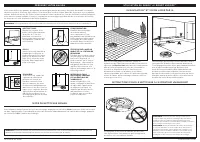
s h a r k c l e a n . e u s h a r k c l e a n . e u WARNHINWEIS So verringern Sie das Brand-, Elektroschock-, Verletzungsrisiko oder Sachschaden: WICHTIGE SICHERHEITSHINWEISE VOR DEM GEBRAUCH BITTE SORGFÄLTIG DURCHLESEN • NUR FÜR DEN HAUSGEBRAUCH Wenn der Stecker des Ladekabels nicht vollständig in ...
Page 3 - EINRICHTUNG; Um eine Kartografierung Ihres; Erkundungslauf; SCHRITTE ZUM ERFOLG; LEBEN MIT IHREM ROBOTER
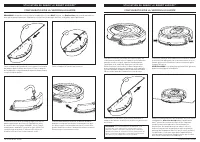
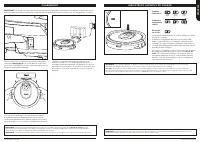
s h a r k c l e a n . e u s h a r k c l e a n . e u EINRICHTUNG Um beste Ergeb- nisse zu erzielen, stellen Sie das Gerät auf den nackten Boden. EINRICHTEN DES DOCKS 1.6m 1m 1m • Finden Sie einen festen Standort für das Dock, wie oben abgebildet, in einem zentralen Bereich mit einem starken WLAN-Sign...
Page 4 - DIE SHARKCLEAN APP MIT DEM ROBOTER VERBINDEN; SIE KÖNNEN KEINE VERBINDUNG; LERNEN SIE IHREN SHARK® AI ROBOT KENNEN
s h a r k c l e a n . e u s h a r k c l e a n . e u DIE SHARKCLEAN APP MIT DEM ROBOTER VERBINDEN SCHRITT 1 Erstellen eines Kontos SCHRITT 2 Roboter WLAN aktivieren SCHRITT 3 Roboter auswählen (nur Apple iOS) • Öffnen Sie die SharkClean App und richten Sie Ihr Konto ein. • Halten Sie die Docktaste un...
Page 5 - DIE SEITENBÜRSTEN MONTIEREN
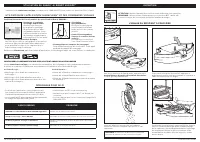
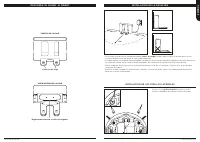
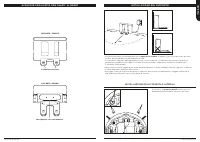
s h a r k c l e a n . e u s h a r k c l e a n . e u LERNEN SIE IHREN SHARK® AI ROBOT KENNEN VORDERSEITE DES DOCKS Ladekontakte UNTERSEITE DES DOCKS Ladekabelwickel DOCK-EINRICHTUNG DIE SEITENBÜRSTEN MONTIEREN Rasten Sie die beiden mitgelieferten Seitenbürsten in die viereckigen Zapfen an der Unterse...
Page 6 - WIRD GELADEN; ANZEIGELEUCHTEN FÜR DEN LADESTAND
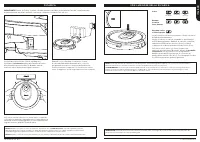
s h a r k c l e a n . e u s h a r k c l e a n . e u Wenn der Akku des Roboters leer ist oder der Roboter nicht zum Dock fährt, bringen Sie ihn eigenhändig hin. Die Anzeigeleuchte blinkt und der Roboter gibt ein akustisches Signal von sich, wenn der Aufladevorgang beginnt. Wenn der Reinigungszyklus a...
Page 7 - TASTEN UND ANZEIGELEUCHTEN; BEREITEN SIE IHR ZUHAUSE VOR
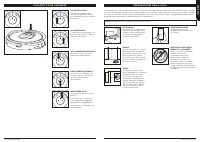
s h a r k c l e a n . e u s h a r k c l e a n . e u TASTEN UND ANZEIGELEUCHTEN DOCKTASTE Drücken Sie diese Taste, um den Reinigungsvorgang anzuhalten und den Roboter zur Ladebasis zurückzuschicken. ANZEIGELEUCHTEN FÜR DEN LADESTAND Zeigen die verbleibende Akkuladung an. „!“ FEHLERANZEIGE Siehe Absch...
Page 8 - VERWENDUNG DES; MANUELLER REINIGUNGSMODUS; SHARK® AI ROBOT; FEHLERCODE; VERWENDUNG DER SHARKCLEAN APP
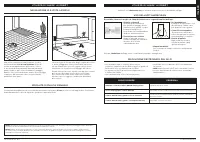
s h a r k c l e a n . e u s h a r k c l e a n . e u VERWENDUNG DES SHARK® AI ROBOT IQ-NAVIGATION UND KI-LASERSICHT Nachdem die Einrichtung abgeschlossen ist, führt Ihr Roboter einen Erkundungslauf durch, um eine erste Kartierung Ihres Wohnraums zu erstellen. Der Roboter bewegt sich während der Reini...
Page 9 - Staubbehälter-Entriegelungsknopf; WARTUNG; REINIGUNG UND AUSTAUSCH DES FILTERS; Anti-Verhedderungskamm
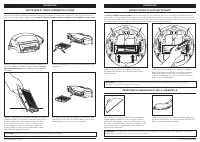
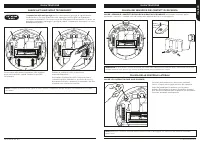
s h a r k c l e a n . e u s h a r k c l e a n . e u WARTUNG SO LEEREN SIE DEN STAUBBEHÄLTER Drücken Sie auf den Staubbehälter-Entriegelungsknopf und ziehen Sie den Staubbehälter heraus. VORSICHT: Schalten Sie das Gerät aus, bevor Sie Wartungsarbeiten durchführen. HINWEIS: In der AUS-Position (O) ver...
Page 10 - SHARK ANTI HAIR WRAP TECHNOLOGY; Anti Hair Wrap-Bürstenrolle; REINIGUNG VON SENSOREN UND LADEKONTAKTEN; REINIGEN SIE DIE SEITENBÜRSTEN JE NACH BEDARF.
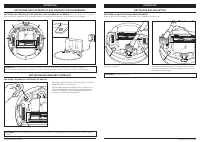
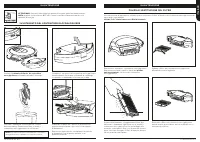
s h a r k c l e a n . e u s h a r k c l e a n . e u SHARK ANTI HAIR WRAP TECHNOLOGY ® WARTUNG Die Anti Hair Wrap-Bürstenrolle entfernt aktiv verwickelte Haare, während der Roboter reinigt. Sollten weiterhin Schmutzablagerungen um die Bürstenrolle gewickelt sein, lassen Sie den Roboter weiterlaufen, ...
Page 11 - REINIGUNG DER RÄDER; ERSATZTEILE
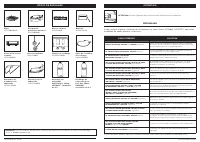
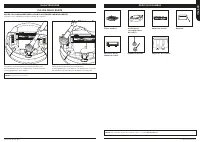
s h a r k c l e a n . e u s h a r k c l e a n . e u REINIGUNG DER RÄDER WARTUNG REINIGEN SIE DAS VORDERRADGEHÄUSE REGELMÄßIG Auf sharkclean.eu finden Sie Ersatzteile. Drehen Sie das Vorderrad, während Sie Schmutz und Ablagerungen leicht wegbürsten. Reinigen Sie das Rad und das Gehäuse um das Rad her...
Page 12 - FEHLERBEHEBUNG; unten stehende Fehlercodetabelle:; Wie registriere ich meine verlängerte Shark® Garantie?; ZWEIJÄHRIGE BESCHRÄNKTE GARANTIE
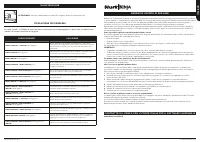
s h a r k c l e a n . e u s h a r k c l e a n . e u WARTUNG FEHLERCODE LÖSUNG REINIGEN (ROT) + ! (ROT) blinkt Ausfall des Saugmotors. Entfernen und entleeren Sie den Staubbehälter, reinigen Sie die Filter und entfernen Sie etwaige Verstopfungen, um sicherzustellen, dass die Saugkraft nicht beeinträc...
Page 13 - WARNING; PLEASE READ CAREFULLY BEFORE USE • FOR HOUSEHOLD USE ONLY; DO NOT force into socket or try to modify to fit.; SAVE THESE INSTRUCTIONS; ENGLISH
s h a r k c l e a n . e u s h a r k c l e a n . e u WARNING To reduce the risk of fire, electric shock, injury, or property damage: IMPORTANT SAFETY INSTRUCTIONS PLEASE READ CAREFULLY BEFORE USE • FOR HOUSEHOLD USE ONLY If the charging cable plug does not fit fully into the socket, contact a qualifi...
Page 14 - s h a r k c l e a n . e u; SETUP; To set up a map of your home in; STEPS FOR SUCCESS; LIVING WITH YOUR ROBOT
s h a r k c l e a n . e u SETUP For best results, place on bare floor. SET UP THE DOCK 1.6m 1m 1m • Find a permanent location for the dock, as pictured above, in a central area with a strong Wi-Fi signal. • Place the dock on bare floor, with its back against the wall. • Plug in the dock. The Indicat...
Page 15 - CONNECTING THE SHARKCLEAN APP AND ROBOT; Restart your phone; GETTING TO KNOW YOUR SHARK® AI ROBOT
s h a r k c l e a n . e u s h a r k c l e a n . e u CONNECTING THE SHARKCLEAN APP AND ROBOT STEP 1 Create An Account STEP 2 Activate Robot Wi-Fi STEP 3 Select Robot (Apple iOS Only) • Open the SharkClean app and set up your account. • Hold down Dock and Clean buttons simultaneously until Wi- Fi ligh...
Page 16 - INSTALLING THE SIDE BRUSHES
s h a r k c l e a n . e u s h a r k c l e a n . e u GETTING TO KNOW YOUR SHARK® AI ROBOT DOCK FRONT Charging Contacts DOCK BOTTOM Charger Cord Wrap DOCK SETUP INSTALLING THE SIDE BRUSHES Snap the 2 included Side Brushes onto the square pegs on the bottom of the robot. 1.6m 1m 1m • Select a permanent...
Page 17 - CHARGING; CHARGE INDICATOR LIGHTS
s h a r k c l e a n . e u s h a r k c l e a n . e u If the robot has no charge or it cannot return to the dock, manually place it on the dock. The indicator light will flash and the robot will beep when charging begins. When the cleaning cycle is complete, the battery is low, or when programmed to i...
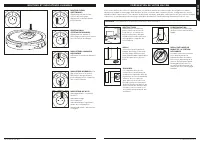
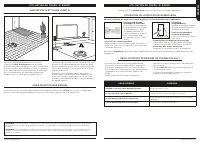
Page 18 - BUTTONS AND INDICATOR LIGHTS; PREP YOUR HOME
s h a r k c l e a n . e u s h a r k c l e a n . e u BUTTONS AND INDICATOR LIGHTS DOCK BUTTON Press to stop cleaning and send robot back to the charging dock. CHARGE INDICATOR LIGHTS Display the amount of charge remaining in the battery. “!” ERROR INDICATOR See Troubleshooting section for full list o...
Page 19 - USING; IQ NAVIGATION AND AI LASER VISION; THE SHARK® AI ROBOT; ERROR CODE; USING THE SHARKCLEAN APP
s h a r k c l e a n . e u s h a r k c l e a n . e u USING THE SHARK® AI ROBOT IQ NAVIGATION AND AI LASER VISION After setup is complete, your robot will conduct an Explore Run to create an initial map of your home. The robot will travel from room to room to identify walls, furniture, and other obsta...
Page 20 - Dustbin Release Button; MAINTENANCE; CLEANING AND REPLACING THE FILTER; See sharkclean.eu for replacement filters.
s h a r k c l e a n . e u s h a r k c l e a n . e u MAINTENANCE EMPTYING THE DUST BIN Press the Dustbin Release Button and slide out the dust bin. CAUTION: Turn off power before performing any maintenance. NOTE: in the OFF (O) position, the robot still uses a small amount of power. To open the dust ...
Page 21 - Anti Hair Wrap Brush-roll; CLEANING SENSORS AND CHARGING CONTACTS; CLEAN SENSORS AND CHARGING CONTACTS AS NEEDED.
s h a r k c l e a n . e u s h a r k c l e a n . e u SHARK ANTI HAIR WRAP TECHNOLOGY ® MAINTENANCE The Anti Hair Wrap Brush-roll actively removes hair wrap while your robot cleans. If some debris remains wrapped around the brush-roll, continue to run the robot to give the brush-roll time to clean its...
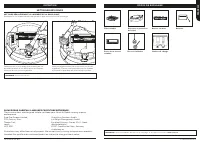
Page 22 - CLEANING THE WHEELS; REPLACEMENT PARTS
s h a r k c l e a n . e u s h a r k c l e a n . e u CLEANING THE WHEELS MAINTENANCE CLEAN FRONT WHEEL HOUSING PERIODICALLY. See sharkclean.eu for replacement parts. Rotate the front wheel while lightly brushing away dirt and debris. Clean the wheel and the housing around it. Periodically clean the d...
Page 23 - TROUBLESHOOTING; END-USER LICENSE AGREEMENT FOR SHARKNINJA SOFTWARE; How do I register my extended Shark® guarantee?
s h a r k c l e a n . e u s h a r k c l e a n . e u MAINTENANCE ERROR CODE SOLUTION CLEAN (RED) + ! (RED) flashing Suction motor failure. Remove and empty the dust bin, clean the filters, and remove blockages to ensure nothing is reducing suction. CLEAN (RED) flashing Robot may be stuck on an obstac...
Page 24 - ADVERTENCIA; INSTRUCCIONES DE SEGURIDAD; ATENDER EN UNA HABITACIÓN A LA QUE; GUARDE ESTAS INSTRUCCIONES; SOLAMENTE
s h a r k c l e a n . e u s h a r k c l e a n . e u ADVERTENCIA Para reducir el riesgo de incendio, descarga eléctrica, lesiones o daños en la propiedad, siga estas instrucciones: INSTRUCCIONES DE SEGURIDAD IMPORTANTES LEER ATENTAMENTE ANTES DEL USO • PARA USO EXCLUSIVAMENTE DOMÉSTICO Si el cabezal ...
Page 25 - CONFIGURACIÓN; Para configurar un mapa de su casa; recorrido de exploración.; PASOS PARA EL EXITO; CONVIVIR CON SU ROBOT; ESP
s h a r k c l e a n . e u s h a r k c l e a n . e u CONFIGURACIÓN Para unos resultados óptimos, colóquela sobre un suelo despejado. CONFIGURACIÓN DE LA ESTACIÓN DE CARGA 1.6m 1m 1m • Busque una ubicación permanente para la base, como en la imagen superior, en una zona céntrica con buena señal de wif...
Page 26 - CONECTAR LA APLICACIÓN SHARKCLEAN Y EL ROBOT; ¿NO SE PUEDE CONECTAR; DESCUBRA SU SHARK® AI ROBOT
s h a r k c l e a n . e u s h a r k c l e a n . e u CONECTAR LA APLICACIÓN SHARKCLEAN Y EL ROBOT PASO 1 Crear una cuenta PASO 2 Activar la wifi del robot PASO 3 Seleccionar el robot (solo en Apple iOS) • Abra la aplicación SharkClean y configure su cuenta. • Mantenga pulsados los botones Base y Limp...
Page 27 - INSTALACIÓN DE LOS CEPILLOS LATERALES
s h a r k c l e a n . e u s h a r k c l e a n . e u DESCUBRA SU SHARK® AI ROBOT FRONTAL DE LA BASE Contactos de carga PARTE INFERIOR DE LA BASE Enganche para enrollar el cable del cargador INSTALACIÓN DE LA ESTACIÓN INSTALACIÓN DE LOS CEPILLOS LATERALES Acople los 2 cepillos laterales incluidos en l...
Page 28 - CARGA; INDICADORES LUMINOSOS DE CARGA
s h a r k c l e a n . e u s h a r k c l e a n . e u Si el robot no tiene batería y no puede volver a la base, llévelo manualmente. El indicador luminoso de la base parpadeará en azul y el robot emitirá un pitido cuando la carga se inicie. Cuando el ciclo de limpieza finalice o si la batería está a p...
Page 29 - BOTONES E INDICADORES LUMINOSOS; PREPARE SU VIVIENDA
s h a r k c l e a n . e u s h a r k c l e a n . e u BOTONES E INDICADORES LUMINOSOS BOTÓN DE ACOPLAMIENTO Púlselo para detener la limpieza y enviar el robot de vuelta a la estación de carga. INDICADORES LUMINOSOS DE CARGA Muestran el nivel de carga de la batería. INDICADOR DE ERROR “!” Consulte una ...
Page 30 - CÓMO USAR; IQ NAVIGATION Y AI LASER VISION; EL ROBOT SHARK® AI ROBOT; RESOLUCIÓN DE PROBLEMAS WIFI; CÓDIGO DE ERROR; CÓMO USAR LA APLICACIÓN SHARKCLEAN
s h a r k c l e a n . e u s h a r k c l e a n . e u CÓMO USAR EL ROBOT SHARK® AI ROBOT IQ NAVIGATION Y AI LASER VISION Una vez ha completado la configuración, siga las instrucciones en la aplicación para ayudar a que su robot realice un recorrido de exploración para crear un mapa inicial de su casa....
Page 31 - botón de desenganche del depósito; MANTENIMIENTO; LIMPIEZA Y SUSTITUCIÓN DEL FILTRO; peine antienredos
s h a r k c l e a n . e u s h a r k c l e a n . e u MANTENIMIENTO VACIADO DEL DEPÓSITO DE POLVO Pulse el botón de desenganche del depósito de polvo y deslice el depósito de polvo hacia fuera. PRECAUCIÓN: Desconecte la alimentación antes de realizar cualquier tarea de mantenimiento. ADVERTENCIA: En l...
Page 32 - cepillo giratorio antienredos; LIMPIEZA DE LOS SENSORES Y CONTACTOS DE CARGA; LIMPIE LOS SENSORES Y CONTACTOS DE CARGA CUANDO SEA NECESARIO.; LIMPIE LOS CEPILLOS LATERALES CUANDO
s h a r k c l e a n . e u s h a r k c l e a n . e u SHARK ANTI HAIR WRAP TECHNOLOGY ® MANTENIMIENTO El cepillo giratorio antienredos elimina el pelo activamente mientras el robot limpia. Si queda algún residuo enrollado en el cepillo giratorio, siga limpiando para permitir que el cepillo se limpie a...
Page 33 - LIMPIEZA DE LAS RUEDAS; PIEZAS DE REPUESTO
s h a r k c l e a n . e u s h a r k c l e a n . e u LIMPIEZA DE LAS RUEDAS MANTENIMIENTO LIMPIE LA CAVIDAD DE LA RUEDA DELANTERA PERIÓDICAMENTE. Busque piezas de recambio en sharkclean.eu Gire la rueda delantera mientras cepilla cualquier suciedad o residuos. Limpie la rueda y la cavidad de alrededo...
Page 34 - SOLUCIÓN DE PROBLEMAS; GARANTÍA LIMITADA DE DOS AÑOS; ¿Cómo debo registrar mi garantía ampliada Shark®?; ACUERDO DE LICENCIA DE USUARIO FINAL DEL SOFTWARE DE SHARKNINJA
s h a r k c l e a n . e u s h a r k c l e a n . e u MANTENIMIENTO CÓDIGO DE ERROR SOLUCIÓN LIMPIEZA (ROJO) + ! (ROJO) parpadeante Fallo del motor de succión. Extraiga y vacíe el depósito de polvo, limpie los filtros y elimine los bloqueos para garantizar que nada dificulta la succión. LIMPIEZA (ROJO...
Page 35 - AVERTISSEMENT; UNIQUEMENT; CONSERVEZ CES INSTRUCTIONS; AN
s h a r k c l e a n . e u s h a r k c l e a n . e u AVERTISSEMENT Pour réduire les risques d’incendie, de chocs électriques, de blessures ou de dommages matériels : CONSIGNES DE SÉCURITÉ IMPORTANTES VEUILLEZ LIRE ATTENTIVEMENT AVANT UTILISATION • DESTINÉ À UN USAGE DOMESTIQUE UNIQUEMENT Si la fiche ...
Page 36 - CONFIGURATION; Pour configurer une carte de votre; MISE EN PLACE; VOTRE ROBOT AU QUOTIDIEN
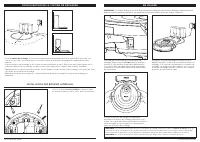
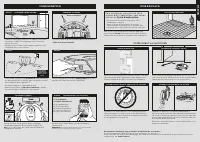
s h a r k c l e a n . e u s h a r k c l e a n . e u CONFIGURATION Pour obtenir de meilleurs résultats, placez le robot sur un sol nu. CONFIGURER LA STATION 1.6m 1m 1m • Trouvez un emplacement permanent pour la station, tel que représenté ci-dessus, dans un espace central présentant un bon signal Wi-...
Page 37 - CONNEXION DE L’APPLI SHARKCLEAN ET DU ROBOT; VOUS N’ARRIVEZ PAS À ÉTABLIR; DESCRIPTIF TECHNIQUE DE VOTRE SHARK® AI ROBOT
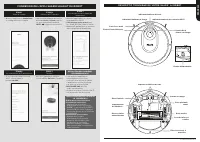
s h a r k c l e a n . e u s h a r k c l e a n . e u CONNEXION DE L’APPLI SHARKCLEAN ET DU ROBOT ÉTAPE 1 Créer un compte ÉTAPE 2 Activer le Wi-Fi du robot ÉTAPE 3 Sélectionner le robot (Apple iOS uniquement) • Ouvrez l’application SharkClean et configurez votre compte. • Appuyez simultanément sur les...
Page 38 - INSTALLATION DES BROSSES LATÉRALES
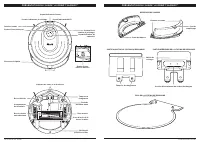
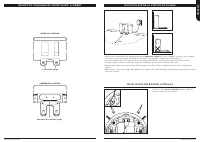
s h a r k c l e a n . e u s h a r k c l e a n . e u DESCRIPTIF TECHNIQUE DE VOTRE SHARK® AI ROBOT AVANT DE LA STATION Contacts de charge ARRIÈRE DE LA STATION Enrouleur du cordon de charge MISE EN PLACE DE LA STATION DE CHARGE INSTALLATION DES BROSSES LATÉRALES Placez les deux brosses latérales incl...
Page 39 - CHARGEMENT; INDICATEURS LUMINEUX DE CHARGE
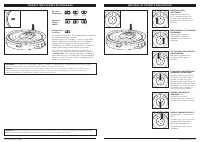
s h a r k c l e a n . e u s h a r k c l e a n . e u Si le robot est déchargé ou ne peut pas retourner à la station, placez-le manuellement sur la station. L’indicateur lumineux de la station clignote et le robot émet un signal sonore lorsque le chargement démarre. Lorsque le cycle de nettoyage est t...
Page 40 - BOUTONS ET INDICATEURS LUMINEUX; PRÉPARATION DE VOTRE MAISON
s h a r k c l e a n . e u s h a r k c l e a n . e u BOUTONS ET INDICATEURS LUMINEUX BOUTON DOCK (STATION DE CHARGE) Appuyez pour arrêter le nettoyage et renvoyer le robot vers la station de charge. INDICATEURS LUMINEUX DE CHARGE Affichent le niveau de batterie restant. INDICATEUR D’ERREUR « ! » Repo...
Page 41 - UTILISATION; NAVIGATION IQ ET VISION LASER AI; DU SHARK® AI ROBOT; RÉSOLUTION DES PROBLÈMES DE CONNEXION WI-FI; CODE D’ERREUR; UTILISATION DE L’APPLICATION SHARKCLEAN
s h a r k c l e a n . e u s h a r k c l e a n . e u UTILISATION DU SHARK® AI ROBOT NAVIGATION IQ ET VISION LASER AI Une fois la configuration terminée, votre robot réalisera un Cycle d’exploration pour créer une première carte de votre maison. Le robot se déplacera de pièce en pièce pour identifier ...
Page 42 - bouton de déverrouillage du réservoir; ENTRETIEN; NETTOYAGE ET REMPLACEMENT DU FILTRE; enchevêtrement
s h a r k c l e a n . e u s h a r k c l e a n . e u ENTRETIEN VIDAGE DU RÉSERVOIR À POUSSIÈRE Appuyez sur le bouton de déverrouillage du réservoir à poussière et faites glisser le réservoir pour le retirer. ATTENTION : coupez l’alimentation avant toute opération d’entretien. REMARQUE : en position O...
Page 43 - TECHNOLOGIE SHARK ANTI HAIR WRAP TECHNOLOGY; brosse rotative anti-enroulement des cheveux; NETTOYAGE DES CAPTEURS ET DES CONTACTS DE CHARGE; NETTOYEZ LES BROSSES LATÉRALES SI CELA EST NÉCESSAIRE.
s h a r k c l e a n . e u s h a r k c l e a n . e u TECHNOLOGIE SHARK ANTI HAIR WRAP TECHNOLOGY ® ENTRETIEN La brosse rotative anti-enroulement des cheveux élimine les cheveux enroulés de manière active pendant que le robot effectue son nettoyage. Si certains débris restent enroulés autour de la bro...
Page 44 - NETTOYAGE DES ROUES; PIÈCES DE RECHANGE
s h a r k c l e a n . e u s h a r k c l e a n . e u NETTOYAGE DES ROUES ENTRETIEN NETTOYEZ RÉGULIÈREMENT LE LOGEMENT DE LA ROUE AVANT. Consultez le site sharkclean.eu pour en savoir plus sur les pièces de rechange. Faites pivoter la roue avant tout en brossant en douceur la saleté et les débris pour...
Page 45 - RÉSOLUTION DES PROBLÈMES; (garanties légales et garantie commerciale shark de 2 ans)
s h a r k c l e a n . e u s h a r k c l e a n . e u ENTRETIEN CODE D’ERREUR SOLUTION CLEAN (NETTOYER) (ROUGE) + ! (ROUGE) clignotant Défaillance du moteur d’aspiration. Retirez et videz le réservoir à poussière, nettoyez les filtres et éliminez les obstructions pour vous assurer que rien n’entrave l...
Page 46 - AVVERTENZA; ALIANO
s h a r k c l e a n . e u s h a r k c l e a n . e u AVVERTENZA Per ridurre il rischio di incendio, scosse elettriche, lesioni o danni materiali: IMPORTANTI ISTRUZIONI DI SICUREZZA LEGGERE ATTENTAMENTE PRIMA DELL’UTILIZZO • SOLO PER IMPIEGO DOMESTICO Se la spina del cavo di ricarica non entra per int...
Page 47 - PREDISPOSIZIONE; Per impostare una mappa della casa; ciclo di esplorazione.; PROCEDURA PER UN USO OTTIMALE; VIVERE CON IL ROBOT
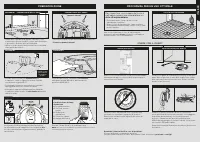
s h a r k c l e a n . e u s h a r k c l e a n . e u PREDISPOSIZIONE Per risultati ottimali, posizio- nare il supporto sul pavimento sgombro. PREDISPOSIZIONE DEL SUPPORTO 1.6m 1m 1m • Trovare una collocazione permanente per il supporto, come in figura, in un’area centrale con un buon segnale Wi-Fi. •...
Page 48 - CONNESSIONE FRA L’APP SHARKCLEAN E IL ROBOT; IMPOSSIBILE CONNETTERSI AL; ACQUISIRE FAMILIARITÀ CON SHARK® AI ROBOT
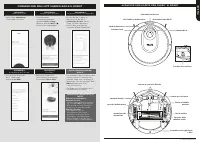
s h a r k c l e a n . e u s h a r k c l e a n . e u CONNESSIONE FRA L’APP SHARKCLEAN E IL ROBOT PASSAGGIO 1 Creare un account PASSAGGIO 2 Attivare il Wi-Fi del robot PASSAGGIO 3 Selezionare il robot (solo Apple iOS) • Aprire l’app SharkClean e impostare l’account. • Tenere premuti contemporaneamente...
Page 49 - Contatti per la ricarica; INSTALLAZIONE DEL SUPPORTO; INSTALLAZIONE DELLE SPAZZOLE LATERALI; spazzole laterali
s h a r k c l e a n . e u s h a r k c l e a n . e u ACQUISIRE FAMILIARITÀ CON SHARK® AI ROBOT SUPPORTO - FRONTE Contatti per la ricarica SUPPORTO - FONDO Avvolgimento cavo caricabatterie INSTALLAZIONE DEL SUPPORTO INSTALLAZIONE DELLE SPAZZOLE LATERALI Innestare le 2 spazzole laterali incluse nei pio...
Page 50 - RICARICA; SPIE LUMINOSE DELLA RICARICA
s h a r k c l e a n . e u s h a r k c l e a n . e u Se il robot non ha carica o non torna verso il supporto, collocarlo sul supporto manualmente. La spia luminosa emetterà una luce lampeggiante e il robot emetterà un segnale acustico quando la carica inizia. Quando il ciclo di pulizia è completo, il...
Page 51 - PULSANTI E SPIE LUMINOSE; PREPARAZIONE DELLA CASA
s h a r k c l e a n . e u s h a r k c l e a n . e u PULSANTI E SPIE LUMINOSE PULSANTE DOCK Premere per interrompere la pulizia e far tornare il robot al supporto di ricarica. SPIE LUMINOSE DI RICARICA Mostrano il livello di carica rimanente nella batteria. INDICATORE DI ERRORE “!” Per un elenco comp...
Page 52 - UTILIZZO DI; NAVIGAZIONE IQ E VISTA LASER AI; RISOLUZIONE DEI PROBLEMI DEL WI-FI; CODICE ERRORE; USO DELL’APP SHARKCLEAN
s h a r k c l e a n . e u s h a r k c l e a n . e u UTILIZZO DI SHARK® AI ROBOT NAVIGAZIONE IQ E VISTA LASER AI Una volta completata l’impostazione, il robot a effettuerà un ciclo di esplorazione al fine di creare una mappa iniziale della casa. Il robot si sposterà da una stanza all’altra individuan...
Page 53 - pulsante di rilascio del contenitore; MANUTENZIONE; PULIZIA E SOSTITUZIONE DEL FILTRO; pettine
s h a r k c l e a n . e u s h a r k c l e a n . e u MANUTENZIONE SVUOTAMENTO DEL CONTENITORE RACCOGLIPOLVERE Premere il pulsante di rilascio del contenitore raccoglipolvere ed estrarlo facendolo scivolare. ATTENZIONE: Staccare l’alimentazione prima di eseguire qualsiasi manutenzione. NOTA: quando è ...
Page 54 - spazzola a rullo anti-grovigli; PULIZIA DEI SENSORI E DEI CONTATTI DI RICARICA; PULIRE I SENSORI E I CONTATTI DI RICARICA IN BASE ALLE ESIGENZE.
s h a r k c l e a n . e u s h a r k c l e a n . e u SHARK ANTI HAIR WRAP TECHNOLOGY ® MANUTENZIONE La spazzola a rullo anti-grovigli rimuove attivamente i grovigli di capelli mentre il robot pulisce. Se nella spazzola a rullo rimangono attorcigliati dei frammenti, continuare a utilizzare il robot pe...
Page 55 - PULIZIA DELLE RUOTE; PEZZI DI RICAMBIO
s h a r k c l e a n . e u s h a r k c l e a n . e u PULIZIA DELLE RUOTE MANUTENZIONE PULIRE L’ALLOGGIAMENTO DELLA RUOTA ANTERIORE PERIODICAMENTE. Visitare il sito sharkclean.eu per le parti di ricambio. Far girare la ruota anteriore spazzolandone via delicatamente sporco e frammenti. Pulire la ruota...
Page 56 - RISOLUZIONE DEI PROBLEMI; i codici di errore riportata di seguito:; GARANZIA LIMITATA DI DUE ANNI; Come è possibile registrare la propria garanzia Shark® estesa?
s h a r k c l e a n . e u s h a r k c l e a n . e u MANUTENZIONE CODICE ERRORE SOLUZIONE CLEAN (ROSSO) + ! (ROSSO) lampeggiante Errore del motore di aspirazione. Rimuovere e svuotare il contenitore raccoglipolvere, pulire i filtri e rimuovere eventuali ostruzioni per assicurarsi che la potenza di as...











 Shark NV356E
User Manual
Shark NV356E
User Manual
 Shark BU3521
User Manual
Shark BU3521
User Manual
 Shark S8201
User Manual
Shark S8201
User Manual
 Shark FA222
Manual
Shark FA222
Manual
 Shark S5003D
User Manual
Shark S5003D
User Manual
 Shark NV141
User Manual
Shark NV141
User Manual
 Shark S7201
User Manual
Shark S7201
User Manual
 Shark RV2410WD
User Manual
Shark RV2410WD
User Manual
 Shark ZD201
User Manual
Shark ZD201
User Manual
 Shark AZ913ANZ
User Manual
Shark AZ913ANZ
User Manual
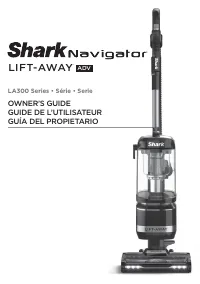 Shark LA322
User Manual
Shark LA322
User Manual
 Shark HZ251
User Manual
Shark HZ251
User Manual
 Shark SV1115
Manual
Shark SV1115
Manual
 Shark WD101
User Manual
Shark WD101
User Manual
 Shark HP200
User Manual
Shark HP200
User Manual
 Shark HP100
User Manual
Shark HP100
User Manual