Page 2 - Contents
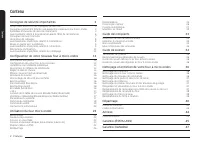
2 English C ontents Contents Contents Important safety instructions 3 What you need to know about safety instructions 3 Precautions to avoid possible exposure to excessive microwave energy 3 Important safety symbols and precautions 3 California proposition 65 warning 6 Grounding instructions 7 Use o...
Page 3 - SAVE THESE INSTRUCTIONS; Important safety instructions; IMPORTANT SAFETY SYMBOLS
English 3 Impor tant saf ety ins truc tions SAVE THESE INSTRUCTIONS Important safety instructions Congratulations on your new Samsung microwave oven. This manual contains important information on the installation, use and care of your appliance. Please take time to read this manual to take full adva...
Page 4 - Move the microwave oven away from the receiver.
4 English Impor tant saf ety ins truc tions Important safety instructions SAVE THESE INSTRUCTIONS 1. FCC NoticeFCC STATEMENT: This equipment generates and uses ISM frequency energy and if not installed and used properly, that is in strict accordance with the manufacturer's instructions, may cause in...
Page 5 - Reorient or relocate the receiving antenna.
English 5 Impor tant saf ety ins truc tions SAVE THESE INSTRUCTIONS • Reorient or relocate the receiving antenna. • Increase the separation between the equipment and receiver. • Connect the equipment into an outlet on a circuit different from that to which the receiver is connected. • Consult the de...
Page 7 - USE OF EXTENSION CORDS; GROUNDING INSTRUCTIONS
English 7 Impor tant saf ety ins truc tions SAVE THESE INSTRUCTIONS WARNING Improper use of the grounding plug can result in a risk of electric shock. • Plug into a grounded, 3 pronged outlet. Do not remove the third (grounding) prong. Do not use an adaptor or otherwise thwart the safety function of...
Page 12 - Checking the parts; Setting up your new microwave oven
12 English Se tting up y our ne w micr o w ave ov en * Hardware kit (Screws & Brackets) Manuals (User & Installation) Templates (Top & Wall) NOTE If you need an accessory marked with an * (asterisk), please contact the Samsung Call Center using the phone number listed on the last page of...
Page 13 - Learning about the control panel; Installing the metal shelf
English 13 Se tting up y our ne w micr o w ave ov en Learning about the control panel 01 03 05 07 10 12 14 16 02 04 06 08 11 13 15 17 09 01 Cooktop Lamp Button (High/Low/Off) 02 Vent Fan Button (4 Speed & On/Off) 03 Popcorn Button 04 Sensor Cook Button 05 Reheat Button 06 Auto Cook Button 07 Def...
Page 14 - Kitchen Timer
14 English Se tting up y our ne w micr o w ave ov en Setting up your new microwave oven Set Date & Time Your microwave oven is equipped with a built-in clock. Set date & time when first installing your microwave oven or after a power failure. The date & time is displayed whenever the mic...
Page 15 - Child Lock
English 15 Se tting up y our ne w micr o w ave ov en Child Lock The Child Lock function allows you to lock all buttons so that the microwave oven cannot be operated by children accidentally. 1 2 3 Activating1. Touch the Settings button. 2. Touch or button until display shows Lock . 3. Touch the OK b...
Page 16 - System Settings
16 English Se tting up y our ne w micr o w ave ov en Setting up your new microwave oven Vent Fan (Boost/High/Medium/Low/Off) The vent fan removes steam and other vapors that result from cooking on the cooktop below.Touch the Vent Fan button once for boost fan, twice for high fan, three times for med...
Page 17 - Smart control
English 17 Se tting up y our ne w micr o w ave ov en • If the Filter Remind function is On, the microwave will remind you to clean or replace the grease filter every four months. When it is time to clean or replace the grease filter, the microwave displays the ' Filter' message to remind you to clea...
Page 19 - Auto connectivity
English 19 Se tting up y our ne w micr o w ave ov en Food Amount Instructions French Fries 1 serving Place two paper towels on a microwave-safe plate and arrange the frozen french fries on the towels without letting them overlap. Blot the fries with additional paper towels after removing from the ov...
Page 20 - Using your microwave oven; Popcorn
20 English Using y our micr o w ave ov en Using your microwave oven Using your microwave oven Multi-stage cooking (maximum of 2 stages) Your oven allows you to set two different cooking stages, each with its own time length and power level. The power level lets you control the heating intensity from...
Page 21 - Defrost
English 21 Using y our micr o w ave ov en Defrost To thaw frozen foods, enter the weight of the food, and the microwave automatically sets the defrosting time, power level, and standing time. 1 3 3 2 1. Touch the Defrost button. 2. Touch the numeric buttons to directly enter the weight of the food. ...
Page 23 - Auto Cook
English 23 Using y our micr o w ave ov en Auto Cook The Auto Cook button lets you cook favorite foods using preset power levels and times. If the food is not thoroughly cooked after using Auto Cook feature, complete the cooking process by cooking the food for an additional amount of time. 3 4 5 5 2 ...
Page 27 - Keep Warm
English 27 Using y our micr o w ave ov en Keep Warm You can keep cooked food warm in your microwave oven for up to 99 minutes and 99 seconds. 3 2 1 1. Touch the Keep Warm button. 2. Enter the warm hold time by touching the numeric buttons. If you don`t set the time, your oven will maintain the Warm ...
Page 28 - Cookware guide; Recommended cooking utensils; Limited use items; Not recommended
28 English C ookw ar e guide Cookware guide To cook food in your microwave oven, microwaves must be able to penetrate the food without being reflected or absorbed by the cookware holding the food.Consequently, it is important to choose cookware that both allows microwaves to penetrate food and is mi...
Page 29 - Cooking techniques; Cooking guide
English 29 C ooking g uide Microwave energy actually penetrates food and is attracted to and absorbed by the water, fat, and sugar molecules in the food. The microwaves cause the molecules in the food to move rapidly. The rapid movement of these molecules creates friction and the resulting heat cook...
Page 30 - General cooking recommendations; Guide for cooking vegetables in your microwave
30 English C ooking g uide Cooking guide General cooking recommendations • Dense foods, such as potatoes, take longer to heat than lighter foods. Food with a delicate texture should be heated at a low power level to prevent it from becoming tough. • Altitude and the type of cookware you are using ca...
Page 31 - Cleaning and maintaining your microwave oven
English 31 Cleaning and maint aining y our micr ow av e oven Cleaning the door and door seals Always ensure that the door seals are clean and that the door closes properly. Take particular care when cleaning the door seals to ensure that no particles accumulate and prevent the door from closing corr...
Page 32 - Replacing the oven light; Storing and repairing your microwave oven; Replacing the cooktop/night light
32 English Cleaning and maint aining y our micr ow av e oven Cleaning and maintaining your microwave oven Replacing the oven light When replacing the oven light, make sure that you are wearing gloves to avoid injury from the heat of the lamp. 1. Unplug the oven or turn off the power at the main powe...
Page 33 - Cleaning the grease filter
English 33 Cleaning and maint aining y our micr ow av e oven Widen Widen Remove Remove 3. Remove the filter from the filter case by widening the case, as shown below. Then, soak the grease filter in hot water mixed with a mild detergent. Rinse well and shake to dry. If necessary, brush the filter li...
Page 34 - Replacing the charcoal filter; Troubleshooting; Check points
34 English Tr ouble shoo ting Troubleshooting Replacing the charcoal filter If your oven is vented to the inside, the charcoal filter should be replaced every 6 to 12 months and more often if necessary. The charcoal filter cannot be cleaned. To order a new charcoal filter, contact the Samsung Parts ...
Page 38 - Information codes
38 English Tr ouble shoo ting Troubleshooting Information codes If the microwave oven fails to operate, you may see an information code on the display. Check the table below for the code, and then follow the directions. Code Description Action C-10 The GAS sensor is open. Unplug the power cord of th...
Page 39 - Appendix; Specifications; SAMSUNG MICROWAVE OVEN
English 39 Appendix Appendix Specifications Model ME21D*6700**AA ME21D*6700**AC Oven Cavity 2.1 cu ft Controls 10 power level, including Defrost Timer 99 minutes, 99 seconds Power Source 120 VAC, 60 Hz Power Consumption 1700 W Microwave 1500 W Microwave Microwave Power Output 1000 W 950 W Cook Top L...
Page 42 - Memo
42 English W arranty (C ANAD A) Warranty (CANADA) THERE ARE NO EXPRESS WARRANTIES OTHER THAN THOSE LISTED AND DESCRIBED ABOVE, AND NO WARRANTIES WHETHER EXPRESS OR IMPLIED, INCLUDING, BUT NOT LIMITED TO, ANY IMPLIED WARRANTIES OF MERCHANTABILITY OR FITNESS FOR A PARTICULAR PURPOSE, SHALL APPLY AFTER...
Page 45 - Horno microondas; Manual del usuario
Page 46 - Contenido
2 Español C ontenido Contenido Contenido Instrucciones de seguridad importantes 3 Lo que debe saber sobre instrucciones de seguridad 3 Precauciones para evitar una posible exposición a un exceso de energía de microondas 3 Precauciones y símbolos de seguridad importantes 3 Advertencia de la propuesta...
Page 47 - CONSERVE ESTAS INSTRUCCIONES; Instrucciones de seguridad importantes; PRECAUCIONES Y SÍMBOLOS DE
Español 3 Instruc cione s de seg uridad impor tantes CONSERVE ESTAS INSTRUCCIONES Instrucciones de seguridad importantes Felicitaciones por su nuevo horno microondas Samsung. Este manual contiene información importante sobre la instalación, el uso y el cuidado del electrodoméstico. Tómese el tiempo ...
Page 49 - DECLARACIÓN DE IC SOBRE LA EXPOSICIÓN A LA; ADVERTENCIA
Español 5 Instruc cione s de seg uridad impor tantes CONSERVE ESTAS INSTRUCCIONES Para cumplir con los requisitos de exposición de radiofrecuencia (RF) de la FCC, se debe mantener una distancia de 20 cm entre la antena del dispositivo y las personas durante el funcionamiento del dispositivo. Para ga...
Page 51 - USO DE CABLES DE EXTENSIÓN
Español 7 Instruc cione s de seg uridad impor tantes CONSERVE ESTAS INSTRUCCIONES ADVERTENCIA El uso inadecuado del enchufe de conexión a tierra puede causar riesgo de descarga eléctrica. • Enchufe el artefacto a un tomacorriente de conexión a tierra de tres clavijas. No retire la tercera clavija (d...
Page 56 - Revisión de las piezas; Configurar su nuevo orno microondas
12 Español C onfigur ar su nue v o orno micr o o ndas * Kit de accesorios (tornillos y soportes) Manuales de usuario y de instalación) Plantillas (superior y de pared) NOTA Si necesita un accesorio marcado con un * (asterisco), comuníquese con el Centro de atención telefónica de Samsung a través del...
Page 57 - Acerca del panel de control; Configurar su orno microondas; Instalación del estante de metal
Español 13 C onfigur ar su nue v o orno micr o o ndas Acerca del panel de control 01 03 05 07 10 12 14 16 02 04 06 08 11 13 15 17 09 01 Botón Lámpara de la cubierta (alta/baja/apagada) 02 Botón Ventilador (4 velocidades y encender/apagar) 03 Botón Popcorn (Palomitas de maíz) 04 Botón Sensor Cook (Co...
Page 58 - Configuración de fec a y ora
14 Español C onfigur ar su nue v o orno micr o o ndas Configurar su nuevo orno microondas Configuración de fec a y ora Su horno microondas cuenta con un reloj incorporado. Configure la fecha y la hora al instalar su horno de microondas por primera vez o después de una interrupción de energía eléctri...
Page 59 - Cronómetro
Español 15 C onfigur ar su nue v o orno micr o o ndas Cronómetro Su horno microondas cuenta con una función de temporizador incorporada, el Temporizador de cocina . Utilice el cronómetro para programar hasta 99 minutos, 99 segundos. 3 1 5 2 3 1. Toque el botón Configuración . 2. Toque el botón o has...
Page 60 - Configuración del sistema
16 Español C onfigur ar su nue v o orno micr o o ndas Configurar su nuevo orno microondas +30 sec (+30 s) Esta función ofrece una forma conveniente de aumentar el tiempo de cocción en el modo de cocción manual. 1. En el modo de espera, si toca el botón +30 sec (+30 s) , se agregarán 30 segundos al m...
Page 61 - Control inteligente
Español 17 C onfigur ar su nue v o orno micr o o ndas Función Descripción Opciones Protector de pantalla Las opciones del protector de pantalla son 15 min, 10 min y 5 min. 15 min 10 min 5 min Utilice el formato de 24 horas El reloj puede indicar los modos de 12 h o 24 h. 12h 24h Idioma Puede elegir ...
Page 62 - Control por voz
18 Español C onfigur ar su nue v o orno micr o o ndas Configurar su nuevo orno microondas Control por voz Para utilizar la función de control por voz del horno microondas, debe instalar en su dispositivo móvil las aplicaciones Bixby o Amazon Alexa o el Asistente de Google. Bixby Inicie una conversac...
Page 64 - Conectividad automática
20 Español C onfigur ar su nue v o orno micr o o ndas Configurar su nuevo orno microondas Alimento Cantidad Instrucciones Papas fritas 1 porción Colocar dos toallas de papel en un plato apto para microondas y colocar las papas fritas congeladas en las toallas sin que se superpongan. Secar las papas ...
Page 65 - Uso del orno microondas; Cocción en una sola etapa; Microondas
Español 21 Uso del orno micr oondas Uso del orno microondas Cocción en una sola etapa 1 3 1 2 3 4 1 4 1. En modo de espera, toque los botones Numéricos para programar el tiempo de cocción. Puede ingresar el tiempo desde un segundo hasta 99 minutos con 99 segundos. Si la pantalla muestra modos de coc...
Page 66 - Palomitas de maíz
22 Español Uso del orno micr oondas Uso del orno microondas Alimento Cantidad Instrucciones Estofado De 1 a 4 porcio- nes Cubrir el plato con una tapa o un envoltorio plástico ventilado. Si la comida no está tan caliente como quisiera después de usar la función Recalentamiento con sensor , continuar...
Page 67 - Descongelar
Español 23 Uso del orno micr oondas Alimento Cantidad Instrucciones Carne molida De 0.5 a 3.0 lb Después de cada etapa, retirar cualquier parte del alimento que esté casi descongelada. Dejar reposar la carne, cubierta con papel de aluminio, entre 5 y 10 minutos. Pollo entero De 2.5 a 6.0 lb Antes de...
Page 68 - Cocción con sensor
24 Español Uso del orno micr oondas Uso del orno microondas Categoría Alimento Cantidad Instrucciones Cook (Coci- nar) Bebidas 1 taza Utilizar una taza o un jarro para medir y no cubrir. Colocar la bebida en el horno microondas. Después de calentar, revolver bien. Dejar que el horno se enfríe duran-...
Page 69 - Cocción automática
Español 25 Uso del orno micr oondas Categoría Alimento Cantidad Instrucciones Home Dessert (Postre casero) Walnut Pound (Libra de nueces) Pastel 1 porción Ingredientes 120 g de harina, 150 g de mantequilla, 100 g de azúcar morena, 2 huevos, 50 g de nueces (picadas), 4 g de polvo para hornear. 1. Mez...
Page 74 - Utensilios de cocina recomendados
30 Español Uso del orno micr oondas Uso del orno microondas Guía de utensilios de cocina Para cocinar alimentos en el horno microondas, este debe poder penetrar los alimentos sin que los utensilios que contienen la comida los reflejen o absorban.En consecuencia, es importante elegir utensilios de co...
Page 75 - No recomendado; Guía de cocción
Español 31 Guía de u tensilio s de c ocina No recomendado • Frascos y frascos de vidrio: el vidrio común es demasiado delgado para usarse en un microondas y puede romperse. • Bolsas de papel: son un peligro de incendio, excepto las bolsas de palomitas de maíz diseñadas para usarse en microondas. • P...
Page 76 - Recomendaciones generales de cocción
32 Español Guía de c oc ción Guía de cocción Dejar reposar Los alimentos cocinados en el microondas acumulan calor interno y siguen cocinándose durante unos minutos después de que el horno se detiene. Deje reposar la comida para completar la cocción, especialmente en los alimentos como carnes asadas...
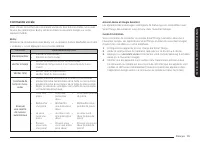
Page 77 - Guía para cocinar verduras en el microondas; Limpieza y mantenimiento del orno microondas; Limpieza del exterior; Limpieza debajo del orno microondas
Español 33 Limpie za y mant enimient o del orno micr oondas Guía para cocinar verduras en el microondas • Las verduras deben lavarse justo antes de cocinarlas. A menudo, no se necesita agua adicional. Si está cocinando verduras densas, como papas en cubos, zanahorias o frijoles verdes, agregue aprox...
Page 78 - Almacenamiento y reparación del orno microondas; Reemplazo de la luz de la cubierta o la luz nocturna; Limpieza de la puerta y los sellos de la puerta; Limpieza del interior; Limpieza del plato giratorio y los anillos giratorios
34 Español Limpie za y mant enimient o del orno micr oondas Limpieza y mantenimiento del orno microondas Almacenamiento y reparación del orno microondas Si necesita almacenar el horno microondas durante un período corto o prolongado, elija un lugar seco y libre de polvo. El polvo y la humedad pueden...
Page 79 - Limpieza del filtro de grasa; Reemplazo de la luz del orno
Español 35 Limpie za y mant enimient o del orno micr oondas Limpieza del filtro de grasa El horno microondas tiene un filtro de grasa reutilizable. El filtro de grasa se debe quitar y limpiar al menos una vez al mes o según sea necesario.Para solicitar un nuevo filtro de grasa, comuníquese con el De...
Page 80 - Reemplazo del filtro de carbón
36 Español Limpie za y mant enimient o del orno micr oondas Limpieza y mantenimiento del orno microondas Reemplazo del filtro de carbón Si su horno tiene ventilación hacia el interior, el filtro de carbón debe reemplazarse entre 6 y 12 meses, y más a menudo si es necesario. El filtro de carbón no pu...
Page 81 - Solución de problemas; Puntos de verificación
Español 37 Solución de pr oblemas Problema Causa Acción El horno se para mientras está en funcionamiento. El usuario ha abierto la puerta para voltear la comida. Después de girar el alimento, toque el botón (Start) Inicio de nuevo para iniciar la operación. Se apaga durante el funcionamiento. El hor...
Page 85 - Códigos de información; Anexo; Especificaciones
Español 41 A n exo Códigos de información Si el horno microondas no funciona, es posible que vea un código de información en la pantalla. Revise la siguiente tabla para ver el código y, luego, siga las instrucciones. Código Descripción Acción C-10 El sensor de gas está abierto. Desenchufe el cable d...
Page 86 - HORNO MICROONDAS SAMSUNG
42 Español A n exo Durante el período de garantía que corresponda, el producto se reparará o reemplazará, o se reembolsará el precio de compra, a elección exclusiva de SAMSUNG. SAMSUNG puede utilizar piezas nuevas o reacondicionadas para reparar un producto, o reemplazar el producto con uno nuevo o ...
Page 88 - Horno microondas sobremesa (otr) de Samsung
44 Español Garantía (C ANAD Á) Se proporcionará servicio a domicilio durante el período de garantía de la mano de obra, sujeto a la disponibilidad dentro del área contigua de los Estados Unidos. El servicio a domicilio no está disponible en todas las áreas. Para recibir el servicio a domicilio, el p...
Page 89 - Notas
Español 45 Garantía (C ANAD Á) NO HAY MÁS GARANTÍAS EXPRESAS QUE LAS ENUMERADAS Y DESCRITAS CON ANTERIORIDAD, Y NINGUNA GARANTÍA, YA SEA EXPRESA O IMPLÍCITA, INCLUIDA, ENTRE OTRAS, CUALQUIER GARANTÍA IMPLÍCITA DE COMERCIABILIDAD O IDONEIDAD PARA UN FIN DETERMINADO, SE APLICARÁ DESPUÉS DE LOS PERÍODO...
Page 91 - Manuel d’utilisation
Four à micro-ondes Manuel d’utilisation ME21D*6700****
Page 92 - Contenu
2 Français Contenu Contenu Contenu Consignes de sécurité importantes 3 Ce qu’il faut savoir sur les consignes de sécurité 3 Consignes permettant d’éviter une exposition excessive aux micro-ondes 3 Symboles et mesures de sécurité importants 3 Avertissement relatif à la proposition 65 de l’État de la ...
Page 93 - CONSERVEZ CES INSTRUCTIONS; Consignes de sécurité importantes; SYMBOLES ET MESURES DE SÉCURITÉ
Français 3 Consigne s de sécurit é impor tantes CONSERVEZ CES INSTRUCTIONS Consignes de sécurité importantes Nous vous félicitons d’avoir acheté ce nouveau four à micro-ondes Samsung. Le présent manuel contient des renseignements importants sur l’installation, l’utilisation et l’entretien de votre a...
Page 95 - DÉCLARATION D’IC RELATIVE À L’EXPOSITION AUX
Français 5 Consigne s de sécurit é impor tantes CONSERVEZ CES INSTRUCTIONS • Réorienter ou déplacer l’antenne de réception. • Augmenter la distance entre l’appareil et le récepteur. • Brancher l’appareil sur une prise située sur un circuit différent de celui sur lequel le récepteur est branché. • Co...
Page 96 - AVERTISSEMENT
6 Français Consigne s de sécurit é impor tantes Consignes de sécurité importantes CONSERVEZ CES INSTRUCTIONS 7. Comme pour tout appareil, une vigilance extrême s’impose lorsque le four est utilisé par des enfants. Veillez à ce que les enfants soient éloignés de la porte lors de son ouverture ou de s...
Page 97 - ATTENTION
Français 7 Consigne s de sécurit é impor tantes CONSERVEZ CES INSTRUCTIONS CONSIGNES DE MISE À LA TERRE Cet appareil doit être mis à la terre. En cas de court-circuit électrique, la mise à la terre réduit le risque d’électrocution en prévoyant un fil de fuite pour le courant électrique. Cet appareil...
Page 102 - Vérification des pièces; Configuration de votre nouveau our à micro-ondes
12 Français Con fig ur ation de v otr e nouv eau our à micr o-onde s Consignes de sécurité importantes AVERTISSEMENTS IMPORTANTS RELATIFS AU NETTOYAGE Ne nettoyez pas l’appareil en pulvérisant de l’eau directement dessus.N’utilisez pas de benzène, de diluant ou d’alcool pour nettoyer l’appareil. • C...
Page 103 - Configuration de votre our à micro-ondes; Installation de la tablette métallique
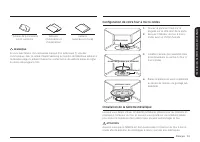
Français 13 Con fig ur ation de v otr e nouv eau our à micr o-onde s * Trousse de quincaillerie (vis et supports) Manuels (d’utilisation et d’installation) Gabarits (supérieur et mural) REMARQUE Si vous avez besoin d’un accessoire marqué d’un astérisque (*), veuillez communiquer avec le centre d’app...
Page 104 - Régler la date et l’heure
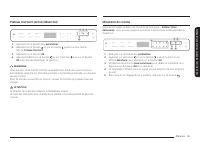
14 Français Con fig ur ation de v otr e nouv eau our à micr o-onde s Configuration de votre nouveau our à micro-ondes Régler la date et l’heure Votre four à micro-ondes est équipé d’une horloge intégrée. Réglez la date et l’heure lors de l’installation initiale du four à micro-ondes ou après une cou...
Page 105 - Minuterie de cuisine
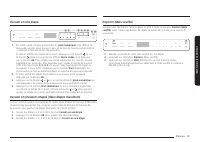
Français 15 Con fig ur ation de v otr e nouv eau our à micr o-onde s Plateau tournant (activé/désactivé) 1 2 3 4 1. Appuyez sur le bouton des paramètres . 2. Appuyez sur le bouton ou sur le bouton jusqu’à ce que l’écran affiche Plateau Tournant . 3. Appuyez sur le bouton OK . 4. Appuyez d’abord sur ...
Page 106 - Verrouillage de sécurité pour en ants; Bouton Arrière
16 Français Con fig ur ation de v otr e nouv eau our à micr o-onde s Configuration de votre nouveau our à micro-ondes Verrouillage de sécurité pour en ants La fonction de verrouillage de sécurité pour en ants vous permet de verrouiller tous les boutons afin que le four micro-ondes ne puisse pas être...
Page 107 - Paramètres du système
Français 17 Con fig ur ation de v otr e nouv eau our à micr o-onde s +30 s Cette fonctionnalité constitue un moyen pratique d’augmenter le temps de cuisson en mode de cuisson manuel. 1. En mode veille, appuyez sur le bouton +30 s pour ajouter 30 secondes au mode micro-ondes. 2. Si le four est en mod...
Page 108 - Commande intelligente
18 Français Con fig ur ation de v otr e nouv eau our à micr o-onde s Configuration de votre nouveau our à micro-ondes Fonction Description Options Économiseur d’écran Les options de délai pour l’écran de veille sont 15 min, 10 min et 5 min. 15 min 10 min 5 min Format 24 heures L’horloge est compatib...
Page 109 - Commande vocale
Français 19 Con fig ur ation de v otr e nouv eau our à micr o-onde s Commande vocale Pour utiliser la fonction de commande vocale du four à micro-ondes, vous avez besoin des applications Bixby, Amazon Alexa ou Assistant Google sur votre appareil mobile. Bixby Démarrez la conversation avec Bixby sur ...
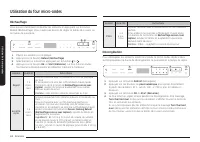
Page 112 - Connectivité automatique; Utilisation du our micro-ondes; Niveaux de puissance
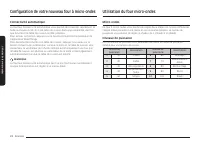
22 Français Utilisation du our micr o-onde s Configuration de votre nouveau our à micro-ondes Connectivité automatique La fonction Connectivité automatique vous permet de connecter rapidement la hotte au moyen du Wi-Fi à une table de cuisson Samsung compatible une fois que la hotte et la table de cu...
Page 113 - Cuisson en une étape
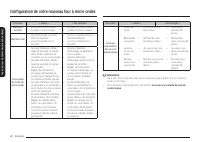
Français 23 Utilisation du our micr o-onde s Cuisson en une étape 1 3 1 2 3 4 1 4 1. En mode veille, utilisez les boutons du pavé numérique pour définir un temps de cuisson. Vous pouvez saisir un temps de cuisson compris entre 1 seconde et 99 minutes et 99 secondes. Si l’écran affiche les modes de c...
Page 114 - Décongélation
24 Français Utilisation du our micr o-onde s Utilisation du our micro-ondes Aliment Quantité Instructions Pâtes 1 à 4 por- tions Couvrez l’assiette avec un couvercle ou un film plastique perforé. Si les aliments ne sont pas suffisamment chauds après l’utilisation de la fonction de Réchau age cuisson...
Page 115 - Cuisson par capteur
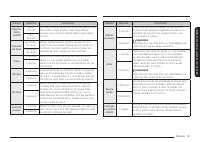
Français 25 Utilisation du our micr o-onde s Cuisson par capteur Les boutons Sensor Cook (Cuisson par capteur) vous permettent de cuisiner vos aliments préférés en utilisant des niveaux de puissance et des temps prédéfinis. Si les aliments ne sont pas assez cuits après l’utilisation de la fonction C...
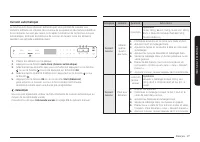
Page 117 - Cuisson automatique
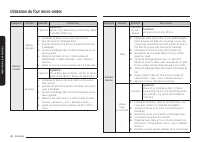
Français 27 Utilisation du our micr o-onde s Catégorie Aliment Quantité Instructions Dessert maison Gâteau quatre- quarts aux noix 1 portion Ingrédients Farine 120 g, Beurre 150 g, Sucre noir 100 g, Œufs 2, Noix de Grenoble (hachées) 50 g, Poudre à pâte 4 g 1. Combinez le beurre et le sucre noir dan...
Page 122 - Maintien au chaud
32 Français Utilisation du our micr o-onde s Utilisation du our micro-ondes Maintien au chaud Vous pouvez maintenir les aliments au chaud dans votre four à micro-ondes pendant une période pouvant aller jusqu’à 99 minutes et 99 secondes. 3 2 1 1. Appuyez sur le bouton Keep Warm (Maintien au chaud). 2...
Page 123 - Guide des récipients; Ustensiles de cuisine recommandés; Éléments à utilisation limitée
Français 33 Guide de s r écipient s Guide des récipients Pour cuire des aliments dans votre four à micro-ondes, ces dernières doivent pénétrer les aliments sans être réfléchies ou absorbées par le récipient utilisé.Par conséquent, il est important de choisir un récipient qui permet aux micro-ondes d...
Page 124 - Non recommandé; Guide de cuisson
34 Français Guide de cuis son Guide des récipients Non recommandé • Récipients et bouteilles en verre – Le verre ordinaire est trop mince pour pouvoir être utilisé dans un micro-ondes et risque donc d’éclater. • Sacs en papier – Ils risquent de prendre feu, hormis les sachets de pop-corn spécialemen...
Page 125 - Recommandations générales de cuisson
Français 35 Guide de cuis son Recommandations générales de cuisson • Les aliments denses, comme les pommes de terre, prennent plus de temps à cuire que les aliments plus légers. Les aliments dont la texture est délicate devraient être réchauffés à puissance faible pour empêcher qu’ils se durcissent....
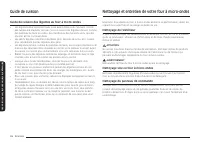
Page 126 - Guide de cuisson des légumes au our à micro-ondes; Nettoyage sous le our à micro-ondes; Nettoyage et entretien de votre our à micro-ondes
36 Français Ne tto yag e et entr etien de v otr e our à micr o-onde s Guide de cuisson Guide de cuisson des légumes au our à micro-ondes • Les légumes devraient être lavés juste avant d’être cuits. Souvent, il n’est pas nécessaire d’ajouter de l’eau. Si vous cuisez des légumes denses, comme des pomm...
Page 127 - Rangement et réparation du our à micro-ondes; Remplacement de l’éclairage de la table de cuisson ou de nuit; Nettoyage de la porte et des joints de porte; Nettoyage de l’intérieur; Nettoyage du plateau tournant et des anneaux de guidage
Français 37 Ne tto yag e et entr etien de v otr e our à micr o-onde s Rangement et réparation du our à micro-ondes Si vous devez ranger votre four à micro-ondes pour une période courte ou prolongée, choisissez un emplacement sec et exempt de poussière. La poussière et l’humidité peuvent nuire au bon...
Page 128 - Nettoyage du filtre à graisse; Remplacement de la lampe du our
38 Français Ne tto yag e et entr etien de v otr e our à micr o-onde s Nettoyage et entretien de votre our à micro-ondes Nettoyage du filtre à graisse Votre four à micro-ondes comporte un filtre à graisse réutilisable. Le filtre à graisse devrait être retiré et nettoyé au moins une fois par mois ou a...
Page 129 - Remplacement du filtre à charbon
Français 39 Ne tto yag e et entr etien de v otr e our à micr o-onde s Remplacement du filtre à charbon Si la ventilation fonctionne à l’intérieur du four, le filtre à charbon doit être remplacé tous les 6 à 12 mois ou plus souvent si nécessaire. Le filtre à charbon ne peut pas être nettoyé. Pour com...
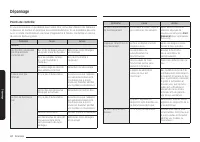
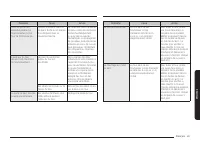
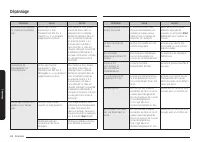
Page 130 - Points de contrôle; Dépannage
40 Français Dépannag e Points de contrôle Si vous rencontrez un problème avec votre four, consultez d’abord les tableaux ci-dessous et mettez en pratique les recommandations. Si un problème persiste ou si un code d’information continue d’apparaître à l’écran, contactez un centre de service Samsung l...
Page 134 - Codes d’in ormation; Annexe; Caractéristiques
44 Français Anne xe Dépannage Codes d’in ormation Si le four à micro-ondes ne fonctionne pas, vous pourriez voir un code d’information apparaître à l’écran. Consultez le tableau ci-dessous pour trouver le code, puis suivez les directives. Code Description Action C-10 Le capteur de GAZ est ouvert. Dé...
Page 135 - FOUR À MICRO-ONDES SAMSUNG
Français 45 Garantie (ÉT AT S-UNIS) Pendant la période de garantie applicable, un produit sera réparé, remplacé ou son prix d’achat remboursé, à la seule discrétion de SAMSUNG. SAMSUNG peut utiliser des pièces neuves ou remises à neuf pour réparer un produit ou remplacer le produit par un produit ne...
Page 137 - Four à micro-ondes à hotte intégrée de Samsung
Français 47 Garantie (C ANAD A) Un service à domicile sera fourni pendant la période de garantie, sous réserve de disponibilité dans les régions contiguës des États-Unis. Le service à domicile n’est pas offert dans toutes les régions. Pour bénéficier du service à domicile, l’appareil doit être facil...
Page 139 - Notes



















 Samsung MC455THRCBB
User Manual
Samsung MC455THRCBB
User Manual
 Samsung ME11A7510DS/AA
User Manual
Samsung ME11A7510DS/AA
User Manual
 Samsung ME11A7710DG/AA
User Manual
Samsung ME11A7710DG/AA
User Manual
 Samsung ME16A4021AS/AA
User Manual
Samsung ME16A4021AS/AA
User Manual
 Samsung ME17R7021ES/AA
User Manual
Samsung ME17R7021ES/AA
User Manual
 Samsung ME21DB630012AA
User Manual
Samsung ME21DB630012AA
User Manual
 Samsung ME21DB650012AA
User Manual
Samsung ME21DB650012AA
User Manual
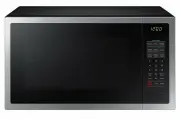 Samsung ME6104ST1
User Manual
Samsung ME6104ST1
User Manual
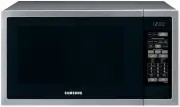 Samsung ME6144ST
User Manual
Samsung ME6144ST
User Manual
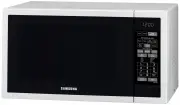 Samsung ME6144W
User Manual
Samsung ME6144W
User Manual
 Samsung MS23J5133AK
User Manual
Samsung MS23J5133AK
User Manual
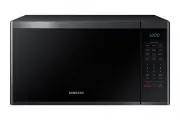 Samsung MS40J5133BG
User Manual
Samsung MS40J5133BG
User Manual
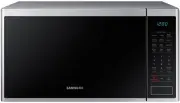 Samsung MS40J5133BT
User Manual
Samsung MS40J5133BT
User Manual
 Samsung CE107M-4S
User Manual
Samsung CE107M-4S
User Manual
 Samsung CE107M-4W
User Manual
Samsung CE107M-4W
User Manual