Page 2 - safety information; WHAT YOU NEED TO KNOW ABOUT SAFETY; SAVE THESE INSTRUCTIONS
2_ safety information safety information Congratulations on your new Samsung microwave oven. This manual contains important information on the installation, use and care of your appliance. Please take time to read this manual to take full advantage of your microwave oven’s many benefits and features...
Page 3 - What the icons and signs in this user manual mean:; IMPORTANT SAFETY INSTRUCTIONS
safety information _3 SAVE THESE INSTRUCTIONS IMPORTANT SAFETY SYMBOLS AND PRECAUTIONS What the icons and signs in this user manual mean: WARNING Hazards or unsafe practices that may result in severe personal injury or death. CAUTION Hazards or unsafe practices that may result in minor personal inju...
Page 5 - GROUNDING INSTRUCTIONS; CRITICAL INSTALLATION WARNINGS
safety information _5 GROUNDING INSTRUCTIONS This appliance must be grounded. In the event of an electrical short circuit, grounding reduces the risk of electric shock by providing an escape wire for the electrical current. This appliance is equipped with a cord that includes a grounding wire and a ...
Page 7 - INSTALLATION CAUTIONS
safety information _7 INSTALLATION CAUTIONS Position the oven so that the plug is easily accessible.- Failing to do so may result in electric shock or fire due to electric leakage. Unplug the oven when it is not being used for long periods of time or during a thunder/lightning storm.- Failing to do ...
Page 8 - USAGE CAUTIONS
8_ safety information If any foreign substance such as water enters the microwave, unplug it and contact your nearest service center.- Failing to do so may result in electric shock or fire. Do not touch the power plug with wet hands.- This may result in electric shock. Do not turn the appliance off ...
Page 10 - CRITICAL CLEANING INSTRUCTIONS
10_ safety information CRITICAL CLEANING INSTRUCTIONS Do not clean the appliance by spraying water directly onto it. Do not use benzene, thinner, or alcohol to clean the appliance. - This may result in discoloration, deformation, damage, electric shock, or fire. Before cleaning or performing mainten...
Page 11 - contents
contents _11 contents SETTING UP YOUR NEW MICROWAVE OVEN Checking the parts . . . . . . . . . . . . . . . . . . . . . 12Setting up your microwave oven . . . . . . . . . . 13Checking the control panel . . . . . . . . . . . . . . 14Turning on the power and setting the clock . . 15Using my setting feat...
Page 12 - setting up your new; CHECKING THE PARTS
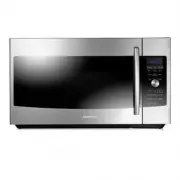
12_ setting up your new microwave oven setting up your new microwave oven Be sure to follow these instructions closely so that your new microwave oven works properly. CHECKING THE PARTS Carefully unpack your microwave oven, and make sure you’ve received all the parts shown below. If your microwave o...
Page 13 - SETTING UP YOUR MICROWAVE OVEN; Installing the metal shelf
setting up your new microwave oven _13 SETTING UP YOUR MICROW A VE OVEN SETTING UP YOUR MICROWAVE OVEN 1. Open the door by pulling the handle on the right side of the door. 2. Wipe the inside of the oven with a damp cloth. 3. Install the pre-assembled ring into the indentation at the center of the m...
Page 14 - CHECKING THE CONTROL PANEL
14_ setting up your new microwave oven CHECKING THE CONTROL PANEL Smart Chef (page 26) Speed Cook (page 21) Roast (page 35) Bake (page 35) Speed Bake/Roast (page 35) Microwave (page 34) Express Menu (page 19) Select Stop/Clear (Page 17) My Settings (page 15) Kitchen Timer (page 17) Eco Mode (page 18...
Page 15 - TURNING ON THE POWER AND SETTING THE CLOCK
setting up your new microwave oven _15 SETTING UP YOUR MICROW A VE OVEN TURNING ON THE POWER AND SETTING THE CLOCK 1. The first time you plug in the power chord, the display shows : SET HOUR 2. Using the knob dial, dial the hour, and then press the Select button. The display shows : SET MIN 3. Dial ...
Page 17 - using your microwave oven; USING THE KITCHEN TIMER
using your microwave oven _17 USING YOUR MICROW A VE OVEN using your microwave oven USING THE KITCHEN TIMER 1. Press the Kitchen Timer button. (max. time 90 min.) The display shows: SET MIN 2. Use the dial to set the number of minutes you want the timer to run. 3. Press the Select button. The displa...
Page 18 - ECO MODE; USING STEAM CLEAN; TURNING ON THE TURNTABLE
18_ using your microwave oven ECO MODE Eco Mode reduces standby power usage. When you press the ECO MODE button once, the display will go out and the microwave shifts to the mode which minimizes power usage. To cancel the ECO MODE , press the ECO MODE button once again, or press any other button. WA...
Page 19 - USING THE DEFROST BUTTON
using your microwave oven _19 USING YOUR MICROW A VE OVEN USING THE DEFROST BUTTON Remove all packaging material before defrosting. Place meat, poultry, fish, bread, etc. on a ceramic plate. General defrosting instructions: 1. Place the food on the turntable (glass tray). 2. Press the Defrost button...
Page 20 - ACCESSORY USAGE
20_ using your microwave oven COOK NO FOOD AMOUNT REMARK 3 BAKED POTATO 2 EA4 EA (10~13oz./ each) Pierce the potatoes 3 times with a fork. Place the potatoes on the glass turntable with one end of the potato pointing towards the center. After cooking, let the potatoes stand for 3-5 minutes. 4 INSTAN...
Page 21 - USING THE SPEED COOK BUTTON
using your microwave oven _21 USING YOUR MICROW A VE OVEN USING THE SPEED COOK BUTTON The Speed Cook menu contains pre-set cooking programs for 43 different items. 1. Place the food on the tray or the rack. (See Accessory Usage on page 20) 2. Press the Speed Cook button. 3. Dial the category, and th...
Page 26 - USING THE SMART CHEF BUTTON
26_ using your microwave oven USING THE SMART CHEF BUTTON The Smart Chef menu contains pre-set cooking programs for 30 different items. 1. Place the food on the tray or the rack. (See Accessory Usage on page 20) 2. Press the Smart Chef button. 3. Dial the category, and then press the Select button. ...
Page 29 - USING THE AUTO COOK BUTTON
using your microwave oven _29 USING YOUR MICROW A VE OVEN CATEGORY Cook No. FOOD Amount Directions Accessory Type 6.SEAFOOD 3 TILAPIA FILLET 1 serving (2 pieces, 4 oz.) 2 servings (4 pieces, 8 oz.) (1 servings = 2 pcs, each pices = 2 oz.) Spray the high rack with a non-stick spray. Place the tilapia...
Page 34 - USING THE MICROWAVE SETTING COOKING TIMES & POWER LEVELS; Power Levels
34_ using your microwave oven USING THE MICROWAVE SETTING COOKING TIMES & POWER LEVELS Your microwave allows you to set up to two different cooking stages, each with its own time length and power level. The power level lets you control the heating intensity from Warm to High. Power Levels The 10...
Page 35 - BROWN; Cookware for cooking with Speed bake/roast
using your microwave oven _35 USING YOUR MICROW A VE OVEN BROWN Browning adds texture and taste to your recipe. When browning, use the middle or high rack accessories.Use the middle rack when the height of food is so high that the food could touch the upper heater. 1. Press the Brown button. The dis...
Page 36 - SPEED BAKE/ROAST GUIDE
36_ using your microwave oven SPEED BAKE/ROAST GUIDE Use the cooking mode, power levels and times in this table as guide lines for speed cooking. Use oven gloves when taking the food out of the microwave. Type Food Quanity Mode Time Instructions PIZZA Frozen Pizza, Individual 6 inch Speed Bake 30% 1...
Page 37 - cookware guide; RECOMMENDED COOKING UTENSILS
cookware guide _37 COOKW ARE GUIDE cookware guide To cook food in the microwave oven, the microwaves must be able to penetrate the food without being reflected or absorbed by the dish.It is important to choose the correct cookware, therefore look for cookware that is marked microwave-safe. The follo...
Page 38 - cooking guide; COOKING TECHNIQUES
38_ cooking guide cooking guide Microwave energy actually penetrates food, attracted and absorbed by the water, fat and sugar content. The microwaves cause the molecules in the food to move rapidly. The rapid movement of these molecules creates friction and the resulting heat cooks the food. COOKING...
Page 39 - GUIDE FOR COOKING EGGS IN YOUR MICROWAVE; GUIDE FOR COOKING VEGETABLES IN YOUR MICROWAVE
cooking guide _39 COOKING GUIDE • Home canning in the microwave oven is not recommended because all harmful bacteria may not be destroyed by the microwave heating process. • Although microwaves do not heat the cookware, the heat from the food is often transferred to the cookware. Always use pot hold...
Page 40 - cleaning and maintaining your; CLEANING THE EXTERIOR; Cleaning under your microwave oven; CLEANING THE INTERIOR; CLEANING THE TURNTABLE AND ROLLER RINGS
40_ cleaning and maintaining your microwave oven cleaning and maintaining your microwave oven Keeping your microwave oven clean improves its performance, wards off unnecessary repairs, and lengthens its life. CLEANING THE EXTERIOR It’s best to clean spills on the outside of your microwave oven as th...
Page 41 - STORING AND REPAIRING YOUR MICROWAVE OVEN; REPLACING THE COOKTOP/NIGHT LIGHT
cleaning and maintaining your microwave oven _41 CLEANING AND MAINT AINING STORING AND REPAIRING YOUR MICROWAVE OVEN If you need to store your microwave oven for a short or extended period of time, choose a dust-free, dry location. Dust and dampness may adversely affect the ability of the microwave ...
Page 42 - CLEANING THE GREASE FILTER
42_ cleaning and maintaining your microwave oven CLEANING THE GREASE FILTER Your microwave oven has reusable grease filter. The grease filters should be removed and cleaned at least once a month, or as required.To order a new grease filter, contact SamsungParts at 1-800-627-4368 or your Samsung deal...
Page 43 - REPLACING THE CHARCOAL FILTER
cleaning and maintaining your microwave oven _43 CLEANING AND MAINT AINING REPLACING THE CHARCOAL FILTER If your oven is vented to the inside, the charcoal filter should be replaced every 6 to 12 months and more often if necessary. The charcoal filter cannot be cleaned. To order a new charcoal filte...
Page 44 - troubleshooting; CHECK THESE POINTS IF YOUR MICROWAVE OVEN
44_ troubleshooting troubleshooting CHECK THESE POINTS IF YOUR MICROWAVE OVEN PROBLEM SOLUTION The display and/or the oven is not working. Make sure the plug is properly connected to a grounded outlet.If the wall outlet is controlled by a wall switch, make sure the wall switch is turned on.Remove th...
Page 45 - appendix; SPECIFICATIONS; warranty; WARRANTY AND SERVICE INFORMATION
appendix _45 TROUBLESHOOTING appendix SPECIFICATIONS MODEL NUMBER ME179KFETSR Oven Cavity 1.7 cuft Controls 10 power levels, including defrost Timer 90 minutes Power Source 120 VAC, 60 Hz Power Consumption 1700 Watt Microwave / 1750 Watt Heater Microwave Power Output 950 Watts Cook Top Light 3.6W LE...
Page 46 - Limited warranty to original purchaser
46_ warranty warranty SAMSUNG OVER-THE-RANGE(OTR) MICROWAVE OVEN Limited warranty to original purchaser This SAMSUNG brand product, as supplied and distributed by Samsung Electronics America, Inc. (SAMSUNG) and delivered new, in the original carton to the original consumer purchaser, is warranted by...
Page 47 - memo
memo ME179KFETSR_AA_DE68-04130A_EN.indd 47 2012-05-21 �� 5:10:49