Page 6 - ENGLISH
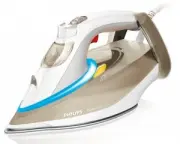
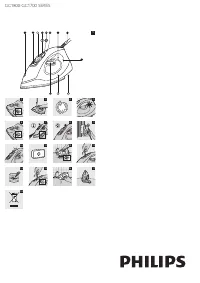
6 Introduction ;<5=>?8<6!8 Philips offers, register your product at www.philip s .com/welcome . % 83 8<68you use the appliance. Save them for future reference. General de s cription (Fig. 3) 1 ’Iron ready’ light2 Calc-Clean button with Calc-Clean light3 Steam trigger 4 Temperature dial 5...
Page 7 - Tip: You can continue to dry iron by not pressing the steam trigger.; Performing the Calc-Clean proce; Place the iron stably on the Calc-Clean container.
IMPORTANT - Cleaning and maintenance Smart Calc-Clean Sy s tem Your appliance has been designed with a Smar t Calc-Clean system to ensure that descaling and cleaning is done regularly. This helps to maintain a strong steam performance and avoids dir t and stains coming out of the soleplate over time...
Page 8 - Problem
- To save energy, the steam generator switches off automatically when it has not been used for #`"?{<&" - To reactivate the steam generator, set the on/off switch to ‘off ’ position and then to ‘on’ position. Trouble s hooting This chapter summarises the most common problems you could...
Page 11 - ss; DEUTSCH
11 Einführung Herzlichen Glückwunsch zu Ihrem Kauf und willkommen bei Philips! Um die Unterstützung von Philips optimal nutzen zu können, registrieren Sie Ihr Produkt bitte unter www.philip s .com/welcome . Lesen Sie diese Bedienungsanleitung, die Broschüre mit wichtigen Informationen und die Kurzan...
Page 13 - Behälter entleeren, bevor Sie mit dem Entkalken beginnen.; Automati
11 Wiederholen Sie falls nötig Schritt 1 bis 11. Vergewissern Sie sich, dass Sie den Calc-Clean- Behälter entleeren, bevor Sie mit dem Entkalken beginnen. Hinweis: Während des Entkalkens kann sauberes Wasser aus der Bügelsohle austreten, wenn sich kein Kalk im Bügeleisen angesammelt hat. Dies ist no...
Page 16 - SUOMI
16 Johdanto Onnittelut ostoksestasi ja ter vetuloa Philips-tuotteiden käyttäjäksi! Hyödynnä Philipsin tuki ja rekisteröi tuotteesi osoitteessa www.philip s .com/welcome . Lue tämä käyttöopas, Tärkeitä tietoja -lehtinen oleva pikaopas huolellisesti ennen laitteen käyttöä. Säästä ne myöhempää tar vett...
Page 17 - Aseta silitysrauta kalkinpoistoastiaan.
TÄRKEÄÄ – puhdi s tu s ja hoito Älykä s Calc-Clean-kalkinpoi s tojärje s telmä Laitteen älykäs Calc-Clean-järjestelmä takaa, että kalkinpoisto ja puhdistus tehdään säännöllisesti. Tämä ylläpitää laitteen höyr yntuottotehoa ja estää lian ja tahrojen ker tymisen pitkän käyttöiän aikana. Höyr ylaite mu...
Page 18 - vastauksia usein
Automaattinen virrankatkai s u (vain tietyi ss ä mallei ss a) - Höyr ylaite säästää energiaa sammuttamalla virran automaattisesti, jollei sitä ole käytetty 15 minuuttiin. Silitysrauta valmis -merkkivalo alkaa vilkkua. - Aktivoi höyr ylaite uudelleen katkaisemalla ja kytkemällä vir ta vir takytkimest...
Page 20 - Introduction; . Lisez attentivement ce mode d’emploi, la brochure « Informations; Réglage de la température; Type de tissu; Recommandation pour l’eau à utili; FRANÇAIS
20 Introduction 6&=>=!l’assistance Philips, enregistrez votre produit sur le site à l’adresse suivante : www.philip s .com/welcome . Lisez attentivement ce mode d’emploi, la brochure « Informations impor tantes » et le guide de démarrage rapide avant d’utiliser l’appareil et conser vez-le pou...
Page 21 - IMPORTANT - Nettoyage et entretien; Placez le fer de manière stable sur le réservoir anticalcaire.
IMPORTANT - Nettoyage et entretien Sy s tème anticalcaire intelligent &<!& nettoyage réguliers et, ainsi, maintenir des performances élevées de vapeur et éviter que saletés et &!"=&<l’appareil indique des rappels réguliers. Outre cela, une deuxième étape de défense pour...
Page 22 - pour consulter les questions fréquemment posées,
Mode d’arrêt automatique de s écurité (certain s modèle s uniquement) - Pour économiser l’énergie, la centrale vapeur s’éteint automatiquement lorsqu’elle n’a pas été utilisée pendant 15 minutes. Le voyant « Fer prêt » clignote. - Pour réactiver la centrale vapeur, réglez le bouton marche/arrêt sur ...
Page 25 - Tipo di tessuto; Acqua da utilizzare: di; ITALIANO
25 Introduzione Congratulazioni per l’acquisto e benvenuti in Philips! Per trarre il massimo vantaggio dall’assistenza Philips, registrate il vostro prodotto su www.philip s .com/welcome. Prima di utilizzare l’apparecchio, leggete attentamente il manuale dell’utente, l’opuscolo “Informazioni impor t...
Page 26 - Posizionate in modo stabile il ferro sul contenitore Calc-Clean.
IMPORTANTE - Pulizia e manutenzione Si s tema Smart Calc-Clean Il vostro apparecchio è stato progettato con un sistema Smar t Calc-Clean per assicurar vi che la rimozione del calcare e la pulizia vengano fatte regolarmente, garantendo una potente erogazione del vapore ed evitando la fuoriuscita di s...
Page 27 - clienti del vostro paese.
Modalità di s pegnimento automatico di s icurezza ( s olo per alcuni modelli) - Per risparmiare energia, il generatore di vapore si spegne automaticamente se non viene utilizzato per 15 minuti consecutivi e la spia di “ferro da stiro pronto” lampeggia. - Per riattivare il generatore di vapore, impos...
Page 30 - Introductie; ’Strijkijzer; De temperatuur in; Temperatuurstand; Aanbevolen water: gedi; NEDERLANDS
30 Introductie
8556=>/5!ondersteuning die Philips biedt, registreer uw product dan op www.philip s .com/welcome . Lees deze gebruiksaanwijzing, het boekje met belangrijke informatie en de snelstar tgids zorgvuldig door voor u het apparaat gebruikt. Bewaar ze om deze indien nodig te kunnen raadp...
Page 31 - ongeveer 5 minuten afkoelen voordat u het aanraakt.
BELANGRIJK - Schoonmaken en onderhoud Smart Calc-Clean- s y s teem Uw apparaat is voorzien van een Smar t Calc-Clean-systeem om er voor te zorgen dat u het apparaat regelmatig ontkalkt en reinigt. Hierdoor blijft het apparaat voldoende stoom leveren en voorkomt u dat de zoolplaat na verloop van tijd...
Page 32 - voor een lijst met veelgestelde vragen of neem contact op met het
Automati s che uit s chakelmodu s (alleen bepaalde typen) - Om energie te besparen schakelt de stoomgenerator automatisch uit als deze 15 minuten niet is gebruikt. Het ‘strijkijzer gereed’-lampje knipper t. - Om de stoomgenerator opnieuw in te schakelen, zet u de aan/uitknop ‘uit’ en ver volgens wee...
Page 35 - SVENSKA
35 Introduktion Grattis till inköpet och välkommen till Philips! För att dra maximal nytta av den suppor t som Philips erbjuder kan du registrera din produkt på www.philip s .com/welcome . Läs noggrant igenom den här användarhandboken, den viktiga informationsbroschyren och snabbstar tshandboken inn...
Page 36 - Lämna inte apparaten obevakad under avkalkningen.
VIKTIGT – Rengöring och underhåll Smart avkalkning ss y s tem Apparaten har ett smar t avkalkningssystem för regelbunden avkalkning och rengöring. Systemet ser 888 <6"För att se till att rengöringen utförs avger ånggeneratorn regelbundna påminnelser. Som ytterligare åtgärd för att skydda ån...
Page 37 - och läsa
Automati s k s äkerhet s av s tängning (enda s t på vi ss a modeller) - Ånggeneratorn stängs av automatiskt för att spara energi när den inte har använts på 15 minuter. När den gör det börjar klarlampan för str ykning lysa. - Om du vill aktivera ånggeneratorn igen ställer du strömbr ytaren i läget “...
Page 42 - Press
4 5 6 7 8 9 Press 2 sec. 10 2 min. 11 12 13 4239_000_9924_1_DFU-Simple_A5_v3.indd 42 17/08/15 13:43