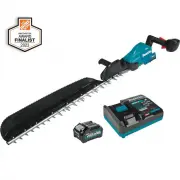
Page 2 - SPECIFICATIONS; Applicable battery cartridge and charger; Recommended cord connected power source; SAFETY WARNINGS; General power tool safety warnings; Save all warnings and instruc-
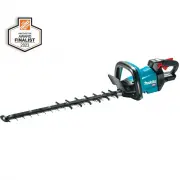
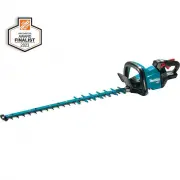
2 ENGLISH ENGLISH (Original instructions) SPECIFICATIONS Model: GHU04 GHU05 Blade length 600 mm (23-5/8") 750 mm (29-1/2") Strokes per minute 2,000 / 3,600 / 5,000 /min Overall length 1,085 mm (42-3/4") 1,225 mm (48-1/4") Rated voltage D.C. 36 V - 40 V max Net weight 3.9 - 4.5 kg (8....
Page 4 - Cordless Hedge Trimmer Safety
4 ENGLISH Service 1. Have your power tool serviced by a qualified repair person using only identical replacement parts. This will ensure that the safety of the power tool is maintained. 2. Never service damaged battery packs. Service of battery packs should only be performed by the manufacturer or a...
Page 5 - SAVE THESE INSTRUCTIONS.; Symbols; Important safety instructions for
5 ENGLISH 3. Do not open or mutilate the battery(ies). Released electrolyte is corrosive and may cause damage to the eyes or skin. It may be toxic if swallowed. 4. Do not charge battery in rain, or in wet locations. 5. Do not charge the battery outdoors. 6. Do not handle charger, including charger p...
Page 6 - FUNCTIONAL; Installing or removing battery
6 ENGLISH 9. Do not use a damaged battery. 10. The contained lithium-ion batteries are subject to the Dangerous Goods Legislation requirements. For commercial transports e.g. by third parties, forwarding agents, special requirement on pack- aging and labeling must be observed. For preparation of the...
Page 7 - Indicating the remaining battery; Tool / battery protection system; Overload protection
7 ENGLISH Indicating the remaining battery capacity Press the check button on the battery cartridge to indi - cate the remaining battery capacity. The indicator lamps light up for a few seconds. 1 2 Fig.2 ► 1. Indicator lamps 2. Check button Indicator lamps Remaining capacity Lighted Off Blinking 75...
Page 8 - Protections against other causes; Speed adjusting
8 ENGLISH Protections against other causes Protection system is also designed for other causes that could damage the tool and allows the tool to stop automatically. Take all the following steps to clear the causes, when the tool has been brought to a temporary halt or stop in operation. 1. Turn the ...
Page 9 - Reverse button for debris removal; Electronic function; ASSEMBLY; Installing or removing the shear
9 ENGLISH Reverse button for debris removal WARNING: If the entangled branches or debris cannot be removed by the reverse function, switch off the tool and remove the battery cartridge, and then remove the entangled branches or debris using tools such as pliers. Failure to switch off the tool and re...
Page 13 - Removing or installing the chip; OPERATION
13 ENGLISH 19. Attach the chip receiver to the tool by tightening four screws (for GHU04) or five screws (for GHU05). For GHU04 2 1 Fig.26 ► 1. Chip receiver 2. Screw For GHU05 2 1 Fig.27 ► 1. Chip receiver 2. Screw NOTICE: If the shear blades do not move smoothly, the shear blades are not engaged w...
Page 15 - MAINTENANCE; Cleaning the tool
15 ENGLISH MAINTENANCE CAUTION: Always be sure that the tool is switched off and the battery cartridge is removed before attempting to perform inspection or maintenance. To maintain product SAFETY and RELIABILITY, repairs, any other maintenance or adjustment should be performed by Makita Authorized ...
Page 16 - Grease lubrication
16 ENGLISH 4. Set the angle of a file to 45°, and grind the upper blade from 3 directions with the file. 1 2 Fig.41 ► (1) File (2) 45° CAUTION: Before grinding the shear blades, make sure that the tool is switched off and the battery cartridge is removed from the tool. 5. Place the tool upside down,...
Page 17 - TROUBLESHOOTING; OPTIONAL; MAKITA LIMITED WARRANTY
17 ENGLISH TROUBLESHOOTING Before asking for repairs, conduct your own inspection first. If you find a problem that is not explained in the manual, do not attempt to dismantle the tool. Instead, ask Makita Authorized Service Centers, always using Makita replace - ment parts for repairs. State of abn...
Page 18 - ESPECIFICACIONES; Cartucho de batería y cargador aplicables; Fuente de alimentación conectada por cable recomendada; ADVERTENCIAS DE; Advertencias generales de seguridad; Conserve todas las advertencias
18 ESPAÑOL ESPAÑOL (Instrucciones originales) ESPECIFICACIONES Modelo: GHU04 GHU05 Longitud de la cuchilla 600 mm (23-5/8″) 750 mm (29-1/2″) Carreras por minuto 2 000 cpm / 3 600 cpm / 5 000 cpm Longitud total 1 085 mm (42-3/4″) 1 225 mm (48-1/4″) Tensión nominal 36 V - 40 V c.c. máx. Peso neto 3,9 ...
Page 22 - GUARDE ESTAS; Símbolos; Instrucciones importantes de
22 ESPAÑOL 6. No abra ni mutile la(s) batería(s). El electrolito liberado es una sustancia corrosiva y puede que cause daños a la piel y los ojos. Pueden ser tóxicos si se llegan a tragar. 7. Almacene la herramienta lejos de la lluvia y la luz directa del sol y en un sitio donde no haga calor ni hay...
Page 23 - DESCRIPCIÓN DEL; Instalación o extracción del
23 ESPAÑOL 15. No toque el terminal de la herramienta inme- diatamente después de su uso, ya que el mismo podría estar lo suficientemente caliente como para provocarle quemaduras. 16. No permita que las rebabas, el polvo o la tierra queden atrapados en los terminales, orificios y ranuras del cartuch...
Page 24 - Sistema de protección para la; Protección contra sobrecarga
24 ESPAÑOL PRECAUCIÓN: Introduzca siempre com- pletamente el cartucho de batería hasta que el indicador rojo no pueda verse. Si no, podría accidentalmente salirse de la herramienta y caer al suelo causando una lesión a usted o alguien a su alrededor. PRECAUCIÓN: No instale el cartucho de batería a l...
Page 26 - Ajuste de velocidad; Botón de inversión para la; Función eléctrica
26 ESPAÑOL Ajuste de velocidad Puede ajustar la velocidad de la herramienta opri - miendo el botón de encendido principal. Cada vez que oprima el botón de encendido principal, el nivel de velocidad cambia. 2 1 Fig.6 ► 1. Indicador de velocidad 2. Botón de encendido principal Indicador de velocidad M...
Page 27 - MONTAJE; Instalación o extracción de las
27 ESPAÑOL MONTAJE PRECAUCIÓN: Asegúrese siempre de que la herramienta esté apagada y el cartucho de batería haya sido extraído antes de realizar cualquier trabajo en la misma. PRECAUCIÓN: Siempre utilice guantes al reemplazar las cuchillas de cizalla de manera que sus manos no hagan contacto direct...
Page 30 - Extracción o instalación del colector
30 ESPAÑOL 16. Coloque el rodamiento y la barra. 1 2 3 Fig.23 ► 1. Barra 2. Orificio pequeño 3. Rodamiento AVISO: Aplique una pequeña cantidad de grasa a la periferia interior del orificio pequeño de la barra. AVISO: Asegúrese de que la protuberancia en las cuchillas de cizalla encaje en el orificio...
Page 31 - OPERACIÓN
31 ESPAÑOL Para el GHU04 2 1 Fig.28 ► 1. Colector de residuos 2. Tornillo Para el GHU05 2 1 Fig.29 ► 1. Colector de residuos 2. Tornillo OPERACIÓN ADVERTENCIA: Mantenga las manos aleja- das de las cuchillas de cizalla. PRECAUCIÓN: Si es posible, evite utilizar la herramienta cuando haga demasiado ca...
Page 32 - MANTENIMIENTO; Limpieza de la herramienta
32 ESPAÑOL Para la operación básica, incline las cuchillas de cizalla hacia la dirección del podado y desplácelas lentamente y con calma a un ritmo de velocidad de 3 a 4 segundos por metro. Fig.32 Para cortar la superficie de un seto de manera uni - forme, ate un cordón a la altura deseada y pode a ...
Page 34 - Lubricación con grasa
34 ESPAÑOL 4. Ajuste el ángulo de la lima a 45°, y afile la cuchilla superior desde 3 direcciones con la lima. 1 2 Fig.41 ► (1) Lima (2) 45° PRECAUCIÓN: Antes de afilar las cuchillas de cizalla, asegúrese de que la herramienta esté apagada y que el cartucho de batería haya sido extraído de la herram...
Page 35 - RESOLUCIÓN DE PROBLEMAS; ACCESORIOS; GARANTÍA LIMITADA DE MAKITA; Ésta Garantía no aplica para México
35 ESPAÑOL RESOLUCIÓN DE PROBLEMAS Antes de solicitar alguna reparación, primero realice una inspección por su cuenta. Si detecta algún problema que no esté explicado en el manual, no intente desensamblar la herramienta. En vez de esto, solicite la reparación a un centro de servicio autorizado de Ma...
Page 36 - Makita Corporation
Makita Corporation 3-11-8, Sumiyoshi-cho, Anjo, Aichi 446-8502 Japan www.makita.com 885918-941 GHU04-1 EN, ESMX 20210817