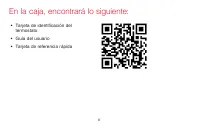
Page 2 - In the box you will find
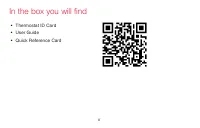
69-2736EFS—05 ii In the box you will find • Thermostat ID Card• User Guide• Quick Reference Card
Page 3 - Welcome
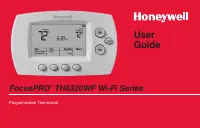
Welcome Congratulations on your purchase of a Honeywell Wi-Fi programmable thermostat. When registered to Honeywell’s Total Connect Comfort Solutions, you can remotely monitor and control the heating and cooling system in your home or business—you can stay connected to your comfort system wherever y...
Page 5 - Table of contents
69-2736EFS—05 3 About your new thermostat Home screen quick reference ..................... 5Connecting to your Wi-Fi network ............... 6 Registering your thermostat online ........... 11Preset energy-saving schedules ............... 19 Operation Setting the clock ................................
Page 6 - Features of your Wi-Fi thermostat; View and change your heating/cooling system settings
69-2736EFS—05 4 Features of your Wi-Fi thermostat With your new thermostat, you can: • Connect to the Internet to monitor and control your heating/cooling system • View and change your heating/cooling system settings • View and set temperature and schedules • Receive alerts via email and get automat...
Page 7 - Home screen quick reference
5 69-2736EFS—05 Home screen quick reference M31586 HOLD Once your Wi-Fi thermostat is installed, it will display the home screen. Portions of this display will change depending on how you are viewing it. The screen lights when you press any button. It stays lit for 8 seconds after you complete chang...
Page 8 - Connecting to your Wi-Fi network
69-2736EFS—05 6 Connecting to your Wi-Fi network Connect your wireless device to your home network. Any of these device types will work: • Tablet (recommended)• Laptop (recommended)• Smartphone If you get stuck... at any point in this procedure, restart the thermostat by removing the thermostat from...
Page 12 - Wait
69-2736EFS—05 10 Connecting to your Wi-Fi network 3 Make sure your thermostat is connected. While the connection is in process, your thermostat will flash Wait for up to 3 minutes. When the connection is complete, the display will show Wi-Fi Setup Connection Success . The Wi-Fi signal strength will ...
Page 13 - Registering your thermostat online
11 69-2736EFS—05 Registering your thermostat online M31570 To view and set your Wi-Fi thermostat remotely, you must have a Total Connect Comfort account. Follow the instructions below. 1 Open the Total Connect Comfort web site. Go to www.mytotalconnectcomfort.com
Page 14 - Check your email; Follow activation instructions
69-2736EFS—05 12 Registering your thermostat online 2 Login or create an account. If you have an account, click Login – or – click Create An Account 2a Follow the instructions on the screen.2b Check your email for a response from My Total Connect Comfort. This may take several minutes. Note: If you ...
Page 17 - iTunes
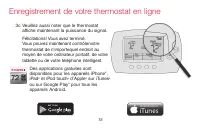
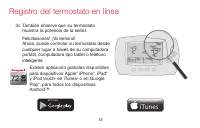
15 69-2736EFS—05 Registering your thermostat online 3c Also notice that your thermostat displays its signal strength. Congratulations! You’re done. You can now control your thermostat from anywhere through your tablet, laptop, or smartphone Total Connect Comfort free app is available for Apple ® iPh...
Page 18 - Setting the time and day
69-2736EFS—05 16 1 Press Set Clock/Day/Schedule , then press s or t to set clock. 2 Press Set Day , then press s or t to select the day of week. 3 Press Done to save. Note: If the Set Clock/Day/Schedule option is not displayed, press Done . Note: If the display flashes Set Clock , the thermostat wil...
Page 19 - Fan; On; Auto; Setting the fan
17 69-2736EFS—05 Press Fan to select On or Auto (toggle to re-select). Auto : Fan runs only when the heating or cooling system is on. Auto is the most commonly used setting. On : Fan is always on. Note: Options may vary depending on your heating/cooling equipment. Setting the fan MCR33895
Page 20 - Selecting system mode; System
69-2736EFS—05 18 Selecting system mode Press System to select: Heat : Controls only the heating system. Cool : Controls only the cooling system. Off : Heating/cooling systems are off. Auto : Selects heating or cooling depending on the indoor temperature. Em Heat (heat pumps with aux. heat): Controls...
Page 21 - Preset energy-saving schedules; Default Heat Settings
19 69-2736EFS—05 Preset energy-saving schedules This thermostat is pre-set with energy-saving program settings for four time periods. Using the default settings can reduce your heating/cooling expenses if used as directed. Savings may vary depending on geographic region and usage. Default Heat Setti...
Page 22 - Adjusting program schedules; Set Schedule
69-2736EFS—05 20 Adjusting program schedules 1 Press Set Clock/Day/Schedule , then Set Schedule . 2 Press s or t to set your Monday (Mon) Wake time, then press Next . 3 Press s or t to set the temperature for this period, then press Next . 4 Set time and temperature for the next time period (Leave)....
Page 23 - Overriding schedules temporarily; Cancel
21 69-2736EFS—05 Overriding schedules temporarily Press s or t to immediately adjust the temperature.The new temperature will be maintained only until the next programmed time period begins.To cancel the temporary setting at any time, press Cancel . The program schedule will resume. MCR33896 HOLD
Page 24 - Overriding schedules permanently
69-2736EFS—05 22 Overriding schedules permanently 1 Press HOLD to permanently adjust the temperature. This will turn off the program schedule. 2 Press s or t to adjust the temperature setting. The temperature you set will be maintained 24 hours a day until you manually change it or press Cancel to r...
Page 25 - Unregistering thermostat; Register at Total Connect
23 69-2736EFS—05 Unregistering thermostat If you remove the thermostat from your Total Connect Comfort website account (for example, you’re moving and leaving the thermostat behind), the thermostat will display Register at Total Connect until it is re-registered. M33876
Page 26 - Replacing your router
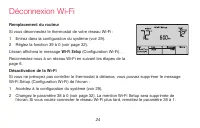
69-2736EFS—05 24 Disconnecting Wi-Fi Replacing your router If you disconnect the thermostat from your Wi-Fi network:1 Enter system setup (see page 29).2 Change setting 39 to 0 (see page 32).The screen will display Wi-Fi Setup . Re-connect to a Wi-Fi network by following the steps on page 6. M33855 T...
Page 27 - Software updates; Updating
25 69-2736EFS—05 Software updates Honeywell periodically issues updates to the software for this thermostat. The updates occur automatically through your Wi-Fi connection. All your settings are saved, so you will not need to make any changes after the update occurs.While the update is taking place, ...
Page 28 - Recovery
69-2736EFS—05 26 M33881 Adaptive Intelligent Recovery (AIR) This feature allows the thermostat to “learn” how long the heating/cooling system takes to reach programmed temperature settings, so the temperature is reached at the time you set.For example: Set the Wake time to 6:00 am, and the temperatu...
Page 29 - Compressor protection; Cool On
27 69-2736EFS—05 Compressor protection This feature forces the compressor to wait a few minutes before restarting, to prevent equipment damage. The message Cool On (or Heat On for a heat pump) will flash during the wait time. M33882
Page 30 - Auto changeover
69-2736EFS—05 28 Auto changeover This feature is used in climates where both air conditioning and heating are used on the same day.When the system is set to Auto , the thermostat automatically selects heating or cooling depending on the indoor temperature.Heat and cool settings must be at least 3 de...
Page 31 - Setting functions and options
29 69-2736EFS—05 Setting functions and options You can change system preferences for a number of system options. The functions, along with available options are described on pages 30-32. 1 Press More and hold for approximately 3 seconds. The screen will change to display two numbers and the button d...
Page 32 - User setup; Function
69-2736EFS—05 30 User setup Function Settings & Options 13 Adaptive Intelligent Recovery (AIR) 1 On 0 Off 14 Temperature Format (°F/°C) 0 Fahrenheit 1 Celsius 16 Schedule Options 1 Program schedule is on (7-day programmable). 0 Program schedule is off. Thermostat can not be programmed.
Page 35 - Frequently asked questions
33 69-2736EFS—05 Frequently asked questions : Q Will my thermostat still work if I lose my Wi-Fi connection? : A Yes, the thermostat will operate your heating and/or cooling system with or without Wi-Fi. : Q How do I find the password to my router? : A Contact the manufacturer of the router or check...
Page 38 - Troubleshooting
69-2736EFS—05 36 Troubleshooting Lost SignalIf the no-Wi-Fi indicator displays in place of the Wi-Fi strength indicator in the upper right hand corner of the home screen: • Check another device to be sure Wi-Fi is working in your home; if not, call your Internet Service Provider. • Move the router.•...
Page 39 - Error Code
37 69-2736EFS—05 Troubleshooting Error Code Action E01 During Wi-Fi Setup, the router lost power. • Ensure your router has power. • If trying to connect to a hidden or manually added network, confirm the router has power and is working. E02 Invalid Wi-Fi password. This code displays for 30 seconds, ...
Page 42 - Glossary
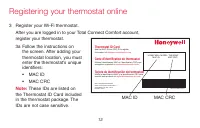
69-2736EFS—05 40 Glossary MAC ID, MAC CRCAlphanumeric codes that uniquely identify your thermostat.QR Code ® Quick response code. A two-dimensional,machine-readable image. Your wireless device can read the black and white pattern in the square and link its browser directly to a web site. QR Code is ...
Page 43 - Regulatory information
41 69-2736EFS—05 Regulatory information FCC Compliance Statement (Part 15.19) (USA only)This device complies with Part 15 of the FCC Rules. Operation is subject to the following two conditions:1 This device may not cause harmful interference, and2 This device must accept any interference received, i...
Page 45 - -year limited warranty
43 69-2736EFS—05 5-year limited warranty Honeywell warrants this product, excluding battery, to be free from defects in the workmanship or materials, under normal use and service, for a period of five (5) years from the date of purchase by the consumer. If at any time during the warranty period the ...
Page 47 - FocusPRO; Guide de
FocusPRO ® Série TH6320WF Wi-Fi Thermostat Programmable Guide de l’utilisateur
Page 48 - Vous trouverez dans la boîte
69-2736EFS—05 ii Vous trouverez dans la boîte • Carte d’identification de thermostat • Guide de l’utilisateur• Carte de référence rapide
Page 49 - Bienvenue
Bienvenue Nous vous félicitons de l’achat d’un thermostat programmable Wi-Fi Honeywell. Après vous être enregistré auprès du service Total Connect Comfort de Honeywell, vous pouvez surveiller et contrôler à distance le système de chauffage et de refroidissement de votre domicile ou de votre entrepri...
Page 51 - Table des matières
69-2736EFS—05 3 À propos du nouveau thermostat Référence rapide de l’écran d’accueil ......... 5Connexion à votre réseau Wi-Fi.................. 6Enregistrement de votre thermostat en ligne ................................... 11Programmes d’économie d’énergie préconfigurés .............................
Page 52 - Caractéristiques de votre thermostat Wi-Fi; chauffage/refroidissement; atteindre la température désirée au moment voulu.
69-2736EFS—05 4 Caractéristiques de votre thermostat Wi-Fi Avec votre nouveau thermostat, vous pouvez : • Vous connecter à Internet pour surveiller et contrôler votre système de chauffage/refroidissement • Consulter et modifier vos réglages du système de chauffage/refroidissement • Consulter et régl...
Page 53 - Référence rapide de l’écran d’accueil
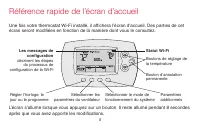
5 69-2736EFS—05 Référence rapide de l’écran d’accueil Une fois votre thermostat Wi-Fi installé, il affichera l’écran d’accueil. Des parties de cet écran seront modifiées en fonction de la manière dont vous le consultez. L’écran s’allume lorsque vous appuyez sur un bouton. Il reste allumé pendant 8 s...
Page 54 - Connexion à votre réseau Wi-Fi
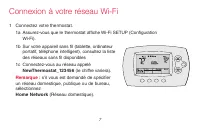
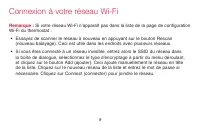
69-2736EFS—05 6 Connexion à votre réseau Wi-Fi Branchez votre dispositif sans fil à votre réseau domestique. Tous ces types d’appareils fonctionneront : • Tablette (recommandé)• Ordinateur portatif (recommandé)• Téléphone intelligent Si vous êtes bloqué... à tout moment dans cette procédure, redémar...
Page 59 - Enregistrement de votre thermostat en ligne
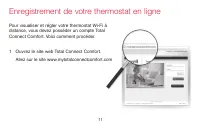
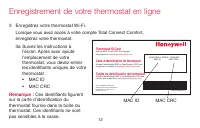
11 69-2736EFS—05 M31570 Pour visualiser et régler votre thermostat Wi-Fi à distance, vous devez posséder un compte Total Connect Comfort. Voici comment procéder. 1 Ouvrez le site web Total Connect Comfort. Allez sur le site www.mytotalconnectcomfort.com Enregistrement de votre thermostat en ligne
Page 60 - Consultez votre messagerie; Suivez les instructions d’activation
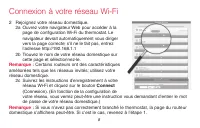
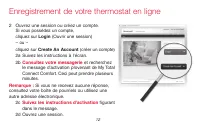
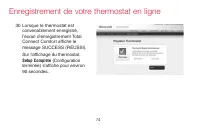
69-2736EFS—05 12 M31571 Enregistrement de votre thermostat en ligne 2 Ouvrez une session ou créez un compte. Si vous possédez un compte, cliquez sur Login (Ouvrir une session) – ou –cliquez sur Create An Account (créer un compte) 2a Suivez les instructions à l’écran.2b Consultez votre messagerie et ...
Page 64 - Réglage de l’horloge
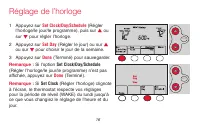
69-2736EFS—05 16 1 Appuyez sur Set Clock/Day/Schedule (Régler l’horloge/le jour/le programme), puis sur s ou sur t pour régler l’horloge. 2 Appuyez sur Set Day (Régler le jour) ou sur s ou sur t pour choisir le jour de la semaine. 3 Appuyez sur Done (Terminé) pour sauvegarder. Remarque : Si l’option...
Page 65 - Réglage du ventilateur
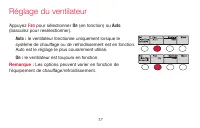
17 69-2736EFS—05 Appuyez Fan pour sélectionner On (en fonction) ou Auto (basculez pour resélectionner). Auto : le ventilateur fonctionne uniquement lorsque le système de chauffage ou de refroidissement est en fonction. Auto est le réglage le plus couramment utilisé. On : le ventilateur est toujours ...
Page 66 - Sélection du mode de fonctionnement du système
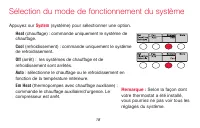
69-2736EFS—05 18 Appuyez sur System (système) pour sélectionner une option. Heat (chauffage) : commande uniquement le système de chauffage. Cool (refroidissement) : commande uniquement le système de refroidissement. Off (arrêt) : les systèmes de chauffage et de refroidissement sont arrêtés. Auto : s...
Page 67 - Programmes d’économie d’énergie préconfigurés
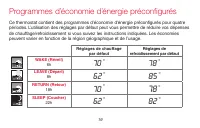
19 69-2736EFS—05 Programmes d’économie d’énergie préconfigurés Ce thermostat contient des programmes d’économie d’énergie préconfigurés pour quatre périodes. L’utilisation des réglages par défaut peut vous permettre de réduire vos dépenses de chauffage/refroidissement si vous suivez les instructions...
Page 68 - Réglage des programmes
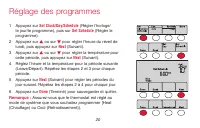
69-2736EFS—05 20 1 Appuyez sur Set Clock/Day/Schedule (Régler l’horloge/ le jour/le programme), puis sur Set Schedule (Régler le programme). 2 Appuyez sur s ou sur t pour régler l’heure du réveil de lundi, puis appuyez sur Next (Suivant). 3 Appuyez sur s ou sur t pour régler la température pour cett...
Page 69 - Dérogation temporaire de la programmation
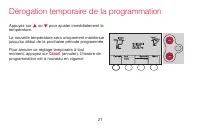
21 69-2736EFS—05 Appuyez sur s ou t pour ajuster immédiatement la température. La nouvelle température sera uniquement maintenue jusqu’au début de la prochaine période programmée. Pour annuler ce réglage temporaire à tout moment, appuyez sur Cancel (annuler). L’horaire de programmation est à nouveau...
Page 70 - Dérogation permanente de la programmation
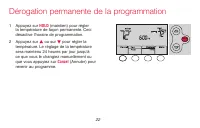
69-2736EFS—05 22 1 Appuyez sur HOLD (maintien) pour régler la température de façon permanente. Ceci désactive l’horaire de programmation. 2 Appuyez sur s ou sur t pour régler la température. Le réglage de la température sera maintenu 24 heures par jour jusqu’à ce que vous le changiez manuellement ou...
Page 71 - Annulation de l’enregistrement du thermostat
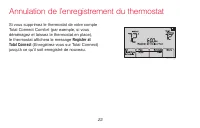
23 69-2736EFS—05 Si vous supprimez le thermostat de votre compte Total Connect Comfort (par exemple, si vous déménagez et laissez le thermostat en place), le thermostat affichera le message Register at Total Connect (Enregistrez-vous sur Total Connect) jusqu’à ce qu’il soit enregistré de nouveau. An...
Page 73 - Technologie Smart Response
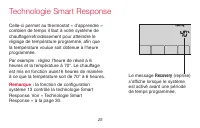
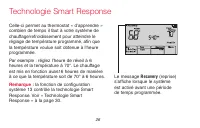
25 69-2736EFS—05 M34001 Celle-ci permet au thermostat « d’apprendre » combien de temps il faut à votre système de chauffage/refroidissement pour atteindre le réglage de température programmé, afin que la température voulue soit obtenue à l’heure programmée.Par exemple : réglez l’heure de réveil à 6 ...
Page 75 - Protection du compresseur
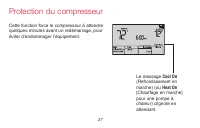
27 69-2736EFS—05 Cette fonction force le compresseur à attendre quelques minutes avant un redémarrage, pour éviter d’endommager l’équipement. Le message Cool On (Refroidissement en marche) (ou Heat On [Chauffage en marche] pour une pompe à chaleur) clignote en attendant. Protection du compresseur M3...
Page 76 - Commutation automatique
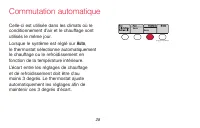
69-2736EFS—05 28 Celle-ci est utilisée dans les climats où le conditionnement d’air et le chauffage sont utilisés le même jour.Lorsque le système est réglé sur Auto , le thermostat sélectionne automatiquement le chauffage ou le refroidissement en fonction de la température intérieure.L’écart entre l...
Page 77 - Fonctions et options de configuration
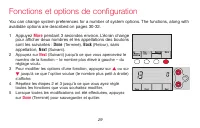
29 69-2736EFS—05 You can change system preferences for a number of system options. The functions, along with available options are described on pages 30-32. 1 Appuyez More pendant 3 secondes environ. L’écran change pour afficher deux nombres et les appellations des boutons sont les suivantes : Done ...
Page 78 - Configuration de l’utilisateur; Fonction
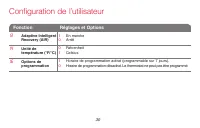
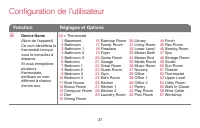
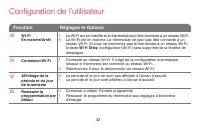
69-2736EFS—05 30 Configuration de l’utilisateur Fonction Réglages et Options 13 Adaptive Intelligent Recovery (AIR) 1 En marche 0 Arrêt 14 Unité de température (°F/°C) 0 Fahrenheit 1 Celsius 16 Options de programmation 1 Horaire de programmation activé (programmable sur 7 jours). 0 Horaire de progra...
Page 81 - Questions fréquemment posées
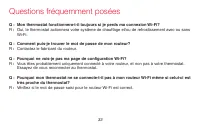
33 69-2736EFS—05 Questions fréquemment posées : Q Mon thermostat fonctionnera-t-il toujours si je perds ma connexion Wi-Fi? : R Oui, le thermostat actionnera votre système de chauffage et/ou de refroidissement avec ou sans Wi-Fi. : Q Comment puis-je trouver le mot de passe de mon routeur? : R Contac...
Page 84 - Dépannage
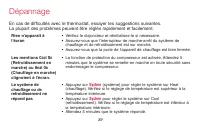
69-2736EFS—05 36 Dépannage Perte du signalSi l’indicateur no-Wi-Fi (pas de Wi-Fi) s’affiche à la place de l’indicateur de puissance du signal Wi-Fi dans le coin supérieur droit de l’écran d’accueil : • Assurez-vous que la Wi-Fi fonctionne chez vous en la vérifiant sur un autre appareil; si elle ne f...
Page 85 - Code d’erreur
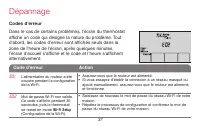
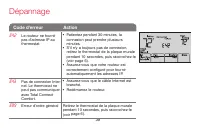
37 69-2736EFS—05 Dépannage Codes d’erreurDans le cas de certains problèmes, l’écran du thermostat affiche un code qui désigne la nature du problème. Tout d’abord, les codes d’erreur sont affichés seuls dans la zone de l’heure de l’écran; après quelques minutes, l’écran d’accueil s’affiche et le code...
Page 88 - Glossaire
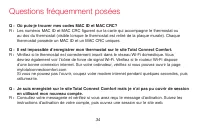
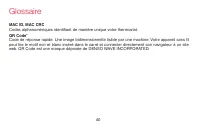
69-2736EFS—05 40 Glossaire MAC ID, MAC CRC Codes alphanumériques identifiant de manière unique votre thermostat. QR Code ® Code de réponse rapide. Une image bidimensionnelle lisible par une machine. Votre appareil sans fil peut lire le motif noir et blanc inséré dans le carré et connecter directemen...
Page 89 - Informations réglementaires
41 69-2736EFS—05 Informations réglementaires Déclaration de conformité à la FCC (partie 15.19) (États-Unis uniquement)Cet appareil est conforme à la partie 15 du règlement de la FCC. Son fonctionnement est soumis aux deux conditions suivantes :1 Ce dispositif ne doit pas causer d’interférences nuisi...
Page 91 - Garantie limitée à 5 ans
43 69-2736EFS—05 Garantie limitée à 5 ans Honeywell garantit ce produit, à l’exception des piles, contre tout défaut de pièce ou de main-d’œuvre, durant une période pour cinq (5) ans an à partir de la date d’achat par le consommateur si le produit est utilisé et entretenu convenablement. En cas de d...
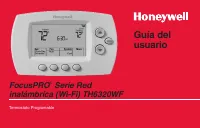
Page 95 - Bienvenido
Bienvenido Felicitaciones por la compra del termostato programable con conexión WiFi de Honeywell. Cuando se registre en Total Connect Comfort Solutions de Honeywell, puede supervisar y controlar de manera remota el sistema de calefacción y refrigeración de su hogar o empresa; puede permanecer conec...
Page 97 - Índice
69-2736EFS—05 3 Acerca de su nuevo termostato Referencia rápida de la pantalla de inicio ....................................................... 5Conexión a la red WiFi ................................ 6Registro del termostato en línea ............... 11Cronogramas de ahorro de energía predeterminad...
Page 98 - Características del termostato con conexión WiFi; Ver y configurar la temperatura y los cronogramas; alcanzar la temperatura deseada a la hora deseada.
69-2736EFS—05 4 Características del termostato con conexión WiFi Con el nuevo termostato, podrá realizar lo siguiente: • Conectarse a Internet para supervisar y controlar el sistema de calefacción/refrigeración • Ver y cambiar las configuraciones del sistema de calefacción/refrigeración • Ver y conf...
Page 99 - Referencia rápida de la pantalla de inicio
5 69-2736EFS—05 Referencia rápida de la pantalla de inicio Una vez que el termostato con conexión WiFi esté instalado, podrá visualizar la pantalla de inicio. Partes de esta pantalla cambiarán según cómo la vea. La pantalla se ilumina cuando presiona cualquier botón. Permanece iluminada durante 8 se...
Page 100 - Conexión a la red WiFi
69-2736EFS—05 6 Conexión a la red WiFi Conecte el dispositivo inalámbrico a su red doméstica. Cualquiera de estos tipos de dispositivos funcionará: • Computadora tipo tablet (recomendado)• Computadora portátil (recomendado)• Teléfono inteligente Si no puede continuar... en algún momento durante este...
Page 101 - Red
7 69-2736EFS—05 Conexión a la red WiFi 1 Conecte el termostato. 1a Asegúrese de que el termostato muestre Wi-Fi SETUP (configuración Wi-Fi). 1b Consulte la lista de todas las redes WiFi disponibles en el dispositivo inalámbrico (computadora tipo tablet, computadora portátil o teléfono inteligente). ...
Page 104 - Connection Failure
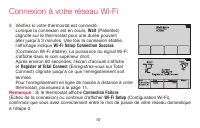
69-2736EFS—05 10 Conexión a la red WiFi 3 Asegúrese de que su termostato esté conectado. Mientras la conexión se encuentra en proceso, su termostato continuará destellando el mensaje Wait (esperar) hasta 3 minutos. Cuando se complete la conexión, la pantalla mostrará Wi-Fi Setup Connection Success (...
Page 105 - Registro del termostato en línea
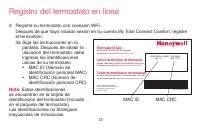
11 69-2736EFS—05 Registro del termostato en línea M31570 Para ver y configurar el termostato con conexión WiFi de manera remota, debe tener una cuenta en Total Connect Comfort. Siga las siguientes instrucciones. 1 Abra el sitio web Total Connect Comfort. Vaya a www.mytotalconnectcomfort.com
Page 106 - Revise su correo electrónico; Siga las instrucciones de activación
69-2736EFS—05 12 Registro del termostato en línea 2 Inicie sesión o cree una cuenta. Si tiene una cuenta, haga clic en Login (Iniciar sesión) – O bien –haga clic en Create An Account (Crear una cuenta) 2a Siga las instrucciones en la pantalla.2b Revise su correo electrónico para verificar si tiene u...
Page 110 - Configuración del reloj; Set Day
69-2736EFS—05 16 Configuración del reloj 1 Presione Set Clock/Day/Schedule (configurar reloj/ día/cronograma) y, luego, presione s o t para configurar el reloj. 2 Presione Set Day (configurar día) y, luego, s o t para seleccionar el día de la semana. 3 Presione Done (terminado) para salir. Nota: si ...
Page 111 - Configuración del ventilador
17 69-2736EFS—05 Configuración del ventilador Presione Fan (Ventilador) para seleccionar la opción On (Encendido) o Auto (alterne para volver a seleccionar la opción). Auto : el ventilador funciona solo cuando el sistema de calefacción o refrigeración está encendido. La configuración de uso más frec...
Page 112 - Selección de la modalidad del sistema
69-2736EFS—05 18 Selección de la modalidad del sistema Nota: Dependiendo de la forma como se instaló su termostato, puede que no vea todas las configuraciones del sistema. Presione System (Sistema) para seleccionar una opción. Heat: controla solo el sistema de calefacción. Cool: controla solo el sis...
Page 113 - Cronogramas de ahorro de energía predeterminados
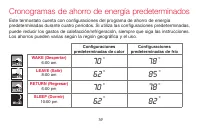
19 69-2736EFS—05 Cronogramas de ahorro de energía predeterminados Este termostato cuenta con configuraciones del programa de ahorro de energía predeterminadas durante cuatro períodos. Si utiliza las configuraciones predeterminadas, puede reducir los gastos de calefacción/refrigeración, siempre que s...
Page 114 - Ajuste de los cronogramas del programa
69-2736EFS—05 20 Ajuste de los cronogramas del programa 1 Presione Set Clock/Day/Schedule (configurar reloj/día/ cronograma) y luego, Set Schedule (configurar cronograma). 2 Presione s o t para configurar la hora de despertarse el lunes (Mon) y luego presione Next (siguiente). 3 Presione s o t para ...
Page 115 - Anulación temporal de los cronogramas
21 69-2736EFS—05 Anulación temporal de los cronogramas Presione s o t para ajustar inmediatamente la temperatura.La nueva temperatura se mantendrá solamente hasta que comience el próximo período programado.Para cancelar la configuración temporal en cualquier momento, presione Cancel (Cancelar). El c...
Page 116 - Anulación permanente de los cronogramas
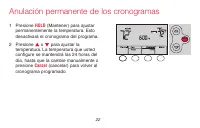
69-2736EFS—05 22 Anulación permanente de los cronogramas 1 Presione HOLD (Mantener) para ajustar permanentemente la temperatura. Esto desactivará el cronograma del programa. 2 Presione s o t para ajustar la temperatura. La temperatura que usted configure se mantendrá las 24 horas del día, hasta que ...
Page 117 - Baja del termostato
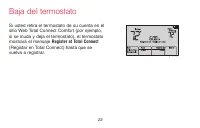
23 69-2736EFS—05 Baja del termostato Si usted retira el termostato de su cuenta en el sitio Web Total Connect Comfort (por ejemplo, si se muda y deja el termostato), el termostato mostrará el mensaje Register at Total Connect (Registar en Total Connect) hasta que se vuelva a registrar. M33876
Page 118 - Desconexión de la red WiFi
69-2736EFS—05 24 Desconexión de la red WiFi Cambio de su enrutador Si usted desconecta el termostato de su red WiFi:1 Ingrese a la configuración del sistema (consulte la página 29.2 Cambie la configuración de 39 a 0 (consulte la página 32). La pantalla mostrará Wi-Fi Setup (configuración de WiFi). P...
Page 119 - Actualizaciones del software
25 69-2736EFS—05 Actualizaciones del software Honeywell realiza actualizaciones periódicas del software para este termostato. Las actualizaciones se efectúan automáticamente a través de su conexión Wi-Fi. Todas sus configuraciones permanecen guardadas, de modo que no necesita hacer cambios después d...
Page 121 - Protección del compresor
27 69-2736EFS—05 Protección del compresor Esta característica hace que el compresor demore unos minutos antes de volver a iniciarse, para evitar daños al equipo. El mensaje Cool On (refrigeración encendida) (o Heat On [calefacción encendida] para una bomba de calor) destellará durante el período de ...
Page 122 - Conversión automática
69-2736EFS—05 28 Conversión automática Esta función se usa en climas en donde el acondicionador de aire y la calefacción se utilizan durante el mismo día.Cuando el sistema está configurado en AUTO (Automático), el termostato elige automáticamente cuándo calentar o refrigerar, según la temperatura in...
Page 123 - Opciones y funciones de configuración
29 69-2736EFS—05 Opciones y funciones de configuración Puede cambiar las opciones en diversas funciones del sistema. Las funciones disponibles dependen del tipo de sistema que usted tenga. Las funciones junto con las opciones disponibles se describen en las páginas 30–32. Este termostato está precon...
Page 124 - Configuración del usuario; Función
69-2736EFS—05 30 Configuración del usuario Función Configuraciones y opciones 13 Adaptive Intelligent Recovery (AIR) 1 Encendido 0 Apagado 14 Formato de la tem- peratura (°F/°C) 0 Fahrenheit 1 Centígrados 16 Opciones de crono- grama 1 El cronograma del programa está activado (programable para 7 días...
Page 127 - Preguntas frecuentes
33 69-2736EFS—05 Preguntas frecuentes : P ¿Mi termostato seguirá funcionando si pierdo la conexión a la red WiFi? : R Sí, el termostato pondrá en funcionamiento el sistema de calefacción o refrigeración con o sin la conexión a la red WiFi. : P ¿Cómo encuentro la contraseña de mi enrutador? : R Comun...
Page 130 - Localización y solución de problemas
69-2736EFS—05 36 Localización y solución de problemas Señal perdidaSi se muestra el indicador no-Wi-Fi en vez del indicador de potencia WiFi en la esquina superior derecha de la pantalla de inicio: • Revise otro dispositivo para verificar que la conexión WiFi está funcionando en su hogar; si no, lla...
Page 131 - Código de error
37 69-2736EFS—05 Localización y solución de problemas Códigos de errorPara ciertos problemas, la pantalla del termostato mostrará un código que identifica el problema. Inicialmente se muestran códigos de error solos en el área de hora de la pantalla; luego de algunos minutos se muestra la pantalla d...
Page 135 - Glosario
41 69-2736EFS—05 Glosario MAC ID, MAC CRC Códigos alfanuméricos que identifican de forma exclusiva al termostato.QR Code ® Código de respuesta rápida. Una imagen bidimensional legible en máquina. Su dispositivo inalámbrico puede leer el patrón en blanco y negro que se encuentra en el cuadrado y vinc...
Page 136 - Información sobre normativas
69-2736EFS—05 42 Información sobre normativas Declaración de conformidad con las regulaciones FCC (Sección 15.19) (solo en los EE. UU.)Este dispositivo cumple con la Sección 15 de las regulaciones FCC. El funcionamiento está sujeto a las dos condiciones siguientes:1 Este dispositivo no debe causar i...
Page 138 - Garantía limitada de 5 años
69-2736EFS—05 44 Garantía limitada de 5 años Honeywell garantiza este producto, a excepción de la batería, por el término de cinco (5) años contra cualquier defecto de fabricación o de los materiales, a partir de la fecha de compra por parte del consumidor. Si en cualquier momento durante el período...


















 Honeywell DT8050A
Installation Manual
Honeywell DT8050A
Installation Manual
 Honeywell DT8050
Manual
Honeywell DT8050
Manual
 Honeywell TPFIT25WK
User Manual
Honeywell TPFIT25WK
User Manual
 Honeywell TPFIT32AWK
User Manual
Honeywell TPFIT32AWK
User Manual
 Honeywell 24DX47
User Manual
Honeywell 24DX47
User Manual
 Honeywell TPFIT50PWK
User Manual
Honeywell TPFIT50PWK
User Manual
 Honeywell TPFIT50WK
User Manual
Honeywell TPFIT50WK
User Manual
 Honeywell 00010
User Manual
Honeywell 00010
User Manual
 Honeywell ADVBLEWIFI
Manual
Honeywell ADVBLEWIFI
Manual