Page 2 - ii; Installation is Easy
69-2210EF—03 ii Installation is Easy Label wires and remove your old thermostat Install and wire your new thermostat Set your new thermostat to match your heating/cooling system – It is preset for the most common system We are here to help. Call 1-800-468-1502 for wiring assistance before returning ...
Page 4 - Remove Old Thermostat; Old thermostat
69-2210EF—03 2 Remove old thermostat but leave wallplate with wires attached. 2 Remove Old Thermostat M28099 Is there a sealed tube containing mercury? If so, see back cover for proper disposal instructions. Leave wallplate in place Old thermostat Cover
Page 5 - Label Wires with Tags; Wire Labels
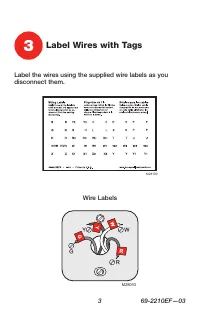
3 69-2210EF—03 Label the wires using the supplied wire labels as you disconnect them. 3 Label Wires with Tags Wire Labels M28100 M28093
Page 6 - Wallplate
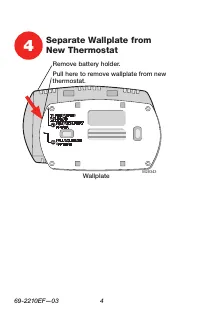
69-2210EF—03 4 M28343 4 Separate Wallplate from New Thermostat Wallplate Pull here to remove wallplate from new thermostat. Remove battery holder.
Page 7 - Insert Quick Reference Card
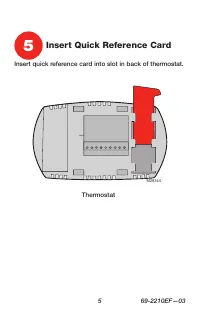
5 69-2210EF—03 M2834 M28344 Insert quick reference card into slot in back of thermostat. Thermostat 5 Insert Quick Reference Card
Page 8 - Mount Wallplate
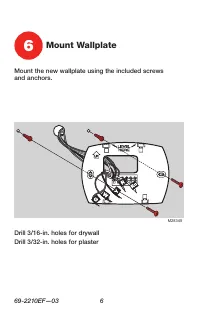
69-2210EF—03 6 Mount the new wallplate using the included screws and anchors. 6 Mount Wallplate M28345 Drill 3/16-in. holes for drywallDrill 3/32-in. holes for plaster
Page 9 - Rc; Connect Wires; Have a Heat Pump system?
7 69-2210EF—03 Simply match wire labels. Remove metal jumper if you have both R and Rc wires. M27513 7 Connect Wires Labels don’t match? See page 21. Have a Heat Pump system? See page 14. We are here to help. Call 1-800-468-1502 for wiring assistance.
Page 10 - Install Batteries
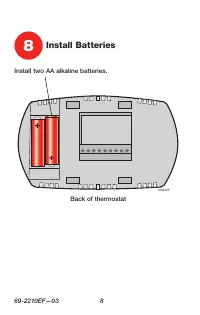
69-2210EF—03 8 Install two AA alkaline batteries. M28346 Back of thermostat 8 Install Batteries
Page 11 - Install thermostat onto the wallplate on the wall.; Install Thermostat onto Wallplate
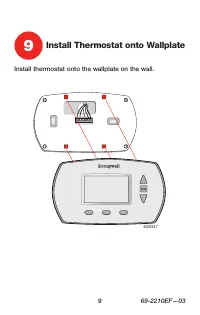
9 69-2210EF—03 Install thermostat onto the wallplate on the wall. M28347 9 Install Thermostat onto Wallplate
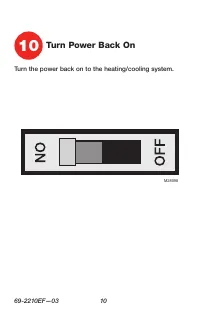
Page 12 - Turn the power back on to the heating/cooling system.; Turn Power Back On
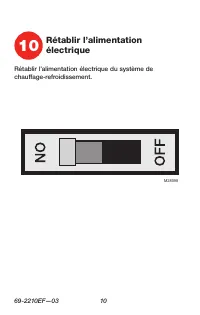
69-2210EF—03 10 Turn the power back on to the heating/cooling system. 10 Turn Power Back On M28098
Page 13 - on page 13 to match your thermostat to your system
11 69-2210EF—03 If your system type is: q Single Stage Heat and Cool Congratulations, you’re done! If your system type is: q Heat Pump* without Backup Heat q Heat Only q Cool Only Continue with advanced installation on page 13 to match your thermostat to your system type. *Heat Pump—an air condition...
Page 14 - Advanced Installation
Advanced Installation System setup ......................................................................13Wiring ..................................................................................21Troubleshooting ..................................................................22Customer assistanc...
Page 15 - About your new thermostat; System setup; NEXT
RTH6400 13 69-2210EF—03 About your new thermostat SETUP WIRING ASSIST ANCE TROUBLESHOOTING M28348 Press and hold the s and FAN buttons until the screen changes (approximately 5 seconds). System setup Setting Function Done Next 1 0 M28349 Press s or t to change settings. Press NEXT to advance to next...
Page 16 - Advanced Installation Guide; Function 1: System type
Advanced Installation Guide 69-2210EF—03 14 SETUP WIRING ASSIST ANCE TROUBLESHOOTING Function 1: System type Press the s or t button to select the type of system you have in your home: Done Next 1 0 M28350 Press to change setting. When correct setting is selected, press NEXT to display next function...
Page 17 - Heat pump changeover valve
RTH6400 15 69-2210EF—03 SETUP WIRING ASSIST ANCE TROUBLESHOOTING Function 2: Heat pump changeover valve Press the s or t button to select whether your changeover valve is used in heating or cooling: NOTE: If Function 2 does not appear, please turn to the next page to continue. Done Next 2 0 M28352 P...
Page 18 - Function 3: Heating fan control
Advanced Installation Guide 69-2210EF—03 16 SETUP WIRING ASSIST ANCE TROUBLESHOOTING Function 3: Heating fan control Press the s or t button to select your heating system and fan operation: NOTE: If Function 3 does not appear, please turn to the next page to continue. Done Next 3 0 M28353 Press to c...
Page 19 - Function 5: Heating cycle rate; Gas or oil furnace:
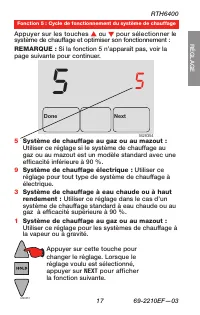
RTH6400 17 69-2210EF—03 SETUP WIRING ASSIST ANCE TROUBLESHOOTING Function 5: Heating cycle rate Press the s or t button to select your heating system and optimize its operation: NOTE: If Function 5 does not appear, please turn to the next page to continue. Done Next 5 5 M28354 5 Gas or oil furnace: ...
Page 20 - Automatic Changeover:
Advanced Installation Guide 69-2210EF—03 18 SETUP WIRING ASSIST ANCE TROUBLESHOOTING Function 12: Manual/Auto Changeover Press the s or t button to select Manual or Auto Changeover: Done Next 12 0 M28355 NOTE: System maintains a minimum 3ºF difference between heat and cool settings. CAUTION: To avoi...
Page 21 - Function 13: Smart Response; Smart Response® Technology ON
RTH6400 19 69-2210EF—03 SETUP WIRING ASSIST ANCE TROUBLESHOOTING Function 13: Smart Response ® Technology Press the s or t button to select Smart Response ® Technology: Done Next 13 1 M28356 NOTE: See Operating Manual for information on Smart Response ® Technology. 1 Smart Response® Technology ON 0 ...
Page 22 - Function 14: Temperature display; DONE
Advanced Installation Guide 69-2210EF—03 20 About your new thermostat SETUP WIRING ASSIST ANCE TROUBLESHOOTING Press the s or t button to select Fahrenheit or Celsius temperature display: Function 14: Temperature display Done Next 14 0 M28357 Press to change setting. When correct setting is selected...
Page 23 - Wiring
RTH6400 21 69-2210EF—03 SETUP WIRING ASSIST ANCE TROUBLESHOOTING Wiring If wires will be connected to both R and Rc terminals, remove metal jumper (see page 6). Do not connect both O and B if you have a heat pump. Connect O wire to O/B W . Wrap B wire with electrical tape and do not use. Do not use ...
Page 24 - Troubleshooting; Display is blank
Advanced Installation Guide 69-2210EF—03 22 Troubleshooting SETUP WIRING ASSIST ANCE TROUBLESHOOTING Troubleshooting If you have difficulty with your thermostat, please try the following suggestions. Most problems can be corrected quickly and easily. Display is blank • Make sure fresh AA alkaline ba...
Page 25 - SYSTEM
RTH6400 23 69-2210EF—03 Troubleshooting SETUP WIRING ASSIST ANCE TROUBLESHOOTING Heating or cooling system does not respond • Press SYSTEM button to set system to Heat. Make sure the temperature is set higher than the Inside temperature. • Press SYSTEM button to set system to Cool. Make sure the tem...
Page 27 - Customer assistance; Accessories/replacement parts
RTH6400 25 69-2210EF—03 About your new thermostat SETUP WIRING ASSIST ANCE TROUBLESHOOTING For assistance with this product, please visit http://DIYthermostats.honeywell.com or call Honeywell Customer Care toll-free at 1-800-468-1502 . Customer assistance To save time, please remove the battery hold...
Page 28 - -year limited warranty
69-2210EF—03 26 Honeywell warrants this product, excluding battery, to be free from defects in the workmanship or materials, under normal use and service, for a period of one (1) year from the date of purchase by the consumer. If at any time during the warranty period the product is determined to be...
Page 30 - Automation and Control Solutions; Do not place your old
Honeywell International Inc. 1985 Douglas Drive North Golden Valley, MN 55422 http://DIYthermostats.honeywell.com ® U.S. Registered Trademark. US Patent No. D542,677 and other patents pending. © 2008 Honeywell International Inc. 69-2210EF— 03 M.S. Rev. 08-08 Automation and Control Solutions Printed ...
Page 31 - Thermostat programmable; Guide d’installation rapide
Série RTH6400 Thermostat programmable 69-2210EF-03 Guide d’installation rapide
Page 32 - L’installation est facile !; Nous sommes à votre
69-2210EF—03 ii L’installation est facile ! Étiquetage des fils et retrait de l’ancien thermostat Installation et raccordement du nouveau thermostat Configuration du nouveau thermostat pour correspondre à votre système de chauffage/ climatisation – Il est préréglé en prévision des systèmes les plus ...
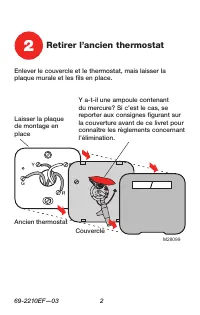
Page 34 - Retirer l’ancien thermostat; Ancien thermostat
69-2210EF—03 2 Enlever le couvercle et le thermostat, mais laisser la plaque murale et les fils en place. 2 Retirer l’ancien thermostat M28099 Y a-t-il une ampoule contenant du mercure? Si c’est le cas, se reporter aux consignes figurant sur la couverture avant de ce livret pour connaître les règlem...
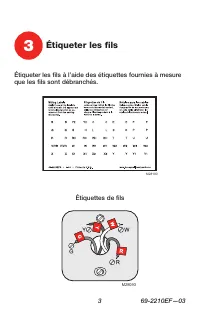
Page 35 - Étiqueter les fils; Étiquettes de fils
3 69-2210EF—03 Étiqueter les fils à l’aide des étiquettes fournies à mesure que les fils sont débranchés. 3 Étiqueter les fils Étiquettes de fils M28100 M28093
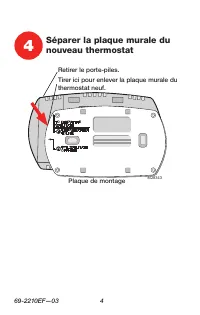
Page 36 - Plaque de montage
69-2210EF—03 4 4 Séparer la plaque murale du nouveau thermostat Plaque de montage M28343 Tirer ici pour enlever la plaque murale du thermostat neuf. Retirer le porte-piles.
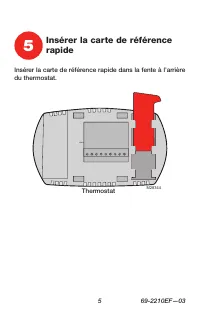
Page 37 - Thermostat; Insérer la carte de référence
5 69-2210EF—03 M2834 M28344 Insérer la carte de référence rapide dans la fente à l’arrière du thermostat. Thermostat 5 Insérer la carte de référence rapide
Page 38 - Installer la plaque
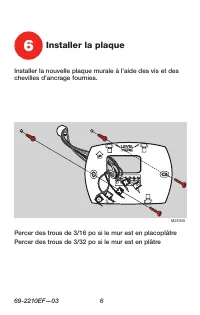
69-2210EF—03 6 Installer la nouvelle plaque murale à l’aide des vis et des chevilles d’ancrage fournies. 6 Installer la plaque M28345 Percer des trous de 3/16 po si le mur est en placoplâtrePercer des trous de 3/32 po si le mur est en plâtre
Page 39 - Raccorder les fils; Les étiquettes ne correspondent pas?
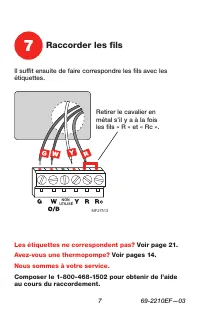
7 69-2210EF—03 Il suffit ensuite de faire correspondre les fils avec les étiquettes. Retirer le cavalier en métal s’il y a à la fois les fils « R » et « Rc ». MF27513 NON UTILISÉ 7 Raccorder les fils Les étiquettes ne correspondent pas? Voir page 21. Avez-vous une thermopompe? Voir pages 14. Nous so...
Page 40 - Installer les piles
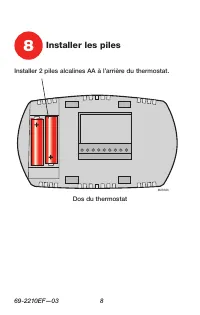
69-2210EF—03 8 Installer 2 piles alcalines AA à l’arrière du thermostat. Dos du thermostat 8 Installer les piles M28346
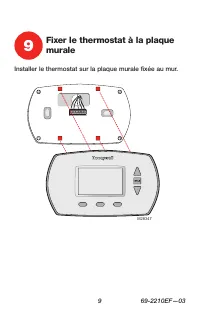
Page 41 - Installer le thermostat sur la plaque murale fixée au mur.; Fixer le thermostat à la plaque
9 69-2210EF—03 Installer le thermostat sur la plaque murale fixée au mur. 9 Fixer le thermostat à la plaque murale M28347
Page 43 - à la page 13 pour faire correspondre le thermostat à; Si votre système est du type
11 69-2210EF—03 Si votre système est du type suivant : q Chauffage et refroidissement à un étage Félicitations, vous avez terminé! Si votre système est du type suivant : q Thermopompe* sans chauffage d’appoint q Chauffage seulement q Refroidissement seulement Passer au mode d’installation avancé à l...
Page 44 - Guide d’installation avancé
Guide d’installation avancé Configuration du système ..................................................13Câblage ...............................................................................21Dépannage. ........................................................................22Assistance à la clien...
Page 45 - Pour commencer, appuyer sur les touches; ou; Configuration du système
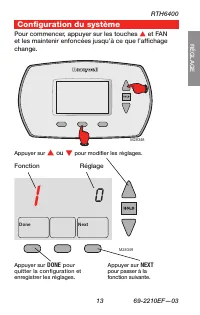
RTH6400 13 69-2210EF—03 RÉGLAGE WIRING ASSIST ANCE TROUBLESHOOTING M28348 Pour commencer, appuyer sur les touches s et FAN et les maintenir enfoncées jusqu’à ce que l’affichage change. Réglage Fonction Done Next 1 0 M28349 Appuyer sur s ou t pour modifier les réglages. Configuration du système Appuy...
Page 46 - Fonction 1 : Type de système
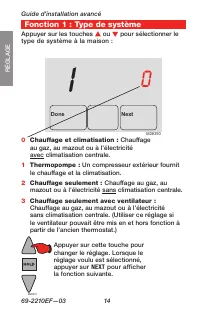
Guide d’installation avancé 69-2210EF—03 14 About your new thermostat RÉGLAGE WIRING ASSIST ANCE TROUBLESHOOTING Fonction 1 : Type de système Appuyer sur les touches s ou t pour sélectionner le type de système à la maison : Done Next 1 0 M28350 Appuyer sur cette touche pour changer le réglage. Lorsq...
Page 47 - Fonction 2 : Vanne d’inversion de thermopompe
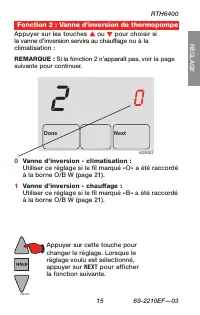
RTH6400 15 69-2210EF—03 RÉGLAGE WIRING ASSIST ANCE TROUBLESHOOTING Appuyer sur les touches s ou t pour choisir si la vanne d’inversion servira au chauffage ou à la climatisation : REMARQUE : Si la fonction 2 n’apparaît pas, voir la page suivante pour continuer. Done Next 2 0 M28352 Appuyer sur cette...
Page 48 - Fonction 3 : Commande du ventilateur de chauffage
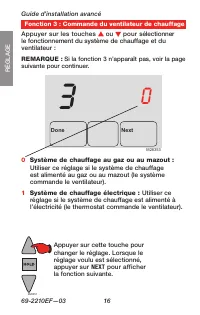
Guide d’installation avancé 69-2210EF—03 16 RÉGLAGE WIRING ASSIST ANCE TROUBLESHOOTING Appuyer sur les touches s ou t pour sélectionner le fonctionnement du système de chauffage et du ventilateur : REMARQUE : Si la fonction 3 n’apparaît pas, voir la page suivante pour continuer. Done Next 3 0 M28353...
Page 50 - Commutation automatique :
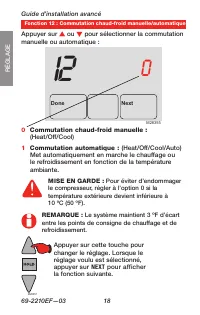
Guide d’installation avancé 69-2210EF—03 18 RÉGLAGE WIRING ASSIST ANCE TROUBLESHOOTING Fonction 12 : Commutation chaud-froid manuelle/automatique Appuyer sur s ou t pour sélectionner la commutation manuelle ou automatique : Done Next 12 0 M28355 REMARQUE : Le système maintient 3 ºF d’écart entre les...
Page 51 - Fonction 13 : Technologie Smart Response
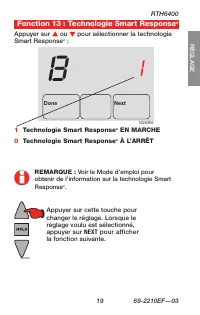
RTH6400 19 69-2210EF—03 About your new thermostat RÉGLAGE WIRING ASSIST ANCE TROUBLESHOOTING Fonction 13 : Technologie Smart Response ® Appuyer sur s ou t pour sélectionner la technologie Smart Response ® : Done Next 13 1 M28356 REMARQUE : Voir le Mode d’emploi pour obtenir de l’information sur la t...
Page 52 - Fonction 14 : Affichage de la température
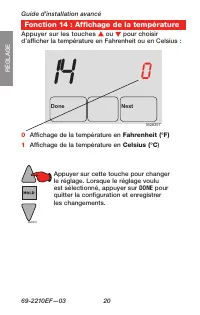
Guide d’installation avancé 69-2210EF—03 20 About your new thermostat RÉGLAGE WIRING ASSIST ANCE TROUBLESHOOTING Fonction 14 : Affichage de la température Appuyer sur les touches s ou t pour choisir d’afficher la température en Fahrenheit ou en Celsius : Done Next 14 0 M28357 0 Affichage de la tempé...
Page 53 - Câblage
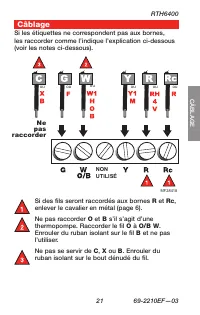
RTH6400 21 69-2210EF—03 About your new thermostat SETUP CÂBLAGE ASSIST ANCE TROUBLESHOOTING Si des fils seront raccordés aux bornes R et Rc , enlever le cavalier en métal (page 6). Ne pas raccorder O et B s’il s’agit d’une thermopompe. Raccorder le fil O à O/B W . Enrouler du ruban isolant sur le fi...
Page 54 - Assistance à la clientèle; Dépannage
Guide d’installation avancé 69-2210EF—03 22 Assistance à la clientèle SETUP WIRING DÉP ANNAGE TROUBLESHOOTING Dépannage Si vous éprouvez des difficultés, nous vous proposons d’essayer les solutions suivantes. La plupart des pro blèmes peuvent être corrigés rapidement et facilement. Rien n’apparaît à...
Page 57 - Pour obtenir de l’aide sur ce produit Honeywell, veuillez; Accessoires et pièces de rechange
RTH6400 25 69-2210EF—03 Dépannage SETUP WIRING ASSIST ANCE ASSIST ANCE Pour obtenir de l’aide sur ce produit Honeywell, veuillez consulter le site http://DIYthermostats.honeywell.com ou vous adresser sans frais aux Services à la clientèle de Honeywell au 1 800 468-1502 . Pour gagner du temps, enleve...
Page 58 - Garantie limitée de un an
69-2210EF—03 26 Garantie limitée de un an Honeywell garantit ce produit, à l’exception des piles, contre tout vice de fabrication ou de matière dans la mesure où il en est fait une utilisation et un entretien convenables, et ce, pour un (1) an à partir de la date d’achat par le consommateur. En cas ...
Page 60 - Solutions de régulation et d’automatisation; AVIS CONCERNANT LE MERCURE :; Si le
Honeywell International Inc. 1985 Douglas Drive North Golden Valley, MN 55422 http://DIYthermostats.honeywell.com ® Marque enregistrée aux États-Unis. Brevets US N OS D542,677 et autres brevets en instance. © 2008 Honeywell International Inc. 69-2210EF— 03 M.S. Rev. 08-08 Solutions de régulation et ...