Page 2 - PARTS DESCRIPTION
1 EN WARNING -- READ AND SAVE THE AIR COOLER SAFETY & MAINTENANCE GUIDE AND USER MANUAL BEFORE USING THIS PRODUCT. FAILURE TO FOLLOW THESE INSTRUCTIONS MAY DAMAGE AND/ OR IMPAIR ITS OPERATION AND VOID THE WARRANTY. IN CASE THERE IS ANY INCONSISTENCY OR CONFLICT BET WEEN THE ENGLISH VERSION AND A...
Page 3 - CONTROL PANEL
2 EN USE & OPERATION CONTROL PANEL Cool Timer / Preset Sleep / Wind Type Power Swing Speed Buttons on Control Panel Wind Type Swing Preset Cool Speed:1 = Ultra Low 2 = Low 3 = Medium 4 = High Sleep Timer:1H 2H 4H 8H Icons on Display Screen
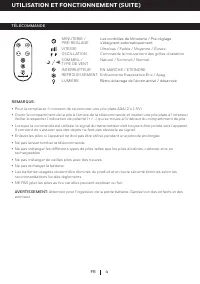
Page 5 - REMOTE CONTROL; Do not drop the remote control.
4 USE & OPERATION (CONTINUED) EN REMOTE CONTROL TIMER / PRESETSPEEDSWINGSLEEP / WIND TYPEPOWERCOOLLIGHT : Controls the Timer / Preset function for automatic off: Ultra Low / Low / Medium / High: Controls the motion of the louvers: Natural / Sleep / Normal: ON / OFF: Evaporative Cooling On / Off:...
Page 6 - FILLING WITH WATER & ICE
5 EN USE & OPERATION (CONTINUED) CAUTION: Unplug the unit from the electrical power outlet before emptying or refilling the water tank. To refill, slide out the water tank located at the front of the unit. The Water Level Indicator is located at the front of the unit. Refill the water tank when ...
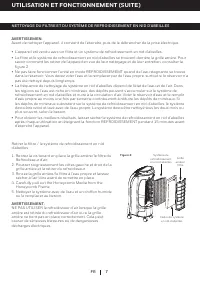
Page 7 - CLEANING & DRAINING THE WATER TANK; elements or chemicals to clean this product.
6 EN USE & OPERATION (CONTINUED) Below are instructions on how to clean and maintain your air cooler. If the cooler will not be used for a long period of time, please refer to the STORAGE & MAINTENANCE GUIDELINES located in the separate Safety & Maintenance Guide. WARNING: Before cleanin...
Page 8 - CLEANING THE MESH FILTER AND HONEYCOMB COOLING MEDIA
7 USE & OPERATION (CONTINUED) EN CLEANING THE MESH FILTER AND HONEYCOMB COOLING MEDIA WARNING: Before cleaning the unit, switch the unit OFF and disconnect from the electrical socket. • The appliance is supplied with a Mesh Filter and Honeycomb Cooling Media. • The Mesh Filter and Honeycomb Cool...
Page 9 - DESCRIPTION DES PIECES
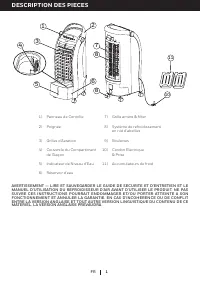
1 FR DESCRIPTION DES PIECES 1 2 3 4 5 6 8 7 8 10 11 AVERTISSEMENT -- LIRE ET SAUVEGARDER LE GUIDE DE SECURITE ET D'ENTRETIEN ET LE MANUEL D'UTILISATION DU REFROIDISSEUR D'AIR AVANT D'UTILISER LE PRODUIT. NE PAS SUIVRE CES INSTRUCTIONS POURRAIT ENDOMMAGER ET/OU PORTER ATTEINTE A SON FONCTIONNEMENT ET...
Page 10 - UTILISATION ET FONCTIONNEMENT; PANNEAU DE COMMANDE; Icônes sur l’écran d’affichage
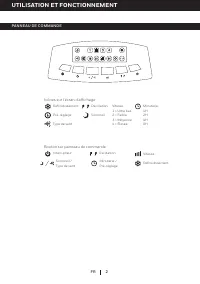
2 FR UTILISATION ET FONCTIONNEMENT PANNEAU DE COMMANDE Icônes sur l’écran d’affichage Refroidissement Minuterie / Pré-réglage Sommeil /Type de vent Interrupteur Oscillation Vitesse Bouton sur panneau de commande Type de vent Oscillation Pré-réglage Refroidissement Vitesse:1 = Ultra bas2 = Faible3 = ...
Page 11 - BOUTONS DE FONCTION
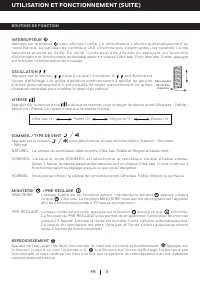
3 UTILISATION ET FONCTIONNEMENT (SUITE) FR BOUTONS DE FONCTION REFROIDISSEMENT Ajoutez de l'eau avant de faire fonctionner la machine en mode refroidissement. Appuyer sur le bouton jusqu’à ce que l’indicateur d’ soit illuminé sur l’écran d’affichage. La pompe à eau fonctionnera et vous sentirez l’ai...
Page 12 - TÉLÉCOMMANDE; Ne pas laisser tomber la télécommande.
4 UTILISATION ET FONCTIONNEMENT (SUITE) FR TÉLÉCOMMANDE • Pour la remplacer, il convient de se procurer une pile plate AAA (2 x 1.5V). • Ouvrir le compartiment de la pile à l’arrière de la télécommande et insérer une pile plate à l’intérieur.Veiller à respecter l’indication de polarité (+ / –) qui s...
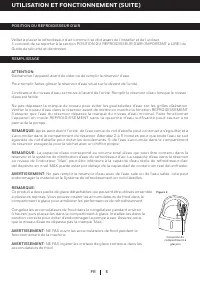
Page 13 - POSITION DU REFROIDISSEUR D’AIR; REMPLISSAGE
5 FR UTILISATION ET FONCTIONNEMENT (SUITE) POSITION DU REFROIDISSEUR D’AIR Veiller à placer le refroidisseur d’air comme il se doit avant de l’installer et de l’utiliser. Il convient de se reporter à la section POSITION DU REFROIDISSEUR D’AIR (IMPORTANT à LIRE) du Guide de sécurité et d’entretien. A...
Page 16 - DESCRIPCIÓN DE PARTES; A D V E R T E N C I A - - L E A Y G U A R D E L A G U I A D E M A N T E N I M I E N T O Y E L M A N U A L D E
1 ES DESCRIPCIÓN DE PARTES 1 2 3 4 5 6 8 7 8 10 11 1) Panel de Control 7) Rejilla Trasera y Filtro de Malla 2) Manija 8) Filtro de Enfriamiento Honeycomb 3) Deflectores 9) Ruedas 4) Compartimento para Hielo 10) Cable de Alimentación y Enchufe 5) Indicador de Nivel de Agua 11) Paquetes de Hielo 6) Ta...
Page 17 - USO Y FUNCIONAMIENTO; PANEL DE CONTROL; Iconos en la Pantalla Display
2 ES USO Y FUNCIONAMIENTO PANEL DE CONTROL Iconos en la Pantalla Display Frío Temporizador / Preestablecido Nocturno / Tipo de Viento Encendido Oscilación Velocidad Botones en la Pantalla Display Tipo de Viento Oscilación Preestablecido Frío Velocidad:1 = Ultra Bajo2 = Bajo3 = Media4 = Alta Nocturno...
Page 19 - CONTROL REMOTO; No deje caer el control remoto.
4 USO Y FUNCIONAMIENTO (CONTINUACIÓN) ES CONTROL REMOTO • El control remote requiere dos pilas AAA (2 x 1.5V) para su reemplazo. • Abra el compartimento para pilas en la parte de atrás del control remoto e inserte una pila. Asegúrese de colocar la pila de acuerdo a la polaridad correcta (+ / -) indi...
Page 20 - cuando el nivel de agua está bajo.; NO abra el paquete de hielo mientra esté operando el equipo.
5 ES USO Y FUNCIONAMIENTO (CONTINUACIÓN) LLENAR CON AGUA Y HIELO UBICACIÓN DEL ENFRIADOR Asegúrese de colocar el enfriador de aire correctamente antes de configurar y empezar a usar el producto.Por favor, consulte la sección UBICACION DEL ENFRIADOR de la Guía de seguridad y de mantenimiento separada...
Page 21 - LIMPIEZA Y VACIADO DEL TANQUE DE AGUA; la marca de nivel mínimo de agua. Conecte y encienda de nuevo.; ALARMA DE NIVEL BAJO DE AGUA*
6 ES USO Y FUNCIONAMIENTO (CONTINUACIÓN) A continuación se presentan las instrucciones para limpiar y mantener el Enfriador de aire. Si el Enfriador no se usa por un largo período de tiempo, por favor, consulte las instrucciones de almacenamiento y mantenimiento situadas en la Guía de seguridad y de...
Page 22 - LIMPIEZA DEL FILTRO DE MALLA Y FILTRO DE ENFRIAMIENTO HONEYCOMB
7 USE & OPERATION (CONTINUED) ES LIMPIEZA DEL FILTRO DE MALLA Y FILTRO DE ENFRIAMIENTO HONEYCOMB ADVERTENCIA: Antes de limpiar la unidad, apague la unidad y desconecte de la toma de corriente. • El aparato tiene un Filtro de Malla y un Medio de Enfriamiento Honeycomb. • El Filtro de Malla y el M...