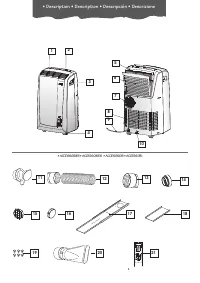
Page 3 - • Description • Description • Descripción • Descrizione
3 7 8 9 10 11 6 • Description • Description • Descripción • Descrizione • ACCESSORIES • ACCESSOIRES • ACCESORIOS • ACCESSORI 1 5 8 4 7 3 9 2 6 10 11 12 20 14 15 16 17 21 13 19 18
Page 4 - Important safeguards; SAVE THESE INSTRUCTIONS; THIS PRODUCT IS FOR HOUSEHOLD ONLY
4 Important safeguards • Use this appliance only as described in this instruction manual.As with any electrical appliance, the instructions aim to cover as many situations as possible.Caution and common sense should be used when operating and installing this air conditioner. • This appliance has bee...
Page 5 - G B; P r e p a r i n g f o r u s e
5 G B AIR-CONDITIONING WITHOUT INSTALLATION Just a few simple steps and your comfort isensured with your air conditioner: • Screw one hose adaptor to the hose’s end . • Fit the other hose adaptor in the air exhaust hose housing at the back of the appliance (see fig. A ). • Screw the other end of the...
Page 7 - Control panel
7 G B H C D THE CONTROL PANEL I L M Q G Control panel DESCRIPTION OF THE CONTROL PANEL A ON/OFF buttonB MODE selection button Air conditioning, dehumidifying, fan. C Fan speed selection button (MAX/MED/MIN)D Timer buttonE Programmed operation increase temperature/time buttonF Programmed operation de...
Page 8 - Operation
8 Operation TURNING THE APPLIANCE ON Plug into an outlet.Two lines appear on the display indicating that the appliance isin stand-by. Press the ON/STAND-BY button ( A ). When turned on, the air con- ditioner starts operating in the same mode as when it was turnedoff. Press the MODE button ( B ) unti...
Page 10 - Using the remote control unit
10 Using the remote control unit (some models only) MODELS WITH REMOTE CONTROL • Point the remote control at the receiver onthe air conditioner. The remote controlmust be no more than 16,4 ft (5 metres)away from the appliance (without obsta-cles between the remote control and thereceiver). • The rem...
Page 11 - T i p s
11 G B To get the best from your air conditioner, fol- low these recommendations: • close the windows and doors in the room to be air conditioned. The only exception is when the appliance is installed through a hole in the wall. In this case, you are recommended to leave a slight draught through a d...
Page 12 - C l e a n i n g
12 Before cleaning or maintenance, turn theappliance off by pressing the ON/OFF button(A) or in models with remote control unit, bypressing the ON/OFF button , then always unplug the appliance from the mains socket. CLEANING THE CABINET You should clean the appliance with a slight-ly damp cloth then...
Page 13 - Troubleshooting
13 G B Troubleshooting PROBLEM CAUSE REMEDY The air conditioning unitdoes not start. • No electricity. • It is not plugged into the outlet. • The safety device of the plug has tripped. • Wait. • Plug into the outlet. • Contact your service center. The air conditioning unitworks for a shorttime only....
Page 14 - Technical specifications
14 Technical specifications TECHNICAL SPECIFICATION Power supply voltage see rating label Max. absorbed power during air conditioning “ Refrigerant “ Cooling capacity “ LIMIT CONDITIONS Room temperature for air conditioning 21 ÷ 35°C Transport, filling, cleaning, recovery and disposal of refrigerant...
Page 16 - Avertissements; CONSERVEZ LES PRESENTES INSTRUCTIONS; PRODUIT À USAGE DOMESTIQUE UNIQUEMENT
16 Avertissements • Utilisez l'appareil en suivant exclusivement cette notice. Comme pour tous les appareils élec-triques, ces instructions essaient de contempler la plupart des situations possibles. Vous devreztoujours utiliser votre appareil avec bon sens et prudence. • Cet appareil a été conçu po...
Page 17 - F R; P r é p a r a t i o n à l ’ e m p l o i
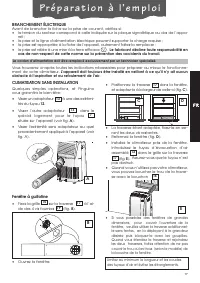
17 F R CLIMATISATION SANS INSTALLATION Quelques simples opérations, et Pinguinovous garantira le bien-être: • Visser un adaptateur à une des extrémi- tés du tuyau 12 . • Visser l’autre adaptateur dans le spécial logement pour le tuyau située sur l’appareil (voir fig. A ). • Visser l'extrémité sans a...
Page 19 - Tableau de commande
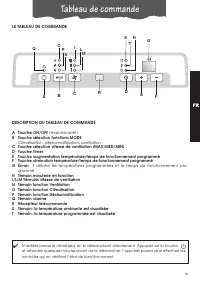
19 F R H C D LE TABLEAU DE COMMANDE I L M Q G Tableau de commande DESCRIPTION DU TABLEAU DE COMMANDE A Touche ON/OFF (marche/arrêt) B Touche sélection fonctions MODE Climatisation, déshumidification, ventilation, C Touche sélection vitesse de ventilation (MAX/MED/MIN)D Touche Timer E Touche augmenta...
Page 20 - Fonctionnement
20 Fonctionnement MISE EN MARCHE DE L’APPAREIL Branchez l’appareil.Deux lignes sur l’afficheur indiquent que l’appareil est en veille(stand-by). Appuyez sur la touche ON/ STAND-BY ( A ). Au démarrage, le cli- matiseur part de la dernière fonction programmée avant l’arrêt.Appuyez sur la touche MODE (...
Page 22 - Fonctionnement avec télécommande
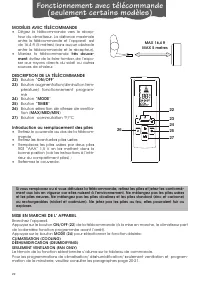
22 Fonctionnement avec télécommande (seulement certains modèles) MODÈLES AVEC TÉLÉCOMMANDE • Dirigez la télécommande vers le récep-teur du climatiseur. La distance maximaleentre la télécommande et l’appareil estde 16,4 ft (5 mètres) (sans aucun obstacleentre la télécommande et le récepteur). • Manie...
Page 23 - C o n s e i l s
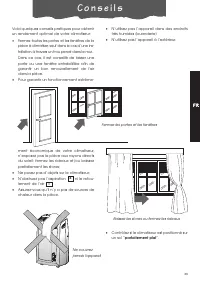
23 F R Voici quelques conseils pratiques pour obtenir un rendement optimal de votre climatiseur: • Fermez toutes les portes et les fenêtres de la pièce à climatiser, sauf dans le cas d’une ins- tallation à travers un trou percé dans le mur. Dans ce cas, il est conseillé de laisser une porte ou une f...
Page 24 - N e t t o y a g e
24 Avant toute opération de nettoyage ou d'en-tretien, arrêtez l’appareil en appuyant sur latouche ON/OFF (A) et, pour les modèles avectélécommande, sur le bouton ON/OFF , et débranchez toujours l’appareil. NETTOYAGE DE LA CARROSSERIE Nous vous conseillons de nettoyer l'appareilavec un simple chiffo...
Page 25 - Si quelque chose ne marche pas ...
25 F R Si quelque chose ne marche pas … PROBLÈMES CAUSES SOLUTIONS Le climatiseur nedémarre pas • absence de courant • la fiche n’est pas branchée • le dispositif de sécurité s’est déclenché • attendez • branchez la fiche • appelez le Centre de service Le climatiseur nemarche que peu detemps • le tu...
Page 26 - Caractéristiques techniques
26 Caractéristiques techniques CONDITIONS DE FONCTIONNEMENTCONSEILLÉES Température dans la pièce en climatisation 21 ÷ 35°C CARACTÉRISTIQUES TECHNIQUES Tension voir plaque d’alimentation signalétique Puissance max. absornée en climatisation “ Réfrigérant “ Puissance réfrigérante “ Le transport, la c...