Page 3 - CONTENTS
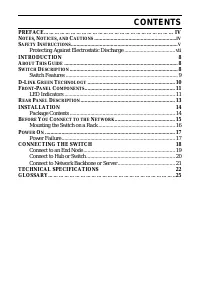
CONTENTS PREFACE……………………………………………………………… IV N OTES , N OTICES , AND C AUTIONS ............................................................ IV S AFETY I NSTRUCTIONS .............................................................................. V Protecting Against Electrostatic Discharge ...............
Page 4 - Preface
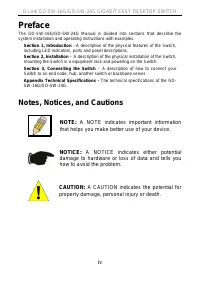
D-Link GO-SW-16G/GO-SW-24G GIGABIT EASY DESKTOP SWITCH Preface The GO-SW-16G/GO-SW-24G Manual is divided into sections that describe the system installation and operating instructions with examples. Section 1, Introduction - A description of the physical features of the Switch, including LED indicat...
Page 7 - Protecting Against Electrostatic Discharge
D-Link GO-SW-16G/GO-SW-24G GIGABIT EASY DESKTOP SWITCH Protecting Against Electrostatic Discharge Static electricity can harm delicate components inside your system. To prevent static damage, discharge static electricity from your body before you touch any of the electronic components, such as the m...
Page 8 - SECTION 1; Introduction; About This Guide
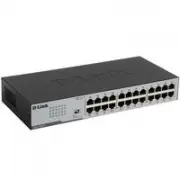
SECTION 1 Introduction About This Guide Switch Description Switch Features D-Link Green Technology Ports Front-Panel Components LED Indicators Power Input on Rear Panel About This Guide Congratulations on your purchase of the 16/24-PORT GIGABIT EASY DESKTOP SWITCH. These devices are using compact pl...
Page 10 - Gigabit Ethernet Technology; D-Link Green Technology
Gigabit Ethernet Technology Gigabit Ethernet is an extension of IEEE 802.3 Ethernet utilizing the same packet structure, format, and support for CSMA/CD protocol, full duplex, flow control, and management objects, but with a tenfold increase in theoretical throughput over 100-Mbps Fast Ethernet and ...
Page 11 - Front-Panel Components
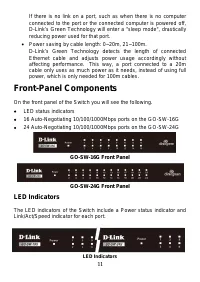
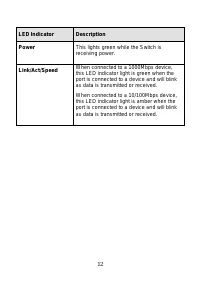
If there is no link on a port, such as when there is no computer connected to the port or the connected computer is powered off, D-Link’s Green Technology will enter a "sleep mode", drastically reducing power used for that port. • Power saving by cable length: 0~20m, 21~100m. D-Link’s Green ...
Page 13 - Rear Panel Description
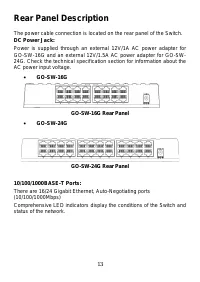
Rear Panel Description The power cable connection is located on the rear panel of the Switch. DC Power Jack: Power is supplied through an external 12V/1A AC power adapter for GO-SW-16G and an external 12V/1.5A AC power adapter for GO-SW-24G. Check the technical specification section for information ...
Page 14 - SECTION 2; Installation; Package Contents
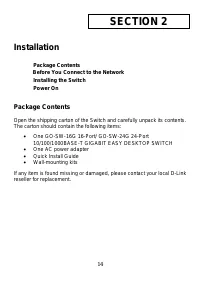
SECTION 2 Installation Package Contents Before You Connect to the Network Installing the Switch Power On Package Contents Open the shipping carton of the Switch and carefully unpack its contents. The carton should contain the following items: • One GO-SW-16G 16-Port/ GO-SW-24G 24-Port 10/100/1000BAS...
Page 15 - Before You Connect to the Network
Before You Connect to the Network The site where you install the Switch may greatly affect its performance. Please follow these guidelines for setting up the Switch. • Install the Switch on a sturdy, level surface that can support at least 3 kg (6.6 lbs.) of weight. Do not place heavy objects on the...
Page 16 - Mounting the Switch on a Rack
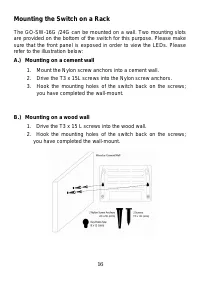
Mounting the Switch on a Rack The GO-SW-16G /24G can be mounted on a wall. Two mounting slots are provided on the bottom of the switch for this purpose. Please make sure that the front panel is exposed in order to view the LEDs. Please refer to the illustration below: A.) Mounting on a cement wall 1...
Page 17 - Power On; Power Failure
Power On Plug one end of the AC to DC power adapter into the power connector of the Switch and the other end into the local power source outlet. After the Switch is powered on, the LED indicators will momentarily blink. This blinking of the LED indicators represents a reset of the system. Power Fail...
Page 18 - Section 3; Connecting the Switch; Cable Quality
Section 3 Connecting the Switch Switch to End Node Switch to Hub or Switch Connecting to a Server Cable Quality For all connections to the Switch, use these rules to determine the • For connections to 10BASE-T and 100BASE-TX devices, use Category 5 or 5e UTP/STP cable. • For connections to 100BASE-T...
Page 19 - Connect to an End Node
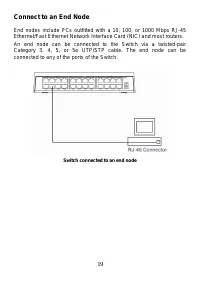
Connect to an End Node End nodes include PCs outfitted with a 10, 100, or 1000 Mbps RJ-45 Ethernet/Fast Ethernet Network Interface Card (NIC) and most routers. An end node can be connected to the Switch via a twisted-pair Category 3, 4, 5, or 5e UTP/STP cable. The end node can be connected to any of...
Page 20 - Connect to Hub or Switch
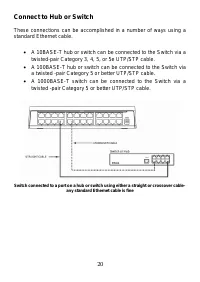
Connect to Hub or Switch These connections can be accomplished in a number of ways using a standard Ethernet cable. • A 10BASE-T hub or switch can be connected to the Switch via a twisted-pair Category 3, 4, 5, or 5e UTP/STP cable. • A 100BASE-T hub or switch can be connected to the Switch via a twi...
Page 21 - Connect to Network Backbone or Server
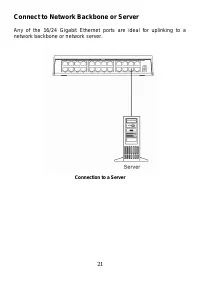
Connect to Network Backbone or Server Any of the 16/24 Gigabit Ethernet ports are ideal for uplinking to a network backbone or network server. Connection to a Server 21
Page 22 - Appendix; Technical Specifications; General
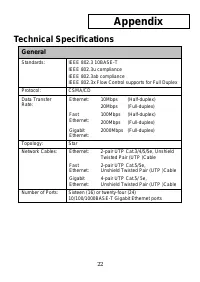
Appendix Technical Specifications General Standards: IEEE 802.3 10BASE-T IEEE 802.3u compliance IEEE 802.3ab compliance IEEE 802.3x Flow Control supports for Full Duplex Protocol: CSMA/CD Data Transfer Rate: Ethernet: 10Mbps (Half-duplex) 20Mbps (Full-duplex) Fast Ethernet: 100Mbps (Half-duplex) 200...
Page 23 - Physical and Environmental
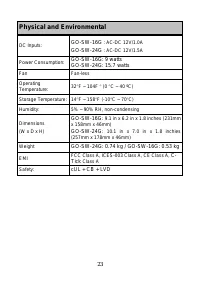
Physical and Environmental DC Inputs: GO-SW-16G : AC-DC 12V/1.0A GO-SW-24G : AC-DC 12V/1.5A Power Consumption: GO-SW-16G: 9 watts GO-SW-24G: 15.7 watts Fan Fan-less Operating Temperature: 32 ° F ~ 104F ° (0 ° C ~ 40 ºC) Storage Temperature: 14 ° F ~ 158 ° F (-10 ° C ~ 70 ° C) Humidity: 5% ~ 90% RH, ...
Page 24 - Performance
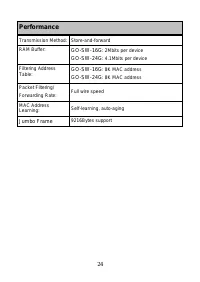
Performance Transmission Method: Store-and-forward RAM Buffer: GO-SW-16G : 2Mbits per device GO-SW-24G : 4.1Mbits per device Filtering Address Table: GO-SW-16G : 8K MAC address GO-SW-24G : 8K MAC address Packet Filtering/ Forwarding Rate: Full wire speed MAC Address Learning: Self-learning, auto-agi...
Page 25 - Glossary
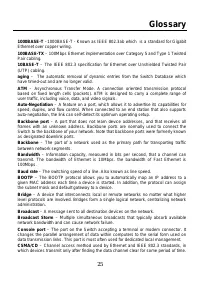
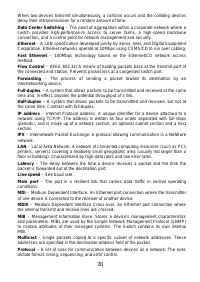
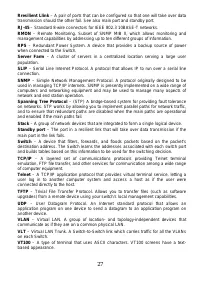
Glossary 1000BASE-T –1000BASE-T - Known as IEEE 802.3ab which is a standard for Gigabit Ethernet over copper wiring. 100BASE-TX – 100Mbps Ethernet implementation over Category 5 and Type 1 Twisted Pair cabling. 10BASE-T – The IEEE 802.3 specification for Ethernet over Unshielded Twisted Pair (UTP) c...