Page 3 - ru Co ep a
ru Co ep a e a a o e o ac oc pe y pe e .............................. 35 a a o y a ................... 39 O e oc a .................................. 40 Te epa ypa o py a e cpe e ........................................ 40 ... 41 . 42 ....... 43 c a o a e epa yp .................... 43 o e o e ........
Page 4 - Safety and warning; Before you switch ON the
en 4 enTable of Contents enInstruction for Use Safety and warning information Before you switch ON the appliance Please read the operating and installation instructions carefully! They contain important information on how to install, use and maintain the appliance.The manufacturer is not liable if y...
Page 6 - Information concerning; Disposal of packaging
en 6 ■ Never put frozen food straight from the freezer compartment into your mouth. Risk of low-temperature burns! ■ Avoid prolonged touching of frozen food, ice or the evaporator pipes, etc. Risk of low-temperature burns! Children in the household ■ Keep children away from packaging and its parts. ...
Page 7 - Scope of delivery; Ambient temperature; Ventilation
en 7 m Warning Redundant appliances1. Pull out the mains plug.2. Cut off the power cord and discard with the mains plug. 3. Do not take out the trays and receptacles: children are therefore prevented from climbing in! 4. Do not allow children to play with the appliance once it has spent its useful l...
Page 8 - Electrical connection; Getting to know your
en 8 Connecting the appliance After installing the appliance, wait at least 1 hour until the appliance is switched on. During transportation the oil in the compressor may have flowed into the refrigeration system.Before switching on the appliance for the first time, clean the interior of the applian...
Page 9 - Controls; Switching; Operating tips
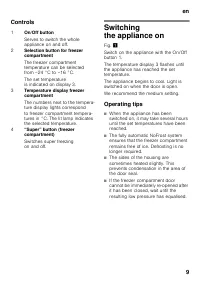
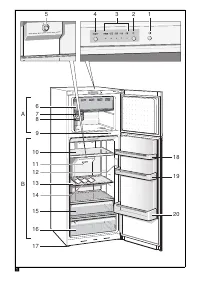
en 9 Controls Switching the appliance on Fig. ! Switch on the appliance with the On/Off button 1.The temperature display 3 flashes until the appliance has reached the set temperature.The appliance begins to cool. Light is switched on when the door is open.We recommend the medium setting. Operating t...
Page 10 - Refrigerator compartment; Freezer compartment; Usable capacity; Note when loading products; Note the chill zones in the
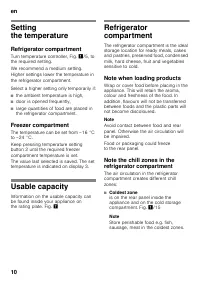
en 10 Setting the temperature Refrigerator compartment Turn temperature controller, Fig. ! /5, to the required setting. We recommend a medium setting.Higher settings lower the temperature in the refrigerator compartment. Select a higher setting only temporarily if: ■ the ambient temperature is high,...
Page 11 - Use the freezer compartment; Max. freezing capacity; Purchasing frozen food
en 11 ■ Warmest zone is at the very top of the door. Note Store e.g. hard cheese and butter in the warmest zone. Cheese can then continue to release its flavour and the butter will still be easy to spread. Freezer compartment Use the freezer compartment ■ To store deep-frozen food. ■ To make ice cub...
Page 12 - Freezing fresh food; Packing frozen food; Shelf life of frozen food
en 12 Freezing fresh food Freeze fresh and undamaged food only.To retain the best possible nutritional value, flavour and colour, vegetables should be blanched before freezing. Aubergines, peppers, zucchini and asparagus do not require blanching.Literature on freezing and blanching can be found in b...
Page 13 - Super freezing; Switching on and off; Thawing frozen food; Interior fittings; Special features
en 13 Super freezing Food should be frozen solid as quickly as possible in order to retain vitamins, nutritional value, appearance and flavour.Several hours before placing fresh food in the freezer compartment, switch on super freezing to prevent an unwanted temperature rise. As a rule, 4–6 hours is...
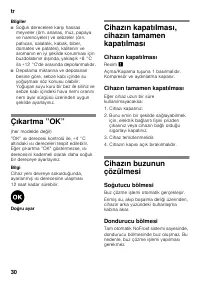
Page 14 - Sticker “OK”
en 14 Cold storage compartment Fig. ! /15 The cold storage compartment has lower temperatures than the refrigerator compartment. Even temperatures below 0 °C may occur.Ideal for storing fish, meat and sausage. Not suitable for lettuce and vegetables and produce sensitive to cold. Ice maker Fig. # 1....
Page 15 - Switching off the appliance; Defrosting; Cleaning the appliance
en 15 Switching off and disconnecting the appliance Switching off the appliance Fig. ! Press the On/Off button 1. Refrigerating unit and light switch off. Disconnecting the appliance If you do not use the appliance for a prolonged period:1. Switch off the appliance.2. Pull out mains plug or switch o...
Page 16 - Tips for saving energy; Quite normal noises; Preventing noises
en 16 Interior fittings All variable parts of the appliance can be taken out for cleaning. Take out glass shelves Pull the glass shelves forwards and take out. Light (LED) Your appliance features a maintenance-free LED light.These lights may be repaired by customer service or authorised technicians ...
Page 17 - Eliminating minor faults yourself
en 17 Eliminating minor faults yourself Before you call customer service:Please check whether you can eliminate the fault yourself based on the following information.Customer service will charge you for advice – even if the appliance is still under guarantee! Fault Possible cause Remedial action Tem...
Page 18 - Customer service; Repair order and advice
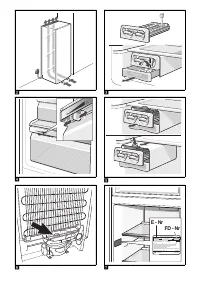
en 18 Customer service Your local customer service can be found in the telephone directory or in the customer-service index. Please provide customer service with the appliance product number (E-Nr.) and production number (FD).These specifications can be found on the rating plate. Fig. ' To prevent u...
Page 19 - Güvenlik ve ikaz; Cihaz
tr 19 tr İ çindekiler trKullanma k ı lavuzu Güvenlik ve ikaz bilgileri Cihaz ı çal ı t ı rmadan önce Kullanma ve montaj k ı lavuzlar ı n ı dikkatlice okuyunuz! Bu k ı lavuzlarda cihaz ı n kurulmas ı , yerle tirilmesi, kullan ı lmas ı ve bak ı m ı ile ilgili önemli bilgiler bulunmaktad ı r. Üretici, ...
Page 22 - Giderme bilgileri; Yeni cihaz; Teslimat kapsam
tr 22 Giderme bilgileri * Yeni cihaz ı n Ambalaj ı n ı n giderilmesi Ambalaj, cihaz ı n ı z ı transport hasarlar ı na kar ı korur. Ambalajda kullan ı lm ı olan tüm malzemeler, çevreye zarar vermeyen türdendir ve yeniden kullan ı labilir. Lütfen siz de yard ı mc ı olunuz: Ambalaj ı çevreye zarar verm...
Page 24 - Kumanda elemanlar
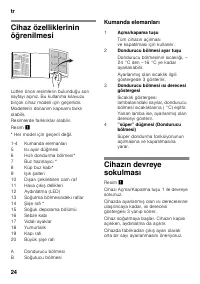
tr 24 Cihaz özelliklerinin ö ğ renilmesi Lütfen önce resimlerin bulundu ğ u son sayfay ı aç ı n ı z. Bu kullanma k ı lavuzu birçok cihaz modeli için geçerlidir.Modellerin donan ı m kapsam ı farkl ı olabilir.Resimlerde farkl ı l ı klar olabilir. Resim ! * Her model için geçerli de ğ il. Kumanda elema...
Page 27 - Dondurulmu besinlerin
tr 27 Taze besinlerin dondurulmas ı Dondurmak için sadece taze ve iyi besinler kullan ı n ı z. Besi de ğ erinin, aroman ı n ve rengin mümkün oldu ğ u kadar korunmas ı için, sebze dondurulmadan önce k ı sa ha lanmal ı d ı r. Patl ı canlarda, biberlerde, kabaklarda ve ku konmazda k ı sa ha lama i lemi...
Page 28 - Süper dondurma; Dondurulmu
tr 28 Dondurulmu besinlerin son kullanma tarihi Dondurulmu besinlerin dayanma süresi, -18 °C ı s ı derecesi ayar ı nda: ■ Bal ı k, sucuk, haz ı r yemek, hamur ürünleri:6 aya kadar ■ Peynir, kanatl ı hayvanlar, et: 8 aya kadar ■ Sebze, meyve:12 aya kadar Süper dondurma Vitaminlerin, besi de ğ erlerin...
Page 29 - Donan; Özel donan
tr 29 Donan ı m İ ç k ı sm ı n raflar ı n ı , kap ı içindeki raflar ı ve gözleri, ihtiyac ı n ı za göre de ğ i tirebilirsiniz: ■ Raf ı öne do ğ ru çekiniz, ön k ı sm ı a a ğ ı indiriniz ve yana do ğ ru çevirip ç ı kar ı n ı z. ■ Kap ı içindeki raf ı veya gözü yukar ı kald ı r ı n ı z ve d ı ar ı ç ı...
Page 31 - A a; Ayd
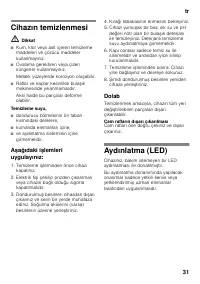
tr 31 Cihaz ı n temizlenmesi m Dikkat ■ Kum, klor veya asit içeren temizleme maddeleri ve çözücü maddeler kullanmay ı n ı z. ■ Ovalama gerektiren veya çizen süngerler kullanmay ı n ı z. Metalik yüzeylerde korozyon olu abilir. ■ Raflar ve kaplar kesinlikle bula ı k makinesinde y ı kanmamal ı d ı r. A...
Page 32 - Enerji tasarrufu; Çal; Normal çal; Gürültü olu mas
tr 32 Enerji tasarrufu ■ Cihaz ı serin ve iyi havaland ı r ı lm ı bir yere kurunuz! Güne ı ı nlar ı do ğ rudan cihaz ı n kurulaca ğ ı yere gelmemeli ve cihaz s ı cakl ı k olu turan cisimlerin ve ı s ı kaynaklar ı n ı n (örn. soba, kalorifer, ocak, f ı r ı n gibi) yan ı na veya yak ı n ı na kurulmama...
Page 34 - Yetkili servis; zalarda onar
tr 34 Yetkili servis Size yak ı n bir yetkili servisimizi telefon rehberinde veya yetkili servis listesinde bulabilirsiniz. Lütfen yetkili servisimizi ça ğ ı rd ı ğ ı n ı z zaman, cihaz ı n ürün numaras ı n ı (E-Nr.) ve imalat numaras ı n ı (FD) bildiriniz.Bu numaralar ı , tip levhas ı n ı n üzerind...
Page 35 - a a
ru 35 ruCo д ep ж a ни e ru cpy o c yaa У a a o e o ac oc pe y pe e pe e e ec p op c ya a B a e o po e c py o o a y c ya a ! B e co ep- c a a op a o yc a o e, c o o a ex ec o y o c y a- p opa. o o e e ece a o o e c e oc a oc e c , ec B e co - a y a a pe y pe - e , p e e e c py o c ya a . Coxpa e c o...
Page 36 - ya a
ru 36 e o ee o ec o x a a e a co ep c o o p ope, e o e o o o e e- e, o opo o yc a o e . B c o a e x o e e- x p y e e x a a e a o e o pa o a c op a c ec apo x a a e a c o yxo . Ha a e 8 x a a e a o e p xo c a y 1 ³ o e e . Ko ec o x a a e a, co ep a eec Ba e o o p ope, p e e o p e o a e, pac o o e o ...
Page 39 - y a o
ru 39 У a a o y a * У a y a o Bec y a o o a ep a , o op c o o a c a xo o - a p pa c op po e, p o e op o epepa o e a oc pe a o py a e cpe e. B ec e, o a y c a, B c o a e o a o py a e cpe , c a y a o y a o o y y - a . op a o a ya x e o ax y a B o e e o y y Ba e o op o o o a e a a c pa x op a ax o ec y...
Page 40 - epa ypa o py a
ru 40 O e oc a - , . , , . : ■ ■ ( ) ■ ■ c py o c ya a ■ c py o o a y ■ ■ ■ Te epa ypa o py a e cpe e Te epa ypa o py a e cpe Xo o o oc c o pe e e - o y a ec o y accy. B a c oc o a ec o o acca, xo o o e pa o a p p e e x e a e x e - epa yp o py a e cpe . ( ' ). У . SN , +5 °C. K a т ч ec acc Д o п yc...
Page 41 - e po o
ru 41 Be P cy o " . Ha pe o yx o e e o - o oc ec pe c e o o - a c epx. a e xo o a pe a o e y e pa o a c o e o a py o . A o o - ae pacxo e po ep . o o y: H o a e a p a e e e a opa a e e o e o epc xo o a! oc e yc a o c e ye o o a a y 1 ac o o o o o e o c ya a . - , . ( « »). Э e po o e e . I. 220–...
Page 47 - Cy ep a opa
ru 47 po o e oc xpa e a opo e x po y o Cpo xpa e po y o a a c o x a. –18 °C: ■ P a, o aca, o o e a, x e o- y o e e : o 6 ec e ■ C p, a, co: o 8 ec e ■ O o , py : o 12 ec e Cy ep a opa a e o a opo e x po y ax coxpa c a a e e e ec a, a a e e c op c x p e a e xopo yc, po y o a o o c pee po ep y o ca o ...
Page 48 - C e
ru 48 Pa opa a e po y o B a c oc o a c oco a p o o e po y o o o pa o c e y x c oco o x pa opa a : ■ p o a o e epa ype, ■ xo o o o e e , ■ e p ec o yxo o a y, c o y o op o yxo e , ■ po o o o e . m o a e o oc pa opo e e po y e c o a a opa a . To o oc e e o o o pa o po y o ( x o o c ap o ap ) o o e a o...
Page 50 - o e o
ru 50 Ha e a «OK» ( e o cex o e x)C o o a e «OK», pe a a e o o po e epa yp , o o o pe e e epa ypy e +4 °C. Ec a a e e o cy c ye c o o «OK», o eo xo o oc e e o, a a a o , o e epa ypy. У p o e xo o a c ya a eo xo a e epa ypa o e yc a a a c e e e 12 aco . pa a yc a o a B e e o e o c ya a P cy o ! Ha e ...
Page 51 - Oc e e
ru 51 m ■ He cpe c a c pac op e , co ep a eco , x op c o . ■ He c o a pa apa a y . Ha e a ec x o epx oc x o e o c oppo . ■ . o y e op po a c ! c o ye a po p o a e o a o ac ■ B , , ■ , ■ c c e y oc e e . : 1. B a e p op epe c o . 2. e y po e pe oxpa e . 3. e a opo e e po y o o x pox a oe ec o. A y y ...