Page 2 - Connect the Battery
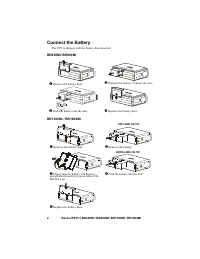
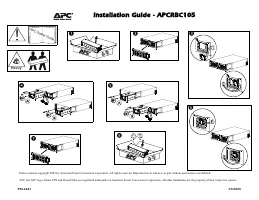
Back-UPS Pro BR650MI / BR900MI / BR1300MI / BR1600MI 2 Connect the Battery The UPS is shipped with the battery disconnected. BR650MI /BR900MI BR1300MI / BR1600MI Remove the battery door. Remove the battery. Connect the wire. Push the battery into the unit. Replace the battery door. Remove ...
Page 3 - When power is restored, it will restart the computer.; Installation; version of PCPE software; Connect the Equipment; Battery backup and surge protected outlets
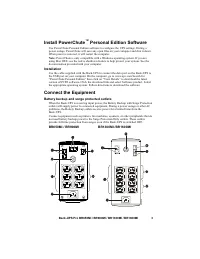
Back-UPS Pro BR650MI / BR900MI / BR1300MI / BR1600MI 3 Install PowerChute ™ Personal Edition Software Use PowerChute Personal Edition software to configure the UPS settings. During a power outage, PowerChute will save any open files on your computer and shut it down. When power is restored, it will ...
Page 4 - Operation; Power saving display
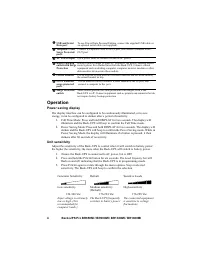
Back-UPS Pro BR650MI / BR900MI / BR1300MI / BR1600MI 4 Operation Power saving display The display interface can be configured to be continuously illuminated, or to save energy, it can be configured to darken after a period of inactivity. 1. Full Time Mode: Press and hold DISPLAY for two seconds. The...
Page 5 - Front panel buttons and display interface; Front panel; button; button
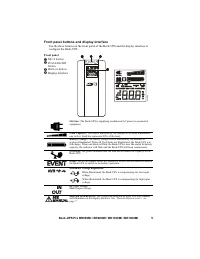
Back-UPS Pro BR650MI / BR900MI / BR1300MI / BR1600MI 5 Front panel buttons and display interface Use the three buttons on the front panel of the Back-UPS and the display interface to configure the Back-UPS. Front panel M UTE button P OWER On/Off button D ISPLAY button Display interface On Li...
Page 6 - Alerts and System Errors; Audible indicators; MUTE
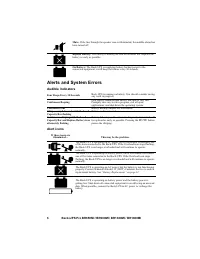
Back-UPS Pro BR650MI / BR900MI / BR1300MI / BR1600MI 6 Alerts and System Errors Audible indicators Alert icons Mute: If the line through the speaker icon is illuminated, the audible alarm has been turned off. Replace Battery: The battery is nearing the end of its useful life. Replace the battery as ...
Page 7 - Detected System errors; SEIT Technical Support.
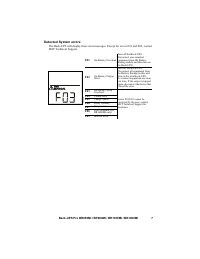
Back-UPS Pro BR650MI / BR900MI / BR1300MI / BR1600MI 7 Detected System errors The Back-UPS will display these error messages. Except for errors F01 and F02, contact SEIT Technical Support. F01 On-Battery Overload Turn off the Back-UPS. Disconnect non-essential equipment from the Battery Backup outle...
Page 8 - Function Button Quick Reference
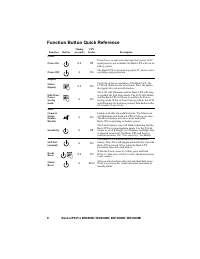
Back-UPS Pro BR650MI / BR900MI / BR1300MI / BR1600MI 8 Function Button Quick Reference Function Button Timing (seconds) UPS Status Description Power Power On 0.2 Off Press Power to start receiving input AC power. If AC input power is not available, the Back-UPS will run on battery power. Power Off 2...
Page 9 - Troubleshooting; Problem
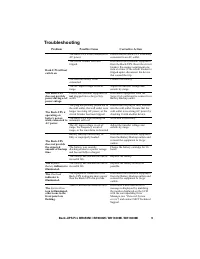
Back-UPS Pro BR650MI / BR900MI / BR1300MI / BR1600MI 9 Troubleshooting Problem Possible Cause Corrective Action Back-UPS will not switch on. The Back-UPS is not connected to AC power. Ensure that the Back-UPS is securely connected to an AC outlet. The circuit breaker has been tripped. Disconnect non...
Page 10 - Specifications; Lead acid, 12V with 1 battery Lead acid, 12V with 2 batteries
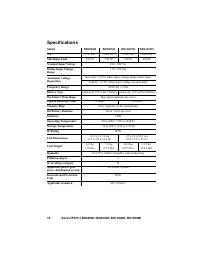
Back-UPS Pro BR650MI / BR900MI / BR1300MI / BR1600MI 10 Specifications Model BR650MI BR900MI BR1300MI BR1600MI VA 650 VA 900 VA 1300 VA 1600 VA Maximum Load 390 W 540 W 780 W 960 W Nominal Input Voltage 220 - 240 Vac Online Input Voltage Range 176 - 294 Vac Automatic Voltage Regulation Boost by +11....
Page 11 - Battery Replacement; . Delaying the replacement of parts may corrode the; Warranty; unit to the customer.; CAUTION
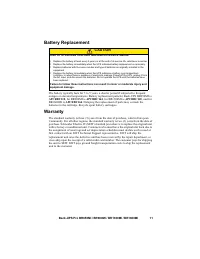
Back-UPS Pro BR650MI / BR900MI / BR1300MI / BR1600MI 11 Battery Replacement The battery typically lasts for 3 to 5 years, a shorter period if subjected to frequent outages or elevated temperatures. Battery replacement parts for Back-UPS BR650MI is APCRBC110 , for BR900MI is APCRBC164 , for BR1300MI ...