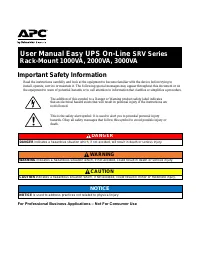
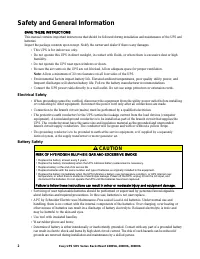
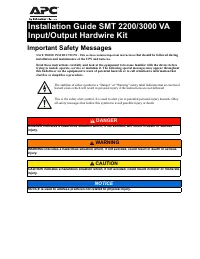
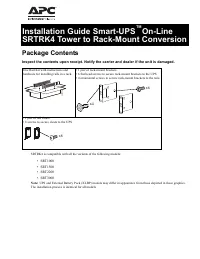
Page 2 - Safety and General Information; Electrical Safety; Battery Safety; CAUTION
2 Easy UPS SRV Series Rack-Mount 1000VA, 2000VA, 3000VA Safety and General Information SAVE THESE INSTRUCTIONS This manual contains important instructions that should be followed during installation and maintenance of the UPS and batteries. Inspect the package contents upon receipt. Notify the carri...
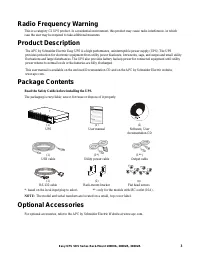
Page 3 - Optional Accessories
3 Easy UPS SRV Series Rack-Mount 1000VA, 2000VA, 3000VA Radio Frequency Warning This is a category C2 UPS product. In a residential environment, this product may cause radio interference, in which case the user may be required to take additional measures. Product Description The APC by Schneider Ele...
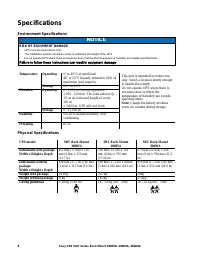
Page 4 - Specifications; Environment Specifications; NOTICE; Physical Specifications
4 Easy UPS SRV Series Rack-Mount 1000VA, 2000VA, 3000VA Specifications Environment Specifications NOTICE RISK OF EQUIPMENT DAMAGE • UPS must be used indoors only. • The installation location should be sturdy to withstand the weight of the UPS. • Do not operate UPS where there is excessive dust or wh...
Page 5 - Input/Output Specifications; Front Panel Display
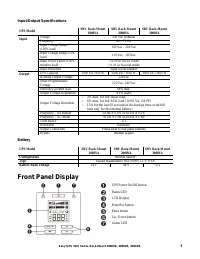
5 Easy UPS SRV Series Rack-Mount 1000VA, 2000VA, 3000VA Input/Output Specifications UPS Model SRV Rack-Mount 1000VA SRV Rack-Mount 2000VA SRV Rack-Mount 3000VA Input Voltage 230 Vac Nominal Frequency 40 – 70 Hz Input Voltage Range (100% load) 160 Vac – 280 Vac Input Voltage Range (50% load) 110 Vac ...
Page 6 - Rear Panel Features
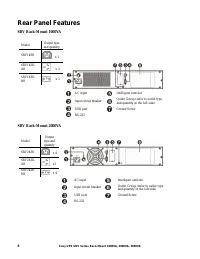
6 Easy UPS SRV Series Rack-Mount 1000VA, 2000VA, 3000VA Rear Panel Features SRV Rack-Mount 1000VA Model Output type and quantity SRV1KRI x 3 SRV1KRI-AR x 3 SRV1KRI-BR x 3 AC input Intelligent card slot Input circuit breaker Outlet Group (refer to outlet type and quantity in the left side) USB port G...
Page 7 - Rack-Mount Installation
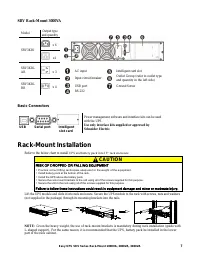
7 Easy UPS SRV Series Rack-Mount 1000VA, 2000VA, 3000VA SRV Rack-Mount 3000VA Model Output type and quantity SRV3KRI x 6 x1 SRV3KRI-AR x 3 SRV3KRI-BR x 4 AC input Intelligent card slot Input circuit breaker Outlet Group (refer to outlet type and quantity in the left side) USB port Ground Screw RS-23...
Page 8 - Start Up Settings; Connect the battery; Start the UPS; Cold start the UPS
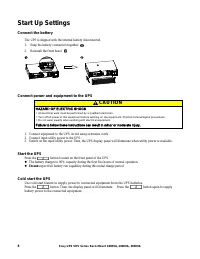
8 Easy UPS SRV Series Rack-Mount 1000VA, 2000VA, 3000VA Start Up Settings Connect the battery The UPS is shipped with the internal battery disconnected. 1. Snap the battery connectors together. 2. Reinstall the front bezel. Connect power and equipment to the UPS CAUTION HAZARD OF ELECTRIC SHOCK • Al...
Page 9 - Connect and install management software; Operation; Using The Display
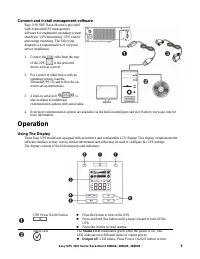
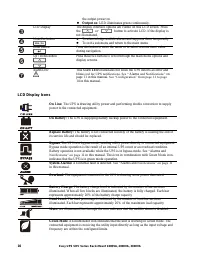
9 Easy UPS SRV Series Rack-Mount 1000VA, 2000VA, 3000VA Connect and install management software Easy UPS SRV Rack-Mount is provided with SchneiderUPS management software for unattended operating system shutdown, UPS monitoring, UPS control and energy reporting. The following diagram is a representat...
Page 11 - Alarms and System Errors; Status Indicators
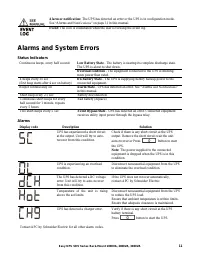
11 Easy UPS SRV Series Rack-Mount 1000VA, 2000VA, 3000VA Alarm or notification: The UPS has detected an error or the UPS is in configuration mode. See “Alarms and Notifications” on page 11 in this manual. Event: The icon is illuminated when the user is viewing the event log. Alarms and System Errors...
Page 12 - Notifications; UPS Display Parameters; Configure UPS Parameters
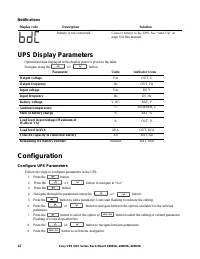
12 Easy UPS SRV Series Rack-Mount 1000VA, 2000VA, 3000VA Notifications Display code Description Solution Battery is not connected. Connect battery to the UPS. See “Start Up” on page 8 in this manual. UPS Display Parameters Operational data displayed in the display panel is given in the table. Naviga...
Page 13 - UPS Settings
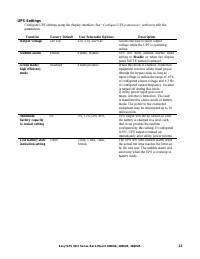
13 Easy UPS SRV Series Rack-Mount 1000VA, 2000VA, 3000VA UPS Settings Configure UPS settings using the display interface. See “Configure UPS parameters” section to edit the parameters. Function Factory Default User Selectable Options Description Output voltage 230 Vac 220, 230, 240 Vac Allows the us...
Page 14 - Advance Display Navigation
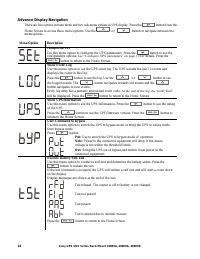
14 Easy UPS SRV Series Rack-Mount 1000VA, 2000VA, 3000VA Advance Display Navigation There are five options in main menu and two sub-menu options in UPS display. Press the button from the Home Screen to access these menu options. Use the o r button to navigate between the menu options. Menu Option De...
Page 15 - Troubleshooting
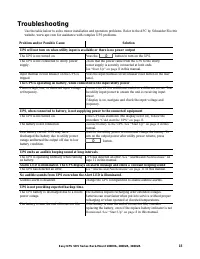
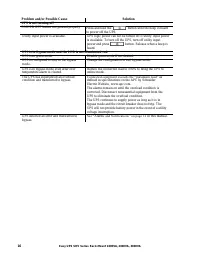
15 Easy UPS SRV Series Rack-Mount 1000VA, 2000VA, 3000VA Troubleshooting Use the table below to solve minor installation and operation problems. Refer to the APC by Schneider Electric website, www.apc.com for assistance with complex UPS problems. Problem and/or Possible Cause Solution UPS will not t...
Page 17 - Transport; Service
17 Easy UPS SRV Series Rack-Mount 1000VA, 2000VA, 3000VA Transport 1. Shut down and disconnect all connected equipment. 2. Disconnect the unit from mains power. 3. Disconnect all internal and external batteries (if applicable). 4. Follow the shipping instructions outlined in the Service section of t...
Page 18 - Limited Factory Warranty
18 Easy UPS SRV Series Rack-Mount 1000VA, 2000VA, 3000VA Limited Factory Warranty Schneider Electric IT Corporation (SEIT), warrants its products to be free from defects in materials and workmanship for a period of two (2) years from the date of purchase. The SEIT obligation under this warranty is l...