Page 2 - Safety and General Information; Deenergizing safety; Electrical safety
Smart-UPS On-Line SRT1000/SRT1500 XLI Tower/Rack-Mount 2U 2 Safety and General Information • Adhere to all national and local electrical codes.• All wiring must be performed by a qualified electrician.• Changes and modifications to this unit not expressly approved by APC could void the warranty.• Th...
Page 4 - Package Contents
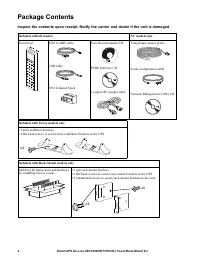
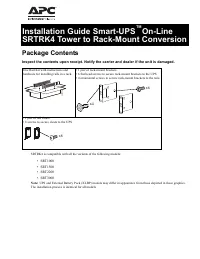
Smart-UPS On-Line SRT1000/SRT1500 XLI Tower/Rack-Mount 2U 4 Package Contents Inspect the contents upon receipt. Notify the carrier and dealer if the unit is damaged. Included with all models NC models only Front bezel RJ45 to DB9 cable USB cable EPO Terminal block User Documentation CD. PCBE Softwar...
Page 5 - Specifications; Environmental
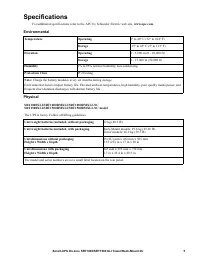
5 Smart-UPS On-Line SRT1000/SRT1500 XLI Tower/Rack-Mount 2U Specifications For additional specifications refer to the APC by Schneider Electric web site, www.apc.com . Environmental Physical Temperature Operating 0º to 40º C (32º to 104º F) Storage -15º to 45º C (5º to 113º F) Elevation Operating 0 ...
Page 6 - Battery; CAUTION
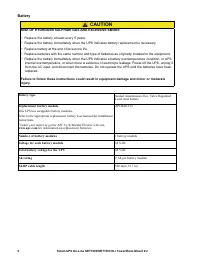
Smart-UPS On-Line SRT1000/SRT1500 XLI Tower/Rack-Mount 2U 6 Battery CAUTION RISK OF HYDROGEN SULPHIDE GAS AND EXCESSIVE SMOKE • Replace the battery at least every 5 years.• Replace the battery immediately when the UPS indicates battery replacement is necessary.• Replace battery at the end of its ser...
Page 7 - Electrical; recommended maximum branch circuit overcurrent protection.
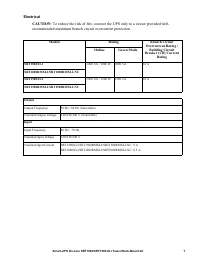
7 Smart-UPS On-Line SRT1000/SRT1500 XLI Tower/Rack-Mount 2U Electrical CAUTION : To reduce the risk of fire, connect the UPS only to a circuit provided with recommended maximum branch circuit overcurrent protection. Models Rating Branch Circuit Overcurrent Rating / Building Circuit Breaker (CB) Curr...
Page 8 - Remove Battery Module
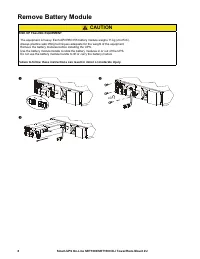
Smart-UPS On-Line SRT1000/SRT1500 XLI Tower/Rack-Mount 2U 8 Remove Battery Module CAUTION RISK OF FALLING EQUIPMENT • The equipment is heavy. Each APCRBC155 battery module weighs 11 kg (24.25 lb). • Always practice safe lifting techniques adequate for the weight of the equipment.• Remove the battery...
Page 9 - Rack-Mount Installation
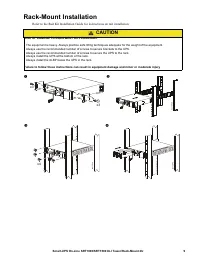
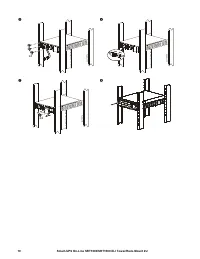
9 Smart-UPS On-Line SRT1000/SRT1500 XLI Tower/Rack-Mount 2U Rack-Mount Installation Refer to the Rail Kit Installation Guide for instructions on rail installation. CAUTION RISK OF DAMAGE TO EQUIPMENT OR PERSONNEL • The equipment is heavy. Always practice safe lifting techniques adequate for the weig...
Page 11 - Tower Installation
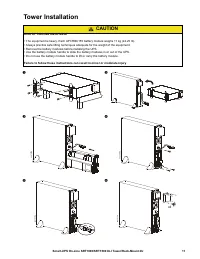
11 Smart-UPS On-Line SRT1000/SRT1500 XLI Tower/Rack-Mount 2U Tower Installation CAUTION RISK OF FALLING EQUIPMENT • The equipment is heavy. Each APCRBC155 battery module weighs 11 kg (24.25 lb). • Always practice safe lifting techniques adequate for the weight of the equipment.• Remove the battery m...
Page 12 - Rear Panel Features
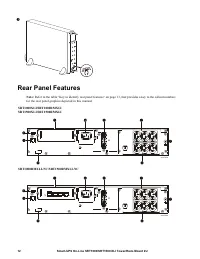
Smart-UPS On-Line SRT1000/SRT1500 XLI Tower/Rack-Mount 2U 12 Rear Panel Features Note: Refer to the table “Key to identify rear panel features” on page 13, that provides a key to the callout numbers for the rear panel graphics depicted in this manual. SRT1000XLI/SRT1000RMXLI SRT1500XLI/SRT1500RMXL...
Page 13 - Key to identify rear panel features; UPS Configuration; Connect Emergency Power Off feature; Configure controllable outlet groups
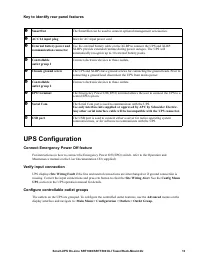
13 Smart-UPS On-Line SRT1000/SRT1500 XLI Tower/Rack-Mount 2U Key to identify rear panel features UPS Configuration Connect Emergency Power Off feature For instructions on how to connect the Emergency Power Off (EPO) switch, refer to the Operation and Maintenance manual on the User Documentation CD (...
Page 14 - UPS Display Interface; Display interface operation
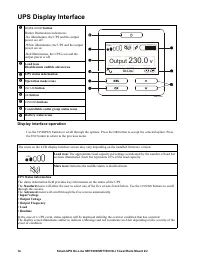
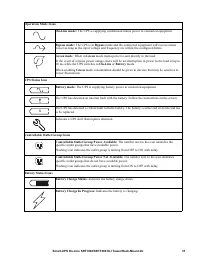
Smart-UPS On-Line SRT1000/SRT1500 XLI Tower/Rack-Mount 2U 14 UPS Display Interface Display interface operation Use the UP / DOWN buttons to scroll through the options. Press the OK button to accept the selected option. Press the ESC button to return to the previous menu. POWER ON / OFF button Butt...