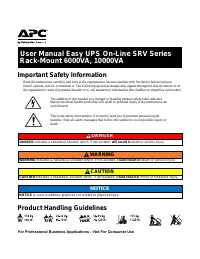
Page 2 - Safety and General Information; Electrical Safety; Battery Safety; CAUTION
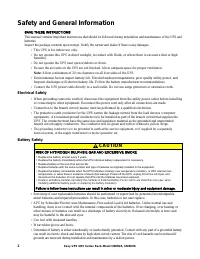
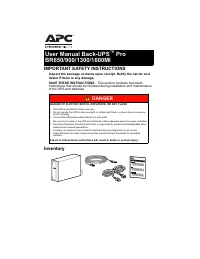
2 Easy UPS SRV Series Rack-Mount 6000VA, 10000VA Safety and General Information SAVE THESE INSTRUCTIONS This manual contains important instructions that should be followed during installation and maintenance of the UPS and batteries. Inspect the package contents upon receipt. Notify the carrier and ...
Page 3 - Optional Accessories
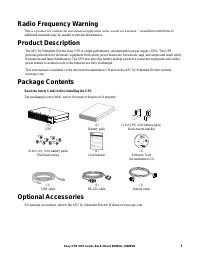
3 Easy UPS SRV Series Rack-Mount 6000VA, 10000VA Radio Frequency Warning This is a product for commercial and industrial application in the second environment − instal lation restrictions or additional measures may be needed to prevent disturbances. Product Description The APC by Schneider Electric ...
Page 4 - Specifications; Environment Specifications; NOTICE; Physical Specifications
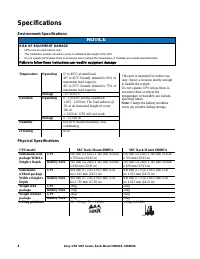
4 Easy UPS SRV Series Rack-Mount 6000VA, 10000VA Specifications Environment Specifications NOTICE RISK OF EQUIPMENT DAMAGE • UPS must be used indoors only. • The installation location should be sturdy to withstand the weight of the UPS. • Do not operate UPS where there is excessive dust or where the...
Page 5 - Front Panel Display
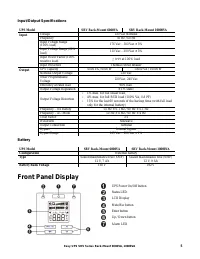
5 Easy UPS SRV Series Rack-Mount 6000VA, 10000VA Input/Output Specifications UPS Model SRV Rack-Mount 6000VA SRV Rack-Mount 10000VA Input Voltage 230 Vac Nominal Frequency 50 Hz / 60 Hz Input Voltage Range (100% load) 176 Vac – 300 Vac ± 3% Input Voltage Range (60% load) 110 Vac – 300 Vac ± 3% Input...
Page 6 - Rear Panel Features; Battery Pack; Basic Connectors
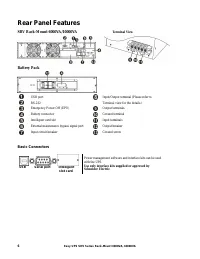
6 Easy UPS SRV Series Rack-Mount 6000VA, 10000VA Rear Panel Features SRV Rack-Mount 6000VA/10000VA Terminal View Battery Pack USB port Input/Output terminal (Please refer to Terminal view for the details.) RS-232 Emergency Power Off (EPO) Output terminals Battery connector Ground terminal Intelligen...
Page 7 - Rack-Mount Installation; Start Up Settings; Attach the front bezel; Connect the battery
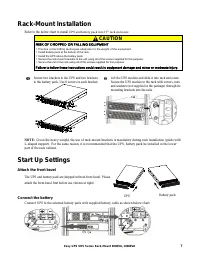
7 Easy UPS SRV Series Rack-Mount 6000VA, 10000VA Rack-Mount Installation Refer to the below chart to install UPS and battery pack into 19” rack enclosure. CAUTION RISK OF DROPPED OR FALLING EQUIPMENT • Practice correct lifting techniques adequate for the weight of the equipment. • Install battery pa...
Page 8 - Connect power and equipment to the UPS; Start the UPS; Cold start the UPS
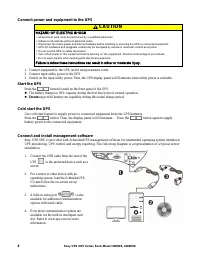
8 Easy UPS SRV Series Rack-Mount 6000VA, 10000VA Connect power and equipment to the UPS CAUTION HAZARD OF ELECTRIC SHOCK • All electrical work must be performed by a qualified electrician. • Adhere to all national and local electrical codes. • Disconnect the mains power and internal batteries before...
Page 9 - Emergency Power Off; Maintenance Bypass
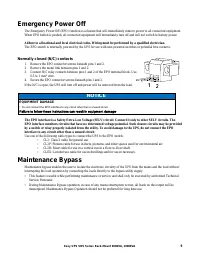
9 Easy UPS SRV Series Rack-Mount 6000VA, 10000VA Emergency Power Off The Emergency Power Off (EPO) function is a feature that will immediately remove power to all connected equipment. When EPO button is pushed, all connected equipment will immediately turn off and will not switch to battery power. A...
Page 10 - Operation; Using The Display
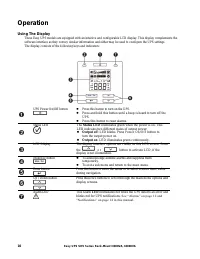
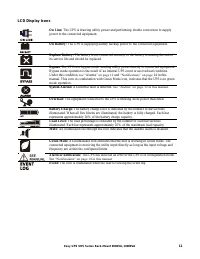
10 Easy UPS SRV Series Rack-Mount 6000VA, 10000VA Operation Using The Display These Easy UPS models are equipped with an intuitive and configurable LCD display. This display complements the software interface as they convey similar information and either may be used to con figure the UPS settings. T...
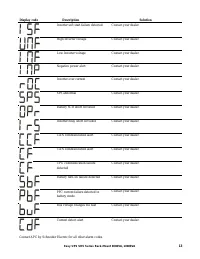
Page 12 - Alarms and System Errors; Status Indicators
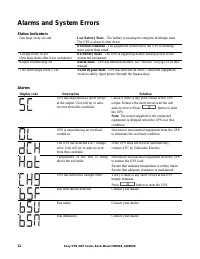
12 Easy UPS SRV Series Rack-Mount 6000VA, 10000VA Alarms and System Errors Status Indicators One beep every second Low Battery State - The battery is nearing its complete discharge state. The UPS is about to shut down. Overload condition - The equipment connected to the UPS is drawing more power tha...
Page 14 - Notifications
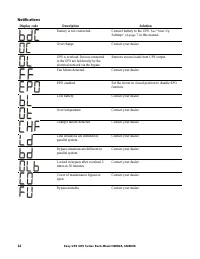
14 Easy UPS SRV Series Rack-Mount 6000VA, 10000VA Notifications Display code Description Solution Battery is not connected. Connect battery to the UPS. See “Start Up Settings” on page 7 in this manual. Over charge Contact your dealer. UPS is overload. Devices connected to the UPS are fed directly by...
Page 15 - UPS Display Parameters; Ah capacity of connected battery; Configuration; Configure UPS Parameters
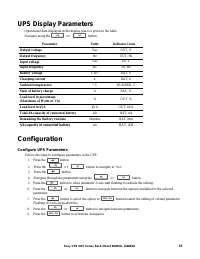
15 Easy UPS SRV Series Rack-Mount 6000VA, 10000VA UPS Display Parameters Operational data displayed in the display panel is given in the table. Navigate using the o r button. Parameter Units Indicator Icons Output voltage Vac OUT, V Output frequency Hz OUT, Hz Input voltage Vac IN, V Input frequency...
Page 16 - UPS Settings
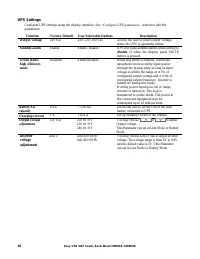
16 Easy UPS SRV Series Rack-Mount 6000VA, 10000VA UPS Settings Configure UPS settings using the display interface. See “Configure UPS parameters” section to edit the parameters. Function Factory Default User Selectable Options Description Output voltage 230 Vac 220, 230, 240 Vac Allows the user to s...
Page 17 - Advance Display Navigation
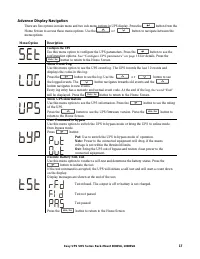
17 Easy UPS SRV Series Rack-Mount 6000VA, 10000VA Advance Display Navigation There are five options in main menu and two sub-menu options in UPS display. Press the button from the Home Screen to access these menu options. Use the o r button to navigate between the menu options. Menu Option Descripti...
Page 18 - Troubleshooting
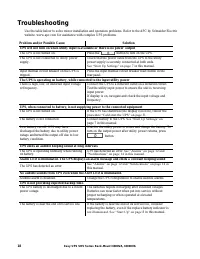
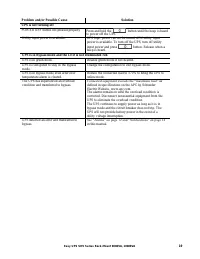
18 Easy UPS SRV Series Rack-Mount 6000VA, 10000VA Troubleshooting Use the table below to solve minor installation and operation problems. Refer to the APC by Schneider Electric website, www.apc.com for assistance with complex UPS problems. Problem and/or Possible Cause Solution UPS will not turn on ...
Page 20 - Transport; Service
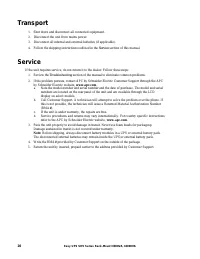
20 Easy UPS SRV Series Rack-Mount 6000VA, 10000VA Transport 1. Shut down and disconnect all connected equipment. 2. Disconnect the unit from mains power. 3. Disconnect all internal and external batteries (if applicable). 4. Follow the shipping instructions outlined in the Service section of this man...
Page 21 - Limited Factory Warranty
21 Easy UPS SRV Series Rack-Mount 6000VA, 10000VA Limited Factory Warranty Schneider Electric IT Corporation (SEIT), warrants its products to be free from defects in materials and workmanship for a period of two (2) years from the date of purchase. The SEIT obligation under this warranty is limited ...