Page 2 - Contents
www.insigniaproducts.com 2 Contents SAFETY INFORMATION . . . . . . . . . . . . . . . . . . . . . . . . . . . . . . . . . . . . . . . . . . . . . . . . . . . . . . . . . . . . . . . . . . . 3 Precautions to avoid possible exposure to excessive microwave energy: . . . . . . . . . . . . . . . . . . . ....
Page 3 - READ ALL INFORMATION BEFORE USING
3 1.6 Cu. Ft. Over-the-Range Microwave www.insigniaproducts.com SAFETY INFORMATION For your safety, the information in this manual must be followed to minimize the risk of fire or explosion or to prevent property damage, personal injury, or loss of life. Precautions to avoid possible exposure to exc...
Page 4 - Unpacking and examining your microwave; Grounding instructions; SAVE THESE INSTRUCTIONS
4 NS-OTR16WH8(-C), NS-OTR16BS8(-C), or NS-OTR16SS8(-C) www.insigniaproducts.com • To reduce the risk of fire in the microwave oven cavity: • Do not overcook food. Carefully attend the appliance when paper, plastic, or other combustible materials are placed inside the microwave oven to facilitate coo...
Page 5 - ABOUT YOUR MICROWAVE OVEN
5 1.6 Cu. Ft. Over-the-Range Microwave www.insigniaproducts.com The microwave oven is equipped with a 3-prong grounding plug. It must be plugged into a wall receptacle that is properly installed and grounded. DO NOT UNDER ANY CIRCUMSTANCES CUT OR REMOVE THE GROUNDING PIN FROM THE PLUG. DO NOT USE AN...
Page 6 - ABOUT MICROWAVE COOKING; Cookware and cooking materials
6 NS-OTR16WH8(-C), NS-OTR16BS8(-C), or NS-OTR16SS8(-C) www.insigniaproducts.com ABOUT MICROWAVE COOKING • Arrange food carefully. Place thickest areas towards outside of the dish. • Watch the cooking time. Cook for the shortest amount of time indicated and add more as needed. Food severely overcooke...
Page 8 - Features; Package contents; Microwave oven; BOTTOM
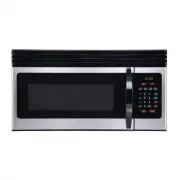
8 NS-OTR16WH8(-C), NS-OTR16BS8(-C), or NS-OTR16SS8(-C) www.insigniaproducts.com Features • Sensor cooking • 10 variable power levels • Add 30 seconds and express cooking • 1000W of power • Exhaust fan with two speeds • Task lighting • Child lock • Turntable • Hidden vent Package contents • 1.6 cu. f...
Page 9 - Control panel; Setting up your microwave oven
9 1.6 Cu. Ft. Over-the-Range Microwave www.insigniaproducts.com Control panel Setting up your microwave oven See the Installation Guide (included in your box) to install and set up your microwave. You can also find the Installation Guide online: 1 Go to www.insigniaproducts.com . 2 Use the search ba...
Page 10 - Installing the turntable; Using your microwave; Tips for the best results
10 NS-OTR16WH8(-C), NS-OTR16BS8(-C), or NS-OTR16SS8(-C) www.insigniaproducts.com Installing the turntable 1 Place the turntable ring in the round depression in the bottom of the microwave oven so that it turns freely. 2 Place the glass turntable (flat side up) on the turntable ring so that the hub e...
Page 11 - Wrapping in paper towels or waxed paper; Cooking in your microwave
11 1.6 Cu. Ft. Over-the-Range Microwave www.insigniaproducts.com Wrapping in paper towels or waxed paper Sandwiches and many other food types containing prebaked bread should be wrapped prior to placing in the microwave to help prevent the food items from drying out while heating. Cooking in your mi...
Page 12 - Cooking with multiple cooking stages; Using the kitchen timer
12 NS-OTR16WH8(-C), NS-OTR16BS8(-C), or NS-OTR16SS8(-C) www.insigniaproducts.com Cooking with multiple cooking stages For best results, some microwave recipes call for different power levels or different lengths of time for cooking. Your microwave may be set to change from one stage to another autom...
Page 13 - Defrosting in your microwave; Tips for defrosting meat; Cooking with the sensor
13 1.6 Cu. Ft. Over-the-Range Microwave www.insigniaproducts.com Defrosting in your microwave 1 Press Defrost repeatedly to select “MEAT,” “POULTRY,” or “FISH.” 2 Press START . 3 Use the number pad to enter the weight of the item to be defrosted (in pounds). For example, 10 = 1.0 lbs. 4 Press START ...
Page 15 - Using the stop/clear button
15 1.6 Cu. Ft. Over-the-Range Microwave www.insigniaproducts.com Popcorn 1 Press Popcorn repeatedly to select your popcorn bag’s weight: 2 Press START . Beverage The beverage setting heats one two three cups of a beverage. Use the table below to determine the setting to use. 1 Press Beverage repeate...
Page 16 - Cleaning and maintaining your microwave; Cleaning the outside of your microwave; Cleaning the inside of your microwave
16 NS-OTR16WH8(-C), NS-OTR16BS8(-C), or NS-OTR16SS8(-C) www.insigniaproducts.com Cleaning and maintaining your microwave Cleaning the outside of your microwave Exterior The outside surface is precoated steel and plastic. Clean the outside with mild soap and water, then rinse and dry with a soft clot...
Page 17 - Replacing the charcoal filter
17 1.6 Cu. Ft. Over-the-Range Microwave www.insigniaproducts.com 1 To remove the exhaust filters, slide the filter toward the back of the microwave, then pull it downward while sliding it out of the side slot. Repeat for the second filter. 2 Soak the ventilation filters in hot water using a mild det...
Page 18 - Replacing the lights
18 NS-OTR16WH8(-C), NS-OTR16BS8(-C), or NS-OTR16SS8(-C) www.insigniaproducts.com 4 Remove the charcoal filter by pushing it inwards, then lift up and pull it out of the microwave. 5 Insert the new charcoal filter, close the vent grill, and secure with the vent grill screws. 6 Plug the microwave back...
Page 20 - Troubleshooting; Obtaining replacement parts; Specifications
20 NS-OTR16WH8(-C), NS-OTR16BS8(-C), or NS-OTR16SS8(-C) www.insigniaproducts.com Troubleshooting If you have a problem with your microwave, review the following chart for a possible solution. If the microwave still does not work properly, contact the nearest authorized service center. Obtaining repl...
Page 21 - Legal notices; Copyright; ONE-YEAR LIMITED WARRANTY; How long does the coverage last?
21 1.6 Cu. Ft. Over-the-Range Microwave www.insigniaproducts.com Legal notices Federal Communications Commission Radio Frequency Interference Statement This equipment generates and uses ISM frequency energy and if not installed and used properly, that is in strict accordance with the manufacturer's ...