Page 2 - AUSTRALIA ONLY; International call charges apply)
AUSTRALIA ONLY Our goods come with guarantees that cannot be excluded under the Australian Consumer Law. You are entitled to a replacement or refund for a major failure and compensation for any other reasonably foreseeable loss or damage caused by our goods. You are also entitled to have the goods r...
Page 3 - English; Motherboard Layout
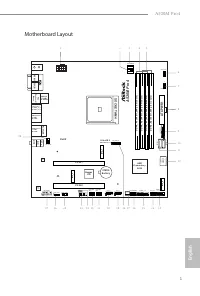
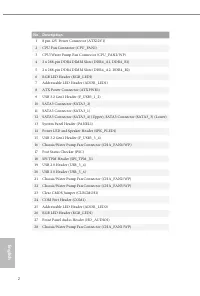
English 1 A520M Pro4 Motherboard Layout 4 3 8 5 9 1 1 1 2 1 1 5 1 6 1 3 1 9 1 4 A T X P W R 1 S u p e r I / O C L R C M O S 1 1 H D _ A U D I O 1 1 C P U _ FA N 2 / W P SOCKE TA M4 F _ U S B 3 _ 1 _ 2 1 C H A _ FA N 1 / W P 1 R o H S S P K _ P L E D 1 1 D D R 4 _ A 1 ( 6 4 b it , 2 8 8 -p in m o d u...
Page 5 - Speed LED
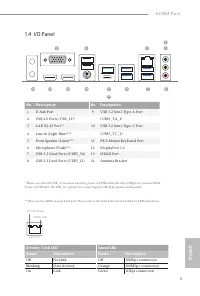
English 3 A520M Pro4 1.4 I/O Panel No. Description No. Description 1 D-Sub Port 9 USB 3.2 Gen1 Type-A Port 2 USB 2.0 Ports (USB_12)* (USB3_TA_1) 3 LAN RJ-45 Port** 10 USB 3.2 Gen1 Type-C Port 4 Line In (Light Blue)*** (USB3_TC_1) 5 Front Speaker (Lime)*** 11 PS/2 Mouse/Keyboard Port 6 Microphone (Pi...
Page 6 - Port; Chapter 1 Introduction; Package Contents
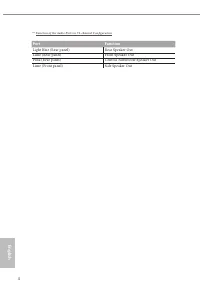
English 4 *** Function of the Audio Ports in 7.1-channel Configuration : Port Function Light Blue (Rear panel) Rear Speaker Out Lime (Rear panel) Front Speaker Out Pink (Rear panel) Central /Subwoofer Speaker Out Lime (Front panel) Side Speaker Out Chapter 1 Introduction Thank you for purchasing ASR...
Page 7 - ASRock A520M Pro4 Motherboard (Micro ATX Form Factor)
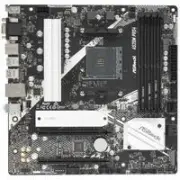
English 5 A520M Pro4 Chapter 1 Introduction Thank you for purchasing ASRock A520M Pro4 motherboard, a reliable motherboard produced under ASRock’s consistently stringent quality control. It delivers excellent performance with robust design conforming to ASRock’s commitment to quality and endurance. ...
Page 8 - Platform; Chipset
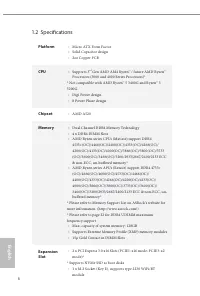
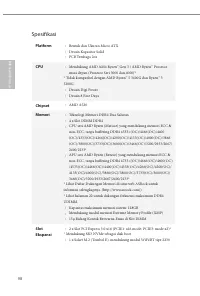
English 6 1.2 Specifications Platform • Micro ATX Form Factor • Solid Capacitor design • 2oz Copper PCB CPU • Supports 3 rd Gen AMD AM4 Ryzen™ / future AMD Ryzen™ Processors (3000 and 4000 Series Processors)* * Not compatible with AMD Ryzen™ 5 3400G and Ryzen™ 3 3200G. • Digi Power design • 8 Power ...
Page 9 - Graphics; Audio
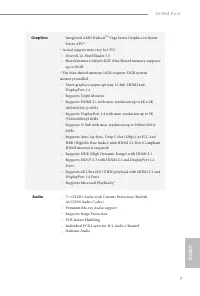
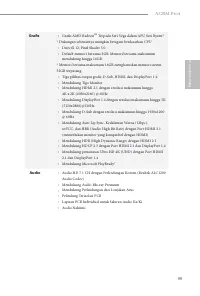
English 7 A520M Pro4 Graphics • Integrated AMD Radeon TM Vega Series Graphics in Ryzen Series APU* * Actual support may vary by CPU • DirectX 12, Pixel Shader 5.0 • Shared memory default 2GB. Max Shared memory supports up to 16GB. * The Max shared memory 16GB requires 32GB system memory installed. •...
Page 10 - LAN; Supports Lightning/ESD Protection; Storage
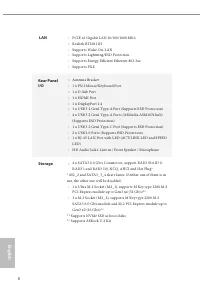
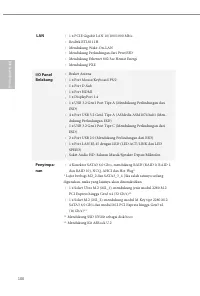
English 8 LAN • PCIE x1 Gigabit LAN 10/100/1000 Mb/s • Realtek RTL8111H • Supports Wake-On-LAN • Supports Lightning/ESD Protection • Supports Energy Efficient Ethernet 802.3az • Supports PXE Rear Panel I/O • Antenna Bracket • 1 x PS/2 Mouse/Keyboard Port • 1 x D-Sub Port • 1 x HDMI Port • 1 x Displa...
Page 11 - Connector
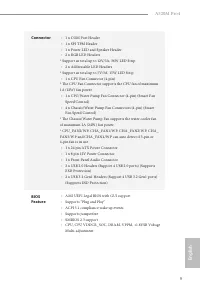
English 9 A520M Pro4 Connector • 1 x COM Port Header • 1 x SPI TPM Header • 1 x Power LED and Speaker Header • 2 x RGB LED Headers * Support in total up to 12V/3A, 36W LED Strip • 2 x Addressable LED Headers * Support in total up to 5V/3A, 15W LED Strip • 1 x CPU Fan Connector (4-pin) * The CPU Fan ...
Page 12 - OS; Microsoft® Windows® 10 64-bit
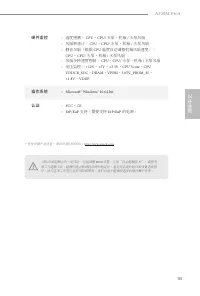
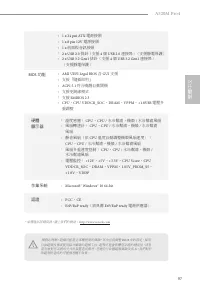
English 10 Hardware Monitor • Temperature Sensing: CPU, CPU/Water Pump, Chassis/Water Pump Fans • Fan Tachometer: CPU, CPU/Water Pump, Chassis/Water Pump Fans • Quiet Fan (Auto adjust chassis fan speed by CPU temperature): CPU, CPU/Water Pump, Chassis/Water Pump Fans • Fan Multi-Speed Control: CPU, ...
Page 13 - Pre-installation Precautions; Hold components by the edges and do not touch the ICs.; Chapter 2 Installation
English 11 A520M Pro4 This is a Micro ATX form factor motherboard. Before you install the motherboard, study the configuration of your chassis to ensure that the motherboard fits into it. Pre-installation Precautions Take note of the following precautions before you install motherboard components or...
Page 14 - Installing the CPU
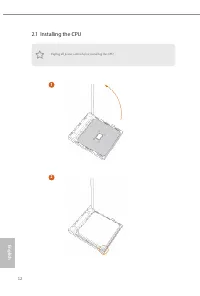
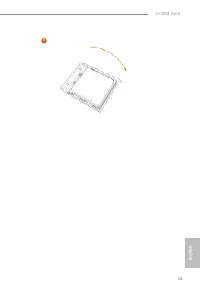
English 12 2.1 Installing the CPU Unplug all power cables before installing the CPU. 2 1
Page 16 - Installing the CPU Fan and Heatsink
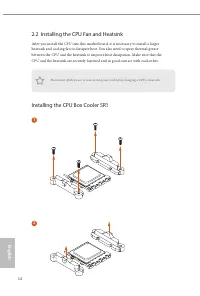
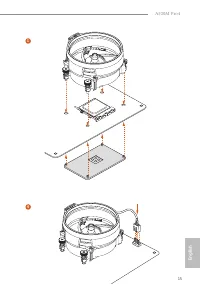
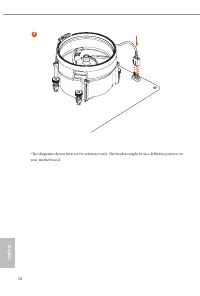
English 14 2.2 Installing the CPU Fan and Heatsink After you install the CPU into this motherboard, it is necessary to install a larger heatsink and cooling fan to dissipate heat. You also need to spray thermal grease between the CPU and the heatsink to improve heat dissipation. Make sure that the C...
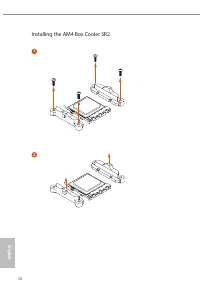
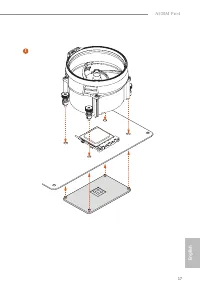
Page 18 - Installing the AM4 Box Cooler SR2
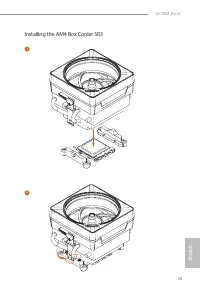
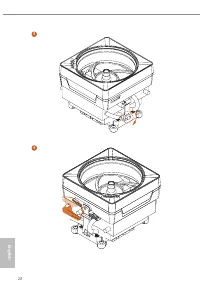
Page 21 - Installing the AM4 Box Cooler SR3
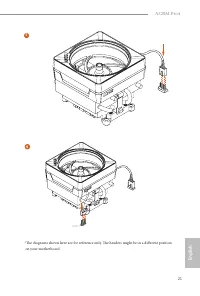
English 19 A520M Pro4 *The diagrams shown here are for reference only. The headers might be in a different position on your motherboard. Installing the AM4 Box Cooler SR3 1 2
Page 24 - AMD non-XMP Memory Frequency Support; UDIMM Memory Slot; DR
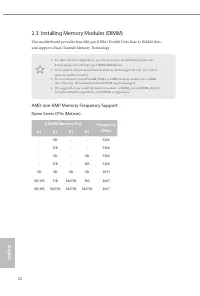
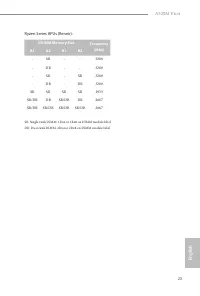
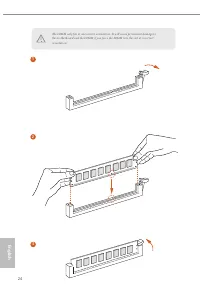
English 22 2.3 Installing Memory Modules (DIMM) This motherboard provides four 288-pin DDR4 (Double Data Rate 4) DIMM slots, and supports Dual Channel Memory Technology. AMD non-XMP Memory Frequency Support Ryzen Series CPUs (Matisse): 1. For dual channel configuration, you always need to install id...
Page 27 - There are 2 PCI Express slots on the motherboard.
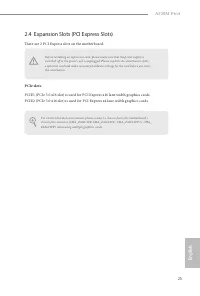
English 25 A520M Pro4 2.4 Expansion Slots (PCI Express Slots) There are 2 PCI Express slots on the motherboard. PCIe slots: PCIE1 (PCIe 3.0 x16 slot) is used for PCI Express x16 lane width graphics cards. PCIE2 (PCIe 3.0 x16 slot) is used for PCI Express x4 lane width graphics cards. Before installi...
Page 29 - Onboard Headers and Connectors
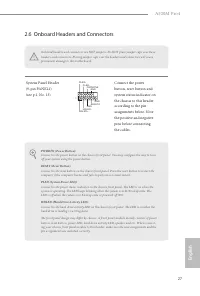
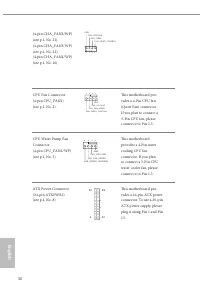
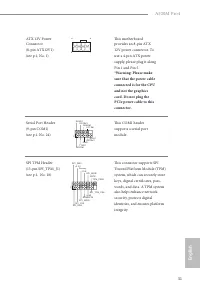
English 27 A520M Pro4 2.6 Onboard Headers and Connectors System Panel Header(9-pin PANEL1)(see p.1, No. 13) Connect the power button, reset button and system status indicator on the chassis to this header according to the pin assignments below. Note the positive and negative pins before connecting t...
Page 34 - Never install the RGB
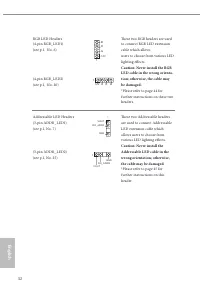
English 32 RGB LED Headers(4-pin RGB_LED1)(see p.1, No. 6) (4-pin RGB_LED2)(see p.1, No. 26) These two RGB headers are used to connect RGB LED extension cable which allows users to choose from various LED lighting effects. Caution: Never install the RGB LED cable in the wrong orienta-tion; otherwise...
Page 35 - Post Status Checker
English 33 A520M Pro4 2.7 Post Status Checker Post Status Checker (PSC) diagnoses the computer when users power on the machine. It emits a red light to indicate whether the CPU, memory, VGA or stor-age is dysfunctional. The lights go off if the four mentioned above are functioning normally.
Page 36 - Nut Location
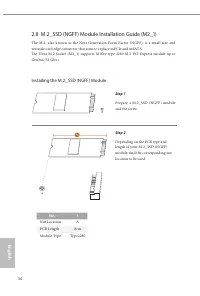
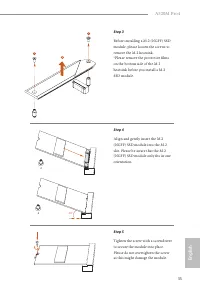
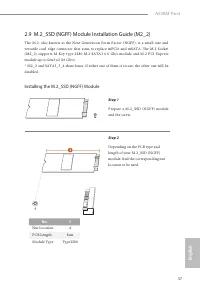
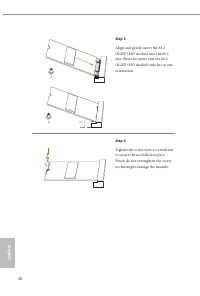
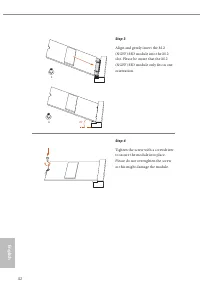
English 34 2.8 M.2_SSD (NGFF) Module Installation Guide (M2_1) The M.2, also known as the Next Generation Form Factor (NGFF), is a small size and versatile card edge connector that aims to replace mPCIe and mSATA. The Ultra M.2 Socket (M2_1) supports M Key type 2280 M.2 PCI Express module up to Gen3...
Page 38 - Vendor
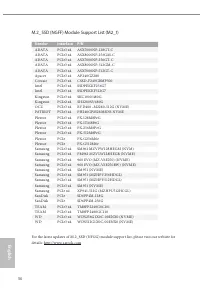
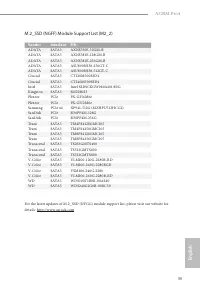
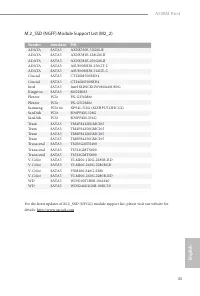
English 36 M.2_SSD (NGFF) Module Support List (M2_1) Vendor Interface P/N ADATA PCIe3 x4 ASX7000NP-128GT-C ADATA PCIe3 x4 ASX8000NP-256GM-C ADATA PCIe3 x4 ASX7000NP-256GT-C ADATA PCIe3 x4 ASX8000NP-512GM-C ADATA PCIe3 x4 ASX7000NP-512GT-C Apacer PCIe3 x4 AP240GZ280 Corsair PCIe3 x4 CSSD-F240GBMP500 ...
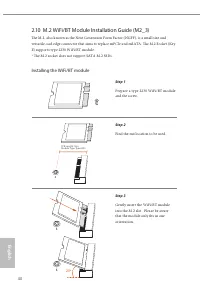
Page 42 - Installing the WiFi/BT module; Find the nut location to be used.
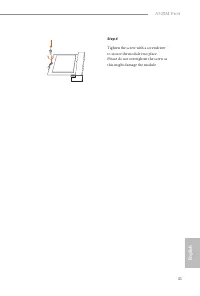
English 40 2.10 M.2 WiFi/BT Module Installation Guide (M2_3) The M.2, also known as the Next Generation Form Factor (NGFF), is a small size and versatile card edge connector that aims to replace mPCIe and mSATA. The M.2 Socket (Key E) supports type 2230 WiFi/BT module. * The M.2 socket does not supp...
Page 46 - ASRock Polychrome SYNC; Connecting the LED Strip; Connect your RGB LED strips to the
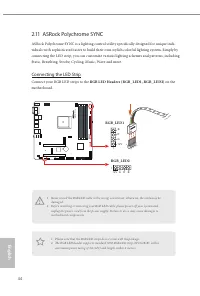
English 44 2.11 ASRock Polychrome SYNC ASRock Polychrome SYNC is a lighting control utility specifically designed for unique indi-viduals with sophisticated tastes to build their own stylish colorful lighting system. Simply by connecting the LED strip, you can customize various lighting schemes and ...
Page 47 - Connecting the Addressable RGB LED Strip; Connect your Addressable RGB LED strips to the
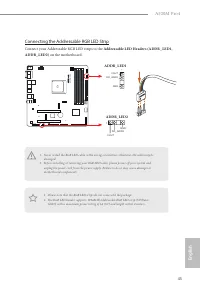
English 45 A520M Pro4 Connecting the Addressable RGB LED Strip Connect your Addressable RGB LED strips to the Addressable LED Headers (ADDR_LED1, ADDR_LED2) on the motherboard. A 52 0M P ro 4 1. Never install the RGB LED cable in the wrong orientation; otherwise, the cable may be damaged. 2. Before ...
Page 48 - ASRock Polychrome SYNC Utility
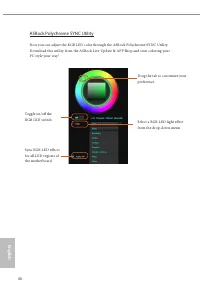
English 46 ASRock Polychrome SYNC Utility Now you can adjust the RGB LED color through the ASRock Polychrome SYNC Utility. Download this utility from the ASRock Live Update & APP Shop and start coloring your PC style your way! Toggle on/off the RGB LED switch Sync RGB LED effects for all LED reg...
Page 49 - Deutsch; Technische Daten; Plattform; Feststoffkondensator-Design; Prozessor; Digi Power design; Chipsatz
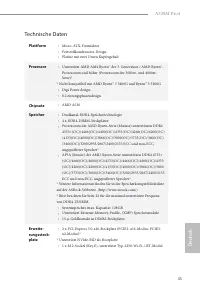
45 A520M Pro4 Deutsch Technische Daten Plattform • Micro-ATX-Formfaktor • Feststoffkondensator-Design • Platine mit zwei Unzen Kupfergehalt Prozessor • Unterstützt AMD AM4 Ryzen™ der 3. Generation / AMD Ryzen™-Prozessoren und höher (Prozessoren der 3000er- und 4000er-Serie)* * Nicht kompatibel mit A...
Page 50 - Grafikkarte
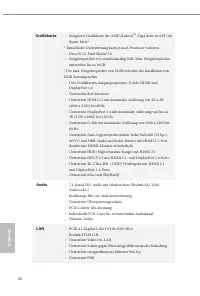
46 Deutsch Grafikkarte • Integrierte Grafikkarte der AMD-Radeon TM -Vega-Serie in APU der Ryzen-Serie* * Tatsächliche Unterstützung kann je nach Prozessor variieren • DirectX 12, Pixel Shader 5.0 • Freigabespeicher von standardmäßig 2GB. Max. Freigabespeicher unterstützt bis zu 16GB. * Der max. Frei...
Page 51 - Speicher
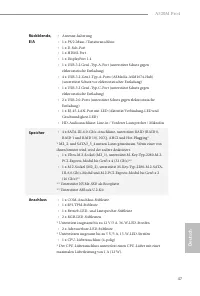
47 A520M Pro4 Deutsch Rückblende, E/A • Antenne-halterung • 1 x PS/2-Maus-/Tastaturanschluss • 1 x D-Sub-Port • 1 x HDMI-Port • 1 x DisplayPort 1.4 • 1 x USB-3.2 Gen1-Typ-A-Port (unterstützt Schutz gegen elektrostatische Entladung) • 4 x USB-3.2-Gen1-Typ-A-Ports (ASMedia-ASM1074-Hub) (unterstützt Sc...
Page 52 - x Audioanschluss an Frontblende
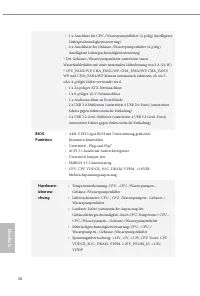
48 Deutsch • 1 x Anschluss für CPU-/Wasserpumpenlüfter (4-polig) (intelligente Lüftergeschwindigkeitssteuerung) • 4 x Anschlusse für Gehäuse-/Wasserpumpenlüfter (4-polig) (intelligente Lüftergeschwindigkeitssteuerung) * Der Gehäuse-/Wasserpumpenlüfter unterstützt einen Wasserkühlerlüfter mit einer m...
Page 53 - Microsoft® Windows® 10, 64 Bit
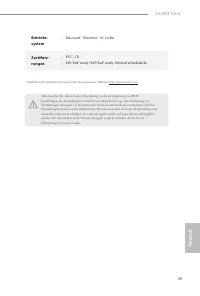
49 A520M Pro4 Deutsch Betriebs-system • Microsoft® Windows® 10, 64 Bit Zertifizie-rungen • FCC, CE • ErP/EuP ready (ErP/EuP ready-Netzteil erforderlich) Bitte beachten Sie, dass mit einer Übertaktung, zu der die Anpassung von BIOS-Einstellungen, die Anwendung der Untied Overclocking Technology oder ...
Page 54 - Spécifications; Plateforme
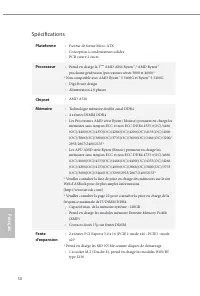
50 Fr ançais Français Spécifications Plateforme • Facteur de forme Micro ATX • Conception à condensateurs solides • PCB cuivre 2 onces Processeur • Prend en charge la 3 ème AMD AM4 Ryzen™ / AMD Ryzen™ prochaine génération (processeurs séries 3000 et 4000)* * Non compatible avec AMD Ryzen™ 5 3400G et...
Page 55 - Graphiques
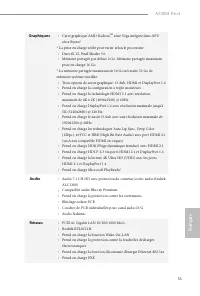
51 A520M Pro4 Fr ançais Français Graphiques • Carte graphique AMD Radeon TM série Vega intégrée dans APU série Ryzen* * La prise en charge réelle peut varier selon le processeur • DirectX 12, Pixel Shader 5.0 • Mémoire partagée par défaut 2 Go. Mémoire partagée maximum prise en charge 16 Go. * La mé...
Page 56 - Stockage
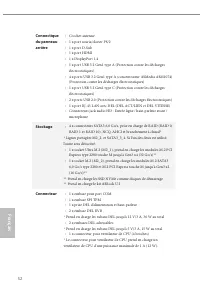
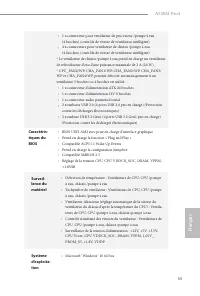
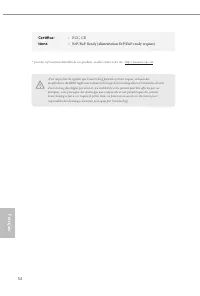
52 Fr ançais Français Connectique du panneau arrière • Crochet antenne • 1 x port souris/clavier PS/2 • 1 x port D-Sub • 1 x port HDMI • 1 x DisplayPort 1.4 • 1 x port USB 3.2 Gen1 type A (Protection contre les décharges électrostatiques) • 4 x ports USB 3.2 Gen1 type A (concentrateur ASMedia ASM107...
Page 59 - Specifiche; Piattaforma
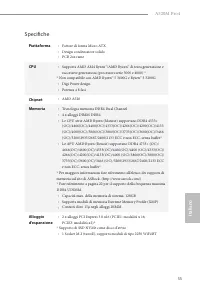
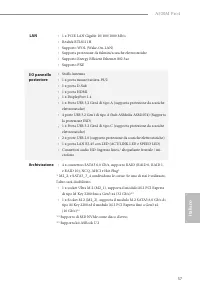
55 A520M Pro4 Italiano Italiano Specifiche Piattaforma • Fattore di forma Micro ATX • Design condensatore solido • PCB 2oz rame CPU • Supporta AMD AM4 Ryzen™/AMD Ryzen™ di terza generazione e successive generazioni (processori serie 3000 e 4000) * * Non compatibile con AMD Ryzen™ 5 3400G e Ryzen™ 3 ...
Page 60 - Grafica
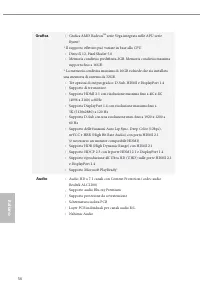
56 Italiano Italiano Grafica • Grafica AMD Radeon TM serie Vega integrata nelle APU serie Ryzen* * Il supporto effettivo può variare in base alla CPU • DirectX 12, Pixel Shader 5.0 • Memoria condivisa predefinita 2GB. Memoria condivisa massima supporta fino a 16GB. * La memoria condivisa massima di ...
Page 62 - Connettore
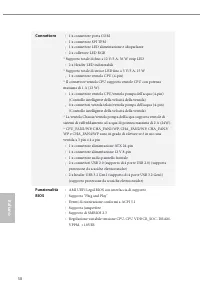
58 Italiano Italiano Connettore • 1 x connettore porta COM • 1 x connettore SPI TPM • 1 x connettore LED alimentazione e altoparlante • 2 x collettore LED RGB * Supporto totale di fino a 12 V/3 A, 36 W strip LED • 2 x Header LED indirizzabili * Supporto totale di strisce LED fino a 5 V/3 A, 15 W • 1...
Page 63 - SO; Microsoft® Windows® 10 64 bit
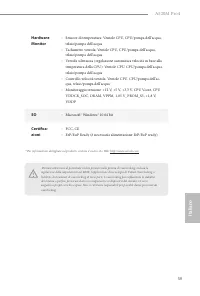
59 A520M Pro4 Italiano Italiano Hardware Monitor • Sensore di temperatura: Ventole CPU, CPU/pompa dell'acqua, telaio/pompa dell'acqua • Tachimetro ventola: Ventole CPU, CPU/pompa dell'acqua, telaio/pompa dell'acqua • Ventola silenziosa (regolazione automatica velocità in base alla temperatura della ...
Page 64 - Español; Especificaciones; Plataforma
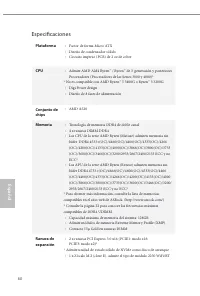
60 Español 60 Especificaciones Plataforma • Factor de forma Micro ATX • Diseño de condensador sólido • Circuito impreso (PCB) de 2 oz de cobre CPU • Admite AMD AM4 Ryzen™ / Ryzen™ de 3 ª generación y posteriores Procesadores (Procesadores de las Series 3000 y 4000)* * No es compatible con AMD Ryzen™...
Page 65 - Gráficos
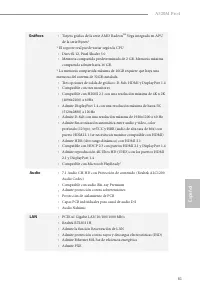
61 A520M Pro4 Español 61 Gráficos • Tarjeta gráfica de la serie AMD Radeon TM Vega integrada en APU de la serie Ryzen* * El soporte real puede variar según la CPU • DirectX 12, Pixel Shader 5.0 • Memoria compartida predeterminada de 2 GB. Memoria máxima compartida admite hasta 16 GB. * La memoria co...
Page 66 - Conector
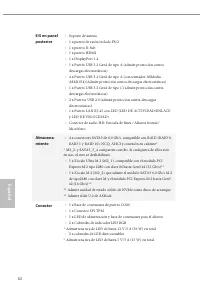
62 Español 62 E/S en panel posterior • Soporte de antena • 1 x puerto de ratón/teclado PS/2 • 1 x puerto D-Sub • 1 x puerto HDMI • 1 x DisplayPort 1.4 • 1 x Puerto USB 3.2 Gen1 de tipo A (admite protección contra descargas electrostáticas) • 4 x Puerto USB 3.2 Gen1 de tipo A (concentrador ASMedia AS...
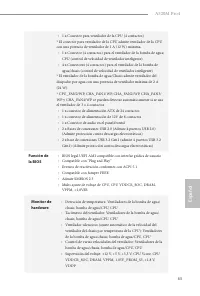
Page 68 - Microsoft® Windows® 10 64 bits
64 Español 64 SO • Microsoft® Windows® 10 64 bits Certifica-ciones • FCC y CE • Preparado para ErP/EuP (se necesita una fuente de alimentación preparada para ErP/EuP) Tenga en cuenta que hay un cierto riesgo implícito en las operaciones de overclocking, incluido el ajuste de la BIOS, aplicando la te...
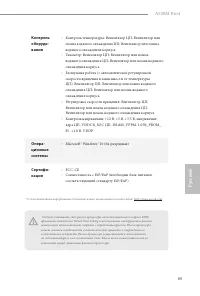
Page 69 - Технические характеристики; Платформа
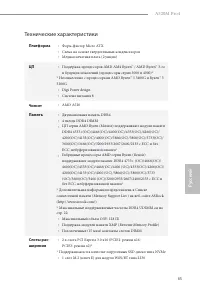
65 A520M Pro4 Ру сский Технические характеристики Платформа • Форм-фактор Micro ATX • Схема на основе твердотельных конденсаторов • Медная печатная плата (2 унции) ЦП • Поддержка процессоров AMD AM4 Ryzen™ / AMD Ryzen™ 3-го и будущих поколений (процессоры серии 3000 и 4000)* * Несовместимо с процесс...
Page 70 - Звук
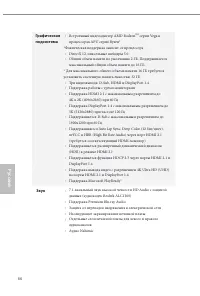
66 Ру сский Графическая подсистема • Встроенный видеоадаптер AMD Radeon TM серии Vega в процессорах APU серии Ryzen* *Фактическая поддержка зависит от процессора • DirectX 12, пиксельные шейдеры 5.0 • Общий объем памяти по умолчанию 2 ГБ. Поддерживается максимальный общий объем памяти до 16 ГБ. * Дл...
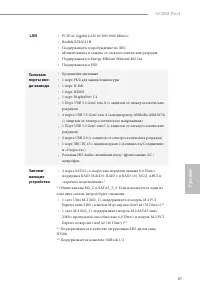
Page 72 - Разъемы
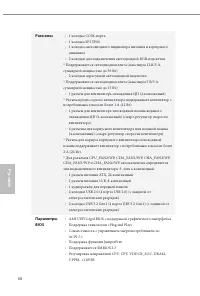
68 Ру сский Разъемы • 1 колодка СОМ-порта • 1 колодка SPI ТРМ • 1 колодка светодиодного индикатора питания и корпусного динамика • 2 колодки для подключения светодиодной RGB-подсветки * Поддерживается светодиодная лента (максимум 12 В/3 А, суммарной мощностью до 36 Вт) • 2 колодки адресуемой светоди...
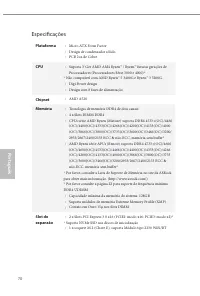
Page 74 - Especificações
70 Por tuguês Especificações Plataforma • Micro ATX Form Factor • Design de condensador sólido • PCB 2oz de Cobre CPU • Suporta 3 ª Ger AMD AM4 Ryzen™ / Ryzen™ futuras gerações de Processadores (Processadores Série 3000 e 4000)* * Não compatível com AMD Ryzen™ 5 3400G e Ryzen™ 3 3200G. • Digi Power ...
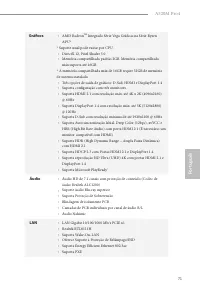
Page 75 - Áudio
71 A520M Pro4 Por tuguês Gráficos • AMD Radeon TM Integrado Série Vega Gráficas na Série Ryzen APU* * Suporte atual pode vairar por CPU • DirectX 12, Pixel Shader 5.0 • Memória compartilhada padrão 2GB. Memória compartilhada máx suporta até 16GB. * A memória compartilhada máx de 16GB requer 32GB de ...
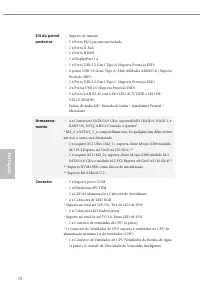
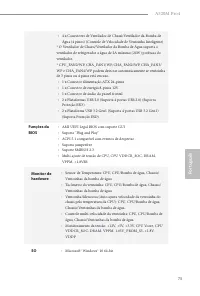
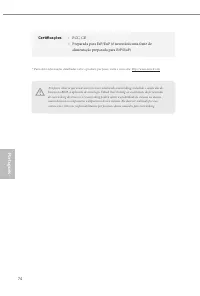
Page 78 - Certificações
74 Por tuguês Por favor, observe que existe um certo risco envolvendo overclocking, incluindo o ajuste das de-finições na BIOS, a aplicação de tecnologia Untied Overclocking ou a utilização de ferramentas de overclocking de terceiros. O overclocking poderá afetar a estabilidade do sistema ou mesmo c...
Page 79 - Polsk; Specyfikacje; Platforma
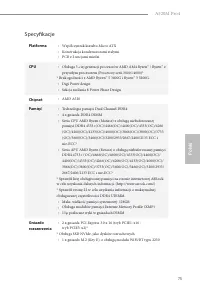
75 A520M Pro4 Polsk i Polski Specyfikacje Platforma • Współczynnik kształtu Micro ATX • Konstrukcja kondensatorami stałymi • PCB z 2 uncjami miedzi CPU • Obsługa 3-ciej generacji procesorów AMD AM4 Ryzen™ / Ryzen™ z przyszłym procesorem (Procesory serii 3000 i 4000)* * Brak zgodności z AMD Ryzen™ 5 ...
Page 80 - Grafika
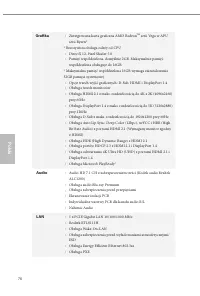
76 Polsk i Polski Grafika • Zintegrowana karta graficzna AMD Radeon TM serii Vega w APU serii Ryzen* * Rzeczywista obsługa zależy od CPU • DirectX 12, Pixel Shader 5.0 • Pamięć współdzielona, domyślnie 2GB. Maksymalnie pamięć współdzielona obsługuje do 16GB. * Maksymalna pamięć współdzielona 16GB wy...
Page 81 - Złącze
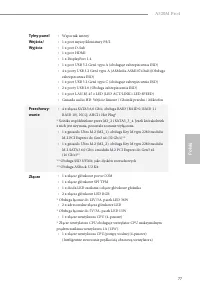
77 A520M Pro4 Polsk i Polski Tylny panel Wejścia/ Wyjścia • Wspornik anteny • 1 x port myszy/klawiatury PS/2 • 1 x port D-Sub • 1 x port HDMI • 1 x DisplayPort 1.4 • 1 x port USB 3.2 Gen1 typu A (obsługuje zabezpieczenia ESD) • 4 x porty USB 3.2 Gen1 typu A (ASMedia ASM1074 hub)(Obsługa zabezpieczen...
Page 82 - Funkcja BIOS
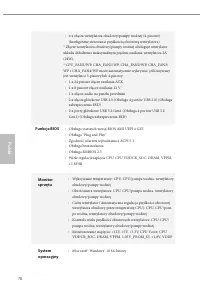
78 Polsk i Polski • 4 x złącza wentylatora obudowy/pompy wodnej (4-pinowe) (Inteligentne sterowanie prędkością obrotową wentylatora) * Złącze wentylatora obudowy/pompy wodnej obsługuje wentylator układu chłodzenia maksymalnym prądem zasilania wentylatora 2A (24W). * CPU_FAN2/WP, CHA_FAN1/WP, CHA_FAN...
Page 83 - Certyfikaty
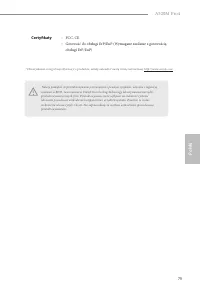
79 A520M Pro4 Polsk i Polski Certyfikaty • FCC, CE • Gotowość do obsługi ErP/EuP (Wymagane zasilanie z gotowością obsługi ErP/EuP) Należy pamiętać, że przetaktowywanie jest związane z pewnym ryzykiem, włącznie z regulacją ustawień w BIOS, zastosowaniem Untied Overclocking Technology lub używaniem na...
Page 84 - 한 국 어; 규격; 플랫폼; 칩세트
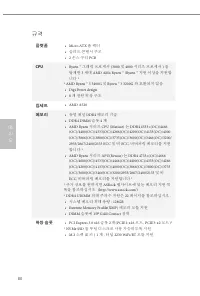
80 한 국 어 규격 플랫폼 • Micro ATX 폼 팩터 • 솔리드 콘덴서 구조 • 2 온스 구리 PCB CPU • Ryzen ™ 그래픽 프로세서 (3000 및 4000 시리즈 프로세서 ) 를 탑재한 3 세대 AMD AM4 Ryzen ™ /Ryzen ™ 지원 이상을 지원합 니다 * * AMD Ryzen ™ 5 3400G 및 Ryzen ™ 3 3200G 와 호환되지 않음 • Digi Power design• 8 개 전원 위상 구조 칩세트 • AMD A520 메모리 • 듀얼 채널 DDR4 메모리 기술 • DDR4 DIMM 슬롯 4 개...
Page 85 - 그래픽; 오디오
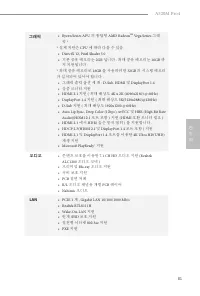
81 A520M Pro4 한 국 어 그래픽 • Ryzen Series APU 의 통합형 AMD Radeon TM Vega Series 그래 픽 * * 실제 지원은 CPU 에 따라 다를 수 있음 • DirectX 12, Pixel Shader 5.0• 기본 공유 메모리는 2GB 입니다 . 최대 공유 메모리는 16GB 까 지 지원됩니다 . * 최대 공유 메모리로 16GB 를 사용하려면 32GB 의 시스템 메모리 가 설치되어 있어야 합니다 . • 그래픽 출력 옵션 세 개 : D-Sub, HDMI 및 DisplayPort 1.4 • 삼중 ...
Page 86 - 후면
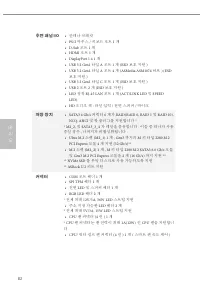
82 한 국 어 후면 패널 I/O • 안테나 브래킷 • PS/2 마우스 / 키보드 포트 1 개 • D-Sub 포트 1 개 • HDMI 포트 1 개 • DisplayPort 1.4 1 개 • USB 3.2 Gen1 타입 A 포트 1 개 (ESD 보호 지원 ) • USB 3.2 Gen1 타입 A 포트 4 개 (ASMedia ASM1074 허브 ) (ESD 보호 지원 ) • USB 3.2 Gen1 타입 C 포트 1 개 (ESD 보호 지원 ) • USB 2 포트 2 개 (ESD 보호 지원 ) • LED 장착 RJ-45 LAN 포트 1 개 ...
Page 87 - ATX; BIOS; 기능; • GUI; 하드웨어; • Microsoft® Windows® 10 64-; 인증
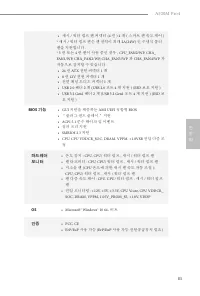
83 A520M Pro4 한 국 어 • 섀시 / 워터 펌프 팬 커넥터 (4 핀 ) 4 개 ( 스마트 팬 속도 제어 ) * 섀시 / 워터 펌프 팬은 팬 전력이 최대 2A(24W) 인 수냉식 쿨러 팬을 지원합니다 . * 3 핀 또는 4 핀 팬이 사용 중인 경우 , CPU_FAN2/WP, CHA_ FAN1/WP, CHA_FAN2/WP, CHA_FAN3/WP 과 CHA_FAN4/WP 가 자동으로 감지할 수 있습니다 . • 24 핀 ATX 전원 커넥터 1 개 • 8 핀 12V 전원 커넥터 1 개 • 전면 패널 오디오 커넥터 1 개 • USB...
Page 89 - 日本語; 仕様; Ryzen TM; チップセット
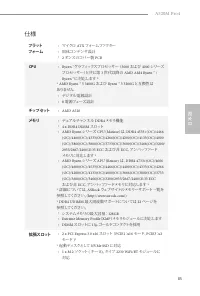
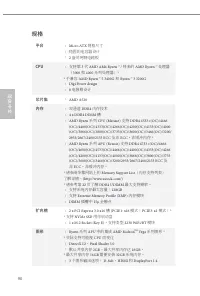
85 A520M Pro4 日本語 仕様 プラットフォーム • マイクロ ATX フォームファクター • 固体コンデンサ設計 • 2 オンスのコパー製 PCB CPU • Ryzen ™ グラフィックスプロセッサー ( 3000 および 4000 シリーズ プロセッサー)と共に第 3 世代以降の AMD AM4 Ryzen ™ / Ryzen ™ に対応します * * AMD Ryzen ™ 5 3400G および Ryzen ™ 3 3200G と互換性は ありません • デジタル電源設計 • 8 電源フェーズ設計 チップセット • AMD A520 メモリ • デュアルチャンネル DDR4...
Page 90 - グラフィックス; オーディオ
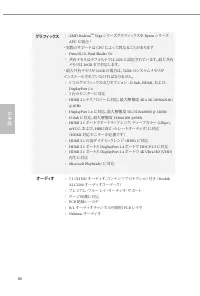
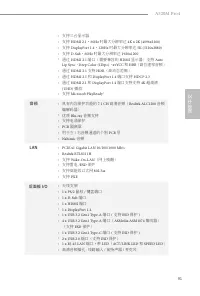
86 日本語 グラフィックス • AMD Radeon TM Vega シリーズグラフィックスを Ryzen シリーズ APU に統合 * * 実際のサポートは CPU によって異なることがあります • DirectX 12 、 Pixel Shader 5.0 • 共有メモリはデフォルトでは 2GB に設定されています。最大共有 メモリは 16GB まで対応します。 * 最大共有メモリが 16GB の場合は、 32GB のシステムメモリが インストールされていなければなりません。 • 3 つのグラフィックス出力オプション : D-Sub 、 HDMI 、および、 DisplayPort 1....
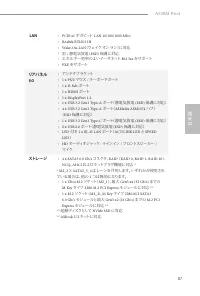
Page 92 - コネクタ
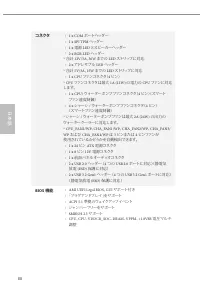
88 日本語 コネクタ • 1 x COM ポートヘッダー • 1 x SPI TPM ヘッダー • 1 x 電源 LED とスピーカーヘッダー • 2 x RGB LED ヘッダー * 合計 12V/3A 、 36W までの LED ストリップに対応 • 2 x アドレサブル LED ヘッダー * 合計 5V/3A 、 15W までの LED ストリップに対応 • 1 x CPU ファンコネクタ( 4 ピン) * CPU ファンコネクタは最大 1A (12W) の電力の CPU ファンに対応 します。 • 1 x CPU/ ウォーターポンプファンコネクタ( 4 ピン) (スマート ファン速度...
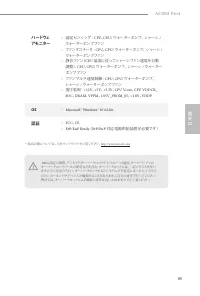
Page 93 - ハードウェ
89 A520M Pro4 日本語 ハードウェ アモニター • 温度センシング : CPU 、 CPU/ ウォーターポンプ、 シャーシ / ウォーターポンプファン • ファンタコメータ : CPU 、 CPU/ ウォーターポンプ、 シャーシ / ウォーターポンプファン • 静音ファン( CPU 温度に従ってシャーシファン速度を自動 調整) : CPU 、 CPU/ ウォーターポンプ、 シャーシ / ウォーター ポンプファン • ファンマルチ速度制御 : CPU 、 CPU/ ウォーターポンプ、 シャーシ / ウォーターポンプファン • 電圧監視 : +12V 、 +5V 、 +3.3V 、 C...
Page 94 - 规格
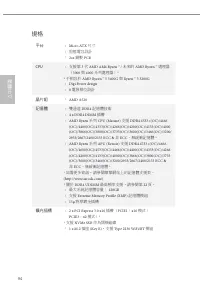
90 简体中文 简体中文 规格 平台 • Micro ATX 规格尺寸 • 稳固的电容器设计 • 2 盎司纯铜电路板 CPU • 支持第 3 代 AMD AM4 Ryzen ™ / 将来的 AMD Ryzen ™ 处理器 ( 3000 和 4000 系列处理器) * * 不兼容 AMD Ryzen ™ 5 3400G 和 Ryzen ™ 3 3200G • Digi Power design • 8 电源相设计 芯片集 • AMD A520 内存 • 双通道 DDR4 内存技术 • 4 x DDR4 DIMM 槽 • AMD Ryzen 系列 CPU (Matisse) 支持 DDR4 453...
Page 95 - 音频
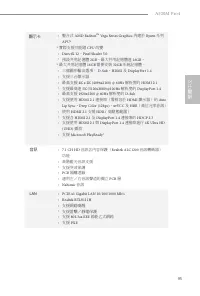
91 A520M Pro4 简体中文 简体中文 • 支持三台显示器 • 支持 HDMI 2.1 , 60Hz 时最大分辨率达 4K x 2K (4096x2160) • 支持 DisplayPort 1.4 , 120Hz 时最大分辨率达 5K (5120x2880) • 支持 D-Sub , 60Hz 时最大分辨率达 1920x1200 • 通过 HDMI 2.1 端口(需要兼容的 HDMI 显示器)支持 Auto Lip Sync 、 Deep Color (12bpc) 、 xvYCC 和 HBR (高位速率音频) • 通过 HDMI 2.1 支持 HDR (高动态范围) • 通过 HD...
Page 96 - 存储
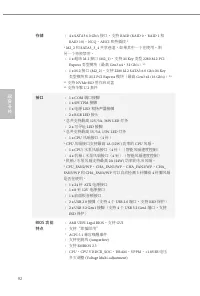
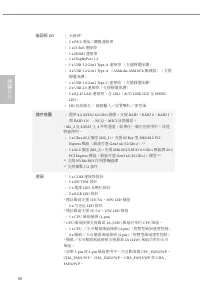
92 简体中文 简体中文 存储 • 4 x SATA3 6.0 Gb/s 接口,支持 RAID (RAID 0 、 RAID 1 和 RAID 10) 、 NCQ 、 AHCI 和热插拔 * * M2_2 和 SATA3_3_4 共享巷道。如果其中一个在使用,则 另一个将被禁用。 • 1 x 超级 M.2 接口 (M2_1) ,支持 M Key 类型 2280 M.2 PCI Express 类型模块(最高 Gen3 x4 , 32 Gb/s ) ** • 1 x M.2 接口 (M2_2) ,支持 2280 M.2 SATA3 6.0 Gb/s M Key 类型模块和 M.2 PCI Exp...
Page 97 - 硬件监控
93 A520M Pro4 简体中文 简体中文 硬件监控 • 温度感测: CPU 、 CPU/ 水泵、机箱 / 水泵风扇 • 风扇转速计: CPU 、 CPU/ 水泵、机箱 / 水泵风扇 • 静音风扇(根据 CPU 温度自动调整机箱风扇速度): CPU 、 CPU/ 水泵、机箱 / 水泵风扇 • 风扇多种速度控制: CPU 、 CPU/ 水泵、机箱 / 水泵风扇 • 电压监控: +12V 、 +5V 、 +3.3V 、 CPU Vcore 、 CPU VDDCR_SOC 、 DRAM 、 VPPM 、 1.05V_PROM_S5 、 +1.8V 、 VDDP 操作系统 • Microsoft®...
Page 98 - 繁體中文繁體中文; 規格; 平台
94 繁體中文繁體中文 規格 平台 • Micro ATX 尺寸 • 固態電容設計 • 2oz 銅製 PCB CPU • 支援第 3 代 AMD AM4 Ryzen ™ / 未來的 AMD Ryzen ™ 處理器 ( 3000 與 4000 系列處理器) * * 不相容於 AMD Ryzen ™ 5 3400G 與 Ryzen ™ 3 3200G • Digi Power design • 8 電源相位設計 晶片組 • AMD A520 記憶體 • 雙通道 DDR4 記憶體技術 • 4 x DDR4 DIMM 插槽 • AMD Ryzen 系列 CPU (Matisse) 支援 DDR4 45...
Page 99 - 顯示卡; 音訊
95 A520M Pro4 繁體中文繁體中文 顯示卡 • 整合式 AMD Radeon TM Vega Series Graphics 內建於 Ryzen 系列 APU* * 實際支援可能隨 CPU 改變 • DirectX 12 、 Pixel Shader 5.0 • 預設共用記憶體 2GB 。最大共用記憶體達 16GB 。 * 最大共用記憶體 16GB 需要安裝 32GB 系統記憶體。 • 三個圖形輸出選項: D-Sub 、 HDMI 及 DisplayPort 1.4 • 支援三台顯示器 • 最高支援 4K x 2K (4096x2160) @ 60Hz 解析度的 HDMI 2.1 •...
Page 100 - 後面板
96 繁體中文繁體中文 後面板 I/O • 天線架 • 1 x PS/2 滑鼠/鍵盤連接埠 • 1 x D-Sub 連接埠 • 1 x HDMI 連接埠 • 1 x DisplayPort 1.4 • 1 x USB 3.2 Gen1 Type-A 連接埠 (支援靜電保護) • 4 x USB 3.2 Gen1 Type-A ( ASMedia ASM1074 集線器)(支援 靜電保護) • 1 x USB 3.2 Gen1 Type-C 連接埠 (支援靜電保護) • 2 x USB 2.0 連接埠(支援靜電保護) • 1 x RJ-45 LAN 連接埠,含 LED ( ACT/LINK LE...
Page 102 - Spesifikasi
98 Bahasa I ndonesia Spesifikasi Platform • Bentuk dan Ukuran Micro ATX • Desain Kapasitor Solid • PCB Tembaga 2oz CPU • Mendukung AMD AM4 Ryzen™ Gen 3 / AMD Ryzen™ Prosesor masa depan (Prosesor Seri 3000 dan 4000)* * Tidak kompatibel dengan AMD Ryzen™ 5 3400G dan Ryzen™ 3 3200G • Desain Digi Power ...
Page 103 - Grafis
99 A520M Pro4 Bahasa I ndonesia Grafis • Grafis AMD Radeon TM Terpadu Seri Vega dalam APU Seri Ryzen* * Dukungan sebenarnya mungkin beragam berdasarkan CPU • DirectX 12, Pixel Shader 5.0 • Default memori bersama 2GB. Memori bersama maksimum mendukung hingga 16GB. * Memori bersama maksimum 16GB mengh...
Page 104 - Mendukung Perlindungan dari Petir/ESD
100 Bahasa I ndonesia LAN • 1 x PCIE Gigabit LAN 10/100/1000 Mb/s • Realtek RTL8111H • Mendukung Wake-On-LAN • Mendukung Perlindungan dari Petir/ESD • Mendukung Ethernet 802.3az Hemat Energi • Mendukung PXE I/O Panel Belakang • Braket Antena • 1 x Port Mouse/Keyboard PS/2 • 1 x Port D-Sub • 1 x Port...
Page 105 - Konektor
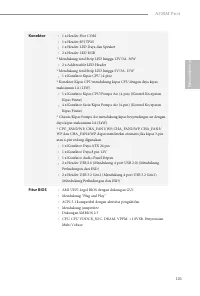
101 A520M Pro4 Bahasa I ndonesia Konektor • 1 x Header Port COM • 1 x Header SPI TPM • 1 x Header LED Daya dan Speaker • 2 x Header LED RGB * Mendukung total Strip LED hingga 12V/3A, 36W • 2 x Addressable LED Header * Mendukung total Strip LED hingga 5V/3A, 15W • 1 x Konektor Kipas CPU (4-pin) * Kon...
Page 106 - Sertifikasi
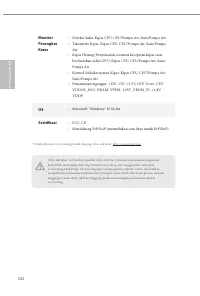
102 Bahasa I ndonesia Monitor Perangkat Keras • Deteksi Suhu: Kipas CPU, CPU/Pompa Air, Sasis/Pompa Air • Takometer Kipas: Kipas CPU, CPU/Pompa Air, Sasis/Pompa Air • Kipas Hening (Penyesuaian otomatis kecepatan kipas sasis berdasarkan suhu CPU): Kipas CPU, CPU/Pompa Air, Sasis/Pompa Air • Kontrol M...
Page 107 - Contact Information; ASRock Incorporation; The Netherlands
Contact Information If you need to contact ASRock or want to know more about ASRock, you’re welcome to visit ASRock’s website at http://www.asrock.com; or you may contact your dealer for further information. For technical questions, please submit a support request form at http://www.asrock.com/suppo...
Page 108 - DECLARATION OF CONFORMITY; Responsible Party Name:; hereby declares that the product; Product Name : Motherboard; Conforms to the following specifications:; Supplementary Information:
DECLARATION OF CONFORMITY Per FCC Part 2 Section 2.1077(a) Responsible Party Name: ASRock Incorporation Address: 13848 Magnolia Ave, Chino, CA91710 +1-909-590-8308/+1-909-590-1026 Phone/Fax No: hereby declares that the product Product Name : Motherboard Model Number : Conforms to the following speci...
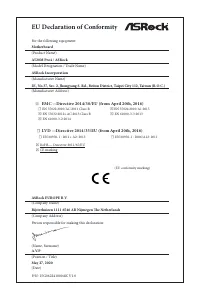
Page 109 - EU Declaration of Conformity; For the following equipment:; Motherboard
EU Declaration of Conformity For the following equipment: Motherboard (Product Name) A520M Pro4 / ASRock (Model Designation / Trade Name) ASRock Incorporation (Manufacturer Name) 2F., No.37, Sec. 2, Jhongyang S. Rd., Beitou District, Taipei City 112, Taiwan (R.O.C.) (Manufacturer Address) ASRock EUR...



 Asrock Z690 User Manual
 Asrock Z690 PG User Manual
 Asrock A320 User Manual
 Asrock A520M-HVS User Manual
 Asrock A520M-ITX/ac User Manual
 Asrock B365 User Manual
 Asrock B450 User Manual
 Asrock B450M-HDV R4.0 User Manual
 Asrock B550 User Manual
 Asrock B550 PG User Manual
 Asrock B550 Pro4 User Manual
 Asrock B550M User Manual
 Asrock B550M PG User Manual
 Asrock B550M Pro4 User Manual
 Asrock B560 User Manual