Page 3 - Charging
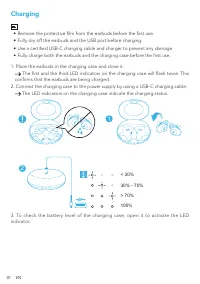
01 EN Charging • Remove the protective film from the earbuds before the first use. • Fully dry off the earbuds and the USB port before charging. • Use a certified USB-C charging cable and charger to prevent any damage. • Fully charge both the earbuds and the charging case before the first use. 1. Pl...
Page 4 - Soundcore App
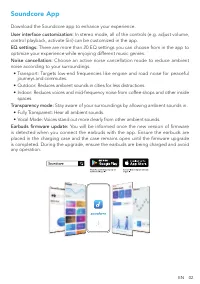
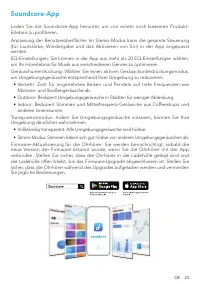
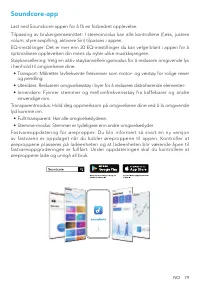
EN 02 Soundcore App Download the Soundcore app to enhance your experience. User interface customization: In stereo mode, all of the controls (e.g. adjust volume, control playback, activate Siri) can be customized in the app. EQ settings: There are more than 20 EQ settings you can choose from in the ...
Page 5 - Wearing
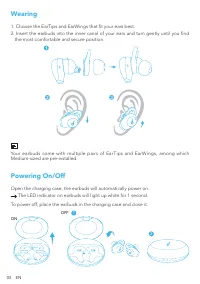
03 EN Wearing 1. Choose the EarTips and EarWings that fit your ears best. 2. Insert the earbuds into the inner canal of your ears and turn gently until you find the most comfortable and secure position. Your earbuds come with multiple pairs of EarTips and EarWings, among which Medium-sized are pre-i...
Page 6 - Bluetooth Pairing; Life Dot 2 NC
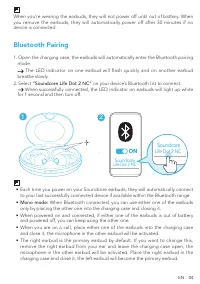
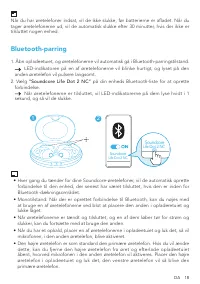
EN 04 When you’re wearing the earbuds, they will not power off until out of battery. When you remove the earbuds, they will automatically power off after 30 minutes if no device is connected. Bluetooth Pairing 1. Open the charging case, the earbuds will automatically enter the Bluetooth pairing mode...
Page 7 - Pairing with another device; Controls
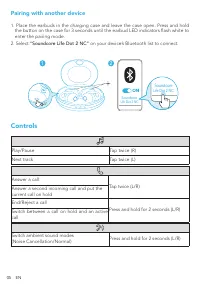
05 EN Pairing with another device 1. Place the earbuds in the charging case and leave the case open. Press and hold the button on the case for 3 seconds until the earbud LED indicators flash white to enter the pairing mode. 2. Select “Soundcore Life Dot 2 NC” on your device’s Bluetooth list to conne...
Page 8 - Mono mode; Reset
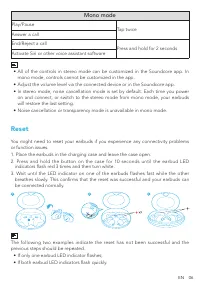
EN 06 Mono mode Play/Pause Tap twice Answer a call End/Reject a call Press and hold for 2 seconds Activate Siri or other voice assistant software • All of the controls in stereo mode can be customized in the Soundcore app. In mono mode, controls cannot be customized in the app. • Adjust the volume l...
Page 9 - Specifications
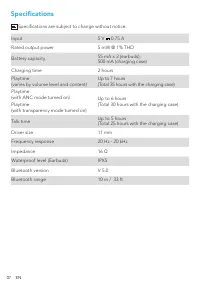
07 EN Specifications Specifications are subject to change without notice. Input 5 V 0.75 A Rated output power 5 mW @ 1% THD Battery capacity 55 mA x 2 (earbuds); 500 mA (charging case) Charging time 2 hours Playtime(varies by volume level and content) Up to 7 hours (Total 35 hours with the charging ...
Page 10 - Nabíjení
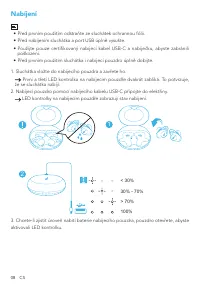
08 CS Nabíjení • Před prvním použitím odstraňte ze sluchátek ochrannou fólii. • Před nabíjením sluchátka a port USB úplně vysušte. • Použijte pouze certifikovaný nabíjecí kabel USB-C a nabíječku, abyste zabránili poškození. • Před prvním použitím sluchátka i nabíjecí pouzdro úplně dobijte. 1. Sluchá...
Page 11 - Aplikace Soundcore
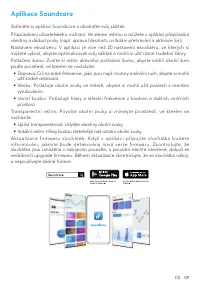
CS 09 Aplikace Soundcore Stáhněte si aplikaci Soundcore a obohaťte svůj zážitek.Přizpůsobení uživatelského rozhraní: Ve stereo režimu si můžete v aplikaci přizpůsobit všechny ovládací prvky (např. úprava hlasitosti, ovládání přehrávání a aktivace Siri).Nastavení ekvalizéru: V aplikaci je více než 20...
Page 12 - Nošení
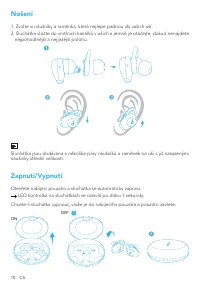
10 CS Nošení 1. Zvolte si náušníky a raménka, která nejlépe padnou do vašich uší.2. Sluchátka vložte do vnitřních kanálků v uších a jemně je otáčejte, dokud nenajdete nejpohodlnější a nejjistější polohu. Sluchátka jsou dodávána s několika páry náušníků a ramének na uši s již nasazenými náušníky stře...
Page 13 - Párování Bluetooth
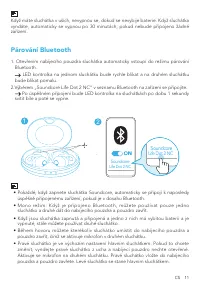
CS 11 Když máte sluchátka v uších, nevypnou se, dokud se nevybije baterie. Když sluchátka vyndáte, automaticky se vypnou po 30 minutách, pokud nebude připojeno žádné zařízení. Párování Bluetooth 1. Otevřením nabíjecího pouzdra sluchátka automaticky vstoupí do režimu párování Bluetooth. LED kontrolka...
Page 14 - Spárování s jiným zařízením; Ovládání
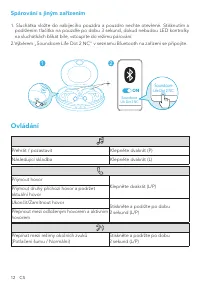
12 CS Spárování s jiným zařízením 1. Sluchátka vložte do nabíjecího pouzdra a pouzdro nechte otevřené. Stisknutím a podržením tlačítka na pouzdře po dobu 3 sekund, dokud nebudou LED kontrolky na sluchátkách blikat bíle, vstoupíte do režimu párování. 2.Výběrem „Soundcore Life Dot 2 NC“ v seznamu Blue...
Page 15 - Mono režim; Resetování
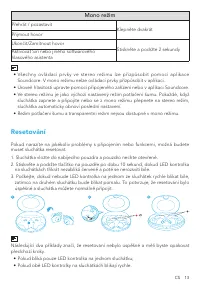
CS 13 Mono režim Přehrát / pozastavit Klepněte dvakrát Přijmout hovor Ukončit/Zamítnout hovor Stiskněte a podržte 2 sekundy Aktivovat Siri nebo jiného softwarového hlasového asistenta • Všechny ovládací prvky ve stereo režimu lze přizpůsobit pomocí aplikace Soundcore. V mono režimu nelze ovládací pr...
Page 16 - Specifikace
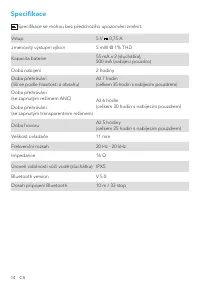
14 CS Specifikace Specifikace se mohou bez předchozího upozornění změnit. Vstup 5 V 0,75 A Jmenovitý výstupní výkon 5 mW @ 1% THD Kapacita baterie 55 mA x 2 (sluchátka); 500 mA (nabíjecí pouzdro) Doba nabíjení 2 hodiny Doba přehrávání(liší se podle hlasitosti a obsahu) Až 7 hodin (celkem 35 hodin s ...
Page 17 - Oplader
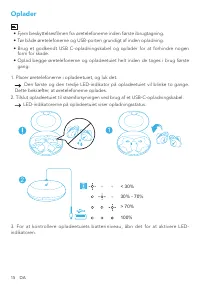
15 DA Oplader • Fjern beskyttelsesfilmen fra øretelefonerne inden første ibrugtagning. • Tør både øretelefonerne og USB-porten grundigt af inden opladning. • Brug et godkendt USB C-opladningskabel og oplader for at forhindre nogen form for skade. • Oplad begge øretelefonerne og opladeetuiet helt ind...
Page 19 - Montering i øre
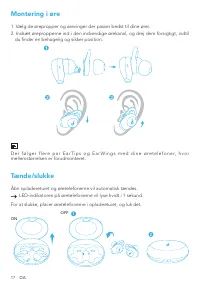
17 DA Montering i øre 1. Vælg de ørepropper og ørevinger der passer bedst til dine ører.2. Indsæt ørepropperne ind i den indvendige ørekanal, og drej dem forsigtigt, indtil du finder en behagelig og sikker position. D e r f ø l g e r f l e r e p a r E a r T i p s o g E a r W i n g s m e d d i n e ø ...
Page 21 - Parring med en anden enhed; Kontroller
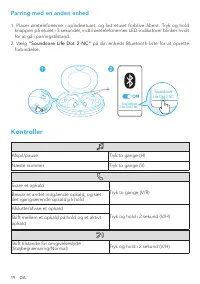
19 DA Parring med en anden enhed 1. Placer øretelefonerne i opladeetuiet, og lad etuiet forblive åbent. Tryk og hold knappen på etuiet i 3 sekunder, indtil øretelefonernes LED-indikatorer blinker hvidt for at gå i parringstilstand. 2. Vælg “Soundcore Life Dot 2 NC” på din enheds Bluetooth-liste for ...
Page 22 - Monotilstand; Nulstil
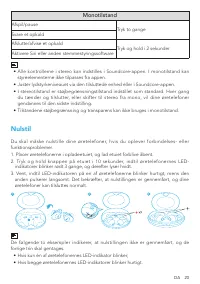
DA 20 Monotilstand Afspil/pause Tryk to gange Svare et opkald Afslutte/afvise et opkald Tryk og hold i 2 sekunder Aktivere Siri eller anden stemmestyringssoftware • Alle kontrollerne i stereo kan indstilles i Soundcore-appen. I monotilstand kan styreelementerne ikke tilpasses fra appen. • Juster lyd...
Page 23 - Specifikationer
21 DA Specifikationer Specifikationerne kan ændres uden varsel. Input 5 V 0,75 A Nominel udgangseffekt 5 mW @ 1% THD Batterikapacitet 55 mA x 2 (øretelefoner); 500 mA (opladeetui) Opladningstid 2 timer Afspilletid(varierer afhængigt af lydstyrke og indhold) Op til 7 timer (I alt 35 timer med opladee...
Page 24 - Ladevorgang
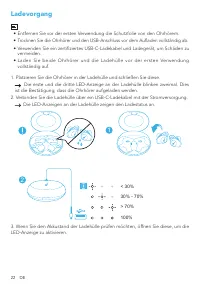
22 DE Ladevorgang • Entfernen Sie vor der ersten Verwendung die Schutzfolie von den Ohrhörern. • Trocknen Sie die Ohrhörer und den USB-Anschluss vor dem Aufladen vollständig ab. • Verwenden Sie ein zertifiziertes USB-C-Ladekabel und Ladegerät, um Schäden zu vermeiden. • Laden Sie beide Ohrhörer und ...
Page 26 - Das Tragen
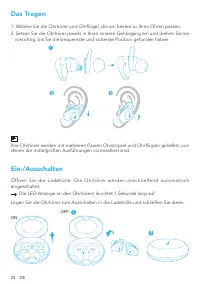
24 DE Das Tragen 1. Wählen Sie die Ohrhörer und Ohrflügel, die am besten zu Ihren Ohren passen.2. Setzen Sie die Ohrhörer jeweils in Ihren inneren Gehörgang ein und drehen Sie sie vorsichtig, bis Sie die bequemste und sicherste Position gefunden haben. Ihre Ohrhörer werden mit mehreren Paaren Ohrstö...
Page 28 - Kopplung mit einem anderen Gerät; Steuerung
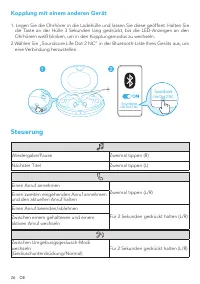
26 DE Kopplung mit einem anderen Gerät 1. Legen Sie die Ohrhörer in die Ladehülle und lassen Sie diese geöffnet. Halten Sie die Taste an der Hülle 3 Sekunden lang gedrückt, bis die LED-Anzeigen an den Ohrhörern weiß blinken, um in den Kopplungsmodus zu wechseln. 2.Wählen Sie „Soundcore Life Dot 2 NC...
Page 29 - Zurücksetzen
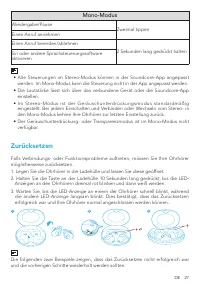
DE 27 Mono-Modus Wiedergabe/Pause Zweimal tippen Einen Anruf annehmen Einen Anruf beenden/ablehnen 2 Sekunden lang gedrückt halten Siri oder andere Sprachsteuerungssoftware aktivieren • Alle Steuerungen im Stereo-Modus können in der Soundcore-App angepasst werden. Im Mono-Modus kann die Steuerung ni...
Page 30 - Technische Daten
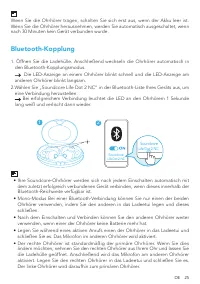
28 DE • Wenn nur eine Ohrhörer-LED blinkt; • Wenn beide LED-Anzeigen schnell blinken. Technische Daten Änderungen der technischen Daten ohne Vorankündigung vorbehalten. Leistungsaufnahme 5 V 0,75 A Nennausgangsleistung 5 mW @ 1 % THD Akkukapazität 55 mA x 2 (Ohrhörer); 500 mA (Ladehülle) Ladedauer 2...
Page 31 - Διαδικασία φόρτισης
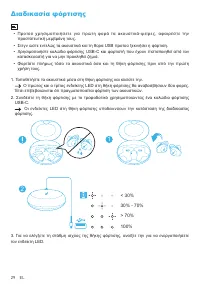
29 EL Διαδικασία φόρτισης • Προτού χρησ ιμοποι ήσ ετε για πρώτη φ ορά τα ακουσ τικά-ψείρες, αφ αιρέστε την προστατευτική μεμβράνη τους. • Στεγν ώστε εντελώς τα ακουστικά και τη θύρα USB προτού ξεκινήσει η φόρτιση. • Χρησιμοποιήστε καλώδιο φόρτισης USB-C και φορτιστή που έχουν πιστοποιηθεί από τον κα...
Page 32 - Εφαρμογή Soundcore
EL 30 Εφαρμογή Soundcore Download the Soundcore app to enhance your experience.Εξατομίκευση διεπαφής χρήστη: Κατά τη χρήση της λειτουργίας στερεοφωνικού ήχου, μπορείτε να εξατομικεύσετε μέσω της εφαρμογής όλα τα κουμπιά ρύθμισης (π.χ. για τη ρύθμιση της έντασης του ήχου, τον έλεγχο της αναπαραγωγής,...
Page 33 - Διαδικασία χρήσης; Διαδικασία ενεργοποίησης/απενεργοποίησης
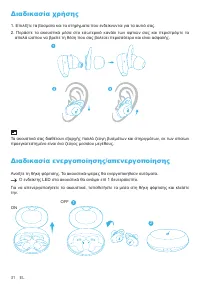
31 EL Διαδικασία χρήσης 1. Επιλέξτε τα βύσματα και τα στηρίγματα που ενδείκνυνται για τα αυτιά σας.2. Περάστε τα ακουστικά μέσα στο εσωτερικό κανάλι των αφτιών σας και περιστρέψτε τα απαλά ώσπου να βρείτε τη θέση που σας βολεύει περισσότερο και είναι ασφαλής. Τα ακουστικά σας διαθέτουν εξαρχής πολλά...
Page 34 - Διαδικασία αντιστοίχισης μέσω Bluetooth
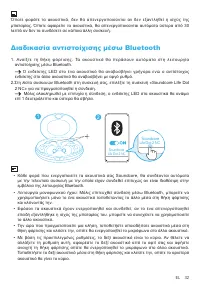
EL 32 Όποτε φοράτε τα ακουστικά, δεν θα απενεργοποιούνται αν δεν εξαντληθεί η ισχύς της μπαταρίας. Όποτε αφαιρείτε τα ακουστικά, θα απενεργοποιούνται αυτόματα ύστερα από 30 λεπτά αν δεν τα συνδέσετε σε κάποια άλλη συσκευή. Διαδικασία αντιστοίχισης μέσω Bluetooth 1. Ανοίξτε τη θήκη φόρτισης. Τα ακουσ...
Page 35 - Διαδικασία αντιστοίχισης με κάποια άλλη συσκευή; Κουμπιά ρύθμισης
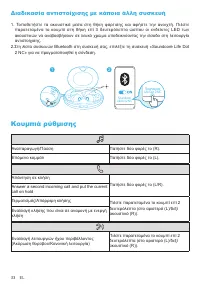
33 EL Διαδικασία αντιστοίχισης με κάποια άλλη συσκευή 1. Τοποθετήστε τα ακουστικά μέσα στη θήκη φόρτισης και αφήστε την ανοιχτή. Πιέστε παρατεταμένα το κουμπί στη θήκη επί 3 δευτερόλεπτα ώσπου οι ενδείκτες LED των ακουστικών να αναβοσβήσουν σε λευκό χρώμα υποδεικνύοντας την είσοδο στη λειτουργία αντ...
Page 36 - Λειτουργία μονοφωνικού ήχου; Επαναφορά
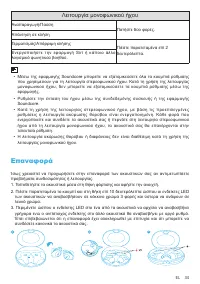
EL 34 Λειτουργία μονοφωνικού ήχου Αναπαραγωγή/Παύση Πατήστε δύο φορές. Απάντηση σε κλήση Τερματισμός/Απόρριψη κλήσης Πιέστε παρατεταμένα επί 2 δευτερόλεπτα. Ενεργοποιήστε την εφαρμογή Siri ή κάποιο άλλο λογισμικό φωνητικού βοηθού. • Μέσω της εφαρμογής Soundcore μπορείτε να εξατομικεύσετε όλα τα κουμ...
Page 37 - Προδιαγραφές
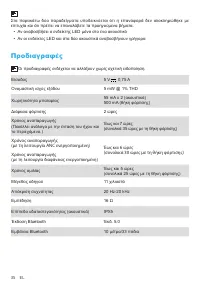
35 EL Στα παρακάτω δύο παραδείγματα υποδεικνύεται ότι η επαναφορά δεν ολοκληρώθηκε με επιτυχία και ότι πρέπει να επαναλάβετε τα προηγούμενα βήματα. • Αν αναβοσβήσει ο ενδείκτης LED μόνο στο ένα ακουστικό • Αν οι ενδείκτες LED και στα δύο ακουστικά αναβοσβήνουν γρήγορα Προδιαγραφές Οι προδιαγραφές εν...
Page 38 - Carga
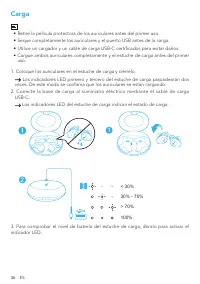
36 ES Carga • Retire la película protectora de los auriculares antes del primer uso. • Seque completamente los auriculares y el puerto USB antes de la carga. • Utilice un cargador y un cable de carga USB-C certificados para evitar daños. • Cargue ambos auriculares completamente y el estuche de carga...
Page 39 - Aplicación Soundcore
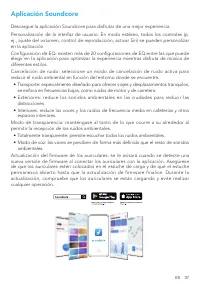
ES 37 Aplicación Soundcore Descargue la aplicación Soundcore para disfrutar de una mejor experiencia.Personalización de la interfaz de usuario: En modo estéreo, todos los controles (p. ej., ajuste del volumen, control de reproducción, activar Siri) se pueden personalizar en la aplicación.Configuraci...
Page 40 - Uso
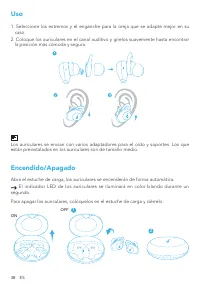
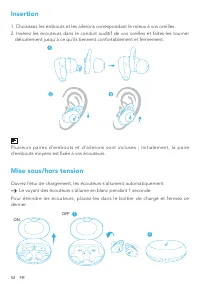
38 ES Uso 1. Seleccione los extremos y el enganche para la oreja que se adapte mejor en su caso. 2. Coloque los auriculares en el canal auditivo y gírelos suavemente hasta encontrar la posición más cómoda y segura. Los auriculares se envían con varios adaptadores para el oído y soportes. Los que est...
Page 41 - Emparejamiento Bluetooth
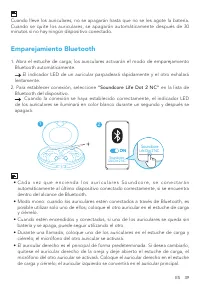
ES 39 Cuando lleve los auriculares, no se apagarán hasta que no se les agote la batería. Cuando se quite los auriculares, se apagarán automáticamente después de 30 minutos si no hay ningún dispositivo conectado. Emparejamiento Bluetooth 1. Abra el estuche de carga; los auriculares activarán el modo ...
Page 42 - Emparejamiento con otro dispositivo; Controles
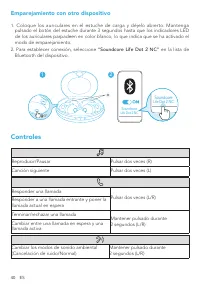
40 ES Emparejamiento con otro dispositivo 1. Coloque los auriculares en el estuche de carga y déjelo abierto. Mantenga pulsado el botón del estuche durante 3 segundos hasta que los indicadores LED de los auriculares parpadeen en color blanco, lo que indica que se ha activado el modo de emparejamient...
Page 43 - Modo mono; Restablecer
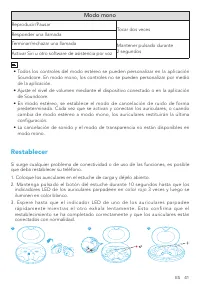
ES 41 Modo mono Reproducir/Pausar Tocar dos veces Responder una llamada Terminar/rechazar una llamada Mantener pulsado durante 2 segundos Activar Siri u otro software de asistencia por voz • Todos los controles del modo estéreo se pueden personalizar en la aplicación Soundcore. En modo mono, los con...
Page 44 - Especificaciones
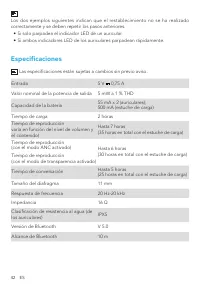
42 ES Los dos ejemplos siguientes indican que el restablecimiento no se ha realizado correctamente y se deben repetir los pasos anteriores. • Si solo parpadea el indicador LED de un auricular. • Si ambos indicadores LED de los auriculares parpadean rápidamente. Especificaciones Las especificaciones ...
Page 45 - Lataaminen
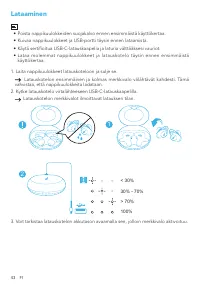
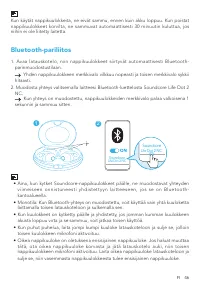
43 FI Lataaminen • Poista nappikuulokkeiden suojakalvo ennen ensimmäistä käyttökertaa. • Kuivaa nappikuulokkeet ja USB-portti täysin ennen lataamista. • Käytä sertifioitua USB-C-latauskaapelia ja laturia välttääksesi vauriot. • Lataa molemmat nappikuulokkeet ja latauskotelo täysin ennen ensimmäistä ...
Page 47 - Käyttö
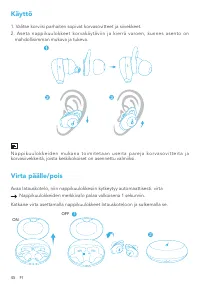
45 FI Käyttö 1. Valitse korviisi parhaiten sopivat korvasovitteet ja siivekkeet.2. Aseta nappikuulokkeet korvakäytäviin ja kierrä varoen, kunnes asento on mahdollisimman mukava ja tukeva. N a p p i k u u l o k k e i d e n m u k a n a t o i m i t e t a a n u s e i t a p a r e j a k o r v a s o v i t ...
Page 49 - Laiteparin muodostaminen toisen laitteen kanssa; Säätimet
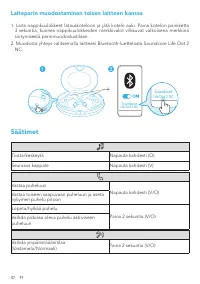
47 FI Laiteparin muodostaminen toisen laitteen kanssa 1. Laita nappikuulokkeet latauskoteloon ja jätä kotelo auki. Paina kotelon painiketta 3 sekuntia, kunnes nappikuulokkeiden merkkivalot vilkkuvat valkoisena merkkinä siirtymisestä parinmuodostustilaan. 2. Muodosta yhteys valitsemalla laitteesi Blu...
Page 50 - Monotila; Nollaaminen
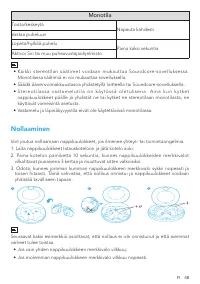
FI 48 Monotila Toista/keskeytä Napauta kahdesti Vastaa puheluun Lopeta/hylkää puhelu Paina kaksi sekuntia Aktivoi Siri tai muu puheavustajaohjelmisto • Kaikki stereotilan säätimet voidaan mukauttaa Soundcore-sovelluksessa. Monotilassa säätimiä ei voi mukauttaa sovelluksella. • Säädä äänenvoimakkuust...
Page 51 - Tekniset tiedot
49 FI Tekniset tiedot Tekniset tiedot voivat muuttua ilman erillistä ilmoitusta. Tulo 5 V 0,75 A Nimellislähtöteho 5 mW @ 1 % THD Akun kapasiteetti 55 mA x 2 (nappikuulokkeet); 500 mA (latauskotelo) Latausaika 2 tuntia Toistoaika(riippuu äänenvoimakkuudesta ja sisällöstä) Enintään 7 tuntia (yhteensä...
Page 52 - En charge
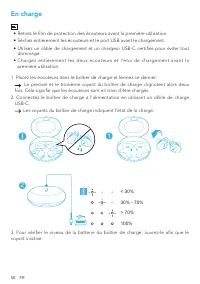
50 FR En charge • Retirez le film de protection des écouteurs avant la première utilisation. • Séchez entièrement les écouteurs et le port USB avant le chargement. • Utilisez un câble de chargement et un chargeur USB-C certifiés pour éviter tout dommage. • Chargez entièrement les deux écouteurs et l...
Page 53 - Application Soundcore
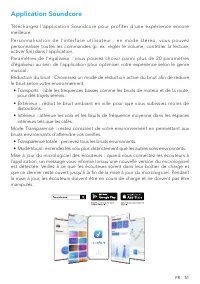
FR 51 Application Soundcore Téléchargez l'application Soundcore pour profiter d'une expérience encore meilleure.P e r s o n n a l i s a t i o n d e l ' i n t e r f a c e u t i l i s a t e u r : e n m o d e s t é ré o , v o u s p o u v e z personnaliser toutes les commandes (p. ex. régler le volume, ...
Page 55 - Couplage Bluetooth
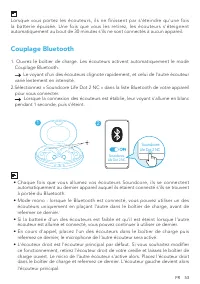
FR 53 Lorsque vous portez les écouteurs, ils ne finissent par s'éteindre qu'une fois la batterie épuisée. Une fois que vous les retirez, les écouteurs s'éteignent automatiquement au bout de 30 minutes s'ils ne sont connectés à aucun appareil. Couplage Bluetooth 1. Ouvrez le boîtier de charge. Les éc...
Page 56 - Couplage avec un autre appareil; Commandes
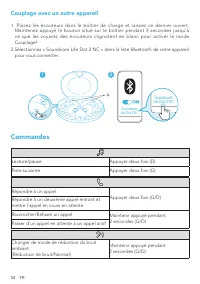
54 FR Couplage avec un autre appareil 1. Placez les écouteurs dans le boîtier de charge et laissez ce dernier ouvert. Maintenez appuyé le bouton situé sur le boîtier pendant 3 secondes jusqu'à ce que les voyants des écouteurs clignotent en blanc pour activer le mode Couplage². 2.Sélectionnez « Sound...
Page 57 - Mode mono; Réinitialisation
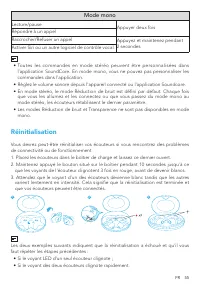
FR 55 Mode mono Lecture/pause Appuyer deux fois Répondre à un appelRaccrocher/Refuser un appel Appuyez et maintenez pendant 2 secondes Activer Siri ou un autre logiciel de contrôle vocal • Toutes les commandes en mode stéréo peuvent être personnalisées dans l’application SoundCore. En mode mono, vou...
Page 58 - Spécifications
56 FR Spécifications Les spécifications sont susceptibles d’être modifiées sans préavis. ENTRÉE 5 V 0,75 A Puissance de sortie nominale 5 mW @ 1 % THD Capacité de la batterie 2 x 55 mA (écouteurs) ; 500 mA (étui de charge) Temps de charge 2 heures Autonomie(varie en fonction du niveau sonore et du c...
Page 59 - Töltés
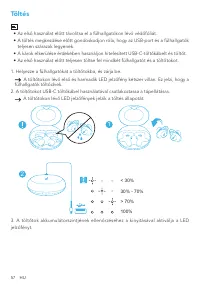
57 HU Töltés • Az első használat előtt távolítsa el a fülhallgatókon lévő védőfóliát. • A töltés megkezdése előtt gondoskodjon róla, hogy az USB-port és a fülhallgatók teljesen szárazak legyenek. • A károk elkerülése érdekében használjon hitelesített USB-C-töltőkábelt és töltőt. • Az első használat ...
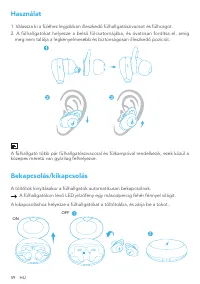
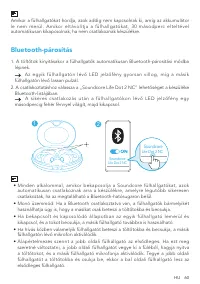
Page 63 - Párosítás más készülékkel; Vezérlők
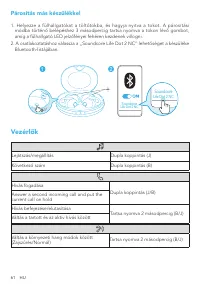
61 HU Párosítás más készülékkel 1. Helyezze a fülhallgatókat a töltőtokba, és hagyja nyitva a tokot. A párosítási módba történő belépéshez 3 másodpercig tartsa nyomva a tokon lévő gombot, amíg a fülhallgató LED jelzőfényei fehéren kezdenek villogni. 2. A csatlakoztatáshoz válassza a „Soundcore Life ...
Page 64 - Mono üzemmód; Visszaállítás
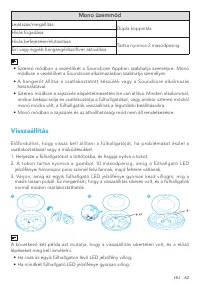
HU 62 Mono üzemmód Lejátszás/megállítás Dupla koppintás Hívás fogadásaHívás befejezése/elutasítása Tartsa nyomva 2 másodpercig Siri vagy egyéb hangsegédszoftver aktiválása • Sztereó módban a vezérlőket a Soundcore Appban szabhatja személyre. Monó módban a vezérlőket a Soundcore alkalmazásban szabhat...
Page 65 - Specifikációk
63 HU Specifikációk A specifikációkat előzetes értesítés nélkül módosíthatjuk. Bemenet 5 V 0,75 A Névleges kimeneti teljesítmény 5 mW @ 1% THD Akkukapacitás 55 mA x 2 (fülhallgatók); 500 mA (töltőtok) Töltési idő 2 óra Lejátszási idő(a hangerőtől és a tartalomtól függően) Maximum 7 óra (Összesen 35 ...
Page 66 - In carica
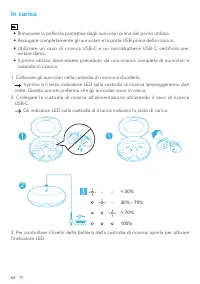
64 IT In carica • Rimuovere la pellicola protettiva dagli auricolari prima del primo utilizzo. • Asciugare completamente gli auricolari e la porta USB prima della ricarica. • Utilizzare un cavo di ricarica USB-C e un caricabatterie USB-C certificati per evitare danni. • Il primo utilizzo deve essere...
Page 67 - App Soundcore
IT 65 App Soundcore Per un’esperienza d’utilizzo ottimale del prodotto, scaricare l’app Soundcore.P e r s o n a l i z z a z i o n e d e l l ’ i n t e r f a c c i a u t e n t e : i n m o d a l i t à s t e re o , è p o s s i b i l e personalizzare dall’app tutti i comandi (ad esempio, regolazione del ...
Page 68 - Utillizzo; Accensione/Spegnimento
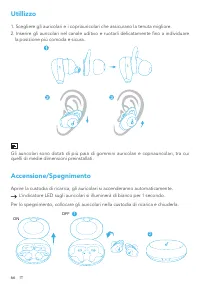
66 IT Utillizzo 1. Scegliere gli auricolari e i copriauricolari che assicurano la tenuta migliore.2. Inserire gli auricolari nel canale uditivo e ruotarli delicatamente fino a individuare la posizione più comoda e sicura. Gli auricolari sono dotati di più paia di gommini auricolari e copriauricolari...
Page 69 - Associazione Bluetooth
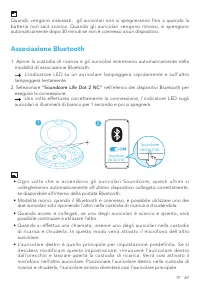
IT 67 Quando vengono indossati, gli auricolari non si spegneranno fino a quando la batteria non sarà scarica. Quando gli auricolari vengono rimossi, si spengono automaticamente dopo 30 minuti se non è connesso alcun dispositivo. Associazione Bluetooth 1. Aprire la custodia di ricarica e gli auricola...
Page 70 - Associazione con un altro dispositivo; Comandi
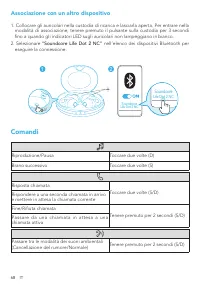
68 IT Associazione con un altro dispositivo 1. Collocare gli auricolari nella custodia di ricarica e lasciarla aperta. Per entrare nella modalità di associazione, tenere premuto il pulsante sulla custodia per 3 secondi fino a quando gli indicatori LED sugli auricolari non lampeggiano in bianco. 2. S...
Page 71 - Modalità mono
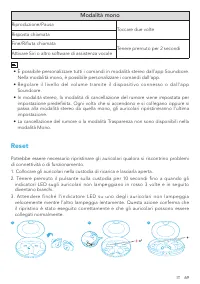
IT 69 Modalità mono Riproduzione/Pausa Toccare due volte Risposta chiamata Fine/Rifiuta chiamata Tenere premuto per 2 secondi Attivare Siri o altro software di assistenza vocale • È possibile personalizzare tutti i comandi in modalità stereo dall'app Soundcore. Nella modalità mono, è possibile perso...
Page 72 - Specifiche
70 IT I due esempi seguenti indicano che il ripristino non è stato eseguito correttamente e che è necessario ripetere i passaggi precedenti. • Se lampeggia l’indicatore LED di un solo auricolare. • Se entrambi gli indicatori LED degli auricolari lampeggiano rapidamente. Specifiche Le specifiche sono...
Page 73 - Opladen
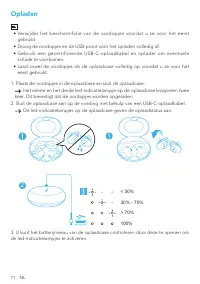
71 NL Opladen • Verwijder het beschermfolie van de oordopjes voordat u ze voor het eerst gebruikt. • Droog de oordopjes en de USB-poort vóór het opladen volledig af. • Gebruik een gecertificeerde USB-C-oplaadkabel en oplader om eventuele schade te voorkomen. • Laad zowel de oordopjes als de oplaadca...
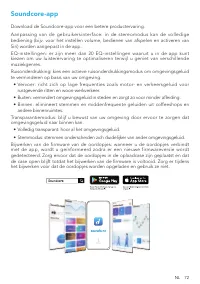
Page 75 - Dragen
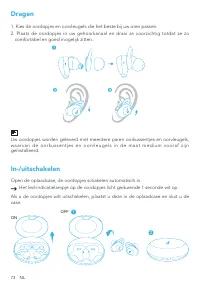
73 NL Dragen 1. Kies de oordopjes en oorvleugels die het beste bij uw oren passen.2. Plaats de oordopjes in uw gehoorkanaal en draai ze voorzichtig totdat ze zo comfortabel en goed mogelijk zitten. Uw oordopjes worden geleverd met meerdere paren oorkussentjes en oorvleugels, w a a r v a n d e o o r ...
Page 76 - Koppelen via Bluetooth
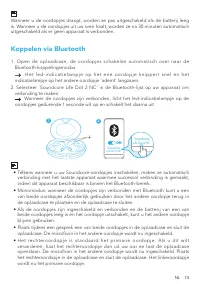
NL 74 Wanneer u de oordopjes draagt, worden ze pas uitgeschakeld als de batterij leeg is. Wanneer u de oordopjes uit uw oren haalt, worden ze na 30 minuten automatisch uitgeschakeld als er geen apparaat is verbonden. Koppelen via Bluetooth 1. Open de oplaadcase, de oordopjes schakelen automatisch ov...
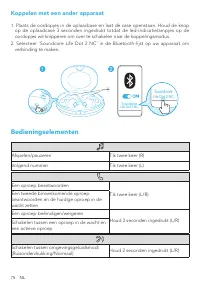
Page 77 - Koppelen met een ander apparaat; Bedieningselementen
75 NL Koppelen met een ander apparaat 1. Plaats de oordopjes in de oplaadcase en laat de case openstaan. Houd de knop op de oplaadcase 3 seconden ingedrukt totdat de led-indicatielampjes op de oordopjes wit knipperen om over te schakelen naar de koppelingsmodus. 2. Selecteer 'Soundcore Life Dot 2 NC...
Page 78 - Monomodus; Resetten
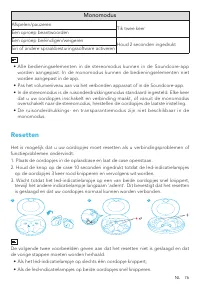
NL 76 Monomodus Afspelen/pauzeren Tik twee keer Een oproep beantwoordenEen oproep beëindigen/weigeren Houd 2 seconden ingedrukt Siri of andere spraakbesturingssoftware activeren • Alle bedieningselementen in de stereomodus kunnen in de Soundcore-app worden aangepast. In de monomodus kunnen de bedien...
Page 79 - Specificaties
77 NL Specificaties Specificaties zijn onderhevig aan verandering zonder kennisgeving. Ingang 5 V 0,75 A Nominaal uitgangsvermogen 5 mW @ 1% THD Batterijcapaciteit 55 mA x 2 (oordopjes); 500 mA (oplaadcase) Oplaadtijd 2 uur Afspeeltijd(afhankelijk van volume en materiaal dat wordt afgespeeld) Maxima...
Page 80 - Lader
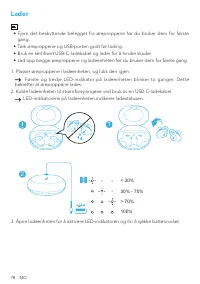
78 NO Lader • Fjern det beskyttende belegget fra øreproppene før du bruker dem for første gang. • Tørk øreproppene og USB-porten godt før lading. • Bruk en sertifisert USB-C-ladekabel og lader for å hindre skader. • Lad opp begge øreproppene og ladeenheten før du bruker dem for første gang. 1. Plass...
Page 82 - Bruk
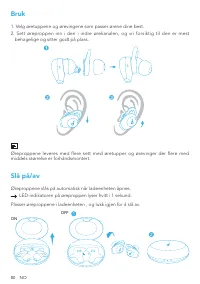
80 NO Bruk 1. Velg øretuppene og ørevingene som passer ørene dine best.2. Sett øreproppen inn i den i indre ørekanalen, og vri forsiktig til den er mest behagelige og sitter godt på plass. Øreproppene leveres med flere sett med øretupper og ørevinger der flere med middels størrelse er forhåndsmonter...
Page 84 - Parer med en annen enhet
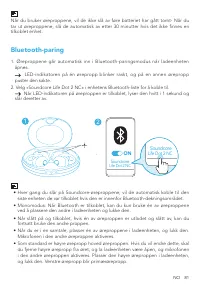
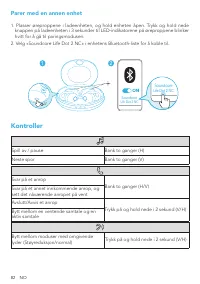
82 NO Parer med en annen enhet 1. Plasser øreproppene i ladeenheten, og hold enheten åpen. Trykk og hold nede knappen på ladeenheten i 3 sekunder til LED-indikatorene på øreproppene blinker hvitt for å gå til paringsmodusen. 2. Velg «Soundcore Life Dot 2 NC» i enhetens Bluetooth-liste for å koble ti...
Page 85 - Tilbakestill
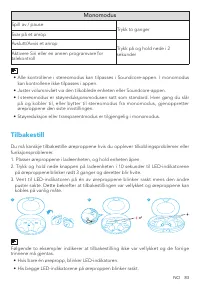
NO 83 Monomodus Spill av / pause Trykk to ganger Svar på et anrop Avslutt/Avvis et anrop Trykk på og hold nede i 2 sekunder Aktivere Siri eller en annen programvare for talekontroll • Alle kontrollene i stereomodus kan tilpasses i Soundcore-appen. I monomodus kan kontrollene ikke tilpasses i appen. ...
Page 86 - Spesifikasjoner
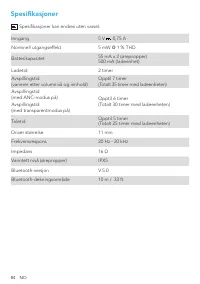
84 NO Spesifikasjoner Spesifikasjoner kan endres uten varsel. Inngang 5 V 0,75 A Nominell utgangseffekt 5 mW @ 1 % THD Batterikapasitet 55 mA x 2 (ørepropper) 500 mA (ladeenhet) Ladetid 2 timer Avspillingstid(varierer etter volumnivå og innhold) Opptil 7 timer (Totalt 35 timer med ladeenheten) Avspi...
Page 87 - Ładowanie
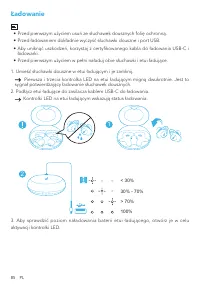
85 PL Ładowanie • Przed pierwszym użyciem usuń ze słuchawek dousznych folię ochronną. • Przed ładowaniem dokładnie wyczyść słuchawki douszne i port USB. • Aby uniknąć uszkodzeń, korzystaj z certyfikowanego kabla do ładowania USB-C i ładowarki. • Przed pierwszym użyciem w pełni naładuj obie słuchawki...
Page 88 - Aplikacja Soundcore
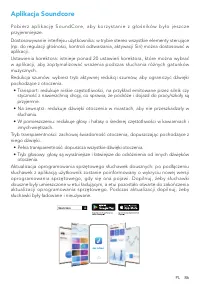
PL 86 Aplikacja Soundcore P o b i e r z a p l i k a c j ę S o u n d C o r e , a b y k o r z y s t a n i e z g ł o ś n i k ó w b y ł o j e s z c z e przyjemniejsze.Dostosowywanie interfejsu użytkownika: w trybie stereo wszystkie elementy sterujące (np. do regulacji głośności, kontroli odtwarzania, ak...
Page 89 - Zakładanie; Włączanie i wyłączanie
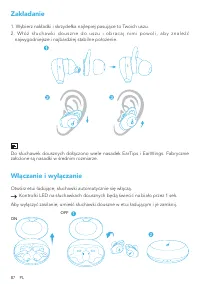
87 PL Zakładanie 1. Wybierz nakładki i skrzydełka najlepiej pasujące to Twoich uszu.2 . W ł ó ż s ł u c h a w k i d o u s z n e d o u s z u i o b r a c a j n i m i p o w o l i , a b y z n a l e ź ć najwygodniejsze i najbardziej stabilne położenie. Do słuchawek dousznych dołączono wiele nasadek EarTi...
Page 90 - Parowanie Bluetooth
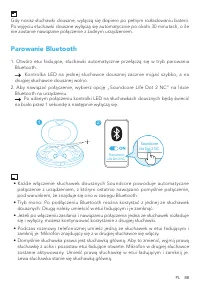
PL 88 Gdy nosisz słuchawki douszne, wyłączą się dopiero po pełnym rozładowaniu baterii. Po wyjęciu słuchawki douszne wyłączą się automatycznie po około 30 minutach, o ile nie zostanie nawiązane połączenie z żadnym urządzeniem. Parowanie Bluetooth 1. Otwórz etui ładujące, słuchawki automatycznie prze...
Page 91 - Parowanie z innym urządzeniem; Sterowanie
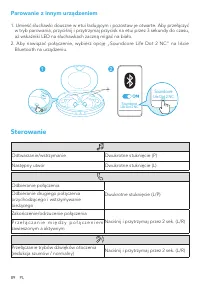
89 PL Parowanie z innym urządzeniem 1. Umieść słuchawki douszne w etui ładującym i pozostaw je otwarte. Aby przełączyć w tryb parowania, przyciśnij i przytrzymaj przycisk na etui przez 3 sekundy do czasu, aż wskaźniki LED na słuchawkach zaczną migać na biało. 2. Aby nawiązać połączenie, wybierz opcj...
Page 92 - Tryb mono; Resetowanie
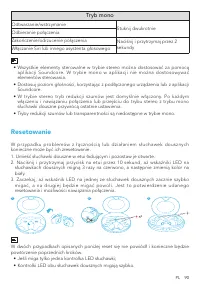
PL 90 Tryb mono Odtwarzanie/wstrzymanie Stuknij dwukrotnie Odbieranie połączeniaZakończenie/odrzucenie połączenia Naciśnij i przytrzymaj przez 2 sekundy Włączanie Siri lub innego asystenta głosowego • Wszystkie elementy sterowalne w trybie stereo można dostosować za pomocą aplikacji Soundcore. W try...
Page 93 - Dane techniczne
91 PL Dane techniczne Dane techniczne mogą ulec zmianie bez powiadomienia. Parametry wejściowe 5 V 0,75 A Znamionowa moc wyjściowa 5 mW @ 1% THD Pojemność akumulatora 55 mA x 2 (słuchawki douszne) 500 mA (etui ładujące) Czas ładowania 2 godz. Czas odtwarzania(różni się w zależności od poziomu głośno...
Page 94 - Carregamento
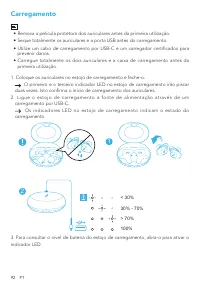
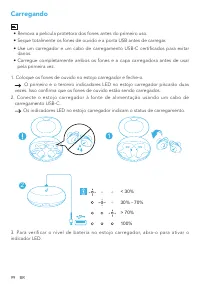
92 PT Carregamento • Remova a película protetora dos auriculares antes da primeira utilização. • Seque totalmente os auriculares e a porta USB antes do carregamento. • Utilize um cabo de carregamento por USB-C e um carregador certificados para prevenir danos. • Carregue totalmente os dois auriculare...
Page 95 - Aplicação Soundcore
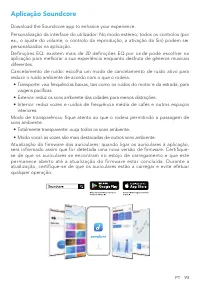
PT 93 Aplicação Soundcore Download the Soundcore app to enhance your experience.Personalização da interface do utilizador: No modo estéreo, todos os controlos (por ex., o ajuste do volume, o controlo da reprodução, a ativação da Siri) podem ser personalizados na aplicação.Definições EQ: existem mais...
Page 96 - Utilização
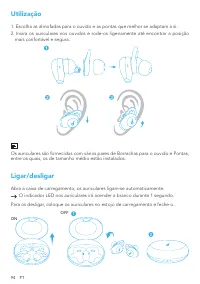
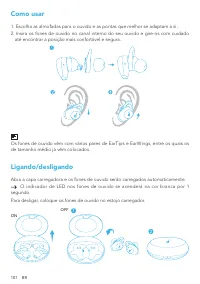
94 PT Utilização 1. Escolha as almofadas para o ouvido e as pontas que melhor se adaptam a si.2. Insira os auriculares nos ouvidos e rode-os ligeiramente até encontrar a posição mais confortável e segura. Os auriculares são fornecidos com vários pares de Borrachas para o ouvido e Pontas, entre os qu...
Page 97 - Emparelhamento por Bluetooth
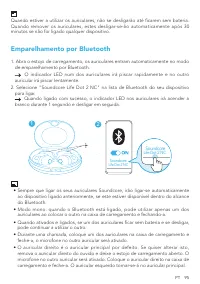
PT 95 Quando estiver a utilizar os auriculares, não se desligarão até ficarem sem bateria. Quando remover os auriculares, estes desligar-se-ão automaticamente após 30 minutos se não for ligado qualquer dispositivo. Emparelhamento por Bluetooth 1. Abra o estojo de carregamento, os auriculares entram ...
Page 98 - Emparelhar com outro dispositivo; Controlos
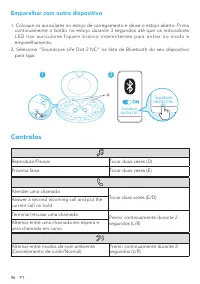
96 PT Emparelhar com outro dispositivo 1. Coloque os auriculares no estojo de carregamento e deixe o estojo aberto. Prima continuamente o botão no estojo durante 3 segundos até que os indicadores LED nos auriculares fiquem branco intermitentes para entrar no modo e emparelhamento. 2. Selecione "...
Page 99 - Repor
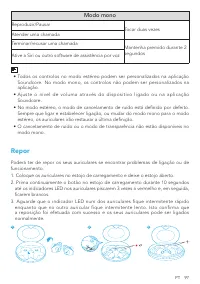
PT 97 Modo mono Reproduzir/Pausar Tocar duas vezes Atender uma chamada Terminar/recusar uma chamada Mantenha premido durante 2 segundos Ative a Siri ou outro software de assistência por voz • Todos os controlos no modo estéreo podem ser personalizados na aplicação Soundcore. No modo mono, os control...
Page 100 - Especificações
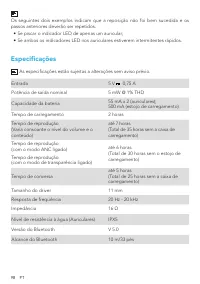
98 PT Os seguintes dois exemplos indicam que a reposição não foi bem sucedida e os passos anteriores deverão ser repetidos. • Se piscar o indicador LED de apenas um auricular; • Se ambos os indicadores LED nos auriculares estiverem intermitentes rápidos. Especificações As especificações estão sujeit...
Page 101 - Carregando
99 BR Carregando • Remova a película protetora dos fones antes do primeiro uso. • Seque totalmente os fones de ouvido e a porta USB antes de carregar. • Use um carregador e um cabo de carregamento USB-C certificados para evitar danos. • Carregue completamente ambos os fones e a capa carregadora ante...
Page 102 - Aplicativo Soundcore
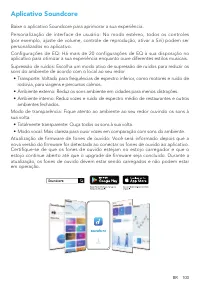
BR 100 Aplicativo Soundcore Baixe o aplicativo Soundcore para aprimorar a sua experiência.Personalização de interface de usuário: No modo estéreo, todos os controles (por exemplo, ajuste de volume, controle de reprodução, ativar a Siri) podem ser personalizados no aplicativo.Configurações de EQ: Há ...
Page 103 - Como usar
101 BR Como usar 1. Escolha as almofadas para o ouvido e as pontas que melhor se adaptam a si.2. Insira os fones de ouvido no canal interno do seu ouvido e gire-os com cuidado até encontrar a posição mais confortável e segura. Os fones de ouvido vêm com vários pares de EarTips e EarWings, entre os q...
Page 104 - Emparelhamento Bluetooth
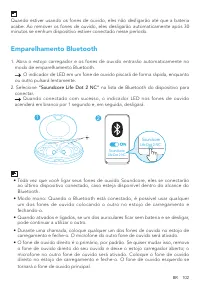
BR 102 Quando estiver usando os fones de ouvido, eles não desligarão até que a bateria acabe. Ao remover os fones de ouvido, eles desligarão automaticamente após 30 minutos se nenhum dispositivo estiver conectado nesse período. Emparelhamento Bluetooth 1. Abra o estojo carregador e os fones de ouvid...
Page 105 - Emparelhando com outro dispositivo
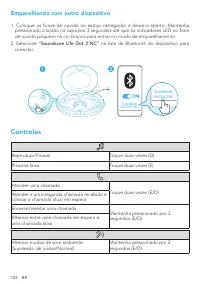
103 BR Emparelhando com outro dispositivo 1. Coloque os fones de ouvido no estojo carregador e deixe-o aberto. Mantenha pressionado o botão na capa por 3 segundos até que os indicadores LED no fone de ouvido pisquem na cor branca para entrar no modo de emparelhamento. 2. Selecione “Soundcore Life Do...
Page 106 - Reiniciar
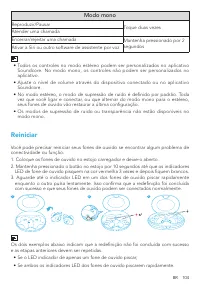
BR 104 Modo mono Reproduzir/Pausar Toque duas vezes Atender uma chamadaEncerrar/rejeitar uma chamada Mantenha pressionado por 2 segundos Ativar a Siri ou outro software de assistente por voz • Todos os controles no modo estéreo podem ser personalizados no aplicativo Soundcore. No modo mono, os contr...
Page 108 - Зарядка
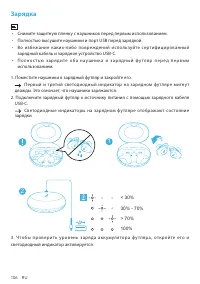
106 RU Зарядка • Снимите защитную пленку с наушников перед первым использованием. • Полностью высушите наушники и порт USB перед зарядкой. • В о и зб е ж а н и е к а к и х - л и б о п о в р е ж де н и й и с п о л ь зу йте се рти ф и ц и р о в а н н ы й зарядный кабель и зарядное устройство USB-C. • ...
Page 109 - Приложение Soundcore
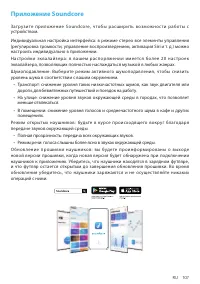
RU 107 Приложение Soundcore З а г р у з и те п р и л о ж е н и е S o u n d c o r e , ч то б ы р а с ш и р и т ь в о з м о ж н о с т и р а б о т ы с устройством. Индивидуальная настройка интерфейса: в режиме стерео все элементы управления (регулировка громкости, управление воспроизведением, активация...
Page 110 - Ношение
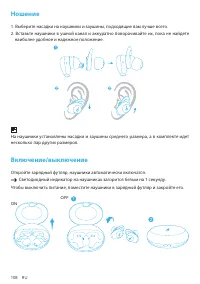
108 RU Ношение 1. Выберите насадки на наушники и заушины, подходящие вам лучше всего. 2. Вставьте наушники в ушной канал и аккуратно поворачивайте их, пока не найдете наиболее удобное и надежное положение. На наушники установлены насадки и заушины среднего размера, а в комплекте идет несколько пар д...
Page 111 - Сопряжение Bluetooth
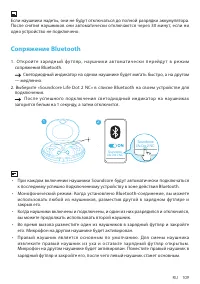
RU 109 Если наушники надеты, они не будут отключаться до полной разрядки аккумулятора. После снятия наушников они автоматически отключаются через 30 минут, если ни одно устройство не подключено. Сопряжение Bluetooth 1 . О т к р о й те з а р я д н ы й ф у т л я р , н а у ш н и к и а в то м а т и ч е...
Page 112 - Сопряжение с другим устройством; Элементы управления
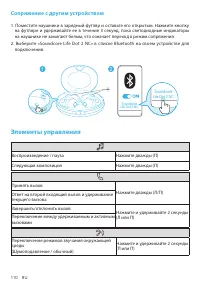
110 RU Сопряжение с другим устройством 1. Поместите наушники в зарядный футляр и оставьте его открытым. Нажмите кнопку на футляре и удерживайте ее в течение 3 секунд, пока светодиодные индикаторы на наушнике не замигают белым, что означает переход в режим сопряжения. 2. Выберите «Soundcore Life Dot...
Page 113 - Монофонический режим; Сброс
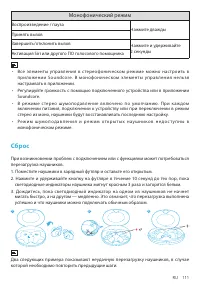
RU 111 Монофонический режим Воспроизведение / пауза Нажмите дважды Принять вызов Завершить/отклонить вызов Нажмите и удерживайте 2 секунды Активация Siri или другого ПО голосового помощника • Все элементы управления в с тереофоническом режиме можно нас троить в п р и л ож е н и и S o u n d c o re. В...
Page 114 - Технические характеристики
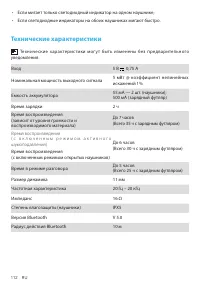
112 RU • Если мигает только светодиодный индикатор на одном наушнике; • Если светодиодные индикаторы на обоих наушниках мигают быстро. Технические характеристики Технические харак терис тики мог у т быть изменены без предварительного уведомления. Вход 5 В 0,75 А Номинальная мощность выходного сигнал...
Page 115 - Nabíjanie
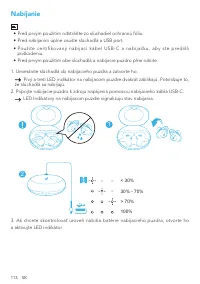
113 SK Nabíjanie • Pred prvým použitím odstráňte zo slúchadiel ochrannú fóliu. • Pred nabíjaním úplne osušte slúchadlá a USB port. • Použite cert ifikovaný nabíjací kábel USB-C a nabíjačku, aby ste pred išl i poškodeniu. • Pred prvým použitím obe slúchadlá a nabíjacie puzdro plne nabite. 1. Umiestni...
Page 116 - Aplikácia Soundcore
SK 114 Aplikácia Soundcore Download the Soundcore app to enhance your experience.Prispôsobenie používateľského rozhrania: V stereo režime možno všetky ovládacie prvky (napríklad úprava hlasitosti, ovládanie prehrávania, aktivácia asistentky Siri) prispôsobiť v aplikácii.Nastavenia ekvalizéra: Apliká...
Page 117 - Nosenie
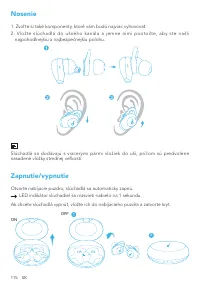
115 SK Nosenie 1. Zvoľ te si také komponenty, ktoré vám budú najviac vyhovovať.2. Vložte slúchadlá do ušného kanála a jemne nimi pootočte, aby ste našli najpohodlnejšiu a najbezpečnejšiu polohu. Slúchadlá sa dodávajú s viacerými pármi vložiek do uší, pričom sú predvolene nasadené vložky strednej veľ...
Page 118 - Párovanie prostredníctvom pripojenia Bluetooth
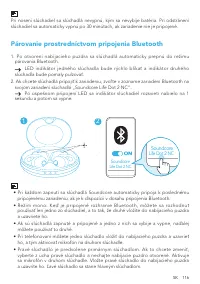
SK 116 Pri nosení slúchadiel sa slúchadlá nevypnú, kým sa nevybije batéria. Pri odstránení slúchadiel sa automaticky vypnú po 30 minútach, ak zariadenie nie je pripojené. Párovanie prostredníctvom pripojenia Bluetooth 1. Po otvorení nabíjacieho puzdra sa slúchadlá automaticky prepnú do režimu párova...
Page 119 - Párovanie s ďalším zariadením; Ovládacie prvky
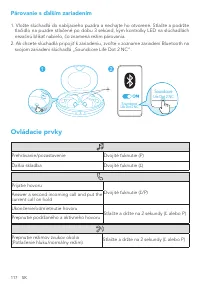
117 SK Párovanie s ďalším zariadením 1. Vložte slúchadlá do nabíjacieho puzdra a nechajte ho otvorené. Stlačte a podržte tlačidlo na puzdre stlačené po dobu 3 sekúnd, kým kontrolky LED na slúchadlách nezačnú blikať nabielo, čo znamená režim párovania. 2. Ak chcete slúchadlá pripojiť k zariadeniu, zv...
Page 120 - Režim mono; Resetovanie
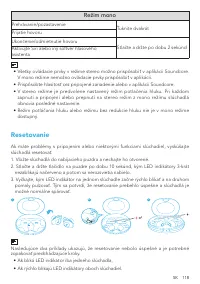
SK 118 Režim mono Prehrávanie/pozastavenie Ťuknite dvakrát Prijatie hovoru Ukončenie/odmietnutie hovoru Stlačte a držte po dobu 2 sekúnd Aktivujte Siri alebo iný softvér hlasového asistenta • Všetky ovládacie prvky v režime stereo možno prispôsobiť v aplikácii Soundcore. V mono režime nemožno ovláda...
Page 121 - Technické údaje
119 SK Technické údaje Technické údaje sa môžu zmeniť bez upozornenia. Napájanie 5 V 0,75 A Menovitý výstupný výkon 5 mW @ 1 % THD Kapacita batérie 55 mA x 2 (slúchadlá); 500 mA (nabíjacie puzdro) Doba nabíjania 2 hodín Čas prehrávania(líši sa podľa úrovne hlasitosti a obsahu) Až 7 hodín (Celkovo 35...
Page 122 - Polnjenje
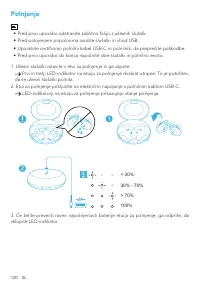
120 SL Polnjenje • Pred prvo uporabo odstranite zaščitno folijo z ušesnih slušalk. • Pred polnjenjem popolnoma osušite slušalki in vhod USB. • Uporabite certificiran polnilni kabel USB-C in polnilnik, da preprečite poškodbe. • Pred prvo uporabo do konca napolnite obe slušalki in polnilno enoto. 1. U...
Page 123 - Aplikacija Soundcore
SL 121 Aplikacija Soundcore Download the Soundcore app to enhance your experience.Prilagajanje uporabniškega vmesnika: V stereo načinu je mogoče vse kontrolnike (npr. nastavitev glasnosti, upravljanje predvajanje in aktiviranje aplikacije Siri) prilagoditi v aplikaciji.Nastavitve izenačevalnika: V a...
Page 124 - Uporaba
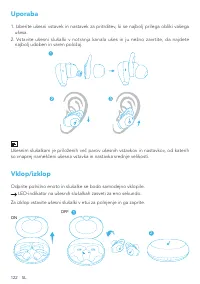
122 SL Uporaba 1. Izberite ušesni vstavek in nastavek za pritrditev, ki se najbolj prilega obliki vašega ušesa. 2. Vstavite ušesni slušalki v notranja kanala ušes in ju nežno zavrtite, da najdete najbolj udoben in varen položaj. Ušesnim slušalkam je priloženih več parov ušesnih vstavkov in nastavkov...
Page 125 - Seznanjanje prek povezave Bluetooth
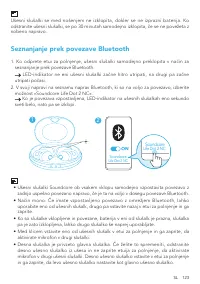
SL 123 Ušesni slušalki se med nošenjem ne izklopita, dokler se ne izprazni baterija. Ko odstranite ušesni slušalki, se po 30 minutah samodejno izklopita, če se ne povežeta z nobeno napravo. Seznanjanje prek povezave Bluetooth 1. Ko odprete etui za polnjenje, ušesni slušalki samodejno preklopita v na...
Page 126 - Povezava z drugo napravo; Kontrolniki
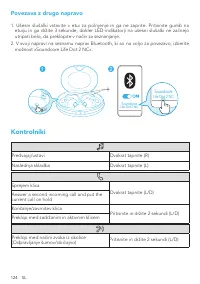
124 SL Povezava z drugo napravo 1. Ušesni slušalki vstavite v etui za polnjenje in ga ne zaprite. Pritisnite gumb na etuiju in ga držite 3 sekunde, dokler LED-indikatorji na ušesni slušalki ne začnejo utripati belo, da preklopite v način za seznanjanje. 2. V svoji napravi na seznamu naprav Bluetooth...
Page 127 - Način Mono; Ponastavi
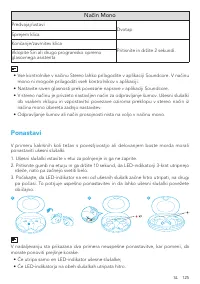
SL 125 Način Mono Predvajaj/ustavi Dvotap Sprejem klica Končanje/zavrnitev klica Pritisnite in držite 2 sekundi. Vklopite Siri ali drugo programsko opremo glasovnega asistenta • Vse kontrolnike v načinu Stereo lahko prilagodite v aplikaciji Soundcore. V načinu mono ni mogoče prilagoditi vseh kontrol...
Page 128 - Tehnične značilnosti
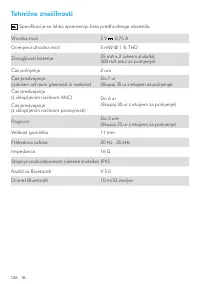
126 SL Tehnične značilnosti Specifikacije se lahko spremenijo brez predhodnega obvestila. Vhodna moč 5 V 0,75 A Ocenjena izhodna moč 5 mW @ 1 % THD Zmogljivost baterije 55 mA x 2 (ušesni slušalki); 500 mA (etui za polnjenje) Čas polnjenja 2 ura Čas predvajanja(odvisen od ravni glasnosti in vsebine) ...
Page 129 - Laddar
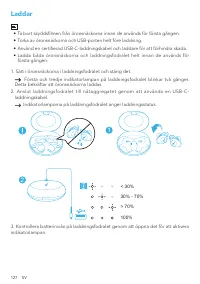
127 SV Laddar • Ta bort skyddsfilmen från öronsnäckorna innan de används för första gången. • Torka av öronsnäckorna och USB-porten helt före laddning. • Använd en certifierad USB-C-laddningskabel och laddare för att förhindra skada. • Ladda båda öronsnäckorna och laddningsfodralet helt innan de anv...
Page 131 - Användning
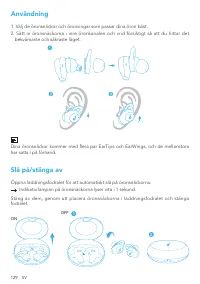
129 SV Användning 1. Välj de öronsnäckor och öronvingar som passar dina öron bäst.2. Sätt in öronsnäckorna i inre öronkanalen och vrid försiktigt så att du hittar det bekvämaste och säkraste läget. Dina öronsnäckor kommer med flera par EarTips och EarWings, och de mellanstora har satts i på förhand....
Page 132 - Bluetooth-parkoppling
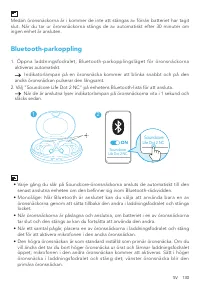
SV 130 Medan öronsnäckorna är i kommer de inte att stängas av förrän batteriet har tagit slut. När du tar ur öronsnäckorna stängs de av automatiskt efter 30 minuter om ingen enhet är ansluten. Bluetooth-parkoppling 1. Öppna laddningsfodralet; Bluetooth-parkopplingsläget för öronsnäckorna aktiveras a...
Page 133 - Parkoppla med en annan enhet
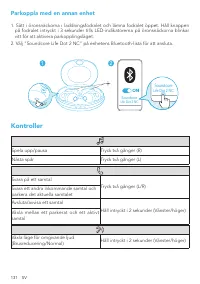
131 SV Parkoppla med en annan enhet 1. Sätt i öronsnäckorna i laddningsfodralet och lämna fodralet öppet. Håll knappen på fodralet intryckt i 3 sekunder tills LED-indikatorerna på öronsnäckorna blinkar vitt för att aktivera parkopplingsläget. 2. Välj ”Soundcore Life Dot 2 NC” på enhetens Bluetooth-l...
Page 134 - Monoläge; Återställning
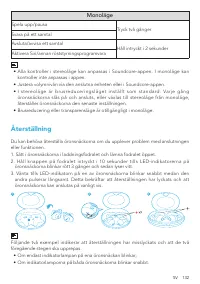
SV 132 Monoläge Spela upp/pausa Tryck två gånger Svara på ett samtal Avsluta/avvisa ett samtal Håll intryckt i 2 sekunder Aktivera Siri/annan röststyrningsprogramvara • Alla kontroller i stereoläge kan anpassas i Soundcore-appen. I monoläge kan kontroller inte anpassas i appen. • Justera volymnivån ...
Page 136 - Şarj etme
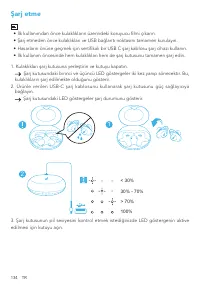
134 TR Şarj etme • İlk kullanımdan önce kulaklıkların üzerindeki koruyucu filmi çıkarın. • Şarj etmeden önce kulaklıkları ve USB bağlantı noktasını tamamen kurulayın. • Hasarların önüne geçmek için sertifikalı bir USB C şarj kablosu şarj cihazı kullanın. • İlk kullanım öncesinde hem kulaklıkları hem...
Page 137 - Soundcore Uygulaması
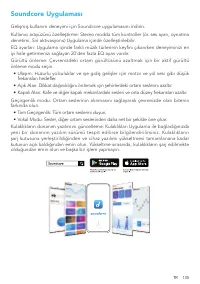
TR 135 Soundcore Uygulaması Gelişmiş kullanım deneyimi için Soundcore uygulamasını indirin.Kullanıcı arayüzünü özelleştirme: Stereo modda tüm kontroller (ör. ses ayarı, oynatma denetimi, Siri aktivasyonu) Uygulama içinde özelleştirilebilir.EQ ayarları: Uygulama içinde farklı müzik türlerinin keyfini...
Page 138 - Takma
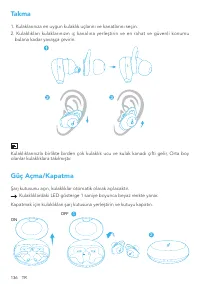
136 TR Takma 1. Kulaklarınıza en uygun kulaklık uçlarını ve kanatlarını seçin.2. Kulaklıkları kulaklarınızın iç kanalına yerleştirin ve en rahat ve güvenli konumu bulana kadar yavaşça çevirin. Kulaklıklarınızla birlikte birden çok kulaklık ucu ve kulak kanadı çifti gelir, Orta boy olanlar kulaklıkla...
Page 139 - Bluetooth Eşleştirme
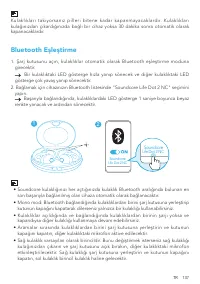
TR 137 Kulaklıkları takıyorsanız pilleri bitene kadar kapanmayacaklardır. Kulaklıkları kulağınızdan çıkardığınızda bağlı bir cihaz yoksa 30 dakika sonra otomatik olarak kapanacaklardır. Bluetooth Eşleştirme 1. Şarj kutusunu açın, kulaklıklar otomatik olarak Bluetooth eşleştirme moduna girecektir. Bi...
Page 140 - Başka cihazla eşleştirme
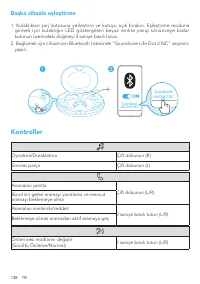
138 TR Başka cihazla eşleştirme 1. Kulaklıkları şarj kutusuna yerleştirin ve kutuyu açık bırakın. Eşleştirme moduna girmek için kulaklığın LED göstergeleri beyaz renkte yanıp sönünceye kadar kutunun üzerindeki düğmeyi 3 saniye basılı tutun. 2. Bağlamak için cihazınızın Bluetooth listesinde "Soun...
Page 141 - Mono mod; Sıfırlama
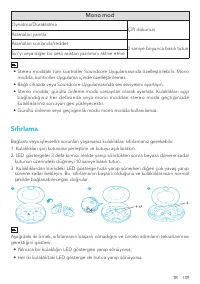
TR 139 Mono mod Oynatma/Duraklatma Çift dokunun Aramaları yanıtla Aramaları sonlandır/reddet 2 saniye boyunca basılı tutun Siri'yi veya diğer bir sesli asistan yazılımını aktive etme • Stereo moddaki tüm kontroller Soundcore Uygulamasında özelleştirilebilir. Mono modda, kontroller Uygulama içinde öz...
Page 142 - Teknik Özellikler
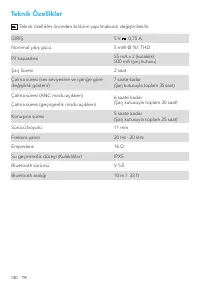
140 TR Teknik Özellikler Teknik özellikler önceden bildirim yapılmaksızın değiştirilebilir. GİRİŞ 5 V 0,75 A Nominal çıkış gücü 5 mW @ %1 THD Pil kapasitesi 55 mA x 2 (kulaklık); 500 mA (şarj kutusu) Şarj Süresi 2 saat Çalma süresi (ses seviyesine ve içeriğe göre değişiklik gösterir) 7 saate kadar (...
Page 143 - 充電
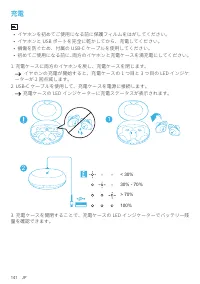
141 JP 充電 • イヤホンを初めてご使用になる前に保護フィルムをはがしてください。• イヤホンと USB ポートを完全に乾かしてから、充電してください。• 損傷を防ぐため、付属の USB-C ケーブルを使用してください。• 初めてご使用になる前に、両方のイヤホンと充電ケースを満充電にしてください。 1. 充電ケースに両方のイヤホンを戻し、充電ケースを閉じます。 イヤホンの充電が開始すると、充電ケースの 1 つ目と 3 つ目の LED インジケ ーターが 2 回点滅します。 2. USB-C ケーブルを使用して、充電ケースを電源に接続します。 充電ケースの LED インジケーターに充電ステ...
Page 144 - Soundcore アプリ
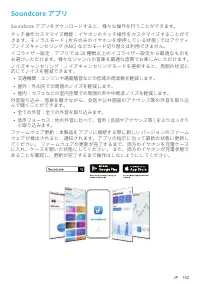
JP 142 Soundcore アプリ Soundcore アプリをダウンロードすると、様々な操作を行うことができます。タッチ操作カスタマイズ機能:イヤホンのタッチ操作をカスタマイズすることがで きます。モノラルモード ( 片方のみのイヤホンを使用している状態 ) ではアクティ ブノイズキャンセリング (ANC) などのモード切り替えは利用できません。イコライザー設定:アプリでは 20 種類以上のイコライザー設定から最適なものを お選びいただけます。様々なジャンルの音楽を最適な音質でお楽しみいただけます。ノイズキャンセリング:ノイズキャンセリングモードを選択すると、周囲の状況に 応じてノイズ...
Page 145 - 装着
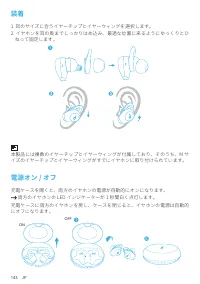
143 JP 装着 1. 耳のサイズに合うイヤーチップとイヤーウィングを選択します。2. イヤホンを耳の奥までしっかりはめ込み、最適な位置に来るようにゆっくりとひ ねって固定します。 本製品には複数のイヤーチップとイヤーウィングが付属しており、そのうち、M サ イズのイヤーチップとイヤーウィングがすでにイヤホンに取り付けられています。 電源オン / オフ 充電ケースを開くと、両方のイヤホンの電源が自動的にオンになります。 両方のイヤホンの LED インジケーターが 1 秒間白く点灯します。 充電ケースに両方のイヤホンを戻し、ケースを閉じると、イヤホンの電源は自動的 にオフになります。 ON 2...
Page 146 - ペアリング
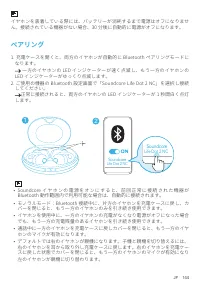
JP 144 イヤホンを装着している際には、バッテリーが消耗するまで電源はオフになりませ ん。接続されている機器がない場合、30 分後に自動的に電源がオフになります。 ペアリング 1. 充電ケースを開くと、両方のイヤホンが自動的に Bluetooth ペアリングモードに なります。 一方のイヤホンの LED インジケーターが速く点滅し、もう一方のイヤホンの LED インジケーターがゆっくり点滅します。 2. ご使用の機器の Bluetooth 設定画面で「Soundcore Life Dot 2 NC」を選択し接続 してください。 正常に接続されると、両方のイヤホンの LED インジケーターが...
Page 147 - 別の機器とのペアリング; 操作方法
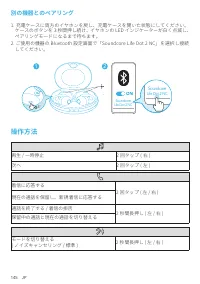
145 JP 別の機器とのペアリング 1. 充電ケースに両方のイヤホンを戻し、充電ケースを開いた状態にしてください。 ケースのボタンを 3 秒間押し続け、イヤホンの LED インジケーターが白く点滅し、 ペアリングモードになるまで待ちます。 2. ご使用の機器の Bluetooth 設定画面で「Soundcore Life Dot 2 NC」を選択し接続 してください。 1 2 Soundcore Life Dot 2 NC Soundcore Life Dot 2 NC 3” 操作方法 再生 / 一時停止 2 回タップ ( 右 ) 次へ 2 回タップ ( 左 ) 着信に応答する 2 回タップ...
Page 148 - モノラルモード; リセット
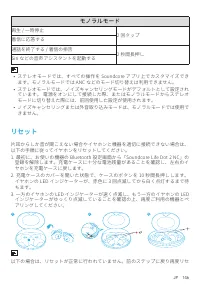
JP 146 モノラルモード 再生 / 一時停止 2 回タップ 着信に応答する通話を終了する / 着信の拒否 2 秒間長押し Siri などの音声アシスタントを起動する • ステレオモードでは、すべての操作を Soundcore アプリ上でカスタマイズでき ます。モノラルモードでは ANC などのモード切り替えは利用できません。 • ステレオモードでは、ノイズキャンセリングモードがデフォルトとして設定され ています。 電源をオンにして接続した際、またはモノラルモードからステレオ モードに切り替えた際には、前回使用した設定が使用されます。 • ノイズキャンセリングまたは外音取り込みモードは、モノ...
Page 149 - 製品の仕様
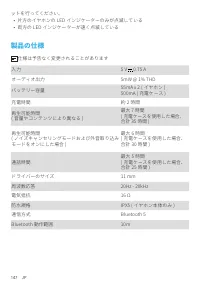
147 JP ットを行ってください。 • 片方のイヤホンの LED インジケーターのみが点滅している• 両方の LED インジケーターが速く点滅している 製品の仕様 仕様は予告なく変更されることがあります 入力 5 V 0.75 A オーディオ出力 5mW @ 1% THD バッテリー容量 55mA x 2 ( イヤホン ) 500mA ( 充電ケース ) 充電時間 約 2 時間 再生可能時間 ( 音量やコンテンツにより異なる ) 最大 7 時間 ( 充電ケースを使用した場合、 合計 35 時間 ) 再生可能時間 ( ノイズキャンセリングモードおよび外音取り込み モードをオンにした場合 ) 最...
Page 150 - 충전
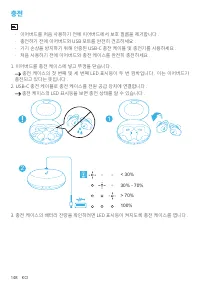
148 KO 충전 • 이어버드를 처음 사용하기 전에 이어버드에서 보호 필름을 제거합니다 .• 충전하기 전에 이어버드와 USB 포트를 완전히 건조하세요 .• 기기 손상을 방지하기 위해 인증된 USB-C 충전 케이블 및 충전기를 사용하세요 .• 처음 사용하기 전에 이어버드와 충전 케이스를 완전히 충전하세요 . 1. 이어버드를 충전 케이스에 넣고 뚜껑을 닫습니다 . 충전 케이스의 첫 번째 및 세 번째 LED 표시등이 두 번 깜박입니다 . 이는 이어버드가 충전되고 있다는 뜻입니다 . 2. USB-C 충전 케이블로 충전 케이스를 전원 공급 ...
Page 152 - 착용; 전원
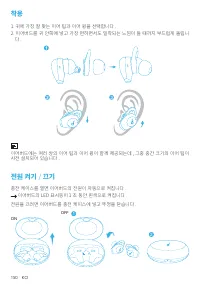
150 KO 착용 1. 귀에 가장 잘 맞는 이어 팁과 이어 윙을 선택합니다 .2. 이어버드를 귀 안쪽에 넣고 가장 편하면서도 밀착되는 느낌이 들 때까지 부드럽게 돌립니 다 . 이어버드에는 여러 쌍의 이어 팁과 이어 윙이 함께 제공되는데 , 그중 중간 크기의 이어 팁이 사전 설치되어 있습니다 . 전원 켜기 / 끄기 충전 케이스를 열면 이어버드의 전원이 자동으로 켜집니다 . 이어버드의 LED 표시등이 1 초 동안 흰색으로 켜집니다 . 전원을 끄려면 이어버드를 충전 케이스에 넣고 뚜껑을 닫습니다 . ON 2 1 OFF
Page 153 - 다른
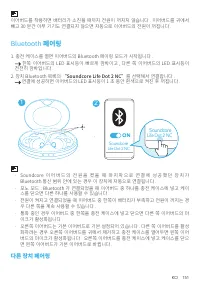
KO 151 이어버드를 착용하면 배터리가 소진될 때까지 전원이 꺼지지 않습니다 . 이어버드를 귀에서 빼고 30 분간 아무 기기도 연결되지 않으면 자동으로 이어버드의 전원이 꺼집니다 . Bluetooth 페어링 1. 충전 케이스를 열면 이어버드의 Bluetooth 페이링 모드가 시작됩니다 . 한쪽 이어버드의 LED 표시등이 빠르게 깜박이고 , 다른 쪽 이어버드의 LED 표시등이 천천히 깜박입니다 . 2. 장치 Bluetooth 목록의 “Soundcore Life Dot 2 NC” 를 선택해서 연결합니다 . 연결에 성공하면 이어버드의 ...
Page 154 - 컨트롤; 모노 모드
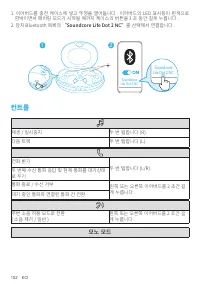
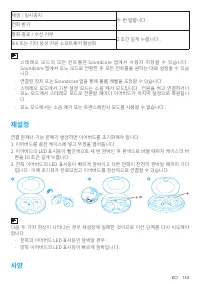
152 KO 1. 이어버드를 충전 케이스에 넣고 뚜껑을 열어둡니다 . 이어버드의 LED 표시등이 흰색으로 깜박이면서 페어링 모드가 시작될 때까지 케이스의 버튼을 3 초 동안 길게 누릅니다 . 2. 장치 Bluetooth 목록의 “Soundcore Life Dot 2 NC” 를 선택해서 연결합니다 . 1 2 Soundcore Life Dot 2 NC Soundcore Life Dot 2 NC 3” 컨트롤 재생 / 일시중지 두 번 탭합니다 (R). 다음 트랙 두 번 탭합니다 (L). 전화 받기 두 번 탭합니다 (L/R). 두 번째 수신...
Page 157 - 充电
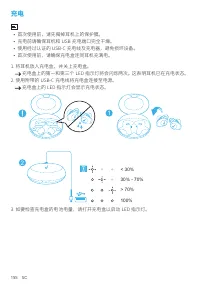
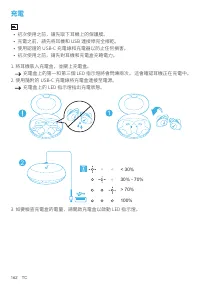
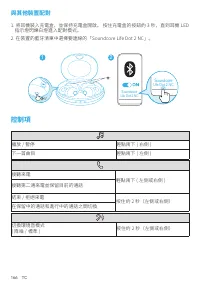
155 SC 充电 • 首次使用前,请先揭掉耳机上的保护膜。• 充电前请确保耳机和 USB 充电端口完全干燥。• 使用经过认证的 USB-C 充电线及充电器,避免损坏设备。• 首次使用前,请确保充电盒连同耳机充满电。 1. 将耳机放入充电盒,并关上充电盒。 充电盒上的第一和第三个 LED 指示灯将会闪烁两次。 这表明耳机已在充电状态。 2. 使用附带的 USB-C 充电线将充电盒连接至电源。 充电盒上的 LED 指示灯会显示充电状态。 2 1 < 30% 30% - 70% > 70% 100% 3. 如要检查充电盒的电池电量,请打开充电盒以启动 LED 指示灯。
Page 158 - Soundcore 应用程序
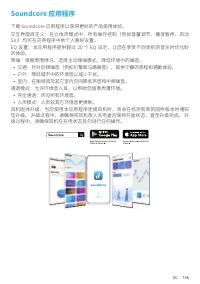
SC 156 Soundcore 应用程序 下载 Soundcore 应用程序以获得更好的产品使用体验。交互界面自定义:在立体声模式中,所有操作控制(例如音量调节、播放暂停、启动 Siri)均可在应用程序中依个人喜好设置。EQ 设置:本应用程序提供超过 20 个 EQ 设定,让您在享受不同类别的音乐时优化聆 听体验。降噪:根据周围情况,选择主动降噪模式,降低环境中的噪音。 • 交通:针对低频噪音(例如引擎和马路噪音),提供宁静的旅程和通勤体验。• 户外:降低城市中的环境音以减少干扰。• 室内:在咖啡馆及其它室内空间降低声音和中频噪音。 通透模式:允许环境音入耳,以帮助您留意周遭环境。 • 完全...
Page 159 - 佩戴
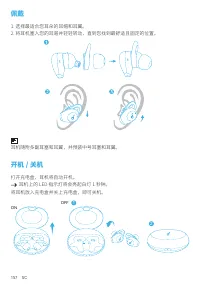
157 SC 佩戴 1. 选择最适合您耳朵的耳帽和耳翼。2. 将耳机塞入您的耳道并轻轻转动,直到您找到最舒适且固定的位置。 耳机随附多副耳塞和耳翼,并预装中号耳塞和耳翼。 开机 / 关机 打开充电盒,耳机将自动开机。 耳机上的 LED 指示灯将会亮起白灯 1 秒钟。 将耳机放入充电盒并关上充电盒,即可关机。 ON 2 1 OFF
Page 160 - 蓝牙配对
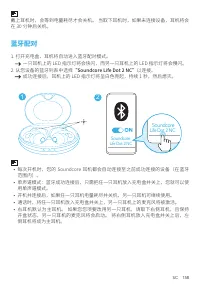
SC 158 戴上耳机时,会等到电量耗尽才会关机。 当取下耳机时,如果未连接设备,耳机将会 在 30 分钟后关机。 蓝牙配对 1. 打开充电盒,耳机将自动进入蓝牙配对模式。 一只耳机上的 LED 指示灯将会快闪,而另一只耳机上的 LED 指示灯将会慢闪。 2. 从您设备的蓝牙列表中选择 “Soundcore Life Dot 2 NC” 以连接。 成功连接后,耳机上的 LED 指示灯将呈白色亮起,持续 1 秒,然后熄灭。 2 Soundcore Life Dot 2 NC Soundcore Life Dot 2 NC 1 • 每次开机时,您的 Soundcore 耳机都会自动连接至之前成功连...
Page 161 - 与其他设备配对; 控制
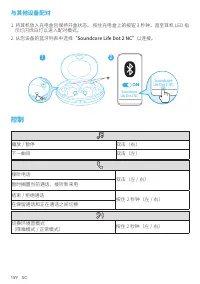
159 SC 与其他设备配对 1. 将耳机放入充电盒且保持开盒状态。 按住充电盒上的按钮 3 秒钟,直至耳机 LED 指 示灯闪烁白灯以进入配对模式。 2. 从您设备的蓝牙列表中选择 “Soundcore Life Dot 2 NC” 以连接。 1 2 Soundcore Life Dot 2 NC Soundcore Life Dot 2 NC 3” 控制 播放 / 暂停 双击(右) 下一曲目 双击(左) 接听电话 双击(左 / 右) 暂时搁置当前通话,接听新来电 结束 / 拒绝通话 按住 2 秒钟(左 / 右) 在保留通话和正在通话之间切换 切换环境音模式 (降噪模式 / 正常模式) 按住...
Page 162 - 单声道模式; 重置
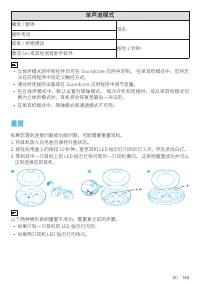
SC 160 单声道模式 播放 / 暂停 双击 接听电话结束 / 拒绝通话 按住 2 秒钟 激活 Siri 或其他语音助手软件 • 立体声模式的所有控件均可在 Soundcore 应用中定制。 在单耳机模式中,您将无 法在应用程序中自定义触控方式。 • 通过所连接的设备或在 Soundcore 应用程序中调节音量。• 在立体声模式中,默认设置为降噪模式。 每次开机和连接时,或从单耳机模式切 换为立体声模式时,耳机将会恢复至最后一次设定。 • 在单耳机模式中,降噪模式和通透模式不可用。 重置 如果您遇到连接问题或功能问题,可能需要重置耳机。1. 将耳机放入充电盒且保持开盒状态。2. 按住充电盒上...
Page 163 - 产品参数
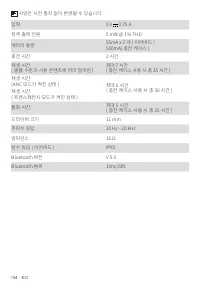
161 SC 产品参数 规格如有变更,恕不另行通知。 输入 5 V 0.75 A 额定输出功率 5 mW @ 1% THD 电池容量 55 mA x 2 (耳机) 500 mA (充电盒) 充电时长 2 小时 播放时间(因音量和内容而异) 长达 7 小时 (搭配充电盒使用时共计 35 小时) 播放时间(ANC 模式开启) 长达 6 小时 (搭配充电盒使用时共计 30 小时) 播放时间(通透模式开启) 通话时间 长达 5 小时 (搭配充电盒使用时共计 25 小时) 驱动单元大小 11 mm 频率范围 20 Hz - 20 kHz 阻抗 16 Ω 防水等级(耳机) IPX5 蓝牙版本 V 5.0 ...
Page 165 - Soundcore 應用程式
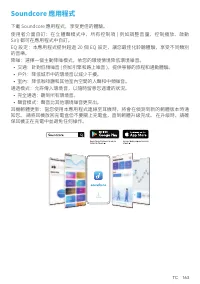
TC 163 Soundcore 應用程式 下載 Soundcore 應用程式,享受更佳的體驗。使用者介面自訂:在立體聲模式中,所有控制項 ( 例如調整音量、控制播放、啟動 Siri) 都可在應用程式中自訂。EQ 設定:本應用程式提供超過 20 個 EQ 設定,讓您最佳化聆聽體驗,享受不同類別 的音樂。降噪:選擇一個主動降噪模式,依您的環境情境降低環境噪音。 • 交通:針對低頻噪音 ( 例如引擎和路上噪音 ),提供寧靜的旅程和通勤體驗。• 戶外:降低城市中的環境音以減少干擾。• 室內:降低咖啡廳和其他室內空間的人聲和中頻噪音。 通透模式:允許傳入環境音,以隨時留意您週遭的狀況。 • 完全通透:...
Page 166 - 穿戴
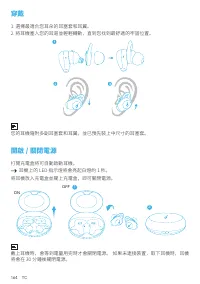
164 TC 穿戴 1. 選擇最適合您耳朵的耳塞套和耳翼。2. 將耳機塞入您的耳道並輕輕轉動,直到您找到最舒適的牢固位置。 您的耳機隨附多副耳塞套和耳翼,並已預先裝上中尺寸的耳塞套。 開啟 / 關閉電源 打開充電盒將可自動啟動耳機。 耳機上的 LED 指示燈將會亮起白燈約 1 秒。 將耳機放入充電盒並關上充電盒,即可關閉電源。 ON 2 1 OFF 戴上耳機時,會等到電量用完時才會關閉電源。 如果未連接裝置,取下耳機時,耳機 將會在 30 分鐘後關閉電源。
Page 167 - 藍牙配對
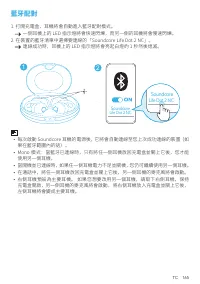
TC 165 藍牙配對 1. 打開充電盒,耳機將會自動進入藍牙配對模式。 一側耳機上的 LED 指示燈將會快速閃爍,而另一側的耳機將會慢速閃爍。 2. 在裝置的藍牙清單中選擇要連線的「Soundcore Life Dot 2 NC」。 連線成功時,耳機上的 LED 指示燈將會亮起白燈約 1 秒然後熄滅。 2 Soundcore Life Dot 2 NC Soundcore Life Dot 2 NC 1 • 每次啟動 Soundcore 耳機的電源後,它將會自動連線至您上次成功連線的裝置(如 果在藍牙範圍內的話)。 • Mono 模式:當藍牙已連線時,只有將任一側耳機放回充電盒並關上它後,您...
Page 168 - 與其他裝置配對; 控制項
166 TC 與其他裝置配對 1. 將耳機裝入充電盒,並保持充電盒開啟。 按住充電盒的按鈕約 3 秒,直到耳機 LED 指示燈閃爍白燈進入配對模式。 2. 在裝置的藍牙清單中選擇要連線的「Soundcore Life Dot 2 NC」。 1 2 Soundcore Life Dot 2 NC Soundcore Life Dot 2 NC 3” 控制項 播放 / 暫停 輕點兩下 ( 右側 ) 下一首曲目 輕點兩下 ( 左側 ) 接聽來電 輕點兩下 ( 左側或右側 ) 接聽第二通來電並保留目前的通話 結束 / 拒絕來電 按住約 2 秒(左側或右側) 在保留中的通話和進行中的通話之間切換 切換環...
Page 169 - Mono 模式; 重設
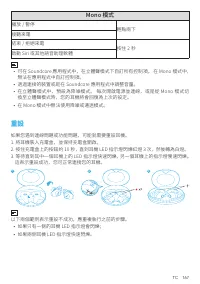
TC 167 Mono 模式 播放 / 暫停 輕點兩下 接聽來電結束 / 拒絕來電 按住 2 秒 啟動 Siri 或其他語音助理軟體 • 可在 Soundcore 應用程式中,在立體聲模式下自訂所有控制項。 在 Mono 模式中, 無法在應用程式中自訂控制項。 • 透過連接的裝置或是在 Soundcore 應用程式中調整音量。• 在立體聲模式中,預設為降噪模式。 每次開啟電源並連線,或是從 Mono 模式切 換至立體聲模式時,您的耳機將會回復為上次的設定。 • 在 Mono 模式中無法使用降噪或通透模式。 重設 如果您遇到連線問題或功能問題,可能就需要重設耳機。1. 將耳機裝入充電盒,並保持充...
Page 170 - 規格
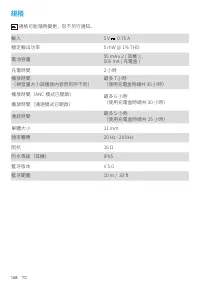
168 TC 規格 規格可能隨時變更,恕不另行通知。 輸入 5 V 0.75 A 額定輸出功率 5 mW @ 1% THD 電池容量 55 mA x 2 ( 耳機 ); 500 mA ( 充電盒 ) 充電時間 2 小時 播放時間 (視音量大小與播放內容而有所不同) 最多 7 小時 (使用充電盒時總共 35 小時) 播放時間(ANC 模式已開啟) 最多 6 小時 (使用充電盒時總共 30 小時) 播放時間(通透模式已開啟) 通話時間 最多 5 小時 (使用充電盒時總共 25 小時) 單體大小 11 mm 頻率響應 20 Hz - 20 kHz 阻抗 16 Ω 防水等級(耳機) IPX5 藍牙版本...
Page 171 - نحشلا
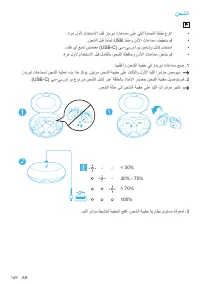
169 AR نحشلا • .ةرم لولأ مادختسلاا لبق زدبريإ تاعامس ىلع يتلا ةيامحلا ةقبط عزنا • .نحشلا لبق ا ًمامت USB ذفنمو نذلأا تاعامس فيفجتب مق • .فلت يأ عنمل نيدمتعم (USB-C) يس-يب.سإ.وي نحاشو لباك مدختسا • .ةرم لولأ مادختسلاا لبق لماكلاب نحشلا ةظفاحو نذلأا تاعامس نحشب مق .اهقلغأو نحشلا ةبيقح يف زدبريإ تاعامس...
Page 172 - قيبطت
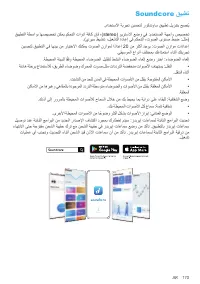
AR 170 Soundcore قيبطت .مادختسلاا ةبرجت نيسحتل روكدنواس قيبطت ليزنتب حصنُي قيبطتلا ةطساوب اهصيصخت نكمي مكحتلا تاودأ ةفاك نإف ،(stereo) ويرتسلاا عضو يف :مدختسملا ةهجاو صيصخت .(يريس طيشنت ،ليغشتلا ةداعإ يف مكحتلا ،توصلا ىوتسم طبض :لثم) نيسحتل قيبطتلا يف اهنيب نم رايتخلاا كنكمي توصلا نزاومل ا ًدادعإ 20...
Page 173 - نذلأا يَتعامس عضو ةقيرط
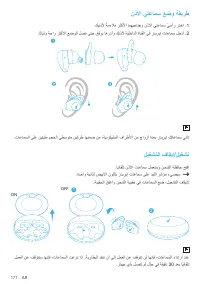
171 AR نذلأا يَتعامس عضو ةقيرط .كينذلأ ًةمءلام رثكلأا امهيحانجو نذلأا يَتعامس ّيسأر رتخا . 1 .اًتابثو ةحار رثكلأا عضولل لصت ىتح قفرب اهردأو كنذلأ ةيلخادلا ةانقلا يف زدبريإ تاعامس لخدأ . 2 .تاعامسلا ىلع نيتبثم مجحلا يطسوتم نيفرط اهنمض نم ،ةينوكيلسلا فارطلأا نم جاوزأ ةدعب زدبريإ كتاعامس يتأت ليغشتلا ف...
Page 174 - ثوتولبلاب طبرلا
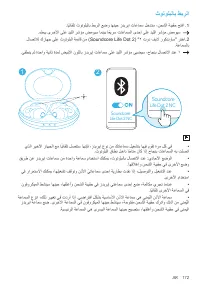
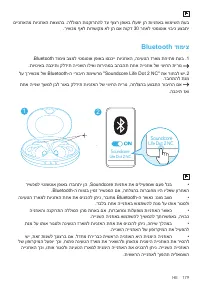
AR 172 ثوتولبلاب طبرلا .اًيئاقلت ثوتولبلاب طبرلا عضو اهنيح زدبريإ تاعامس لخدتس ،نحشلا ةبيقح حتفا . 1 .ءطبب ىرخلأا ىلع ديللا رشؤم ضمويس امنيب ا ًعيرس تاعامسلا ىدحإ ىلع ديللا رشؤم ضمويس لاصتلال كزاهج ىلع ثوتولبلا ةمئاق نم (Soundcore Life Dot 2) "٢ تود فيلا روكدنواس" رتخا. 2 .ةعامسلاب .ئفطني مث...
Page 175 - رخآ زاهجب نارتقلاا; مكحتلا رصانع
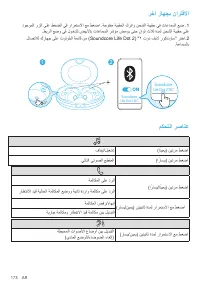
173 AR رخآ زاهجب نارتقلاا دوجوملا رزلا ىلع طغضلا يف رارمتسلاا عم طغضا .ةحوتفم ةبيقحلا كرتاو نحشلا ةبيقح يف تاعامسلا عض . 1 .طبرلا عضو يف لوخدلل ضيبلأاب تاعامسلا رشؤم ضموي ىتح ٍناوث ثلاث ةدمل نحشلا ةبيقح ىلع لاصتلال كزاهج ىلع ثوتولبلا ةمئاق نم (Soundcore Life Dot 2) "٢ تود فيلا روكدنواس" رتخا...
Page 176 - يداحلأا عضولا; نييعتلا ةداعإ
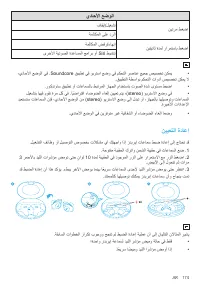
AR 174 يداحلأا عضولا فاقيإ/ليغشت نيترم طغضا ةملاكملا ىلع درلا ةملاكملا ضفر/ءاهنإ نيتيناث ةدمل رارمتساب طغضا ىرخلأا ةيتوصلا ةدعاسملا جمارب وأ Siri طيشنت • ،يداحلأا عضولا يف .Soundcore قيبطت يف ويرتسا عضو يف مكحتلا رصانع عيمج صيصخت نكمي .قيبطتلا ةطساوب مكحتلا تاودأ صيصخت نكمي لا • .روكدنواس قيبطت وأ ت...
Page 177 - تافصاوملا
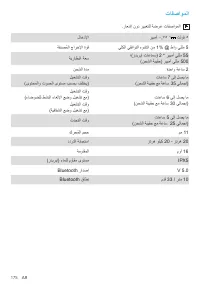
175 AR تافصاوملا .راعشإ نود رييغتلل ةضرع تافصاوملا لاخدلإا ريبمأ ٠,٧٥ ١ تلوف ٥ ةفنصُملا جارخلإا ةوق يلكلا يقفاوتلا هوشتلا نم 1% @ طاو يللم 5 ةيراطبلا ةعس ؛(زدبريإ تاعامس) 2 * ريبمأ يللم 55 (نحشلا ةبيقح) ريبمأ يللم 500 نحشلا ةدم ةدحاو ةعاس 2 ليغشتلا تقو (ىوتحملاو توصلا ىوتسم بسحب فلتخي) تاعاس 7 ىلإ ل...
Page 178 - הניעט
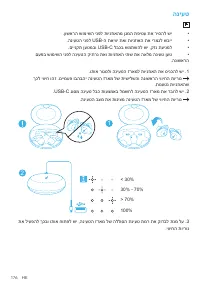
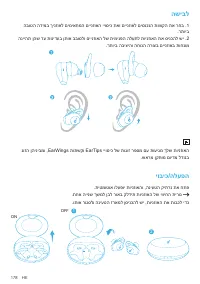
176 HE הניעט • .ןושארה שומישה ינפל תוינזואהמ ןגמה תפיטע תא ריסהל שי • .הניעטה ינפל USB-ה תאיצי תאו תוינזואה תא ירמגל שביי • .םיינקת ןעטמבו USB-C לבכב שמתשהל שי ,קזנ תעינמל • םעפב שומישה ינפל הניעטה קיתרנ תאו תוינזואה יתש תא האלמ הניעט ןעט .הנושארה .ותוא רוגסלו הניעטה זראמל תוינזואה תא סינכהל שי . 1 ...
Page 180 - השיבל
178 HE השיבל הבוטה הדימב ךינזואל םימיאתמה םיינזואה ייוסיכ תאו םיינזואל םיסנכנה תווצקה תא רחב . 1 .רתויב הנייהת ןהש דע תונידעב ןתוא בבוסלו םיינזואה לש תימינפה הלעתל תוינזואה תא סינכהל שי . 2 .רתויב הביציהו החונה הרוצב םיינזואב תוחנומ גוזה ןהיניבמו ,EarWings תותשקו EarTips ייוסיכ לש תוגוז רפסמ םע תועי...
Page 182 - רחא רישכמל ךויש; רישכמה ידקפ
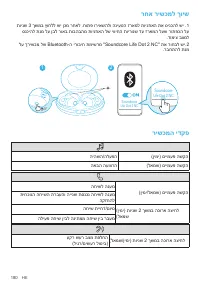
180 HE רחא רישכמל ךויש תוינש 3 ךשמב ץוחלל שי ןכמ רחאל .חותפ וריאשהלו הניעטה זראמל תוינזואה תא סינכהל שי . 1 סנכיהל תנמ לע ןבל רואב תובהבהמ תוינזואה לש יוויחה תוירונש דע זראמה לעש רותפכה לע .דומיצ בצמל לע ךרישכמ לש Bluetooth-ה ירוביח תמישרמ "Soundcore Life Dot 2 NC" תא רוחבל שי. 2 .רבחתהל תנמ...
Page 183 - ונומ בצמ; סופיא
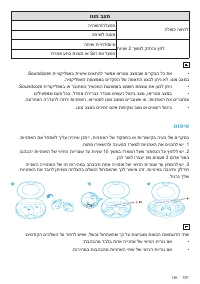
HE 181 ונומ בצמ היהשה/הלעפה הלופכ הציחל החישל הנעמ החיש תייחד/םויס תוינש 2 ךשמל קזחהו ץחל תרחא עויס תנכות וא Siri תא לעפה • .Soundcore תייצקילפאב תישיא םיאתהל רשפא וארטס בצמבש םירקבה לכ תא .היצקילפאה תועצמאב םידקפה לש המאתה עצבל ןתינ אל ,ונומ בצמב • .Soundcore תייצקילפאב וא רבוחמה רישכמה תועצמאב עמש...
Page 184 - ינכט טרפמ
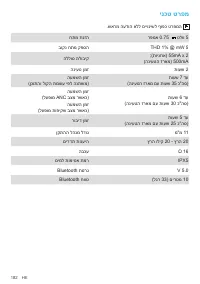
182 HE ינכט טרפמ .שארמ העדוה אלל םייונישל ףופכ טרפמה חתמ תנזה רפמא 0.75 טלוו 5 בוקנ חתמ קפסה THD 1% @ mW 5 הללוס תלוביק ;(תוינזוא) 55mA x 2 (הניעטה זראמ) 500mA הניעט ןמז תועש 2 העמשה ןמז (ןכותהו לוקה תמצוע יפל הנתשמ) תועש 7 דע (הניעטה זראמ םע תועש 35 כ"הס) העמשה ןמז (לעפומ ANC בצמ רשאכ) תועש 6 ד...