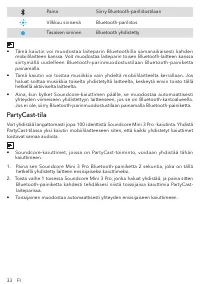
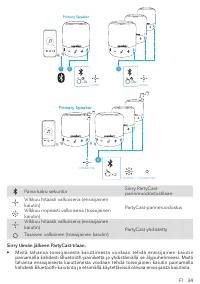
Page 3 - At a Glance; Charging
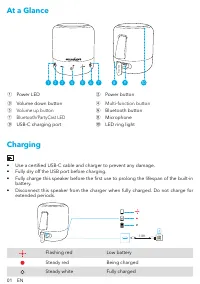
01 EN At a Glance Mini 3 Pro 2 1 3 4 5 6 7 8 9 10 ① Power LED ② Power button ③ Volume down button ④ Multi-function button ⑤ Volume up button ⑥ Bluetooth button ⑦ Bluetooth/PartyCast LED ⑧ Microphone ⑨ USB-C charging port ⑩ LED ring light Charging • Use a certified USB-C cable and charger to prevent ...
Page 4 - Using your Speaker; Bluetooth Mode
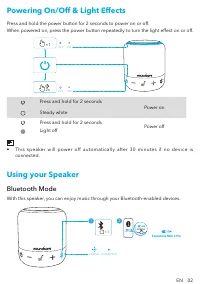
EN 02 Powering On/Off & Light Effects Press and hold the power button for 2 seconds to power on or off. When powered on, press the power button repeatedly to turn the light effect on or off. 2s ×1 OFF ON OFF ON Press and hold for 2 seconds Power on Steady whitePress and hold for 2 seconds Power ...
Page 5 - PartyCast Mode
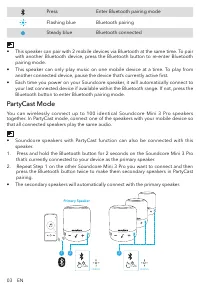
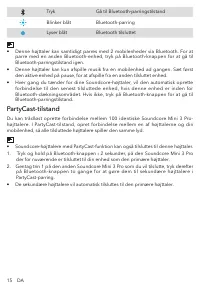
03 EN Press Enter Bluetooth pairing mode Flashing blue Bluetooth pairing Steady blue Bluetooth connected • This speaker can pair with 2 mobile devices via Bluetooth at the same time. To pair with another Bluetooth device, press the Bluetooth button to re-enter Bluetooth pairing mode. • This speaker ...
Page 6 - Button Controls
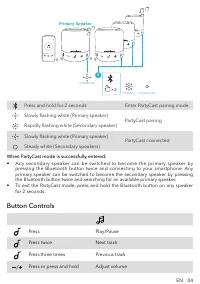
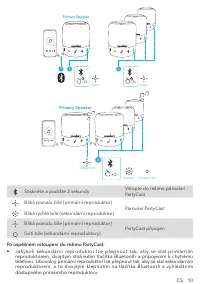
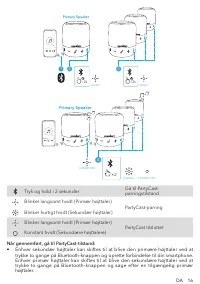
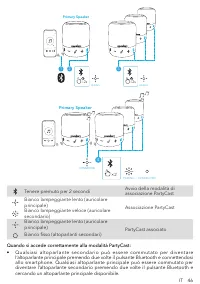
EN 04 × 2 4 PAIRING CONNECTED CONNECTED Primary Speaker Press and hold for 2 seconds Enter PartyCast pairing mode Slowly flashing white (Primary speaker) PartyCast pairing Rapidly flashing white (Secondary speaker) Slowly flashing white (Primary speaker) PartyCast connected Steady white (Secondary s...
Page 7 - Soundcore App
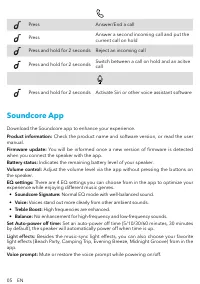
05 EN Press Answer/End a call Press Answer a second incoming call and put the current call on hold Press and hold for 2 seconds Reject an incoming call Press and hold for 2 seconds Switch between a call on hold and an acitve call Press and hold for 2 seconds Activate Siri or other voice assistant so...
Page 8 - Specifications
EN 06 Google Play and the Google Play logo are trademarks of Google Inc. Apple and the Apple logo are trademarks of Apple Inc. Soundcore Soundcore Specifications Specifications are subject to change without notice. DC power input 5 V 1 A Battery capacity 1800 mAh / 3.7 V Audio output power 6 W Charg...
Page 9 - Přehled; Nabíjení
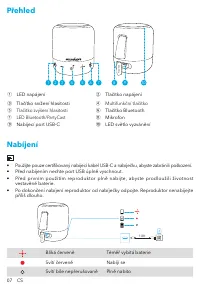
07 CS Přehled Mini 3 Pro 2 1 3 4 5 6 7 8 9 10 ① LED napájení ② Tlačítko napájení ③ Tlačítko snížení hlasitosti ④ Multifunkční tlačítko ⑤ Tlačítko zvýšení hlasitosti ⑥ Tlačítko Bluetooth ⑦ LED Bluetooth/PartyCast ⑧ Mikrofon ⑨ Nabíjecí port USB-C ⑩ LED světlo vyzvánění Nabíjení • Použijte pouze certif...
Page 10 - Použití reproduktoru Soundcore Mini 3 Pro; Režim Bluetooth
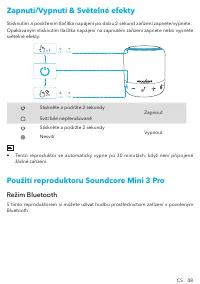
CS 08 Zapnutí/Vypnutí & Světelné efekty Stisknutím a podržením tlačítka napájení po dobu 2 sekund zařízení zapnete/vypnete.Opakovaným stisknutím tlačítka napájení na zapnutém zařízení zapnete nebo vypnete světelné efekty. 2s ×1 OFF ON OFF ON Stiskněte a podržte 2 sekundy Zapnout Svítí bíle nepře...
Page 11 - Režim PartyCast
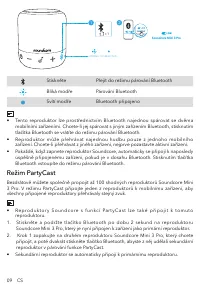
09 CS 1 ×1 PAIRING CONNECTED Soundcore Mini 3 Pro 2 Soundcore Mini 3 Pro Soundcore Mini 3 Pro Stiskněte Přejít do režimu párování Bluetooth Bliká modře Párování Bluetooth Svítí modře Bluetooth připojeno • Tento reproduktor lze prostřednictvím Bluetooth najednou spárovat se dvěma mobilními zařízeními...
Page 13 - Ovládací tlačítka; Aplikace Soundcore
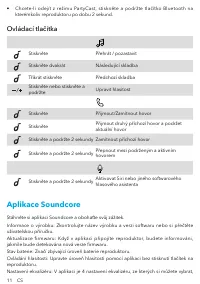
11 CS • Chcete-li odejít z režimu PartyCast, stiskněte a podržte tlačítko Bluetooth na kterémkoliv reproduktoru po dobu 2 sekund. Ovládací tlačítka Stiskněte Přehrát / pozastavit Stiskněte dvakrát Následující skladba Třikrát stiskněte Předchozí skladba Stiskněte nebo stiskněte a podržte Upravit hlas...
Page 14 - Specifikace
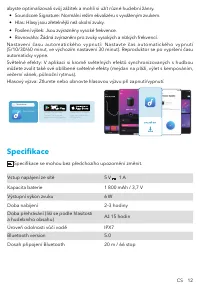
CS 12 abyste optimalizovali svůj zážitek a mohli si užít různé hudební žánry. • Soundcore Signature: Normální režim ekvalizéru s vyváženým zvukem.• Hlas: Hlasy jsou zřetelnější než okolní zvuky.• Posílení výšek: Jsou zvýrazněny vysoké frekvence.• Rovnováha: Žádná zvýraznění pro zvuky vysokých a nízk...
Page 15 - Et overblik; Oplader
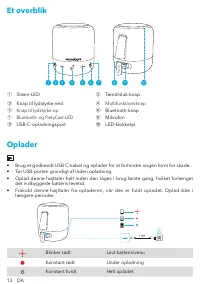
13 DA Et overblik Mini 3 Pro 2 1 3 4 5 6 7 8 9 10 ① Strøm-LED ② Tænd/sluk-knap ③ Knap til lydstyrke ned ④ Multifunktionsknap ⑤ Knap til lydstyrke op ⑥ Bluetooth-knap ⑦ Bluetooth- og PartyCast-LED ⑧ Mikrofon ⑨ USB-C-opladningsport ⑩ LED-klokkelys Oplader • Brug et godkendt USB C-kabel og oplader for ...
Page 16 - Sådan bruger du din Soundcore Mini 3 Pro
DA 14 Tænde/slukke & Lyseffekter Tryk og hold på strømknappen i 2 sekunder for at tænde eller slukke.Når tændt, tryk på strømknappen gentagne gange for at slå lyseffekten til eller fra. 2s ×1 OFF ON OFF ON Tryk og hold i 2 sekunder Tænde Konstant hvidtTryk og hold i 2 sekunder Slukke Slukket • D...
Page 19 - Knapfunktioner
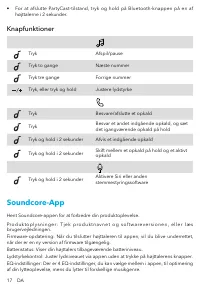
17 DA • For at afslutte PartyCast-tilstand, tryk og hold på Bluetooth-knappen på en af højttalerne i 2 sekunder. Knapfunktioner Tryk Afspil/pause Tryk to gange Næste nummer Tryk tre gange Forrige nummer Tryk, eller tryk og hold Justere lydstyrke Tryk Besvare/afslutte et opkald Tryk Besvar et andet i...
Page 20 - Specifikationer
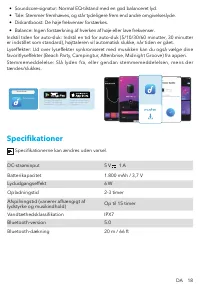
DA 18 • Soundcore-signatur: Normal EQ-tilstand med en god balanceret lyd.• Tale: Stemmer fremhæves, og står tydeligere frem end andre omgivelseslyde.• Diskantboost: De høje frekvenser forstærkes.• Balance: Ingen forstærkning af hverken af høje eller lave frekvenser. Indstil tiden for auto-sluk: Inds...
Page 21 - Auf einen Blick; Ladevorgang
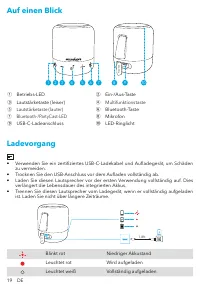
19 DE Auf einen Blick Mini 3 Pro 2 1 3 4 5 6 7 8 9 10 ① Betriebs-LED ② Ein-/Aus-Taste ③ Lautstärketaste (leiser) ④ Multifunktionstaste ⑤ Lautstärketaste (lauter) ⑥ Bluetooth-Taste ⑦ Bluetooth-/PartyCast-LED ⑧ Mikrofon ⑨ USB-C-Ladeanschluss ⑩ LED-Ringlicht Ladevorgang • Verwenden Sie ein zertifiziert...
Page 22 - Verwendung Ihres Soundcore Mini 3 Pro
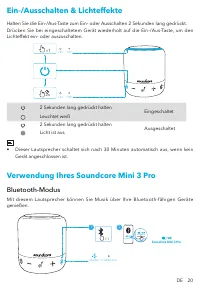
DE 20 Ein-/Ausschalten & Lichteffekte Halten Sie die Ein-/Aus-Taste zum Ein- oder Ausschalten 2 Sekunden lang gedrückt.Drücken Sie bei eingeschaltetem Gerät wiederholt auf die Ein-/Aus-Taste, um den Lichteffekt ein- oder auszuschalten. 2s ×1 OFF ON OFF ON 2 Sekunden lang gedrückt halten Eingesch...
Page 25 - Bedienelemente
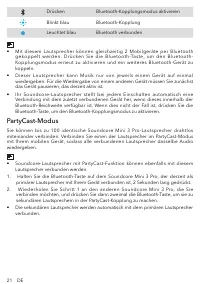
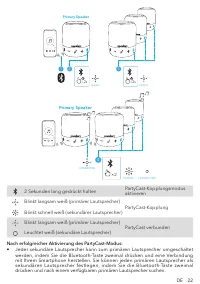
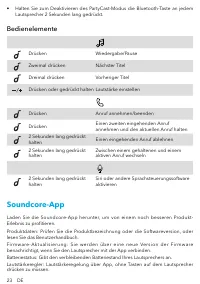
23 DE • Halten Sie zum Deaktivieren des PartyCast-Modus die Bluetooth-Taste an jedem Lautsprecher 2 Sekunden lang gedrückt. Bedienelemente Drücken Wiedergabe/Pause Zweimal drücken Nächster Titel Dreimal drücken Vorheriger Titel Drücken oder gedrückt halten Lautstärke einstellen Drücken Anruf annehme...
Page 26 - Technische Daten
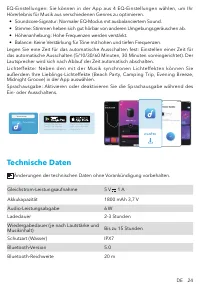
DE 24 EQ-Einstellungen: Sie können in der App aus 4 EQ-Einstellungen wählen, um Ihr Hörerlebnis für Musik aus verschiedenen Genres zu optimieren. • Soundcore-Signatur: Normaler EQ-Modus mit ausbalanciertem Sound.• Stimme: Stimmen heben sich gut hörbar von anderen Umgebungsgeräuschen ab.• Höhenanhebu...
Page 27 - Vista general; Carga
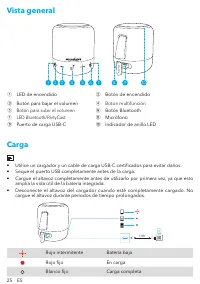
25 ES Vista general Mini 3 Pro 2 1 3 4 5 6 7 8 9 10 ① LED de encendido ② Botón de encendido ③ Botón para bajar el volumen ④ Botón multifunción ⑤ Botón para subir el volumen ⑥ Botón Bluetooth ⑦ LED Bluetooth/PartyCast ⑧ Micrófono ⑨ Puerto de carga USB-C ⑩ Indicador de anillo LED Carga • Utilice un ca...
Page 28 - Encendido/Apagado Y Efectos Luminosos; Uso del Soundcore Mini 3 Pro; Modo Bluetooth
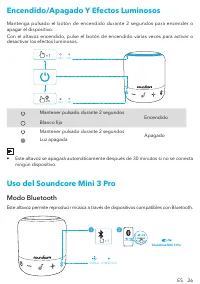
ES 26 Encendido/Apagado Y Efectos Luminosos Mantenga pulsado el botón de encendido durante 2 segundos para encender o apagar el dispositivo.Con el altavoz encendido, pulse el botón de encendido varias veces para activar o desactivar los efectos luminosos. 2s ×1 OFF ON OFF ON Mantener pulsado durant...
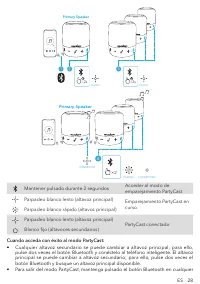
Page 29 - Modo PartyCast
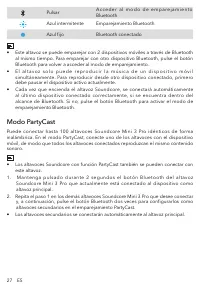
27 ES Pulsar A c c e d e r a l m o d o d e e m p a re j a m i e n t o Bluetooth Azul intermitente Emparejamiento Bluetooth Azul fijo Bluetooth conectado • Este altavoz se puede emparejar con 2 dispositivos móviles a través de Bluetooth al mismo tiempo. Para emparejar con otro dispositivo Bluetooth, ...
Page 31 - Controles de botón; Aplicación Soundcore
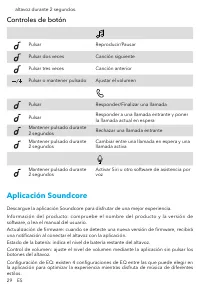
29 ES altavoz durante 2 segundos. Controles de botón Pulsar Reproducir/Pausar Pulsar dos veces Canción siguiente Pulsar tres veces Canción anterior Pulsar o mantener pulsado Ajustar el volumen Pulsar Responder/Finalizar una llamada Pulsar Responder a una llamada entrante y poner la llamada actual en...
Page 32 - Especificaciones
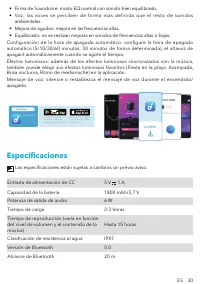
ES 30 • Firma de Soundcore: modo EQ normal con sonido bien equilibrado.• Voz: las voces se perciben de forma más definida que el resto de sonidos ambientales. • Mejora de agudos: mejora en las frecuencias altas.• Equilibrado: no se realizan mejoras en sonidos de frecuencias altas o bajas. Configurac...
Page 33 - Pikakatsaus; Lataaminen
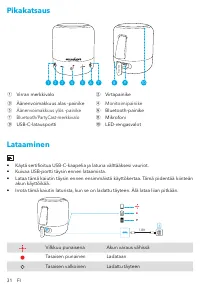
31 FI Pikakatsaus Mini 3 Pro 2 1 3 4 5 6 7 8 9 10 ① Virran merkkivalo ② Virtapainike ③ Äänenvoimakkuus alas -painike ④ Monitoimipainike ⑤ Äänenvoimakkuus ylös -painike ⑥ Bluetooth-painike ⑦ Bluetooth/PartyCast-merkkivalo ⑧ Mikrofoni ⑨ USB-C-latausportti ⑩ LED-rengasvalot Lataaminen • Käytä sertifioi...
Page 34 - Soundcore Mini 3 Pro -kaiuttimen käyttäminen
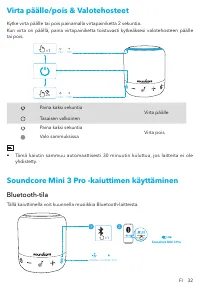
FI 32 Virta päälle/pois & Valotehosteet Kytke virta päälle tai pois painamalla virtapainiketta 2 sekuntia.Kun virta on päällä, paina virtapainiketta toistuvasti kytkeäksesi valotehosteen päälle tai pois. 2s ×1 OFF ON OFF ON Paina kaksi sekuntia Virta päälle Tasaisen valkoinenPaina kaksi sekuntia...
Page 37 - Ohjauspainikkeet
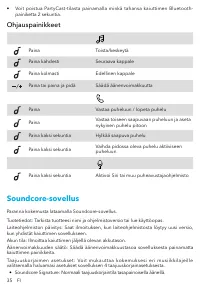
35 FI • Voit poistua PartyCast-tilasta painamalla minkä tahansa kaiuttimen Bluetooth- painiketta 2 sekuntia. Ohjauspainikkeet Paina Toista/keskeytä Paina kahdesti Seuraava kappale Paina kolmasti Edellinen kappale Paina tai paina ja pidä Säädä äänenvoimakkuutta Paina Vastaa puheluun / lopeta puhelu P...
Page 38 - Tekniset tiedot
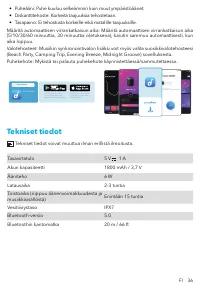
FI 36 • Puheääni: Puhe kuuluu selkeämmin kuin muut ympäristöäänet.• Diskanttitehoste: Korkeita taajuuksia tehostetaan.• Tasapaino: Ei tehostusta korkeille eikä matalille taajuuksille. Määritä automaattisen virrankatkaisun aika: Määritä automaattisen virrankatkaisun aika (5/10/30/60 minuuttia, 30 min...
Page 39 - Récapitulatif; En charge
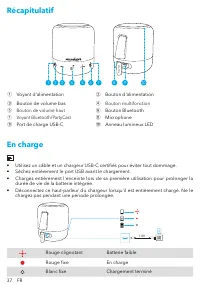
37 FR Récapitulatif Mini 3 Pro 2 1 3 4 5 6 7 8 9 10 ① Voyant d'alimentation ② Bouton d'alimentation ③ Bouton de volume bas ④ Bouton multifonction ⑤ Bouton de volume haut ⑥ Bouton Bluetooth ⑦ Voyant Bluetooth/PartyCast ⑧ Microphone ⑨ Port de charge USB-C ⑩ Anneau lumineux LED En charge • Utilisez un ...
Page 40 - Utilisation de votre SoundCore Mini 3 Pro; Mode Bluetooth
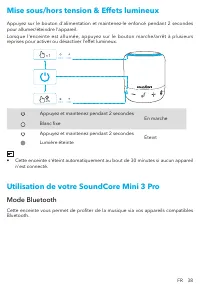
FR 38 Mise sous/hors tension & Effets lumineux Appuyez sur le bouton d'alimentation et maintenez-le enfoncé pendant 2 secondes pour allumer/éteindre l'appareil.Lorsque l'enceinte est allumée, appuyez sur le bouton marche/arrêt à plusieurs reprises pour activer ou désactiver l'effet lumineux. 2s...
Page 41 - Mode PartyCast
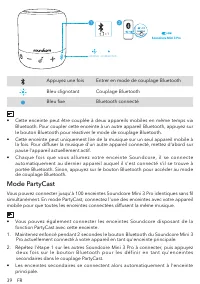
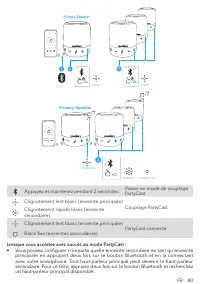
39 FR 1 ×1 PAIRING CONNECTED Soundcore Mini 3 Pro 2 Soundcore Mini 3 Pro Soundcore Mini 3 Pro Appuyez une fois Entrer en mode de couplage Bluetooth Bleu clignotant Couplage Bluetooth Bleu fixe Bluetooth connecté • Cette enceinte peut être couplée à deux appareils mobiles en même temps via Bluetooth....
Page 43 - Contrôles; Application Soundcore
41 FR • Pour quitter le mode PartyCast, maintenez enfoncé le bouton Bluetooth d'une des enceintes pendant 2 secondes. Contrôles Appuyez une fois Lecture/pause Appuyer deux fois Piste suivante Appuyez trois fois Piste précédente Appuyez ou appuyez et maintenez enfoncé Régler le volume Appuyez une foi...
Page 44 - Spécifications
FR 42 • Soundcore Signature : mode d'égaliseur normal offrant un son bien équilibré.• Voix : entendez les voix plus distinctement que les autres sons environnants.• Amplification des aigus : accentue les hautes fréquences.• Équilibré : aucune amplification des sons de haute et basse fréquences. D é ...
Page 45 - Descrizione del prodotto; In carica
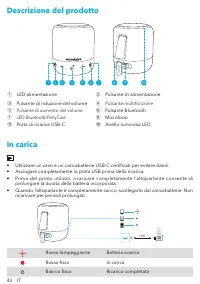
43 IT Descrizione del prodotto Mini 3 Pro 2 1 3 4 5 6 7 8 9 10 ① LED alimentazione ② Pulsante di alimentazione ③ Pulsante di riduzione del volume ④ Pulsante multifunzione ⑤ Pulsante di aumento del volume ⑥ Pulsante Bluetooth ⑦ LED Bluetooth/PartyCast ⑧ Microfono ⑨ Porta di ricarica USB-C ⑩ Anello lu...
Page 46 - Uso di Soundcore Mini 3 Pro; Modalità Bluetooth
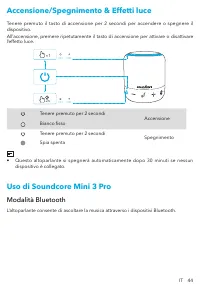
IT 44 Accensione/Spegnimento & Effetti luce Tenere premuto il tasto di accensione per 2 secondi per accendere o spegnere il dispositivo.All’accensione, premere ripetutamente il tasto di accensione per attivare o disattivare l’effetto luce. 2s ×1 OFF ON OFF ON Tenere premuto per 2 secondi Accens...
Page 47 - Modalità PartyCast
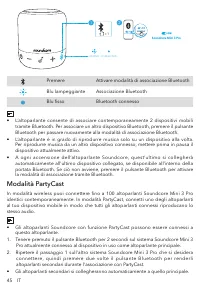
45 IT 1 ×1 PAIRING CONNECTED Soundcore Mini 3 Pro 2 Soundcore Mini 3 Pro Soundcore Mini 3 Pro Premere Attivare modalità di associazione Bluetooth Blu lampeggiante Associazione Bluetooth Blu fisso Bluetooth connesso • L’altoparlante consente di associare contemporaneamente 2 dispositivi mobili tramit...
Page 49 - Controlli pulsanti; App Soundcore
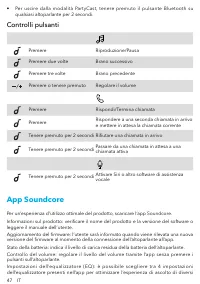
47 IT • Per uscire dalla modalità PartyCast, tenere premuto il pulsante Bluetooth su qualsiasi altoparlante per 2 secondi. Controlli pulsanti Premere Riproduzione/Pausa Premere due volte Brano successivo Premere tre volte Brano precedente Premere o tenere premuto Regolare il volume Premere Rispondi/...
Page 50 - Specifiche
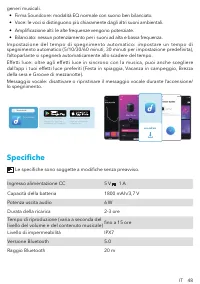
IT 48 generi musicali. • Firma Soundcore: modalità EQ normale con suono ben bilanciato.• Voce: le voci si distinguono più chiaramente dagli altri suoni ambientali.• Amplificazione alti: le alte frequenze vengono potenziate.• Bilanciato: nessun potenziamento per i suoni ad alta e bassa frequenza. Imp...
Page 51 - In één oogopslag; Opladen
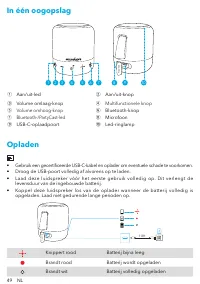
49 NL In één oogopslag Mini 3 Pro 2 1 3 4 5 6 7 8 9 10 ① Aan/uit-led ② Aan/uit-knop ③ Volume omlaag-knop ④ Multifunctionele knop ⑤ Volume omhoog-knop ⑥ Bluetooth-knop ⑦ Bluetooth-/PartyCast-led ⑧ Microfoon ⑨ USB-C-oplaadpoort ⑩ Led-ringlamp Opladen • Gebruik een gecertificeerde USB-C-kabel en oplade...
Page 52 - Uw Soundcore Mini 3 Pro gebruiken
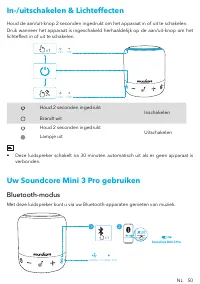
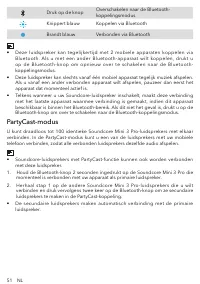
NL 50 In-/uitschakelen & Lichteffecten Houd de aan/uit-knop 2 seconden ingedrukt om het apparaat in of uit te schakelen.Druk wanneer het apparaat is ingeschakeld herhaaldelijk op de aan/uit-knop om het lichteffect in of uit te schakelen. 2s ×1 OFF ON OFF ON Houd 2 seconden ingedrukt Inschakelen ...
Page 55 - Knoppen
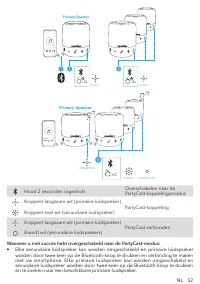
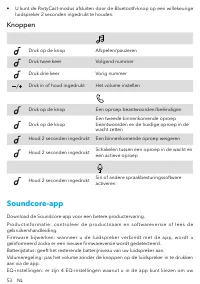
53 NL • U kunt de PartyCast-modus afsluiten door de Bluetooth-knop op een willekeurige luidspreker 2 seconden ingedrukt te houden. Knoppen Druk op de knop Afspelen/pauzeren Druk twee keer Volgend nummer Druk drie keer Vorig nummer Druk in of houd ingedrukt Het volume instellen Druk op de knop Een op...
Page 56 - Specificaties
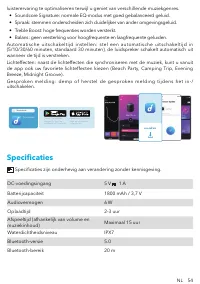
NL 54 luisterervaring te optimaliseren terwijl u geniet van verschillende muziekgenres. • Soundcore Signature: normale EQ-modus met goed gebalanceerd geluid.• Spraak: stemmen onderscheiden zich duidelijker van ander omgevingsgeluid.• Treble Boost: hoge frequenties worden versterkt.• Balans: geen ver...
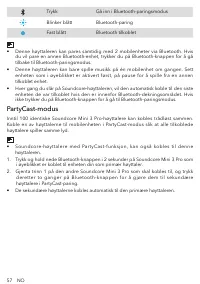
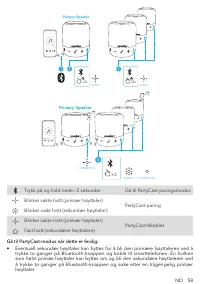
Page 57 - Kort oppsummert; Lader
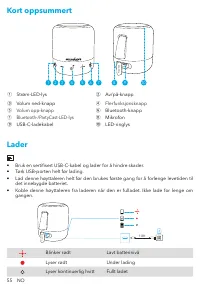
55 NO Kort oppsummert Mini 3 Pro 2 1 3 4 5 6 7 8 9 10 ① Strøm-LED-lys ② Av/på-knapp ③ Volum ned-knapp ④ Flerfunksjonsknapp ⑤ Volum opp-knapp ⑥ Bluetooth-knapp ⑦ Bluetooth-/PartyCast-LED-lys ⑧ Mikrofon ⑨ USB-C-ladekabel ⑩ LED-ringlys Lader • Bruk en sertifisert USB-C-kabel og lader for å hindre skade...
Page 58 - Slik bruker du Soundcore Mini 3 Pro
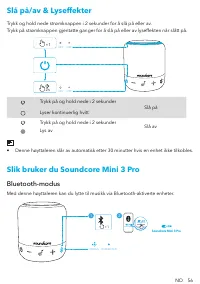
NO 56 Slå på/av & Lyseffekter Trykk og hold nede strømknappen i 2 sekunder for å slå på eller av.Trykk på strømknappen gjentatte ganger for å slå på eller av lyseffekten når slått på. 2s ×1 OFF ON OFF ON Trykk på og hold nede i 2 sekunder Slå på Lyser kontinuerlig hvittTrykk på og hold nede i 2 ...
Page 61 - Knappekontroller
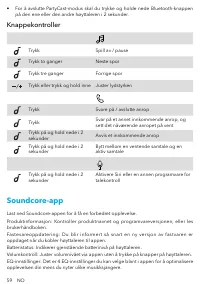
59 NO • For å avslutte PartyCast-modus skal du trykke og holde nede Bluetooth-knappen på den ene eller den andre høyttaleren i 2 sekunder. Knappekontroller Trykk Spill av / pause Trykk to ganger Neste spor Trykk tre ganger Forrige spor Trykk eller trykk og hold inne Juster lydstyrken Trykk Svare på ...
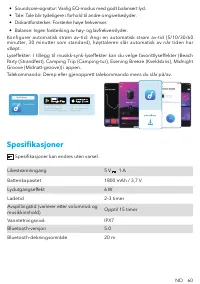
Page 62 - Spesifikasjoner
NO 60 • Soundcore-signatur: Vanlig EQ-modus med godt balansert lyd.• Tale: Tale blir tydeligere i forhold til andre omgivelseslyder.• Diskantforsterker: Forsterke høye frekvenser.• Balanse: Ingen forsterking av høy- og lavfrekvenslyder. Konfigurer automatisk strøm av-tid: Angi en automatisk strøm av...
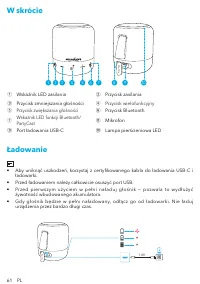
Page 63 - W skrócie; Ładowanie
61 PL W skrócie Mini 3 Pro 2 1 3 4 5 6 7 8 9 10 ① Wskaźnik LED zasilania ② Przycisk zasilania ③ Przycisk zmniejszania głośności ④ Przycisk wielofunkcyjny ⑤ Przycisk zwiększania głośności ⑥ Przycisk Bluetooth ⑦ Wskaźnik LED funkcji Bluetooth/ PartyCast ⑧ Mikrofon ⑨ Port ładowania USB-C ⑩ Lampa pierśc...
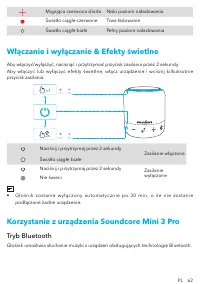
Page 64 - Włączanie i wyłączanie & Efekty świetlne; Korzystanie z urządzenia Soundcore Mini 3 Pro; Tryb Bluetooth
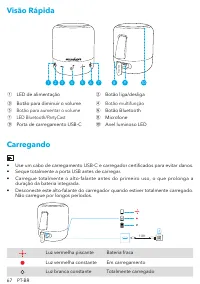
PL 62 Migająca czerwona dioda Niski poziom naładowaniaŚwiatło ciągłe czerwone Trwa ładowanie Światło ciągłe białe Pełny poziom naładowania Włączanie i wyłączanie & Efekty świetlne Aby włączyć/wyłączyć, nacisnąć i przytrzymać przycisk zasilania przez 2 sekundy.Aby włączyć lub wyłączyć efekty świe...
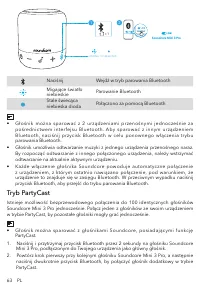
Page 65 - Tryb PartyCast
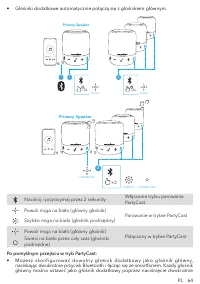
63 PL 1 ×1 PAIRING CONNECTED Soundcore Mini 3 Pro 2 Soundcore Mini 3 Pro Soundcore Mini 3 Pro Naciśnij Wejdź w tryb parowania Bluetooth Migające światło niebieskie Parowanie Bluetooth Stale świecąca niebieska dioda Połączono za pomocą Bluetooth • Głośnik można sparować z 2 urządzeniami przenośnymi j...
Page 67 - Przyciski sterujące; Aplikacja Soundcore
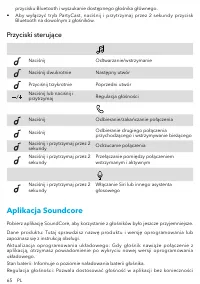
65 PL przycisku Bluetooth i wyszukanie dostępnego głośnika głównego. • Aby wyłączyć tryb PartyCast, naciśnij i przytrzymaj przez 2 sekundy przycisk Bluetooth na dowolnym z głośników. Przyciski sterujące Naciśnij Odtwarzanie/wstrzymanie Naciśnij dwukrotnie Następny utwór Przyciśnij trzykrotnie Poprze...
Page 68 - Dane techniczne
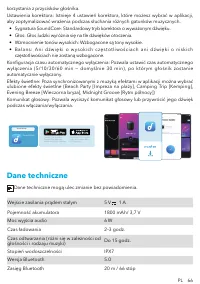
PL 66 korzystania z przycisków głośnika.Ustawienia korektora: Istnieje 4 ustawień korektora, które możesz wybrać w aplikacji, aby zoptymalizować wrażenia podczas słuchania różnych gatunków muzycznych. • Sygnatura SoundCore: Standardowy tryb korektora o wyważonym dźwięku.• Głos: Głos ludzki wyróżnia ...
Page 69 - Visão Rápida; Carregando
67 PT-BR Visão Rápida Mini 3 Pro 2 1 3 4 5 6 7 8 9 10 ① LED de alimentação ② Botão liga/desliga ③ Botão para diminuir o volume ④ Botão multifunção ⑤ Botão para aumentar o volume ⑥ Botão Bluetooth ⑦ LED Bluetooth/PartyCast ⑧ Microfone ⑨ Porta de carregamento USB-C ⑩ Anel luminoso LED Carregando • Use...
Page 70 - Ligando/desligando E Efeitos de luz; Como usar o Soundcore Mini 3 Pro
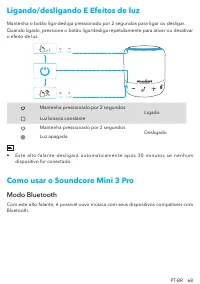
PT-BR 68 Ligando/desligando E Efeitos de luz Mantenha o botão liga-desliga pressionado por 2 segundos para ligar ou desligar.Quando ligado, pressione o botão liga/desliga repetidamente para ativar ou desativar o efeito de luz. 2s ×1 OFF ON OFF ON Mantenha pressionado por 2 segundos Ligado Luz branca...
Page 73 - Botões de controle; Aplicativo Soundcore
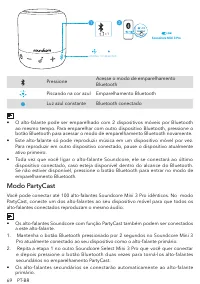
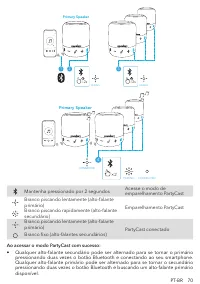
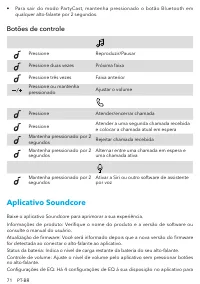
71 PT-BR • Para sair do modo PartyCast, mantenha pressionado o botão Bluetooth em qualquer alto-falante por 2 segundos. Botões de controle Pressione Reproduzir/Pausar Pressione duas vezes Próxima faixa Pressione três vezes Faixa anterior Pressione ou mantenha pressionado Ajustar o volume Pressione A...
Page 74 - Especificações
PT-BR 72 otimizar a sua experiência enquanto ouve diferentes estilos musicais. • Assinatura Soundcore: Modo EQ normal com som bem balanceado.• Voz: Vozes se destacam mais claramente de outros sons do ambiente.• Turbo de Agudos: Altas frequências são elevadas.• Balanceado: Sem aumento de sons de alta...
Page 75 - Краткий обзор; Зарядка
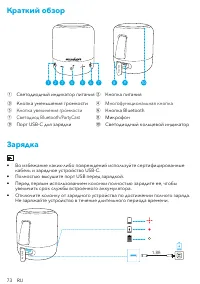
73 RU Краткий обзор Mini 3 Pro 2 1 3 4 5 6 7 8 9 10 ① Светодиодный индикатор питания ② Кнопка питания ③ Кнопка уменьшения громкости ④ Многофункциональная кнопка ⑤ Кнопка увеличения громкости ⑥ Кнопка Bluetooth ⑦ Светодиод Bluetooth/PartyCast ⑧ Микрофон ⑨ Порт USB-C для зарядки ⑩ Светодиодный кольцев...
Page 76 - Использование Soundcore Mini 3 Pro; Режим Bluetooth
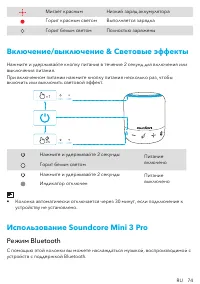
RU 74 Мигает красным Низкий заряд аккумулятора Горит красным светом Выполняется зарядка Горит белым светом Полностью заряжены Включение/выключение & Световые эффекты Нажмите и удерживайте кнопку питания в течение 2 секунд для включения или выключения питания.При включенном питании нажмите кнопку...
Page 77 - Режим PartyCast
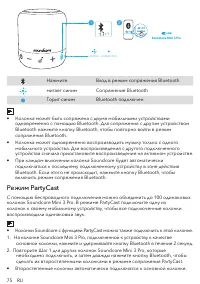
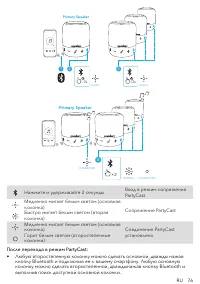
75 RU 1 ×1 PAIRING CONNECTED Soundcore Mini 3 Pro 2 Soundcore Mini 3 Pro Soundcore Mini 3 Pro Нажмите Вход в режим сопряжения Bluetooth мигает синим Сопряжение Bluetooth Горит синим Bluetooth подключен • Колонка может быть сопряжена с двумя мобильными устройствами одновременно с помощью Bluetooth. Д...
Page 79 - Кнопки управления; Приложение Soundcore
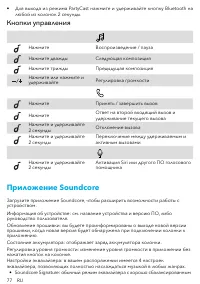
77 RU • Для выхода из режима PartyCast нажмите и удерживайте кнопку Bluetooth на любой из колонок 2 секунды. Кнопки управления Нажмите Воспроизведение / пауза Нажмите дважды Следующая композиция Нажмите трижды Предыдущая композиция Нажмите или нажмите и удерживайте Регулировка громкости Нажмите Прин...
Page 80 - Технические характеристики
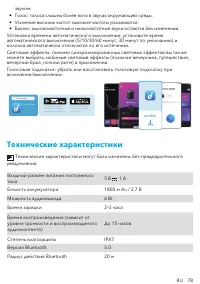
RU 78 звуком. • Голос: голоса слышны более ясно в звуках окружающей среды. • Усиление высоких частот: высокие частоты усиливаются. • Баланс: высокочастотные и низкочастотные звуки остаются без изменений. Установка времени автоматического выключения: установите время автоматического выключения (5/10/...
Page 81 - Överblick; Laddar
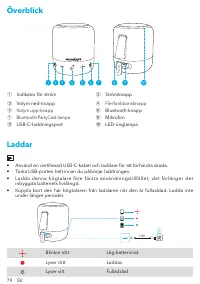
79 SV Överblick Mini 3 Pro 2 1 3 4 5 6 7 8 9 10 ① Indikator för ström ② Strömknapp ③ Volym ned-knapp ④ Flerfunktionsknapp ⑤ Volym upp-knapp ⑥ Bluetooth-knapp ⑦ Bluetooth/PartyCast-lampa ⑧ Mikrofon ⑨ USB-C-laddningsport ⑩ LED-ringlampa Laddar • Använd en certifierad USB-C-kabel och laddare för att fö...
Page 82 - Använda Soundcore Mini 3 Pro
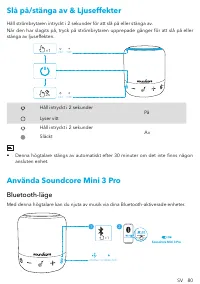
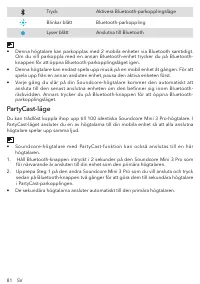
SV 80 Slå på/stänga av & Ljuseffekter Håll strömbrytaren intryckt i 2 sekunder för att slå på eller stänga av.När den har slagits på, tryck på strömbrytaren upprepade gånger för att slå på eller stänga av ljuseffekten. 2s ×1 OFF ON OFF ON Håll intryckt i 2 sekunder På Lyser vittHåll intryckt i 2...
Page 85 - Knappkontroller
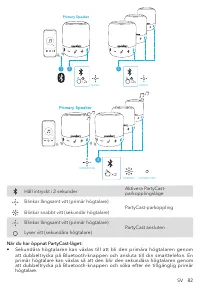
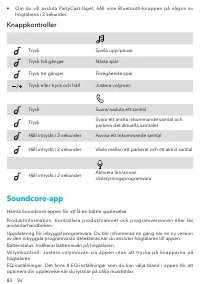
83 SV • Om du vill avsluta PartyCast-läget, håll inne Bluetooth-knappen på någon av högtalarna i 2 sekunder. Knappkontroller Tryck Spela upp/pausa Tryck två gånger Nästa spår Tryck tre gånger Föregående spår Tryck eller tryck och håll Justera volymen Tryck Svara/avsluta ett samtal Tryck Svara ett an...
Page 87 - Genel Bakış; Şarj etme
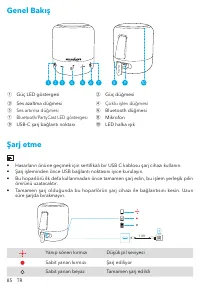
85 TR Genel Bakış Mini 3 Pro 2 1 3 4 5 6 7 8 9 10 ① Güç LED göstergesi ② Güç düğmesi ③ Ses azaltma düğmesi ④ Çoklu işlev düğmesi ⑤ Ses artırma düğmesi ⑥ Bluetooth düğmesi ⑦ Bluetooth/PartyCast LED göstergesi ⑧ Mikrofon ⑨ USB-C şarj bağlantı noktası ⑩ LED halka ışık Şarj etme • Hasarların önüne geçme...
Page 88 - Soundcore Mini 3 Pro hoparlörünüzü kullanma; Bluetooth Modu
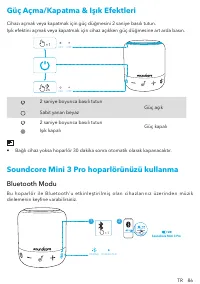
TR 86 Güç Açma/Kapatma & Işık Efektleri Cihazı açmak veya kapatmak için güç düğmesini 2 saniye basılı tutun.Işık efektini açmak veya kapatmak için cihaz açıkken güç düğmesine art arda basın. 2s ×1 OFF ON OFF ON 2 saniye boyunca basılı tutun Güç açık Sabit yanan beyaz2 saniye boyunca basılı tutun...
Page 89 - PartyCast Modu
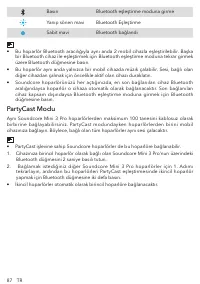
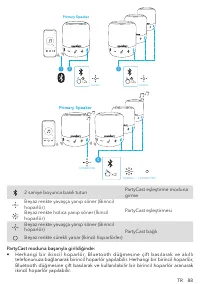
87 TR Basın Bluetooth eşleştirme moduna girme Yanıp sönen mavi Bluetooth Eşleştirme Sabit mavi Bluetooth bağlandı • Bu hoparlör Bluetooth aracılığıyla aynı anda 2 mobil cihazla eşleştirilebilir. Başka bir Bluetooth cihaz ile eşleştirmek için Bluetooth eşleştirme moduna tekrar girmek üzere Bluetooth ...
Page 91 - Düğme Kontrolleri; Soundcore Uygulaması
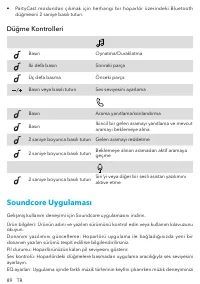
89 TR • PartyCast modundan çıkmak için herhangi bir hoparlör üzerindeki Bluetooth düğmesini 2 saniye basılı tutun. Düğme Kontrolleri Basın Oynatma/Duraklatma İki defa basın Sonraki parça Üç defa basma Önceki parça Basın veya basılı tutun Ses seviyesini ayarlama Basın Arama yanıtlama/sonlandırma Bası...
Page 92 - Teknik Özellikler
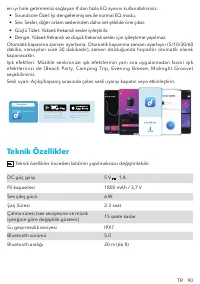
TR 90 en iyi hale getirmenizi sağlayan 4'dan fazla EQ ayarını kullanabilirsiniz. • Soundcore Özel: İyi dengelenmiş ses ile normal EQ modu.• Ses: Sesler, diğer ortam seslerinden daha net şekilde öne çıkar.• Güçlü Tizler: Yüksek frekanslı sesler iyileştirilir.• Denge: Yüksek frekanslı ve düşük frekans...
Page 93 - 各部分の名称; 充電
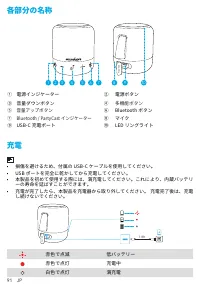
91 JP 各部分の名称 Mini 3 Pro 2 1 3 4 5 6 7 8 9 10 ① 電源インジケーター ② 電源ボタン ③ 音量ダウンボタン ④ 多機能ボタン ⑤ 音量アップボタン ⑥ Bluetooth ボタン ⑦ Bluetooth / PartyCast インジケーター ⑧ マイク ⑨ USB-C 充電ポート ⑩ LED リングライト 充電 • 損傷を避けるため、付属の USB-C ケーブルを使用してください。 • USB ポートを完全に乾かしてから充電してください。 • 本製品を初めて使用する際には、満充電してください。これにより、内蔵バッテリ ーの寿命を延ばすことができます...
Page 94 - 本製品の使用方法; Bluetooth モード
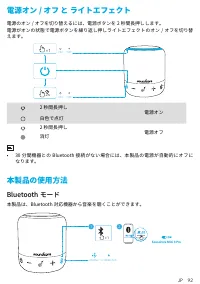
JP 92 電源オン / オフ と ライトエフェクト 電源のオン / オフを切り替えるには、電源ボタンを 2 秒間長押しします。電源がオンの状態で電源ボタンを繰り返し押しライトエフェクトのオン / オフを切り替 えます。 2s ×1 OFF ON OFF ON 2 秒間長押し 電源オン 白色で点灯2 秒間長押し 電源オフ 消灯 • 30 分間機器との Bluetooth 接続がない場合には、本製品の電源が自動的にオフに なります。 本製品の使用方法 Bluetooth モード 本製品は、Bluetooth 対応機器から音楽を聴くことができます。 1 ×1 PAIRING CONNECTED S...
Page 95 - PartyCast モード
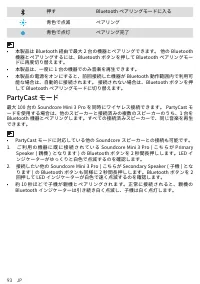
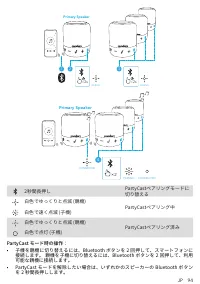
93 JP 押す Bluetooth ペアリングモードに入る 青色で点滅 ペアリング 青色で点灯 ペアリング完了 • 本製品は Bluetooth 経由で最大 2 台の機器とペアリングできます。 他の Bluetooth 機器とペアリングするには、Bluetooth ボタンを押して Bluetooth ペアリングモー ドに再度切り替えます。 • 本製品は、一度に 1 台の機器でのみ音楽を再生できます。• 本製品の電源をオンにすると、前回接続した機器が Bluetooth 動作範囲内で利用可 能な場合は、自動的に接続されます。 接続されない場合は、Bluetooth ボタンを押 して Bluet...
Page 97 - ボタンの操作方法; Soundcore アプリ
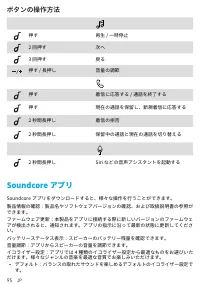
95 JP ボタンの操作方法 押す 再生 / 一時停止 2 回押す 次へ 3 回押す 戻る 押す / 長押し 音量の調節 押す 着信に応答する / 通話を終了する 押す 現在の通話を保留し、新規着信に応答する 2 秒間長押し 着信の拒否 2 秒間長押し 保留中の通話と現在の通話を切り替える 2 秒間長押し Siri などの音声アシスタントを起動する Soundcore アプリ Soundcore アプリをダウンロードすると、様々な操作を行うことができます。製品情報の確認:製品名やソフトウェアバージョンの確認、および取扱説明書の参照が できます。ファームウェア更新:本製品をアプリに接続する際に新...
Page 98 - 製品の仕様
JP 96 • ボイス:他の音に比べボーカル音がより明瞭に聞こえます。• トレブルブースト:高い周波数の音が強化されます。• バランス:高い周波数および低い周波数の増減をせずにサウンドをお楽しみいただけ ます。 オートパワーオフ設定:設定時間に合わせてスピーカーの電源が自動的にオフになりま す。5 分・10 分・30 分 ( デフォルト )・60 分から選択できます。ライトエフェクト : 音楽に合わせて変化するライトエフェクトに加え、お気に入りのラ イトエフェクト (Beach Party、Camping Trip、Evening Breeze、Midnight Groove) を アプリで選...
Page 99 - 요약; 충전
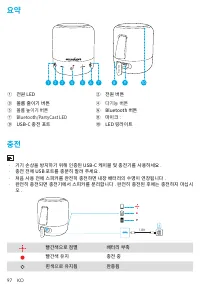
97 KO 요약 Mini 3 Pro 2 1 3 4 5 6 7 8 9 10 ① 전원 LED ② 전원 버튼 ③ 볼륨 줄이기 버튼 ④ 다기능 버튼 ⑤ 볼륨 높이기 버튼 ⑥ Bluetooth 버튼 ⑦ Bluetooth/PartyCast LED ⑧ 마이크 : ⑨ USB-C 충전 포트 ⑩ LED 링라이트 충전 • 기기 손상을 방지하기 위해 인증된 USB-C 케이블 및 충전기를 사용하세요 . • 충전 전에 USB 포트를 충분히 말려 주세요 . • 처음 사용 전에 스피커를 완전히 충전하면 내장 배터리의 수명이 연장됩니다 . • 완전히 충전되면 충...
Page 100 - Soundcore Mini 3 Pro 사용하기; Bluetooth 모드
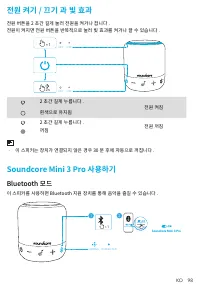
KO 98 전원 켜기 / 끄기 과 빛 효과 전원 버튼을 2 초간 길게 눌러 전원을 켜거나 끕니다 .전원이 켜지면 전원 버튼을 반복적으로 눌러 빛 효과를 켜거나 끌 수 있습니다 . 2s ×1 OFF ON OFF ON 2 초간 길게 누릅니다 . 전원 켜짐 흰색으로 유지됨2 초간 길게 누릅니다 . 전원 꺼짐 꺼짐 • 이 스피커는 장치가 연결되지 않은 경우 30 분 후에 자동으로 꺼집니다 . Soundcore Mini 3 Pro 사용하기 Bluetooth 모드 이 스피커를 사용하면 Bluetooth 지원 장치를 통해 음악을 즐길 수 있습니...
Page 101 - PartyCast 모드
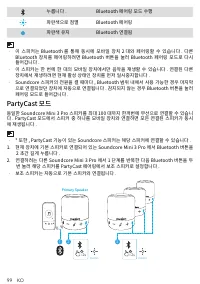
99 KO 누릅니다 . Bluetooth 페어링 모드 수행 파란색으로 점멸 Bluetooth 페어링 파란색 유지 Bluetooth 연결됨 • 이 스피커는 Bluetooth 를 통해 동시에 모바일 장치 2 대와 페어링할 수 있습니다 . 다른 Bluetooth 장치를 페어링하려면 Bluetooth 버튼을 눌러 Bluetooth 페어링 모드로 다시 들어갑니다 . • 이 스피커는 한 번에 한 대의 모바일 장치에서만 음악을 재생할 수 있습니다 . 연결된 다른 장치에서 재생하려면 현재 활성 상태인 장치를 먼저 일시중지합니다 . • Soundc...
Page 102 - 버튼 컨트롤
KO 100 × 2 4 PAIRING CONNECTED CONNECTED Primary Speaker 2초간 길게 누릅니다. PartyCast 페어링 모드 시작 흰색으로 느리게 깜박임(기본 스피커) PartyCast 페어링 흰색으로 빠르게 깜박임(보조 스피커) 흰색으로 느리게 깜박임(기본 스피커) PartyCast 연결됨 흰색으로 계속 켜져 있음(보조 스피커) PartyCast 모드에 진입하면 다음의 작업을 수행할 수 있습니다 . • Bluetooth 버튼을 두 번 누르고 스마트폰에 연결하여 보조 스피커를 주 스피커로 전환할 수 있...
Page 103 - Soundcore 앱을
101 KO 누릅니다 . 전화 받기 / 통화 종료 누릅니다 . 두 번째 수신 통화 응답 및 현재 통화를 대기상태 로 두기 2 초간 길게 누릅니다 . 수신 통화 응답 거부 2 초간 길게 누릅니다 . 대기 중인 통화와 연결된 통화 간 전환 2 초간 길게 누릅니다 . Siri 또는 기타 음성 지원 소프트웨어 활성화 Soundcore 앱을 경험 향상을 위해 Soundcore 앱을 다운로드합니다 .제품 정보 : 제품명과 소프트웨어 버전을 확인하거나 사용 설명서를 읽습니다 .펌웨어 업데이트 : 스피커를 앱에 연결할 때 새로운 버전의 펌웨어가 ...
Page 104 - 사양
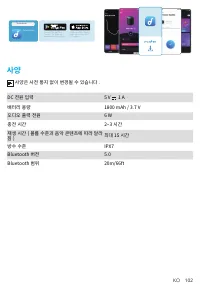
KO 102 Google Play and the Google Play logo are trademarks of Google Inc. Apple and the Apple logo are trademarks of Apple Inc. Soundcore Soundcore 사양 사양은 사전 통지 없이 변경될 수 있습니다 . DC 전원 입력 5 V 1 A 배터리 용량 1800 mAh / 3.7 V 오디오 출력 전원 6 W 충전 시간 2~3 시간 재생 시간 ( 볼륨 수준과 음악 콘텐츠에 따라 달라 짐 ) 최대 15 시간 방수 수준 IPX7 Bl...
Page 105 - 概览; 充电
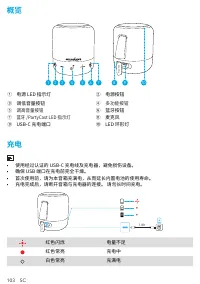
103 SC 概览 Mini 3 Pro 2 1 3 4 5 6 7 8 9 10 ① 电源 LED 指示灯 ② 电源按钮 ③ 调低音量按钮 ④ 多功能按钮 ⑤ 调高音量按钮 ⑥ 蓝牙按钮 ⑦ 蓝牙 /PartyCast LED 指示灯 ⑧ 麦克风 ⑨ USB-C 充电端口 ⑩ LED 环形灯 充电 • 使用经过认证的 USB-C 充电线及充电器,避免损伤设备。 • 确保 USB 端口在充电前完全干燥。 • 首次使用前,请为本音箱充满电,从而延长内置电池的使用寿命。 • 充电完成后,请断开音箱与充电器的连接。 请勿长时间充电。 1.8ft Mini 3 Pro 红色闪烁 电量不足 红色常亮 充...
Page 106 - 使用 Soundcore Mini 3 Pro; 蓝牙模式
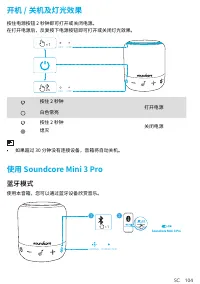
SC 104 开机 / 关机及灯光效果 按住电源按钮 2 秒钟即可打开或关闭电源。在打开电源后,反复按下电源按钮即可打开或关闭灯光效果。 2s ×1 OFF ON OFF ON 按住 2 秒钟 打开电源 白色常亮按住 2 秒钟 关闭电源 熄灭 • 如果超过 30 分钟没有连接设备,音箱将自动关机。 使用 Soundcore Mini 3 Pro 蓝牙模式 使用本音箱,您可以通过蓝牙设备欣赏音乐。 1 ×1 PAIRING CONNECTED Soundcore Mini 3 Pro 2 Soundcore Mini 3 Pro Soundcore Mini 3 Pro
Page 107 - PartyCast 模式
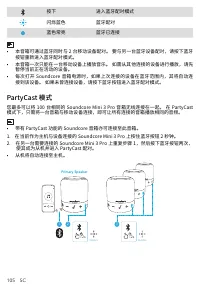
105 SC 按下 进入蓝牙配对模式 闪烁蓝色 蓝牙配对 蓝色常亮 蓝牙已连接 • 本音箱可通过蓝牙同时与 2 台移动设备配对。 要与另一台蓝牙设备配对,请按下蓝牙 按钮重新进入蓝牙配对模式。 • 本音箱一次只能在一台移动设备上播放音乐。 如需从其他连接的设备进行播放,请先 暂停当前正在活动的设备。 • 每次打开 Soundcore 音箱电源时,如果上次连接的设备在蓝牙范围内,其将自动连 接到该设备。 如果未曾连接设备,请按下蓝牙按钮进入蓝牙配对模式。 PartyCast 模式 您最多可以将 100 台相同的 Soundcore Mini 3 Pro 音箱无线连接在一起。 在 PartyCas...
Page 108 - 按钮控制
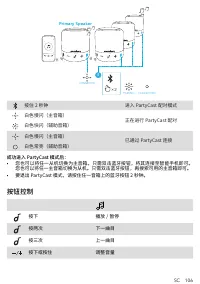
SC 106 × 2 4 PAIRING CONNECTED CONNECTED Primary Speaker 按住 2 秒钟 进入 PartyCast 配对模式 白色慢闪(主音箱) 正在进行 PartyCast 配对 白色快闪(辅助音箱) 白色慢闪(主音箱) 已通过 PartyCast 连接 白色常亮(辅助音箱) 成功进入 PartyCast 模式后: • 您也可以将任一从机切换为主音箱。只需双击蓝牙按钮,将其连接至智能手机即可。 您也可以将任一主音箱切换为从机。只需双击蓝牙按钮,再搜索可用的主音箱即可。 • 要退出 PartyCast 模式,请按住任一音箱上的蓝牙按钮 2 秒钟。 按钮控...
Page 109 - Soundcore 应用程序
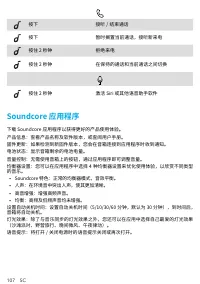
107 SC 按下 接听 / 结束通话 按下 暂时搁置当前通话,接听新来电 按住 2 秒钟 拒绝来电 按住 2 秒钟 在保持的通话和当前通话之间切换 按住 2 秒钟 激活 Siri 或其他语音助手软件 Soundcore 应用程序 下载 Soundcore 应用程序以获得更好的产品使用体验。产品信息:查看产品名称及软件版本,或查阅用户手册。固件更新:如果检测到新固件版本,您会在音箱连接到应用程序时收到通知。电池状态:显示音箱剩余的电池电量。音量控制:无需使用音箱上的按钮,通过应用程序即可调整音量。均衡器设置:您可以在应用程序中选择 4 种均衡器设置来优化使用体验,以欣赏不同类型 的音乐。 • ...
Page 110 - 产品参数
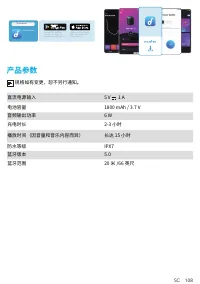
SC 108 Google Play and the Google Play logo are trademarks of Google Inc. Apple and the Apple logo are trademarks of Apple Inc. Soundcore Soundcore 产品参数 规格如有变更,恕不另行通知。 直流电源输入 5 V 1 A 电池容量 1800 mAh / 3.7 V 音频输出功率 6 W 充电时长 2-3 小时 播放时间(因音量和音乐内容而异) 长达 15 小时 防水等级 IPX7 蓝牙版本 5.0 蓝牙范围 20 米 /66 英尺
Page 111 - 概觀
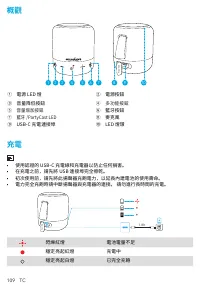
109 TC 概觀 Mini 3 Pro 2 1 3 4 5 6 7 8 9 10 ① 電源 LED 燈 ② 電源按鈕 ③ 音量降低按鈕 ④ 多功能按鈕 ⑤ 音量增加按鈕 ⑥ 藍牙按鈕 ⑦ 藍牙 /PartyCast LED ⑧ 麥克風 ⑨ USB-C 充電連接埠 ⑩ LED 燈環 充電 • 使用認證的 USB-C 充電線和充電器以防止任何損害。 • 在充電之前,請先將 USB 連接埠完全擦乾。 • 初次使用前,請先將此揚聲器充飽電力,以延長內建電池的使用壽命。 • 電力完全充飽時請中斷揚聲器與充電器的連接。 請勿進行長時間的充電。 1.8ft Mini 3 Pro 閃爍紅燈 電池電量不足 穩...
Page 112 - 使用您的 Soundcore Mini 3 Pro; 藍牙模式
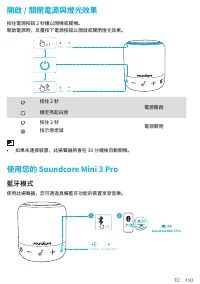
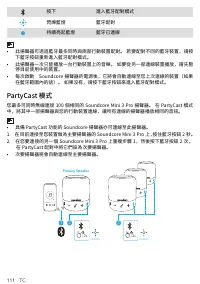
TC 110 開啟 / 關閉電源與燈光效果 按住電源按鈕 2 秒鐘以開機或關機。開啟電源時,反覆按下電源按鈕以開啟或關閉燈光效果。 2s ×1 OFF ON OFF ON 按住 2 秒 電源開啟 穩定亮起白燈按住 2 秒 電源關閉 指示燈熄滅 • 如果未連接裝置,此揚聲器將會在 30 分鐘後自動關機。 使用您的 Soundcore Mini 3 Pro 藍牙模式 使用此揚聲器,您可透過具備藍牙功能的裝置享受音樂。 1 ×1 PAIRING CONNECTED Soundcore Mini 3 Pro 2 Soundcore Mini 3 Pro Soundcore Mini 3 Pro
Page 114 - 按鈕控制項
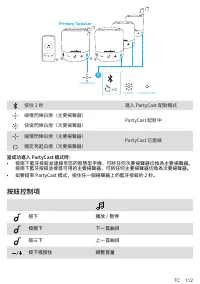
TC 112 × 2 4 PAIRING CONNECTED CONNECTED Primary Speaker 按住 2 秒 進入 PartyCast 配對模式 緩慢閃爍白燈(主要揚聲器) PartyCast 配對中 快速閃爍白燈(次要揚聲器) 緩慢閃爍白燈(主要揚聲器) PartyCast 已連線 穩定亮起白燈(次要揚聲器) 當成功進入 PartyCast 模式時: • 按兩下藍牙按鈕並連線至您的智慧型手機,可將任何次要揚聲器切換為主要揚聲器。 按兩下藍牙按鈕並搜尋可用的主要揚聲器,可將任何主要揚聲器切換為次要揚聲器。 • 如要結束 PartyCast 模式,按住任一個揚聲器上的藍牙按鈕約...
Page 115 - Soundcore 應用程式
113 TC 按下 接聽 / 結束通話 按下 接聽第二通來電並保留目前的通話 按住 2 秒 拒接來電 按住 2 秒 在保留中的通話和進行中的通話之間切換 按住 2 秒 啟動 Siri 或其他語音助理軟體 Soundcore 應用程式 下載 Soundcore 應用程式,享受更佳的體驗。產品資訊:檢查產品名稱和軟體版本,或閱讀使用者手冊。韌體更新:當您使用本應用程式連線至揚聲器時,將會在偵測到新的韌體版本時通知您。電池狀態:指出您揚聲器剩餘的電池電量。音量控制:透過應用程式調整音量,無需按下揚聲器上的按鈕。EQ 設定:本應用程式提供 4 個 EQ 設定,讓您最佳化聆聽體驗,享受不同類別的音樂。 ...
Page 116 - 規格
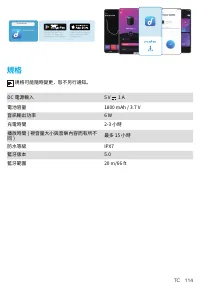
TC 114 Google Play and the Google Play logo are trademarks of Google Inc. Apple and the Apple logo are trademarks of Apple Inc. Soundcore Soundcore 規格 規格可能隨時變更,恕不另行通知。 DC 電源輸入 5 V 1 A 電池容量 1800 mAh / 3.7 V 音訊輸出功率 6 W 充電時間 2-3 小時 播放時間 ( 視音量大小與音樂內容而有所不 同 ) 最多 15 小時 防水等級 IPX7 藍牙版本 5.0 藍牙範圍 20 m/66 ft
Page 117 - ةعيرس ةرظن; نحشلا
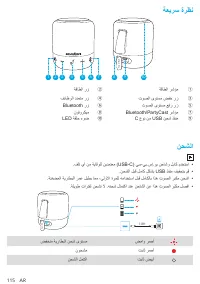
115 AR ةعيرس ةرظن Mini 3 Pro 2 1 3 4 5 6 7 8 9 10 ةقاطلا رز ② ةقاطلا رشؤم ① فئاظولا ددعتم رز ④ توصلا ىوتسم ضفخ رز ③ Bluetooth رز ⑥ توصلا ىوتسم عفر رز ⑤ نوفوركيم ⑧ Bluetooth/PartyCast رشؤم ⑦ LED ةقلح ءوض ⑩ C عون نم USB نحش ذفنم ⑨ نحشلا .فلت يأ نم ةياقولل نيدمتعم )USB-C( يس-يب.سإ.وي نحاشو لباك مدختسا ...
Page 118 - ةءاضلإا تاريثأت و ليغشتلا فاقيإ/ليغشت; كب صاخلا Soundcore Mini 3 Pro زاهج مادختسا; Bluetooth عضو
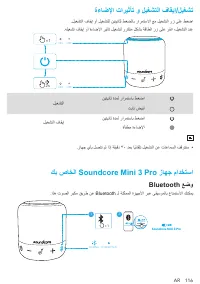
AR 116 ةءاضلإا تاريثأت و ليغشتلا فاقيإ/ليغشت .ليغشتلا فاقيإ وأ ليغشتلل نيتيناثل طغضلاب رارمتسلاا عم ليغشتلا رز ىلع طغضا .هليغشت فاقيإ وأ ةءاضلإا ريثأت ليغشتل رركتم ٍلكشب ةقاطلا رز ىلع رقنا ،ليغشتلا دنع 2s ×1 OFF ON OFF ON ليغشتلا نيتيناث ةدمل رارمتساب طغضا تباث ضيبأ ليغشتلا فاقيإ نيتيناث ةدمل رارمتس...
Page 119 - PartyCast عضو
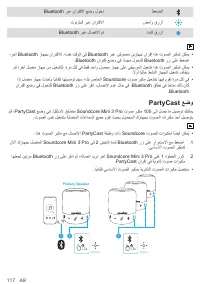
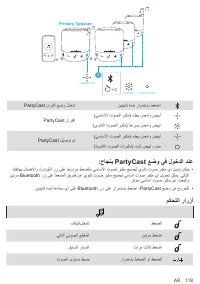
117 AR Bluetooth ربع نارتقلاا عضو لوخد طغضلا ثوتولبلا ربع نارتقلاا ضماو قرزأ Bluetooth ربع لاصتلاا مت تباث قرزأ ،رخآ Bluetooth زاهجب نارتقلال .هسفن تقولا يف Bluetooth ربع نيلومحم نيزاهج نارقإ اذه توصلا ربكمل نكمي .Bluetooth نارتقا عضو يف ا ًددجم لوخدلل Bluetooth رز ىلع طغضا مق ؛رخآ لصتم زاهج نم ليغش...
Page 120 - :حاجنب PartyCast عضو يف لوخدلا دنع
AR 118 × 2 4 PAIRING CONNECTED CONNECTED Primary Speaker PartyCast نارتقا عضو لاخدإ نيتيناث ةدمل رارمتساب طغضا PartyCast نارتقا )يساسلأا توصلا ربكم( ءطبب ضماو ضيبأ )يوناثلا توصلا ربكم( ةعرسب ضماو ضيبأ PartyCast ليصوت مت )يساسلأا توصلا ربكم( ءطبب ضماو ضيبأ )ةيوناثلا توصلا تاربكم( تباث ضيبأ ءوض :حاجنب...
Page 121 - Soundcore قيبطت
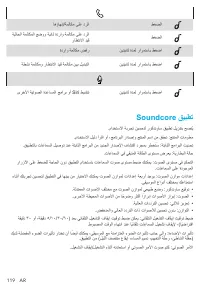
119 AR اهؤاهنإ/ةملاكم ىلع درلا طغضلا ةيلاحلا ةملاكملا عضوو ةيناث ةدراو ةملاكم ىلع درلا راظتنلاا ديق طغضلا ةدراو ةملاكم ضفر نيتيناث ةدمل رارمتساب طغضا ةطشن ةملاكمو راظتنلاا ديق ةملاكم نيب ليدبتلا نيتيناث ةدمل رارمتساب طغضا ىرخلأا ةيتوصلا ةدعاسملا جمارب وأ Siri طيشنت نيتيناث ةدمل رارمتساب طغضا Soundco...
Page 122 - تافصاوملا
AR 120 Google Play and the Google Play logo are trademarks of Google Inc. Apple and the Apple logo are trademarks of Apple Inc. Soundcore Soundcore تافصاوملا .راعشإ نود رييغتلل ةضرع تافصاوملا ريبمأ 1 تلوف 5 رمتسملا رايتلا ةقاط لاخدإ تلوف 3.7 دهجب / ةعاسلا يف ريبمأ يللم 1800 ةيراطبلا ةعس طاو 6 توصلا ...
Page 123 - הריהמ הריקס; הניעט
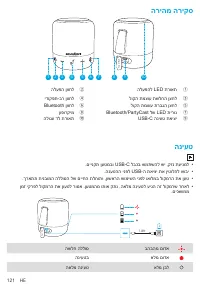
121 HE הריהמ הריקס Mini 3 Pro 2 1 3 4 5 6 7 8 9 10 הלעפה ןצחל ② הלעפהל LED תרואת ① ידוקפת-בר ןצחל ④ לוקה תמצוע תשלחה ןצחל ③ Bluetooth ןצחל ⑥ לוקה תמצוע תרבגה ןצחל ⑤ ןופורקימ ⑧ Bluetooth/PartyCast לש LED תירונ ⑦ הלוגע דל תרואת ⑩ USB-C הניעט תאיצי ⑨ הניעט .םיינקת ןעטמבו USB-C לבכב שמתשהל שי ,קזנ תעינמ...
Page 124 - הרואת יטקפא הו יוביכ/הלעפה; Soundcore Mini 3 Pro-ה רישכמב שומיש; Bluetooth בצמ
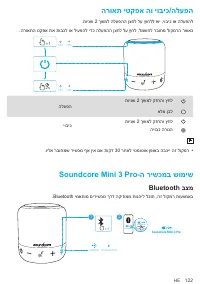
HE 122 הרואת יטקפא הו יוביכ/הלעפה .תוינש 2 ךשמל הלעפהה ןצחל לע ץוחלל שי ,יוביכ וא הלעפהל .הרואתה טקפא תא תובכל וא ליעפהל ידכ הלעפהה ןצחל לע ץחל ,למשחל רבוחמ לוקמרה רשאכ 2s ×1 OFF ON OFF ON הלעפה תוינש 2 ךשמל קזחהו ץחל אלמ ןבל יוביכ תוינש 2 ךשמל קזחהו ץחל היובכ הרונה .וילא רבוחמש רישכמ ףא ןיא םא תוקד...
Page 125 - PartyCast בצמ
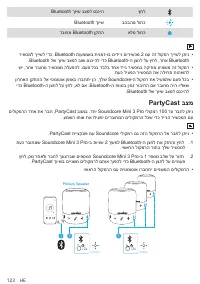
123 HE Bluetooth ךויש בצמל סנכיה ץחל Bluetooth ךויש בהבהמ לוחכ רבוחמ Bluetooth ןקתה אלמ לוחכ רישכמל ךיישל ידכ .Bluetooth תועצמאב תינמז-וב םידיינ םירישכמ 2 םע הז לוקמר ךיישל ןתינ .Bluetooth לש ךויש בצמל בוש סנכיהל ידכ Bluetooth-ה ןצחל לע ץחל ,רחא Bluetooth שי ,רחא רבוחמ רישכממ הלעפהל .םעפ לכב דבלב דח...
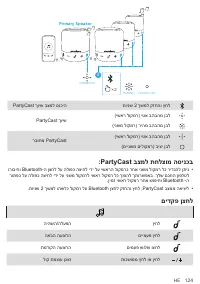
Page 126 - :PartyCast בצמל תחלצומ הסינכב
HE 124 × 2 4 PAIRING CONNECTED CONNECTED Primary Speaker PartyCast ךויש בצמל סנכיה תוינש 2 ךשמל קזחהו ץחל PartyCast ךויש )ישאר לוקמר( יטא בהבהמ ןבל )ינשמ לוקמר( ריהמ בהבהמ ןבל רבוחמ PartyCast )ישאר לוקמר( יטא בהבהמ ןבל )םיינשמ םילוקמר( ביצי ןבל :PartyCast בצמל תחלצומ הסינכב ורוביחו Bluetooth-ה ןצחל ...
Page 127 - Soundcore ןומושיי
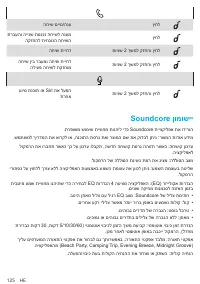
125 HE החיש םייס/הנע ץחל תרבעהו היינש תסנכנ החישל הנעמ הקזחהל תיחכונה החישה ץחל החיש תייחד תוינש 2 ךשמל קזחהו ץחל החיש ןיב רבעמו החיש תייחד הליעפ החישל תקזחומ תוינש 2 ךשמל קזחהו ץחל עויס תנכות וא Siri תא לעפה תרחא תוינש 2 ךשמל קזחהו ץחל Soundcore ןומושיי .תרפושמ שומיש תייווחמ תונהיל ידכ Soundcore תי...
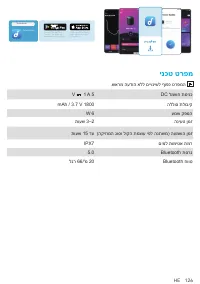
Page 128 - ינכט טרפמ
HE 126 Google Play and the Google Play logo are trademarks of Google Inc. Apple and the Apple logo are trademarks of Apple Inc. Soundcore Soundcore ינכט טרפמ .שארמ העדוה אלל םייונישל ףופכ טרפמה V 1 A 5 DC למשח תסינכ mAh / 3.7 V 1800 הללוס תלוביק W 6 עמש קפסה תועש 3–2 הניעט ןמז תועש 15 דע )הקיזומה גו...