Page 2 - Specifications
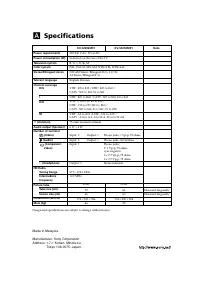
A Specifications Power requirements Power consumption (W) Television system Color system Stereo/Bilingual stereo Teletext language Channel coverage B/G I D/K M 8 (Antenna) Audio output (Speaker) Number of terminal (Video) (Audio) (Component Video) i (Headphone) FM Radio Tuning Range IntermediateFreq...
Page 3 - WARNING
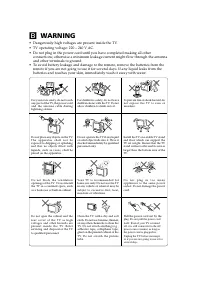
Clean the TV with a dry and softcloth. Do not use benzine, thinner,or any other chemicals to clean theTV. Do not attach anything (e.g.,adhesive tape, cellophane tape,glue) on the painted cabinet of theTV. Do not scratch the picturetube. B WARNING • Dangerously high voltages are present inside the TV...
Page 4 - Securing the TV; screws; or
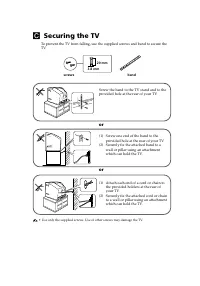
C Securing the TV To prevent the TV from falling, use the supplied screws and band to secure theTV. 20 mm 3.8 mm screws band Screw the band to the TV stand and to theprovided hole at the rear of your TV. (1) Screw one end of the band to the provided hole at the rear of your TV. (2) Securely fix the ...
Page 5 - Getting Started
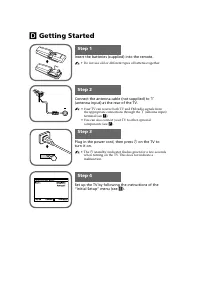
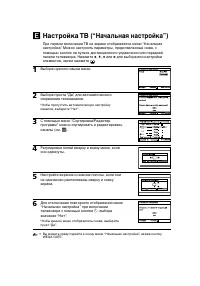
Step 2 b b 1 Step 1 Insert the batteries (supplied) into the remote. • Do not use old or different types of batteries together. Step 3 Step 4 Set up the TV by following the instructions of the“Initial Setup” menu (see E ). Plug in the power cord, then press 1 on the TV to turn it on. • The 1 (standb...
Page 7 - Connecting optional components
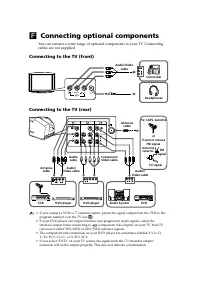
1 Y C B C R Y R L C B C R (MONO) L R (MONO) L R R L R L R L F Connecting optional components You can connect a wide range of optional components to your TV. Connectingcables are not supplied. Connecting to the TV (front) Connecting to the TV (rear) Camcorder Audio/Video cable • If you connect a VCR ...
Page 8 - TV buttons and remote control; qa
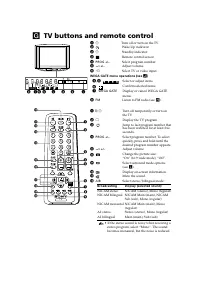
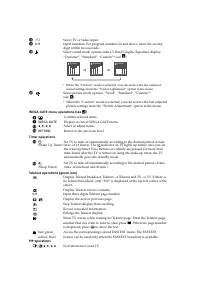
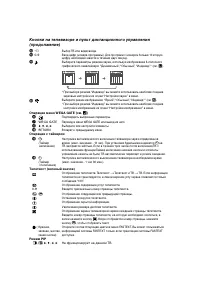
G TV buttons and remote control 1 1 Turn off or turn on the TV. 2 Wake Up indicator. 2 1 Standby indicator. 3 Remote control sensor. 4 PROG +/– Select program number. 5 2 +/– Adjust volume. 6 t Select TV or video input. WEGA GATE menu operations (see J ) 4 , 5 , , , Select or adjust items. 6 Confirm...
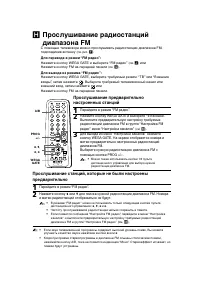
Page 10 - Listening to the FM Radio; To access to FM Radio mode:; Listening to preset stations
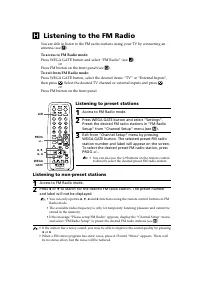
H Listening to the FM Radio You are able to listen to the FM radio stations using your TV by connecting anantenna (see F ). To access to FM Radio mode: Press WEGA GATE button and select “FM Radio” (see J ). or Press FM button on the front panel (see G ). To exit from FM Radio mode: Press WEGA GATE b...
Page 11 - Troubleshooting; ) or check the Troubleshooting guide
I Troubleshooting If you find any problem while viewing your TV, you can either use the“Factory Settings” function (see N ) or check the Troubleshooting guide below. If the problem persists, contact your Sony dealer. Snowy picture, noisy sound • Check the antenna setup and other connections.• Preset...
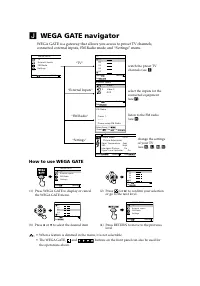
Page 13 - WEGA GATE navigator; How to use WEGA GATE
Confirm End Picture C o l o r T e m p e r a t u r e : C o o l P i c t u r e A d j u s t m e n t P i c t u r e M o d e : V i v i d V M : H i g h I n t e l l i g e n t P i c t u r e : O n S i g n a l L e v e l I n d i c a t o r : O n Select 0 1 0 2 0 3 0 4 0 5 T V Confirm Select End E x t e r n a l I ...
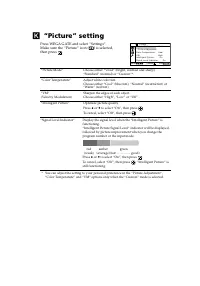
Page 14 - “Picture” setting; Press WEGA GATE and select “Settings”.
Confirm End Picture C o l o r T e m p e r a t u r e : C o o l P i c t u r e A d j u s t m e n t P i c t u r e M o d e : V i v i d V M : H i g h I n t e l l i g e n t P i c t u r e : O n S i g n a l L e v e l I n d i c a t o r : Select O n K “Picture” setting Press WEGA GATE and select “Settings”. Ma...
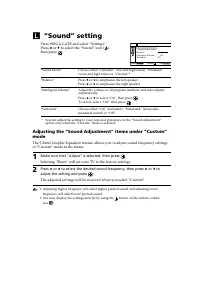
Page 16 - “Sound” setting
Confirm End Sound B a l a n c e S o u n d A d j u s t m e n t S o u n d M o d e : D y n a m i c I n t e l l i g e n t V o l u m e : O f f S u r r o u n d : O f f Select L “Sound” setting Press WEGA GATE and select “Settings”.Press V or v to select the “Sound” icon ( ), then press . “Sound Mode” Choo...
Page 17 - “Channel Setup” setting
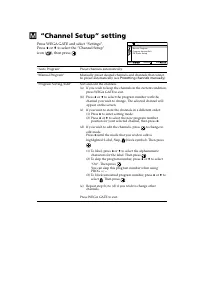
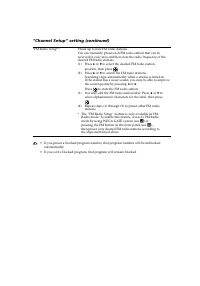
M “Channel Setup” setting Press WEGA GATE and select “Settings”.Press V or v to select the “Channel Setup” icon ( ), then press . “Auto Program” Preset channels automatically. “Manual Program” Manually preset desired channels and channels that cannotbe preset automatically (see Presetting channels m...
Page 19 - Select the desired channel.
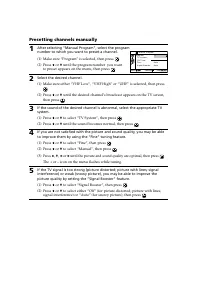
V H F L o w F i n e : T V S y s t e m : D / K : Confirm Select 0 1 A u t o S i g n a l B o o s t e r : A u t o End M a n u a l P r o g r a m P r o g r a m Presetting channels manually 1 After selecting “Manual Program”, select the programnumber to which you want to preset a channel. (1) Make sure “P...
Page 20 - “Setup” setting
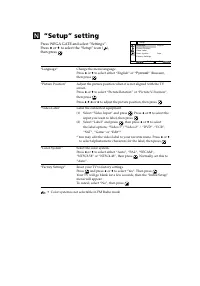
N “Setup” setting Press WEGA GATE and select “Settings”.Press V or v to select the “Setup” icon ( ), then press . “Language” Change the menu language.Press V or v to select either “English” or “ Русский ” (Russian), then press . “Picture Position” Adjust the picture position when it is not aligned w...
Page 21 - Trinitron Color TV; Инструкция по эксплуатации
Trinitron Color TV © 2007 Sony Corporation KV-SZ292 KV-SZ252 3-211-536- 12 (1) RU M91 Инструкция по эксплуатации • Перед работой с устройством внимательно прочтайте инструкциюи сохраните её для дальнейшего использования.
Page 22 - Технические характеристики
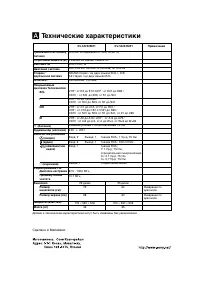
A Технические характеристики Требования к источникупитания Потребляемая мощность (Вт) Система ТВ Цветовая система Стерео /двуязычная система Teлeтeкст Покрываемыйдиапазон Телеканалов B/G I D/K M 8 (Антенна) Аудиовыход (колонки) Количество разъёмов (видео) (аудио) (компонентное видео) i (наушники) Ра...
Page 23 - • Внутри телевизора очень высокое напряжение.
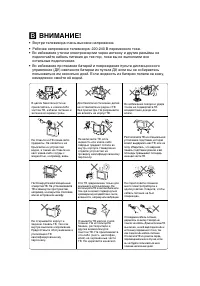
В целях безопасности неприкасайтесь к каким-либочастям ТВ, кабелю питания иантенне во время грозы. B ВНИМАНИЕ! • Внутри телевизора очень высокое напряжение. • Рабочее напряжение телевизора: 220-240 В переменного тока.• Во избежание утечки электроэнергии через антенну и другие разъёмы не подключайте ...
Page 24 - Безопасная установка телевизора; Винты; или
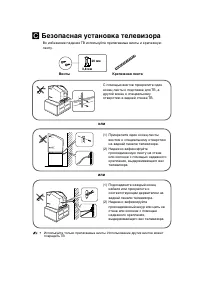
C Безопасная установка телевизора Во избежание падения ТВ используйте прилагаемые винты и крепежнуюленту. 20 мм 3,8 мм Винты Крепежная лента или • Используйте только прилагаемые винты. Использование других винтов может повредить ТВ. или С помощью винтов прикрепите одинконец ленты к подставке для ТВ,...
Page 25 - Перед эксплуатацией; Уст; на ТВ для включения телевизора.
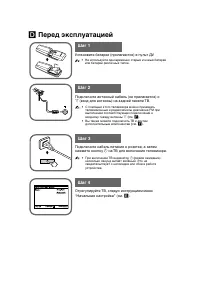
D Перед эксплуатацией b b Шаг 1 Шаг 2 Шаг 3 Шаг 4 Уст ановите бат ареи (прилагаются) в пульт ДУ. • Не используйте одновременно старые и новые батареиили батареи различных типов. Подключите антенный кабель (не прилагается) к 8 (вход для антенны) на задней панели ТВ. • С помощью этого телевизора можно...
Page 27 - Подключение к телевизору (передняя панель)
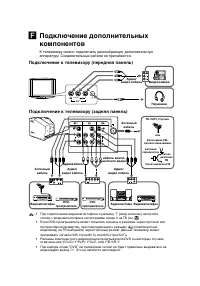
1 Y C B C R Y R L C B C R (MONO) L R (MONO) L R R L R L R L L(MONO) R 2 F Подключение дополнительныхкомпонентов К телевизору можно по дключа ть разнообразную дополнительную аппаратуру. Соединительные кабели не прилагаются. Подключение к телевизору (передняя панель) Подключение к телевизору (задняя п...
Page 31 - Устранение неисправностей
I Устранение неисправностей При возникновении проблем эксплуатации телевизора можно использовать функцию“Заводские настр.” (см. N ) или обратиться к руководству по поиску и устранению неисправностей, приведенному ниже. Если устранить проблему не удастся, обратитеськ дилеру Sony. Рябь на экране, Поме...
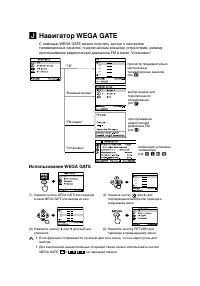
Page 33 - Навигатор WEGA GATE; Использование WEGA GATE
0 1 0 20 3 0 4 0 5 Оконч J Навигатор WEGA GATE С помощью WEGA GATE можно получить доступ к настройкетелевизионных каналов, подключенным внешним устройствам, режимупрослушивания радиостанций диапазона FM и меню “Установки”. просмотр предварительнонастроенныхтелевизионных каналов(см. E ) выбор входов ...
Page 34 - Настройка меню “Изображение”; пиктограмма
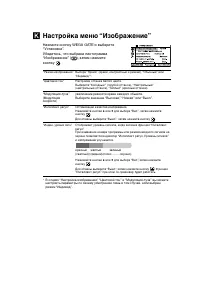
K Настройка меню “Изображение” Нажмите кнопку WEGA GATE и выберите“Установки”.Убедитесь, что выбрана пиктограмма “Изображение” ( ), затем нажмите кнопку . “Режим изображения” Выбора “Яркий” (яркий, контрастный и резкий), “Обычный” или “Индивид.”*. “Цветовой тон” Настройки оттенка белого цвета.Выбери...
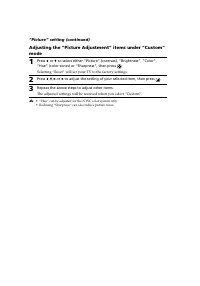
Page 35 - Настройка меню “Изображение” (продолжение); Выбор “Сброс” вернёт ТВ к заводским настройкам.
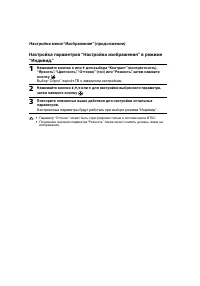
Настройка меню “Изображение” (продолжение) Настройка параметров “Нaстройка изображения” в режиме“Индивид.” 1 Нажимайте кнопки V или v для выбора “Контрaст” (контpaстность), “Яркость”, “Цветность”, “Оттенок” (тон) или “Pезкость”, затем нажмитекнопку . Выбор “Сброс” вернёт ТВ к заводским настройкам. 2...
Page 36 - Настройка меню “Звук”
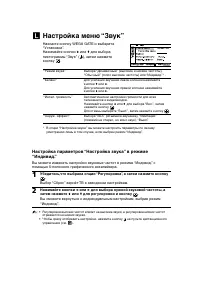
L Настройка меню “Звук” Нажмите кнопку WEGA GATE и выберите“Установки”.Нажимайте кнопки V или v для выбора пиктограммы “Звук” ( ), затем нажмитекнопку . “Режим звука” Выбора “Динамичный” (высокие и низкие частоты),“Обычный” (голос высокие частоты) или “Индивид.”* . “Баланс” Для усиления звучания лев...
Page 37 - Настройка меню “Настройка каналов”
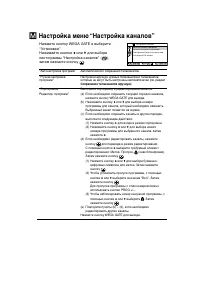
M Настройка меню “Настройка каналов” Нажмите кнопку WEGA GATE и выберите“Установки”.Нажимайте кнопки V или v для выбора пиктограммы “Настройка каналов” ( ), затем нажмите кнопку . “ Aвтонaстройкa программ” Автоматического сохранения телеканалов. “Pучная настройка Настройки вручную нужных телеканалов...
Page 38 - Настройка меню
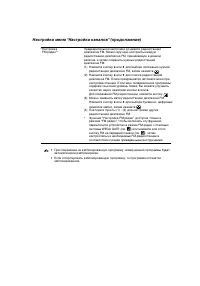
“Настройка Предварительной настройки до девяти радиостанций FM радио”* диапазона FM. Можно вручную настроить каждуюрадиостанцию диапазона FM, принимаемую в данномрегионе, а затем сохранить нужных радиостанцийдиапазона FM.(1) Нажмите кнопку V или v для выбора положения нужной радиостанции диапазона F...
Page 39 - После выбора пункта “Ручная настройка программ”
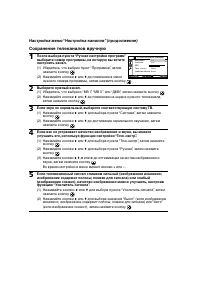
Сохранение телеканалов вручную 1 После выбора пункта “Ручная настройка программ” выберите номер программы, на которую вы хотитенастроить канал. (1) Убедитесь, что выбран пункт “Программa”, затемнажмите кнопку . (2) Нажимайте кнопки V или v до появления в меню нужного номера программы, затем нажмите ...
Page 40 - Настройка меню “Установка”; Нажимайте кнопки
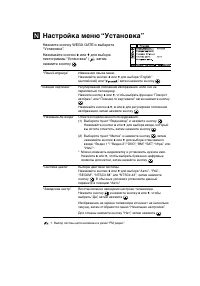
N Настройка меню “Установка” Нажмите кнопку WEGA GATE и выберите“Установки”. Нажимайте кнопки V или v для выбора пиктограммы “Установка” ( ), затем нажмите кнопку . “Язык/Language” Изменения языка меню.Нажимайте кнопки V или v для выбора “English” (английский) или “ ”, затем нажмите кнопку . “Позици...