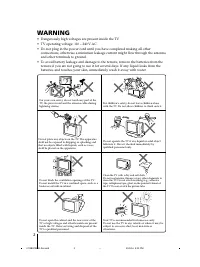
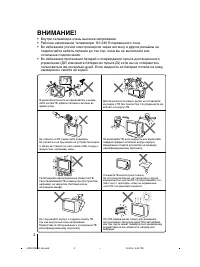
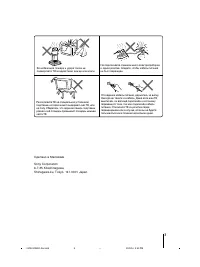
Page 2 - WARNING; • Dangerously high voltages are present inside the TV.
2 Do not place any objects on the TV. The apparatusshall not be exposed to dripping or splashing andthat no objects filled with liquids, such as vases,shall be placed on the apparatus. WARNING • Dangerously high voltages are present inside the TV. • TV operating voltage: 110 – 240 V AC. • Do not plu...
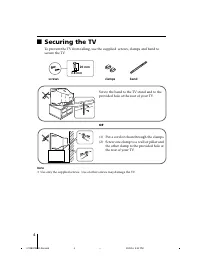
Page 4 - Securing the TV; screws; or
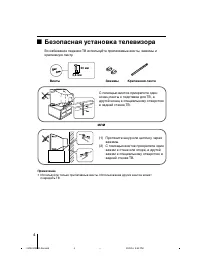
4 x Securing the TV To prevent the TV from falling, use the supplied screws, clamps and band tosecure the TV. 20 mm 3.8 mm screws clamps band Screw the band to the TV stand and to theprovided hole at the rear of your TV. (1) Put a cord or chain through the clamps.(2) Screw one clamp to a wall or pil...
Page 5 - Additional Information; Table of Contents; Installation
5 Additional Information Connecting the 3D WOOFER(KV-HW212M95 only) ....................... 25 Connecting optional components ... 25 Troubleshooting ................................. 27 Specifications ...................................... 31 Table of Contents Installation Getting Started .............
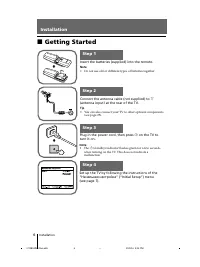
Page 6 - Getting Started; Начальная настройкa; Connect the antenna cable (not supplied) to
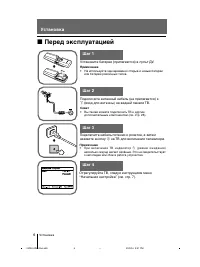
6 Installation Installation x Getting Started b b 1 Step 1 Insert the batteries (supplied) into the remote. Note • Do not use old or different types of batteries together. Step 2 Step 3 Step 4 Set up the TV by following the instructions of the“ Начальная настройкa ” (“Initial Setup”) menu (see page ...
Page 7 - Setting up your TV; Press
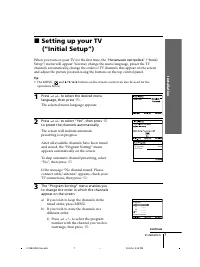
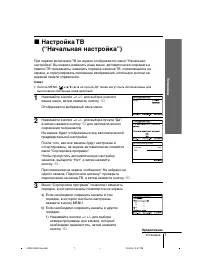
7 Installation Installation x Setting up your TV (“Initial Setup”) When you turn on your TV for the first time, the “ Начальная настройкa ” (“Initial Setup”) menu will appear. You may change the menu language, preset the TVchannels automatically, change the order of TV channels that appear on the sc...
Page 8 - continued
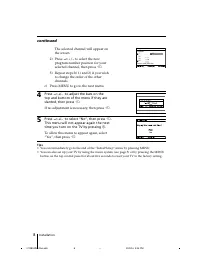
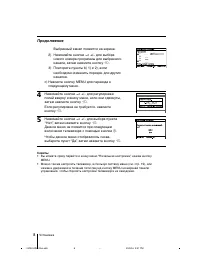
8 Installation The selected channel will appear onthe screen. 2) Press 2 +/– to select the new program number position for yourselected channel, then press t . 3) Repeat steps b) 1) and 2) if you wish to change the order of the otherchannels. c) Press MENU to go to the next menu. 4 Press 2 +/– to ad...
Page 9 - Overview of Controls; TV top control, front and rear panels; TV front panel
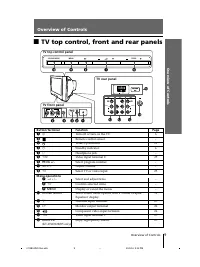
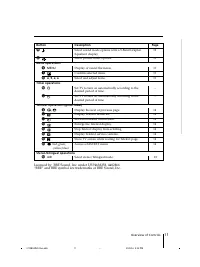
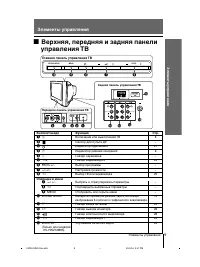
9 Overview of Contr ols Overview of Controls Overview of Controls x TV top control, front and rear panels Button/Terminal Function Page 1 ! Turn off or turn on the TV. 6 2 Remote control sensor. – 3 Wake Up indicator. 21 3 1 Standby indicator. 6 4 i Headphone jack. – 5 t 2 Video input terminal 2. 25...
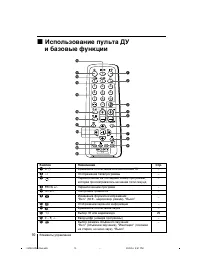
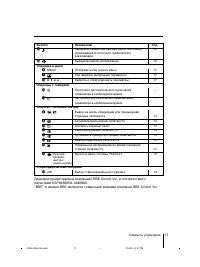
Page 10 - Using the remote control and basic
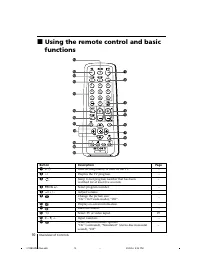
10 Overview of Controls x Using the remote control and basic functions TV 1 2 3 4 6 7 8 9 0 5 MENU PROG A / B 1 2 3 6 8 7 45 qk qf qa qg qh qj 0 qs qd qlw; wa 9 Button Description Page 1 ? / 1 Turn off temporarily or turn on the TV. – 2 a Display the TV program. – 3 Jump to last program number that ...
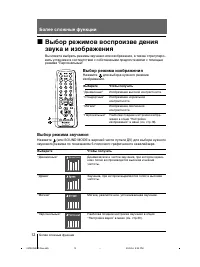
Page 12 - Advanced Operations; Selecting the sound mode
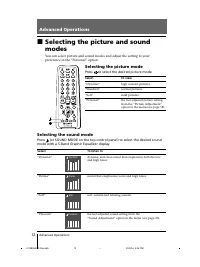
12 Advanced Operations Advanced Operations Selecting the sound mode Press (or SOUND MODE on the top control panel) to select the desired soundmode with a 5-Band Graphic Equalizer display. Select To listen to “Dynamic” dynamic and clear sound that emphasizes both the lowand high tones. “Drama” sound ...
Page 13 - Enjoying stereo or bilingual programs; Viewing a stereo or bilingual program; When receiving a NICAM program; When receiving an A2 program
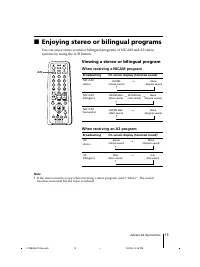
13 Advanced Operations NICAM (Stereo sound) Mono (Regular sound) t t NICAM Main (Main sound) NICAM Sub (Sub sound) Mono (Regular sound) t t t NICAM Main (Main sound) Mono (Regular sound) t t TV 1 2 3 4 6 7 8 9 0 5 MENU PROG A / B A/B x Enjoying stereo or bilingual programs You can enjoy stereo sound...
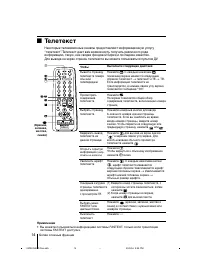
Page 14 - Viewing Teletext; You can use the buttons on the remote to view Teletext.
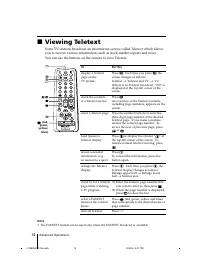
14 Advanced Operations x Viewing Teletext Some TV stations broadcast an information service called Teletext which allowsyou to receive various information, such as stock market reports and news. You can use the buttons on the remote to view Teletext. To Do this display a Teletext Press . Each time y...
Page 15 - Menu Adjustment; Introducing the menu system
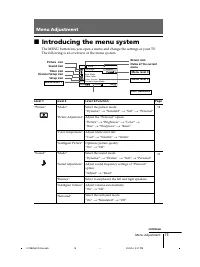
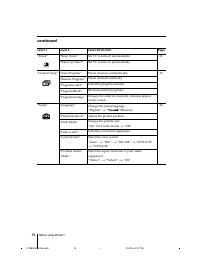
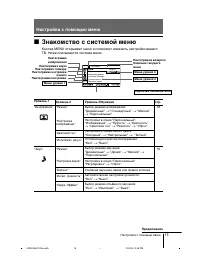
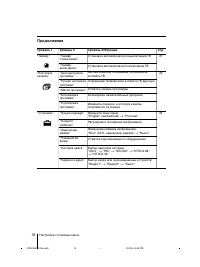
15 Menu Adjustment Menu Adjustment x Introducing the menu system The MENU button lets you open a menu and change the settings of your TV.The following is an overview of the menu system. Return icon Setup icon Channel Setup icon Timer icon Name of the currentmenu Picture icon Menu level 3 Menu level ...
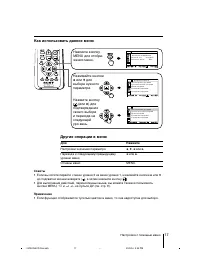
Page 17 - How to use the menu
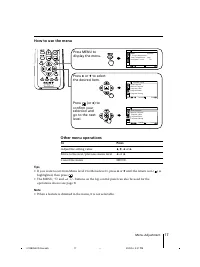
17 Menu Adjustment Select End Channel Setup P r o g r a m B l o c k P r o g r a m L a b e l M a n u a l P r o g r a m A u t o P r o g r a m Confirm P r o g r a m S o r t i n g Select End Channel Setup P r o g r a m B l o c k M a n u a l P r o g r a m P r o g r a m L a b e l P r o g r a m S o r t i n...
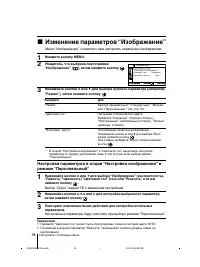
Page 18 - Changing the “Picture” setting; The “Picture” menu allows you to adjust the picture settings.; Selecting “Reset” will set your TV to the factory setting.
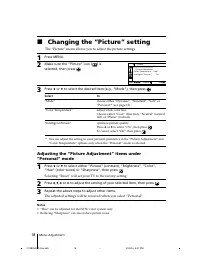
18 Menu Adjustment x Changing the “Picture” setting The “Picture” menu allows you to adjust the picture settings. 1 Press MENU. 2 Make sure the “Picture” icon ( ) is selected, then press . 3 Press V or v to select the desired item (e.g., “Mode”), then press . Select To “Mode” choose either “Dynamic”...
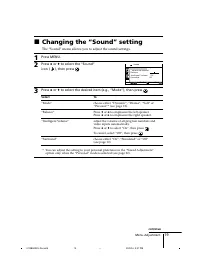
Page 19 - Changing the “Sound” setting; The “Sound” menu allows you to adjust the sound settings.
19 Menu Adjustment x Changing the “Sound” setting The “Sound” menu allows you to adjust the sound settings. 1 Press MENU. 2 Press V or v to select the “Sound” icon ( ), then press . 3 Press V or v to select the desired item (e.g., “Mode”), then press . Select To “Mode” choose either “Dynamic”, “Dram...
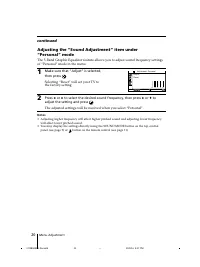
Page 20 - The adjusted settings will be received when you select “Personal”.
20 Menu Adjustment R e s e t 1 0 0 3 0 0 1 k 3 k 8 k A d j u s t Adjustment: Personal Confirm End Select Adjusting the “Sound Adjustment” item under“Personal” mode The 5-Band Graphic Equalizer feature allows you to adjust sound frequency settingsof “Personal” mode in the menu. 1 Make sure that “Adju...
Page 21 - Changing the “Timer” setting
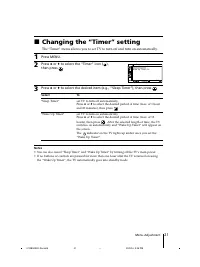
21 Menu Adjustment x Changing the “Timer” setting The “Timer” menu allows you to set TV to turn off and turn on automatically. 1 Press MENU. 2 Press V or v to select the “Timer” icon ( ), then press . 3 Press V or v to select the desired item (e.g., “Sleep Timer”), then press . Select To “Sleep Time...
Page 23 - Select the desired channel.
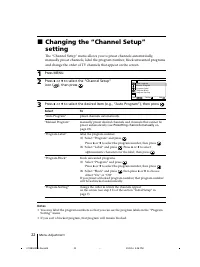
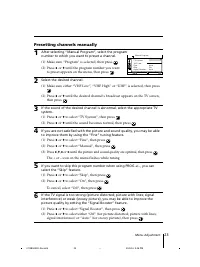
23 Menu Adjustment Presetting channels manually 1 After selecting “Manual Program”, select the programnumber to which you want to preset a channel. (1) Make sure “Program” is selected, then press . (2) Press V or v until the program number you want to preset appears on the menu, then press . 2 Selec...
Page 24 - Changing the “Setup” setting
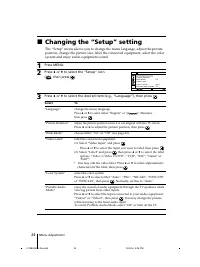
24 Menu Adjustment x Changing the “Setup” setting The “Setup” menu allows you to change the menu language, adjust the pictureposition, change the picture size, label the connected equipment, select the colorsystem and enjoy audio equipment sound. 1 Press MENU. 2 Press V or v to select the “Setup” ic...
Page 25 - Connecting optional components; Connecting to the video input terminal (; Connecting the 3D WOOFER
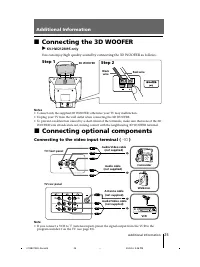
25 Additional Information x Connecting optional components Connecting to the video input terminal ( t ) TV front panel Walkman L R (MONO) 2 L R R 1 L Y C B C R (MONO) (MONO) Audio cable (not supplied) Antenna cable (not supplied) VCR TV rear panel Audio/Video cable (not supplied) Camcorder Note • If...
Page 26 - Connecting to the component video input terminal (
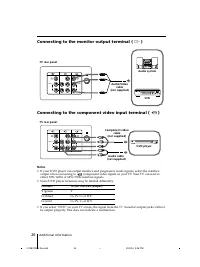
26 Additional Information DVD player TV rear panel Component video cable (not supplied) Audio cable (not supplied) L R R 1 L Y C B C R (MONO) (MONO) Connect To (on the DVD player) Y (green) Y C B (blue) C B , P B , C b or B-Y C R (red) C R , P R , C r or R-Y Connecting to the component video input t...
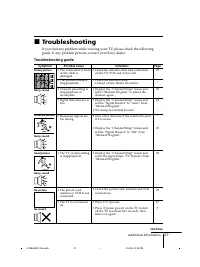
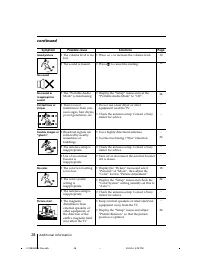
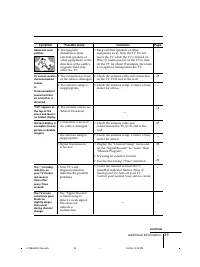
Page 27 - Troubleshooting; Troubleshooting guide
27 Additional Information Snowy picture Noisy sound Distorted picture Noisy sound Good picture Noisy sound No picture No sound Possible cause Symptom Solutions x Troubleshooting If you find any problem while viewing your TV, please check the followingguide. If any problem persists, contact your Sony...
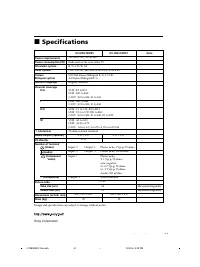
Page 31 - Specifications
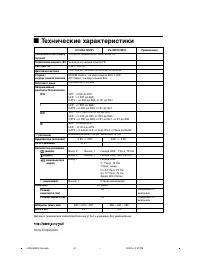
31 Additional Information Power requirements Power consumption (W) Television system Color system Stereo/Bilingual system Teletext language Channel coverage B/G I D/K M 8 (Antenna) Audio output (Speaker) 3D Woofer Number of terminal (Video) (Audio) (Component Video) i (Headphone) Picture tube Tube s...
Page 34 - Безопасная установка телевизора; Винты; или
4 x Безопасная установка телевизора Во избежание падения ТВ используйте прилагаемые винты, зажимы икрепежную ленту. 20 мм 3,8 мм Винты Зажимы Крепежная лента С помощью винтов прикрепите одинконец ленты к подставке для ТВ, адругой конец к специальному отверстиюв задней стенке ТВ. (1) Протяните шнур и...
Page 35 - Пoдключение; Содержание; Установка
5 RU Дополнительнаяинформация Пoдключение (3D) НЧ динамика (Только длямоделей KV-HW212M95) ............... 25 Подключение дополнительныхкомпонентов .................................. 25 Устранение неисправностей ........ 27 Техническиехарактеристики ............................. 31 Содержание Устано...
Page 36 - Перед эксплуатацией; на ТВ для включения телевизора.; Подключите антенный кабель (не прилагается) к
Установка 6 Установка x Перед эксплуатацией b b 1 Шаг 1 Установите батареи (прилагаются) в пульт ДУ. Примечание • Не используйте одновременно старые и новые батареи или батареи различных типов. Шаг 2 Шаг 3 Шаг 4 Подключите кабель питания к розетке, а затемнажмите кнопку ! на ТВ для включения телевиз...
Page 37 - Настройка ТВ
Установка Установка 7 x Настройка ТВ (“Начальная настройкa”) При первом включении ТВ на экране отображается меню “Начальнаянастройкa”. Вы можете изменить язык меню, автоматически сохранить впамяти ТВ телеканалы, изменить порядок каналов ТВ, появляющихся наэкране, и отрегулировать положение изображен...
Page 39 - Элементы управления; Верхняя, передняя и задняя панели; Главная панель управления ТВ
Элементы управления Элементы управления 9 Элементы управления PROG MENU S O U N D M O D E 0 9 8 7 6 L R 2 3 4 2 5 (MONO) 1 qh L R R 1 L Y C B C R (MONO) (MONO) qf qd qs qa qg Передняя панель управления ТВ Задняя панель управления ТВ x Верхняя, передняя и задняя панели управления ТВ Главная панель уп...
Page 42 - Более сложные функции; Bыбор режима звучания; Bыбор режима изображения; Hажмите
12 Более сложные функции Более сложные функции Bыбор режима звучания Нажмите (или SOUND MODE в верхней части пульта ДУ) для выбора нужногозвукового режима по показаниям 5-полосного графического эквалайзера. Bыберите Чтобы получить “Динамичный” Динамическое и чистое звучание, при котором одина–ково п...
Page 43 - При приеме программы NICAM
13 Более сложные функции NICAM (Стереофонический звук) Моно (Обычный звук) t t TV 1 2 3 4 6 7 8 9 0 5 MENU PROG A / B A/B x Просмотр стереофонических программили программ на двух языках С помощью кнопки А/В можно переключать ТВ в режим стереозвучанияили режим программы на двух языках в системе NICAM...
Page 44 - eлeтeкст
14 Более сложные функции x T eлeтeкст Некоторые телевизионные каналы предоставляют информационную услугу“телетекст”. Teлeтeкст дает вам возможность получать различного родаинформацию, такую, как сводки фондовой биржи и лоследние известия.Для вывода на экран страниц телетекста вы можете пользоваться ...
Page 45 - Настройка с помощью меню; Знакомство с системой меню
15 Настройка с помощью меню Уровень 2 “Режим” “Настройкаизображения” “Цветовой тон” “Интеллект. регул.” “Режим” “Настройка звука” “Баланс” “Интел. громкость” “Окруж. Эффект” Меню уровня 2 Пиктограмма возвратаНазвание текущегоменю Подсказки пользователю Меню уровня 3 Пиктограмма настройки канала Пикт...
Page 47 - Другие операции в меню; Как использовать данное меню; Нажимайте кнопки
17 Настройка с помощью меню Другие операции в меню Советы • Если вы хотите перейти с меню уровня 2 на меню уровня 1, нажимайте кнопки V или v до подсветки иконки возврата ( ), а затем нажмите кнопку . • Для выполнения действий, перечисленных выше, вы можете также использовать кнопки MENU, t и 2 +/– ...
Page 48 - Изменение параметров “Изображение”; Выбор “Сброс” вернёт ТВ к заводским настройкам.
RU 18 Настройка с помощью меню x Изменение параметров “Изображение” Меню “Изображение” позволяет вам настроить параметры изображения. 1 Нажмите кнопку MENU. 2 Убедитесь, что выбрана пиктограмма“Изображение” ( ), затем нажмите кнопку . 3 Нажимайте кнопки V или v для выбора нужного параметра (например...
Page 49 - Изменение параметров “Звук”; Меню “Звук” позволяет вам настроить параметры звучания.
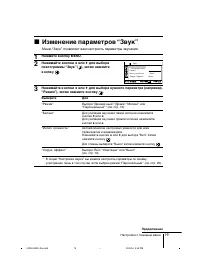
19 Настройка с помощью меню x Изменение параметров “Звук” Меню “Звук” позволяет вам настроить параметры звучания. 1 Нажмите кнопку MENU. 2 Нажимайте кнопки V или v для выбора пиктограммы “Звук” ( ), затем нажмитекнопку . 3 Нажимайте кнопки V или v для выбора нужного параметра (например, “Режим”), за...
Page 50 - продолжение
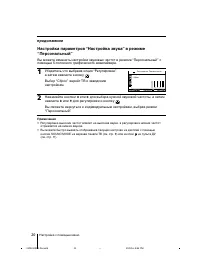
Настройка с помощью меню 20 RU 1 0 0 3 0 0 1 k 3 k 8 k Регулировкa: Персонaльная РегулировкаСброс Настройка параметров “Настройка звука” в режиме“Персональный” Вы можете изменять настройки звуковых частот в режиме “Персональный” спомощью 5-полосного графического эквалайзера. 1 Убедитесь,что выбрана ...
Page 51 - Изменение установок “Таймер”
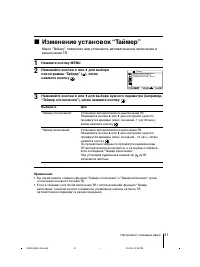
21 Настройка с помощью меню x Изменение установок “Таймер” Меню “Таймер” позволяет вам установить автоматическое включение ивыключение ТВ. 1 Нажмите кнопку MENU. 2 Нажимайте кнопки V или v для выбора пиктограммы “Таймер” ( ), затем нажмите кнопку . 3 Нажимайте кнопки V или v для выбора нужного парам...
Page 53 - Сохранение телеканалов вручную; Выберите нужный канал.
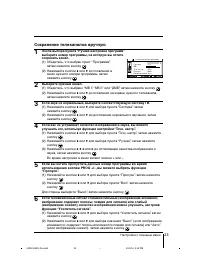
23 Настройка с помощью меню Сохранение телеканалов вручную 1 После выбора пункта “Ручная настройка программ”выберите номер программы, на которую вы хотитесохранить канал. (1) Убедитесь, что выбран пункт “Программa”, затем нажмите кнопку . (2) Нажимайте кнопки V или v до появления в меню нужного номе...
Page 54 - Изменение установок “Установка”
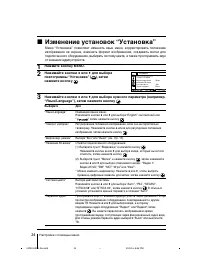
Настройка с помощью меню 24 RU x Изменение установок “Установка” Меню “Установка” позволяет изменять язык меню, корректировать положениеизображения на экране, изменять формат изображения, создавать метки дляподключенного оборудования, выбирать систему цвета, а также прослушивать звукот внешних аудио...
Page 55 - Подключение к разъему входа видеосигнала (; Действие 1; Дополнительная информация
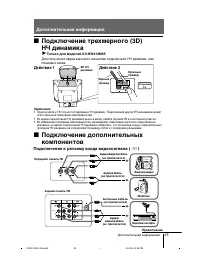
25 Дополнительная информация x Подключение дополнительныхкомпонентов Подключение к разъему входа видеосигнала ( t ) Передняя панель ТВ Walkman L R (MONO) 2 L R R 1 L Y C B C R (MONO) (MONO) Аудиокабель (не прилагается) Антенный кабель (не прилагается) Видеомагнитофон Задняя панель ТВ Аудио/ видеокаб...
Page 56 - Подключение к разъему выхода сигнала монитора (
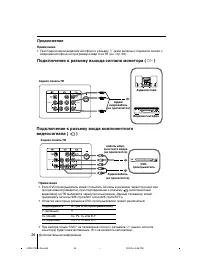
26 RU Дополнительная информация Подсоедините К...(на DVD-проигрывателе) Y (зеленый) Y C B (синий) C B , P B , C b или B-Y C R (красный) C R , P R , C r или R-Y Задняя панель ТВ Аудиосистема L R R 1 L Y C B C R (MONO) (MONO) Видеомагнитофон Аудио/ видеокабель (не прилагается) Подключение к разъему вы...
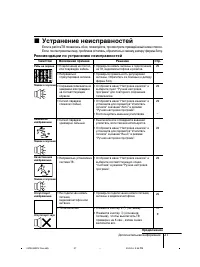
Page 57 - Устранение неисправностей; Рекомендации по устранению неисправностей
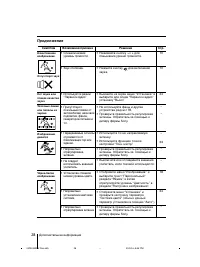
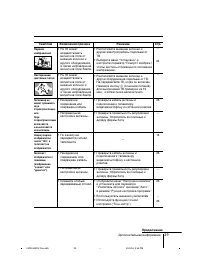
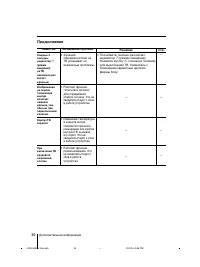
Дополнительная информация 27 x Устранение неисправностей Если в работеТB появились сбои, пожалуйста, просмотрите приведённый ниже список.Eсли, после принятых мер, проблема осталась, обратитесь к своему дилеру фирмы Sony. Рябь на экране Помехи в звучании Помехи наизображении Помехи в звучании Качеств...
Page 61 - ехнические характеристики
Дополнительная информация 31 Sony Corporation x Т ехнические характеристики Требования к источникупитания Потребляемая мощность (Вт) Система ТВ Цветовая система Стерео /на двух языках система Teлeтeкст язык Покрываемыйдиапазон Телеканалов B/G I D/K M 8 (Антенна) Аудиовыход (колонки) 3D НЧ динамик Ко...