Page 2 - Important Safety Instructions; WARNING
2 GB Owner’s Record The model and serial numbers are located on the bottom of the Bar Speaker. Record serial numbers in the space provided below. Refer to them whenever you call upon your Sony dealer regarding this product.Model No. HT-CT380/CT780 Serial No._____________________________ To reduce th...
Page 3 - CAUTION
3 GB stoves, or other apparatus (including amplifiers) that produce heat. 9) Do not defeat the safety purpose of the polarized or grounding-type plug. A polarized plug has two blades with one wider than the other. A grounding type plug has two blades and a third grounding prong. The wide blade or th...
Page 4 - For the customers in Canada; Copyrights and Trademarks
4 GB This equipment must not be co-located or operated in conjunction with any other antenna or transmitter. This equipment complies with FCC radiation exposure limits set forth for an uncontrolled environment and meets the FCC radio frequency (RF) Exposure Guidelines. This equipment has very low le...
Page 5 - Compatible iPod/iPhone models
5 GB Apple, the Apple logo, iPhone, iPod, and iPod touch are trademarks of Apple Inc., registered in the U.S. and other countries. App Store is a service mark of Apple Inc. “Made for iPod,” and “Made for iPhone” mean that an electronic accessory has been designed to connect specifically to iPod or i...
Page 7 - Table of Contents; Connecting to a 4K TV and 4K
7 GB Table of Contents About these operating instructions .......................... 6 Listening Listening to sound from a TV, Blu-ray Disc™ player, cable/satellite box, etc. ................. 8 Listening to music from a BLUETOOTH device ............. 8 Sound Adjustment Enjoying sound effects (Sport...
Page 8 - Press INPUT repeatedly.; Press PAIRING on the system.; Listening
8 GB Listening to sound from a TV, Blu-ray Disc™ player, cable/satellite box, etc. Press INPUT repeatedly. When you press INPUT once, the current device appears on the front display, then each time you press INPUT, the device changes cyclically as follows. [TV] [HDMI 1] [HDMI 2] [HDMI 3] [AN...
Page 9 - Compatible remote devices
9 GB List e n in g • Once the BLUETOOTH connection is established, an indication recommending which application to download will be displayed, according to what equipment you have connected. Following the instructions displayed, an application called “SongPal,” which will enable you to operate this ...
Page 11 - Sound Adjustment; Selecting the sound field; Setting the Night mode
11 GB Sound A d just men t Enjoying sound effects (Sports mode, etc.) You can easily enjoy pre-programmed sound fields that are tailored to different kinds of sound sources. Press SOUND FIELD repeatedly until the desired sound field appears on the front panel display. * DSEE stands for Digital Sound...
Page 12 - Press; BLUETOOTH Functions
12 GB Controlling the system using a smartphone or tablet device (SongPal) “SongPal” is the application to operate the system with your smartphone or tablet, etc.“SongPal” is available from either Google Play or App Store.This function is enabled by setting [BT PWR] to [ON] (page 17). The default se...
Page 14 - Connecting to a 4K TV and 4K devices
14 GB Connecting to a 4K TV and 4K devices To view copyright-protected 4K content, connect the devices via an HDCP 2.2-compatible HDMI jack on each end. Copyright-protected 4K content can be viewed only by a connection via HDCP 2.2-compatible HDMI jacks. Refer to the TV’s operating instructions as t...
Page 16 - Using the setup display; Press MENU to turn on the menu on the front panel display.; Settings and Adjustments; Menu list
16 GB Using the setup display You can set the following items with the menu.Your settings are retained even if you disconnect the AC power cord (mains lead). 1 Press MENU to turn on the menu on the front panel display. 2 Press BACK/ (select)/ENTER repeatedly to select the item and press ENTER to...
Page 19 - System Power Off; Other Functions
19 GB O ther Funct ions Using the Control for HDMI function By using the Control for HDMI function, and connecting a device that is compatible with the Control for HDMI function via an HDMI cable (High Speed type), operation is simplified with the features below.The Control for HDMI function is enab...
Page 24 - Press LINK on the subwoofer.
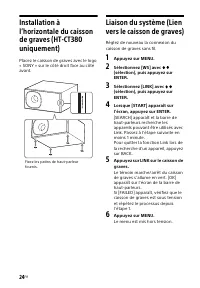
24 GB Installing the subwoofer horizontally (HT-CT380 only) Place the subwoofer on the right side with the “SONY” logo facing front. Linking the system (Link to the subwoofer) Set up the wireless subwoofer connection again. 1 Press MENU. 2 Select [WS] with (select), then press ENTER. 3 Select [L...
Page 25 - Precautions; Additional Information
25 GB Addi tional I n fo rmat ion Precautions On safety • Should any solid object or liquid fall into the system, unplug the system and have it checked by qualified personnel before operating it any further. • Do not climb on the Bar Speaker and subwoofer, as you may fall down and injure yourself, o...
Page 26 - Troubleshooting; General
26 GB Troubleshooting If you experience any of the following difficulties while using the system, use this troubleshooting guide to help remedy the problem before requesting repairs. Should any problem persist, consult your nearest Sony dealer. The power does not turn on. Check that the AC power c...
Page 27 - BLUETOOTH device
27 GB Addi tional I n fo rmat ion Make sure the input source is selected correctly. You should try other input sources by pressing the INPUT button on the remote control several times (page 8). Check that all the cables and cords of the system and the connected device are firmly inserted. No sou...
Page 28 - Subwoofer wireless sound
28 GB radiation is nearby, move the device away from this system. No sound is output from the connected BLUETOOTH device. Make sure that the BLUETOOTH indicator (blue) is lit (page 31). Bring this system and the BLUETOOTH device closer together. If a device that generates electromagnetic radia...
Page 29 - Remote control
29 GB Addi tional I n fo rmat ion Switch the wireless LAN frequency of any nearby Wi-Fi router or personal computer to 5 GHz band. Switch the TV, Blu-ray Disc player, etc. from wireless LAN to wired LAN. The remote control does not function. Point the remote control at the center of the front ...
Page 30 - Reset
30 GB Sensors of the TV do not work properly. The Bar Speaker may block some sensors (such as the brightness sensor) and the remote control receiver of your TV, or the “emitter for 3D glasses (infrared transmission)” of a 3D TV that supports the infrared 3D glass system or the wireless communicati...
Page 31 - Guide to parts and controls; Front and top panels; Remote control sensor; Bar Speaker
31 GB Addi tional I n fo rmat ion Guide to parts and controls For more information, refer to the pages indicated in parentheses. Front and top panels Remote control sensor Front panel display / (on/standby) button INPUT button (page 8, 21) PAIRING button (page 8) VOLUME +/– buttons ...
Page 32 - Rear panel; For update only; ANALOG IN jack
32 GB Rear panel AC power cord (mains lead) UPDATE port (HT-CT780 only) For update only ANALOG IN jack DIGITAL IN (TV) jack HDMI IN 3 jack HDMI IN 1 jack HT-CT780 is compatible with HDCP 2.2. HDMI IN 2 jack HDMI OUT (ARC) jack HT-CT780 is compatible with HDCP 2.2.
Page 33 - Subwoofer
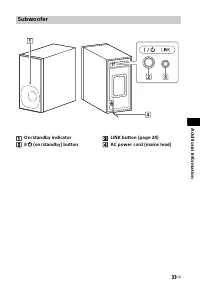
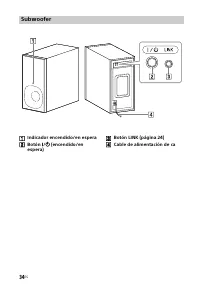
33 GB Addi tional I n fo rmat ion On/standby indicator / (on/standby) button LINK button (page 24) AC power cord (mains lead) Subwoofer
Page 35 - Supported audio formats
35 GB Addi tional I n fo rmat ion Supported audio formats Audio formats supported by this system are as follows.• Dolby Digital• Dolby Digital Plus*• Dolby TrueHD*• DTS• DTS96/24• DTS-HD Master Audio*• DTS-HD High Resolution Audio*• DTS-HD Low Bit Rate*• Linear PCM 2ch 48 kHz or less• Linear PCM Max...
Page 36 - Video formats supported by the system
36 GB Input/Output (HDMI Repeater block) * YCbCr 4:2:0/Supported 8-bit only ** Supported 8-bit only Video formats supported by the system File 2D 3D Frame packing Side-by-Side (Half) Over-Under (Top-and-Bottom) 4096 × 2160p @ 59.94/60 Hz * 4096 × 2160p @ 50 Hz * 4096 × 2160p @ 23.98/...
Page 37 - Specifications; Amplifier section
37 GB Addi tional I n fo rmat ion Specifications Amplifier section U.S. models: POWER OUTPUT AND TOTAL HARMONIC DISTORTION:(FTC) Front L + Front R:With 4 ohms loads, both channels driven, from 200 Hz - 20,000 Hz; rated 35 Watts per channel minimum RMS power, with no more than 1% total harmonic disto...
Page 41 - CONTENT SERVICE
41 GB Addi tional I n fo rmat ion available, or will operate without interruption or modification. USE OF SOFTWARE WITH COPYRIGHTED MATERIALS The SOFTWARE may be capable of being used by you to view, store, process and/or use content created by you and/or third parties. Such content may be protected...
Page 43 - EQUITABLE REMEDIES
43 GB Addi tional I n fo rmat ion shall constitute part of, the SOFTWARE for purposes of this EULA. By acceptance of this EULA, you consent to such update/modification. ENTIRE AGREEMENT, WAIVER, SEVERABILITY This EULA and SONY’s privacy policy, each as amended and modified from time to time, togethe...
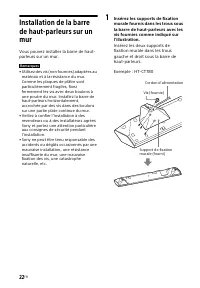
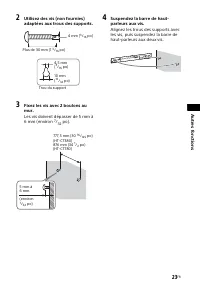
Page 44 - Enregistrement du propriétaire; Pour la barre de haut-parleurs; Pour les clients aux États-Unis; AVERTISSEMENT
2 FR Enregistrement du propriétaire Le modèle et le numéro de série sont situés sous la barre de haut-parleurs. Notez le numéro de série dans l’espace ci-dessous. Vous devrez vous y référer lors d’un appel à votre revendeur Sony au sujet de ce produit.N° de modèle HT-CT380/CT780 N° de série ________...
Page 49 - Table des matières; Branchement à un
7 FR Table des matières À propos de ce manuel d’instructions ....................... 6 Écoute Écoute de son sur un téléviseur, un lecteur Blu-ray Disc™, un décodeur câble, un récepteur satellite, etc. ....... 8 Écoute de musique depuis un dispositif BLUETOOTH ......... 8 Réglage du son Effets sonore...
Page 50 - Appuyez plusieurs fois sur INPUT.; Écoute; Appairage de ce système
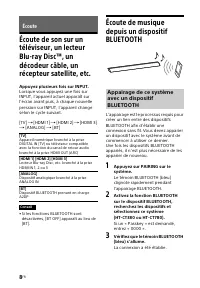
8 FR Écoute de son sur un téléviseur, un lecteur Blu-ray Disc™, un décodeur câble, un récepteur satellite, etc. Appuyez plusieurs fois sur INPUT. Lorsque vous appuyez une fois sur INPUT, l’appareil actuel apparaît sur l’écran avant puis, à chaque nouvelle pression sur INPUT, l’appareil change selon ...
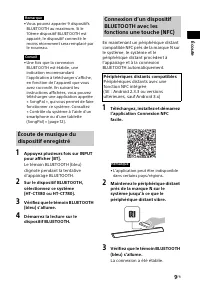
Page 51 - Éc; Écoute de musique du; Périphériques distants compatibles
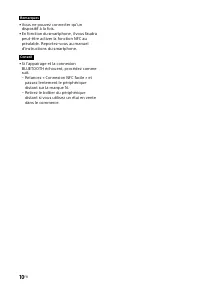
9 FR Éc o u te • Vous pouvez apparier 9 dispositifs BLUETOOTH au maximum. Si le 10ème dispositif BLUETOOTH est apparié, le dispositif connecté le moins récemment sera remplacé par le nouveau. • Une fois que la connexion BLUETOOTH est établie, une indication recommandant l’application à télécharger s...
Page 53 - Réglage du son; Sélection du champ
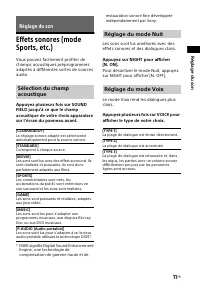
11 FR Régl a g e d u s o n Effets sonores (mode Sports, etc.) Vous pouvez facilement profiter de champs acoustiques préprogrammés adaptés à différentes sortes de sources audio. Appuyez plusieurs fois sur SOUND FIELD jusqu’à ce que le champ acoustique de votre choix apparaisse sur l’écran du panneau ...
Page 54 - Appuyez sur; Fonctions BLUETOOTH; Utilisation d’un appareil
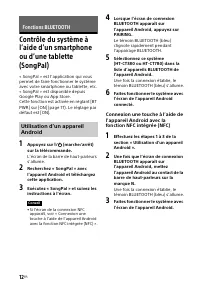
12 FR Contrôle du système à l’aide d’un smartphone ou d’une tablette (SongPal) « SongPal » est l’application qui vous permet de faire fonctionner le système avec votre smartphone ou tablette, etc.« SongPal » est disponible depuis Google Play ou App Store.Cette fonction est activée en réglant [BT PWR...
Page 55 - Utilisation d’un iPhone/iPod
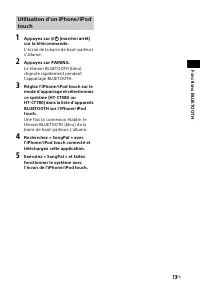
13 FR Fo n ctions BLU ET OOT H 1 Appuyez sur / (marche/arrêt) sur la télécommande. L’écran de la barre de haut-parleurs s’allume. 2 Appuyez sur PAIRING. Le témoin BLUETOOTH (bleu) clignote rapidement pendant l’appairage BLUETOOTH. 3 Réglez l’iPhone/iPod touch sur le mode d’appairage et sélection...
Page 56 - Branchement à un téléviseur 4K et à des appareils 4K; Lorsque la prise HDMI du téléviseur est compatible HDCP 2.2
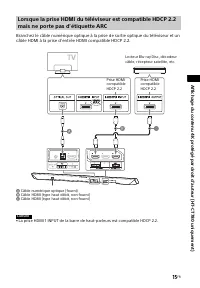
14 FR Branchement à un téléviseur 4K et à des appareils 4K Pour voir le contenu 4K protégé par droit d’auteur, branchez les appareils sur une prise HDMI compatible HDCP 2.2 à chaque extrémité. Le contenu 4K protégé par droit d’auteur peut être affiché uniquement par une connexion sur des prises HDMI...
Page 58 - Utilisation de l’écran de configuration; Appuyez sur MENU pour activer le menu sur l’écran du panneau avant.; Réglages et ajustements; Liste de menus
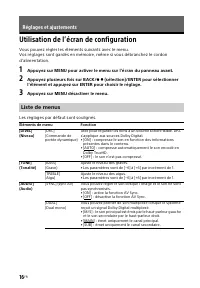
16 FR Utilisation de l’écran de configuration Vous pouvez régler les éléments suivants avec le menu.Vos réglages sont gardés en mémoire, même si vous débranchez le cordon d’alimentation. 1 Appuyez sur MENU pour activer le menu sur l’écran du panneau avant. 2 Appuyez plusieurs fois sur BACK/ (sél...
Page 59 - t ajust
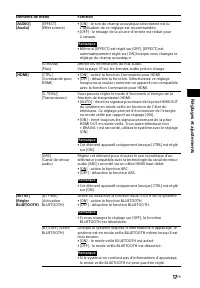
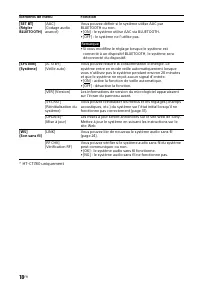
17 FR R é g lages e t ajust e ment s [AUDIO] (Audio) [EFFECT](Effet sonore) • [ON] : le son du champ acoustique sélectionné est lu. L’utilisation de ce réglage est recommandée. • [OFF] : le mixage de la source d’entrée est réduit pour 2 canaux. • Même si [EFFECT] est réglé sur [OFF], [EFFECT] est au...
Page 61 - Mise hors tension du système; Autres fonctions
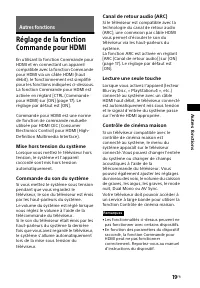
19 FR Autr e s f o n ct ions Réglage de la fonction Commande pour HDMI En utilisant la fonction Commande pour HDMI et en connectant un appareil compatible avec la fonction Commande pour HDMI via un câble HDMI (haut débit), le fonctionnement est simplifié pour les fonctions indiquées ci-dessous.La fo...
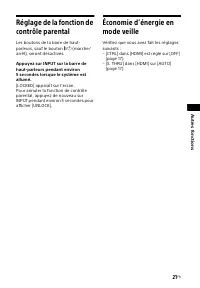
Page 62 - Économie d’énergie
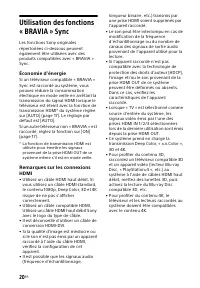
20 FR Utilisation des fonctions « BRAVIA » Sync Les fonctions Sony originales répertoriées ci-dessous peuvent également être utilisées avec des produits compatibles avec « BRAVIA » Sync. Économie d’énergie Si un téléviseur compatible « BRAVIA » Sync est raccordé au système, vous pouvez réduire la co...
Page 67 - Précautions; Concernant la sécurité; Informations supplémentaires
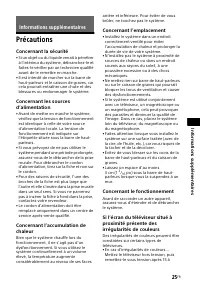
25 FR Info rma tio ns s u p p lémenta ires Précautions Concernant la sécurité • Si un objet ou du liquide venait à pénétrer à l’intérieur du système, débranchez-le et faites-le vérifier par un technicien qualifié avant de le remettre en marche. • Il est interdit de marcher sur la barre de haut-parle...
Page 68 - Concernant l’entretien; Dépannage; Caractéristiques générales
26 FR 30 minutes. • En cas d’irrégularités de couleurs persistantes…Éloignez davantage le système du téléviseur. Concernant l’entretien Nettoyez le système avec un chiffon sec et doux. N’utilisez pas de tampons abrasifs, de poudre à récurer ou de solvant tel que de l’alcool ou de la benzine. Si vous...
Page 70 - Dispositif BLUETOOTH
28 FR Lors de la lecture de contenu compatible avec la technologie de protection des droits d’auteur (HDCP), le son n’est pas émis par le caisson de graves. Vous n’arrivez pas à obtenir les effets surround. Selon le signal d’entrée et le réglage du champ acoustique, le traitement du son surround...
Page 71 - Son sans fil du caisson de
29 FR Info rma tio ns s u p p lémenta ires Montez le volume du dispositif BLUETOOTH connecté. Le son n’est pas synchronisé avec l’image. Lors du visionnage d’un film, vous pourriez constater un décalage entre le son et l’image. Le caisson de graves n’émet aucun son. Vérifiez que le cordon d’al...
Page 72 - Télécommande
30 FR La télécommande ne fonctionne pas. Pointez la télécommande vers le centre du panneau avant (capteur de télécommande) du système (page 32). Retirez tous les obstacles se trouvant entre la télécommande et le système. Si les piles de la télécommande sont usées, remplacez-les. Assurez-vous...
Page 73 - Réinitialiser
31 FR Info rma tio ns s u p p lémenta ires L’écran du panneau avant de la barre de haut-parleurs n’est pas allumé. Appuyez sur DIMMER pour régler la luminosité sur Lumineux ou Sombre, si elle est réglée sur Désactivé (page 35). Les capteurs du téléviseur ne fonctionnent pas correctement. La barr...
Page 74 - Guide des pièces et des commandes; Panneaux avant et du haut; Capteur de télécommande; Barre de haut-parleurs
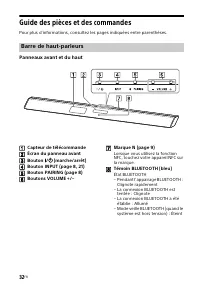
32 FR Guide des pièces et des commandes Pour plus d’informations, consultez les pages indiquées entre parenthèses. Panneaux avant et du haut Capteur de télécommande Écran du panneau avant Bouton / (marche/arrêt) Bouton INPUT (page 8, 21) Bouton PAIRING (page 8) Boutons VOLUME +/– M...
Page 75 - Panneau arrière; Pour la mise à jour uniquement; Prise ANALOG IN
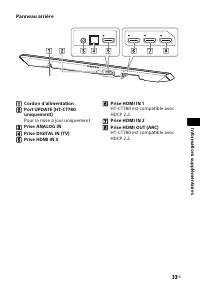
33 FR Info rma tio ns s u p p lémenta ires Panneau arrière Cordon d’alimentation Port UPDATE (HT-CT780 uniquement) Pour la mise à jour uniquement Prise ANALOG IN Prise DIGITAL IN (TV) Prise HDMI IN 3 Prise HDMI IN 1 HT-CT780 est compatible avec HDCP 2.2. Prise HDMI IN 2 Prise HDMI OU...
Page 76 - Caisson de graves
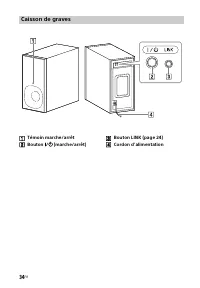
34 FR Témoin marche/arrêt Bouton / (marche/arrêt) Bouton LINK (page 24) Cordon d’alimentation Caisson de graves
Page 78 - Formats d’entrée audio
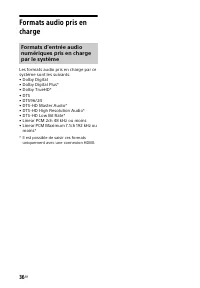
36 FR Formats audio pris en charge Les formats audio pris en charge par ce système sont les suivants.• Dolby Digital• Dolby Digital Plus*• Dolby TrueHD*• DTS• DTS96/24• DTS-HD Master Audio*• DTS-HD High Resolution Audio*• DTS-HD Low Bit Rate*• Linear PCM 2ch 48 kHz ou moins• Linear PCM Maximum 7.1ch...
Page 79 - Formats vidéo pris en charge par le système
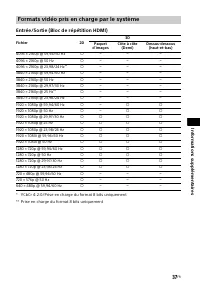
37 FR Info rma tio ns s u p p lémenta ires Entrée/Sortie (Bloc de répétition HDMI) * YCbCr 4:2:0/Prise en charge du format 8 bits uniquement** Prise en charge du format 8 bits uniquement Formats vidéo pris en charge par le système Fichier 2D 3D Paquet d’images Côte à côte (Demi) Dessus-dessous (haut...
Page 80 - Caractéristiques; Partie amplificateur
38 FR Caractéristiques Partie amplificateur Modèles des États-Unis : PUISSANCE DE SORTIE ET DISTORSION HARMONIQUE TOTALE : (FTC) Avant G + avant D : Avec des charges de 4 ohms, les deux canaux étant excités, de 200 Hz à 20 000 Hz ; puissance efficace minimale de 35 Watts par canal, avec une distorsi...
Page 85 - DROITS D’AUTEUR
43 FR Info rma tio ns s u p p lémenta ires LICENCE D’UTILISATION DU LOGICIEL Le LOGICIEL est concédé sous licence, il n’est pas vendu. Le LOGICIEL est protégé par les lois relatives aux droits d’auteur et autres droits de propriété intellectuelle. DROITS D’AUTEUR Tous les droits et titres afférents ...
Page 90 - Registro de propiedad; Para la barra parlante; ADVERTENCIA
2 ES Registro de propiedad El número de serie y del modelo se encuentran en la parte inferior de la barra parlante. Anote el número de serie en el espacio que aparece a continuación. Consúltelo cuando deba llamar a un distribuidor Sony con respecto a este producto.N.º de modelo HT-CT380/CT780 N.º de...
Page 92 - PRECAUCIÓN; Para los clientes en Canadá
4 ES – Conecte el equipo en una toma de circuito distinta a la que está conectado el receptor. – Consulte con su distribuidor o con un técnico especializado en radio/televisión para solicitar asistencia. Es preciso utilizar cables y conectores correctamente blindados y conectados a tierra para la co...
Page 95 - Tabla de contenidos; Conexión a un televisor 4K y
7 ES Tabla de contenidos Acerca de este manual de instrucciones ....................... 6 Escuchar Escuchar sonido proveniente de un televisor, un reproductor Blu-ray Disc™, caja de cable satélite, etc. ......................... 8 Escuchar música desde un dispositivo BLUETOOTH ...... 8 Ajuste de son...
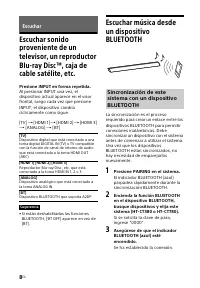
Page 96 - Presione INPUT en forma repetida.; Presione PAIRING en el sistema.; Escuchar; Sincronización de este
8 ES Escuchar sonido proveniente de un televisor, un reproductor Blu-ray Disc™, caja de cable satélite, etc. Presione INPUT en forma repetida. Al presionar INPUT una vez, el dispositivo actual aparece en el visor frontal, luego cada vez que presione INPUT, el dispositivo cambia cíclicamente como sig...
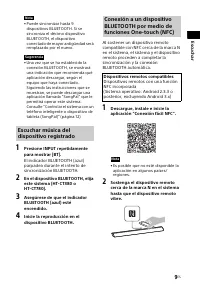
Page 97 - Escuchar música del; Dispositivos remotos compatibles
9 ES Es cu ch ar • Puede sincronizar hasta 9 dispositivos BLUETOOTH. Si se sincroniza el décimo dispositivo BLUETOOTH, el dispositivo conectado de mayor antigüedad será remplazado por el nuevo. • Una vez que se ha establecido la conexión BLUETOOTH, se mostrará una indicación que recomienda qué aplic...
Page 99 - sonido; Ajuste de sonido; Selección de campo de
11 ES A juste d e sonido Disfrutar de efectos de sonido (Modo deportes, etc.) Puede disfrutar fácilmente de campos de sonido preprogramados que están personalizados para diferentes tipos de fuentes de sonido. Presione SOUND FIELD repetidamente hasta que el campo de sonido deseado aparezca en el viso...
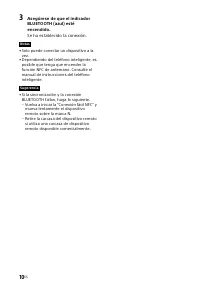
Page 100 - Presione; BLUETOOTH Funciones; Al usar un dispositivo con
12 ES Controlar el sistema con un teléfono inteligente o dispositivo de tableta (SongPal) “SongPal” es la aplicación para operar el sistema con su teléfono inteligente o tableta, etc.“SongPal” está disponible en Google Play o App Store.Esta función se activa al configurar [BT PWR] en [ON] (página 17...
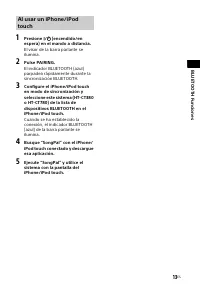
Page 101 - TH Funciones; Al usar un iPhone/iPod
13 ES BLU ETOO TH Funciones 1 Presione / (encendido/en espera) en el mando a distancia. El visor de la barra parlante se ilumina. 2 Pulse PAIRING. El indicador BLUETOOTH (azul) parpadea rápidamente durante la sincronización BLUETOOTH. 3 Configure el iPhone/iPod touch en modo de sincronización y ...
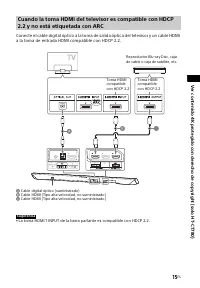
Page 102 - Conexión a un televisor 4K y dispositivos 4K; Ver contenido 4K protegido con derecho de copyright (solo HT-CT780); Cuando la toma HDMI del televisor es compatible con HDCP
14 ES Conexión a un televisor 4K y dispositivos 4K Para ver contenido 4K protegido con derecho de copyright, conecte los dispositivos vía una toma HDMI compatible con HDCP 2.2 en cada extremo. El contenido protegido con derecho de copyright se puede ver solo por medio de una conexión vía tomas HDMI ...
Page 104 - Uso del visor de configuración; Presione MENU para encender el menú en el visor del panel frontal.; Configuraciones y ajustes; Lista de menú
16 ES Uso del visor de configuración Puede ajustar las siguientes cosas con el menú.Los ajustes se mantienen aún si desconecta el cable de alimentación de ca. 1 Presione MENU para encender el menú en el visor del panel frontal. 2 Presione BACK/ (seleccionar)/ENTER repetidamente para seleccionar ...
Page 107 - Apagado del sistema; Otras funciones
19 ES O tra s f u ncio nes Uso del Control para la función HDMI Al usar el Control para la función HDMI y conectar el dispositivo compatible con el Control para la función HDMI a través de un cable HDMI (tipo alta velocidad), se simplifica el funcionamiento con las siguientes características.El Cont...
Page 108 - Ahorro de energía; Notas sobre conexiones HDMI
20 ES Uso de las características de “BRAVIA” Sync Las características originales de Sony que se indican a continuación también se pueden usar con productos que sean compatibles con “BRAVIA” Sync. Ahorro de energía Si se conecta al sistema un televisor compatible con “BRAVIA” Sync, el consumo de ener...
Page 112 - Presione LINK en el subwoofer.
24 ES Instalación del subwoofer horizontalmente (solo HT-CT380) Posicione el subwoofer de modo que el logotipo “SONY” quede del lado derecho orientado hacia el lado frontal. Enlace del sistema (Enlace al subwoofer) Configurar la conexión subwoofer inalámbrica nuevamente. 1 Pulse MENU. 2 Seleccione [...
Page 113 - Precauciones; Seguridad; Información adicional
25 ES Info rm ación adic ional Precauciones Seguridad • En caso de que caiga algún objeto sólido o líquido dentro del sistema, desconéctelo y solicite al personal especializado que realice una verificación antes de volver a utilizarlo. • No se apoye en la barra parlante y el subwoofer, dado que podr...
Page 114 - Limpieza; Solución de problemas
26 ES Limpieza Limpie el sistema con un paño seco y suave. No utilice estropajos abrasivos, detergente en polvo ni disolventes, como alcohol o bencina. Si desea realizar alguna pregunta o solucionar algún problema relacionado con el sistema, póngase en contacto con el distribuidor Sony más cercano. ...
Page 116 - Dispositivo BLUETOOTH
28 ES No se puede obtener el efecto de sonido envolvente. Dependiendo de la señal de entrada y de la configuración del campo acústico, el procesamiento de sonido envolvente podría no funcionar de forma efectiva. El efecto envolvente puede ser sutil según el programa o el disco. Para emitir audio...
Page 117 - Sonido inalámbrico del
29 ES Info rm ación adic ional El sonido no está sincronizado con la imagen. Cuando mira películas, es posible que escuche el sonido con un leve retraso en comparación con la imagen. No se escuchan sonidos desde el subwoofer. Compruebe que el cable de alimentación de ca del subwoofer esté correc...
Page 118 - Otros
30 ES Retire cualquier obstáculo que se interponga entre el mando a distancia y el sistema. Si las pilas del mando a distancia tienen poca energía, reemplace ambas por otras nuevas. Asegúrese de presionar el botón correcto en el mando a distancia. El mando a distancia del televisor no funciona...
Page 119 - Presione el botón; Reiniciar
31 ES Info rm ación adic ional distancia de su televisor, o el “emisor para los anteojos 3D (transmisión infrarroja)” de un televisor 3D compatible con el sistema de anteojos 3D o la comunicación inalámbrica. Mueva la barra parlante lejos del televisor dentro de un rango que permita que esas partes ...
Page 120 - Guía para las partes y los controles; Paneles frontales y superiores; Sensor de mando a distancia; Barra parlante
32 ES Guía para las partes y los controles Para obtener más información, consulte las páginas indicadas en paréntesis. Paneles frontales y superiores Sensor de mando a distancia Visor del panel frontal Botón / (encendido/en espera) Botón INPUT (página 8, 21) Botón PAIRING (página 8) ...
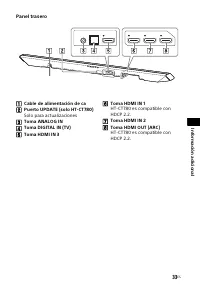
Page 121 - Panel trasero; Solo para actualizaciones; Toma ANALOG IN
33 ES Info rm ación adic ional Panel trasero Cable de alimentación de ca Puerto UPDATE (solo HT-CT780) Solo para actualizaciones Toma ANALOG IN Toma DIGITAL IN (TV) Toma HDMI IN 3 Toma HDMI IN 1 HT-CT780 es compatible con HDCP 2.2. Toma HDMI IN 2 Toma HDMI OUT (ARC) HT-CT780 es compa...
Page 123 - Mando a distancia
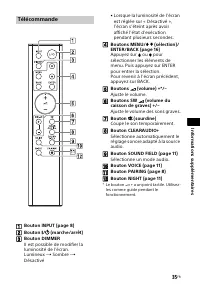
35 ES Info rm ación adic ional Botón INPUT (página 8) Botón / (encendido/en espera) Botón DIMMER Se puede cambiar el brillo del visor.Brillante Oscuro Apagado • Cuando el brillo del visor esté configurado en “Apagado”, el visor se apaga después de que el visor muestra el estado de oper...
Page 124 - Formatos de entrada de
36 ES Formatos de audio compatibles Los formatos de audio compatibles con este sistema son los siguientes.• Dolby Digital• Dolby Digital Plus*• Dolby TrueHD*• DTS• DTS96/24• DTS-HD Master Audio*• DTS-HD High Resolution Audio*• DTS-HD Low Bit Rate*• Linear PCM 2ch 48 kHz o menos• Linear PCM Maximum 7...
Page 125 - Formatos de video compatibles con el sistema
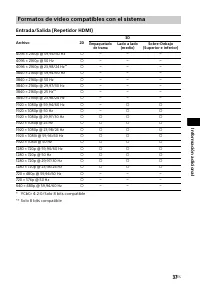
37 ES Info rm ación adic ional Entrada/Salida (Repetidor HDMI) * YCbCr 4:2:0/Solo 8 bits compatible** Solo 8 bits compatible Formatos de video compatibles con el sistema Archivo 2D 3D Empaquetado de trama Lado a lado (medio) Sobre-Debajo (Superior e inferior) 4096 × 2160p @ 59,94/60 Hz * 409...
Page 126 - Especificaciones; Sección del amplificador
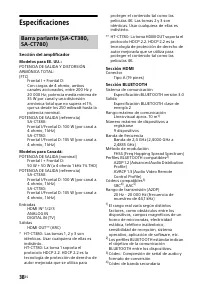
38 ES Especificaciones Sección del amplificador Modelos para EE. UU.: POTENCIA DE SALIDA Y DISTORSIÓN ARMÓNICA TOTAL: (FTC) Frontal I + Frontal D: Con cargas de 4 ohmio, ambos canales accionados, entre 200 Hz y 20 000 Hz; potencia media mínima de 35 W por canal y una distorsión armónica total que no...
Page 127 - Sección Altavoces Frontal I/Frontal D
39 ES Info rm ación adic ional 5) Codificación de audio avanzada Sección Altavoces Frontal I/Frontal D Sistema de altavoz SA-CT380: Sistema de altavoz de rango total, suspensión acústica SA-CT780: Sistema de altavoz bidireccional, suspensión acústica Altavoz SA-CT380: Tipo cónico de 60 mm (2 3 / 8 p...
Page 131 - SERVICIOS DE CONTENIDO
43 ES Info rm ación adic ional autorice expresamente. No podrá suprimir, alterar, ocultar o eliminar ninguna de las marcas y advertencias del SOFTWARE. No podrá compartir, distribuir, alquilar, arrendar, sublicenciar, ceder, transferir o vender el SOFTWARE. El software, los servicios de red y el res...
Page 132 - ACTIVIDADES DE ALTO RIESGO
44 ES reside, y se obliga asimismo a no transferir el SOFTWARE (o autorizar su transferencia) a un país prohibido o en contravención de lo estipulado por dichas normativas y restricciones. ACTIVIDADES DE ALTO RIESGO El SOFTWARE no es infalible ni ha sido diseñado, fabricado o concebido para ser util...
Page 133 - LEY APLICABLE Y JURISDICCIÓN
45 ES Info rm ación adic ional PUEDAN RESULTAR DE LA INFRACCIÓN DE CUALQUIER GARANTÍA EXPRESA O IMPLÍCITA, DE CUALQUIER INCUMPLIMIENTO CONTRACTUAL O NEGLIGENCIA, O EN APLICACIÓN DEL PRINCIPIO DE RESPONSABILIDAD OBJETIVA O DE CUALQUIER OTRO PRINCIPIO JURÍDICO EN RELACIÓN CON EL SOFTWARE, INCLUYENDO, ...






















 Sony DAV-S400 Manual
 Sony DAV-S500 Manual
 Sony DAV-S800 Manual
 Sony DAV-S880 Manual
 Sony DAV-SA30 Manual
 Sony DAV-SR4W Manual
 Sony HT-CT780 User Manual
 Sony HTCT80 User Manual
 Sony HTM77 User Manual
 Sony HTRT3 User Manual
 Sony HTRT5 User Manual
 Sony HTS100F User Manual
 Sony HTX9000F User Manual
 Sony HTXT3 User Manual
 Sony STRDH590 User Manual
 Sony STRDH790 User Manual
 Sony BDV-E280 Manual
 Sony BDV-E370 Manual
 Sony BDV-E490 Manual