Page 2 - Instructions; General safety instructions
Instructions 4 1 Instructions 1.1 General safety instructions Risk of personal injury • During use the appliance and its accessible parts become very hot. Never touch the heating elements during use. • Protect your hands by wearing oven gloves when moving food inside the oven. • Never try to put out...
Page 3 - Risk of damaging the appliance
Instructions 5 EN compartment (where present) when the oven is on and still hot. • The items inside the storage compartment could be very hot after using the oven. • DO NOT USE OR STORE FLAMMABLE MATERIALS IN THE STORAGE COMPARTMENT (IF AVAILABLE) OR NEAR THE APPLIANCE. • DO NOT USE AEROSOLS IN THE ...
Page 5 - Installation
Instructions 7 EN detergents (e.g. scouring powders, stain removers and metallic sponges) on glass parts. • Do not wash the removable components such as the hob grids, flame-spreader crowns and burner caps in a dishwasher. • Never use the oven door to lever the appliance into place when fitting. • A...
Page 6 - Manufacturer liability
Instructions 8 1.2 Manufacturer liability The manufacturer declines all liability for damage to persons or property caused by:• Use of the appliance other than that specified; • failure to comply with the instructions in the user manual; • tampering with any part of the appliance; • use of non-origi...
Page 7 - • Deliver the appliance to the; How to read the user manual; Plastic packaging
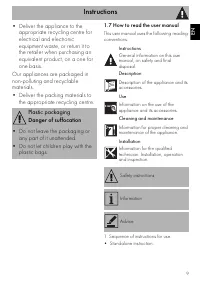
Instructions 9 EN • Deliver the appliance to the appropriate recycling centre for electrical and electronic equipment waste, or return it to the retailer when purchasing an equivalent product, on a one for one basis. Our appliances are packaged in non-polluting and recyclable materials.• Deliver the...
Page 8 - Information for European Control; Fan forced mode
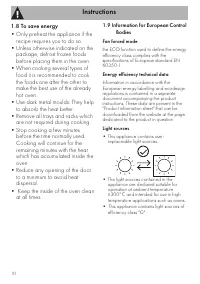
Instructions 10 1.8 To save energy • Only preheat the appliance if the recipe requires you to do so. • Unless otherwise indicated on the package, defrost frozen foods before placing them in the oven. • When cooking several types of food it is recommended to cook the foods one after the other to make...
Page 9 - Description; General Description
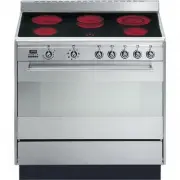
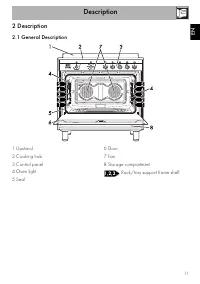
Description 11 EN 2 Description 2.1 General Description 1 Upstand 2 Cooking hob 3 Control panel 4 Oven light 5 Seal 6 Door 7 Fan 8 Storage compartment Rack/tray support frame shelf
Page 10 - Programmer clock
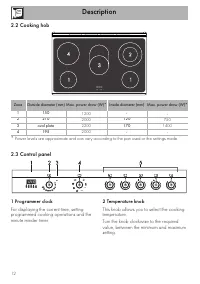
Description 12 2.2 Cooking hob * Power levels are approximate and can vary according to the pan used or the settings made. 2.3 Control panel 1 Programmer clock For displaying the current time, setting programmed cooking operations and the minute minder timer. 2 Temperature knob This knob allows you ...
Page 11 - from the
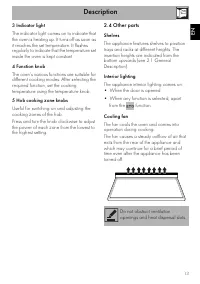
Description 13 EN 3 Indicator light The indicator light comes on to indicate that the oven is heating up. It turns off as soon as it reaches the set temperature. It flashes regularly to indicate that the temperature set inside the oven is kept constant. 4 Function knob The oven’s various functions a...
Page 12 - Available accessories; Tray
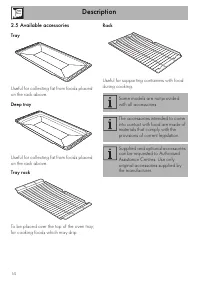
Description 14 2.5 Available accessories Tray Useful for collecting fat from foods placed on the rack above. Deep tray Useful for collecting fat from foods placed on the rack above. Tray rack To be placed over the top of the oven tray; for cooking foods which may drip. Rack Useful for supporting con...
Page 13 - Use
Use 15 EN 3 Use Instructions High temperature inside the oven during use Danger of burns • Keep the oven door closed during cooking. • Protect your hands by wearing oven gloves when moving food inside the oven. • Do not touch the heating elements inside the oven. • Do not pour water directly onto ve...
Page 14 - First use; Using the accessories; Tray rack
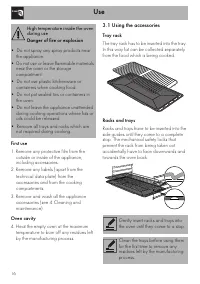
Use 16 First use 1. Remove any protective film from the outside or inside of the appliance, including accessories. 2. Remove any labels (apart from the technical data plate) from the accessories and from the cooking compartments. 3. Remove and wash all the appliance accessories (see 4 Cleaning and m...
Page 15 - LIGHT; • The diameter of the base of the pan must
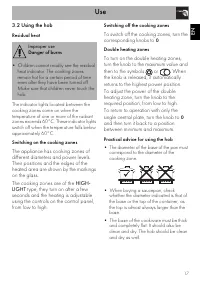
Use 17 EN 3.2 Using the hob Residual heat The indicator lights located between the cooking zones come on when the temperature of one or more of the radiant zones exceeds 60°C. These indicator lights switch off when the temperature falls below approximately 60°C. Switching on the cooking zones The ap...
Page 16 - Using the storage compartment; Switching on the oven
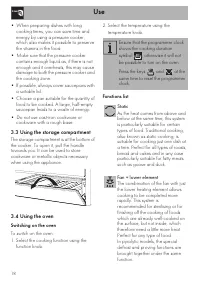
Use 18 • When preparing dishes with long cooking times, you can save time and energy by using a pressure cooker, which also makes it possible to preserve the vitamins in the food. • Make sure that the pressure cooker contains enough liquid as, if there is not enough and it overheats, this may cause ...
Page 17 - and
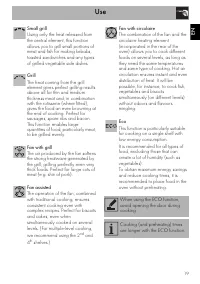
Use 19 EN Small grill Using only the heat released from the central element, this function allows you to grill small portions of meat and fish for making kebabs, toasted sandwiches and any types of grilled vegetable side dishes. Grill The heat coming from the grill element gives perfect grilling res...
Page 18 - General advice
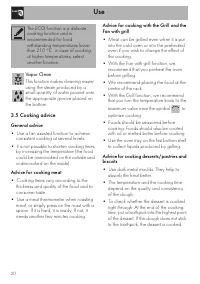
Use 20 3.5 Cooking advice General advice • Use a fan assisted function to achieve consistent cooking at several levels. • It is not possible to shorten cooking times by increasing the temperature (the food could be overcooked on the outside and undercooked on the inside). Advice for cooking meat • C...
Page 19 - Advice for defrosting and proving; Digital programmer
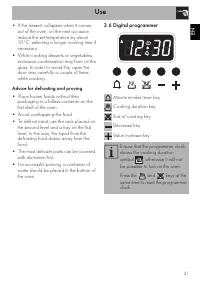
Use 21 EN • If the dessert collapses when it comes out of the oven, on the next occasion reduce the set temperature by about 10°C, selecting a longer cooking time if necessary. • While cooking desserts or vegetables, excessive condensation may form on the glass. In order to avoid this, open the door...
Page 20 - Setting the time
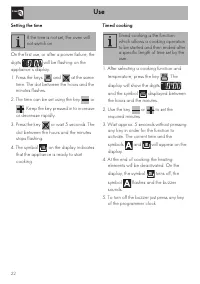
Use 22 Setting the time On the first use, or after a power failure, the digits will be flashing on the appliance’s display. 1. Press the keys and at the same time. The dot between the hours and the minutes flashes. 2. The time can be set using the key or . Keep the key pressed in to increase or decr...
Page 21 - Programmed cooking
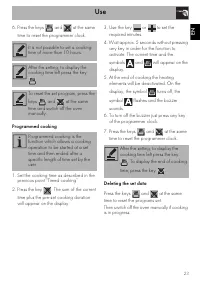
Use 23 EN 6. Press the keys and at the same time to reset the programmer clock. Programmed cooking 1. Set the cooking time as described in the previous point “Timed cooking”. 2. Press the key . The sum of the current time plus the pre-set cooking duration will appear on the display. 3. Use the key o...
Page 22 - Minute minder timer
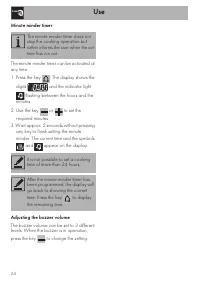
Use 24 Minute minder timer The minute minder timer can be activated at any time. 1. Press the key . The display shows the digits and the indicator light flashing between the hours and the minutes. 2. Use the key or to set the required minutes. 3. Wait approx. 5 seconds without pressing any key to fi...
Page 23 - Cooking information table
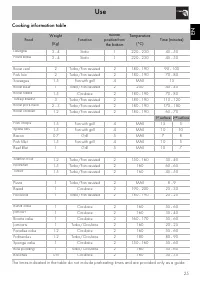
Use 25 EN Cooking information table Food Weight (Kg) Function Runner position from the bottom Temperature (°C) Time (minutes) Lasagne 3 - 4 Static 1 220 - 230 45 - 50 Pasta bake 3 - 4 Static 1 220 - 230 45 - 50 Roast veal 2 Turbo/Fan assisted 2 180 - 190 90 - 100 Pork loin 2 Turbo/Fan assisted 2 180...
Page 24 - Cleaning and maintenance
Cleaning and maintenance 26 4 Cleaning and maintenance Instructions Cleaning the surfaces To keep the surfaces in good condition, they should be cleaned regularly after use. Let them cool first. Ordinary daily cleaning Always and only use specific products that do not contain abrasives or chlorine-b...
Page 25 - which may have fallen on the hob
Cleaning and maintenance 27 EN 4.1 Cleaning the hob Cleaning the glass ceramic hob Light coloured marks from pans with aluminium bases can be easily cleaned off with a cloth moistened in vinegar.After cooking, remove any burnt residues with the scraper provided; rinse with water and dry thoroughly w...
Page 26 - Cleaning the door; Removing the door
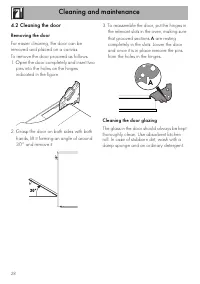
Cleaning and maintenance 28 4.2 Cleaning the door Removing the door For easier cleaning, the door can be removed and placed on a canvas.To remove the door proceed as follows:1. Open the door completely and insert two pins into the holes on the hinges indicated in the figure. 2. Grasp the door on bot...
Page 27 - Removing the internal glass panes
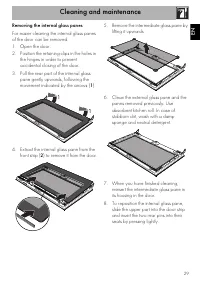
Cleaning and maintenance 29 EN Removing the internal glass panes For easier cleaning the internal glass panes of the door can be removed.1. Open the door.2. Position the retaining clips in the holes in the hinges in order to prevent accidental closing of the door. 3. Pull the rear part of the intern...
Page 28 - Cleaning the oven cavity; Removing the rack/tray support frames
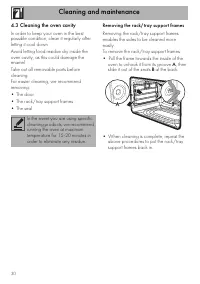
Cleaning and maintenance 30 4.3 Cleaning the oven cavity In order to keep your oven in the best possible condition, clean it regularly after letting it cool down.Avoid letting food residue dry inside the oven cavity, as this could damage the enamel.Take out all removable parts before cleaning.For ea...
Page 29 - Preliminary operations
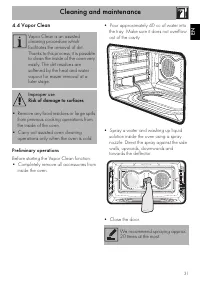
Cleaning and maintenance 31 EN 4.4 Vapor Clean Preliminary operations Before starting the Vapor Clean function:• Completely remove all accessories from inside the oven. • Pour approximately 40 cc of water into the tray. Make sure it does not overflow out of the cavity. • Spray a water and washing up...
Page 30 - Vapor Clean setting; Extraordinary maintenance; Installing and removing the seal
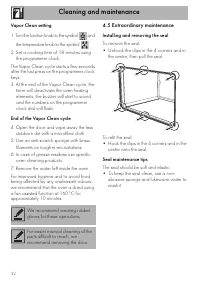
Cleaning and maintenance 32 Vapor Clean setting 1. Turn the function knob to the symbol and the temperature knob to the symbol . 2. Set a cooking time of 18 minutes using the programmer clock. The Vapor Clean cycle starts a few seconds after the last press on the programmer clock keys.3. At the end ...
Page 31 - Replacing the internal light bulb
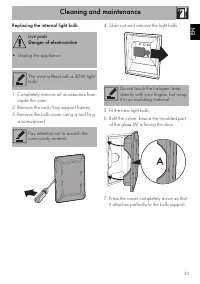
Cleaning and maintenance 33 EN Replacing the internal light bulb 1. Completely remove all accessories from inside the oven. 2. Remove the rack/tray support frames. 3. Remove the bulb cover using a tool (e.g. a screwdriver). 4. Slide out and remove the light bulb. 5. Fit the new light bulb. 6. Refit ...
Page 32 - Installation; Heavy appliance
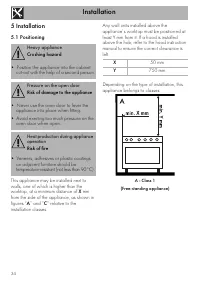
Installation 34 5 Installation 5.1 Positioning This appliance may be installed next to walls, one of which is higher than the worktop, at a minimum distance of X mm from the side of the appliance, as shown in figures “ A ” and “ C ” relative to the installation classes. Any wall units installed abov...
Page 33 - B - Class 2 subclass 1; Appliance overall dimensions
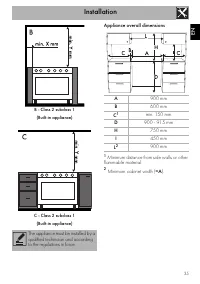
Installation 35 EN B - Class 2 subclass 1 (Built-in appliance) C - Class 2 subclass 1 (Built-in appliance) Appliance overall dimensions 1 Minimum distance from side walls or other flammable material. 2 Minimum cabinet width ( =A ). The appliance must be installed by a qualified technician and accord...
Page 34 - Electrical connection
Installation 36 Appliance dimensions: location of electrical connection (mm) E = Electrical connection Positioning and levelling • After making the gas and electrical connections, screw on the four feet supplied with the appliance. The appliance must sit level on the floor to ensure stability.• Scre...
Page 35 - Fastening to the wall
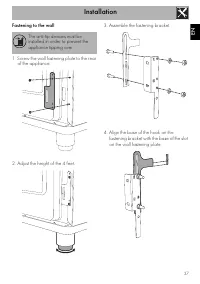
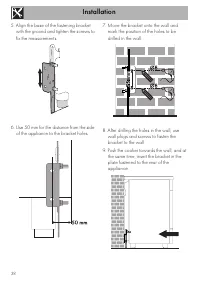
Installation 37 EN Fastening to the wall 1. Screw the wall fastening plate to the rear of the appliance. 2. Adjust the height of the 4 feet. 3. Assemble the fastening bracket. 4. Align the base of the hook on the fastening bracket with the base of the slot on the wall fastening plate. The anti-tip d...
Page 37 - Assembling the upstand; Electrical connection; General information
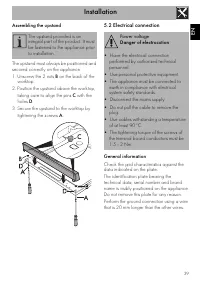
Installation 39 EN Assembling the upstand The upstand must always be positioned and secured correctly on the appliance.1. Unscrew the 2 nuts B on the back of the worktop. 2. Position the upstand above the worktop, taking care to align the pins C with the holes D . 3. Secure the upstand to the workto...
Page 38 - Fixed connection; Instructions for the installer; • The plug must be accessible after
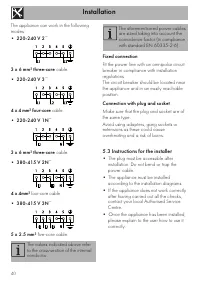
Installation 40 The appliance can work in the following modes:• 220-240 V 2 ~ 3 x 6 mm² three-core cable. • 220-240 V 3 ~ 4 x 4 mm² four-core cable. • 220-240 V 1N ~ 3 x 6 mm² three-core cable. • 380-415 V 2N ~ 4 x 4mm² four-core cable. • 380-415 V 3N ~ 5 x 2.5 mm² five-core cable. Fixed connection ...