Page 7 - ”طقف ةيداشرإ ةميق تاذ امنإو ةمزلُم ليلدلا اذه يف ةدراولا فاصولأاو
ةيحيضوتلا موسرلا ربتعت لا ،كلذلو .قبسم راذنإ نود اهتاجتنم نيسحتل ةبسانم اهارت يتلا تلايدعتلا عيمجب مايقلا يف قحلاب اهسفنل عينصتلا ةهج ظفتحت“ ”طقف ةيداشرإ ةميق تاذ امنإو ةمزلُم ليلدلا اذه يف ةدراولا فاصولأاو The manufacturer reserves the right to make any changes deemed useful for the improvement of ...
Page 8 - Warnings; General safety warnings; Important safety information
EN - 1 EN 1 Warnings This user manual is an integral part of the appliance and must therefore be kept in its entirety and on-hand for the whole working life of the appliance. 1.1 Intended use F a i l u r e t o c o m p l y w i t h t h e s a f e t y recommendations and not reading the instruction manu...
Page 10 - Important safety information / Description; P u l s a n t e s e t t a g g i / C a m b i o
EN - 3 EN • Always disconnect the appliance from the power supply and let the appliance cool down before cleaning. • Do not use the appliance with parts or accessories produced by other manufacturers. • Only use the manufacturer's original spare parts. The use of spare parts not recommended by the m...
Page 11 - Description; Use
EN - 4 • Avoid getting the cof fee machine wet and do not spray liquids onto it. In the event of contact with liquids, immediately disconnect the cable from the power outlet and dry thoroughly: Electric shock hazard! • Do not use aggressive detergents or sharp objects to clean the coffee machine. • ...
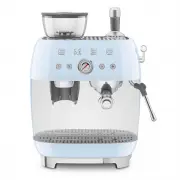
Page 12 - Description of the parts/
EN - 5 EN Pressurised filters (30a, 30b) These filters facilitate and regulate pressure also when grinding and dosing are not perfect. Select the filter for one or two cups as required. If non-pressurised filters are used and passage from a single filter to a double one and vice versa, it may be nec...
Page 13 - Description of controls
EN - 6 Use Water hardness test strip (17) Use the strip supplied to detect the hardness of the water used as indicated in the “Machine setting - Water hardness” paragraph . Milk jug (28) Stainless steel milk jug. Tamper (23) Tamper with stainless steel disk with diameter of 58 mm to be used to press...
Page 14 - B e f o r e c o m m i s s i o n i n g
EN - 7 EN Keys (13) and (14) flash simultaneously: No water tank (7) or tank not introduced correctly or with insufficient water to dispense coffee alarm. Check the correct introduction or add water if necessary. Key (14) with orange light: The key has an orange light to indicate that a descaling cy...
Page 15 - Grinding level regulation
EN - 8 Use • Lift the coffee bean container lid (2) and introduce the coffee beans into the container (3). • Switch the coffee machine on by pressing the ON/OFF switch (9): the keys (13) and (14) flash to indicate that the correct temperature is being reached. The coffee machine is ready for use as ...
Page 16 - Preparing espresso coffee; • Distribute the ground coffee evenly and; Dispensing steam and
EN - 9 EN 4.4 Preparing espresso coffee (Fig.A, B, C, D) For excellent coffee tasting, it is recommended to pre-heat the cup by rinsing them with hot water or dispensing hot water into the cup via the wand (22). At every switch-on, it is advised to rinse the circuits of the dispensing unit (21) and ...
Page 17 - Dispensing hot water
EN - 10 • Put cold milk into the jug as desired up to the spout of the same. • Position the tip of the steam wand (22) in correspondence with the relative hole (41), and turn the lever to the " " icon for a few seconds to make any residual water escape and then take it back to the vertical p...
Page 18 - Machine settings; - Coffee temperature
EN - 11 EN To reset the manufacturer's original settings, press the keys at the same time for at least 10 seconds. All of the keys flash at the same time and the machine emits a single sound indicating that factory settings have been reset. 5 Machine settings The programming menu can be used to set:...
Page 19 - Water hardness; • Press the key corresponding to the desired; Temperature of the coffee
EN - 12 Water hardness The machine is factory set to “Very Hard Water Level”. The machine can be set according to the actual hardness of the water used, thus making the requirement for descaling less frequent. If you don’t know the water hardness, use the test strip supplied (17) and follow the inst...
Page 20 - Acoustic signals
EN - 13 EN • The current setting is shown with the keys switching on, as shown in the following table: Key Temperature set 11 Low 11.12 Medium 11,12,13 Excellent 11,12,13,14 High • Press the key corresponding to the desired setting to modify the temperature, as indicated in the table. Key Temperatur...
Page 21 - C l e a n i n g t h e m a c h i n e; Cleaning and maintenance
EN - 14 6 Cleaning and maintenance 6.1 Warnings Electrocution hazard. • Remove the plug from the power outlet before cleaning the coffee machine. • N e v e r i m m e r s e t h e c o f f e e machine in water or other liquids. • Allow the coffee machine to cool down before cleaning. Risk of damage to ...
Page 22 - Cleaning the coffee bean container
EN - 15 EN Cleaning the coffee bean container (3) and of the grounds (18) (Fig.A e F) • Switch the machine on. • Make sure the coffee bean container (3) is empty and then press the key (12) to remove any coffee residues from the grinder. • Switch the machine off and remove the plug from the outlet. ...