Siemens A70 - User Manual
Siemens A70 – User Manual, read for free online in PDF format. We hope this helps you resolve any issues you may have. If you have further questions, please contact us through the contact form.


right page (1)
of A70 Dorado, 140mm, en2, A31008-H2770-M7-3-RC19 (28.06.2005, 10:53)
S
iem
ens AG
2004, \\F
ilese
rv
er\users\S
ieme
ns
MP\Dorado\E2
\D
ora
do_
O
vervie
w
.fm
VAR Langua
ge: en2;
VAR issue
date: 05033
1
s
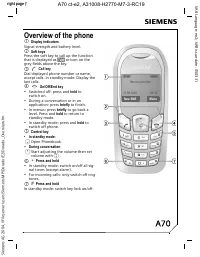
Overview of the phone
1
Display indicators
Signal strength and battery level.
2
Soft keys
Press the soft key to call up the function
that is displayed as
§Text§
or icon on the
grey fields above the key.
3
A
Call key
Dial displayed phone number or name,
accept calls. In standby mode: Display the
last calls.
4
B
On/Off/End key
• Switched off: press and
hold
to
switch on.
• During a conversation or in an
application: press
briefly
to finish.
• In menus: press
briefly
to go back a
level. Press and
hold
to return to
standby mode.
• In standby mode: press and
hold
to
switch off phone.
5
Control key
• In standby mode:
F
Open Phonebook.
•
During conversation
:
E
Start adjusting the volume then set
volume with
G
.
6
*
Press and hold
• In standby mode: switch on/off all sig-
nal tones (except alarm).
• For incoming calls: only switch off ring
tones.
7
'
Press and hold
In standby mode: switch key lock on/off.
_
g
Service provider
17.06.2005
09:15
New SMS
Menu
A70
A70 ct-e2, A31008-H2770-M7-3-RC19
A70 ct-e2, A31008-H2770-M7-3-RC19
"Loading the manual" means you need to wait until the file loads and becomes available for online reading. Some manuals are very large, and the time they take to appear depends on your internet speed.
Was this manual helpful?
About this manual
- Brand
- Siemens
- Model
- A70
- Document type
- User Manual
- Language(s)
- English
- Pages
- 16
- File size
- 1.7 MB
- Format