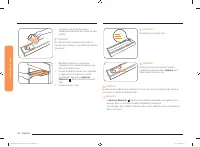
Page 2 - Reorienting or relocating the receiving antenna; Regulatory Notice; CAUTION; This device may not cause harmful interference, and
2 English FCC STATEMENT: This equipment has been tested and found to comply within the limits for a Class B digital device, pursuant to part 15 of the FCC Rules. These limits are designed to provide reasonable protection against harmful interference in a residential installation. This equipment gene...
Page 3 - IC RADIATION EXPOSURE STATEMENT:
English 3 IC RADIATION EXPOSURE STATEMENT: This equipment complies with IC RSS-102 radiation exposure limits set forth for an uncontrolled environment. This equipment should be installed and operated so there is at least 8 inches (20 cm) between the radiator and your body. This device and its antenn...
Page 4 - Contents
4 English C ontents Contents Contents Important safety instructions 5 Introducing your new oven 17 Overview 17What’s included with your oven 17 Before you begin 17 Energy saving tips 17 Water reservoir 17 Operating the oven 19 The oven control panel 19 Control panel display modes 20 Setting the cloc...
Page 5 - SAVE THESE INSTRUCTIONS; Important safety instructions; This guide does not cover all possible; Important safety symbols and precautions; What the icons and signs in this user manual mean:
English 5 Impor tant saf ety ins truc tions SAVE THESE INSTRUCTIONS SAVE THESE INSTRUCTIONS CAUTION To reduce the risk of fire, explosion, electric shock, or personal injury when using your oven, follow these basic safety precautions. Do NOT attempt.Do NOT disassemble.Do NOT touch.Follow directions ...
Page 7 - Use only dry potholders.
English 7 Impor tant saf ety ins truc tions SAVE THESE INSTRUCTIONS SAVE THESE INSTRUCTIONS • Use only dry potholders. Placing moist or damp potholders on hot surfaces may result in burns from steam. Do not let the potholder touch hot heating elements. Do not use a towel or other bulky cloth instead...
Page 8 - WARNING
8 English Impor tant saf ety ins truc tions Important safety instructions SAVE THESE INSTRUCTIONS SAVE THESE INSTRUCTIONS WARNING • Ensure that the appliance is switched off before replacing the lamp to avoid the possibility of electric shock. CHILD SAFETY WARNING • This appliance is not intended fo...
Page 10 - Do not let grease
10 English Impor tant saf ety ins truc tions Important safety instructions SAVE THESE INSTRUCTIONS SAVE THESE INSTRUCTIONS • Do not use any commercial oven cleaner or oven liner protective coating of any kind in or on the outside of the oven. • Remove the nickel oven shelves from the oven before you...
Page 11 - CRITICAL INSTALLATION WARNINGS
English 11 Impor tant saf ety ins truc tions SAVE THESE INSTRUCTIONS SAVE THESE INSTRUCTIONS • Do not cut or remove the ground prong from the power cord under any circumstances. • Connect the oven to a circuit that provides the correct amperage. • Do not install this appliance in a humid, oily or du...
Page 12 - Failing to do so may result in electric shock or fire.
12 English Impor tant saf ety ins truc tions Important safety instructions SAVE THESE INSTRUCTIONS SAVE THESE INSTRUCTIONS • Always observe safety precautions when using your oven. Never try to repair the oven on your own - there is dangerous voltage inside. If the oven needs to be repaired, contact...
Page 14 - USAGE CAUTIONS
14 English Impor tant saf ety ins truc tions Important safety instructions SAVE THESE INSTRUCTIONS SAVE THESE INSTRUCTIONS USAGE CAUTIONS CAUTION • If the surface is cracked, turn the appliance off. • Failing to do so may result in electric shock. • Dishes and containers can become hot. Handle with ...
Page 16 - CRITICAL CLEANING WARNINGS
16 English Impor tant saf ety ins truc tions Important safety instructions SAVE THESE INSTRUCTIONS SAVE THESE INSTRUCTIONS CRITICAL CLEANING WARNINGS CAUTION • Do not clean the appliance by spraying water directly on to it. • Do not use benzene, thinner, or alcohol to clean the appliance. • This may...
Page 17 - Before you begin; Energy saving tips; Introducing your new oven; Overview
English 17 Intr oducing y our ne w ov en Before you begin Clean the oven thoroughly before using it for the first time. Then, remove the accessories, set the oven to Bake, and then run the oven at 400 °F for 1 hour. There will be a distinctive odor. This is normal.Ensure your kitchen is well ventila...
Page 19 - Operating the oven; The oven control panel
English 19 Oper ating the o v en Operating the oven The oven control panel READ THE INSTRUCTIONS CAREFULLY BEFORE USING THE OVEN. For satisfactory use of your oven, become familiar with the various features and functions of the oven as described below. Detailed instructions for each feature and func...
Page 20 - Control panel display modes
20 English Oper ating the o v en Operating the oven Control panel display modes Sleep Mode Your control panel will remain in a sleep mode when not in use. Only the clock will display. You will need to wake the control panel to begin any function. Wake Mode To wake the control panel, touch Touch to W...
Page 21 - Control Lockout; Timed Cooking
English 21 Oper ating the o v en Control Lockout Control Lockout lets you lock the buttons on the touch pad so they cannot be activated accidently. Control Lock also locks both oven doors so they cannot be opened. You can only activate Control Lockout when the oven is in standby mode. How to activat...
Page 22 - Delay Start
22 English Oper ating the o v en Operating the oven Delay Start With Delay Start, the oven’s timer turns the oven on and off at times you select in advance. • You can use the Delay Start only with another cooking operation (Convection Bake, Convection Roast, Bake, Steam Bake, Steam Roast, Self Clean...
Page 23 - Using the oven racks
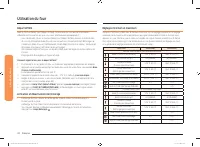
English 23 Oper ating the o v en Using the oven racks Oven rack positions 1 2 3 4 5 6 Recommended rack position for cooking TYPE OF FOOD RACK POSITION Broiling hamburgers 6 Broiling meats or small cuts of poultry, fish 3-5 Bundt cakes, pound cakes, frozen pies, casseroles 4 or 3 Angel food cakes, sm...
Page 24 - Using the Gliding Rack
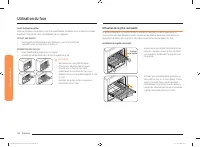
24 English Oper ating the o v en Operating the oven Before using the racks Each rack has stops that need to be placed correctly on the supports. These stops will keep the rack from coming completely out. REMOVING THE RACKS 1. Pull the rack straight out until it stops. 2. Lift up the front of the rac...
Page 25 - Baking
English 25 Oper ating the o v en Removing the Gliding Rack • With the Gliding Rack in the "Closed" position and the oven off and cool, grasp the rack and frame and pull both forward to remove. CAUTION Do not install the Gliding Rack directly above the Flat Rack and Recessed rack.You will not...
Page 26 - Convection baking
26 English Oper ating the o v en Operating the oven Convection baking 1 2 3 4 5 6 By using the Convection Bake, you will be able to cook faster. Convection baking uses a fan to circulate the oven’s heat evenly and continuously within the oven. This improved heat distribution allows for even cooking ...
Page 27 - Convection roasting; No Preheat
English 27 Oper ating the o v en Convection roasting Convection roasting is good for cooking large tender cuts of meat uncovered.Heat comes from the top heating element. The convection fan circulates the heated air evenly over and around the food. Meat and poultry are browned on all sides as if they...
Page 28 - Broiling
28 English Oper ating the o v en Operating the oven Broiling Broiling is a method of cooking tender cuts of meat by direct heat under the broil element of the oven.The high heat cooks quickly and gives a rich, brown outer appearance. Broil mode is best for meats, fish, and poultry up to 1" thick...
Page 29 - Steam baking and roasting (upper oven only)
English 29 Oper ating the o v en Steam baking and roasting (upper oven only) Steam Bake provides excellent baking conditions for breads, pastries, and desserts by increasing moisture content and improving texture and flavor. Steam Roast provides excellent cooking conditions for roasted meats or poul...
Page 32 - Using Smart Control; Using Options
32 English Oper ating the o v en Operating the oven Using Smart Control To use the oven’s Smart Control, you must download Samsung’s Smart Home app to a mobile device. Functions that can be operated using Samsung’s Smart Home app may not work smoothly if communication conditions are poor or the oven...
Page 34 - Using the Sabbath feature
34 English Oper ating the o v en Operating the oven Sound On/Off Using Sound On/OFF, you can set the oven controls to operate silently. How to turn the sound on or off 1. Touch Options , and then 6 on the number pad . 2. Touch 1 (On) or 2 (Off) on the number pad . 3. Touch START/SET to save the chan...
Page 35 - Maintaining your appliance
English 35 Maint aining y our applianc e Do not to attempt to activate any other program feature except Bake while the Sabbath feature is active. ONLY the following key pads will function correctly with the Sabbath feature on: Number , Bake , START/SET and OVEN OFF . All other keys should not be use...
Page 37 - Hybrid Cleaning
English 37 Maint aining y our applianc e How to turn off the self-cleaning feature If you need to stop or interrupt a self-cleaning cycle: 1. Touch OVEN OFF . 2. You will be able to open the oven door once the oven has cooled down for approximately 1 hour. After a self-cleaning cycle • You may notic...
Page 39 - Descale
English 39 Maint aining y our applianc e Descale If you use Steam Bake or Steam Roast frequently, we recommend descaling regularly to remove minerals from the oven that may affect the taste or quality of food cooked. When running a descaling cycle, use only descaling agents that are specific to stea...
Page 40 - Draining; Care and cleaning of the oven
40 English Maint aining y our applianc e Maintaining your appliance Draining When a steam function is complete, you must drain the remaining water to prevent the water from affecting other cooking modes.To drain the water, follow these steps: 1. Touch Drain . The oven drains water from the steam gen...
Page 42 - Removing the oven doors
42 English Maint aining y our applianc e Maintaining your appliance Removing the oven doors CAUTION • The door is very heavy. Be careful when removing and lifting the door. • Do not lift the door by the handle. Use two hands to remove an oven door. For double ovens, repeat the process for each door....
Page 43 - Replacing the oven doors
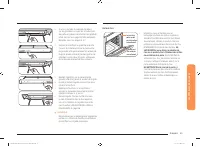
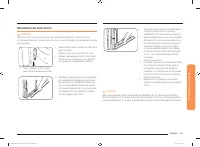
English 43 Maint aining y our applianc e 4. Lower the oven door to the fully open position. If the oven door does not open to a full 90°, repeat steps 1 through 3. 5. Locate the oven door hinge locks in the corners of the oven door, and rotate the hinge locks toward the oven cavity to the locked pos...
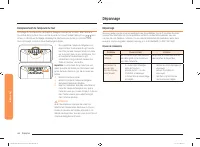
Page 44 - Troubleshooting; Changing the oven light
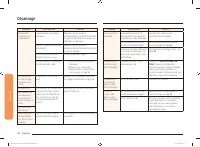
44 English Tr ouble shoo ting Troubleshooting Troubleshooting Samsung works hard to ensure that you don’t have problems with your new electric oven. If you run into unexpected trouble, look first for a solution in the tables below. If you’re still having trouble after trying the suggested solution, ...
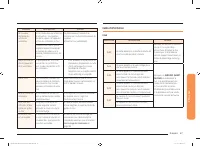
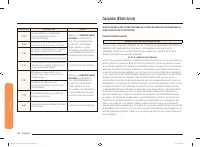
Page 47 - Information codes
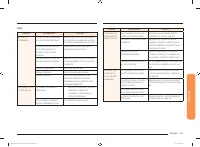
English 47 Tr ouble shoo ting Problem Possible cause Solution Steam is coming out of the vent. When using the convection feature, it is normal to see steam coming out of the oven vent. This is normal operation and not a system failure.Use the oven as usual. As the number of racks or amount of food b...
Page 51 - Open Source Announcement
English 51 W arranty EXCEPT AS SET FORTH HEREIN THERE ARE NO WARRANTIES ON THIS PRODUCT EITHER EXPRESS OR IMPLIED AND SAMSUNG DISCLAIMS ALL WARRANTIES INCLUDING, BUT NOT LIMITED TO, ANY IMPLIED WARRANTIES OF MERCHANTABILITY, INFRINGEMENT OR FITNESS FOR A PARTICULAR PURPOSE. NO WARRANTY OR GUARANTY G...
Page 53 - Horno eléctrico empotrado en pared; Manual del usuario
Horno eléctrico empotrado en pared Manual del usuario NV51K6650D* NV51K6650DS_DG68-00854A-00_EN+MES+CFR.indb 1 2016-08-16 6:52:33
Page 54 - DECLARACIÓN DE LA FCC:; Aviso sobre regulaciones; PRECAUCIÓN; Este dispositivo no puede causar interferencia dañina, y; seleccionar otros canales.
2 Español DECLARACIÓN DE LA FCC: Este equipo ha sido sometido a pruebas y se ha determinado que cumple con los límites para un dispositivo digital clase B, de acuerdo con la sección 15 de las normas de la FCC. Estos límites están destinados a ofrecer una protección razonable contra interferencias pe...
Page 55 - DECLARACIÓN DE IC SOBRE LA EXPOSICIÓN A LA RADIACIÓN:
Español 3 DECLARACIÓN DE IC SOBRE LA EXPOSICIÓN A LA RADIACIÓN: Este equipo cumple con los límites de exposición a la radiación IC RSS-102 establecidos para un entorno no controlado. Este equipo debe ser instalado y operado a una distancia mínima de 8 pulgadas (20 cm) entre su cuerpo y el radiador. ...
Page 56 - Contenido
4 Español C ontenido Contenido Contenido Instrucciones de seguridad importantes 5 Introducción a su nuevo horno 17 Descripción general 17 Elementos incluidos con su horno 17 Antes de comenzar 17 Sugerencias para ahorrar energía 17 Depósito de agua 17 Funcionamiento del horno 19 Panel de control del ...
Page 57 - CONSERVE ESTAS INSTRUCCIONES; Instrucciones de seguridad importantes; Esta guía no; Símbolos y precauciones de seguridad importantes; Significado de iconos y símbolos en este manual del usuario:
Español 5 Instruc cione s de seg uridad impor tantes CONSERVE ESTAS INSTRUCCIONES CONSERVE ESTAS INSTRUCCIONES PRECAUCIÓN Para reducir el riesgo de incendio, explosión, descarga eléctrica o lesiones personales cuando utilice el horno, siga estas instrucciones básicas de seguridad. NO intentar.NO des...
Page 59 - Utilice solamente agarradores aislantes secos.
Español 7 Instruc cione s de seg uridad impor tantes CONSERVE ESTAS INSTRUCCIONES CONSERVE ESTAS INSTRUCCIONES • Utilice solamente agarradores aislantes secos. Colocar agarradores aislantes mojados o húmedos sobre superficies calientes podría producir quemaduras por vapor. No permita que el agarrado...
Page 60 - ADVERTENCIA
8 Español Instruc cione s de seg uridad impor tantes Instrucciones de seguridad importantes CONSERVE ESTAS INSTRUCCIONES CONSERVE ESTAS INSTRUCCIONES ADVERTENCIA • Asegúrese de que el electrodoméstico esté apagado antes de reemplazar la bombilla de luz para evitar la posibilidad de una descarga eléc...
Page 63 - ADVERTENCIAS FUNDAMENTALES PARA LA INSTALACIÓN
Español 11 Instruc cione s de seg uridad impor tantes CONSERVE ESTAS INSTRUCCIONES CONSERVE ESTAS INSTRUCCIONES • No corte ni retire el pin de conexión a tierra del cable de alimentación bajo ninguna circunstancia. • Conecte el horno a un circuito que proporcione el amperaje correcto. • No instale e...
Page 64 - No intente reparar, desarmar ni modificar el electrodoméstico.
12 Español Instruc cione s de seg uridad impor tantes Instrucciones de seguridad importantes CONSERVE ESTAS INSTRUCCIONES CONSERVE ESTAS INSTRUCCIONES • Siempre respete las precauciones de seguridad cuando utilice su horno. Nunca intente reparar el horno: contiene voltaje peligroso en el interior. S...
Page 66 - PRECAUCIONES PARA EL USO
14 Español Instruc cione s de seg uridad impor tantes Instrucciones de seguridad importantes CONSERVE ESTAS INSTRUCCIONES CONSERVE ESTAS INSTRUCCIONES PRECAUCIONES PARA EL USO PRECAUCIÓN • Si la superficie está rajada, apague el electrodoméstico. • No hacerlo puede provocar una descarga eléctrica. •...
Page 68 - ADVERTENCIAS FUNDAMENTALES PARA LA LIMPIEZA
16 Español Instruc cione s de seg uridad impor tantes Instrucciones de seguridad importantes CONSERVE ESTAS INSTRUCCIONES CONSERVE ESTAS INSTRUCCIONES ADVERTENCIAS FUNDAMENTALES PARA LA LIMPIEZA PRECAUCIÓN • No rocíe agua directamente sobre el electrodoméstico para limpiarlo. • No utilice benceno, d...
Page 69 - Antes de comenzar; Sugerencias para ahorrar energía; Introducción a su nuevo horno; Descripción general
Español 17 Intr oduc ción a su nue v o horno Antes de comenzar Limpie el horno a fondo antes de utilizarlo por primera vez. Luego, retire los accesorios, programe el horno en Bake (Hornear) y luego haga funcionar el horno a 400 °F durante una hora. Se notará un olor característico. Esto es normal.As...
Page 71 - Funcionamiento del horno; Panel de control del horno
Español 19 Funcionamient o del horno Funcionamiento del horno Panel de control del horno LEA LAS INSTRUCCIONES CON ATENCIÓN ANTES DE UTILIZAR EL HORNO. Para obtener un funcionamiento satisfactorio del horno, familiarícese con las diversas características y funciones que se describen a continuación. ...
Page 72 - Modos de pantalla del panel de control
20 Español Funcionamient o del horno Funcionamiento del horno Modos de pantalla del panel de control Modo de reposo El panel de control permanecerá en modo de reposo cuando no esté en uso. Solo se mostrará el reloj. Deberá activar el panel de control para iniciar cualquier función. Modo de actividad...
Page 73 - Traba de controles; Cocción con temporizador
Español 21 Funcionamient o del horno Traba de controles La traba de controles permite bloquear los botones del panel táctil de modo que no puedan activarse accidentalmente. El bloqueo de controles también traba las dos puertas del horno de modo que no puedan abrirse. Solo puede activar la traba de c...
Page 74 - Inicio retardado; Cómo encender y apagar la luz; Ajustes mínimos y máximos
22 Español Funcionamient o del horno Funcionamiento del horno Inicio retardado Con Delay Start (Inicio retardado), el temporizador enciende y apaga el horno a las horas que usted seleccione con anticipación. • Solo puede utilizar Delay Start (Inicio retardado) con otra operación de cocción (Convecti...
Page 75 - Uso de las parrillas del horno
Español 23 Funcionamient o del horno Uso de las parrillas del horno Posiciones de las parrillas en el horno 1 2 3 4 5 6 Posición recomendada de las parrillas para cocción TIPO DE ALIMENTO POSICIÓN DE LA PARRILLA Hamburguesas a la parrilla 6 Carnes o cortes pequeños de ave, pescado, a la parrilla 3-5...
Page 76 - Uso de la parrilla deslizante
24 Español Funcionamient o del horno Funcionamiento del horno Antes de usar las parrillas Cada parrilla tiene topes que requieren una colocación correcta sobre las guías. Estos topes impedirán que la parrilla se salga completamente. RETIRAR LAS PARRILLAS 1. Jale la parrilla directamente hacia afuera...
Page 77 - Hornear
Español 25 Funcionamient o del horno Cómo retirar la parrilla deslizante • Con la parrilla deslizante en la posición "Cerrada" y el horno apagado y frío, sujete la parrilla y el marco y jale ambos para retirarlos. PRECAUCIÓN No instale la parrilla deslizante directamente arriba de la parrill...
Page 78 - Hornear por convección
26 Español Funcionamient o del horno Funcionamiento del horno Hornear por convección 1 2 3 4 5 6 La función Convection Bake (Hornear por convección) le permitirá una cocción más rápida. En el horneado por convección se activa un ventilador para hacer circular el calor del horno en forma pareja y con...
Page 79 - Asar por convección; Sin precalentamiento
Español 27 Funcionamient o del horno Asar por convección Asar por convección es conveniente para cortes de carne tiernos y de gran tamaño, sin cubrir.El calor procede del elemento calentador de la parte superior. El ventilador de convección hace circular el aire caliente en forma pareja sobre y por ...
Page 80 - Asar a la parrilla
28 Español Funcionamient o del horno Funcionamiento del horno Asar a la parrilla Asar a la parrilla es un método de cocinar cortes tiernos de carne mediante el calor directo bajo el elemento de asado a la parrilla del horno.La elevada temperatura realiza una cocción rápida y deja el exterior con un ...
Page 81 - Horneado y asado con vapor (solo horno superior)
Español 29 Funcionamient o del horno Horneado y asado con vapor (solo horno superior) El horneado con vapor proporciona unas condiciones excelentes para hornear panes, pasteles y postres, ya que aumenta el grado de humedad y mejora la textura y el sabor. El asado con vapor proporciona unas condicion...
Page 82 - Uso de Entibiar pan para leudado (solo horno inferior); Uso de la sonda de temperatura (solo horno superior)
30 Español Funcionamient o del horno Funcionamiento del horno Uso de Entibiar pan para leudado (solo horno inferior) Levantamiento del pan genera automáticamente una temperatura óptima para el proceso de leudado del pan y, por ende, no requiere ningún ajuste de temperatura. Para obtener los mejores ...
Page 84 - Uso de Smart Control; Uso de Opciones
32 Español Funcionamient o del horno Funcionamiento del horno Uso de Smart Control Para usar el Smart Control del horno, debe descargar la aplicación Smart Home de Samsung a un dispositivo móvil. Las funciones disponibles con la aplicación Smart Home de Samsung pueden no funcionar adecuadamente si l...
Page 86 - Uso de la función Shabat
34 Español Funcionamient o del horno Funcionamiento del horno Activar/Desactivar sonido Mediante esta función, puede configurar los controles del horno para que funcionen silenciosamente. Cómo activar o desactivar el sonido 1. Toque Options (Opciones) y luego 6 en el teclado numérico . 2. Toque 1 (A...
Page 87 - Mantenimiento de su electrodoméstico
Español 35 Mant enimient o de su elec tr odomé stico No intente activar ninguna otra función de programa excepto Bake (Hornear) mientras la función Sabbath (Shabat) está activa. ÚNICAMENTE las siguientes teclas funcionarán correctamente con la función Sabbath (Shabat) activada: Número , Bake (Hornea...
Page 89 - Limpieza híbrida
Español 37 Mant enimient o de su elec tr odomé stico Como apagar la función de auto-limpieza Si necesita detener o interrumpir un ciclo de auto-limpieza: 1. Toque OVEN OFF (APAGAR HORNO) . 2. La puerta solamente se podrá abrir cuando la temperatura del horno se haya reducido lo suficiente, lo cual d...
Page 91 - Desincrustar
Español 39 Mant enimient o de su elec tr odomé stico Desincrustar Si utiliza Steam Bake (Hornear con vapor) o Steam Roast (Asar con vapor) frecuentemente, recomendamos desincrustar regularmente para eliminar minerales del horno que podrían afectar el sabor o la calidad de los alimentos cocinados. Du...
Page 92 - Drenaje
40 Español Mant enimient o de su elec tr odomé stico Mantenimiento de su electrodoméstico Drenaje Cuando finaliza una función con vapor, debe drenar el agua restante para evitar que afecte a otros modos de cocción. Para drenar el agua, siga estos pasos: 1. Toque Drain (Drenar) . El horno drena el ag...
Page 94 - Cómo retirar las puertas del horno
42 Español Mant enimient o de su elec tr odomé stico Mantenimiento de su electrodoméstico Cómo retirar las puertas del horno PRECAUCIÓN • La puerta es muy pesada. Tenga cuidado al retirarla y levantarla. • No levante la puerta por la manija. Retire la puerta del horno con las dos manos. Si el horno ...
Page 95 - Reemplazo de las puertas del horno
Español 43 Mant enimient o de su elec tr odomé stico 4. Baje la puerta del horno hasta la posición totalmente abierta. Si la puerta del horno no se abre hasta un ángulo de 90°, repita los pasos de 1 a 3. 5. Busque las trabas de las bisagras en las esquinas de la puerta y gírelas hacia la cavidad del...
Page 96 - Resolución de problemas; Recambio de la luz del horno
44 Español R esolución de pr oblemas Resolución de problemas Resolución de problemas Samsung hace grandes esfuerzos para asegurar que usted no experimente problemas con su nuevo horno eléctrico. Si se encuentra con problemas inesperados, como primera medida busque la solución en las siguientes tabla...
Page 99 - Códigos de información
Español 47 R esolución de pr oblemas Problema Causa posible Solución Sale vapor por la abertura de ventilación. Cuando se usa la función de convección, es normal ver salir vapor por la abertura de ventilación. Este funcionamiento es normal y no se debe a una falla del sistema.Use el horno como siemp...
Page 103 - Anuncio de código abierto
Español 51 Garantía SALVO LO ESTABLECIDO EN ESTE DOCUMENTO, NO EXISTEN GARANTÍAS RESPECTO DE ESTE PRODUCTO NI EXPRESAS NI TÁCITAS Y SAMSUNG DESCONOCE Y RECHAZA TODA GARANTÍA INCLUIDAS, AUNQUE NO TAXATIVAMENTE ENUMERADAS, TODA GARANTÍA TÁCITA DE COMERCIABILIDAD, INFRACCIÓN O APTITUD PARA UN PROPÓSITO...
Page 105 - Four mural électrique encastrable; Manuel d’utilisation
Four mural électrique encastrable Manuel d’utilisation NV51K6650D* NV51K6650DS_DG68-00854A-00_EN+MES+CFR.indb 1 2016-08-16 6:52:51
Page 106 - DÉCLARATION DE LA FCC :; Informations relatives à la réglementation; ATTENTION; Cet appareil ne doit pas provoquer d'interférences néfastes, et
2 Français DÉCLARATION DE LA FCC : Cet appareil a été testé ; il est conforme aux limitations applicables aux appareils numériques de classe B, selon le paragraphe 15 de la réglementation FCC. Ces limites sont destinées à assurer une protection suffisante contre les interférences néfastes dans une z...
Page 107 - DÉCLARATION DE LA FCC RELATIVE À L'EXPOSITION AUX
Français 3 DÉCLARATION D'IC RELATIVE À L'EXPOSITION AUX RADIATIONS : Cet appareil est conforme aux limites d'exposition aux radiations de la norme RSS-102 d'IC, définies pour un environnement contrôlé. Cet appareil doit être installé et utilisé en laissant une distance d'au moins 8 pouces (20 cm) en...
Page 108 - Table des matières; Consignes de sécurité importantes
4 Français Table de s matièr es Table des matières Table des matières Consignes de sécurité importantes 5 Présentation de votre nouveau four 17 Présentation 17Accessoires fournis 17 Avant de commencer 17 Conseils pour économiser de l'énergie 17 Réservoir d'eau 17 Utilisation du four 19 Panneau de co...
Page 109 - CONSERVEZ PRÉCIEUSEMENT CES INSTRUCTIONS; Le présent guide; Symboles de sécurité importants et précautions; Signification des icônes et des symboles utilisés dans ce manuel :
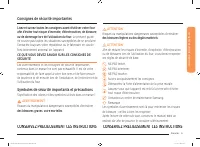
Français 5 C onsigne s de sécurit é impor tantes CONSERVEZ PRÉCIEUSEMENT CES INSTRUCTIONS CONSERVEZ PRÉCIEUSEMENT CES INSTRUCTIONS ATTENTION Risques ou manipulations dangereuses susceptibles d'entraîner des blessures légères ou des dégâts matériels . ATTENTION Afin de réduire les risques d'incendie,...
Page 111 - Utilisez uniquement des maniques sèches.
Français 7 C onsigne s de sécurit é impor tantes CONSERVEZ PRÉCIEUSEMENT CES INSTRUCTIONS CONSERVEZ PRÉCIEUSEMENT CES INSTRUCTIONS • Utilisez uniquement des maniques sèches. L'utilisation de maniques humides ou mouillées sur les surfaces chaudes peut entraîner des brûlures en raison de la vapeur qui...
Page 112 - AVERTISSEMENT
8 Français C onsigne s de sécurit é impor tantes Consignes de sécurité importantes CONSERVEZ PRÉCIEUSEMENT CES INSTRUCTIONS CONSERVEZ PRÉCIEUSEMENT CES INSTRUCTIONS AVERTISSEMENT • Afin d'éviter tout risque d'électrocution, veillez à ce que l'appareil soit hors tension avant de procéder au remplacem...
Page 114 - Nettoyez fréquemment la hotte d'aspiration.
10 Français C onsigne s de sécurit é impor tantes Consignes de sécurité importantes CONSERVEZ PRÉCIEUSEMENT CES INSTRUCTIONS CONSERVEZ PRÉCIEUSEMENT CES INSTRUCTIONS • Aucun nettoyant ou revêtement de protection pour four disponible dans le commerce ne doit être utilisé pour l'intérieur ou l'extérie...
Page 115 - Ne vrillez et ne serrez pas le cordon d'alimentation.
Français 11 C onsigne s de sécurit é impor tantes CONSERVEZ PRÉCIEUSEMENT CES INSTRUCTIONS CONSERVEZ PRÉCIEUSEMENT CES INSTRUCTIONS • Ne coupez ni ne retirez JAMAIS la broche de mise à la terre de la fiche du cordon d'alimentation. • Assurez-vous que l'ampérage de la prise sur laquelle est branché l...
Page 116 - AVERTISSEMENTS IMPORTANTS RELATIFS À L'UTILISATION
12 Français C onsigne s de sécurit é impor tantes Consignes de sécurité importantes CONSERVEZ PRÉCIEUSEMENT CES INSTRUCTIONS CONSERVEZ PRÉCIEUSEMENT CES INSTRUCTIONS • Respectez systématiquement les consignes de sécurité lorsque vous utilisez votre four. Ne tentez jamais de réparer vous-même l'appar...
Page 118 - AVERTISSEMENTS RELATIFS À L'UTILISATION
14 Français C onsigne s de sécurit é impor tantes Consignes de sécurité importantes CONSERVEZ PRÉCIEUSEMENT CES INSTRUCTIONS CONSERVEZ PRÉCIEUSEMENT CES INSTRUCTIONS AVERTISSEMENTS RELATIFS À L'UTILISATION ATTENTION • Si la surface du four est fissurée, n'utilisez pas l'appareil. • Le non-respect de...
Page 120 - AVERTISSEMENTS IMPORTANTS RELATIFS AU NETTOYAGE
16 Français C onsigne s de sécurit é impor tantes Consignes de sécurité importantes CONSERVEZ PRÉCIEUSEMENT CES INSTRUCTIONS CONSERVEZ PRÉCIEUSEMENT CES INSTRUCTIONS AVERTISSEMENTS IMPORTANTS RELATIFS AU NETTOYAGE ATTENTION • Ne nettoyez pas l'appareil en pulvérisant directement de l'eau dessus. • N...
Page 121 - Avant de commencer; Conseils pour économiser de l'énergie; Présentation de votre nouveau four; Présentation
Français 17 Pr ésent ation de v o tr e nouv eau f our Avant de commencer Nettoyez soigneusement le four avant de l'utiliser pour la première fois. Ensuite, retirez les accessoires, lancez un cycle Bake (Cuisson traditionnelle) et faites fonctionner le four à 400° F pendant 1 heure. Il est normal qu'...
Page 123 - Utilisation du four; Panneau de commande du four
Français 19 Utilisation du f our Utilisation du four Panneau de commande du four LISEZ ATTENTIVEMENT LES CONSIGNES D'UTILISATION AVANT DE VOUS SERVIR DU FOUR. Afin de profiter au mieux de votre four, familiarisez-vous avec les fonctionnalités décrites ci-dessous. Vous trouverez un descriptif détaill...
Page 124 - Modes d'affichage du panneau de commande
20 Français Utilisation du f our Utilisation du four Modes d'affichage du panneau de commande Mode veille Votre panneau de commande reste en mode veille lorsqu'il n'est pas en cours d'utilisation. Seule l'horloge sera affichée. Vous devez réveiller le panneau de commande avant de lancer une fonction...
Page 125 - Verrouillage des commandes; Cuisson minutée
Français 21 Utilisation du f our Verrouillage des commandes La fonction Control Lockout (Verrouillage des commandes vous permet de verrouiller les boutons du pavé tactile afin qu'ils ne puissent pas être actionnés par accident. La fonction Control Lockout (Verrouillage des commandes) vous permet éga...
Page 126 - Départ différé; Activation et désactivation de l'éclairage
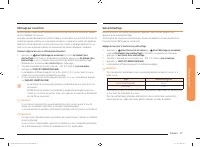
22 Français Utilisation du f our Utilisation du four Départ différé Avec la fonction Delay Start (Départ différé), la minuterie du four permet d'allumer et d'éteindre le four aux heures que vous avez sélectionnées préalablement. • Vous ne pouvez utiliser la fonction Delay Start (Départ différé) qu'a...
Page 127 - Utilisation des grilles du four
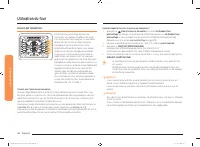
Français 23 Utilisation du f our Utilisation des grilles du four Hauteurs de grille 1 2 3 4 5 6 Position recommandée de la grille pour la cuisson TYPE D'ALIMENTS HAUTEUR DE GRILLE Cuisson d'hamburgers au gril 6 Cuisson au gril de viandes ou de petits morceaux de volaille, poisson 3-5 Couronnes, quat...
Page 128 - Utilisation de la grille coulissante
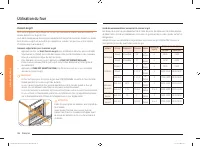
24 Français Utilisation du f our Utilisation du four Avant d'utiliser les grilles Chacune comporte une butée qui doit être correctement installée sur son support. Les butées empêchent la grille de sortir complètement de son logement. RETRAIT DES GRILLES 1. Tirez la grille horizontalement vers l'exté...
Page 129 - Cuisson traditionnelle
Français 25 Utilisation du f our Retrait de la grille coulissante • Assurez-vous que la grille coulissante est en position « fermée » et que le four est éteint et a refroidi, puis tirez à la fois sur la grille et le cadre pour le retrait. ATTENTION N'installez pas la grille coulissante juste au-dess...
Page 130 - Cuisson par convection
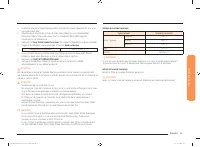
26 Français Utilisation du f our Utilisation du four Cuisson par convection 1 2 3 4 5 6 La fonction Convection Bake (Cuisson par convection) vous permet d'accélérer la cuisson. Lors de la cuisson par convection, un ventilateur permet de faire circuler la chaleur de façon homogène et continue dans le...
Page 131 - Rôtissage par convection; Sans préchauffage
Français 27 Utilisation du f our Rôtissage par convection Le rôtissage par convection est conseillé pour la cuisson de morceaux de viande très tendres qu'il faut préparer sans couvrir.La chaleur provient de l'élément chauffant supérieur. Le ventilateur de convection distribue l'air chauffé de manièr...
Page 132 - Cuisson au gril
28 Français Utilisation du f our Utilisation du four Cuisson au gril La cuisson au gril est une méthode de cuisson des morceaux de viande tendres utilisant la chaleur directe sous le gril du four.La chaleur élevée permet de cuire plus rapidement et permet de brunir les aliments. Le mode Broil (Cuiss...
Page 136 - Utilisation de la fonction Commande intelligente; Utilisation de la fonction Options
32 Français Utilisation du f our Utilisation du four Utilisation de la fonction Commande intelligente Pour utiliser la fonction Smart Control (Commande intelligente) du four, vous devez télécharger l'application Samsung Smart Home pour appareils mobiles. Les fonctions pouvant être actionnées à l'aid...
Page 138 - Utilisation de la fonction Shabbat
34 Français Utilisation du f our Utilisation du four Activation/Désactivation du son Cette fonction vous permet de désactiver la sonorité des boutons de commande. Comment activer ou désactiver le son ? 1. Appuyez sur Options puis sur 6 sur le pavé numérique . 2. Appuyez sur 1 (Activation) ou sur 2 (...
Page 139 - Entretien de votre appareil
Français 35 Entr etien de v o tr e appar eil 5. Vous pouvez éteindre le four à tout moment en appuyant sur OVEN OFF (ARRÊT DU FOUR) . Ainsi, seul le four s'éteint. Si vous désactivez la fonction Sabbath (Shabbat), maintenez Bake (Cuisson traditionnelle) et sur Touch To Wake-Up/Sleep (Touche de révei...
Page 141 - Nettoyage hybride
Français 37 Entr etien de v o tr e appar eil Comment désactiver la fonction d'auto-nettoyage ? Si vous devez arrêter ou interrompre un cycle d'auto-nettoyage : 1. Appuyez sur OVEN OFF (ARRÊT DU FOUR) . 2. Vous pourrez à nouveau ouvrir la porte du four une fois que le four aura refroidi pendant envir...
Page 143 - Détartrage
Français 39 Entr etien de v o tr e appar eil Détartrage Si vous utilisez la fonction Steam Bake (Cuisson à la vapeur) ou Steam Roast (Rôtissage à la vapeur) fréquemment, nous vous recommandons d'effectuer régulièrement un détartrage pour éliminer les minéraux présents dans le four et pouvant affecte...
Page 144 - Vidange; Entretien et nettoyage du four
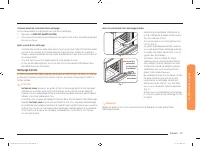
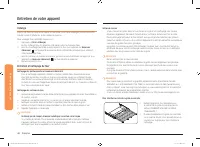
40 Français Entr etien de v o tr e appar eil Entretien de votre appareil Vidange Lorsqu'une fonction avec de la vapeur est terminée, vous devez vidanger l'eau restante afin d'éviter qu'elle n'affecte les autres modes de cuisson.Pour vidanger l'eau, procédez comme suit : 1. Appuyez sur Drain (Vidange...
Page 146 - Retrait des portes du four
42 Français Entr etien de v o tr e appar eil Entretien de votre appareil Retrait des portes du four ATTENTION • La porte est très lourde. Soyez prudent lorsque vous retirez et soulevez la porte. • Ne soulevez pas la porte par la poignée. Utilisez vos deux mains pour retirer l'une des portes du four....
Page 147 - Réinstallation des portes du four
Français 43 Entr etien de v o tr e appar eil 4. Abaissez la porte du four en position entièrement ouverte. Si la porte du four ne s'ouvre pas complètement à 90°, recommencez les étapes 1 à 3. 5. Repérez l'emplacement des verrous de la charnière de la porte du four, aux angles de la porte du four, pu...
Page 148 - Dépannage; Remplacement de l'ampoule du four
44 Français Dépannag e Dépannage Dépannage Samsung veille à ce que vous ne rencontriez pas de problèmes lors de l'utilisation de votre nouveau four électrique. En cas de problème inattendu, recherchez en premier lieu une solution dans les tableaux ci-dessous. Si vous rencontrez encore des problèmes ...
Page 155 - Annonce de contenu libre
Français 51 Garantie SAUF EXCEPTION MENTIONNÉE DANS LE PRÉSENT DOCUMENT, SAMSUNG NE FOURNIT AUCUNE GARANTIE SUR CET APPAREIL, EXPRESSE OU IMPLICITE, Y COMPRIS, MAIS SANS S'Y LIMITER, LES GARANTIES IMPLICITES DE QUALITÉ COMMERCIALE, DE CONTREFAÇON, OU D'APTITUDE À UN USAGE PARTICULIER. AUCUNE GARANTI...