Page 2 - At a Glance; Power Smart Features; Cleaning and Maintenance; Contents
2 English Safety Information 3 Safety Information 3 At a Glance 10 Indoor Unit Overview 10 Power Smart Features 11 Operation Features 11 Operating temperature and humidity Cleaning and Maintenance 12 Cleaning and Maintaining 12 Cleaning the indoor unit exterior • Disassembling the air filter • Clean...
Page 3 - ormation; FOR INSTALLATION; WARNING
3 English Safety Inf ormation Before using your new air conditioner, please read this manual thoroughly to ensure that you know how to safely and efficiently operate the extensive features and functions of your new appliance.Because the following operating instructions cover various models, the char...
Page 4 - • Failing to do so may result in electric shock or fire.
4 English Safety Information Safety Inf ormation The installation of this appliance must be performed by a qualified technician or service company. • Failing to do so may result in electric shock, fire, explosion, problems with the product, or injury. Install a switch and circuit breaker dedicated t...
Page 5 - FOR POWER SUPPLY; • This may result in electric shock or fire.; CAUTION
5 English Safety Inf ormation CAUTION Install your appliance on a level and hard floor that can support its weight. • Failing to do so may result in abnormal vibrations, noise, or problems with the product. Install the draining hose properly so that water is drained correctly. • Failing to do so may...
Page 6 - FOR USING
6 English Safety Information Safety Inf ormation FOR USING WARNING If the appliance is flooded, please contact your nearest service centre. • Failing to do so may result in electric shock or fire. If the appliance generates a strange noise, a burning smell or smoke, unplug the power plug immediately...
Page 7 - Do not strike or pull the air conditioner with excessive force.
7 English Safety Inf ormation After unpacking the air conditioner, keep all packaging materials well out of the reach of children, as packaging materials can be dangerous to children. • If a child places a bag over its head, it may result in suffocation. Do not touch the front panel with your hands ...
Page 8 - Do not place objects or devices under the indoor unit.
8 English Safety Information Safety Inf ormation CAUTION Do not place objects or devices under the indoor unit. • Water dripping from the indoor unit may result in fire or property damage. Check that the installation frame of the outdoor unit is not broken at least once a year. • Failing to do so ma...
Page 9 - FOR CLEANING; Do not clean the inside of the air conditioner by yourself.
9 English Safety Inf ormation This appliance is not intended for use by persons (including children) with reduced physical, sensory or mental capabilities, or lack of experience and knowledge, unless they have been given supervision or instruction concerning use of the appliance by a person responsi...
Page 10 - t a Glanc
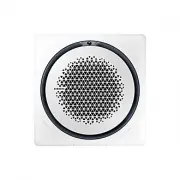
10 English A t a Glanc e Indoor Unit Overview At a Glance 01 Display Operation status Indication on the display Power on Ice blue (blinking) In operation Ice blue Stopped Off Timed on/off function Blue Requires filter cleaning Yellow green Defrost function Ice blue (blinking once every 10 seconds) W...
Page 11 - ow; Mode; condensation and a leakage of water on the floor.
11 English P ow er Smar t Featur es Operating temperature and humidity Mode Outdoor temperature Indoor temperature Indoor humidity Cool mode -15°C to 50°C 18°C to 32°C 80% or less Heat mode -20°C to 24°C 27°C or less - Dry mode -15°C to 50°C 18°C to 32°C 80% or less CAUTION • If you use the air cond...
Page 12 - Cleaning and Maint; Cleaning the indoor unit exterior; Disassembling the air filter; NOTE
12 English Cleaning and Maint enanc e Cleaning and Maintaining Cleaning and Maintenance Cleaning the indoor unit exterior Wipe the surface of the unit with a slightly wet or dry cloth when needed. Wipe off dirt from odd-shaped areas by using a soft brush. CAUTION • Do not use alkaline detergent, sul...
Page 13 - Cleaning the air filter; Reassembling the air filter; Filter Reset
13 English Cleaning and Maint enanc e Cleaning the air filter NOTE • Clean the air filter once every two weeks.• Spray water or use a vacuum cleaner to remove dust.• After removing dust, dry the air filter completely. – Avoid direct sunlight. Failure to do so may deform the air filter. Reassembling ...
Page 14 - Periodical maintenance; Unit
14 English Cleaning and Maintaining Cleaning and Maint enanc e Periodical maintenance Unit Maintenance item Interval Requires qualified technicians Indoor unit Clean the air filter. At least once a month Clean the condensate drain pan. Once a year Required Clean up the heat exchange. Once a year Req...
Page 15 - Troubleshooting
15 English Cleaning and Maint enanc e Troubleshooting Refer to the following chart if the air conditioner operates abnormally. This may save time and unnecessary expense. Problem Solution The air conditioner does not operate at all. • Check if the power plug is properly connected.• Check whether the...
Page 18 - Technical specifications
18 English Cleaning and Maintaining Cleaning and Maint enanc e Problem Solution Steam is produced on the indoor unit. • In winter, if the indoor humidity is high, steam may be produced around the air outlet while the defrost function is running. This is a normal operation. The outdoor unit fan conti...
Page 19 - Memo
19 English Cleaning and Maint enanc e Memo SAMSUNG_IB_UM_ENG.indb 19 2016-03-17 오후 2:52:02
Page 20 - QUESTIONS OR COMMENTS?
COUNTRY CALL OR VISIT US ONLINE AT UK 0330 SAMSUNG (7267864) www.samsung.com/uk/support EIRE 0818 717100 www.samsung.com/ie/ support GERMANY "0180 6 SAMSUNG bzw. 0180 6 7267864* (*0,20 €/Anruf aus dem dt. Festnetz, aus dem Mobilfunk max. 0,60 €/ Anruf) [HHP] 0180 6 M SAMSUNG bzw. 0180 6 67267864...