Page 2 - Connection; Precautions; Important safeguards
2 En WARNING Rear visibility systems (backup cameras) are required in certain new vehicles sold in the U.S. and Canada. U.S. regulations began according to a two year phase-in on May 1, 2016, and both the U.S. and Canada require that all such vehicles manufactured on or after May 1, 2018 have rear v...
Page 4 - Power cord
4 En WARNING IMPROPER CONNECTION MAY RESULT IN SERIOUS DAMAGE OR INJURY INCLUDING ELECTRICAL SHOCK, AND INTERFERENCE WITH THE OPERATION OF THE VEHICLE'S ANTILOCK BRAKING SYSTEM, AUTOMATIC TRANSMISSION AND SPEEDOMETER INDICATION. To power supply Power cord Yellow To terminal supplied with power regar...
Page 6 - iPhone; Camera
6 En NOTES • For details on how to connect an external device using a separately sold cable, refer to the manual for the cable. • For details concerning the connection, operations and compatibility of the iPhone, refer to the Operation Manual. • For details concerning the connection and operations o...
Page 7 - Using an AUX input; Using an HDMITM input; Rear display
7 En Engl is h RCA cable (sold separately) View camera (sold separately) * Not available for DMH-W4600NEX NOTES • Connect only the rear view camera to brown cable. Do not connect any other equipment. • Some appropriate settings are required to use rear view cameras. For details, refer to the Operati...
Page 8 - Installation; Before installing
8 En WARNING NEVER install the rear display in a location that enables the driver to watch the video source while driving.This product’s rear video output is for connection of a display to enable passengers in the rear seats to watch the video source. CAUTION • Never install this product in places w...
Page 9 - Installation tips
9 En Engl is h vehicle’s location display, and might otherwise cause reduced display performance. • When installing, to ensure proper heat dispersal when using this unit, make sure you leave ample space behind the rear panel and wrap any loose cables so they are not blocking the vents. • Do not forc...
Page 11 - Installation notes
11 En Engl is h TIP The amount of this unit's protrusion from the dashboard/console can be adjusted by shifting the position of the screw hole of this unit to the factory radio-mounting bracket. Factory radio-mounting bracket If the pawl interferes with installation, you may bend it down out of the ...
Page 12 - Mounting on the sun visor; Adjusting the microphone angle
12 En • Install the microphone in a place where its direction and distance from the driver make it easiest to pick up the driver’s voice. • Be sure to turn off (ACC OFF) the product before connecting the microphone. • Depending on the vehicle model, the microphone cable length may be too short when ...
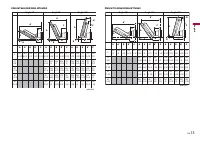
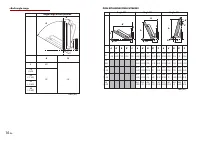
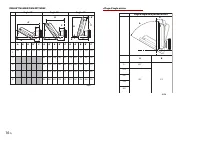
Page 14 - Adjustable display angles and up-down positions; Mounting dimension with the angle range of the display
14 En WARNING Keep hands and fingers clear of this product when adjusting the LCD screen angle. Be especially cautious of children’s hands and fingers. NOTE Certain positions cannot be adjusted and held depending on the up-down position and the front-back position. For details, refer to Mounting dim...
Page 18 - Connexion; Précautions
2 Fr ATTENTION Les systèmes de surveillance de marche arrière (caméras de secours) sont requis dans certains véhicules neufs vendus aux États-Unis et au Canada. La réglementation des États-Unis a commencé avec une intégration basée sur deux ans débutant le 1er mai 2016, et où les États-Unis et le Ca...
Page 20 - Cordon d’alimentation; Fils de haut-parleurs
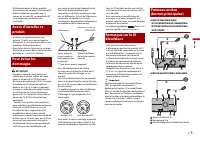
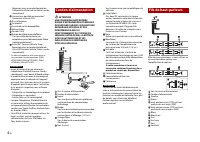
4 Fr Reportez-vous au mode d’emploi de l’adaptateur iDataLink ou Metra (vendu séparément). Connecteur de câble de moniteur* Connectez à l’écran LCD. Prise d’antenne Ce produit Source de sortie préamplifiée Alimentation Fusible (10A) Entrée de télécommande filaire Il est possible de connecter un adap...
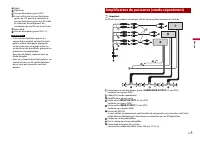
Page 21 - Amplificateur de puissance (vendu séparément)
5 Fr Fr a n ça is Violet Violet/noir Caisson d’extrêmes graves (4 Ω) Si vous utilisez un caisson d’extrêmes graves de 2 Ω, pensez à connecter le caisson d’extrêmes graves aux fils violet et violet/noir de cet appareil. Ne connectez rien aux fils vert et vert/noir. Non utilisé. Caisson d’extrêmes gra...
Page 23 - Caméra; Composant vidéo externe; Utilisation d’une entrée AUX
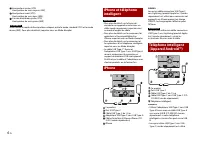
7 Fr Fr a n ça is pour connecter cet appareil à un téléphone intelligent, la charge rapide s’effectue. REMARQUES • Si vous utilisez un câble autre que ceux suggérés dans l’illustration, l’appareil principal pourrait ne pas fonctionner correctement. • Android est une marque de commerce de Google LLC....
Page 24 - Utilisation d’une entrée HDMITM; Afficheur arrière
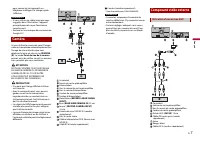
8 Fr Vers la sortie vidéo Vers la sortie audio Composant vidéo externe (vendu séparément) REMARQUE Le réglage adéquat est requis pour utiliser le composant vidéo externe. Pour plus de détails, reportez-vous au Mode d’emploi. PRÉCAUTION Assurez-vous d’utiliser un câble AV à mini-prise (vendu séparéme...
Page 25 - Avant l’installation; Conseils d’installation
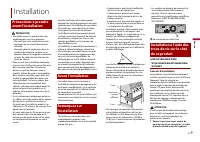
9 Fr Fr a n ça is PRÉCAUTION • N’installez jamais ce produit dans des emplacements ou d’une manière :– Pouvant blesser le conducteur ou les passagers en cas d’arrêt brusque du véhicule. – Pouvant gêner le conducteur dans la conduite du véhicule, comme sur le plancher devant le siège du conducteur ou...
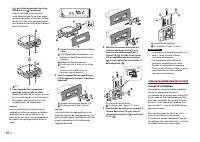
Page 27 - Remarques sur l’installation
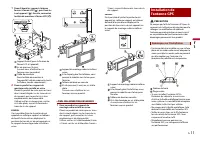
11 Fr Fr a n ça is 1 Fixez d’abord les supports latéraux fournis à l’écran LCD ( ), puis fixez-les à cet appareil ( ). Ensuite, connectez le câble de moniteur à l’écran LCD ( ). Support latéral (pour la fixation de l’écran LCD à l’appareil) Vis de pression (5 mm) Assurez-vous d’utiliser les vis four...
Page 28 - Installer le microphone; Monter sur le pare-soleil
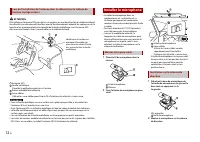
12 Fr ATTENTION N’installez pas l’antenne GPS par-dessus un capteur ou une bouche d’air du tableau de bord du véhicule, car cela pourrait interférer avec le fonctionnement adéquat du capteur ou de la bouche d’air et compromettre la capacité de la feuille métallique sous l’antenne GPS d’assurer une f...
Page 29 - Régler l’angle du microphone; Avant; Arrière; Centre; mm; Gauche; mm; Droite; mm
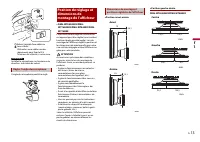
13 Fr Fr a n ça is Ruban à double face adhésive Serre-câbles Utilisez les serre-câbles vendus séparément pour fixer le fil à l’intérieur du véhicule, si nécessaire. REMARQUE Installez le microphone sur la colonne de direction, à distance du volant. L’angle du microphone peut être réglé. ▶ DMH-WT8600...
Page 30 - Angles et positions haut-bas réglables de l’afficheur
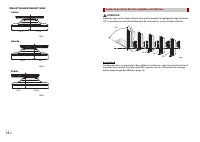
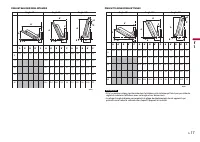
14 Fr DMH-WT7600NEX/DMH-WT76NEX Centre 115,4 115,4 mm Gauche 145,4 85,4 mm Droite 145,4 85,4 mm ATTENTION Gardez les mains et les doigts à l’écart de ce produit pendant le réglage de l’angle de l’écran LCD. La prudence est tout particulièrement de mise pour les mains et doigts d’enfants. REMARQUE Ce...
Page 31 - Dimension de montage avec la plage d’angle de l’afficheur
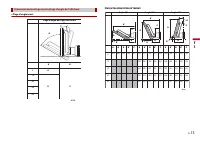
15 Fr Fr a n ça is ▶ Plage d’angle avant Dimension de montage avec la plage d’angle de l’afficheur Plage d’angle de la position avant A B A B 0 -15 -30 -45 -60 60˚ 35˚ -15˚ mm DMH-WT8600NEX/DMH-WT86NEX Angle 60˚ Angle 35˚ Angle -15˚ A B A’ B’ C A B B’ A’ C A A’ B’ B C A 58,3 A’ B B’ C A A’ B B’ C A ...
Page 34 - Conexión; Precauciones
2 Es ADVERTENCIA Se necesitan sistemas de visión trasera (cámaras de retroceso) en determinados vehículos nuevos que se venden en Estados Unidos y Canadá. En Estados Unidos, el 1º de mayo de 2016 se implementó un programa de dos años mediante el cual se debían instalar sistemas de visión trasera en ...
Page 35 - Para evitar daños; Aviso para el cable
3 Es Españo l • Utilice esta unidad con una batería de 12 V y puesta a tierra negativa únicamente. De lo contrario, quizá se produzca un incendio o una avería. • Para evitar cortocircuitos en el sistema eléctrico, asegúrese de desconectar el cable de la batería (–) antes de la instalación. ADVERTENC...
Page 36 - Cable de alimentación; Cables de bocinas
4 Es Entrada de adaptador iDatalink o Metra Consulte el manual de instrucciones del adaptador iDataLink o Metra (se vende por separado). Conector del cable del monitor* Conecte a la pantalla LCD. Clavija de conexión de la antena Este producto Suministro previo a la salida Fuente de alimentación Fusi...
Page 37 - Amplificador de potencia (se vende por separado)
5 Es Españo l Violeta/negro Subwoofer (4 Ω) Cuando utilice un subwoofer de 2 Ω, asegúrese de conectar el subwoofer a los cables violeta y violeta/negro de esta unidad. No conecte nada a los cables verde y verde/negro. Sin usar. Subwoofer (4 Ω) × 2 NOTAS • Cuando se conecte un subwoofer a este produc...
Page 39 - Cámara; Uso de una entrada AUX
7 Es Españo l vende por separado) si su teléfono inteligente tiene puerto micro USB B. • Cuando se utiliza un cable de USB Type-C a USB Type-C (se vende por separado) para conectar esta unidad a un teléfono inteligente, se realiza la carga rápida. NOTAS • Si utiliza un cable que no sea el sugerido e...
Page 40 - Uso de una entrada HDMITM; Pantalla trasera
8 Es Rojo, blanco Cables RCA (se venden por separado) A la salida de video A la salida de audio Componente de video externo (se vende por separado) NOTA Se necesita el ajuste adecuado para utilizar el componente de video externo. Para obtener información detallada, consulte el Manual de operaciones....
Page 41 - Instalación; Antes de la instalación; Consejos de instalación
9 Es Españo l PRECAUCIÓN • Nunca instale este producto en lugares donde, o de modo que:– El conductor o los pasajeros pudieran lesionarse si el vehículo se detiene de repente. – Pudiera estorbar al conductor al manejar el vehículo; por ejemplo, en el piso delante del asiento del conductor o cerca de...
Page 44 - Notas acerca de la instalación
12 Es PRECAUCIÓN No corte el cable de la antena GPS para acortarla ni use una extensión para prolongarla. Modificar el cable de la antena podría resultar en cortocircuitos o averías así como daños permanentes a este producto. • La antena se debe instalar sobre una superficie nivelada donde las ondas...
Page 45 - Montaje en el parasol; Ajuste del ángulo del micrófono
13 Es Españo l • Instale el micrófono en el lugar donde esté correctamente orientado y a la distancia correcta para facilitar al máximo la detección de la voz del conductor. • Asegúrese de apagar (ACC OFF) el producto antes de conectar el micrófono. • Según el modelo del vehículo, el largo del cable...
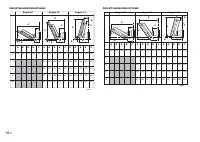
Page 47 - Dimensión de montaje con el rango de ángulo de la pantalla
15 Es Españo l ADVERTENCIA Mantenga las manos y los dedos fuera de este producto al ajustar el ángulo de la pantalla LCD. Tenga especial cuidado con las manos y los dedos de los niños. NOTA Determinadas posiciones no pueden ajustarse y mantenerse dependiendo de la posición superior-inferior y la pos...