Page 3 - er; English
RQ1090, RQ1062, RQ1060, RQ1052, RQ1050 with charg er English 6 FRançais 23
Page 5 - Compliance with standards; on scientific evidence available today.; general
- Always put the protection cap on the shaver to protect the shaving heads when you are travelling. - Never use scouring pads, abrasive cleaning agents or aggressive liquids such as petrol or acetone to clean the appliance. - Only use the adapter supplied. - If the adapter is damaged, always have it...
Page 6 - The display; Before you use the shaver for the first time, remove; Charging
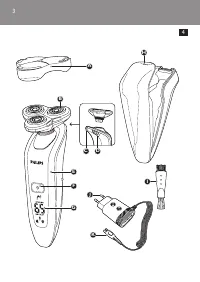
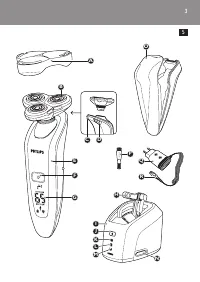
E Shaver (RQ1090/RQ1062/RQ1060/RQ1052/ RQ1050) F Shaver on/off button G Display H Power Pod I Cleaning brush J Adapter K Small plug L Charger The display Before you use the shaver for the first time, remove the protective foil from the display. The five shaver types (RQ1090, RQ1062, RQ1060, RQ1052 a...
Page 7 - Battery fully charged
- When you place the shaver in the Power Pod or in the charger, the display automatically switches off after approx. 5 hours. RQ1090 - When the shaver is charging, the minutes indication and the plug symbol flash. - The shaving minutes increase until the shaver is fully charged. RQ1062/RQ1060 - When...
Page 8 - Battery low; minutes and the plug symbol continue to flash for
- When you remove the shaver from the Power Pod or the charger, the arrowheads of the top charge level light up blue to indicate that the batter y is full. RQ1052/RQ1050 - When the batter y is fully charged, the batter y symbol lights up blue continuously. Battery low RQ1090 - When the batter y is a...
Page 9 - symbol star ts to flash for a few seconds.; Remaining battery capacity; flashing arrowheads of a par ticular charge level; Clean shaver; For optimal shaving performance, we advise you to; Replace shaving unit; For maximum shaving performance, we advise you
RQ1052/RQ1050 - When the batter y is almost empty (when there are only 5 or fewer shaving minutes left), the batter y symbol lights up red. - When you switch off the shaver, the batter y symbol star ts to flash for a few seconds. Remaining battery capacity RQ1090 - The remaining batter y capacity is...
Page 10 - Travel lock; and RQ1050 look different but show the same; Deactivating the travel lock; Note: When you place the shaver in the plugged-in
- To remind you to replace the shaving unit, the shaving unit symbol flashes (all types) and you hear a beep when you switch off the shaver (RQ1090 only). This happens at the end of 7 successive shaves to remind you to replace the shaving unit. Note: The displays of types RQ1062, RQ1060, RQ1052 and ...
Page 11 - Blocked shaving heads; flash. In this case, the motor cannot run because; Put the small plug in the Power Pod.
Blocked shaving heads - If the shaving heads are blocked, the shaving unit symbol and the tap symbol with exclamation mark flash. In this case, the motor cannot run because the shaving heads are soiled or damaged. Note: The displays of types RQ1062, RQ1060, RQ1052 and RQ1050 look different but show ...
Page 12 - Charging in the charger
3 Pull at the top of the lid (1) and remove it (2). 4 First insert the top of the shaver into the Power Pod (1) and then press the bottom part into the Power Pod (2). Note: The shaver cannot be placed in the Power Pod when the protection cap is on the shaving unit. , The display shows that the shave...
Page 13 - Trimming; You can use the trimmer to groom your sideburns
2 Move the shaving heads over your skin. Make both straight and circular movements. - Shaving on a dr y face gives the best results. - Your skin may need 2 or 3 weeks to get accustomed to the Philips shaving system. 3 Press the on/off button once to switch off the shaver. , The display lights up for...
Page 14 - Cleaning and maintenance; - Be careful with hot water. Always check if the; Cleaning the shaving unit under the tap
7 Insert the lug of the shaving unit into the slot in the top of the shaver (1). Then press the shaving unit downwards (2) to attach it to the shaver (‘click’). Cleaning and maintenance Never use scouring pads, abrasive cleaning agents or aggressive liquids such as petrol or acetone to clean the app...
Page 15 - Clean the trimmer ever y time you have used it.
4 Carefully shake off excess water and leave the shaving heads open to let the shaving unit dry completely. Never dry the shaving unit with a towel or tissue, as this may damage the shaving heads. , For thorough cleaning, switch on the shaver and immerse the shaving unit in hot water with some liqui...
Page 16 - storage
2 Press the trimmer slide forwards to slide out the trimmer. 3 Clean the trimmer with the short-bristled side of the brush supplied. Brush up and down along the trimmer teeth. 4 Switch the shaver on and off and repeat step 3. 5 Press the trimmer slide backwards to retract the trimmer. Tip: For optim...
Page 17 - arc; Pull the old shaving unit off the shaver.; Ordering parts; but hand them in at an official collection point for
Only replace the shaving unit with an original RQ10 Philips arc itec Shaving Unit. 1 Pull the old shaving unit off the shaver. 2 Insert the lug of the new shaving unit into the slot in the top of the shaver (1). Then press the shaving unit downwards (2) to attach it to the shaver (‘click’). Ordering...
Page 18 - Disposal of the shaver battery
remove the batter y for you and will dispose of it in an environmentally safe way. Disposal of the shaver battery Only remove the battery when you discard the shaver. Make sure the battery is completely empty when you remove it. 1 Remove the shaver from the Power Pod or the charger. 2 Let the shaver...
Page 19 - guarantee restrictions; Why doesn’t the shaver shave as well as it used
8 Pull the wires out of the motor unit and remove the battery. Be careful, the battery strips are sharp.Do not put the shaver back into the plugged-in Power Pod or charger after you have removed the battery. guarantee & service If you need information or if you have a problem, please visit the P...
Page 21 - L’adaptateur contient un transformateur. Afin; FRançais
23 introduction Merci d’avoir acheté ce rasoir Philips. Veuillez lire ce mode d’emploi, qui contient des informations sur les fonctionnalités remarquables de ce rasoir, ainsi que des conseils pour un rasage plus facile et plus agréable. important Lisez ce mode d’emploi attentivement avant d’utiliser...
Page 22 - attention; rasoir afin de protéger les têtes de rasoir lorsque; Conformité aux normes; établies sur la base des connaissances scientifiques
attention - N’utilisez pas le rasoir, le Power Pod, le chargeur ou l’adaptateur s’il est endommagé. - Chargez et conser vez le rasoir à une température comprise entre 5 °C et 35 °C. - Placez toujours le capot de protection sur le rasoir afin de protéger les têtes de rasoir lorsque vous êtes en voyag...
Page 23 - général; Afficheur; le film de protection de l’afficheur.
général - L’adaptateur transforme la tension de 100-240 V en une tension de sécurité de moins de 24 V. Aperçu (fig. 5) A Coque de protection B Unité de rasage C Tondeuse D Bouton coulissant marche/arrêt de la tondeuse E Rasoir (RQ1090/RQ1062/RQ1060/RQ1052/ RQ1050) F Bouton marche/arrêt du rasoir G A...
Page 24 - Charge; Pod ou sur le chargeur, l’afficheur s’éteint
- RQ1052/RQ1050 Charge - La charge dure environ 1 heure. - Lorsque vous placez le rasoir sur le Power Pod ou sur le chargeur, l’afficheur s’éteint automatiquement au bout d’environ 5 heures. RQ1090 - Lorsque le rasoir est en charge, le nombre de minutes et le symbole de la fiche clignotent. - Le nom...
Page 26 - niveau de charge de la batterie; le nombre de minutes de rasage restantes figurant
- Lorsque vous éteignez le rasoir, le nombre de minutes de rasage et le symbole de la fiche continuent à clignoter pendant quelques secondes. Vous entendez un bip lorsque le nombre de minutes de rasage arrive à zéro. RQ1062/RQ1060 - Lorsque la batterie est presque vide (5 minutes ou moins de rasage ...
Page 27 - nettoyage du rasoir; Remplacement de l’unité de rasage; Remarque : Les afficheurs des rasoirs de type; système de verrouillage pour voyage
nettoyage du rasoir Pour garantir des performances de rasage optimales, nous vous recommandons de nettoyer le rasoir après chaque utilisation. - Le symbole du robinet clignote pour vous rappeler de nettoyer le rasoir. Remarque : Les afficheurs des rasoirs de type RQ1062, RQ1060, RQ1052 et RQ1050 se...
Page 28 - activation du verrouillage; Le symbole de la clé apparaît sur l’afficheur; Désactivation du verrouillage
activation du verrouillage 1 Appuyez sur le bouton marche/arrêt pendant 3 secondes pour activer le verrouillage. , Le symbole de la clé apparaît sur l’afficheur (tous types) et vous entendez un bip (RQ1090 seulement), signalant que le verrouillage a été activé. Remarque : Les afficheurs des rasoirs ...
Page 29 - L’autonomie de rasage peut également varier au fil; Charge rapide; suffisamment chargé pour une séance de rasage.; Charge à l’aide du Power Pod; Insérez la petite fiche dans le Power Pod.
- Le symbole de l’unité de rasage et le symbole du robinet avec un point d’exclamation continuent de clignoter jusqu’à ce que vous déverrouilliez les têtes de rasage. Charge La charge dure environ 1 heure. Un rasoir entièrement chargé offre une autonomie de rasage de 65 minutes, ce qui permet d’effe...
Page 30 - Charge à l’aide du chargeur; Insérez la petite fiche dans le chargeur.; Utilisation du rasoir; L’afficheur s’allume pendant quelques secondes.
4 Commencez par insérer la partie supérieure du rasoir sur le Power Pod (1), puis exercez une pression sur la partie inférieure pour la positionner dans le Power Pod (2). Remarque : Le rasoir ne doit pas être placé sur le Power Pod tant que le capot de protection est installé sur l’unité de rasage....
Page 31 - Tondeuse; Vous pouvez utiliser la tondeuse pour tailler les
2 Déplacez les têtes de rasoir sur la peau en effectuant des mouvements rectilignes et circulaires. - Vous obtiendrez de meilleurs résultats de rasage sur peau sèche. - Votre peau pourrait avoir besoin de 2 ou 3 semaines pour s’habituer au système de rasage Philips. 3 Arrêtez le rasoir en appuyant s...
Page 34 - Faites glisser le taquet vers l’avant pour; Rangement; Faites glisser le capot de protection sur l’unité de; Remplacement; de l’unité de rasage apparaît sur l’afficheur.
nettoyage de la tondeuse à l’aide de la brosse fournie Nettoyez la tondeuse après chaque utilisation. 1 Éteignez le rasoir. 2 Faites glisser le taquet vers l’avant pour dégager la tondeuse. 3 Nettoyez la tondeuse avec le côté à poils courts de la brosse fournie. Brossez les dents de la tondeuse de h...
Page 35 - Détachez l’ancienne unité de rasage du rasoir.; Commande de pièces
N’attendez pas pour remplacer une unité de rasage endommagée. Pour garantir des performances de rasage optimales, nous vous recommandons de remplacer l’unité de rasage tous les deux ans. L’unité de rasage ne peut être remplacée que par une unité de rasage arc itec RQ10 Philips. 1 Détachez l’ancienne...
Page 36 - Mise au rebut de la batterie du rasoir
batterie, vous pouvez appor ter l’appareil dans un Centre Ser vice Agréé Philips qui se chargera de l’opération en veillant à le faire dans le respect de l’environnement. Mise au rebut de la batterie du rasoir Retirez la batterie uniquement lorsque vous mettez le rasoir au rebut. Assurez-vous que la...
Page 37 - garantie et service
7 Dévissez les 3 vis situées à l’intérieur du rasoir et retirez la plaque de protection arrière. 8 Sortez les fils du bloc moteur et retirez la batterie. Soyez prudent car les languettes de la batterie sont coupantes.Ne replacez pas le rasoir sur le Power Pod ou sur le chargeur après avoir retiré la...
Page 38 - Foire aux questions; le point d’exclamation clignote sur l’afficheur. Dès
Foire aux questions 1 Pourquoi les résultats de rasage ne sont-ils pas aussi satisfaisants que d’habitude ? - Le rasoir n’est peut-être pas complètement propre. Mettez le rasoir en marche et plongez l’unité de rasage dans de l’eau chaude savonneuse (voir le chapitre « Nettoyage et entretien »). - Le...





 Philips PT720 Manual
 Philips PT735 Manual
 Philips QG3380 User Manual
 Philips RQ1062 User Manual
 Philips RQ1075 Manual
 Philips S1100/04 User Manual
 Philips S1121/41 User Manual
 Philips S1133/41 User Manual
 Philips S1223/41 User Manual